
Review of the Sharp SL-C760
I've been to Japan twice, spending a month in the land of the rising sun over the past two years. On both occasions, I've been amazed at the ubiquity of cool technology. The tiniest cell phones, smallest DVD players, lightest laptops all seem to be available in Japan long before they cross the marketing ocean of the Pacific to the shores of the US. It's truly a country of tech-savvy early adopters and is perhaps the perfect testing ground for the latest and greatest in cool devices. If you want to know what's ahead for technology in the next few years in the US, you have to look to Japan.
Few devices sit farther out on the cutting edge than does Sharp's latest update to the Personal Mobile Tool product line, the SL-C760. The SL-C760 upgrades the SL-C700, reviewed in depth by Guylhem Aznar in the June 2003 issue of Linux Journal. The review below addresses multiple significant upgrades and changes in the SL-C760 model. Those changes push the Sharp line even farther into the future than its Microsoft and Palm-based competitors. After a rigorous two-week round of testing, in which my SL-5600 sat idly in its cradle, I have some additional thoughts to share on the changes to the SL-C760.
True to form, the SL-C760 officially is available only in Japan. Fortunately for western-world customers, this stout little Linux-based PDA is available in the US and North America through Dynamism. Sharp's reputation for tight inventory control is, by the way, well-earned--supply of the SL-C760 is far less than demand. It took some tough negotiation to convince Dynamism to part with a review unit for a short two-week loaner period. However short the review period and tough the negotiation, the SL-C760 was well worth it.

Side View of Sharp's SL-C760 with a Quarter for Reference
The physical design of this new Zaurus is much the same as its predecessor: unique, extremely functional and, in the end, quite sexy even to a mainstream PDA user. The 760 is 5mm thicker and 25g heavier than the 700, primarily due to a new extended life 8-hour battery. The display operates in both landscape and portrait modes, swiveling from one position to another with an effortless twist. The desktop display layout follows this change seamlessly, activated by a tiny switch in the pivot hinge. The screen continues to function with touch capability in either mode.
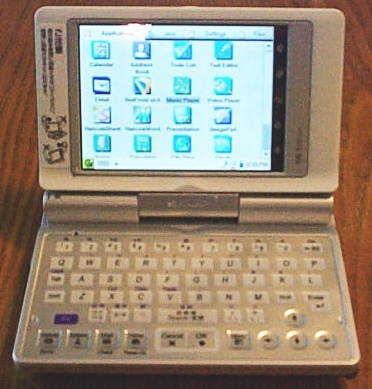
Figure 2. The SL-C760 in Landscape Mode
The touch screen, however, becomes almost irrelevant in landscape mode. With the screen oriented horizontally, the SL-C760 looks much more like a highly miniaturized laptop than a PDA. Changing to landscape mode uncovers a full QWERTY keyboard complete with number and arrow keys, plus hot buttons for calendar, contacts, mail and home. The tactile response on these buttons is very satisfying, producing a noticeable click at the bottom of travel. The keyboard provides an extremely usable input alternative for the stylus-impaired. Put to real-world use in my favorite Wi-Fi coffee shop, the rotating display and hidden keyboard left mainstream PDA users staring, mouth agape. Much like the hidden keyboard of the SL-5500 and SL-5600, Sharp has hit a design home run with the form of the SL-C760.
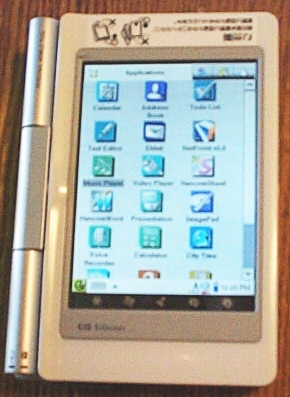
Figure 3. In landscape mode, the SL-C760 looks much like other PDAs.
Let's look at the improvements to the SL-C760 since the release of the SL-C700 in June. These upgrades primarily come in the form of changes to the hardware, expansion of both user and flash memory and upgrades to the OS.
Processor: In its original release, the SL-C700 utilized a 255MHz Intel XScale processor. Later releases upgraded the processor to Sharp's current PDA standard, the 400MHz XScale. The SL-C760 utilizes the 400MHz version of this cutting-edge Intel PDA processor. Applications launch quickly, and there is no significant speed decrease when launching multiple applications.
Memory: The 700 shipped on release with 32MB user-available RAM and 64MB system flash memory. Sharp's intermediate SL-C750 upped the memory ante, shipping with 64MB of both user RAM and flash. It's interesting to note that system flash in any Sharp Zaurus exists primarily for applications and data storage, providing a rock-solid means of preserving applications and data in the event of a power loss. The SL-C760 steps up memory significantly. With 64MB user RAM and 128MB flash, the 760 has more than enough room for additional third-party applications. Furthermore, the Qtopia's desktop required 16MB of the installed 32MB user RAM on the 700, leaving little for the user. With 64MB, the 760 runs the desktop and other applications with ease.
Prior to the SL-C760, the standard Zaurus embedded Linux version was Embeddix. With the release of the 760, Sharp has moved its OS platform to Metrowerks' OpenPDA. Unveiled at Linux World 2003, OpenPDA carries less code overhead than Embeddix and handles I/O even more quickly and smoothly. In fact, after working with OpenPDA during the two-week review period, I went searching for a downloadable version with which to upgrade my SL-5600 workhorse. To my chagrin, OpenPDA is unavailable as a standalone download. This fundamental system change clearly represents a significant leap forward for the Zaurus line.
The SL-C760 is fully equipped for life on the road, at work, at home and anywhere else you might have a need for mobile computing. With its quick processor and ample memory, the 760 performs more like a miniature laptop or desktop than a PDA. The installed applications include Hancom's Word, Presenter and Sheet. Qtopia also includes the terminal application in the default installation, a problematic oversight in previous Zaurus models. Although the contact manager and calendar are a bit less than attractive, they're both full featured and easy to use.
Significant improvements also have been made to the multimedia applications. These include an interface that's much easier to read when on the go and the ability to view the music playlist with the player active. Both the sound and video quality produced by these applications are top notch.
The SL-C760 features both Compact Flash and Secure Digital/Multi-Media Card slots, creating more external storage capabilities than most users are likely to need. Now that the screen occupies the full height of the 760 in portrait mode, the OK and Cancel buttons have been moved to the side. There's also a smooth-action jog wheel similar in functionality to the touch ring on earlier Zaurus models. The power button has been moved to the side, as well. The 760 also has removed one of my personal annoyances from the SL-5x00 models, the requirement to hold the power button to move into standby mode.
For all the advances these features represent over earlier Zaurus models, they don't describe the biggest and most visible enhancement. With the SL-C7xx series, Sharp has incorporated the CG Silicon display. Developed by Sharp and manufactured by CG Silicon, this hands-down is the cleanest, brightest display in the PDA space. Regardless of the brightness level, this display shows virtually zero pixillation. Fonts are rendered with the clean smooth lines of a CRT. During my review period, I was able to run the display at half brightness quite easily. At full bright, the display could serve as the headlamp for a coal miner. In short, this is the display that all PDAs should aspire to have.
The SL-C760 does have a few drawbacks. As it officially is available only in Japan, the device has been localized from Japanese to English. Some menus remain in the Japanese character set, resulting in unreadable blocks in several of the configuration screens. Further, the reticence of Sharp in releasing the SL-C760 to the US market means the included user manual is in Japanese.
From a design perspective, I found only small flaws. The first is the placement of the CF card when the PDA is used in landscape mode. Although a small card may remain unnoticed so long as the 760 is sitting on a firm surface, it feels awkward when holding the PDA and using the keyboard. I had some fear of damaging the card with my right hand. As a result, I refrained from landscape mode when the network card was in place.
The second flaw is the full travel of the screen when moving from landscape to portrait mode. It is possible, when in a hurry, to rake the corner of the display across the keyboard when twisting from one mode to the other. A quick close of the PDA in the airport, for example, easily could damage the keyboard.
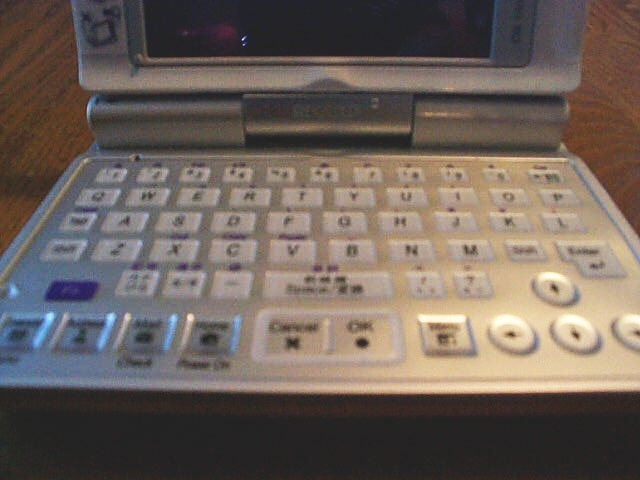
Figure 4. A View of the SL-C760 QWERTY Keyboard
Unfortunately, the SL-C760 has yet to resolve two other issues from both the SL-C700 and the SL-5x00 models. Although the sound quality of the audio player is superb, the software still does not support saving playlists. With the available storage on these devices, this seems like a trivial problem to solve. In addition, like the 700, the 760 lacks an internal microphone for voice memos. This was a prominent addition to the SL-5600 and would clearly close the loop on necessary features for the 760.
The Sharp SL-C760 represents a significant upgrade from both the SL-5x00 series and the SL-C700. Rather than throwing the upgrade book at this new model, Sharp has devoted clear-headed resources to closing the loop on the minimal deficiencies of previous models. Out of the box, the 760 represents a logical evolution in both the Personal Mobile Tool and larger PDA spaces. At $799, it's not for everyone. If your needs include the full range of current PDA capabilities, however, the SL-C760 stands farther along the development curve than any other mobile device on the market. If those changes are the result of spot-marketing in tech-savvy Japan, then an official US release is well worth the wait.
Tony Steidler-Dennison is a PHP programmer, Linux system administrator, project manager, paralegal, spin doctor and rabid mobile Linux user. He maintains the poli-tech blog Frankly, I'd Rather Not and is the founder and co-author of the Linux site uptime. Tony currently is working on his first book, Practical Linux Administration and breathlessly awaits your comments on all things Linux-related at tony@steidler.net.
email: steidler@gmail.com
