
Policy Routing for Fun and Profit
Sangoma is a manufacturer of PCI-based WAN interface cards. For demonstrations and redundancy, we have two separate high-speed Internet connections: a full T1 carrying Frame Relay, using our PCI S5148 T1/E1 modem, and an ADSL connection carrying PPPoE over ATM, using our PCI S518 ADSL modem. The ADSL line is shared with our fax machine, the only telephone line not connected to our PBX. We use two different ISPs for the services. The ADSL and fax telephone line are provided by Bell Canada's Sympatico service, and the T1 Frame Relay connection is provided by MCI.
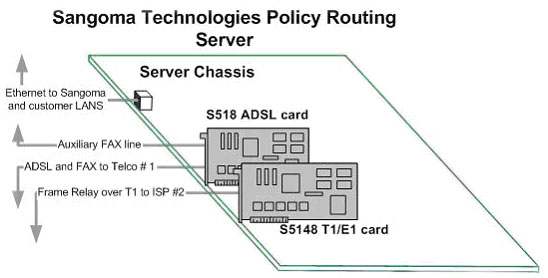
Figure 1. For redundancy and cost control, the policy routing server has both T1 and ADSL connections.
The combination of the installed T1 and ADSL Internet links provide reliable connectivity, but the resultant bandwidth is excessive for our requirements. Sangoma's Web site is hosted by Earthlink in Atlanta, so our Internet access requirements are not too different from any other company's, primarily e-mail and Web access, with some FTP traffic mainly as uploads to the FTP server on our Web site. We could manage without a fixed IP address, although we do find it valuable that the T1 link is provisioned with a range of fixed addresses.
All our Internet servers are Linux-based. Although we support Windows, FreeBSD, Solaris and other popular operating systems, Linux is our most important platform, and only Linux has the rich toolset of traffic management routines we need. The layout is shown in Figure 1.
The ADSL line is inexpensive, especially after the rebate we get for using our own ADSL modem instead of the consumer-grade external ADSL modem normally provided as part of the service. T1 in Canada is expensive as compared to the US; the cost of a standard unrestricted T1 Internet link can exceed $1,900 CAN ($1,450 US) per month.
Sangoma resells Internet access to two other tenants in our building to offset costs somewhat. The other parties sharing our connections host Web and VPN services, so they need both fixed addresses and high outbound bandwidth, which is why they are interested in sharing our T1 line. The private and public segments of the T1 line are shown in Figure 2.
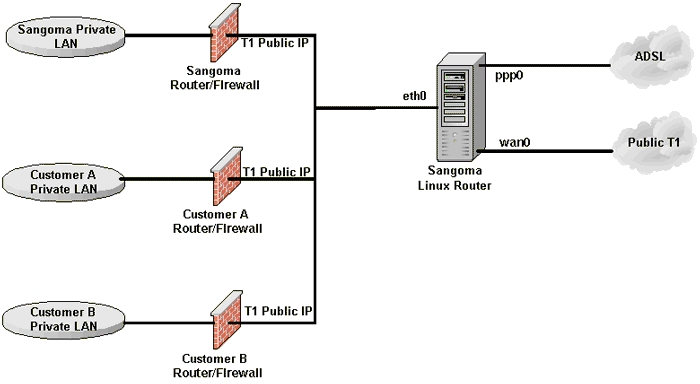
Figure 2. Two tenants in the building buy Internet access from Sangoma.
The two Sangoma Linux machines could be combined into one quite easily. The combination router would have another NIC to support the public network segments to customers A and B. Sangoma's firewall would operate between Sangoma's private LAN segment and all the other public segments, which include the Frame Relay T1 link, the ADSL link and the public Ethernet link.
The financial contributions from customers A and B are not enough to pay for a full T1 at Canadian prices. The solution for us was to employ a usage-based service for T1. This is a so-called burstable T1 service, which is about half the price of a full bandwidth T1 line. The T1 use is unrestricted up to the full bandwidth of 1,536Mbps full duplex. Billing is based on the 95th percentile of the bandwidth used. Traffic is sampled in five-minute intervals, and the average bandwidth for the five minutes is calculated. At the end of the month, these five-minute bins are arranged in decreasing order of bandwidth. The top 5% are discarded, and the billing rate depends on the next highest bin for the month. The trigger throughput in our case is 128kbps. If our 95th percentile throughput exceeds 128kbps, the monthly line charge is incremented by a minimum of $300.
This complicated billing structure is hard for subscribers to understand. It looks like a good deal to the customer but is difficult to manage and hard to measure. The billing rate is measured at the 5% level, where the rate of change of the usage curve is near a maximum. So, many users find themselves paying high bills that depend on the bandwidths of only one or two five-minute bins out of the more than 8,500 bins measured each month. Unless one's traffic is consistently low, one quickly finds that the surcharges are such that one may as well bite the bullet and take the full T1, even though the average throughput may be well below 128kbps.
The major plus is that the highest 5% of bandwidth usage for each month is “free”. This amounts to about 36 hours per month at any bandwidth without penalty, so almost a full working week out of the month is available at full line speed. Figure 3 shows the ideal traffic pattern for achieving the highest throughput for the lowest cost on our burstable T1 service. Essentially, the aim of the traffic control logic is to restrict the T1 bandwidth to 128kbps after the first free 36 hours of unrestricted bandwidth has been consumed in a given month.
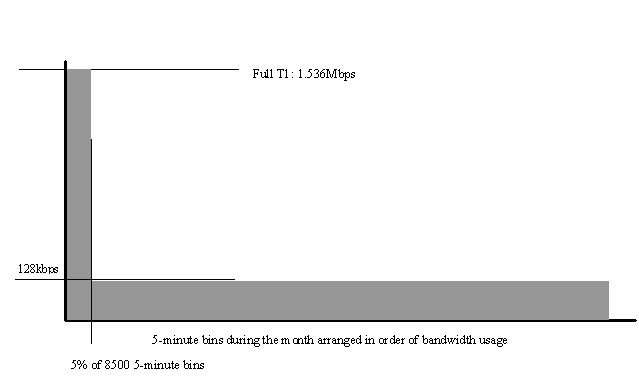
Figure 3. To achieve the lowest possible cost, the ideal T1 traffic pattern uses the full T1 line only 5% of the time.
So how do we manage to take the bait without the hook? With a series of scripts and dæmons that use a combination of policy routing, IP accounting and traffic shaping we can manage the network intelligently, so both we and our co-users get maximum performance at minimum cost.
The first step is to unload the T1 of all the traffic that could be routed through the ADSL line without losing service quality. Our ADSL line runs at a downstream rate of 1,728kbps, with an upstream rate of 800kbps. The T1 nominal rate is 1,536kbps, full duplex. The ADSL line is less efficient than the Frame Relay T1 line because of the high ATM and error correction overheads. So in terms of useful throughput, the incoming or down rates of the T1 and ADSL lines are similar.
We are fortunate that our particular ADSL connection seems to have a low level of oversubscription, so our performance is more consistent than that of many similar installations. Normally, ADSL links are oversubscribed at the central office end by up to 200 or 300 times, which results in poor performance in peak periods. But even with our near perfect ADSL line, the true upstream rate of the ADSL line is less than half that of the T1. It therefore makes sense to use ADSL for downstream traffic and reserve the T1 for the upstream flow.
Apart from the speed differences, the other major difference between our Frame Relay T1 line and the ADSL line is that the T1 offers a small range of fixed IP addresses, whereas the ADSL line is assigned an IP address by a DHCP server. At a minimum, services that need to support unsolicited incoming traffic on a fixed IP address, such as Web servers, need to be on the T1 line.
Downstream-heavy traffic consists mainly of Web browsing, e-mail traffic and incoming FTP traffic, which is handled well by the high downstream rate of the ADSL line. We also have the same type of traffic originating from a third server belonging to customer A. Thus, almost all the traffic from Sangoma and the third-customer server is routed through the ADSL line. The exception is outgoing SMTP mail traffic, which benefits from the increased upstream bandwidth of the Frame Relay T1 line.
Customers A and B have three servers between them. Of these, one is a Web server that needs a fixed IP address and has mostly outbound traffic. Another is a VPN server that also requires a fixed IP address; its traffic is light. All the traffic for both of these servers is routed through the T1 line with its fixed IP addressing structure.
The Sangoma policy solution is a staged process where outgoing packets traverse a set of rules and policies to achieve the desired traffic distribution. Only outgoing packets are distributed between the two interfaces, because we cannot control the path of incoming traffic. However, once the packets leave a particular interface, either T1 or ADSL, the response comes back through the same interface.
The advanced routing tools and utilities available for Linux give us the means to manage the network and achieve our desired goals. The Linux kernel supports multiple routing tables, allowing each physical connection to have its own routing table. Once we have a separate table for each of our physical interfaces, we use iptables and iproute2 to lead traffic into either routing table. From there, the packets follow a default route out to the appropriate physical interface.
The iproute2 suite contains a configuration file that is used to assign routing tables to the Linux routing stack. By default, the tr_tables contains a single routing table definition, main. This is the standard routing table used by the Linux routing stack. Listing 1 shows the routing table entry we added for our ADSL line, adsl. Individual routes are added to these routing tables using standard Linux commands. The outgoing packets must traverse six stages between router input and output.
Listing 1. Multiple Routing Tables
cat /etc/iproute2rt_tables
#
# reserved values
#
#255    local
#254    main
#253    default
#0      unspec
# local
#1      inr.ruhep
200 adsl
The first step is iptables mangle rules where traffic is tagged as either Tag 1 for ADSL or Tag 2 for T1. To give all Sangoma mail Tag 2, for example, we apply the rule:
iptables -t mangle -A PREROUTING -i eth0 \
-p tcp -s xxx.xxx.xxx.82 --dport smtp -j t1_line
We then use the iptables --set-mark option in the t1_line chain:
iptables -t mangle -N t1_line
iptables -t mangle -A t1_line -j MARK --set-mark 2
iptables -t mangle -A t1_line -j ACCEPT
We have similar rules for traffic going to the ADSL line.
The iproute2 policy points Tag 1 to the ADSL routing table and Tag 2 to the main routing table, which goes to the T1 line:
ip rule del fwmark 1 table adsl
ip rule add fwmark 1 table adsl

ip rule del fwmark 2 table main
ip rule add fwmark 2 table main
The default route of the ADSL routing table is ppp0, representing a PPP over Ethernet (PPPoE) link. The Ethernet then is encapsulated into ATM (EoA), and it is ATM cells that traverse the ADSL link to the telco DSLAM.
If the ppp0 interface goes down, the ADSL default route is removed automatically by the kernel and replaced with the main routing table. Thus, if the ADSL line fails, all traffic destined for the ADSL routing table is diverted to the presumably more reliable main routing table. We do get the occasional ADSL outages that are endemic to low cost, unmanaged broadband services like ADSL. These outages last from a few seconds to several hours, but there is no loss of user functionality because the traffic switches transparently to the T1 line. The T1 interface is good backup for the ADSL line, but the reverse is not true. Most of the hosts that use the T1 link do so because they need to use fixed IP addresses; they cannot be serviced adequately with the ADSL line that has a non-fixed IP address.
The default route of the main routing table is wan0 (T1). All traffic coming into this routing table is forwarded to the T1 line.
Outgoing Internet traffic over the ADSL connection comes from servers with routable IP addresses. These address types need to be NATed; otherwise, the traffic routed to the real IP addresses comes back over the T1 line:
iptables -t nat -A POSTROUTING -o ppp0 -j MASQUERADE
Our tagging and policy routing is shown in Figure 4.
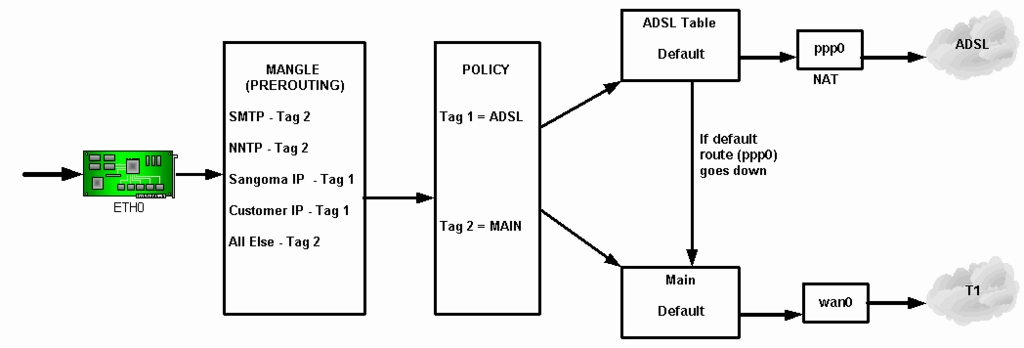
Figure 4. Tagging and policy routing allows for failover to the T1 line if the ADSL line goes down.
Once we have directed the appropriate traffic to the ADSL line, we need to manage residual T1 traffic so that the usage boundaries are never exceeded. The magic 95th percentile point always must be less than or equal to 128kbps. We first measure the traffic using IP accounting, which allows us to gauge average throughput over a specified time interval.
All incoming and outgoing packets on the T1 line pass through IP accounting rules. Each customer's traffic is measured based on the IP address and direction of the traffic.
A custom dæmon has been written to check the T1 bandwidth used for each five-minute period or bin. Each time the T1 throughput is greater than 128kbps averaged over a five-minute period, a counter is incremented. The 128kbps threshold corresponds to about 4.5MB over the five-minute period.
If the counter reaches 432, that represents the free 36 hours per month. In turn, that equals 5% of the time in a month, and the TC (traffic control) script is executed to clamp the T1 line down to 128kbps, until the start of the next month. The IP accounting configuration file is shown in Listing 2, available from the Linux Journal FTP site [ftp.linuxjournal.com/pub/lj/listings/issue121/7134.tgz].
We usually get through the month without having to clamp the T1 line. Sometimes, however, the free 36 hours are consumed. In this case, traffic control (TC) is used to clamp the bandwidth. The documentation covering traffic control and the tc command can be found at lartc.org/manpages.
We use Qdisc class-based queuing (CBQ) discipline for both the T1 line, wan0 and the local Ethernet, eth0. This is done for both connections to implement flow control in both traffic directions:
tc qdisc add dev wan0 root handle 10: \
cbq bandwidth 1500Kbit avpkt 1000
tc qdisc add dev eth0 root handle 20: \
cbq bandwidth 1500Kbit avpkt 1000
Next, add Global Class with maximum bandwidth for wan0 and eth0. The maximum bandwidth for both lines is 1,500kbps (T1):
tc class add dev wan0 parent 10:0 classid 10:1 \
cbq bandwidth 1500Kbit avpkt 1000 rate 1500Kbit \
allot 1514 weight 150Kbit prio 8 maxburst 0
tc class add dev wan0 parent 20:0 classid 20:1 \
cbq bandwidth 1500Kbit avpkt 1000 rate 1500Kbit \
allot 1514 weight 150Kbit prio 8 maxburst 0
Add User Class with limited bandwidth for both wan0 and eth0. The bandwidth limit we use is 100kbps, not 128kbps. Linux TC is not perfectly accurate, and we determined through trial and error that if we set the bandwidth limit higher than 100kbps, sometimes the burst traffic could go over 128kbps:
tc class add dev wan0 parent 10:1 classid 10:100 \
cbq bandwidth 1500Kbit avpkt 1000 rate 100Kbit \
allot 1514 weight 10Kbit prio 8 maxburst 0 bounded
tc class add dev eth0 parent 20:1 classid 20:100 \
cbq bandwidth 1500Kbit avpkt 1000 rate 100Kbit \
allot 1514 weight 10Kbit prio 8 maxburst 0 bounded
Add SFQ queuing discipline for the User Class, on both wan0 and eth0. The default queuing discipline Stochastic Fairness Queueing (SFQ) has been selected. A number of other disciplines also could be employed:
tc qdisc add dev wan0 parent 10:100 \
sfq quantum 1514b perturb 15
tc qdisc add dev eth0 parent 20:100 \
sfq quantum 1514b perturb 15
Bind the traffic tagged number 2 to the User Class Queue for both wan0 and eth0. All traffic destined for the T1 line already has been tagged with number 2. The traffic control only limits the T1 traffic, while letting ADSL traffic flow at its full physical rate:
tc filter add dev wan0 parent 10:0 protocol ip \
prio 25 handle 2 fw flowid 10:100
tc filter add dev eth0 parent 20:0 protocol ip \
prio 25 handle 2 fw flowid 20:100
The policy routing works perfectly as programmed, directing the traffic as appropriate to the T1 and ADSL links and providing redundancy in case the ADSL link fails. The traffic management on the T1 has been satisfactory, and we generally have been able to provide our users with a respectable service transparently. Of course, the consistency of traffic throughput during a single month is dependent on how rapidly the free bandwidth is consumed.
As an example of our T1 traffic management see Figure 5, which shows Frame Relay T1 bandwidth usage during May 2003. The red line on the graph represents 128kbps, which is our threshold limit for billing. Throughput clamping occurred after May 23. One of our customer's servers became infected with a virus that generated a great deal of traffic during the month, consuming our precious free bandwidth. As a result, these customers were required to exist for more than a week running at 128kbps on the T1 line. ADSL traffic, of course, was not affected.
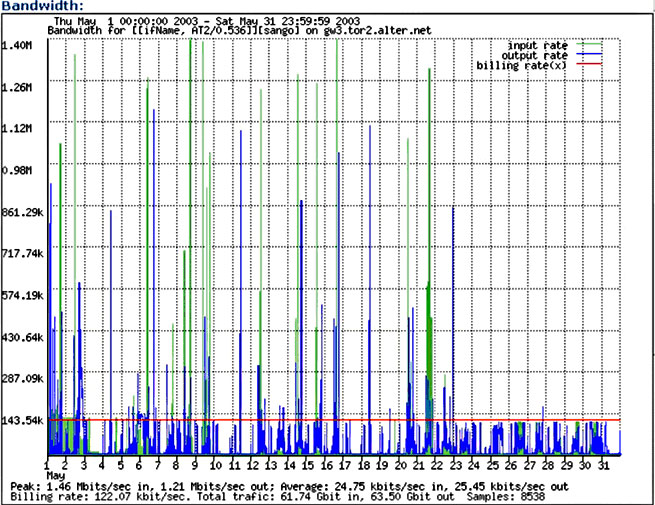
Figure 5. Bandwidth Usage by Five-Minute Bins during May 2003
The same data presented with the five-minute bins listed by bandwidth is shown in Figure 6. This graph may be compared with the ideal usage shown in Figure 3. Notice the billing rate of 122.07kbps indicated in this figure. This reflects the success of the traffic control procedures in ensuring that the billing rate remained below 128kbps.
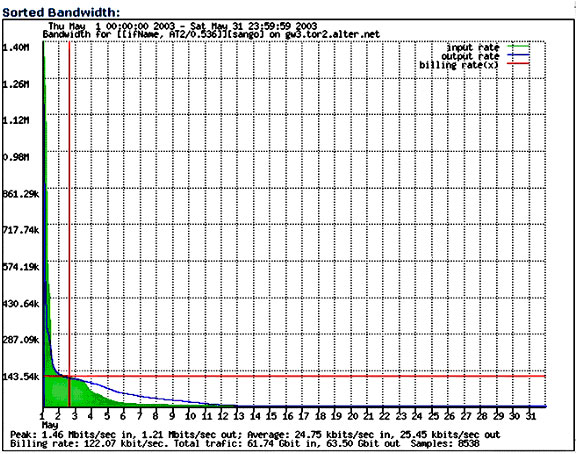
Figure 6. Bandwidth Usage by Five-Minute Bins during May 2003, Ranked by Bandwidth
David Mandelstam is President of Sangoma Technologies Corp. Founded in 1984, Sangoma develops and manufactures wide area network (WAN) communication hardware and software products, with an emphasis on the PC platform. The communications solutions and routing products support all popular WAN networks, line protocols and all standard PC operating systems and platforms.
Nenad Corbic is Senior Linux Developer at Sangoma Technologies Corp. (www.sangoma.com).

