
DVD Transcoding with Linux Metacomputing
As a consequence of the many recent advances in video and audio encoding, the MPEG-2 format now is used for digital video broadcasting (DVB) transmission and DVD storage and is supported by a wide range of hardware devices. MPEG-2 movie files typically range in size from 3–6GB, sizes that are suitable for DVDs but not for CD-Rs. Similarly, high-quality MPEG-2 videos are suitable for DVB-S or DVB-T networks, but not for IEEE 802.11b or domestic HomePlug transmission. To solve these kinds of problems, improved encoding techniques have been developed, and as a result, MPEG-4 has been standardized. The MPEG-4 format can reduce movie sizes down to 700MB or so and maintain reasonably good quality.
Because much multimedia content is available as DVD MPEG-2 files, it is necessary to transcode them to obtain the MPEG-4 equivalents. In this article, we propose a Linux framework based on the Condor metacomputing platform to achieve high-throughput DVD transcoding. Although some LAN parallel transcoding tools for fixed sets of machines exist, we are not aware of any metacomputing system for parallel transcoding. Metacomputing refers to architectures that hide physical resources and instead offer a simplified virtual machine view. For example, the Condor tool we use “steals” cycles of available machines when neither users nor high-priority processes are using them.
The DVD movie market has boomed thanks to the availability of cheap DVD players, the robustness of DVD as a storage media as compared to VHS cassettes and so on. The DVD recording media market, however, is incipient. Because CD-R technology has been around for a while and CD-R disks are much cheaper than DVD disks, domestic users have found ways to store DVD movies on CDs with similar subjective qualities. This kind of storage is possible due to the last generation of video and audio codecs. They are based on the MPEG-4 standard and offer high compression ratios. Transcoding a DVD to make its contents fit in a CD, however, still is expensive computationally for many desktop PCs.
Parallelization is a promising solution to accelerate DVD transcoding. The most obvious approach is manual parallelization, dividing input files in chunks manually, transcoding the chunks in different machines and joining the result in a single file. Manual parallelization may be adequate for users who wish to keep track of the whole process. However, it may be advantageous to use metacomputing to implement high-throughput, submit-and-forget DVD transcoding.
Parallelizing a process requires breaking it into elementary tasks, scheduling those tasks and collecting their results. Consequently, a resource management tool is necessary. Tools such as Condor and Globus provide basic metacomputing and parallelization software. In our case, we have chosen Condor because it does not add extra complexity, it is easy to install and configure and it works properly on Linux. Finally, Condor does not require a dedicated cluster.
Condor is a specialized workload management system for computation-intense jobs. Like other full-featured batch systems, Condor provides a job queuing mechanism, a scheduling policy, a priority scheme, resource monitoring and resource management. Users submit their serial or parallel jobs to Condor, and Condor places them into a queue, chooses when and where to run the jobs based on a policy, monitors their progress and ultimately informs the user of a job's completion.
While providing functionality similar to that of any traditional batch queuing system, Condor's architecture allows it to succeed in areas where traditional scheduling systems fail. Unique mechanisms enable Condor to harness wasted CPU power from otherwise idle desktop computers. For instance, Condor can be configured to use desktop machines only when the keyboard and mouse are idle. Should Condor detect that a machine is no longer available (say, a key press is detected), it is able to produce a transparent checkpoint and migrate a job to a different machine that would otherwise be idle. Condor also is able to redirect transparently all the job's I/O requests back to the submitting machine. As a result, Condor can be used to combine seamlessly all the computational power in a community.
The apparent lack of commercial metacomputing transcoding systems may exist because metacomputing mostly has been linked with the UNIX scientific community. On the other hand, entertainment software designers still give maximum priority to the metacomputing-unfriendly Microsoft Windows world. For example, the most recent version of the DivX codec—v.5.0.5 at the time this article was written—is a key tool for Linux transcoding development, but it did not work properly on Pentium 4 Linux boxes. The previous release was v.5.0.1alpha, an unstable version that had been released the previous year. This example provides an idea of the problems one may encounter when trying to port entertainment applications to metacomputing-friendly Linux platforms.
Although diverse transcoding applications are available, we outline the three that we found most interesting:
FlaskMpeg: one of the first transcoding applications to appear. Currently, it is one of the most popular in the Windows world. It does not support parallelization.
Mencoder: one of the top Linux applications for DVD transcoding. Its efficiency (output-to-input size ratio) in general, is slightly worse than FlaskMpeg's. As in the previous case, it does not support parallelization.
Dvd::rip: a high-level Linux transcoder based on another program, Transcode. Its results are comparable to those of Mencoder. Dvd::rip does support parallelization, but it is difficult to configure. Parallelization requires manual configuration of all computers involved in the transcoding process. This configuration is static, and it does not react to environmental changes (a major difference for a Condor-oriented system like ours). Dvd::rip does not admit audio streams. The audio stream must be processed sequentially due to technical problems Dvd::rip points out but does not solve; see Dvd::rip's Web page. This is a minor problem, though, because transcoding time is dominated by video transcoding, regardless of whether the audio transcoding strategy is employed in parallel or sequentially.
DVD is based on a subset of standards ISO/IEC 11172 (MPEG-1) and ISO/IEC 13818 (MPEG-2). A DVD movie is divided into three parts: video objects (VOBs) files with a maximum size of 1GB each, multiplexing video and audio sources.
Three types of MPEG-2 frames exist: I (Intra), P (Predictive) and B (Bidirectionally-predictive). I frames represent full images, while P and B frames encode differences between previous and/or future frames. In principle, it seems obvious that video stream cuts must be located at the beginning of I frames. This is almost right, but not quite. Some parameters, such as frame rate and size, must be taken into account. This information is part of the Sequence Header. For this reason, packets chosen as cut points must have a Sequence Header. Fortunately, there is a Sequence Header before every I frame.
Another important issue is frame reordering due to the existence of P and B frames. After an I frame, B frames may follow that depend on P frames that came prior to the I frame. If the video stream is partitioned at the start of that I frame, it is not possible to maintain video transcoding consistency. The solution consists of assigning the late B frames to the previous chunk. As a consequence, a little extra complexity is added to video preprocessing.
Obviously, it is not interesting to fragment video to the maximum extent, because the size of the chunks would be too small. Typically, about 300KB exist between two consecutive I frames, although this length depends on several parameters, such as bit rate or image size.
We considered two basic load balancing strategies for our project. In the first, called Small-Chunks, the DVD movie is divided into small chunks of a fixed size. Condor assigns a chunk to every available computer. When a computer finishes transcoding one chunk, it requests another one. This process is repeated until there are no more chunks left on the server. In the other strategy, called Master-Worker, load balancing depends on the shares, which are determined by the master processor. Obviously, the other computers involved are the workers. This strategy often is used for high-throughput computations. For this project, chunk size for each particular computer is assigned according to a training stage, as explained in the next section.
It should be understood that we deliberately do not consider the possibility of machine failures or user interference. If those events take place, the performance of the simple Master-Worker implementation in this project would drop. Nevertheless, our two approaches are illustrative because they are extreme cases, pure Master-Worker on one hand and the high granularity of Small-Chunks on the other. Fault/interference-tolerant Master-Worker strategies lie in the middle. Our aim is to evaluate whether the behavior of our application is similar in the two extremes, in terms of processing time and transcoded file size. As the results described in this article suggest, Small-Chunks may be more advantageous due to its simplicity (it does not need a training stage) and because it adapts naturally to Condor's management of machine unavailability.
To provide information to the Master-Worker coordinator, it is necessary to evaluate all computers beforehand. Evaluation is performed in a training stage, which estimates the transcoding rate of each computer in frames per second. The training stage of our prototype consists of transcoding a variety of small video sequences in the target computer set and estimating the average frames per second delivered by each computer. This result then is used to set the sizes of the data chunks, which are proportional to the estimated performance of each computer. Ideally, this approach minimizes DVD transcoding time, because all computers should finish their jobs at the same time.
Our testbed emulated a typical heterogeneous computing environment, including machines at the end of their usage lives. It was composed of five computers (see Table 1), classified in three groups according to their processing capabilities. Two machines were in the first group (gigabyte and kilobyte), a single computer was in the second group (nazgul) and two machines with the worst performance (titan and brio) were in the third group.
Table 1. Test Bed Computers
| Name | CPU | MHz | Memory | Kflops | Mips |
|---|---|---|---|---|---|
| gigabyte | Intel Pentium 4 | 1,700 | 256 DDR | 528,205 | 1,388 |
| kilobyte | Intel Pentium 4 | 1,700 | 256 DDR | 624,242 | 1,355 |
| nazgul | Intel Celeron | 433 | 192 | 152,593 | 491 |
| titan | Intel Pentium II | 350 | 320 | 67,987 | 398 |
| brio | Intel Pentium II | 350 | 192 | 72,281 | 398 |
In addition, all computers were linked to a 100Mbps Ethernet network, and the operating system used in all computers was Red Hat Linux 8.0. All computers shared the same user space, defined by an NIS server, and the same filesystem (NFS server in gigabyte). Finally, we installed Condor v. 6.4.7, and gigabyte was the central manager. Condor was configured to keep all jobs in their respective processors regardless of user activity. Thus, the timings in this section are best-case results, as mentioned above.
The DVD-to-DivX parallel transcoder was implemented with the following libraries:
libmpeg2 0.3.1: DVD MPEG-2 stream demultiplexing and decoding.
liba52 0.7.5-cvs: DVD AC3 audio decoding.
DivX 5.0.1alpha: MPEG-4 video encoding.
lame 3.93.1: MP3 audio encoding.
Once the video partitioning stage is done, video data chunks are submitted to Condor transcoding jobs. These jobs are processed in the Condor Vanilla universe, because they load the DivX library dynamically.
In order to transcode a data chunk, every transcoder reads the data directly from source VOBs. Output data is written to the same folder. Read/write operations are performed on a frame-to-frame basis: a transcoder reads a frame, transcodes it and writes the result back. This strategy yields a better performance than delivering whole chunks to the workers, transcoding them in worker local filesystems and sending whole transcoded results from the workers to the server computer for joining. All computers used NFS to share both input VOB files and the output folder. Once the parallel transcoding stage finishes, transcoded results are a set of independent files, which are concatenated at the master to generate a DivX movie. Table 2 presents the results.
We used the two load balancing strategies, Small-Chunks and Master-Worker. The testing movie was All about My Mother, which has a length of 1 hour and 37 minutes and an original size of 2.94GB. The tuples in the comp column in Table 2 are the first letters of the names of the test bed computers, for example, g refers to gigabyte and t refers to titan. A - symbol indicates that the computer was not used in that particular test. Chunk size in Small-Chunks was set to 60MB. Video preprocessing time has not been included because it was negligible in all cases.
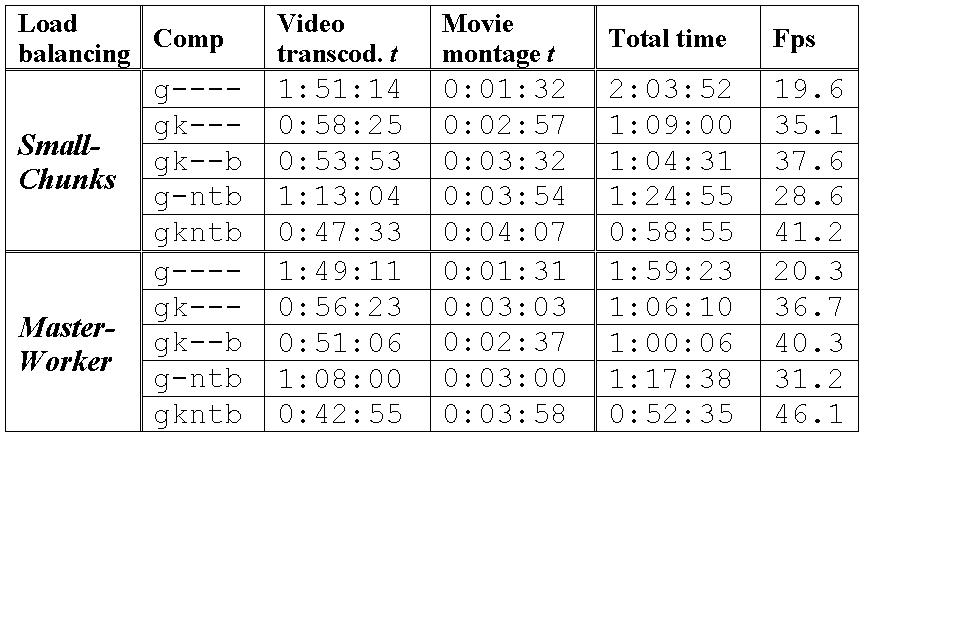
Table 2. Computational Results (t = time, Fps = frames per second)
Several conclusions can be extracted from Table 2. First, according to the Fps column, load balancing is better with Master-Worker than it is with Small-Chunks. The difference is small, but it tends to grow as the number of machines used increases. In general, parallelization increases transcoding performance, which is evident when adding a second powerful machine (see [g----] vs. [gk---]). The impact of adding low-end machines successively is low (see [gk---] vs. [gk--b] and [gk--b] vs. [gkntb]). However, the combined impact of all low-end machines is noticeable, especially when departing from the case of a single available powerful machine (see [g----] vs. [g-ntb]).
In order to evaluate further the behavior of the prototype, we compared it with two popular transcoding tools, Mencoder and FlaskMpeg. Table 3 shows these results. The speed of the monoprocessor version of our prototype lies between FlaskMpeg's and Mencoder's. Regarding output size, in the worst case (Small-Chunks), our prototype delivers a DivX movie that is only 2.6% larger than FlaskMpeg's output. Indeed, the global compression rates achieved by Small-Chunks (24.67%) and FlaskMpeg (24.05%) are similar, and the difference is not relevant if processing speedup is taken into consideration. It is important to note that FlaskMpeg uses DivX codec v. 5.0.5 Pro, which was not available for Linux at the time this article was written. Therefore, compression performances may be even closer when the Linux version becomes available.
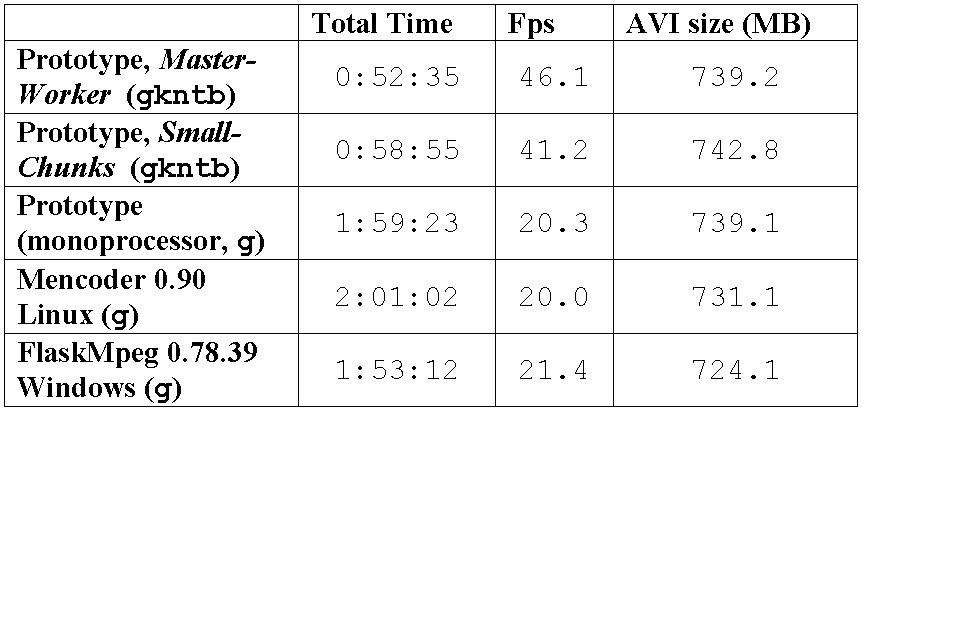
Table 3. Comparative Results, State-of-the-Art Transcoding Applications
Finally, Figures 1 and 2 show the throughput of the machines in the system prototypes, both Small-Chunks and Master-Worker, for load balancing. The computers do not finish their assignments exactly at the same time. This should be expected, though, as Small-Chunks load balancing is only approximate. Plus, Master-Worker job size is assigned according to the results of a training stage, which is representative but not exact.
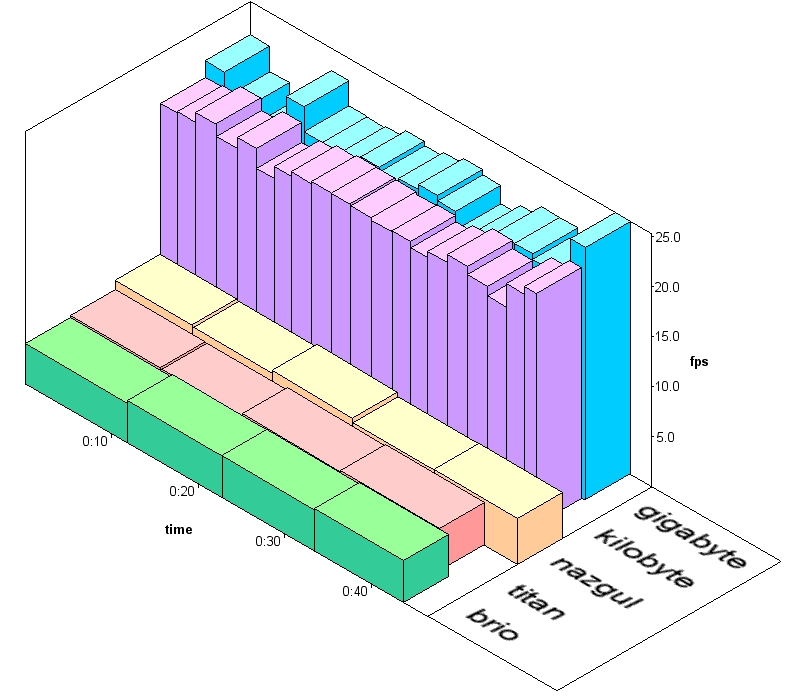
Figure 1. Individual Computer Throughput, Small-Chunks
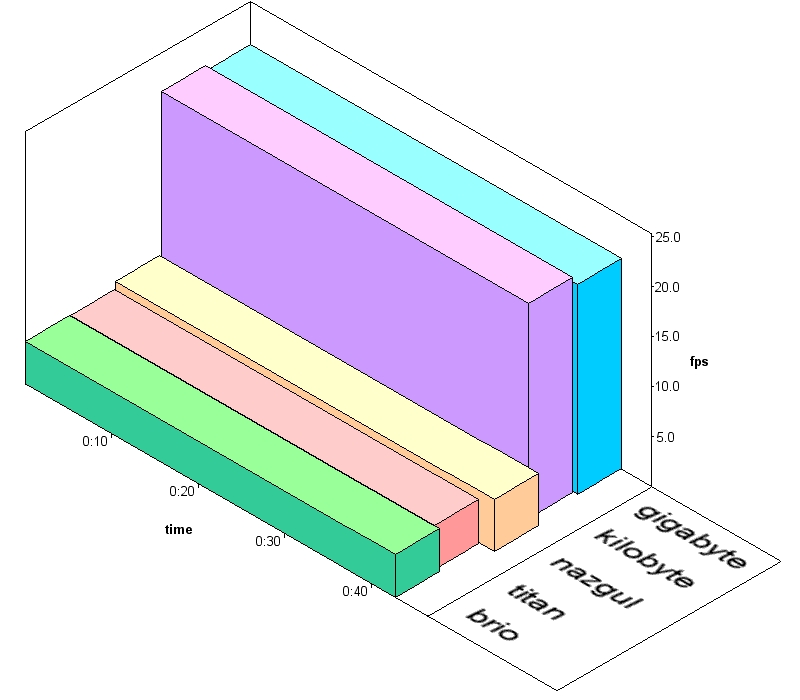
Figure 2. Individual Computer Throughput, Master-Worker
In this article, we have presented a Condor high-throughput DVD transcoding system for Linux. Our results indicate that metacomputing-oriented parallel transcoding is of practical interest, and it can achieve noticeable improvements when compared to existing monoprocessor Windows tools.
Attending to the statistics of our case study, pure Master-Worker produces better results than Small-Chunks, but the difference is minimal and seems irrelevant in practice.
Resources
Condor Project: www.cs.wisc.edu/condor
Dvd::rip: www.exit1.org/dvdrip
Globus Project: www.globus.org
Mencoder: www.mplayerhq.hu/DOCS/encoding.html
Transcode: www.theorie.physik.uni-goettingen.de/~ostreich/transcode
Francisco J. Gonzalez-Castaño is currently a Professor Titular with the Departamento de Ingenieria Telematica, Universidad de Vigo, Spain and has been a visiting assistant professor with the Computer Sciences Department, University of Wisconsin-Madison. He is the head of the TC-1 Information Technology Group, Universidad de Vigo. His research interests include mobile communications, high-performance switching, metacomputing and data mining.
Rafael Asorey Cacheda was born in Vigo, Spain in 1977. Currently, he is a researcher with the TC-1 Information Technology Group, University of Vigo. His interests include content distribution, high-performance switching, video transcoding and IPv6.
Rafael P. Martinez-Alvarez works as a telecommunications engineer for the TC-1 Information Technology Group, University of Vigo, Spain. His interests include multimedia encoding formats and real-time multimedia transcoding.
Eduardo Comesaña-Seijo was born in 1976 in Vigo, Spain. He has been a researcher with the TC-1 Information Technology Group, University of Vigo. He currently works for Comunitel Global SA (a Spanish Telco). His interests include real-time multimedia transcoding and parallel computing.
Javier Vales-Alonso is a Professor Ayudante with the Department of Information Technologies and Communications, Polytechnic University of Cartagena, Spain. His research interests include mobile networks and metacomputing.

