
Desktop Guerrilla Tactics: a Portable Thin Client Approach

April 6th, 2004 by William Yu in

Roll out a desktop Linux pilot project quickly without disturbing the legacy desktop OS.
Your rating: None Average: 3 (1 vote)

As an operating system, Linux has reached the point where it has entered mainstream computing. No longer do people scratch their heads at the mention of its name, nor do they shake it when they hear it's being used for enterprise applications. Linux has proven its value propositions of cost, scalability and performance in the real world. The final frontier for Linux to conquer is the desktop.

The reality of Linux on the desktop is the situation we faced when we worked for an organization in the midst of deploying Linux. Several servers already had been migrated to Linux with much success. Now, the managers were casting a wary eye at the desktop. We demonstrated several desktop-oriented distributions: Lindows, Xandros, Knoppix and Red Hat. Of these, the managers liked the Red Hat environment and support structure the best.

Although they liked what they saw in Linux desktops, the managers felt the responses to the demos were too subjective and too theoretical to commit to mass deployment wholesale. They wanted to see how the users would react to this shift. The only way to do this was through a pilot group.

We were working against two major constraints. First, the managers wanted to run the pilot group without any major disruptions in their day-to-day operations. If we did install Linux on the pilot group's existing desktops, we would have to do the entire job in half a day. If the pilot group did not like what they saw, we would have to restore the existing Windows desktops just as quickly.

Second, we were working with a hodge-podge of old machines. The desktops were a varied mix of Pentium II and Pentium III computers with different memory and hard disk configurations and no CD-ROM drives. Worse, the hard disks generally had less than 500MB of free space. No way could we dual-boot a decent Linux distribution on these machines.

So, here was the challenge: how could we bring Linux quickly onto the desktop to penetrate the users' defenses? Just as importantly, how could we take Linux out of the environment in case the opposition proved overwhelming? We would have to take a guerrilla approach to conquering the desktop.

One of the things we had going in our favor was the office network. Fortunately, the company had invested in a decent Ethernet infrastructure, and all the machines already were connected. This setup immediately led us to consider a thin client approach to our project.

Thin Client Options

A thin client approach meant we would be running all the applications off a fat server. The desktops themselves would be responsible only for outputting display on the monitor and accepting input from the keyboard and the mouse. But how would we accomplish this?

We were aware of several open-source thin client projects, most notably, the Linux Terminal Server Project (www.ltsp.org) and Netstation (netstation.sourceforge.net). Although these packages have proven popular, we found them complicated to set up and maintain. They required us to put together a tightly coupled server and client environment: critical client files needed to be served through NFS, for example.

An approach we liked better was the Virtual Network Computer (VNC) from AT&T (www.uk.research.att.com/vnc). VNC is a remote display system that allows you to view a computing desktop environment from anywhere on a network and control it as if you were sitting in front of that computer. The beauty of VNC is that it works with a wide variety of platforms for both the client and the server. The server and the clients communicate primarily through the VNC protocol, so they are not as tightly linked. We could run it on almost any type of client and any type of server.

We thought we had found our answer, so we installed the VNC server on our Linux machine. We put VNC clients on the desktop, running within the Windows environment. Using VNC, our users could access the Linux desktop that was running on our server.

Needless to say, this approach failed dismally. Users followed the path of least resistance and opted to ignore the VNC icons on their Windows desktops. Instead of trying Red Hat, they continued to use their old applications. Luckily, we found this out before deployment to our pilot group.

Our Thin Client Approach

We were left with only one recourse: we would have to package a small floppy-based distribution that contained a VNC client. Then, with their hard drives disconnected for the duration of the pilot, the users would have no option but to use our thin client network. If the pilot failed, we would reconnect their hard disks and they would be back in their old environment.

Here, in broad strokes, is the thin client approach on which we settled. We assembled a small floppy-based distribution with an SVGA VNC client, and then we set up our Linux machine to act as a fat server to our thin clients. We then deployed our floppy distribution to the client machines. All our work was done with a stock distribution of Red Hat 9, with the exception of some packages we downloaded from the Internet.
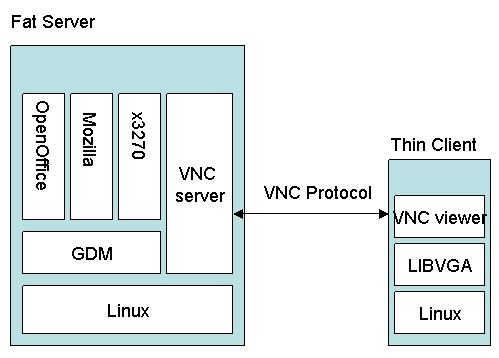
Figure 1. Thin Client Diagram

Assembling a Floppy-Based Distribution

We based our thin client boot floppy on BusyBox (www.busybox.net), which provides a complete bootable system on a floppy disk. It originally was created by Bruce Perens and currently is maintained by Erik Andersen. For a full explanation of each step, however, we would refer you to the three articles written by Bruce Perens and published in LJ, as well as the documentation from the BusyBox Web site (see www.linuxjournal.com/article/4335, www.linuxjournal.com/article/4395 and www.linuxjournal.com/article/4528).

Below, we outline the most elaborate part of our thin client approach. If you want to go straight to setting up your thin client network, skip this section and use the floppy image available on our Web site (cng.ateneo.net/cng/wyu/software). You have to modify only the network.cnf and libvga.config files to suit the circumstances of your network.

Step 1: we first created a filesystem with the appropriate nodes and configuration files for our system. We did this first on a Linux workstation. To simplify and automate the process, we wrote a script called genfilesys.sh. You can download this script from cng.ateneo.net/cng/wyu/software. We adapted this script from Bruce Perens' script (also available from the LJ FTP site at ftp.ssc.com/pub/lj/listings/issueXXX/7109.tgz) and added configuration files for SVGALIB and UDHPC:

mkdir svilinux-filesystem
./genfilesys.sh ./svilinux-filesystem

In genfilesys.sh, we also set parameters for the video mode and mouse types, defined in libvga.config. You may want to modify this to suit your environment.

Step 2: build uClibc. uClibc is a C library with supplementary routines that we needed in order to run our VNC viewer. We downloaded the source package uClibc-0.9.20.tar.bz2 from www.uclibc.org and compiled it into our preparatory filesystem:

tar xvjf src/uClibc-0.9.20.tar.bz2
cd uClibc-0.9.20
make 
make install
make PREFIX=../svilinux-filesystem install_target
export PATH=/usr/i386-linux-uclibc/bin:$PATH
cd ..

Step 3: build BusyBox. We downloaded the BusyBox source package, busybox-1.00-pre2.tar.gz, from www.busybox.net and built it in our workstation:

tar xvzf src/busybox-1.00-pre2.tar.gz
cd busybox-1.00-pre2
make config 
make dep
make
make PREFIX=../svilinux-filesystem install
cd ..

For the configuration, we chose to enable CONFIG_AWK, CONFIG_TELNET, CONFIG_UDHCPC and CONFIG_FEATURE_INITRD; we disabled CONFIG_SYSLOGD.

Step 4: configure SVGALIB. Because we were using VNC, at the very least we needed to incorporate SVGA support into our small distribution. To do this, we downloaded SVGALIB from www.svgalib.org and compiled it:

tar xvzf src/svgalib-1.4.3.tar.gz
cd svgalib-1.4.3
vi Makefile.cfg (defaults are okay)
make install
make prefix=../svilinux-filesystem installsharedlib
ln  -s libvgagl.so.1.4.3 \
../svilinux-filesystem/lib/libvgagl.so.1
ln  -s libvga.so.1.4.3 \
../svilinux-filesystem/lib/libvga.so.1

Do not use the experimental version of SVGALIB, as it uses a kernel helper for the frame buffer. Using this would mean recompiling the kernel to include this support, further bloating the kernel.

Step 5: configure the SVGA VNC viewer. We needed to configure our own VNC viewer that would work with SVGA, so we downloaded sources from www.tightvnc.com and packages.qa.debian.org/s/svncviewer.html. This VNC viewer still works with the stock VNC server from Red Hat.


tar xvjf src/tightvnc-1.2.9_unixsrc.tar.bz2
cd vnc_unixsrc 
xmkmf
cd libvncauth
xmkmf
make
cd ../.. 
tar xvzf src/svncviewer-0.1.1.tar.gz
gzip -dc src/svncviewer_0.1.1-5.diff.gz | \
patch -p0
cd svncviewer-0.1.1
vi Imakefile 

(Add -I/usr/local/include to INCLUDES and -L/usr/local/lib -L../vnc_unixsrc/libvncauth to SVGALIB.)

rm makefile
xmkmf
make
strip -s -x -X svncviewer
install svncviewer ../svilinux-filesystem/bin

Step 6: generate a ROM filesystem. We generated a ROM filesystem could load onto our boot floppy:

genromfs -f initrd -d ./svilinux-filesystem
gzip -9 initrd

Step 7: build a small kernel. To minimize the size of our kernel, we decided to build a statically linked bzImage-style kernel. We removed all unnecessary items, such as unneeded drivers and features. The features we need to include are:

  • RAM disk support (in the Block Devices menu).

  • Initial RAM disk (initrd) support (also in the block devices menu).

  • ROM filesystem support (in the File Systems menu).

  • DOS FAT filesystem (in the File Systems menu).

  • VFAT (Windows 95) filesystem (in the File Systems menu).

We configured and compiled the kernel by invoking in our kernel source directory:

make menuconfig
make dep clean bzImage

Step 8: create a bootable floppy with SYSLINUX. SYSLINUX is a bootloader for Linux that operates off MS-DOS floppies. It is part of a standard Red Hat 9 install. Thus, with our prepared floppy in the drive, we invoked:

syslinux /dev/fd0

This altered the boot sector of our floppy and also copied the second-stage bootstrap ldlinux.sys file to it.

We then copied our RAM disk initrd.gz and the compiled kernel bzImage to the floppy:

mount -t msdos /dev/fd0 /mnt 
cp initrd.gz /mnt/initrd.gz 
cp /usr/src/linux/arch/i386/boot/bzImage /mnt/linux

Step 9: create a SYSLINUX configuration file. We created a file called syslinux.cfg in our floppy that contains the following lines:

TIMEOUT 20 
DEFAULT linux LABEL linux 
    KERNEL linux 
    APPEND root=/dev/ram0 initrd=initrd.gz 

This tells SYSLINUX to wait for two seconds and then boot the default system. The kernel is booted with the arguments root=/dev/ram0 and initrd=initrd.gz.

Step 10: next, we created a bare network configuration file, network.cnf, in our boot floppy:

HOSTNAME=vnc
DEVICE=eth0
DHCP=yes
VNCHOST=192.168.0.100

Step 11: at this time, we tested our boot floppy on one of the target machines to see if it would work.

Step 12: satisfied that our boot floppy would work, we proceeded to make an image from it so we could recreate additional boot floppies:

umount /mnt
dd if=/dev/fd0 of=./vnclinux.img

mkdir loopback
mount -o loop vnclinux.img loopback/
umount loopback/
rm -rf loopback
dd if=./vnclinux.img of=/dev/fd0

Setting Up a Fat Server

Our next major step was to set up a fat server for our thin clients. We began by installing Red Hat 9 on the machine that would be our fat server. Red Hat 9's default GNOME workstation configuration option was sufficient for our needs. GNOME and X needed to be configured properly.

We next checked that our required software already was installed—VNC and GDM were critical. We also installed OpenOffice.org, Mozilla, Evolution and the x3270 client, as these were needed for our users' environment.

We then had to modify the GDM configuration. By default, GDM is configured not to allow XDMCP connections. We edited the GDM configuration file located in /etc/X11/gdm/gdm.conf. The options we needed to change were in the [xdmcp] section. We changed it to enable XDMCP like this:

[xdmcp]
Enable=1
HonorIndirect=1
Port=177

After editing the configuration file, we restarted GDM. This was be done by issuing

killall -HUP gdm

For your own implementation, watch out for any unnecessary error messages in the /var/log/messages file. You can edit the GDM configuration file and enable verbose debugging in the event that GDM does not restart successfully.

We then added the following entry to the /etc/services configuration file for our VNC server:

vnc   5900/tcp

We also created a file named /etc/xinetd.d/vnc, which needed to contain the following lines:

service vnc {
    disable = no
    id = vnc
    socket_type = stream
    protocol = tcp
    wait = no
    user = gdm
    server = /usr/bin/Xvnc
    server_args = -inetd -geometry 800x600 -depth 16 -query localhost
    log_on_failure += USERID
}

In the line that starts with server_args, the parameters after the -inetd parameter are standard X arguments. Any argument normally passed to an X server can be passed here. In this example, the spawned GDM sessions are loaded in an X session with 16-bit color on an 800×600 screen. These values can be changed according to user preferences. The larger the color depth and screen resolution, however, the larger the network bandwidth consumption. The Xinetd superserver is then restarted with:

/sbin/service xinetd restart

From here, the DHCP server is ready to be configured. We wanted to allow workstations to obtain their network configuration options, including their IP addresses, from a DHCP server. Our simple configuration file dhcpd.conf looked like this:

subnet 192.168.0.0 netmask 255.255.255.0 {
    option routers		192.168.0.1;
    option subnet-mask	255.255.255.0;

    option domain-name	"svi.com.ph";
    option doman-name-servers 192.168.1.1;

    range dynamic-bootp 192.168.0.128 192.168.0.255;
    default-lease-time 21600;
    max-lease-time 43200;
}

Once the fat server was set up, it needed to be tested. From Windows, we invoked a VNC client and typed the IP address of our fat server. We then saw the login screen of the fat server. We tried the same with our thin client boot floppy, with similar results.

Our Results

Over a Thursday and Friday, we conducted the training for our pilot group. This group had simple requirements, representative of half the population in the organization: they needed basic office productivity tools, such as e-mail, Web browsing and terminal access to a mainframe. OpenOffice.org, Evolution, Mozilla and x3270 sufficiently met their requirements.

On Saturday, we disconnected their systems' hard disks and reproduced boot floppies for each workstation. We spent half the day testing each and every machine for any glitches. We also migrated their files to accounts on the fat server so they would have ready access to them. We also connected the printer to the fat server. Finally, we set up the server desktop to have the often-used icons prominently displayed.

When the users arrived on Monday, they were greeted with Red Hat login screens on their desktops. The SVGA-driven VNC displays were crisp, and the overall performance of the applications, from loading time to actual use, was pretty fast. Overall, everything went as users expected from our training.

The first few days of the pilot generated some complaints from the users, but that was to be expected. They were faced, after all, with an environment different from what they were accustomed. The more frequent queries concerned how to use OpenOffice.org, the location of their files and how they would print.

At the end of our first week, the questions tapered to a trickle. Our pilot group even reacted with some pride when coworkers asked them what strange programs they were running on their machines. The real value of our approach popped up inadvertently during the rash of infections from the Blaster worm. As their colleagues were faced with system slowdown and lost productive hours while disinfecting their PCs, our pilot group continued working on their machines.

Conclusion

We strongly feel that the possibility of a graceful exit from the pilot positively affected the outlook of both management and users. So far, they have opted not to use that exit. End-user response has been positive, and some have even offered usability suggestions.

An unexpected side benefit has surfaced: it has allowed the company to observe and document the speed, ease and costs of deployment and support of this approach. This, in turn, provided management with the option of considering its use as a critical component in an enterprise-wide, disaster-ready infrastructure. Thus, without irrevocably committing the company to large-scale migration, prototype systems have been seeded across the organization and are being nurtured by champions.

The current strategy options include continuing deployment of these terminals to increase and improve both support skills and user familiarity. We are confident that this diffusion of skill sets and attitudes across the enterprise will enhance the future decision-making calculus and further bolster Linux as a practical and superior alternative.

William Yu takes charge of information planning and security at SVI Technologies, Inc., a Manila-based IT outsourcing company. His fields of interest include high-performance computing, network security and information systems planning. He also is a faculty member at the Ateneo de Manila University.

Dominique Cimafranca is a Linux IT specialist for IBM Philippines. He has implemented Linux in the whole range of hardware platforms from IBM for several enterprise customers. He has been writing about Linux and technology issues for the past three years.

__________________________


Special Magazine Offer -- Free Gift with Subscription
Receive a free digital copy of Linux Journal's System Administration Special Edition as well as instant online access to current and past issues. CLICK HERE for offer

Linux Journal: delivering readers the advice and inspiration they need to get the most out of their Linux systems since 1994.

Comment viewing options

Select your preferred way to display the comments and click "Save settings" to activate your changes.
Sammy's picture

Client hardware underutilized

On August 8th, 2006 Sammy (not verified) says:

It seems like an interesting solution. Issues I have with it, VNC does not encrypt it's traffic. Solution to that, SSH tunneling - hard part would be setting up the session (each user has to log in with a password and username first?). The next issue is the fact the thin clients hardware is entirely unused, this seems like a waste and pushes more load onto the server. Why not use something like Xubuntu on the clients (designed to be thin) and handle the home directories on the fat server? I am sure you can get the client to ask for updates if needed, although this does require the use of a hard drive.

At the very least I would add the SSH tunneling to ensure some measure of security.

PC Remote Support Software's picture

At SSH would be great. After

On September 7th, 2006 PC Remote Support Software (not verified) says:

At SSH would be great. After all these years, developers of vnce could have added at least some basic form of encryption. It's understood that it's a free project althiough they do have a purchase version now. But the software would reach even more widespread use if there was at least some encryption. Maybe they were saving this for the paid version and never added it to the free version on purpose. There are other flavors of vnce avaialable that do have encryption but I hear the data stream slows down greatly though. It's a trade-off.

Evosys's picture

FYI

On November 4th, 2004 Evosys (not verified) says:

Thin clients are very useful, and I haven't found LTSP difficult to set up in the past.

Diskettes ? Are you kidding ?
Try a real thin client: http://pxes.sf.net

Evosys's picture

Easy

On November 4th, 2004 Evosys (not verified) says:

Disks are easy to use for a demonstration set up.

actually, there is nothing stopping us from installing this system on a bootable CDROM or flash storage device.

another solution would be to save the image in the server and configure systems with bootable PXE LAN cards. we just configure the PXE server to serve both the kernel and the filesystem (ramdisk) separately.

We at our installation are trying to use Openoffice solution over thin clients running off RedHat 9 servers (low end/midrange). We are using xdcmp and find speeds terribly slow. After reading about your VNC experiment I have some queries :
a) Through VNC how can separate user logins be handled ? VNC only allows using the console X Screen isnt it. So wont there be a situation wherein every user views each other's work ?

Kindly reply. If not difficult email to mohan@hcbom.bom.nic.in

Thanks in advance..
- Mohan

that's the thing about this solution. it does support multiple session logins. this is done by using a combination of xdm/gdm/kdm , vnc and xinetd. try it out. good luck!

Anonymous's picture

Important aspect: Sound

On April 7th, 2004 Anonymous says:

Although there is generally not a business case for having sound on a workstation, how was sound addressed? I don't just mean the odd beep here and there, I mean full multimedia and such.

Anonymous's picture

Re: Important aspect: Sound

On April 14th, 2004 Anonymous says:

The MuNAS solves the problem that the X Window system does not support the transformation of audio data. It makes the thin-client/server computing model in Linux be capable of executing multimedia applications. The audio data generated by Open Sound System (OSS/Free ) compatible audio applications which are executed in the terminal server can be transferred to X-terminals. The MuNAS is designed and developed for the thin-client system. With MuNAS installed, you can execute multimedia applications in the terminal server and listen for the sound from your X-terminal. Otherwise, these applications must be executed mutely in the thin-client architecture of Unix.

you can get more information on this web site
http://www.advancedthintech.com

Regards,

howie
Innovation Group
Advanced Thin-client Technology Inc.

Anonymous's picture

Re: Important aspect: Sound

On April 14th, 2004 Anonymous says:

At first blush, I find it hard to trust any Linux software whose extremely ugly web page was written under Windows -- with Frontpage, no less!

Anonymous's picture

Re: Important aspect: Sound

On May 27th, 2004 Anonymous says:

Maybe you can check again ,We have change that~@@

hip2b2's picture

Re: Important aspect: Sound

On April 7th, 2004 hip2b2 (not verified) says:

in this version, no sound. just your usual beeps.

a possible solution would be to grab what LTSP does for sound. that would be a good start. but, a topic for another article ;-)

Anonymous's picture

Re: Important aspect: Sound

On April 7th, 2004 Anonymous says:

There are sound packages that stream the sound to the clients. Look at the LTSP site for some info.

Anonymous's picture

Re: Desktop Guerrilla Tactics:Bandwidth requirements

On April 7th, 2004 Anonymous says:

You would be shocked at how little bandwidth is required to do such a thing. For efficiency disable all screen savers and set the desktop background to a neutral wallpaper with no fancy stuff. I run on machine with 120 users on it and the bandwidth used is about 200k average. X is incredibly efficient as long as you can keep the necessary screen refresh rates down by not running too much eye candy.

When setting up a thin client environment I generally use a straight x setup running xdmp. I do not run the LTSP package but I do use their sound utilities. The problem with LTSP I feel is the complexity and the lack of configuration flexibility. I also cannot have 200 people logging into a box and pulling a kernel across the network all
at the same time in the morning.That being said one thing I use alot is a slax cd distro that I did one little hack to. I added a line at the bottom of rc.local that uses wget to grab a shell script
from a internal web server and execute it. The wget command passes the mac address of the nic eth0 to a php page on the internal web server. This php page either will pass a default shell script that contains the flollowing.
/usr/X11R6/bin --query linuxserver.mydomain.com
Or it can pass any other configuration based on the mac address that it needs to. The beauty in it is that you never have to remaster a cd yet you have full control over of the client configurations. Say a month from now you wish to move some clients to a new server. I just point the script the get from the web server to a different server and bingo they are instantly migrated. Or If your server gets to loaded you can you can just push half of the clients to a new server. It also allows you to do
automated network mounts, printer configs, network settings,sound etc. I am willing to bet that using this method I can bring up a 500 workstation enterprise in a single day. It is also safe that if for some reason I wish to revert back I just remove the client cd.

hip2b2's picture

Re: I do something similar for test rollouts and even production

On April 7th, 2004 hip2b2 (not verified) says:

actually, that is not such a bad idea. the current version of the floppy system does contain wget. it shouldn't be very hard to grab the VNC server settings from a web server within the network.

this is will definitely try out. thanks for the idea.

If you want a simple thin-client system, try pilotlinux. (www.pillotlinux.nl). It is a Morphix based cd that transforms the pc into a thinclient.

  • Download the iso
  • Burn it to cd
  • boot PC from cd
  • Connect to a server

The current beta (version 2.0 beta3) supports RDP (microsoft Terminal Server). The next beta (available at the end of the week) also supports VNC and X.

hip2b2's picture

Re: Desktop Guerrilla Tactics: a Portable Thin Client Approach

On April 7th, 2004 hip2b2 (not verified) says:

cool. what does this CDROM distro contain aside from the RDP client (rdesktop, i suppose)? it is meant for regular end-users like knoppix or is it for high performance computing dudes?

as a matter of fact, i have a single floppy system that does RDP too. you can complile rdesktop with svgalib too. as a matter of fact, it can still fit on the vnc floppy in this article. email me if you are interested.

It's meant for ease of use :-)
Currently we are running PilotLinux on a Pentium 166 with 64 MB ram (no HDD, just a cdrom-drive).

PilotLinux contains:

  • the knoppix hardware detection software
  • A complete X-windows system
  • Special software to make it possible to connect to the server without user intervention
  • Special GUI software to make the cd easy to use

A new beta is being tested and almost ready for upload. It contains also support for VNC (4.0) and the X-protocol.

hip2b2's picture

Re: Desktop Guerrilla Tactics: a Portable Thin Client Approach

On April 7th, 2004 hip2b2 (not verified) says:

oh and one more benefit.... CDROMs last longer than floppies!

cheers!

True. But remember, the article states that not all of the clients have CD drives.

hip2b2's picture

Re: Desktop Guerrilla Tactics: a Portable Thin Client Approach

On April 7th, 2004 hip2b2 (not verified) says:

true. but, don't you think we should start worrying about the day when floppy drives will be phased out? ;-)

I have a very very ancient PowerPC which runs MacOS 8.x and cannot be upgraded to MacOS X :-( ... so I wanted to know if I can make a floppy such as described in the article for it? Or am I just trying to raise the dead?

hip2b2's picture

Re: Desktop Guerrilla Tactics: a Portable Thin Client Approach

On April 7th, 2004 hip2b2 (not verified) says:

yup. can you install Linux PPC on that mac and install the necessary software. but, i would not be able to do much.

to the Mac user: probably not, as there would be extra steps involved in recompiling a PowerPC-based Linux kernel. An easier approach may be to re-partition the Mac hard drive to give yourself a little room for a PowerPC-based Linux-distribution, such as YellowDog Linux. Properly set up, you could use yellowdog as a "slightly-thicker" client to access the main Linux server.

jimm@digitalmouse.org

We've used Quantian (a Knoppix-based bootable CD distro) to very quickly set up such a fat-server, thin-client environment. It's incredibly easy because Quantian comes with both LTSP and openMosix (for clustering). The steps are trivial:

1. Download Quantian.
2. Burn ISO to CD.
3. Determine NIC types on thin clients.
4. Go to BusyBox and create boot floppies.
5. Boot Quantian on fat-server.
6. Start terminal server and clustering apps.
7. Input IP address range for clients.
8. Boot clients from floppies.

Our server wasn't particularly fat (1GHz AMD Duron with 1GB RAM on a 100MBPS ethernet) and we only went up to 3 clients, but there was no drag on the server with that set up. The "downside" to Quantian is that it is a math/stats distro and lacks OpenOffice (uses Koffice by default).

More recent versions of Quantian include OpenOffice.

I believe Quantian has put back OpenOffice, so it may have it now.

There is also ClusterKnoppix as well. And don't forget that once installed to disk, the lack of OpenOffice or any other app is easily solved with Apt-get. The client-server setup makes it easier to install to disk, since you are only installing the server, the clients still boot from the floppy or cd (or ethernet card).

hip2b2's picture

Re: Desktop Guerrilla Tactics: a Portable Thin Client Approach

On April 6th, 2004 hip2b2 (not verified) says:

thanks for pointing this out. as a matter of fact, the Knoppix people have already placed in "terminal server" functionality into the base knoppix distribution.

quantian does add the novelty of being about to "farm" out processes to other machines in the quantian cluster. i presume using openmosix. very nice!

i am just curious what does quantian and knoppix use for its terminal server functionality? i haven't actually tried it myself yet. it is vanilla X-windows or VNC?

It's X. The thin-client looks just like you've booted the Knoppix CD.

hip2b2's picture

Re: Desktop Guerrilla Tactics: a Portable Thin Client Approach

On April 7th, 2004 hip2b2 (not verified) says:

shucks. now that would be bandwidth heavy. well, can't have everything. hahaha.

There's an option to VNC that places a lower burden on the server: run X on all the workstations with a display manager (gdm or xdm) running on the server. Performance is quite good over 10MHz ethernet.

qed's picture

Re: Desktop Guerrilla Tactics: a Portable Thin Client Approach

On April 7th, 2004 qed (not verified) says:

This is an interesting approach, I am dubious about the responsiveness of a straight vnc client server approach based on personal experience with vnc.
Does anyone have any other first hand experience with vnc?

q

hip2b2's picture

Re: Desktop Guerrilla Tactics: a Portable Thin Client Approach

On April 7th, 2004 hip2b2 (not verified) says:

if you are using a LAN the performance is spectacular. the sluggishness typically noticable in thin client solutions is hardly noticable.

for a low bandwidth links like VPN over unrealiable internet or a 28.8kbps dial-up which we used in our tests, there is some sluggishness.

generally, our users find the performance acceptable in both scenarios. in the LAN scenario, they hardly notice it is a thin client. i would like to note that we are using tightVNC for this with the low-bandwidth optimized tight encoding.

however, in our setup, the resources limits were configured on a per user basis effectively limiting the amount of RSS and CPU time per user. this prevents the scenario were one user hogs the resources.

hip2b2's picture

Re: Desktop Guerrilla Tactics: a Portable Thin Client Approach

On April 6th, 2004 hip2b2 (not verified) says:

this was actually one of the original proposal. however, the goal of the project was to have a "bandwidth"-friendly system.

currently, the system uses tightVNC and works pretty well on a 28.8kbps dial-up line. i have not tested it on anything lower since i do not have a slower modem lying around.

Its good to know that you got good results from your approach. I have tested VNC before on a 100Mbps LAN but I thought it was not that good. I encountered some minor screen redraw problems but I admt it was a usable system. Maybe its time to revisit VNC again (using tightVNC).

I downloaded your disk image and will try it out myself.

Good luck to your project. Maybe we can share user expereinces as I also have a project here in Davao where I helped an NGO migrate to an LTSP system. It has been running since December 2003.

Holden

Yes, the compression on TightVNC is much better. I use it regularly to
move my desktop (applications humming along intact) from work, to
my home office, to the coffee shop and from machine to machine at work.

Those are all lan or broadband class connections, but i run a graphics rich
desktop.

hip2b2's picture

Re: Desktop Guerrilla Tactics: a Portable Thin Client Approach

On April 7th, 2004 hip2b2 (not verified) says:

thanks for show of support.

you know how to contact me if you need some tips. i currently have one production system (mainly for mainframe support, lotus notes and web browsing) and a new one being deployed.

we are having wine/SMP problems on the newer system. grrr.

I think that forgot some details about the test. For example, server configuracion (memory, processor speed, hardisk, etc), network topology, how many clients connected to the server, network performance, etc. Without that information, the test have little value for a third party.

I think the article was more focused on the human user side of the project. with some technical details thrown in.

hip2b2's picture

Machine Specifications [was Re: Desktop Guerrilla ...]

On April 6th, 2004 hip2b2 (not verified) says:

i apologize for leaving out the details on the machine specification. as somebody already mentioned, this is mainly focusing on the "human" aspect of the project. but i understand the need.

the "fat" server is actually a Intel Pentium III 733MHz with 512MB RAM. it is not quite as beefy as i would like it to be. during the tests i was able to cram 10 users into the system mainly using their web browsers, x3270 emulators and Lotus Notes (on Wine). however, running openoffice will not allow me to run that many users.

the "thin" clients tests were are low as a Pentium classic 75Mhz with 8MB RAM. i suppose we can even go lower.

hope this helps.

Anonymous's picture

Machine Specifications [was Re: Desktop Guerrilla ...]

On April 7th, 2004 Anonymous says:

Thanks for the additional info.

That sounds like a reasonable setup, fitting the intended budget here. Judging by your tests, what would you consider the bottleneck? CPU load, hard disk performance or memory usage?

Thanks again,

Blaze

hip2b2's picture

Machine Specifications [was Re: Desktop Guerrilla ...]

On April 7th, 2004 hip2b2 (not verified) says:

the main bottleneck is memory. the only cases were my CPU maxes out are cases when there is not enough memory and the system starts to page. however, particular applications need more CPU than others.

another note is that i use system limits per user on my system. this way each user is limited to a particular number of processes, RSS and CPU time.

Anonymous's picture

Machine Specifications [was Re: Desktop Guerrilla ...]

On April 12th, 2004 Anonymous says:

Can you provide a little more infoon the system limits per user? How is this done? What utilities should I study to enable this type of control? I'm aware of disk quotas, but can you provide a few utility names/tips for the others, processes, RSS, CPU time?

Thanks!

Anonymous's picture

Machine Specifications [was Re: Desktop Guerrilla ...]

On April 21st, 2004 Anonymous says:

system limits are configured in limits.conf. just make sure that you /etc/pam.d/system-auth has the pam_limits.so session module loaded.

Anonymous's picture

Machine Specifications [was Re: Desktop Guerrilla ...]

On April 7th, 2004 Anonymous says:

From real world experience I can tell you that the bottleneck you are most likely to hit is memory. I run a similar setup with about 200 clients connected to it, the server is a dual zeon 1.4 ghz machine which is not that much processor but the machine does have 4 GIG of ram and if I could put in more I would.

Anonymous's picture

Numbers, numbers, numbers ...

On April 6th, 2004 Anonymous says:

Nonetheless, it would be really interesting to get some numbers.
I'm considering a similar solution for a small CyberCafe (10 - 20 stations), but small here also means extremely cash strapped. So any information on how "fat" such a server actually needs to be (and thus how expensive) would be most appreciated.

Anyway, thanks for the article.

Blaze

Anonymous's picture

Re: Numbers, numbers, numbers ...

On April 6th, 2004 Anonymous says:

Although not the same setup as this, the article at http://linux.dbw.org/articles/linux_nt_what_the_tests_prove.html might give you some ideas on how to come up with the answer your self.

Anonymous's picture

Re: Numbers, numbers, numbers ...

On April 7th, 2004 Anonymous says:

> http://linux.dbw.org/articles/linux_nt_what_the_tests_prove.html

Seems unreachable at the moment but I'll try again. Thanks anyway!

Blaze

Post new comment

Please note that comments may not appear immediately, so there is no need to repost your comment.
The content of this field is kept private and will not be shown publicly.
  • Allowed HTML tags: <a> <em> <strong> <cite> <code> <pre> <ul> <ol> <li> <dl> <dt> <dd> <i> <b>
  • Lines and paragraphs break automatically.

More information about formatting options

Newsletter

Each week Linux Journal editors will tell you what's hot in the world of Linux. You will receive late breaking news, technical tips and tricks, and links to in-depth stories featured on www.linuxjournal.com.
Sign up for our Email Newsletter

Tech Tip Videos

From the Magazine

December 2009, #188

If last month's Infrastrucuture issue was too "big" for you then try on this month's Embedded issue. Find out how to use Player for programming mobile robots, build a humidity controller for your root cellar, find out how to reduce the boot time of your embedded system, and if you're new to embedded systems find out the basics that go into one. You can also read about the Beagle Board, the Mesh Potato and a spate of other interestingly named items. And along with our regular columns don't miss our new monthly column: Economy Size Geek.


Read this issue