
Introducing Scribus
In contemplating the seemingly eternal question—Is Linux ready for the Desktop? —the recent release of Scribus 1.0 adds one more major reason to say yes. A frequent complaint is “I can't use Linux on the desktop because I am missing application X.” Scribus ably fills a missing piece—a graphical WYSIWYG page layout application. Linux users and their *nix cousins now have a versatile and user-friendly desktop publishing application with fresh approaches to the challenges of using Linux as a desktop publishing (DTP) platform. Moreover, Scribus brings other new capabilities beyond DTP with its ability to create PDF (portable document format) Web forms and interactive PDF documents.
Thanks to the increasing polish of important support libraries, like freetype2, Ghostscript and CUPS, Linux desktop publishing is a reality. Scribus cleverly works around some of the potential limitations of Linux and UNIX as DTP platforms, by the extensive and flexible use of PDF as an output file format and to a lesser extent, PDF import. PDF, whose format is copyrighted by Adobe but licensed at no charge for other developers' use, offers flexibility, stability in format and broad application support. PDF is similar to PostScript and is well documented by Adobe; the draft PDF 1.5 reference manual is a slim 1,000+ pages. Plus, PDF is supported on almost every modern computing platform available.
At the most simplistic level, creating documents with Scribus is like grade-school cut and paste. When using the drawing tools, working with Scribus is like having a canvas. When dealing with text and images, it is like using a pasteboard. Composing documents with a word processor is more like working with an intelligent typewriter. Conceptually, it helps to think of Scribus as a pretty face wrapped around a great PDF engine—an engine that greatly reduces the complexity in creating either press-ready high-resolution PDF files or fully interactive PDFs. One of the challenges in creating PDFs, especially press-ready PDFs, is the necessity to know some of almost 100 distilling options in Adobe Acrobat Distiller.
Scribus is most definitely not a word processor; it belongs to the family of applications known as page layout programs. Well known DTP applications include Adobe's PageMaker (the original) or InDesign and Quark XPress. Scribus is unique because it is licensed under the GPL, and no other DTP application with its professional features runs on Linux. Scribus has been ported to the BSDs, HP-UX and Solaris as well. With the help of KDE-Cygwin, an experimental version of Scribus also runs on Microsoft Windows 2000. Work on a Mac OS X version with the GPL'd Qt for OS X is underway as well.
Table 1. A Comparison of DTP and Word Processor Features
| Feature | DTP | Word Processor |
|---|---|---|
| Layout | Pasteboard | Intelligent typewriter |
| Automation | Scripting | Macros |
| Color support | CMYK and RGB | RGB only |
| Drawing tools | Real PostScript vector | Metafiles or low-res bitmap |
| Four-color printing | Color management | N/A |
| Precision | High—up to 3,600 dpi | Adjusts to screen resolution |
| Built-in export | Via third-party drivers (OpenOffice 1.1 has a built-in PDF exporter) |
A page layout application is different from word processors in the sense that it is concerned with laying out text, images and drawings with a much higher level of precision and control by the designer, which is not possible and sometimes not desirable with modern word processors. Where a word processor excels at processing words, only a page layout program can combine text plus images and other artwork with exactness and ease. Scribus, for example, has many bits of code to optimize PostScript output, control color reproduction, layer images with text and manage high-resolution artwork.
In a page layout application, text is an object, like pictures or shapes, and is contained within frames. This enables precise placement and flow of text on a page. With Scribus you easily can create effects like flipping or running text at angles or auto-flowing multicolumn text. You can use layers or place objects on top of each other, otherwise known as masking, to achieve impressive visual effects. Scribus has special controls for typography to adjust the layout and spacing of individual letters within words, known as kerning. You can control the placement of all objects to within hundredths of an inch or hundredths of a millimeter. Try thinking of a page layout file as a wrapper—the last step in composing a document of any kind destined for print professionally, in-house or a Web downloadable PDF, where object placement, exact color matching and formatting are a necessity.
Some of Scribus' major features include:
Creating state-of-the-art ISO standard PDF/X-3 conforming high-quality press-ready PDF files for use in commercial pre-press. It is the only one to support this directly—a DTP first.
Creating fully scripted and interactive PDF documents, which include external links, such as Web links and presentation PDFs à la MS PowerPoint or OpenOffice's Impress. You also can create calculated fields and send user-entered form data to a Web site.
Using Python as a scripting language. Most serious DTP applications are scriptable. Python gives Scribus a uniquely powerful and platform-neutral scripting language. Most other DTP applications use a custom scripting language or AppleScript, which does not cross platforms. This ability also enables you to run third-party Python modules, like the imaging modules, or to run other Python applications, such as PySol.
Having full support for CMYK (cyan, magenta, yellow and black) color used in commercial printing, including optional color management, color separations and importing spot colors in EPS (Encapsulated PostScript) files.
Supporting Unicode text and fonts with freetype2, as well as right-to-left languages, like Arabic or Hebrew. At the time of this writing, Scribus has been translated into 19 languages, most recently Czech, Russian and Indonesian.
Installing Scribus is straightforward. You can choose to compile from source or grab one of the third-party packages of Scribus. Details and locations are in the Scribus on-line documentation. Compiling from source is the usual ./configure && make && make install. You should have the latest updated versions of Trolltech's Qt, freetype2, libtiff, libpng and ghostscript available for your distribution. Scribus 1.0 is optimized for Qt 3.1.2, the latest stable version at the time of this writing. If you wish to enable color management, you need the littlecms libraries and some ICC profiles. Scribus also needs the development libraries for libtiff, libjpeg and libpng. The biggest issue we have seen when compiling is that the QTDIR environment variable either is not set or is set incorrectly. The documentation contains detailed notes about compiling.
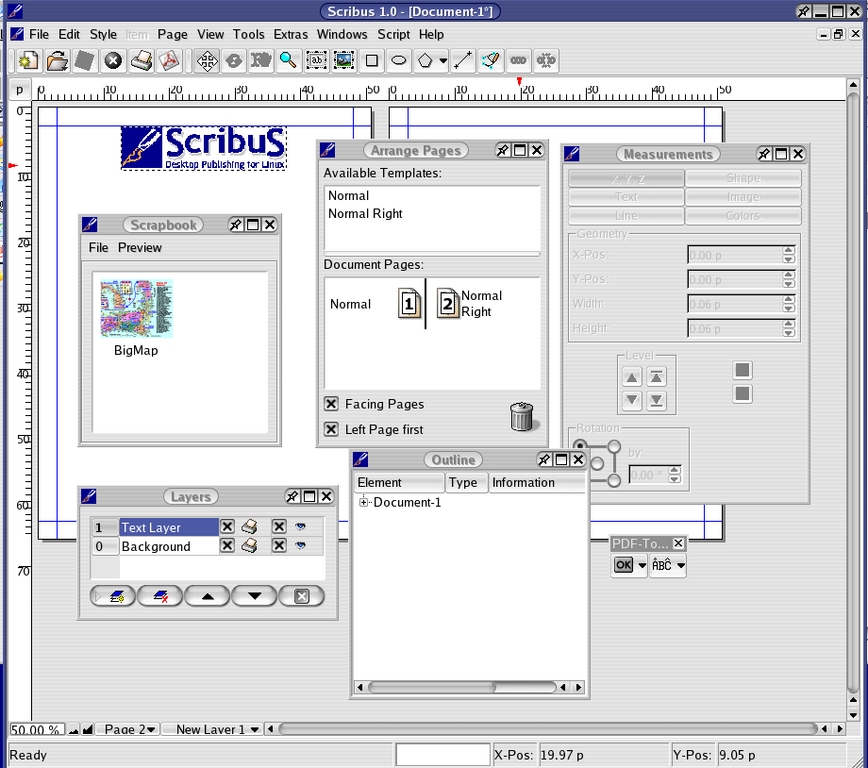
Figure 1. Scribus tools—Scribus has easy-to-use palettes, all of which have tooltips explaining their functions. Clockwise from the top: 1) The Page palette manages pages and page templates. Adding a page is drag-and-drop simple. 2) The Measurements palette provides frequently used editing tools. 3) The PDF toolbar shows how toolbars can be dragged from the desktop. 4) Outline is a tree diagram of every object in the document. This assists in selecting objects in complex documents. 5) Layers allows you to stack objects on top of each other for stunning effects. 6) The Scrapbook stores frequently used items.
Scribus' user interface has been optimized for DTP. You can drag guides right from the rulers. Measurement units can be changed with a simple click. The status bar gives users a lot of information and precise measurements of objects and tools. Although Scribus runs under any window manager, it has special features when run under KDE, such as desktop drag and drop, and uses KDE-style plugins.
Unlike word processors, you do not simply open a new empty document and start typing. First, you must create a text frame and then either start typing or importing some text. My preferred method is to use a text editor, edit, spell-check and then save and import the text. Similarly, you do not open The GIMP, then copy and paste. First, create an image frame then place the image on the page. Image files can be huge, so they are linked externally. This also ensures that the latest up-to-date image is in your document. Keeping track of commonly used objects is made easier with the Scrapbook.

Figure 2. User-friendly—the Scrapbook enables the easy re-use of objects between pages and documents. You can save scrapbooks separately, and they can be saved for projects or single documents. Shown here is an EPS of a full-page map, a full page of text and a logo. Almost any kind of object can be saved by right-dragging it from the page to the Scrapbook.
To help with creating your publication, Scribus comes with a set of useful and user-friendly drawing tools, including styled lines, polygons, Bezier curves, tinting or shading of drawn objects and gradients, which is a special way of blending one or two colors to add shadowing or dimension to an object. Scribus also can manipulate type the way that illustration or drawing programs like CorelDraw or Adobe Illustrator do, by converting fonts into PostScript curves or outlines, which can be twisted, scaled, sheared and stretched at will. You also can fill these with gradients or images and attach text to a path. Scribus also can export SVG, including text and images. All images within SVG files are converted to PNGs.

Figure 3. Advanced PDF export—Scribus can modify font outlines and create sharp, high-resolution gradients with layers in the object and transparency as well. This kind of output requires advanced Level 3 PostScript and PDF 1.4 operators, previously available only in proprietary DTP applications. (This is a snapshot of Scribus 1.1.0.)
DTP users are accustomed to extensive keyboard shortcuts, and Scribus is no exception. Functions can be operated by user-defined keyboard shortcuts, menu choices and considerable usage of right-click context menus. Font paths can be added or disabled, along with font substitution preferences on the fly. Caution is advised to ensure your fonts are installed correctly with up-to-date fonts.dir and fonts.scale files. Scribus is necessarily quite fussy about font paths and has a lot of code to sniff out the exact capabilities of your installed fonts. A common problem new users find with Scribus is they think that Scribus cannot find fonts that have been installed. To the contrary, Scribus rejects installed fonts that are not 100% in order. The documentation contains an extensive explanation of this. Fonts are mini programs in a sense and have bugs too.
Scribus can import ASCII text files as well as clipboard text. This is enhanced by the ability to specify the encoding of text. Thus, you can place Unicode text, as well as text created in Cyrillic and Latin encodings. You also can switch the direction of text to right-to-left scripts like Arabic and Hebrew. Expect to see additional import filters added in the next versions.
Special font handling features allow you to rotate, flip and scale text. Scribus automatically can hyphenate text in many languages and can allow you to adjust kerning or spacing between letters in a font. If you add AFMs (ASCII font metrics) files for a given font, Scribus uses this to adjust the spacing between letters automatically. Scribus also supports Type 1 and TrueType fonts equally.

Figure 4. Scribus has one of the easiest to use tools for creating text on a path. This allows users to have text follow an irregular object and can be used for styling text or, for example, naming roads in a diagram.
Scribus can import many common image formats, such as PNGs, TIFFs and JPEGs. All images can be scaled within Scribus, rotated, flipped and layered. If an image file has an ICC color profile embedded, Scribus reads the tags and uses them in the littlecms color management. You easily can import EPS files, as well as the first page of a PDF. To make it easier for you to place EPSes and PDFs, Scribus automatically generates a low-resolution preview. EPS files do not have previews natively.
Scribus has one of the best PDF export engines on the planet—a bold claim, but in my opinion, second only to the latest version of Adobe's InDesign. The PDF exporter is not only easy to use, but generates high-quality PDFs, as long as you use properly prepared images and choose good quality fonts. Part of the genius in the PDF exporter is the way it masks confusing options but does not constrain the power of the user or the use of advanced features, like PDF/X-3. In testing, I used the same images and fonts to create large high-resolution, four-color CMYK PDF from both Scribus and other high-end DTP applications. The differences were indiscernible. Colors, fonts and text rendered exactly the same, and the images were rendered with the same fidelity throughout. It also fully supports PDF 1.4 features, such as 128-bit encryption and transparency in the PDF. Scribus can export high-quality EPS and raw PostScript files if needed as well.
Scribus documents and preference files are XML-based, completely open and documented. This makes adding features much simpler, and their text-based nature makes them robust. DTP file formats internally are some of the most complex in the PC world. File corruption frequently can be a problem, and DTP files can be unstable on less-than-perfect networks as well. I have found the XML format in Scribus to be almost crash-proof. Even with bleeding-edge CVS versions of Scribus, I rarely have lost a file, and even broken ones can be fixed with a text editor. PageMaker and Quark users have long been used to frequent saves and some novel tricks to repair damaged documents.
The design decision early in the launching of the Scribus Project to concentrate on the PDF format was prescient. After many years of false starts, the commercial print world is adopting PDF as the preferred method of file exchange. [Linux Journal sends pages to the printer as PDFs—Ed.] It is not uncommon for publications to require PDF files from advertisers. Thus, some magazines are composed entirely of PDFs, with the complete publication re-exported as a PDF. Why? PDF eliminates a host of application and cross-platform incompatibilities, especially with fonts. In addition, mature preflighting tools now exist for verifying PDFs as being press-ready. The emergence of the PDF/X ISO standards also has pushed PDF adoption.
That said, Scribus was not designed to be a “Quark-killer”. Scribus is meant to give Linux and UNIX users comparable tools, which have been, until now, the province of expensive proprietary applications, available only on Mac and Windows operating systems. DTP users and shops can be rather conservative about upgrades and changing applications. Reliability is critical—a missed print run can cost thousands of dollars. Plus, these applications take months, sometimes years to master. Productivity can suffer in the switch-over, even amongst newer versions of the same application.
The support for PDF/X-3 in Scribus is another way to make Scribus files accepted in the print world. The newest raster image processors (RIPs) can support PDF/X-3, preserving the original RGB (red, green and blue) images and ICC profiles until the last moment when the files are converted to printing plates.
As a personal aside, as a Linux newbie and nonprogrammer at the time, volunteering to work on the documentation was one of the best experiences I have had in computing. Coming from the Windows/Mac/Novell world, this gave me a more sophisticated understanding of Linux/UNIX methodologies. Many excellent open-source projects and developers almost always can use help with documentation and testing. For nonprogrammers, this is a small repayment for the many programs we enjoy so freely.
The history of DTP on Linux is, well, brief. In 2000, Adobe publicly beta tested a release of Framemaker that runs on some flavors of UNIX. It then disappeared. For a short time, a company called Chilliware offered a DTP application called Ice Sculptor. The company closed shortly after the release. Although DTP is in some respects a niche application, Scribus brings new reach to the Linux desktop.
Q & A with Franz Schmid
Q: Why did you begin Scribus?
A: I needed a program for Linux to make menus and cards for my in-laws' small hotel in Bavaria, but there was nothing for Linux like the DTP programs that ran on my Mac. I originally wrote this only for myself in Python, until a friend suggested I put it on the Web. I was really surprised with the response.
Q: How did you come up with the name Scribus?
A: I was thinking of calling it something like “Open Page”, but it was not unique enough for me. Scribus comes from Latin for the name of official writers in Rome, like we use the word scribes in English. It makes sense in many languages.
Q: Why did you pick Qt?
A: When I decided to switch to C++, Qt was the only C++ kit with full documentation. Scribus was and is my first C++ project. Python is great for proof of concepts, but it was slow in some functions.
Q: Who is on the Scribus team?
A. Well, at the moment, it is me and Paul Johnson, who has been a member since 0.8 of Scribus. He started the anoncvs, helped with code review and does many other things like supporting users on the mailing list. Peter Linnell joined earlier with testing and documentation. Some valuable contributions have come from other users. Our mailing list is quite active, and I have received some nice e-mails from users who appreciate the quick responses. We have a group of users who are really active on the mailing list, and this helps free me to have time to code. We are probably not normal for open source in that we all are in our 30s and 40s. We all have regular jobs and families. But for DTP, especially, it helps to have some experience and knowledge of the industry.
When to use TeX, when to use Scribus?
For years, a large part of the UNIX/Linux world has equated DTP with TeX and its derivatives—for good reason, in the publication of long technical documents, scientific, mathematic and other text-heavy documents, TeX excels. TeX can create press-ready files as well; entire books have been created with TeX. However, although one can add images and other artwork, TeX is neither intuitive nor efficient for composing highly graphically oriented documents. DTP is actually one of the best uses of WYSIWYG. The methodology of TeX is quite different from visual WYSIWYG DTPs. It's like trying to describe a painting in HTML code—you can do it, but it is not easy. In the Linux world, there is most certainly room and a need for both.
The Secret Sauce of Color Management
One of the advanced features of Scribus is the option to use the littlecms color management libraries. Released under the LGPL, littlecms has become a refined and versatile package for a number of color-related tasks. End users of the profiling tools give it high marks for accuracy and constant improvement.
Proprietary color management methods have been a closely guarded secret until now. How does littlecms accomplish this? First, there exist ISO standards for color and color profile formats that are open and published by the ICC at color.org. Second, to greatly simplify, conversions are made with 3-D lookup tables to convert one color space to another. The secret sauce is the algorithms used by the color management module to adjust the differences between color spaces. The challenge is mapping from one type of color to the other while minimizing the effects of gamut compression. This is the result of the CMYK color space typically having a smaller gamut, or range, of colors that can be rendered by a given device. For example, certain brilliant greens can be created on an RGB monitor but are difficult to render with CMYK colors on a printed page. The thickness, brightness and ink adsorption of the paper also affect printer gamuts. The latest versions of littlecms have something called Black Point Compensation, another trick in adjusting the colors just so, matching as closely as possible the screen and scanner to the final print destination.
Littlecms offers not only a cmm (color management module), but additional utilities that can assist with color-oriented tasks. Some command-line tools allow for embedding or tagging ICC profiles in image files, but also a set of profiling tools can be used to create ICC profiles for your monitor and scanner. A good ICC profile of your monitor is really the first necessity in setting up useful color management in Scribus. My testing of the littlecms monitor profile yields good results for a visual profiler. In high-end DTP, profile creation and calibration is done with special equipment and software, which can run in the thousands of dollars.
Using The GIMP with Scribus
One of the limitations of using The GIMP in the pre-press and DTP world has been the lack of CMYK support. Simply put, The GIMP works in RGB or grayscale. The printing world uses CMYK—the four primary ink colors used in four-color printing. A reading of The GIMP mailing list suggests this might be added to GIMP 2.0, as it has been a long-standing request. Moreover, a lot of discussion has surrounded patents relating to CMYK color. To me, this is a lot of nonsense. As Scribus and the littlecms libraries show, CMYK colors themselves are not encumbered by patents. As long as you do not use patented processes, you are in the clear. Fortunately, a couple of workarounds exist for using The GIMP in the CMYK world: 1) Scribus itself automatically converts RGB colors to CMYK, if the printing options are set to printing in PDF export. 2) Alistair Robinson, who has contributed code to Scribus before, has created a simple, but effective way to output CMYK TIFFs with The GIMP, by cleverly separating the RGB layers and using the gray channel for the CMYK colors. Separate is a GIMP plugin available here: www.blackfiveservices.co.uk/separate.shtml.
There are two other options for CMYK support in Linux: Corel PhotoPaint 9 still is downloadable via FTP. It is free, as in free beer, but unsupported and difficult to install on newer distributions. Caldera Graphics offers both a free “light” version and a commercial version of Cameleo, which includes scanning and image conversion tools. Both have ICC color management support. More detailed information is in the Scribus documentation.
Watch Those DPIs!
One frequent stumbling block for beginners is image resolution. Typically, most images on the Web are 72–96 dpi (dots per inch). When creating DTP files, much higher resolutions often are needed, typically a minimum of 200 dpi or often 300 dpi. For example, this magazine has an optimal resolution of 266 dpi. I have output images in The GIMP as high as 1,200 dpi with excellent results.
Resources
Linux DTP Links: www.atlantictechsolutions.com/scribusdocs/sclinks.html
Littlecms: www.littlecms.com
Scribus Documentation On-Line: www.atlantictechsolutions.com/scribusdocs or home.comcast.net/~scribusdocs
Scribus Home Page: web2.altmuehlnet.de/fschmid or scribus.planetmirror.com
Scribus Mailing List: nashi.altmuehlnet.de/mailman/listinfo/scribus
Peter Linnell is an IT consultant and principal of Atlantic Tech Solutions in New England, specializing in networks, pre-press and DTP. A self-described “Windows refugee”, the Scribus Project is the first open-source project he has worked on. He is working studiously on gaining a Red Hat Engineers' certification to complement his Microsoft and CompTIA certifications. He eschews all claims to geek status, hopefully proven by marrying a lovely French lady, preferring Bordeaux to Jolt cola and traveling to Europe as much as possible.

