
Red Hat 9
Product Information.
Manufacturer: Red Hat
URL: www.redhat.com
Price: $39.95 US
The Good.
Nice fonts and overall look and feel.
Best-of-breed applications chosen for consistency.
UTF-8 support.
Educational software included.
Stable and good hardware recognition.
The Bad.
CD burning may be problematic in certain conditions.
Some package dependencies are incorrect.
Excessive startup time for desktop and OpenOffice.org.
Red Hat 9, code-named Shrike, was released on April 7, 2003. It took everyone by surprise, including this reviewer, who was expecting an 8.1 release. As a matter of fact, starting with this release, the offering from Red Hat has changed, clearly splitting into two lines with different purposes and targets.
The Enterprise line is designed for professional use on mission-critical servers or corporate workstations with powerful hardware and the need for the highest possible stability. This product line will have release cycles of 12–18 months and five years of support for every version, which is great for all those companies that have to develop and maintain products for several years. The top product is the Advanced Server for up to eight CPUs and 16GB of main memory. The ES server is basically the same thing but optimized and scaled down for systems with no more than two CPUs and 4GB of RAM. The Enterprise Workstation is the version for the corporate desktop. The first and last products also are available for the Itanium 2 processor.
Standard Red Hat Linux is defined by Red Hat itself as a “community product for SOHO users, independent professionals, students and hobbyists with minimal support needs”. It also has a professional edition ($149.95 US), with an extra multimedia CD, manuals and phone support for 60 days. This line marks the beginning of a different numbering scheme. Patches and updates will be released, of course, but for periods shorter than the Enterprise Line (Red Hat says “at least until April 30, 2004”), and the next version will be 10, not 9.1. This review covers Red Hat Linux 9.
The kernel shipped with the CDs is 2.4.20. Everything has been compiled with GCC 3.2.1 and with GNU libc 2.3.2. Both the kernel and the libraries already have been updated on Red Hat's web site, so be sure to grab the latest versions from https://rhn.redhat.com/errata/rh9-errata.html after you install. The Web server installed is Apache httpd 2.0.
Installation didn't really differ from previous releases, except for more refined Red Hat commercials, but produced better end results. This is the first Red Hat on my computer that allowed me to use my UMAX Astra 610S scanner without manual tweaking.
In user space, all the most popular applications are provided. The shipped versions often are a bit behind those provided, for example, by Mandrake 9.1, but unless one really wants the bleeding edge, this is not a big deal. The versions of some of the most popular programs are reported in Table 1.
Table 1. Popular Programs Included in Red Hat 9
| Emacs | 21.2 |
| Evolution | 1.2.2 |
| Gaim | 0.59.8 |
| Galeon | 1.2.7 |
| GIMP | 1.2.3 |
| GnuPG | 1.2.1 |
| Kdebase | 3.1 |
| KOffice | 1.2.1 |
| Mozilla | 1.2.1 |
| Mutt | 1.4 |
| OpenOffice.org | 1.0.2 |
| OpenSSH | 3.5p1 |
| Perl | 5.8.0 |
| Quanta | 3.1 |
Some applications may have benefited from a more modular packaging. OpenOffice.org, for example, requires two extra RPMs, openoffice-libs and openoffice-i18n. The files to manage all conceivable languages are placed on disk, no matter what you choose at install time. The end result is that on Shrike, OpenOffice takes almost 200MB of space.
System-wide support for UTF-8 is great, in spite of one issue, which doesn't depend on Red Hat. There is no clean, unique solution to guarantee that all, possibly old, Perl scripts will continue to process all, possibly old, text files as expected. As serious as it is, this problem comes from the simple fact that text files are plain and cannot specify how their content is encoded, unlike e-mail messages and XML documents. The script must then be helped from the outside by setting environment variables to work properly.
This release is the first Red Hat to support the Native POSIX Thread Library (NPTL). This should increase performance if an application has been coded or modified to use it. On the other hand, it may interfere with some old applications or with ones operating at a very low level, such as WINE. If this is the case on your system, NPTL can be turned off at the user level by adding the following to the cshrc or bashrc files, where kernel-version is 2.4.1 or 2.2.5:
export LD_ASSUME_KERNEL=kernel-version
or system-wide by adding nosysinfo at the end of the kernel load line in your bootloader configuration. The release notes also warn that “kernel support for the new NPTL feature changes several internal kernel programming interfaces significantly. As a result, several external kernel modules may not compile without modifications.. Examples currently include the NVIDIA and ATI 3-D modules.”
Fonts are anti-alised and are beautiful. The integration with the xft2/fontconfig system has matured from Red Hat 8. The most common problem annoying early users, the fact that the dash and other characters in man pages were not displayed properly under an UTF-8 locale, now is gone. Some applications still work outside the system, however. OpenOffice.org is the main case, but being a cross-platform application it will move to fontconfig later, and Red Hat configured OpenOffice.org fonts properly anyway.
The process started with Red Hat 8—customizing GNOME and KDE to offer a consistent look called Bluecurve and the same default choice for the most common tasks such as Web browsing and e-mail—continues. I deliberately chose to review the KDE desktop partly because it is not Red Hat's first choice, and partly because the difference is smaller in Red Hat. Figure 1 shows an almost vanilla Bluecurve/KDE screenshot. My only changes were placing the panel vertically, not installing Evolution and choosing different colors for the main panel icons. The icons for the text files include the beginning of the text of the file.

Figure 1. KDE in Red Hat 9
Figure 1 also shows a change from Red Hat 8 that came from popular demand—a different menu organization. Each submenu lists only five to ten applications and has a “More programs of this type” submenu. This definitely makes searching for programs easier. The first five entries of the main menu are filled dynamically with the five most used or most recently used programs. For some reason, not all the menu entries are considered when doing this. I added Mutt, opened it continuously, and it never showed up at the top.
Another minor annoyance with the desktop is the fact that, although automount works nicely and opens a file manager window as soon as you insert a CD-ROM, it works too much in at least one case. When I inserted the first Red Hat 9 CD, simply to read the release notes, the system said that to run the rh-install-helper, I had (rightly) to type the root password. When I clicked cancel, it exited with “unknown exit code”.
The short story is that Red Hat 9 can play music and movies fine, it simply doesn't want to by default. The distribution does not include MP3 players, deCSS or anything else, including the fortune program, that cannot be certified as freely redistributable with respect to current law. Please don't whine about this, as it does the right thing, which is to force the end user to choose between asking her government representative if certain laws, such as the controversial Digital Millennium Copyright Act (DMCA) can be reformed, or deliberately installing the missing packages herself, which is really easy anyway.
Under both GNOME and KDE, normal users can do everything they typically are allowed to do without problems. The only misconfiguration I found is shown in Figure 2. LPD is declared as the currently used printing system, although CUPS had been chosen. Everything printed fine, but the text is misleading.

Figure 2. The Shrike/KDE Control Center
Red Hat provides its own set of system administration tools, most of them named redhat-config-* (simply type redhat-, then press Tab while logged in as root to see them all). All are documented in the downloadable or printed Red Hat manuals and are adequate for beginning and intermediate system administrators. Figure 3 shows the security/firewall tool, which is limited but sufficient for home users. The only problem found with other services is that the redhat-switch-mail tool would not work in the text version.
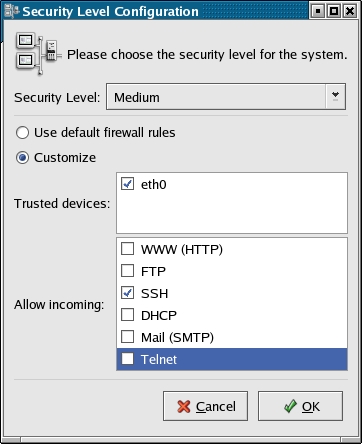
Figure 3. The Firewall Manager
The CD-ROM includes the KDE-EDU package, a nice collection of educational and recreational programs. This household's favorite is KStars, shown in Figure 4.
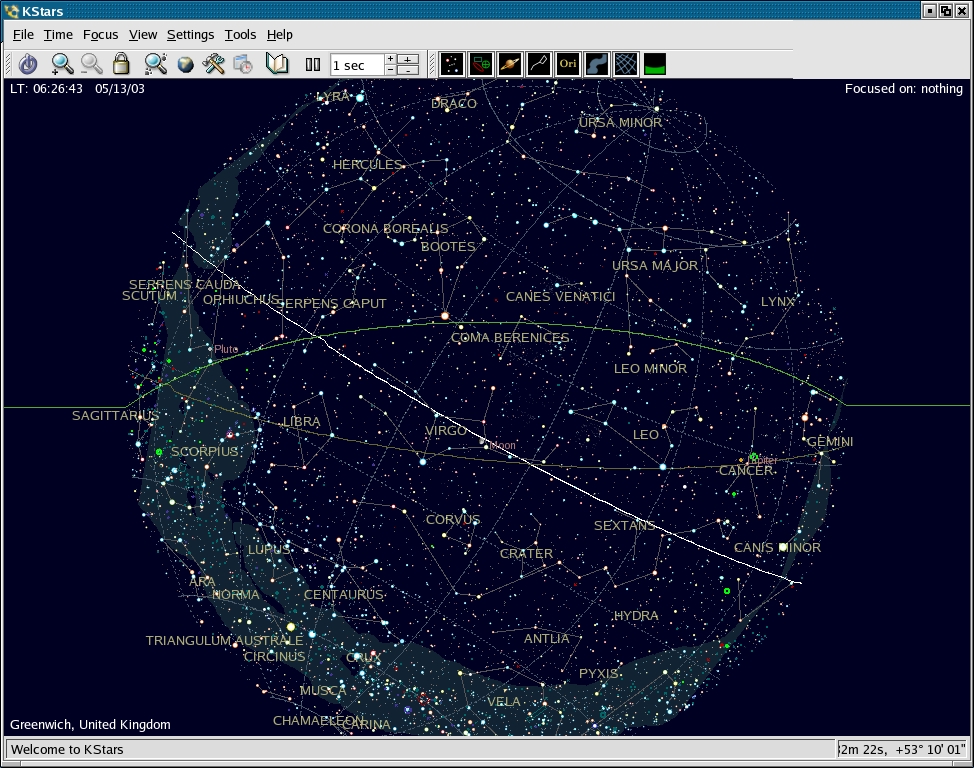
Figure 4. To Infinity and Beyond with KStars
As already mentioned, Shrike was the first Red Hat version to let me use my scanner without changing any settings. I was able to scan without a glitch, so when I saw the OCR button I immediately pressed it (I consider this the number one application area still sorely missing good software for Linux, be it free or proprietary). The system answered with “gocr: command not found”. I didn't find this program on the CD-ROMs, so it does seem to have escaped the dependency checks. I found the gocr RPM on-line and am still testing it.
During the first weeks of life of the Shrike users list, a noticeable amount of traffic was devoted to CD burning problems. On the test system used for this review, using Xcdroast on a Philips CDRW1600 device, no problems were observed. Everything was recognized without manual intervention, and no disks were wasted. Several users reported that problems disappeared by removing the magicdev package. This tool is supposed to perform several user-friendly actions when removable media are inserted—playing audio CDs, opening a burn window in Nautilus and so on. The fact that Nautilus (and its dependencies, like magicdev) were not installed on the test system seems to confirm the hypothesis that magicdev, at least as packaged in Red Hat 9 version 1.1.4, is not ready for prime time, at least not for all systems.
Red Hat 9 is indeed a nice desktop. Overall performance, even on a relatively limited system, is not slower than with the previous release. The convergence imposed on KDE and GNOME is much less dramatic than it may seem and hopefully will lead to less work to maintain future versions and fix the quirks reported here.
Marco Fioretti is a hardware systems engineer interested in free software both as an EDA platform and (as the current leader of the RULE Project) as an efficient desktop. Marco lives with his family in Rome, Italy.

