
CrossOver Office Server Edition

Product Information.
Manufacturer: CodeWeavers
URL: www.codeweavers.com
Price: 25 clients for $2,407.50 ($96.30/client); 50 clients for $3,532.50 ($70.65/client); 100 clients for $5,595.00 ($55.95/client); 500 clients for $21,950.00 ($43.90/client)
The Good.
Awesome installation program(s).
All software in one place, thin clients on desktops.
Support for Solaris clients.
The Bad.
Figuring out whether a file is shared on the network is too picky.
Price—for anything but an enterprise environment (their target) its priced out of reach.
I first heard the name CodeWeavers as I was lurking on www.slashdot.org one day. They announced a product to allow you to play Apple QuickTime movies within your browser using the QuickTime plugin for Microsoft Windows. I was skeptical, but as it was only $20, I decided to try it out. It worked so well, I ended up sending CodeWeavers an e-mail of praise and thanks. I didn't think it could get any better.
CrossOver Office is a similar type of product from CodeWeavers. Like their QuickTime plugin (CrossOver Plugin), it uses a patched version of Wine, the Windows emulator, to run an application. In this case, the application is Microsoft Office and several other popular Windows applications.
Several differences exist between CrossOver Office, and CrossOver Office Server Edition. In CrossOver Office, Microsoft Office and Wine run on your local computer. In CrossOver Office Server Edition, the application runs on an application server on your network. CodeWeavers tries to make the distinction as invisible as possible. MIME types are added to all of the default applications so file associations and links in web pages can be processed appropriately. After installation, when you double-click on a .doc file, Microsoft Word opens it.
Setting up the server was an easy process. My server sits in a dark corner of my office, and I typically walk over there only to put in CDs. That was no problem. SSHing to the server was enough to install and configure the software.
The application setup also was easy to do. There is a list of “supported” applications that you can install. I tested with Microsoft Office 97 and Intuit's Quicken 2001 Basic, as well as a newer version of Microsoft Media Player. I was surprised once again; they all installed without a hitch.
One of the coolest things about the server is it can generate RPM files to install on the client. And, if you use SSH, it installs them for you too. This is a system administrator's dream. I simply typed in the hostname of a client computer, and presto, it had Microsoft Office 97 and Quicken installed.
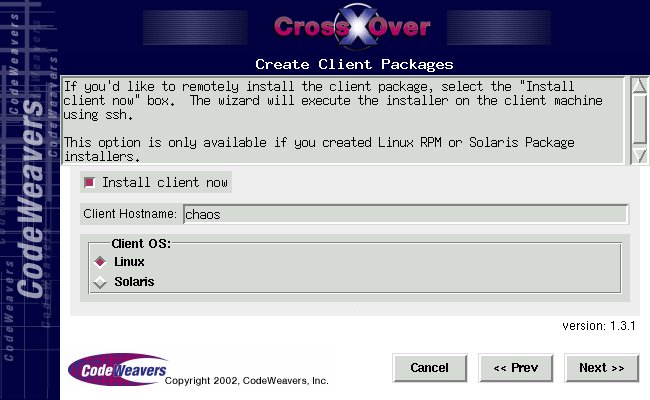
Figure 1. Installing on a Client Remotely with SSH
Using CrossOver Office is easy too. The installation process installed MIME types for most applications, so on filesystem browser the file is opened by the right application automatically. Word, Excel, Outlook and Quicken all worked without any problems. I even was able to connect to my bank with Quicken's on-line banking. Some applications did have issues, but they were predictable: Microsoft Media Player was not able to play video properly, and Internet Explorer had some problems with plugins.
The applications themselves also were usable. Running them on another machine did not seem to produce any noticeable performance degradations, even when two users ran the same applications. My network is 100Mbps and the server is a Pentium III 650. I was impressed that two separate versions of Microsoft Excel were running without any noticeable performance loss. Actually, the applications came up faster than I remember them loading with Windows installed.

Figure 2. Quicken, Microsoft Word and Microsoft Excel on a KDE Desktop
The only downsides I noticed to using CrossOver Office Server Edition were in the SSH scripts themselves. When you open a file, the scripts try to determine if the file exists on the file server or on the local (client) machine. If the file is local, it sends a copy over to the server for viewing. If the file is on the server, you are able to edit it. But, I noticed that it was not always obvious that the file should not be edited. When the file is copied, it is renamed to Temporary-Copy-Of-filename-######. Surprisingly, that is not always noticeable when you bring up a document. A few times, my wife (the unknowing tester) entered data into an Excel spreadsheet and did not notice that the file was a copy until she tried to save. If the file had somehow been marked read-only for Excel, so that edits were prevented, it would have been much nicer. Also, if the client's time drifts from the server time, the NFS vs. local file times may not match, which could cause a temporary copy to be made of a file that is on the server.
With CrossOver Office Server Edition, users are no longer tied to Microsoft Windows if they want to use Microsoft Office, Quicken or several other applications (see www.codeweavers.com for a complete list). The applications work well, and IT departments should love the easy server and client installations.
David Frascone (dave@frascone.com) has been using Linux since 1993 (kernel 0.99.pl4-12) and last summer finally converted his family.
