
Product Review: Siemens' SIMpad SL4
Product: SIMpad SL4Manufacturer: SiemensURL: www.my-siemens.com/simpadPrice: less than $400
Siemens is known to the public mostly for the cellular phones it builds. But Siemens has other interesting hardware that one should discover--like the SIMpad SL4.

Apple-Like Design
The SIMpad SL4 is a beautiful machine. A sleek and polished look is an important feature for such machines, which may be used on the go. It also feels solid and is easy to use with only one hand. The big buttons are placed conveniently on only one side of the screen.
Measuring 10.35 x 7.08 x 1.10 inches, this piece of hardware is incredibly light--only 2.2 lbs.. Forget your heavy laptop; only my Sony C1V Picturebook is as light. All of this makes the SIMpad an excellent companion for long work days, where every ounce matters.
Another interesting feature is the LiIon battery life, up to seven hours according to Siemens. But my tests with a PCMCIA 802.11b Wi-Fi card lasted nearly seven hours, which means the SIMpad without any PCMCIA card may last longer. Now you can really leave the AC adapter at home.
Powered by a 206MHz StrongARM processor, featuring 64MB of RAM and 32MB of Flash memory, a microphone, a speaker, a serial port, an infrared port, a smart card port, a PCMCIA port and a USB slave port, the SIMpad SL4 looks like a grown up Zaurus 5500. Only two details are different--the SL4 has a beautiful 800x600 TFT touch screen, with 65,000 colors supported. While not as bright and crisp as the Sharp Zaurus C700 screen, the SL4 can be used perfectly outdoors.
The other difference between the Zaurus and the SIMpad is the missing keyboard. The SIMpad is not a PDA or a laptop but a tablet PC, and tablet PCs do not have keyboards. Too bad; even a small 5500 keyboard would have been welcome, say, below the screen. You can, however, purchase a serial keyboard, such as the iBiz serial keyboard, which is reported to work with the SIMpad. It connects to the sync cable, but iBiz was not able to provide me such a keyboard for tests.
Perhaps the tablet PC label should be discussed here. Some say only i386 hardware capable of running Windows XP and featuring a touchscreen which cannot be activated by fingers or other objects truly can be called tablet PCs. I think this is far too restrictive; i386/XP requirements are due to the heavy usage of not free operating systems coming from Redmond. In fact, the SIMpad can and does run Linux. As with an iPAQ, you can remove Windows CE to use a handheld distribution, including OPIE or GPE. You also can run standard Linux applications if you have a PCMCIA hard disk on which to store them all and if you can find ARM binaries. But many distributions now release ARM packages, and you can cross-compile from your PC any missing application you may need.
Personally, being unable to use my fingers on the touchscreen is not a feature but a bug. I want to be able to click on the screen with anything I have nearby, like a closed pen. Restricting the use of the touchscreen to fingertips sounds like a bad idea to me.
Initially announced in January 2001 at CES, the SIMpad SL4 was not immediately on the market. An initial $1,500 price tag, when the first Windows XP tablet PC were announced, meant the SL4 was not a big seller in the mainstream market. Now it can be found in Germany and Switzerland for much less, as little as Eur. 199 for the Windows CE version (called Sinus Pad) and Eur. 385 for the Linux flashable version (SIMpad SL4). The SIMpad SLC, an SL4 with DECT cordless phone support, is sparingly available. If you have a DECT compatible cordless phone, go for it because you will not need Wi-Fi. Otherwise, forget the SLC because of possible collisions on the unlicensed 2.4GHz band.
An SL4 itself still can be hard to track down. Be prepared to read and write German (or use Babelfish) if you want to get one. I was able to purchase one from NRG Systems, an Augsburg-based company operating mostly on eBay.de. The service was excellent, and I received my SIMpad by COD in only a few days.
The first thing I did was flash a Linux image from simpad.sf.net; I recommend image-opie_0.9.1 to get a Zaurus-like OPIE environment. OPIE support is being actively developed by Chris Martin, who also helped me with OPIE support.
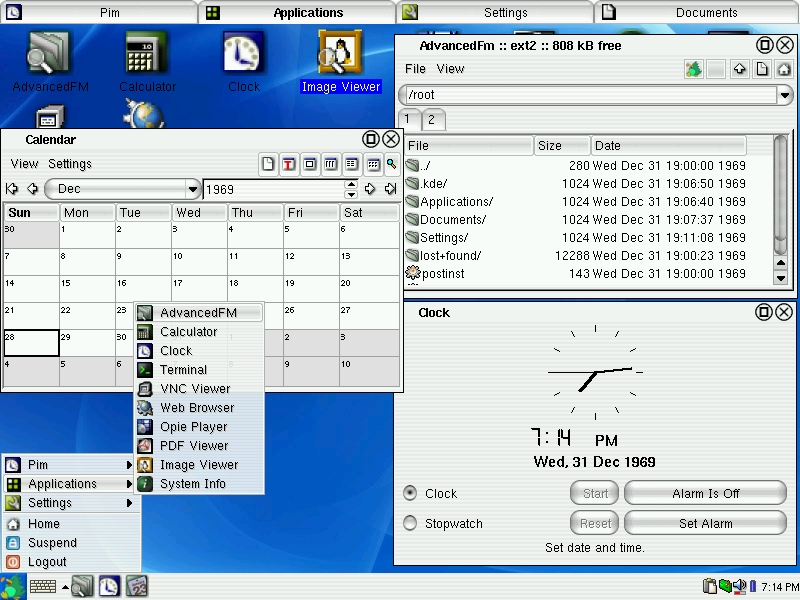
Figure 1. The very same Qtopia user interface from the Zaurus is available on the SIMpad in its free software version called OPIE.
To get started, download the serload application and an image from simpad.sf.net, connect the SIMpad to your PC using the serial cable and start the 20 minute upgrade process. I had to do that twice, because the first flash with the cpk1sp1 image failed--a bad start.
When it finally succeeded, I was greeted with OPIE boot screen. But bad news again: OPIE 0.9.1 is buggy. You first have to change the default theme to get title bar buttons. At that very moment, for no reason, OPIE crashed and I had to reboot the SIMpad--a very bad start indeed.
The lack of jffs2 support on the SIMpad is a real problem for now. It means you cannot install applications besides those on the image. Every Zaurus 5500 .ipk application should be supported, but because the filesystem is not rewritable, nothing can be installed. jffs2 journalized and rewritable filesystem support should come soon, with OPIE 0.9.3 (used in OpenZaurus 3.2) support, to fix this #1 drawback. This improvement also would let the Eur. 199 Sinus Pad support a Linux flash. I also was disappointed when I noticed my Intel Wi-Fi card was not supported; it works on a GNU/Linux desktop machine with a pcmcia-cs patch.
Now the good news: you can find and use the traditional OPIE tools and the Konqueror browser. PCMCIA works, the USB slave port works and a pre-alpha smart card driver exists, but there's not yet such a driver for the Windows CE SIMpad. Moreover, a SIMpad with the ck1sp1 OPIE image was shown at CeBit this year, where a very active German community is working on Linux support.
Currently, the SIMpad has no sound support for OPIE. If you prefer TinyX over OPIE, however, sound should work. I could not manage to play or record sound, a problem I attribute to my lack of knowledge of the SIMpad hardware and the current state of the project. I intend to spend more time on it to at least get fullscreen video playback with mplayer and a correct hardware support for jffs2, the sound abilities and PCMCIA. It should not be impossible as the SL4 uses the same hardware as the Zaurus 5500.
Given these limitations, one may wonder what can be done with a SIMpad under Linux/OPIE besides establishing the classical PIM? The big screen makes it perfect to read documents, far better than a Palm or a Zaurus. The instant-on feature also is convenient; the SIMpad can be started and stopped in a couple of seconds. This feature comes in handy when you want to use the SIMpad for short durations, say between two subway stations, when the boot and suspend process otherwise would eat most of the time.
I find that reading documents is becoming a more and more central part of my PDA usage. For example, my research work currently requires reading a lot of publications. Most of them are in PDF format, and qpdf display them on the SIMpad. I don't think I could bear the eye strain caused by reading these tiny prints on a Zaurus screen.
Likewise, I do not enjoy the smell of newspapers and I do not have enough time to read them on-line--but I cannot live without the NY Times. My solution? Plucker creates a .pdb archive for off-line reading with opie-reader. I previously did that on the Zaurus tiny screen, but now that I have the big and comfortable 800x600 SIMpad screen I don't want to go back.
The seven hours of battery life also helps make the SIMpad an excellent device for on-line browsing, well, as soon as my Intel 2011 Wi-Fi card is supported.
I hope video support and sound support will evolve to let me use my SIMpad as a portable media center, so I can encode DVDs to a PCMCIA removable hard drive and then watch them on the SIMpad. If I can do this currently on a CompactFlash on my Zaurus, it certainly will be possible to do on SIMpad's identical hardware.
In spite of all the problems I encountered while trying to run Linux on the SIMpad, this is a very promising device. Now that I have one, I don't want to be without it, if only for the big screen perfectly suited for reading. The SIMpad currently is being pulled from the market and therefore is selling at only a fraction of the original price. I strongly advise anyone with good Linux knowledge and a will to hack to get one. NRG Systems still have some, but not for long. Finding a dealer with SIMpad in stock is going to become harder and harder.
While the SIMpad may not be as consumer friendly as the Zaurus because of some important features currently missing, these problems should be fixed soon, as new OPIE images are released. Then, you can show your neighbors who spent $3,000 for an XP Tablet PC your Eur. 300 Linux tablet PC.
NRG Systems (Buy a SIMpad SL4)
Deutche Telekom (Buy a Sinuspad)
Guylhem Aznar is the coordinator of the The LDP (www.tldp.org). In real life, he is a consultant, a 6th-year medical student and a PhD student in Computer Science. In his little free time, he enjoys playing with his Zaurus and SIMpad. He can be reached on www.externe.net.
