
Speeding Up the Scientific Process
As a research staff member at NASA Ames Research Center at Moffett Field, in the heart of Silicon Valley, California, I was a part of a team that used Linux for some interesting and advanced research. I worked in the Neuro Engineering Lab at Ames in support of the construction of a brain-computer interface, a system by which EEG (electroencephalogram—brain wave) signals can be used to control electronic systems and robotic devices. My job was to take ideas and prototype code from primary lab researchers and develop and evaluate efficient implementations of them for use in real-time data processing with human subjects. Often, I would be handed only a rough sketch of an algorithm or a fragment of code to see if it could be used on the brain wave data we had been collecting.
Matlab and the free software GNU Octave were great tools for doing this work; they allowed me to develop effective methods for data processing and data visualization that would have been a real pain to construct in C or, heaven forbid, Fortran. Ease of implementation is a great concern when dealing with large amounts of experimental code that may or may not end up as a finished product.
When a process did indeed fit the bill, and it was time to start thinking about using it in our real-time data processing system, it would become immediately apparent that the advantages of Matlab in programming ease did not come without cost. The cost was speed. The time to process data representing a single second, for instance, could take minutes or even hours. Obviously, this would not do in a real-time system. Also, any code deemed worthy would have to end up in C or C++ to fit into our existing code base. To address both of these issues, we rewrote much of our Matlab code in C.
Now, if you have some experience with Matlab, you might think, “but Matlab already exports to C on its own” or, “what about the new Matlab JIT compiler?” Although the new JIT compiler may speed up code in places (looking at the documentation, there are many exceptions to what it will try to optimize), it cannot equal the efficiency of well-written, compiled C code. As for the C export feature of Matlab, the code exported by Matlab is as slow as the interpreted code running inside the Matlab environment and is fairly difficult to merge into existing projects without a bit of interface work. And, none of this helps users of GNU Octave or those that can't keep up with expensive Matlab upgrades. In general, it seems the best way to work something originally developed in Matlab into fast, production-level code, is to do it by hand.
This article first offers a few tips on how to write somewhat more efficient Matlab code. Then it illustrates the process of integrating C code into a Matlab program using MEX functions, in order to speed up program execution while still tweaking and evaluating it in the Matlab environment. From there, it is a relatively short step to bring the entire project into C or C++. Most of the information here is available in different places on-line; this article is presented as a sort of a HOWTO or a personal account of bringing a piece of Matlab experimental code into the real world.
For this article, I use as an example a piece of code developed to isolate rapid changes of voltage measured on the surface of the head. The code uses an algorithm called multicomponent event-related potential estimation, or simply mcERP. I first looked into porting Matlab code to C when working on this algorithm. When testing the algorithm with different configuration parameters and input data sets, I usually would have to let it run overnight. No amount of optimization inside Matlab was able to drastically cut down its execution time.
After full conversion to C, it usually would take on the order of tens of seconds to execute with a large input data set. I view this as an extreme time savings, due to the highly nested, looping nature of the algorithm (see Listing 1). I would not expect most algorithms to speed up this much. Even so, this performance still is not quite good enough for real-time operation, but it is close enough that we could start to look at data reduction techniques, parallelizing the code and other tricks to pare it down to something closer to the speed we need.
The main area in which the performance of Matlab suffers greatly is looping. Matlab abhors the loop; it was written to be more efficient to do many loop-type operations by vectorizing the code, applying functions over a range of data in a matrix, than it is to iterate through the data. Unfortunately, this only works with certain kinds of operations. When dealing with high-dimensional matrices, this often produces code that is hard to read and understand. Looping happens to be an area in which C excels—iterating through a matrix using pointer arithmetic is an extremely efficient and sometimes more understandable way to do operations over large chunks of data. Most of the effort of C optimization of Matlab code is spent trying to optimize nested loop structures.
Other ways to code in Matlab more efficiently include:
Make sure to allocate all, even moderately sized, arrays using the zeros() function before assigning values to the array, instead of having Matlab append data to existing arrays as values are assigned.
As mentioned in the Matlab documentation, store all of your code in functions instead of scripts. This offers about a two- to threefold speed increase.
Organize data such that operations over a range of a matrix operate in a column-major fashion. Matlab stores arrays like Fortran does, in that data in a particular matrix column is contiguous in memory. This is unlike C, where data in a matrix row are contiguous in memory. If you are going to apply functions over a range of data, store that data in a column rather than along a row in the matrix. This is completely anecdotal and may be false, but it seems to make sense.
Try to avoid internal-type conversions that happen over and over. This is another one where I don't have hard proof, but as Matlab usually does not make you explicitly label the data types of variables, it is sometimes easy to have a loop of repeated implicit type conversions. It is better to convert to a common data type first, then do your repeated operations. This is like programming in C or C++ but harder to detect right away, because variables are almost never explicitly typed in Matlab.
That being out of the way, let's take a look at a code snippet from the mcERP algorithm (Listing 1). This represents one of the many nested loop structures within the code. The mcERP algorithm relies on a complicated process of iterative Bayesian waveform estimation. A number of the following loopy bits are in the code, all of which are run repeatedly to hone in on waveform shapes present at the data.
Listing 1. Nested Loops in the mcERP Algorithm
One can see how this sort of structure would not run so quickly with an interpreter that does not perform well with loops. However, because of the inner if statement, the code cannot be vectorized without adding an inner function call—which can't be any better. This code, then, is a prime candidate for translation to C/C++. However, it is nice to have a foot in Matlab when developing the algorithm, because it is easy to produce pretty pictures like those in Figure 1. So, we write something called a MEX function. That way, we can have the core fast bits run quickly while retaining interface points around those parts in Matlab that tune and inspect the overall algorithm.
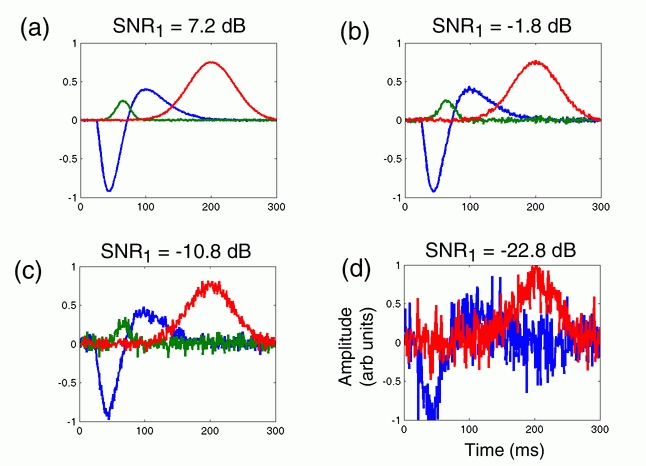
Figure 1.
Figure 1 is an example output from the mcERP algorithm, showing estimates of the fundamental waveforms driving real-time potential readouts at scalp electrodes during simulated experimental trials. Each of these waveshapes is the result of many iterations of progressively accurate Bayesian waveshape estimation, requiring many calculations per iteration. These results can take many hours to achieve with Matlab but take seconds or minutes if portions of the algorithm are rewritten in C.
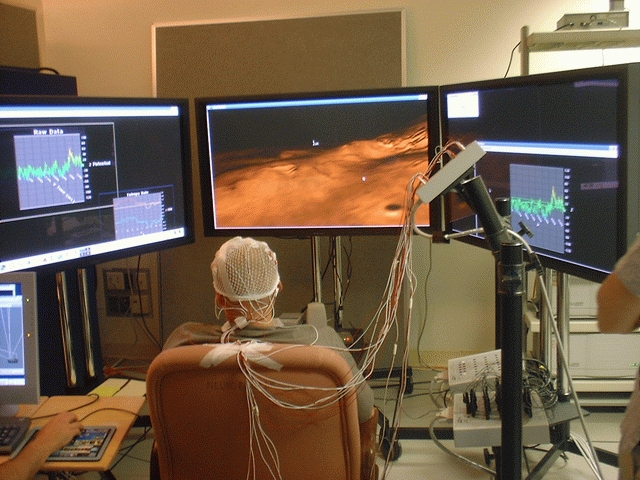
Figure 2.
The photograph in Figure 2 shows our experimental setup for conducting experiments in brain-computer interface with real-time feedback. With the three large displays, we have complete control over what the subject sees within most of his or her field of view. All of the number crunching and display software was developed in-house and runs on Linux.
A fair amount of documentation is available on the MathWorks web site (see Resources), and you should take a look at it after reading this article if you are serious about developing MEX functions. This article emphasizes optimization and some of the sticking points of getting things working.
To develop MEX functions in Linux, go to the source of all that is good, the command line, and type mex -start. When that doesn't work, search for the MEX script within the Matlab install directory. Your system administrator may have made a link in your path only to the Matlab binary. Running MEX, you are presented with a choice of compiler. To take advantage of some compiler optimizations that I will detail later, it is a good idea to use GCC rather than the Matlab built-in LCC. MEX will create the file ~/.matlab/R12/mexopts.sh, which is sourced when you compile external code for Matlab using the MEX utility. It is useful and instructive to take a look at the mexopts.sh file, under the appropriate section for your platform/compiler. In the case of x86 Linux/GCC, look at the glnx86 section of the main switch statement. Any changes made outside this section do not have any effect when compiling code. Place any compiler switches there with which you wish to compile your C functions. For the purpose of optimization, you might want to try:
COPTIMFLAGS='-O3 -funroll-loops
-finline-functions'
(this is aggressive—be careful) or whatever flags you desire. To use these flags in compilation, you later must run MEX with the -O option. As with some makefiles, include here any header directories you wish to include by appending:
-I/path/to/header/directoryto the end of CFLAGS. Indicate libraries you wish to link with by adding:
-l[libname]and:
-L/path/to/library/directoryto the end of LDFLAGS.
Once this is done, set up a directory to hold your C files to be compiled with MEX. I suggest not working on C-based and Matlab-based code within the same directory. Now, add that directory, or a third build directory that you have created, to the path within the Matlab environment. Now you are ready to think about writing code.
First and foremost, think about what your goals are for optimization and what parts of your program will benefit the most by being rewritten in C. Since the prime area in which C is much faster than Matlab is the evaluation of loops, it makes sense to look for loops over a lot of data in your code. It is not worth it to code for something that loops three times, but if you are iterating over each voxel in a 500 × 500 × 500 volume, coding in C can shave off tons of time. Especially look for simple operations in nested loops, like the code fragment in Listing 1. Anything that performs a complex operation in a nested loop—anything that looks hard to implement yourself or that you cannot find a third-party library for—is probably not a good starting point for optimization. It is possible to call Matlab functions from within your C code, but this won't help your execution time, for obvious reasons.
Now, the general method of creating C MEX files is to functionize a block of code in your algorithm or to choose a function you have already written to optimize. Now, it is time to create the C version of the function. The general procedure is to create a generic Matlab interface function and then a meat function representing the actual procedure for which you are coding. See Listing 2 for an example of a MEX function. The meat function it calls corresponds to the Matlab file in Listing 1, and parts are available on the Linux Journal FTP site [ftp.linuxjournal.com/pub/lj/listings/issue110/6722.tgz].
mexFunction() is a sort of main() of the MEX-file programming world. It is the actual function called when you call your function in Matlab. The actual name of the function is defined by the name of your compiled .c files, usually the name of the first .c file that you pass to MEX for compilation. On the Linux x86 platform, MEX files have the extension .mexglx. When Matlab is run on the Linux x86 platform, Matlab looks for .mexglx files in the same path and in the same way as it looks for normal .m files, so .mexglx and .m files are interchangeable. A good way to switch between Matlab and optimized code is to change Matlab's search path. I compile c_mLAT.c to c_mLAT.mexglx, and then I can run the compiled code simply by calling c_mLAT() within the Matlab environment. It's a fairly slick system.
Things get a little complicated when trying to pass data back and forth between Matlab and C. You will notice two double pointers in the argument list of the mexFunction. *plhs[] refers to the return values of the function (Matlab functions can have multiple return values), and *prhs[] refers to the input arguments. The number of input and return arguments also are passed to the function as nlhs and nrhs. The return matrices of the function must be allocated within the mexFuntion() using routines such as mxCreateDoubleMatrix() in order to be passed back correctly to the Matlab environment. The mx functions create memory in the Matlab environment and are handled by the Matlab memory manager, so there is no need to worry about freeing memory created by the mx functions.
Functions beginning with mex are called within the Matlab environment, and with mexCallMATLAB() it is possible to call arbitrary Matlab functions from within your code. From the mexFunction(), you then call your meat function after allocating the output, formatting the input and doing things like argument checking.
Something quite frustrating for C programmers is not dealt with well in the Matlab documentation, however, and that is the fact that Matlab stores its data in column-major format. This can be extremely annoying because you want to be able to use easy-to-understand pointer arithmetic to iterate over the multidimensional input matrices. But it is frustrating and bug-causing to figure out how far to step per iteration and so on. There are three solutions to this, as I see it.
1) Figure out the amount you need to step per iteration manually and think it out. This seems doable and is probably the best solution, but it leads to huge headaches with arrays of dimension equal to or greater than three.
2) Reformat the code before entering the MEX function so it is organized correctly for iterating through the way you want in C. This can be fairly expensive in Matlab, and many times you want to have a drop-in replacement for your original version.
3) Do what I do, and create macros or macro-type items to access memory in Matlab arrays. This is slower than stepping through the arrays and might seem to be an inelegant solution. In my experience, though, it ends up being easy to read and plenty fast. For instance, I created a file named pops.h that contains functions like:
extern inline double num3d(double *start, int rows,
                           int cols, int x, int y,
                           int z)
{
    return(*(start + rows * cols * z
                   + rows * y + x));
}
which returns the value in a 3-D Matlab array given the array, the number of rows and columns of the array and the xyz location of the data you want to retrieve. It's a little unwieldy, but not too bad. When the code is optimized, it is inserted into the code the same as a preprocessor macro. One could use macros just as well, but I find this method much easier to create and debug. In the end, the speed improvement for doing the loops in C far outweighs the relatively small loss from doing array access this way.
Other than that, the creation of MEX files is not difficult. When it comes time to compile, run the MEX program with the names of the C files you wish to compile. A list of MEX options also is available at the MathWorks web site. After running mex X.c Y.c Z.c, you will have a file called X.mexglx that, if it is in your path, you can call as X() on the Matlab command line.
From here, you can rewrite larger and larger portions of your code in C. When it is time to do the full C implementation, it often is beneficial to use the C export feature of Matlab to export the outer Matlab code, because the important parts also have been optimized by you. If things are still not fast enough, it might be a good idea to redo the outer function to deal with memory in a C-friendly fashion. Then you can speed up the loops in the inner-C code, using optimized pointer iteration to access the array values.
In general, the use of Matlab to prototype and develop code can speed things up greatly. However, when you find yourself waiting overnight for Matlab to produce results, only to find that you messed up a small input value, the process of hand-optimizing pieces of the code can be extremely beneficial to making your algorithms practical for use.

Sam Clanton is currently an MD/PhD student at The University of Pittsburgh/Carnegie Mellon, maintaining an affiliation with NASA and QSS Corporation at Ames Research Center in Mountain View, California. He spends his time looking at problems in biological signal processing, computer vision and medical robotics, and is most interested in building information systems like nature does. Sam spends most of his time checking his e-mail (but never writing back) and drinking too much coffee.
