
Power Management in Linux-Based Systems
Power management (PM) software is a crucial component in battery-powered systems, such as PDAs and laptops, because it helps conserve power when the system is inactive. As a simple example, power may be conserved by switching off the display when a system is inactive for some time. Conserving power in this manner extends battery life, so one can work more hours before having to recharge the battery.
Hardware support is vital for power management to work, and software intelligently exercises that support. The degree of power management support available in hardware varies from device to device. Some devices, such as a display, simply provide two power states, on and off. Other devices, like the SA1110 CPU, may support more complex power-saving features, including frequency scaling.
Implementing power management in any system is a complex task, considering that several non-interacting subsystems need to be brought together under a single set of guidelines. This article explains how power management works in Linux (2.4.x) and how it can be implemented in battery-powered systems based on an APM standard, at both the device driver and application levels.
Power management for computer systems has matured over the years and several standards exist. The two popular ones are advanced power management (APM) and advanced configuration and power interface (ACPI). APM is a standard proposed by Microsoft and Intel for system power management, and it consists of one or more layers of software to support power management. It standardizes the information flow across those layers. In the APM model, BIOS plays a key role. ACPI is the newer of the two technologies, and it is a specification by Toshiba, Intel and Microsoft for defining power management standards. ACPI allows for more intelligent power management, as it is managed more by the OS than by the BIOS. Although both standards are more popular in x86-based systems, it is possible to implement them in other architectures.
Before implementing power management, it is important to understand what hardware support is available for saving power. One of the important goals of power management software is to keep all devices in their low power states as much as possible.
A possible approach for implementing power management is first to define a power state transition diagram. This defines several power states for the system and also defines the rules and events governing state transitions.
As an example, consider a PDA that has the following devices: Intel SA1110 CPU, real-time clock, DRAM, Flash, LCD, front light, UART, audio codec, touchscreen, keys and power button. The Intel SA1110 CPU supports several power-saving features, including frequency scaling, where the core clock frequency can be configured by software. Lowering clock frequency reduces the CPU's power consumption, but at the cost of reduced CPU speed. This CPU also supports several modes of operation:
Run mode: the normal state of operation for the SA1110 when it is executing code. All power supplies are enabled, all clocks are running and every on-chip resource is functional.
Idle mode: allows software to stop the CPU when not in use. In this mode, the CPU clock is stopped, representing some savings in power. All other on-chip resources are active. When an interrupt occurs, the CPU is reactivated.
Sleep mode: offers the greatest power savings and consequently the lowest level of available functionality. In this mode, power is switched off to the majority of the processor. Some preprogrammed event, such as a power button press, wakes up the CPU from this mode.
As you can see, software is responsible for transitioning the CPU either to idle mode or sleep mode.
In such a PDA, DRAM cells normally are refreshed periodically by the memory controller logic present inside the CPU. In sleep state, however, the majority of the CPU is shut off, which results in DRAM cells not being refreshed, which in turn leads to loss of data in DRAM. To avoid this loss, most DRAMs support a mode called self-refresh wherein the DRAM itself takes care of refreshing its cells. In such cases, software can put DRAM in its self-refresh mode by writing to a few control registers before transitioning the CPU to its sleep mode, thereby preserving the DRAM contents.
The top power-hungry devices in this PDA can be the CPU, DRAM and display back light. Hence, they should be kept in their low power states as much as possible.
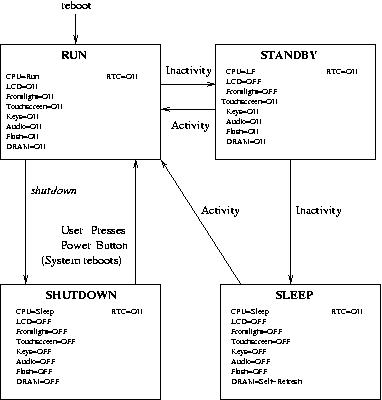
Figure 1. Power State Transition Diagram
Figure 1 shows a possible power state transition diagram for this PDA. Here is a brief description of the power states:
Run state: system falls into this default state when it reboots. Power consumption is maximum in this state, as all devices are turned on or active.
Standby state: system falls into this state due to inactivity. LCD and display back light are turned off, and CPU clock speed is reduced to save some power.
Sleep state: system falls into this state due to continued inactivity. Power is conserved aggressively by putting the CPU in sleep mode, which in turn powers off most devices. DRAM, however, is put in its self-refresh mode to preserve the machine state (system and application text/data loaded in memory) while the system is sleeping. The system awakens from sleep state when a preprogrammed event occurs. When it wakes up, it transitions to the run state and machine state is restored.
Shutdown state: system falls into this state when the shutdown command is issued. The system reboots when it exits from this state. This means it is not necessary to preserve the machine state in DRAM, and hence DRAM can be powered off. The shutdown state then represents the lowest power consumption state of all.
The real-time clock is kept on in all power states to retain system time.
It is clear from this diagram that detecting inactivity and putting the devices in their low power states forms the heart of power management software.
Power management software manages state transitions in association with device drivers and applications. It intimates all PM events, including standby transition, sleep transition and low battery, when they occur. This allows software to veto certain state transitions when it is not safe to do so.
Device drivers generally are responsible for saving device states before putting them into their low power states and also for restoring the device state when the system becomes active.
Generally, applications are not involved in power management state transitions. A few specialized applications, which deal directly with some devices, may want to participate. This section explains what device drivers need to do in order to participate in power management:
pm_dev structure: the PM subsystem in the Linux kernel maintains some information in a pm_dev structure about every registered driver. Maintaining this information allows it to notify all registered drivers about PM events.
pm_register: device drivers first have to register themselves with the PM subsystem before participating in power management. They do this by calling pm_register:
struct pm_dev *pm_register(pm_dev_t type, unsigned
long id, pm_callback cbackfn);
where type is the type of device being managed by the driver, id is the device ID and cbackfn is a pointer to some function in device driver. This is called as the driver's callback function.
The linux/pm.h file defines the various types and IDs that can be used by drivers. If successful, pm_register returns a pointer to a structure of type pm_dev. A driver's callback function is invoked by the PM subsystem whenever there is a PM event. The following arguments are passed to the function:
dev: a pointer to the pm_dev structure that represents the device; the same pointer returned by pm_register.
event: identifies the PM event type. The possible events are PM_STANDBY, meaning the system is going into standby state; PM_SUSPEND, meaning the system is going into suspend state; and PM_RESUME, meaning the system is resuming (from either standby or sleep states). Based on implementation, more events can be supplied.
data: data, if any, associated with the request.
Each device driver is supposed to do some processing according to the PM event type. In a PM_SUSPEND event, for example, the LCD driver is supposed to save the device state and then switch off the LCD. If it is a PM_RESUME event, the LCD driver should switch on the LCD and restore its state from the saved state.
The callback function should return an integer value. Returning a value of zero signifies that the driver agrees to the PM event. A nonzero value signifies that the driver does not agree to the PM event. This may cause the state transition in progress to be aborted. For example, if a PM_SUSPEND event is sent to the LCD driver's PM callback function and it returns 1, the suspend operation is aborted.
All the driver's callback functions are invoked in a predefined order. This is on a last-come-first-served basis, which can be a problem if two devices depend on each other. Let's say the interface to a Bluetooth (BT) device is through a USB host controller (HC). The Bluetooth driver needs this interface to be up before it can talk to the BT device. Because of this dependency, the USB HC driver is loaded before the BT driver. This means the USB HC driver registers with PM before the BT driver.
Whenever a system wants to transition to sleep state, a PM_SUSPEND request is sent first to the BT driver and then to the USB driver. The USB HC driver may shut off the BT port as part of its PM_SUSPEND processing. When the system resumes, PM_RESUME is sent first to the BT driver and then to the USB HC driver. At the time when the BT driver processes this request, its interface to the BT device is not available, and hence it may have problems in resuming the BT device. One way of tackling this situation is to change the PM_RESUME order in the kernel to be on a first-come-first-served basis.
A driver stops participating in power management by calling pm_unregister:
pm_unregister(pm_callback cbackfn);
To unregister, it has to supply the pointer to the same function it used while registering. Once a driver has unregistered itself, the PM subsystem stops involving it in further PM events.
Linux also defines two interfaces, pm_access and pm_dev_idle, for drivers; pm_access should be called before accessing hardware, and pm_dev_idle has to be called when the device is not being used. These interfaces cannot be implemented on all platforms, though.
Now we illustrate how a typical state transition takes place when only device drivers are involved. The PM subsystem maintains all drivers that have registered with it in a doubly linked circular list. Figure 2 shows how this list looks when three drivers, A, B and C, have registered with it. This assumes that driver C registers first, then B and finally A.
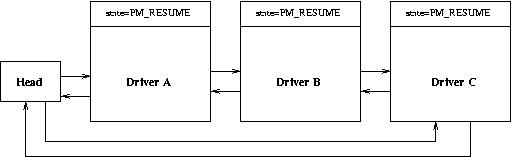
Figure 2. System in Run State
Now, let's say the system has to transition to standby state from run state. PM subsystem sends out a PM_STANDBY request to all three drivers, for which there are two possible outcomes. One, all drivers accept the request, and the system is put in standby state. Two, some driver rejects it. In this case, the standby transition is aborted, and the system continues to be in run state.
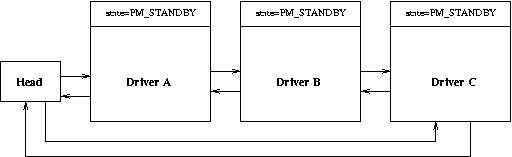
Figure 3. System in Standby State
Figure 3 shows what happens when all the drivers have accepted the PM_STANDBY request. Notice how the state field in pm_dev structure is changed when a driver accepts the request.
Let's now consider the case where drivers A and B accept the PM_STANDBY request, but driver C rejects it. Figure 4 shows the case after driver A has accepted the request. After driver A has agreed, the PM_STANDBY request is sent to driver B.
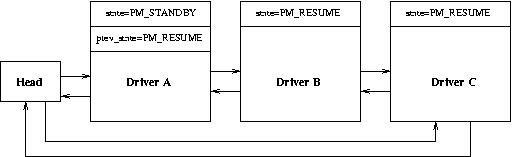
Figure 4. Driver A has accepted the PM_STANDBY request.
Figure 5 shows the state of the drivers after driver B also has accepted. Now both devices A and B are put in their standby state, while device C is still in its run state.
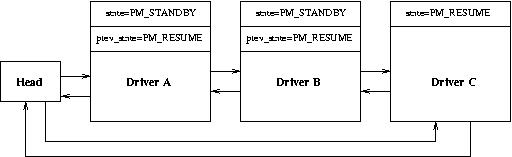
Figure 5. Driver A and driver C have accepted a PM_STANDBY request.
Next, PM_STANDBY is sent to driver C, which rejects it. In this case, the standby transition has to be aborted. Because devices A and B already have been put in their standby states, the PM subsystem has to perform an undo operation on them, so it sends a PM_RESUME request first to driver B and then to driver A. After this undo operation is done, all devices are put back in their run states, as shown in Figure 6.
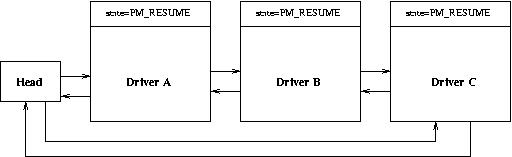
Figure 6. The system is back in run state after driver C rejected the PM_STANDBY request.
Figure 7 shows the APM model. The important components of this model are:
APM BIOS: software interface to the motherboard and its power managed devices and components. It is the lowest level of PM software in the system.
APM driver: implements APM in a particular operating system.
APM-aware device drivers and applications: APM driver interacts with them for all PM events.
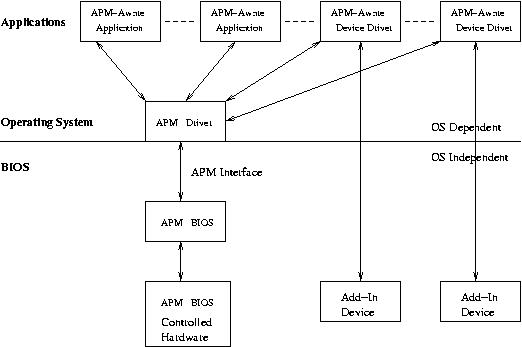
Figure 7. APM Model
APM BIOS detects and reports various PM events, including low battery, power status change, system standby, system resume and so on. The APM driver uses polling function calls to the APM BIOS to gather information about PM events. It then processes these events in association with APM-aware drivers and applications.
The APM driver in Linux exposes two interfaces for an application's use. The first, /proc/apm, holds information on the system power. It specifies whether the system is running on A/C power or battery. If running on battery, it also specifies the battery charge and time left for the battery to drain completely. The second interface, /dev/apm-bios, allows applications to know of and participate in PM events. It also allows them to initiate power state transitions by themselves, by issuing suitable ioctl calls. Read calls issued against this file will block until the next PM event occurs. When the read call returns, it carries information regarding the PM event about to occur.
Some of the applications that have opened /dev/apm_bios may be running with root privileges. Such applications are special to the APM driver. For some of the events, such as standby or suspend transition, APM driver informs all applications that have opened /dev/apm_bios about the event. In addition, it waits for approval from those few applications running with root privileges before the system actually is put in standby/suspend state. This approval comes when applications issue suitable ioctls.
The following ioctls normally are supported:
APM_IOC_STANDBY: puts the system in standby state.
APM_IOC_SUSPEND: puts the system in suspend state.
APM also comes with two user-space utilities. The apm command interacts with the APM subsystem in the kernel. Depending on the arguments passed, it can display system power status, or it can be used to initiate system standby/suspend transition. The apmd dæmon reports and processes various PM events and logs all PM events to /var/log/messages. In addition to logging, apmd also can take some specific actions for each type of PM event. These actions are specified in a script file (usually called apmd_proxy). This script file is invoked by the apmd dæmon with one or two arguments indicating the PM event about to occur. The following is a sample script file:
case 1:2 in

"standby":*)
     #System is going to Standby state because of
     #inactivity. Reduce CPU speed.
     echo 162200 > /proc/sys/cpu/0/speed
     ;;

"resume":"standby")
     #System is resuming to Run state from Standby
     #because of activity. Increase back the CPU
     #speed.
     echo 206400 > /proc/sys/cpu/0/speed
     ;;

"suspend":*)
     #System going to suspend state. Bring down
     #network interface.
     ifconfig eth0 down
     ;;

"resume":"suspend")
     #System resuming from suspend state.
     #bring up network interface and
     #increase the CPU speed and
     ifconfig eth0 up
     echo 206400 > /proc/sys/cpu/0/speed
     ;;
Some of the complexities involved in power state transitions can be understood by taking the example of a state transition involving both drivers and applications. Assume the system has two drivers, D1 and D2, registered with PM and three applications, A, B and C, also participating in PM (by way of opening /dev/apm_bios). Of the three applications, A and B are running with superuser privileges, and C is not. Figure 8 depicts this scenario.
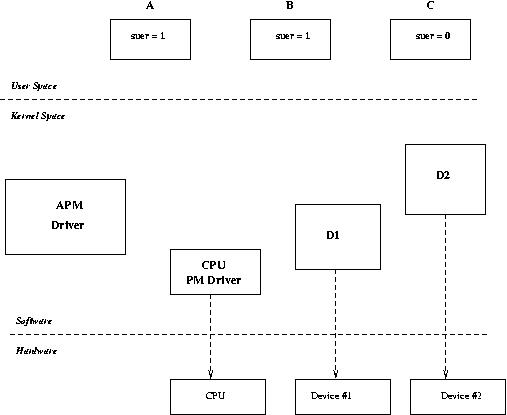
Figure 8. Example Power State Transition
Now, with this setup, let's consider a case where the system wants to transition to sleep state from run state. The sequence of steps involved in this case begins with informing applications A, B and C about the pending transition to sleep state. This allows them to take whatever actions are necessary for this transition. Also, because A and B have superuser privileges, we have to wait for them to say okay to this sleep transition before it proceeds any further.
When A and B are done with whatever work they need to perform before the system transitions to a sleep state, they give the go-ahead to the APM driver. Now, the APM driver is ready to put the system into sleep state. It sends a PM_SUSPEND message to D1 and D2. D1 and D2 put their respective devices into sleep state and say okay to APM. After D1 and D2 are finished processing this transition, APM informs the CPU PM driver to put the CPU in sleep state. At this stage, the system transition to sleep state is complete.
Although APM has some drawbacks, its simplicity allows it to be implemented in almost any device. Other standards, such as ACPI, provide richer control over power management at the cost of complexity. It also is essential that all device drivers and applications implement power management support correctly. Without this proper support, a single driver may prevent the system from, say, going into suspend state. Once implemented properly, power management software greatly benefits the system in terms of enhanced battery life, leading to greater efficiency.
Srivatsa Vaddagiri (vsrivatsa@in.ibm.com) has been with IBM India since 1996. He has worked on a number of projects focusing mainly on UNIX systems. Currently, he is with the embedded Linux group working on power management support for a Linux-based handheld.
Anand K. Santhanam (asanthan@in.ibm.com) has been working for IBM Global Services (Software Labs), India, since July 1999. He is a member of the Linux Group at IBM, where he concentrates primarily on device drivers, ARM-Linux and power management in embedded systems.
Vijay Sukthankar (vksuktha@in.ibm.com) has been with IBM since 1994. Currently he is managing the Linux Competency Center, and he also is managing teams working on open-source development on Linux at IBM. He also is involved in various groups within IBM to provide services on embedded Linux.
Murali Iyer (mniyer@us.ibm.com) has been with IBM since 1995 and has worked in various IBM labs around the world. Since 2000 he has been involved with designing embedded systems using Linux. Some of the projects being executed include high-end handheld devices and a programmer for pacemakers.
