
The Sharp Zaurus SL-C700
After the success of the Zaurus SL-5500 and the SL-5600, which was a revamped SL-5500 featuring a faster CPU, a better battery and a microphone, many people expected the next Zaurus would be as innovative as the SL-5500 was when it was first introduced. The Zaurus SL-C700 seems to satisfy this expectation.
The SL-C700 device is smaller than the previous ones and feels much more polished. When I received it, my fiancée immediately wanted to play with it, though she hadn't found the older ones very attractive. The SL-C700, however, comes with some disadvantages, which easily are explained by the lack of official support for it from Sharp outside Japan. Its range of use is quite impaired by the lack of support.
Featuring an Intel XScale PXA 250 400MHz processor, 64MB of Flash, 32MB of RAM, a 65,536 color 640 × 480 VGA screen, an IrDA port, a USB port, both a CompactFlash and a MMC-SD port, a stereo audio jack, a jogdial-like wheel, a comfortable keyboard and a screen that can move between the traditional computer-style landscape mode and the traditional PDA-style language mode, this is the most-advanced PDA currently available.
The audiophile will enjoy the excellent sound output; the typist will find the keyboard pleasurable for a device so tiny; and the graphics fan will be seduced by the crystal-clear screen. Personally, I was much more impressed by the soft and luxurious feeling of the gray case. Although the earlier devices felt a bit like plastic toys, this one proclaims its style with its appearance. The inclusion of LEDs on the left side of the hinge for quick access to battery charge and e-mail status, plus a convenient wheel with OK and Cancel buttons on the side of the machine, showcase the user-friendly design.
One missing feature may be an included microphone. Due to the poor quality of typical PDA microphones and the availability of hands-free earbuds and microphones, this is not a real issue. However, Sharp has listened to customer feedback and did not forget to include an internal speaker. It may not seem natural to include a speaker without also providing a microphone, but its presence allows the SL-C700 to communicate directly to its user through customized tones when an e-mail is received, when the device is powered on or for alarms.
The SL-C700 is officially available only in Japan. Dynamism.com, though, sells the device worldwide for $699 US, plus custom duties. Because it is a big success in Japan, where it is always back-ordered, expect long delays before receiving one. It took two months to have my order processed, and the FedEx parcel arrived after I was no longer expecting it.
Dynamism.com hired a coder well known in the Zaurus community to localize the whole device to English. After the default Japanese applications had been removed, I couldn't spot a single Japanese word except in the Favorites bookmarks. Even with full-English support, two dangerous keys featuring Japanese letters stand between Fn and space. If you press them, you are put into Japanese mode. The English fonts used prevent the application from displaying Japanese, though, so only little squares underlined in red by the Japanese on-the-fly spell checker appear. It took me some time to realize these keys had to be pressed again until an A appeared in the titlebar. When in Japanese input mode, the letter A is replaced by a Japanese character.
The keyboard on the SL-C700 has keys that look big and soft, but a disturbing beep accompanies every key press. The beep can be disabled with a simple click on the audio icon on the taskbar, which brings up the Audio Setting menu. Then, the keys emit soft clicks with each key press, much more discreet than the loud beep.
The quality of the SL-C700 screen is impressive; I had never seen such a screen before. The picture is so sharp you cannot see any individual pixels. The colors and the display are so bright you can use the device outdoors with the backlight on. The SL-5x00 series screens were impressive—much better than the IPAQ, for example—but could not compete with the most recent Sony Clié LCD screens. The SL-C700 screen outperforms the competition and will bring disappointment to previously proud Clié owners.
It takes four minutes to boot the first time the SL-C700 is powered up. During boot up, the SL-C700 told me it needed power on a pop-up window. I found a matchbox-sized charger in the box, with a Japanese/American plug. With a plug adapter, it worked like a charm in the European 230V output, even if it was labeled as only 100V. Dynamism.com comments that no power adapter is needed. The small size of the charger is a big plus; it makes the short battery life, around three hours, less important because it can be carried everywhere.
When the boot is finally over, the setup screen welcomes you. After calibrating the screen sensors with five clicks, you must enter the local date, time and time zone. New York is included by default, along with Tokyo and other important cities.

Figure 1. The launcher features big icons.
Next, the default launcher pops up. Many applications are installed by default. I tried the personal information manager (PIM) first. I was disappointed by the small font used in the datebook and address book until I realized this font is used in every other application. Comparing the screen in front of me to the Japanese user manual screenshots, I realized it was smaller than what it should have been. An e-mail to Dynamism.com technical support confirmed that the English localization of the device had the unexpected side effect of implementing a different font by default. It has been reported to Dynamism.com, so the devices now should ship with a normal font.
Another problem is the strange alphabetical ordering in the address book—A, Ka, Sa and so on. This is Japanese alphabetical order, which is not exactly suited for English speakers. Another problem is the lack of XML support for former SL-5x00 owners. Someone at Sharp must have had the clever idea of removing the industry-standard XML format in favor of an obscure binary data format, where data is stored in ~/Applications/dtm with strange names. Personally, I liked the old ~/Applications/Datebook and ~/Applications/Addressbook, with XML files that could be imported or exported into other applications easily.

Figure 2. The datebook is not too handy.
I installed the original SL-5x00 Addressbook, which required only putting the addressbook.xml file in ~/Applications/Addressbook. For some reason, the SL-5x00 series datebook is not compatible with the SL-C700—it displays only a line instead of the meetings scheduled. So I decided to go with Korganiser embedded, which uses the same format of the award-winning desktop software. I simply put the addressbook.xml file and the calendar on a CompactFlash card and copied them to the Zaurus.
Even with my best efforts over several days of attempts augmented by forum support, I did not come close to having the Zaurus syncing to either Windows or Linux. The desktop setup is a mystical adventure I may try again when I have more time or when an English user manual is available.
HancomWord and HancomSheet, the Zaurus' word processor and spreadsheet, were interesting on the SL-5x00. They have matured into fast, easy-to-use and professional software on the SL-C700, able to read and save Microsoft files without any problem. Although the import may be slow sometimes, having the documents available everywhere is a pleasure.
The big 640 × 480 screen of the SL-C700 provides a true interface to the user. The screen rotation between 640 × 480 landscape mode and 480 × 640 portrait mode is supported perfectly. It also enables an editing session to take advantage of the wider screen and the keyboard, as well as a quick visualization of the data using a taller display and a simple press of the wheel.
Configuring the internet connection is a kid's game. Being the lucky owner of a home wireless network, I had only to go to the network setting application, give a title to my connection, type my encryption key and select auto (dhcp) mode, a mode where IP addresses are assigned automatically. Plugging in a wireless CompactFlash card presented a globe-like icon with a big red cross on it. Clicking this icon showed me a list of available connections, where I chose the wireless connection I had set up and was connected. The list of connections means the SL-C700 is able to move from one network to another without any trouble—a necessary feature for a mobility device.
Both the Netfront browser and the Qtopia mail client are present on the SL-C700. They once again outperform their SL-5x00 equivalents. Although the Opera browser was not able to display every web site on the tiny SL-5x00 screen, Netfront is perfectly compatible with every web site I tried.
If the text is too small or too large, the Fn-3 and Fn-4 shortcuts allow the user to resize the display dynamically. The Fn-1 and Fn-2 shortcuts complete this customization with a brightness increase or decrease, which is useful when the ambient light changes.
Tabs allow multiple web sites to be opened at the same time. The browser is easy to use with self-evident menu items and icons and few configurable options. This ease is welcome as the only user manual is in Japanese.
The e-mail application also is easy to configure and use. I had to type only my POP server, user name, password and outgoing mail server to receive e-mail on the Zaurus. I immediately was able to reply off-line. Mails too big to be stored reasonably are not downloaded. It still is possible to retrieve them, but each message requires manual confirmation. Once again this is a useful feature to prevent the PDA memory from becoming full of junk mail and useless attachments.

Figure 3. Excellent e-mail support is a big plus for the SL-C700.
Both an audio player and a video player are present on the SL-C700. They are completed by a picture viewer and an audio recorder. The audio player plays MP3 files perfectly, keeping a playlist for the user. The sound output is excellent, and the user interface for the audio player is intuitive. A volume control and a randomize function allow the SL-C700 to be used as a digital jukebox. The audio player is completed by a clever display-off button that turns off the whole screen, saving battery usage to prolong the musical experience.
In the case of the picture viewer, a list of the digital pictures I had on my CompactFlash card was presented with thumbnails. I could then click on each thumbnail to see the pictures individually or start a slideshow to use the SL-C700 as a digital picture viewer. My fiancée was impressed by the quality of the pictures we took on New Year's Eve on such a small display. They were crisp and bright, with such beautiful colors it was hard to believe we were viewing them on a PDA.
I do not like carrying a laptop with me when I am traveling, which can be annoying when the on-flight movie is bad. But next time I take a long flight, I will not envy the big, portable DVD player the person sitting next to me has. Saving a DivX file to a 256MB CompactFlash disk, then watching it on my PDA, however, certainly will make my flight neighbor jealous. Thanks to the Doctor Z video player, it is possible to enjoy a high-quality playback without frame drop if the movie has been recoded with some settings regarding the supported DivX codec, the SL-C700 screen and supported frame rate.
Another interesting feature of the SL-C700 is the complete Java support. I always am looking for more knowledge of the sky and galaxies, so sky maps are the first applications I install. I went to the Solun web site at www.piecafe.demon.co.uk and downloaded the Java version, designed for the SL-5500. It worked like a charm on the SL-C700, after some minor tweaks to use the 640 × 480 resolution. The high resolution allows comfortable use, even if the lack of memory quickly reminds you the SL-C700 is not perfect.
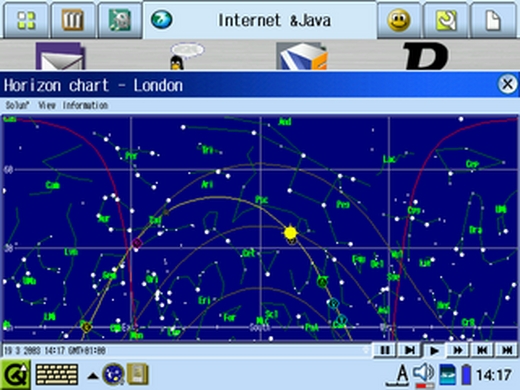
Figure 4. Java applications take advantage of the big screen.
After the honeymoon with the new toy, I realized the SL-C700 was not without fault. The first problem is the resolution tweaking. Although using a different processor from the one the SL-5x00 uses, every SL-5x00 application should work fine on the SL-C700. However, some have been coded using fixed-screen sizes, which cause them not to scale well on a bigger display. To avoid this problem, Sharp introduced a low resolution (240 × 320) portrait mode to emulate the SL-5x00 screen better. It is active by default, however, and the transition between high resolution and low resolution takes four seconds, which seems like forever if you need the application at that moment.
The Doctor Z video player works fine and officially is SL-C700-compatible. The SL-C700 also comes with excellent e-mail support. I tried the free SL-5x00 applications, and most of them work fine even if the high resolution mode is selected. It takes only a long click on the application icon then selecting/deselecting the run-in compatibility mode icon to give it a try.
Another annoying problem is the lack of memory. 64MB of Flash means 64MB of storage space, where 30MB are left for the user. Although 32MB may seem a lot for a PDA, Qtopia is memory hungry, which does not leave a lot for the user. When I run the audio player and a command line, only 600K are left. Even worse, only 4MB of memory are free after a clean boot up, which means there is little room left for the applications to run. I had many errors due to the lack of available memory when using Java applications. The device became sluggish until a screen suddenly appeared and asked me to stop some applications.
A serious problem my unit had was the SD port; for some reason, inserting an SD card resulted in a complete lock until the card was removed, when the traditional four-minute reboot takes over. I had to send it back to Dynamism.com.
I also could not find any cases or accessories for the SL-C700. In Japan, some accessories are starting to be made available, but it is hard to order them on-line when you do not speak Japanese.
I must admit that even with these problems, I miss my SL-C700. The default PIM suite is not really usable, but the multimedia suite, the office suite and the internet suite were more than what I needed to be happy with my PDA. Most of the problems I experienced are explained easily by the lack of official support in English. The lack of XML support and SL-5x00 backward compatibility in the PIM is a bigger issue, because it certainly cannot be solved by official support.
With some help found on the SL-C700 forums on externe.net/zaurus/forum, I will start using the SL-C700 on a daily basis when it comes back. It will completely replace my former PDA, the Zaurus SL-5500, when I can run a good PIM suite that syncs to the desktop computer.
email: g@7un.org
Guylhem Aznar is the coordinator of the LDP (www.tldp.org). In real life, he is a consultant, a sixth-year medical student and is preparing a PhD in Computer Science. With the little time left, he enjoys playing with his Zaurus.

