
How to Index Anything
You might want to build custom indices of documents for many reasons. A widely cited one is to supply search functionality to a web site, but you also may want to index your e-mail or technical documents. Anyone who has looked into implementing such a functionality has probably found it's not as easy as it might seem. Various factors conspire to make searching difficult.
The venerable and indispensable grep and its ilk are effective for scanning through lines of text. But grep, egrep and their relations won't do everything for you. They won't search across lines, they won't show search results in a ranked order and their linear search algorithms don't lend themselves to searching larger volumes of data.
HTML doesn't help the situation either. Its display-oriented features, idiosyncratic grammar and bevy of formatting and entity tags make it fairly difficult to parse correctly.
At the other end of the data storage spectrum is data slotted into a database. The ubiquitous example is that of the SQL database, which allows somewhat sophisticated search facilities but usually is not particularly fast for searching. Some database engines, notably MySQL 4, address this issue by allowing fast and ranked searches, but they may not be as customizable as desired.
In this article, we explore ways to create custom indices using SWISH-E, Perl and XML on Linux. Through examples, we show how SWISH-E can be used to build indices of HTML files, PDF files and man pages.
SWISH-E (simple web indexing system for humans—enhanced) is a descendant of SWISH, which was created in 1994 by Kevin Hughes. SWISH was transferred in 1996 to the UC Berkeley Library to fix bugs and add features, and the result was licensed under the GPL and renamed SWISH-E. Development continues, spearheaded by current project maintainer Bill Moseley and assisted by a team of developers.
Here at SkateboardDirectory.com, we happened upon SWISH-E when researching indexing toolkits. We found that it offers a unique combination of features that make it attractive for our purposes. Not only does SWISH-E offer a fast and robust toolkit with which to build and query indices, but it is also well documented, undergoes active development and bug fixes and includes a Perl interface. We also liked that maintainer Moseley and other experienced SWISH-E users and developers are usually prompt when addressing questions and bugs brought up on the SWISH-E mailing list.
For our examples, we started with a stock Red Hat 7.3 workstation with the Software Development bundle of packages installed. We also tested the examples on a Red Hat 6.2 workstation and a Debian Woody.
Currently, installing SWISH-E on Red Hat means installing from source, and the zlib and libxml2 libraries are required to build SWISH-E fully. If you find you need to install either, you probably can find packages provided with your distribution. We also use the xpdf package in our examples, so you may want to install that now if it isn't already. Our reference Red Hat 7.3 workstation setup had all of SWISH-E's prerequisites installed.
Here, we describe the use of SWISH-E 2.4, which according to the development team, should be released by the time you read this article. You can fetch and set up SWISH-E with the following sequence of commands, substituting the current version for (x.x):
% wget \
  http://swish-e.org/Download/swish-e-x.x.tar.gz
% tar zxf swish-e-x.x.tar.gz
% cd swish-e-x.x
% ./configure
% make
% make test
To install the SWISH-E binary, C libraries and man pages into their default locations in /usr/local, type make install as root. This installs the SWISH-E executable into /usr/local/bin. If this directory isn't in your PATH, either change your appropriate dot file to include /usr/local/bin in your PATH, or always call the swish-e executable by full pathname, like /usr/local/bin/swish-e.
Now, let's build and install the SWISH::API Perl module from the Perl directory in the source. We'll need it later when we build a Perl client for our index of man pages. SWISH::API is set up by the normal Perl module install process:
% cd perl
% perl Makefile.PL
% make
% make test
Then, install the SWISH-E Perl module by typing make install as root.
Now that SWISH-E and the SWISH::API Perl module are installed fully, let's build a simple index of HTML files to test SWISH-E. For this example, we index the HTML, one-page-per-section versions of the Linux Documentation Project (LDP) HOWTOs, which we've unpacked into ~/HOWTO-htmls/. The tarballs of LDP documents used in this article come from www.tldp.org/docs.html.
The first step in building an index with SWISH-E is writing a configuration file. Create a directory like ~/indices, cd into it and create the file ./howto-html.conf with the following contents:
# howto-html.conf
IndexDir  ../HOWTO-htmls/
IndexOnly .html
IndexFile ./howto-html.index
The IndexDir directive specifies the directory in which SWISH-E should look for files to be indexed. The IndexOnly directive requests that only files ending in .html be indexed. Finally, the location of the index to be created is specified with the IndexFile directive.
Now, let's build our index of HTML files with the command:
% swish-e -c howto-html.conf
The -c option specifies which SWISH-E configuration file to use. On an older system, building this index may take a few minutes or so; on a contemporary one, it should take under a minute. Figure 1 illustrates the process of indexing HTML files on the filesystem with SWISH-E.
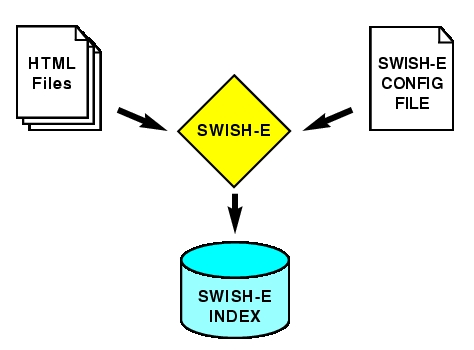
Figure 1. Indexing HTML on the Filesystem with SWISH-E
Let's test our first index by doing a simple search for HTML files relevant to the term NFS. You can test SWISH-E indices quickly using the swish-e executable by specifying an index with the -f option, and the text to be searched with the -w option; searches on SWISH-E indices are case-insensitive. Because we expect a lot of pages (or hits) to include the word NFS, we use the -m 3 option to request only three:
% swish-e -f howto-html.index -m 3 -w nfs
This returns (abridged and reformatted):
1000 ../HOWTO-htmls/NFS-HOWTO/performance.html
        "Optimizing NFS Performance" 33288
998 ../HOWTO-htmls/NFS-HOWTO/intro.html
       "Introduction" 10966
993 ../HOWTO-htmls/NFS-HOWTO/security.html
       "Security and NFS" 35968
Not bad—those pages are definitely about NFS, and the output is intuitive. The first column is the rank SWISH-E gives each hit—the hits considered most relevant always are ranked 1000, with less-relevant files ranked in descending order. The second column shows the name of the file, the third gives the page's title and the fourth shows the byte count of the indexed data. SWISH-E determines the title of each page from the HTML tags in each file using one of its HTML parsing engines.
The built-in SWISH-E parsing engines are called TXT, HTML and XML, and each is designed to parse the corresponding type of content. Recent versions of SWISH-E also can use the libxml2 library for the HTML2 and XML2 parsing back ends. Both the XML2 and HTML2 parsers are preferable to their built-in counterparts—especially HTML2. This is why a recent version of libxml2, though technically optional when building SWISH-E, probably should be considered a prerequisite.
SWISH-E supports a full-featured text retrieval search language with syntax including AND, OR, NOT and parenthetic grouping that all work predictably. For example, the following searches all have the expected semantics:
% swish-e -f howto-html.index -w nfs AND tcp
% swish-e -f howto-html.index -w nfs OR tcp
% swish-e -f howto-html.index \
-w '(gandalf OR frodo) OR (lord AND rings)'SWISH-E configuration files are simple text files in which each line is either a directive or a comment. Any line in which the first non-whitespace character is a # is ignored by SWISH-E as a comment. All other non-empty lines should be in the form:
Directive Options [Options] ...
If you need to specify an option with spaces embedded, you can use quotation marks:
Directive "Option With Spaces!"
If the option has single quotation marks within it, you can quote it with the double quote character and vice versa, for example:
Directive "Fred's Index Option"
Directive 'By Josh "joshr" Rabinowitz'
Dozens of directives can be applied to SWISH-E configuration files. An exhaustive reference can be found in the SWISH-E documentation.
Each SWISH-E index is stored in a pair of files. One is named as specified in the IndexFile directive, and the other is called indexname.prop. When talking about a SWISH-E index, we mean this pair of files.
The indices can get large. In our example index of HTML files, the index occupies about 11MB, about one-fourth the size of the original files indexed.
Up to now, we've talked only about indexing HTML, XML and text files. Here's a more-advanced example: indexing PDF documents from the Linux Documentation Project.
For SWISH-E to index arbitrary files, PDF or otherwise, we must convert the files to text, ideally resembling HTML or XML, and arrange to have SWISH-E index the results.
We could index the PDF files by converting each to a corresponding file on disk and then index those, but instead we'll use this opportunity to introduce a more flexible way to index data: SWISH-E's programmatic access method (Figure 2).
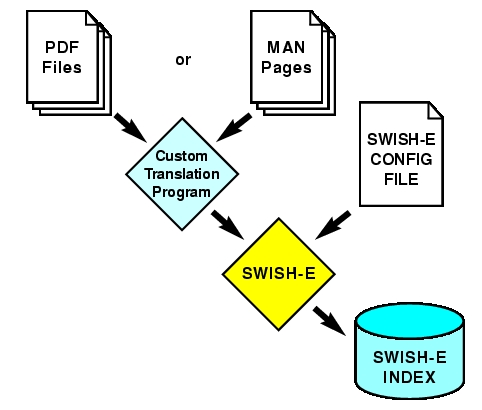
Figure 2. Indexing Arbitrary Data with an External Program and SWISH-E
To index the PDF files, start by creating a SWISH-E configuration file, calling it howto-pdf.conf and endowing it with the following contents:
# howto-pdf.conf
IndexDir      ./howto-pdf-prog.pl
               # prog file to hand us XML docs
IndexFile     ./howto-pdf.index
               # Index to create.
UseStemming   yes
MetaNames     swishtitle swishdocpath
Here, the IndexDir directive specifies what SWISH-E calls an external program that will return data about what is to be indexed, instead of a directory containing all the files. The UseStemming yes directive requests SWISH-E to stem words to their root forms before indexing and searching. Without stemming, searching for the word “runs” on a document containing the word “running” will not match. With stemming, SWISH-E recognizes that “runs” and “running” both have the same root, or stem word, and finds the document relevant.
Last in our configuration file, but certainly not least, is the MetaNames directive. This line adds a special ability to our index—the ability to search on only the titles or filenames of the files.
Now, let's write the external program to return information about the PDF files we're indexing. Conveniently, the SWISH-E source ships with an example module, pdf2xml.pm, which uses the xpdf package to convert PDF to XML, prefixed with appropriate headers for SWISH-E. We use this module, copied to ~/indices, in our external program howto-pdf-prog.pl:
#!/usr/bin/perl -w
use pdf2xml;
my @files =
    `find ../HOWTO-pdfs/ -name '*.pdf' -print`;
for (@files) {
    chomp();
    my $xml_record_ref = pdf2xml($_);
    # this is one XML file with a SWISH-E header
    print $$xml_record_ref;
}
Equipped with the SWISH-E configuration file and the external program above, let's build the index:
% swish-e -c howto-pdf.conf -S prog
The -S prog option tells SWISH-E to consider the IndexDir specified as a program that returns information about the data to be indexed. If you forget to include -S prog when using an external program with SWISH-E, you'll be indexing the external program itself, not the documents it describes.
When the PDF index is built, we can perform searches:
% swish-e -f howto-pdf.index -m 2 -w boot disk
We should get results similar to:
1000 ../HOWTO-pdfs/Bootdisk-HOWTO.pdf
      "Bootdisk-HOWTO.pdf" 127194
983 ../HOWTO-pdfs/Large-Disk-HOWTO.pdf
     "Large-Disk-HOWTO.pdf" 85280
The MetaNames directive also lets us search on the titles and paths of the PDF files:
% swish-e -f howto-pdf.index -w swishtitle=apache
% swish-e -f howto-pdf.index -w swishdocpath=linux
All corresponding combinations of searches are supported. For example:
% swish-e -f howto-pdf.index -w '(larry and wall)
    OR (swishdocpath=linux OR swishtitle=kernel)'
The quoting above is necessary to protect the parentheses from interpretation by the shell.
For our final example, we show how to make a useful and powerful index of man pages and how to use the SWISH::API Perl module to write a searching client for the index. Again, first write the configuration file:
# sman-index.conf
IndexFile ./sman.index
  # Index to create.
IndexDir  ./sman-index-prog.pl
IndexComments no
  # don't index text in comments
UseStemming yes
MetaNames     swishtitle desc sec
PropertyNames            desc sec
We've described most of these directives already, but we're defining some new MetaNames and introducing something called PropertyNames.
In a nutshell, MetaNames are what SWISH-E actually searches on. The default MetaName is swishdefault, and that's what is searched on when no MetaName is specified in a query. PropertyNames are fields that can be returned describing hits.
SWISH-E results normally are returned with several Auto Properties including swishtitle, swishdesc, swishrank and swishdocpath. The MetaNames directive in our configuration specifies that we want to be able to search independently not only on each whole document, but also on only the title, the description or the section. The PropertyNames line specifies that we want the sec and desc properties, the man page's section and short description, to be returned separately with each hit.
The work of converting the man pages to XML and wrapping it in headers for SWISH-E is performed in Listing 1 (sman-index-prog.pl).
Listing 1. sman-index-prog.pl converts man pages to XML for indexing.
#!/usr/bin/perl -w
use strict;
use File::Find;
my ($cnt, @files) = (0, get_man_files());
warn scalar @files, " man pages to index...\n";
for my $f (@files) {
warn "processing $cnt\n" unless ++$cnt % 20;
my ($hashref) = parse_man($f);
my $xml = make_xml($hashref);
my $size = length $xml; # NOTE: Fails if UTF
print "Path-Name: $f\n",
"Document-Type: XML*\n",
"Content-Length: $size\n\n", $xml;
}
sub get_man_files { # get english manfiles
my @files;
chomp(my $man_path = $ENV{MANPATH} ||
`manpath` || '/usr/share/man');
find( sub {
my $n = $File::Find::name;
push @files, $n
if -f $n && $n =~ m!man/man.*\.!
}, split /:/, $man_path );
return @files;
}
sub make_xml { # output xml version of hash
my ($metas) = @_; # escapes vals as side-effect
my $xml = join ("\n",
map { "<$_>" . escape($metas->{$_}) .
"</$_>" }
keys %$metas);
my $pre = qq{<?xml version="1.0"?>\n};
return qq{$pre<all>$xml</all>\n};
}
sub escape { # modifies scalar you pass!
return "" unless defined($_[0]);
s/&/&/g, s/</</g, s/>/>/g for $_[0];
return $_[0];
}
sub parse_man { # this is the bulk
my ($file) = @_;
my ($manpage, $cur_content) = ('', '');
my ($cur_section,%h) = qw(NOSECTION);
open FH, "man $file | col -b |"
or die "Failed to run man: $!";
my ($line1, $lineM) = (scalar(<FH>) || "", "");
while ( <FH> ) { # parse manpage into sections
$line1 = $_ if $line1 =~ /^\s*$/;
$manpage .= $lineM = $_ unless /^\s*$/;
if (s/^(\w(\s|\w)+)// || s/^\s*(NAME)/$1/i){
chomp( my $sec = $1 ); # section title
$h{$cur_section} .= $cur_content;
$cur_content = "";
$cur_section = $sec; # new section name
}
$cur_content .= $_ unless /^\s*$/;
}
$h{$cur_section} .= $cur_content;
# examine NAME, HEADer, FOOTer, (and
# maybe the filename too).
close(FH) or die "Failed close on pipe to man";
@h{qw(A_AHEAD A_BFOOT)} = ($line1, $lineM);
my ($mn, $ms, $md) =
("","","","");
# NAME mn, DESCRIPTION md, & SECTION ms
for(sort keys(%h)) { # A_AHEAD & A_BFOOT first
my ($k, $v) = ($_, $h{$_}); # copy key&val
if (/^A_(AHEAD|BFOOT)$/) { #get sec or cmd
# look for the 'section' in ()'s
if ($v =~ /\(([^)]+)\)\s*$/) {$ms||= $1;}
} elsif($k =~ s/^\s*(NOSECTION|NAME)\s*//) {
my $namestr = $v || $k; # 'cmd - a desc'
if ($namestr =~ /(\S.*)\s+--?\s*(.*)/) {
$mn ||= $1 || "";
$md ||= $2 || "";
} else { # that regex could fail.
$md ||= $namestr || $v;
}
}
}
if (!$ms && $file =~ m!/man/man([^/]*)/!) {
$ms = $1; # get sec from path if not found
}
($mn = $file) =~ s!(^.*/)|(\.gz$)!! unless $mn;
my %metas;
@metas{qw(swishtitle sec desc page)} =
($mn, $ms, $md, $manpage);
return ( \%metas ); # return ref to 5-key hash.
}The first for loop in Listing 1 is the main loop of the program. It looks at each man page, parses it as needed, converts it to XML and wraps it in the appropriate headers for SWISH-E:
get_man_file() uses File::Find to traverse the man directories to find man page source files.
make_xml() and escape() together create XML from the hashref returned by parse_man().
parse_man() performs the nitty-gritty work of getting the relevant fields from the man page source.
Now that we've explained it, let's use it:
% swish-e -c sman-index.conf -S prog
When that's done, you can test the index as before, using swish-e's -w option.
As our final example, we discuss a Perl script that uses SWISH::API to use the index we just built to provide an improved version of the UNIX standby apropos. The code is included in Listing 2 (sman). Here's a brief rundown: lines 1-14 set things up and parse command-line options, lines 15-23 issue the query and do cursory error handling and lines 24-39 present the search results using Properties returned through the SWISH::API.
Listing 2. sman is a command-line utility to search man pages.
#!/usr/bin/perl -w

use strict;
use Getopt::Long qw(GetOptions);
use SWISH::API;

my ($max,$rankshow,$fileshow,$cnt) = (20,0,0,0);
my $index = "./sman.index";
GetOptions( "max=i"   => \$max,
             "index=s" => \$index,
             "rank"    => \$rankshow,
             "file"    => \$fileshow,
);
my $query = join(" ", @ARGV);
my $handle = SWISH::API->new($index);
my $results = $handle->Query( $query );
if ( $results->Hits() <= 0 ) {
    warn "No Results for '$query'.\n";
}
if ( my $error = $handle->Error( ) ) {
    warn "Error: ",  $handle->ErrorString(), "\n";
}
while ( ($cnt++ < $max) &&
(my $res = $results->NextResult)) {
    printf "%4d ", $res->Property( "swishrank" )
       if $rankshow;
    my $title = $res->Property( "swishtitle" );
    if (my $cmd = $res->Property( "cmd" )) {
       $title .= " [$cmd]";
    }
    printf "%-25s (%s) %-30s", $title,
       $res->Property( "sec" ),
       $res->Property( "desc" );
    printf " %s", $res->Property( "swishdocpath"
)
       if $fileshow;
    print "\n";
}
The Perl client is that simple. Let's use ours to issue searches on our man pages such as:
% ./sman -m 1 boot disk
We should get back:
bootparam (7) Introduction to boot time para...
But we now also can do searches like:
% ./sman sec=3 perl
to limit searches to section 3. The sman program also accepts the command-line option --max=# to specify the maximum number of hits returned, --file to show the source file of the man page and --rank to show each hit's rank for the given query:
% ./sman --max=1 --file --rank boot
This returns:
1000 lilo.conf (5) configuration file for lilo
    /usr/man/man5/lilo.conf.5
Notice the rank as the first column and the source file as the last one.
An enhanced version of the sman package will be available at joshr.com/src/sman/.
SWISH-E has two downsides we should mention. First, it's not multibyte safe—it handles only 8-bit ASCII data. Second, records cannot be deleted from a SWISH-E index—to remove records, an index must be re-created. On the plus side, SWISH-E has numerous features we didn't even get to mention. See the SWISH-E web site at www.swish-e.org for more details. We hope you'll agree that SWISH-E is an impressive toolkit and a useful addition to your programming toolbelt.

Josh Rabinowitz is a 13-year veteran of the software industry who cut his teeth at NASA Ames Research Center and at CNET.com and other web companies. He currently is an independent consultant and the publisher of SkateboardDirectory.com, which aims to be your guide to skateboard sites on the Internet.

