
Building a Linux IPv6 DNS Server
IPv6 is the next-generation protocol designed by the Internet Engineering Task Force (IETF) to replace IPv4, the current version of the Internet Protocol. IPv4 has been remarkably resilient. However, its initial design did not take into consideration several issues of importance today, such as a large address space, mobility, security, autoconfiguration and quality of service. To address these concerns, IETF has developed a suite of protocols and standards known as IPv6, which incorporates many of the concepts and proposed methods for updating IPv4. As a result, IPv6 fixes a number of problems in IPv4 and adds many improvements and features that cater to the future mobile Internet.
IPv6 is expected to replace IPv4 gradually, with the two coexisting for a number of years in a transition period. Servers will be dual stack, supporting both IPv4 and IPv6.
In this article, we look closely at IPv6 name resolution and provide a technical tutorial to help readers set up their own IPv6 Linux DNS servers to allow IPv6 name resolution using the latest version of BIND 9.x.
In this section, we present a sample network scheme (Figure 1) with different IPv6 servers.
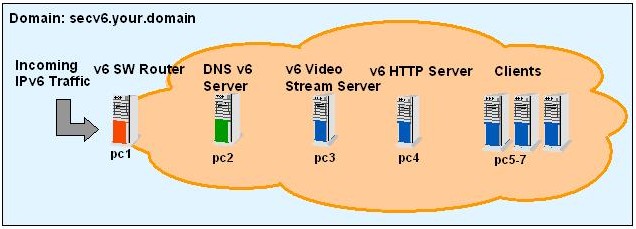
Figure 1. Sample Network Architecture
The following nodes are represented in this architecture:
Routing server (pc1) acts as an IPv6 software router server and provides router advertisement for all IPv6 nodes.
DNS IPv6 server (pc2) provides IPv6 name resolution.
Two application servers, one provides video streaming (pc3) and the other is an Apache-based Web server (pc4).
Client machines (pc5–7) used for testing purposes.
Domain names are a meaningful and easy-to-remember “handle” for Internet addresses. The domain name system (DNS) is the way that Internet domain names are located and translated into Internet protocol addresses. Because maintaining a central list of domain name/IP address correspondences is not practical, the lists of domain names and IP addresses are distributed throughout the Internet in a hierarchy of authority. Typically, a DNS server is within close geographic range of your access provider; this DNS server maps the domain names in DNS requests or forwards them to other servers on the Internet. For IPv6 DNS requests, both A6 and AAAA syntax are used to express IPv6 addresses.
AAAA resource record (called quad A record) is formatted as fixed-length data. With AAAA, we can define DNS records for IPv6 name resolution as follows, the same method as A records in IPv4:
$ORIGIN X.EXAMPLE.
N            AAAA 2345:00C1:CA11:0001:1234:5678:9ABC:DEF0
N            AAAA 2345:00D2:DA11:0001:1234:5678:9ABC:DEF0
N            AAAA 2345:000E:EB22:0001:1234:5678:9ABC:DEF0
An A6 resource record is formatted as variable-length data. With A6, it is possible to define an IPv6 address by using multiple DNS records. Here is an example taken from RFC 2874:
$ORIGIN X.EXAMPLE.
N            A6 64 ::1234:5678:9ABC:DEF0 SUBNET-1.IP6
SUBNET-1.IP6 A6 48 0:0:0:1::  IP6
IP6          A6 48 0::0       SUBSCRIBER-X.IP6.A.NET.
IP6          A6 48 0::0       SUBSCRIBER-X.IP6.B.NET.

SUBSCRIBER-X.IP6.A.NET. A6 40 0:0:0011:: A.NET.IP6.C.NET.
SUBSCRIBER-X.IP6.A.NET. A6 40 0:0:0011:: A.NET.IP6.D.NET.
SUBSCRIBER-X.IP6.B.NET. A6 40 0:0:0022:: B-NET.IP6.E.NET.
A.NET.IP6.C.NET. A6 28 0:0001:CA00:: C.NET.ALPHA-TLA.ORG.
A.NET.IP6.D.NET. A6 28 0:0002:DA00:: D.NET.ALPHA-TLA.ORG.
B-NET.IP6.E.NET. A6 32 0:0:EB00::    E.NET.ALPHA-TLA.ORG.
C.NET.ALPHA-TLA.ORG. A6 0 2345:00C0::
D.NET.ALPHA-TLA.ORG. A6 0 2345:00D0::
E.NET.ALPHA-TLA.ORG. A6 0 2345:000E::
If we translate the above code into AAAA records, it looks like:
$ORIGIN X.EXAMPLE.
N            AAAA 2345:00C1:CA11:0001:1234:5678:9ABC:DEF0
N            AAAA 2345:00D2:DA11:0001:1234:5678:9ABC:DEF0
N            AAAA 2345:000E:EB22:0001:1234:5678:9ABC:DEF0
Once IPv6 name resolution is configured, we can add domain name system (DNSSEC) to our DNS server. DNSSEC provides three distinct services: key distribution, data origin authentication and transaction and request authentication. The complete definition of DNSSEC is provided in RFC 2535.
An essential step prior to installing the IPv6-compliant BIND version is to enable IPv6 support in the kernel and for the networking binaries on the system supporting IPv6. We have covered this topic in a previous article, “Supporting IPv6 on a Linux Server Node”, in the August 2002 issue of LJ (/article/4763). After following the tutorial presented in that article, you should be ready to install the latest BIND version with IPv6 support.
The latest version of BIND is available from the Internet Software Consortium Web site (www.isc.org/products/BIND/BIND9.html). BIND version 9 is a major rewrite of nearly all aspects of the underlying BIND architecture. Many important features and enhancements were introduced in version 9; the most relevant to this article is the support for IPv6. BIND 9.x allows the DNS server to answer DNS queries on IPv6 sockets, provides support for IPv6 resource records (A6, DNAME and so on) and supports bitstring labels. In addition, BIND 9.x makes available an experimental IPv6 resolver library. Many other features are available, and you can read more about them from the BIND Web site.
BIND 9.2.1 is the latest stable release available at the time of this writing. Our installation and configuration procedure follows this version. To install BIND, begin by downloading the latest BIND version into /usr/src, and then uncompress the package with:
% tar -xzf bind-9.2.1.tar.gz
% cd bind-9.2.1
Although IPv6 support is native to BIND, it must be specified explicitly when compiling. In addition, because we want to support DNSSEC, we need to compile BIND with crypto support. OpenSSL 0.9.5a or newer should be installed. Running the configuration script with the needed options looks like:
% ./configure -enable-ipv6 -with-openssl
Finally, compile and install the package as root with:
% make && make install
By default, the BIND 9 files are distributed in the filesystem. Configuration files are placed in /etc/named.conf; the binary “named” is in /usr/local/sbin and all other related configuration files go in /var/named.
DNS queries can be resolved in many different ways. For instance, a DNS server can use its cache to answer a query or contact other DNS servers on behalf of the client to resolve the name fully. When the DNS server receives a query, it first checks to see if it can answer it authoritatively, based on the resource record information contained in a locally configured zone on the server. If the queried name matches a corresponding resource record in the local zone information, the server answers authoritatively, using this information to resolve the queried name. For a complete DNS query process, there are four existing DNS zones:
Master: the server has the master copy of the zone data and provides authoritative answers for it.
Slave: a slave zone is a copy of a master zone. Each slave zone has a list of masters that it may query to receive updates to its copy of the zone. A slave, optionally, may keep a copy of the zone saved on disk to speed startups. A single master server can have any number of slaves in order to distribute load.
Stub: a stub zone is much like a slave zone and behaves similarly, but it replicates only the NS records of a master zone rather than the whole zone. Stub zones keep track of which DNS servers are authoritative for the organization. They directly contact the root DNS server to determine which servers are authoritative for which domain.
Forward: a forward zone directs all queries in the zone to other servers. As such, it acts as a caching DNS server for a network. Or it can provide Internet DNS services to a network behind a firewall that limits outside DNS queries, but obviously the forwarding DNS server must have DNS access to the Internet. This situation is similar to the global forwarding facility but allows per-zone selection of forwarders.
To map this to our network (Figure 1), we need to create a master server for our own domain, secv6.your.domain. Listing 1 provides a sample /etc/named.conf configuration. (The secret key is truncated to fit on a line.)
Listing 1. /etc/named.conf
options {
directory "/var/named";

// a caching only nameserver config
zone "." IN {
type hint;
file "named.ca";
};

// this defines the loopback name lookup
zone "localhost" IN {
type master;
file "master/localhost.zone";
allow-update { none; };
};

// this defines the loopback reverse name lookup
zone "0.0.127.in-addr.arpa" IN {
type master;
file "master/localhost.rev";
allow-update { none; };
};

// This defines the secv6 domain name lookup
// Secure (signed) zone file is
// secv6.your.domain.signed
// Regular zone file is secv6.your.domain
zone "secv6.your.domain" IN {
type master;
file "master/secv6.your.domain.signed";
// file "master/secv6.your.domain";
};

// this defines the secv6 domain reverse
// name lookup (AAAA)
zone "secv6.int" IN {
type master;
file "master/secv6.int";
};

// this defines the secv6 domain reverse
// name lookup (A6)
zone "secv6.arpa" IN {
type master;
file "master/secv6.rev";
};

// secret key truncated to fit
key "key" {
algorithm hmac-md5;
secret "HxbmAnSO0quVxcxBDjmAmjrmhgDUVFcFNcfmHC";
};
The next step is to define the configuration files that describe our domain. Notice that until now we have not touched on the specifics of IPv6. As for DNSSEC, the file /var/named/master/secv6.your.domain.signed is the domain file signed by the zone key of the DNS server. This is important to DNSSEC, because clients are able to authenticate all subsequent DNS requests. The DNS server zone key is different from the key in the configuration file; the details on how to generate a zone key are discussed later in the article.
The next file to edit is /var/named/master/secv6.your.domain. Our example (Listing 2) uses both AAAA and A6 formats. The $INCLUDE directive at the end includes the public portion of the zone key. Keep the private portion of the key private. The private key has private appended at the end, whereas key postfixes the public key. If you have any concerns regarding DNSSEC keys and their permissions, consult the BIND manual. In Listing 2, we display a typical IPv6 DNS domain configuration for secv6.your.domain.
Listing 2. /var/named/master/secv6.your.domain
$TTL 86400
$ORIGIN secv6.your.domain.
@ IN SOA secv6.your.domain. hostmaster.your.domain. (
2002011442 ; Serial number (yyyymmdd-num)
3H ; Refresh
15M ; Retry
1W ; Expire
1D ) ; Minimum
IN MX 10 noah.your.domain.
IN NS ns.secv6.your.domain.
$ORIGIN secv6.your.domain.
ns 1D IN AAAA fec0::1:250:b7ff:fe14:35d0
1D IN A6 0 fec0::1:250:b7ff:fe14:35d0
secv6.your.domain. 1D IN AAAA fec0::1:250:b7ff:fe14:35d0 1D IN A6 0
fec0::1:250:b7ff:fe14:35d0
pc2 1D IN AAAA fec0::1:250:b7ff:fe14:35d0  1D IN A6 0
fec0::1:250:b7ff:fe14:35d0
pc3 1D IN A6 0 fec0::1:250:b9ff:fe00:131   1D IN AAAA
fec0::1:250:b9ff:fe00:131
pc6 1D IN A6 0 fec0::1:250:b7ff:fe14:3617  1D IN AAAA
fec0::1:250:b7ff:fe14:3617
pc4 1D IN A6 0 fec0::1:250:b7ff:fe14:35c4  1D IN AAAA
fec0::1:250:b7ff:fe14:35c4
pc5 1D IN A6 0 fec0::1:250:b7ff:fe14:361b  1D IN AAAA
fec0::1:250:b7ff:fe14:361b
pc7 1D IN A6 0 fec0::1:250:b7ff:fe14:365a  1D IN AAAA
fec0::1:250:b7ff:fe14:365a
pc1 1D IN A6 0 fec0::1:250:b9ff:fe00:12e   1D IN AAAA
fec0::1:250:b9ff:fe00:12e
pc1 1D IN A6 0 fec0:0:0:1::1 1D IN AAAA fec0:0:0:1::1
$INCLUDE "/var/named/master/Ksecv6.your.domain.+003+27034.key"
For configuration files in /var/named/master, Hostmaster actually is the e-mail address of the administrator, where the first dot replaces the at symbol (@) because of syntax restrictions. In addition, the first number for the IN SOA structure at the beginning of Listing 2 is the serial number conventionally expressed as YYYYMMDDNN, where NN is a number incremented each time the DNS zone is updated.
Now, we discuss how to generate a zone key. The working directory for this step is important because the keys are placed there. We suggest placing the keys in /var/named/master. The following command generates a 768-bit DSA key for the zone:
% dnssec-keygen -a DSA -b 768 -n ZONE \
secv6.your.domain
By default, all zone keys that have an available private key are used to generate signatures. The keys must be either in the working directory or included in the zone file. The following command signs the secv6.your.domain zone, assuming it is in a file called /var/named/master/secv6.your.domain:
% dnssec-signzone -o secv6.your.domain \
secv6.your.domain
One output file is produced: /var/named/master/secv6.your.domain.signed. This file should be referenced by /etc/named.conf as the input file for the zone.
The remaining configuration files are localhost.zone (Listing 3), localhost.rev (Listing 4), secv6.rev (Listing 5) and secv6.int (Listing 6). The difference between reverse lookup zone files secv6.rev and secv6.int is that one can be specified using A6 strings (that do not need to be reversed in secv6.rev) and the other with reverse AAAA format addresses in secv6.int. For instance, ping6 can refer only to secv6.int domain because it does not support A6 format.
Listing 3. /var/named/master/localhost.zone
// localhost.zone  Allows for local communications
// using the loopback interface
$TTL 86400
$ORIGIN localhost.
@ 1D IN SOA @ root (
42 ; serial (d. adams)
3H ; refresh
15M ; retry
1W ; expire
1D ) ; minimum
1D IN NS @
1D IN A 127.0.0.1
Listing 4. /var/named/master/localhost.rev
// localhost.rev  Defines reverse DNS lookup on
// loopback interface
$TTL 86400
$ORIGIN 0.0.127.in-addr.arpa.
@ IN SOA 0.0.127.in-addr.arpa. hostmaster.secv6.your.domain. (
42 ; Serial number (d. adams)
3H ; Refresh
15M ; Retry
1W ; Expire
1D ) ; Minimum
NS ns.secv6.your.domain.
MX 10 noah.ip6.your.domain.
PTR localhost.
Listing 5. /var/named/master/secv6.rev
// secv6.rev  Defines reverse lookup for secv6
// domain in A6 format
$TTL 86400
$ORIGIN secv6.arpa.
@ IN SOA secv6.arpa. hostmaster.secv6.your.domain. (
2002011442 ; Serial number (yyyymmdd-num)
3H ; Refresh
15M ; Retry
1W ; Expire
1D ) ; Minimum
NS ns.secv6.your.domain.
MX 10 noah.your.domain.
; fec0:0:0:1::/64
$ORIGIN \[xfec0000000000001/64].secv6.arpa.
\[x0250b7fffe1435d0/64] 1D IN PTR pc2.secv6.your.domain.
\[x0250b9fffe000131/64] 1D IN PTR pc3.secv6.your.domain.
\[x0250b7fffe143617/64] 1D IN PTR pc6.secv6.your.domain.
\[x0250b7fffe1435c4/64] 1D IN PTR pc4.secv6.your.domain.
\[x0250b7fffe14361b/64] 1D IN PTR pc5.secv6.your.domain.
\[x0250b7fffe14365a/64] 1D IN PTR pc7.secv6.your.domain.
\[x0250b9fffe00012e/64] 1D IN PTR pc1.secv6.your.domain.
Listing 6. /var/named/master/secv6.int
// secv6.int  Defines reverse lookup for secv6
// domain in AAA format
$TTL 86400
$ORIGIN secv6.int.
@ IN SOA secv6.int. hostmaster.secv6.your.domain. (
2002011442 ; Serial number (yyyymmdd-num)
3H ; Refresh
15M ; Retry
1W ; Expire
1D ) ; Minimum
NS ns.secv6.your.domain.
MX 10 noah.your.domain.
; fec0:0:0:1::/64
$ORIGIN 1.0.0.0.0.0.0.0.0.0.0.0.0.c.e.f.secv6.int.
0.d.5.3.4.1.e.f.f.f.7.b.0.5.2.0 IN PTR pc2.secv6.your.domain.
e.2.1.0.0.0.e.f.f.f.9.b.0.5.2.0 IN PTR pc1.secv6.your.domain.
1.0.0.0.0.0.0.0.0.0.0.0.0.0.0.0 IN PTR pc1.secv6.your.domain.
1.3.1.0.0.0.e.f.f.f.9.b.0.5.2.0 IN PTR pc3.secv6.your.domain.
7.1.6.3.4.1.e.f.f.f.7.b.0.5.2.0 IN PTR pc6.secv6.your.domain.
4.c.5.3.4.1.e.f.f.f.7.b.0.5.2.0 IN PTR pc4.secv6.your.domain.
b.1.6.3.4.1.e.f.f.f.7.b.0.5.2.0 IN PTR pc5.secv6.your.domain.
Once the installation and configuration steps are complete, you are ready to start the DNS dæmon on pc2. Named uses /etc/named.conf by default, although you can specify a different configuration file with the -c option if you want. Depending on where you installed the dæmon, enter:
pc2% /usr/local/sbin/named
One additional configuration step is needed on the machines within the IPv6 network: update /etc/resolv.conf (Listing 7) to contain the DNS server's IP address. It is important that the IP address is included and not the hostname of the DNS server, because this file is where the system looks to find the address of the DNS. In other words, if you specified the hostname of the DNS server here, how would the system know what IP address corresponds to the DNS' hostname?
Listing 7. /etc/resolv.conf on Client Machines
# To enable secv6 domain, start named on pc2
# and use this file as /etc/resolv.conf
search secv6.your.domain
nameserver fec0::1:250:b7ff:fe14:35d0
We use two simple methods of testing the setup. The first verifies that A6 addresses are enabled in the DNS server, and the second verifies that AAAA addresses are supported by the DNS server. The tests were performed on pc2. We present only the meaningful output here; otherwise the listing would be too long. For the first example, we use the DNS lookup utility dig to perform a lookup on secv6 domain in A6 format (Listing 8). We then perform a lookup in AAAA format (Listing 9). In both cases, we are not specifying an address to look up, thus our use of 0.0.0.0.
Listing 8. A6 DNS Query
pc2% dig 0.0.0.0 secv6.your.domain a6
; <<>> DiG 9.1.0 <<>> 0.0.0.0 secv6.your.domain A6
[...]
;secv6.your.domain. IN A6
;; ANSWER SECTION:
secv6.your.domain. 86400 IN A6 0 fec0::1:250:b7ff:fe14:35d0
;; AUTHORITY SECTION:
secv6.your.domain. 86400 IN NS ns.secv6.your.domain.
;; ADDITIONAL SECTION:
ns.secv6.your.domain. 86400 IN A6 0 fec0::1:250:b7ff:fe14:35d0
ns.secv6.your.domain. 86400 IN AAAA fec0::1:250:b7ff:fe14:35d0
Listing 9. AAAA DNS Query
pc2% dig 0.0.0.0 secv6.your.domain aaaa
; <<>> DiG 9.1.0 <<>> 0.0.0.0 secv6.your.domain AAAA
[...]
;secv6.your.domain. IN AAAA
;; ANSWER SECTION:
secv6.your.domain. 86400 IN AAAA fec0::1:250:b7ff:fe14:35d0
;; AUTHORITY SECTION:
secv6.your.domain. 86400 IN NS ns.secv6.your.domain.
;; ADDITIONAL SECTION:
ns.secv6.your.domain. 86400 IN A6 0 fec0::1:250:b7ff:fe14:35d0
ns.secv6.your.domain. 86400 IN AAAA fec0::1:250:b7ff:fe14:35d0
For our second test, we include samples of an SSH session connection, first using an IPv6 address and then using an IPv6 hostname.
In our IPv6 network, we presented two application servers: Apache as a Web server and VideoLan for video streaming. To test IPv6 name resolution when streaming a video, a user on client node pc5 accesses the video-streaming server on pc3. The video server is on pc3 (fec0::1:250:b7ff:fe14:5768), and the video client is on pc5 (fec0::1:250:b7ff:fe50:7c). Sniffing the network communications on pc5 with tcpdump, we captured packets from the video stream. Here is a portion of the trace:
% tcpdump ip6    # only trace IPv6 traffic, must be run as root or setuid root
[snip...]
02:09:26.716040 fec0::1:250:b7ff:fe14:5768.32769 > fec0::1:250:b7ff:fe50:7c.1234: udp 1316
02:09:26.735805 fec0::1:250:b7ff:fe14:5768.32769 > fec0::1:250:b7ff:fe50:7c.1234: udp 1316
02:09:26.735971 fec0::1:250:b7ff:fe14:5768.32769 > fec0::1:250:b7ff:fe50:7c.1234: udp 1316
02:09:26.736082 fec0::1:250:b7ff:fe14:5768.32769 > fec0::1:250:b7ff:fe50:7c.1234: udp 1316
02:09:26.755810 fec0::1:250:b7ff:fe14:5768.32769 > fec0::1:250:b7ff:fe50:7c.1234: udp 1316
02:09:26.755935 fec0::1:250:b7ff:fe14:5768.32769 > fec0::1:250:b7ff:fe50:7c.1234: udp 1316
02:09:26.775787 fec0::1:250:b7ff:fe14:5768.32769 > fec0::1:250:b7ff:fe50:7c.1234: udp 1316
The video is displayed properly using X11 output on a Linux X server; Figure 2 shows a capture from the stream.

Figure 2. The Output Stream of IPv6 Video
IPv6 is becoming a reality. For the next few years, we will need to be able to support both IPv4 and IPv6 on our servers before the complete transition to IPv6 occurs. We need different pieces of the puzzle to achieve a full migration to IPv6, and one essential piece is an IPv6-compliant BIND implementation.
Ericsson Research Corporate Unit for approving the publication of this article. Open Systems Lab for supporting our work with Linux and IPv6. Simon Jubinville, Open Systems Lab, for his reviews.
Resources
BIND: www.isc.org/products/BIND/BIND9.html
BIND Manual: www.crt.se/dnssec/bind9/Bv9ARM.html
Comparison of AAAA and A6: www.ietf.org/proceedings/02mar/I-D/draft-ietf-dnsext-aaaa-a6-01.txt
DNSSEC: www.ietf.org/rfc/rfc2535.txt
DNSSEC and IPv6 A6: ftp.rfc-editor.org/in-notes/rfc3226.txt
DNSSEC Signing Authority: ftp.rfc-editor.org/in-notes/rfc3008.txt
IPv6 HOWTO: www.bieringer.de/linux/IPv6/IPv6-HOWTO/IPv6-HOWTO.html
IPv6 Linux Implementations: /article/5468
IPv6 Support for DNS: www.ietf.org/rfc/rfc2874.txt
IP Version 6 Addressing Architecture: www.rfc-editor.org/rfc/rfc2373.txt
Linux Kernel: www.kernel.org
“Supporting IPv6 on a Linux Server Node” by Hbrahim Haddad and Marc Blanchet, LJ, August 2002: /article/4763
David Gordon (David.Gordon@Ericsson.ca) is a computer science intern at Ericsson Research—Open Systems Lab. He is completing his undergraduate studies in Computer Science at Sherbrooke University. His research interests include security, next-generation IP networks and wireless technologies.
Ibrahim Haddad (Ibrahim.Haddad@Ericsson.com) is a researcher at the Ericsson Corporate Unit of Research in Montréal, Canada, involved with the system architecture of third-generation wireless IP networks.

