
An Introduction to FreeS/WAN, Part II
Last month I introduced FreeS/WAN, Linux's implementation of the IPSec tunneling protocol for secure virtual private networks (VPNs). For my sample configuration, I used the common scenario of remote access (RA) VPN. RA VPNs, you'll recall, are used when each remote user is expected to connect to the home network using separate connections, resulting in a one-tunnel-per-user setup.
But what happens when some or all of your remote users are connected to the same local area network (LAN)? I mentioned this type of site-to-site VPN scenario last month, but I didn't explain how to set up one. Building site-to-site VPNs with FreeS/WAN, therefore, is our focus this month.
Before we dive into FreeS/WAN configurations, let's take a quick look at architectural considerations. Figure 1 shows a typical site-to-site VPN network layout.
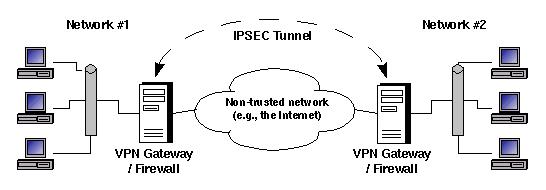
Figure 1. Simple Site-to-Site VPN Design
In Figure 1, each site's firewall acts as a tunnel endpoint. There are several good reasons to use a firewall as a VPN endpoint:
Convenience: most firewall platforms support IPSec or some other VPN protocol, eliminating the expense and time required to configure and administer separate VPN servers.
Security: a firewall acting as a VPN endpoint can regulate traffic entering and leaving VPN tunnels with excellent granularity and accuracy.
Simplicity: if your firewall and IPSec software were designed to run together on the same host, it can be much easier to get your tunnels working and to troubleshoot them when they don't.
However, there are several reasons why this type of setup may not be feasible or desirable:
Non-interoperability: if you aren't in control of both sides of the VPN tunnel (e.g., if you're connecting to a vendor's or partner's network), the remote firewall's VPN implementation may not be compatible with your firewall's.
Performance: if your firewall is already fully or over-subscribed doing its normal duties, it may not be able to support the added overhead of VPN authentication and encryption.
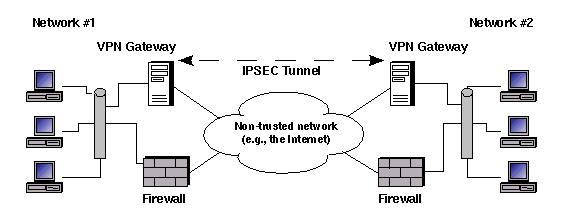
Figure 2. Alternative Site-to-Site VPN Design
In Figure 2, each VPN endpoint is a dedicated computer (in Figure 2 both endpoints are set up this way, but you can also mix and match, say, a combined firewall/VPN endpoint on one end and a split on the other). It may seem reckless to put any device in parallel with your firewall. Couldn't such a device be used as a back door?
Indeed, it could—unless the VPN server is carefully configured to accept only VPN traffic and its VPN software is carefully configured to accept VPN connections from only approved endpoints, i.e., using strong authentication mechanisms.
Let's jump right into FreeS/WAN and see how to set up a site-to-site VPN with endpoints secure enough to reside either on firewalls or on standalone hosts.
Figure 3 shows a site-to-site VPN scenario that's functionally equivalent to the one in Figure 1. That is, it also has the same host at each site serving as a combined Linux firewall and FreeS/WAN IPSec server. Figure 3, however, offers a bit more detail. First, you can see that each network is connected to the Internet via a local router. Second, Figure 3 shows the IP addresses needed for tunnel definitions (we'll see which IPs get used where shortly).
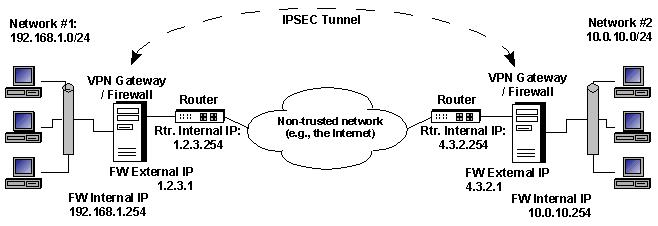
Figure 3. Our Example Site-to-Site VPN Scenario
In this scenario, we need to set up a VPN tunnel between two sites' firewalls' respective “external” interfaces. When a user on one site's LAN wishes to communicate with a host on the other LAN, the firewall sends those packets through the tunnel. Reply packets take the same path back through the tunnel. Hosts on either side may initiate connections through the tunnel.
The firewalls restrict what sort of data may enter and leave the tunnel at either side. On a combined iptables/FreeS/WAN server, these firewall rules can be the same, as though no tunnel were being used, even if network address translation (NAT) is involved. This point is explained later in this article.
A few important premises about this scenario should be noted. First, both firewalls are running Linux kernel version 2.4.18. Second, both firewalls' kernels have been patched with FreeS/WAN version 1.97 and had the user-space FreeS/WAN tools (same version) installed as well. Third, the two networks can reach each other without IPSec, i.e., in the clear. (We don't want them to communicate that way, but we need to know they could; otherwise troubleshooting VPN problems are much harder.)
Another ground rule for this scenario is using RSA authentication rather than a “shared secret”. While I don't want to completely re-explain last month's material on host key generation and maintenance, it's important to review the most important points.
You hopefully recall that each host running FreeS/WAN should have a unique host key; you should not use the default key provided by the FreeS/WAN binary package you installed. Once you've generated a new key on a given host, however, you'll be able to use that key for as many different tunnels as that host needs. The key remains useful for as long as the secret portion of the host key (stored in /etc/ipsec.secrets) is kept hidden or until advances in cryptanalysis render your host key too short. (Actually, the chances of this occurring before FreeS/WAN itself becomes obsolete for some reason are pretty slim.)
To generate a new host key using FreeS/WAN 1.92 or higher, enter this command:
# ipsec newhostkey --hostname my.host.fqdn \
--output /etc/ipsec.secrets --bits 2192
This generates a 2192-bit RSA key, saving both its public and private components in /etc/ipsec.secrets. I didn't point out last month that because these commands deal with RSA keys, longer key lengths are required than for, say, a block cipher such as 3DES.
Do not be tempted, therefore, to use a value of 128, 196 or some other three-figure number for newhostkey --bits. Public key mechanisms such as RSA and DSA work differently, and their keys must be roughly ten times longer than block- and stream-ciphers' keys. 1,096 bits is the smallest RSA key size you should even consider; 2,192 is much safer.
To display your new public key in a format that can be directly copied and pasted into tunnel definitions, use this command:
bash-# ipsec showhostkey --left
You can use the option --right instead if you want to print a rightrsasigkey statement instead of a leftrsakey statement.
Remember, the output of this command may be shared safely. It contains only the public component of your host's signing key. You may e-mail it without encryption, post it on a web site or set it to music and sing about it at your favorite coffee shop. This is why RSA authentication is more convenient than shared-secret authentication, in which you must securely and covertly send the authentication credentials (shared-secret string) to another site any time you wish to build an IPSec tunnel. RSA authentication allows you to be sloppy (except with /etc/ipsec.secrets, which must be kept root-readable-only at all times); shared-secret authentication does not.
FreeS/WAN's main configuration file, other than /etc/ipsec.secrets, is /etc/ipsec.conf. In the interest of simplifying things, FreeS/WAN was designed in such a way that tunnel definitions usually look the same on both endpoints of a FreeS/WAN tunnel. Most of the example lines that follow, therefore, are the same on both firewalls in our example scenario.
Last month I focused mainly on tunnel definitions. We'll get to them here, too. But first, let's delve a little deeper into the config setup and conn %default sections. Listing 1 shows a config setup for one of our firewalls (it doesn't matter which one).
Listing 1. Basic Setup in /etc/ipsec.conf
The first parameter in Listing 1, interfaces, is crucial. It defines the interface on which the host will listen for IPSec connections from other IPSec servers. This is not to be confused with the interface on which the host listens for packets sent through the tunnel. If you think of the Internet (or other untrusted network) as the outside and the local LAN as the inside, always make sure that the interfaces' parameter is set to your outside interface.
The two debug options, klipsdebug and plutodebug, determine how much logging is done by FreeS/WAN's kernel-interface dæmon (KLIPS) and IKE keying dæmon (Pluto), respectively. Both of these parameters accept the self-explanatory magic values all and none, plus a variety of specific IPSec attributes/events that can be logged. See the ipsec_klipsdebug(8) and ipse_pluto(8) man pages for complete lists of these.
The parameter plutoload specifies which tunnel definitions to initialize when FreeS/WAN starts up. The magic value %search tells Pluto to check each subsequent tunnel definition's auto parameter to determine this (i.e., each tunnel for which auto is set to add).
Similarly, the value plutostart tells Pluto which tunnels to try to connect to automatically when FreeS/WAN starts. In other words, whereas plutoload merely tells Pluto to allow other hosts to bring up specified tunnels, plutostart tells Pluto itself to bring up specified tunnels, without waiting for their other endpoints. Again, the %search value may be specified. In this case, it will match tunnel definitions in which auto is set to start.
Listing 2. Tunnel Defaults in /etc/ipsec.conf
Listing 2 shows the subsequent conn %default section in an ipsec.conf file. The first parameter in Listing 2, keyingtries, is set to zero, which actually translates to no limit. This means when Pluto tries to bring up or replace a tunnel, it tries to key it as many times as necessary. This is a reasonable setting for a site-to-site VPN in which both hosts have persistent network connections, but it's not for a remote-access VPN in which remote clients will be on-line only sporadically.
disablearrivalcheck, if set to no, causes KLIPS to make sure that each packet entering the host from an IPSec tunnel has plausible source- and destination-IP addresses in its header. The default value is yes, which prevents these checks, but you should set it to no unless you really know what you're doing.
Finally, authby lets you choose the default authentication method for tunnels, which, as I said earlier, will be via RSA (rsasig) for our example scenario. And now we arrive at our actual tunnel definition—it's displayed in Listing 3.
Listing 3. Tunnel Definition in /etc/ipsec.conf
Because this is a site-to-site scenario, FreeS/WAN's convention of server = left, remote-access clients = right isn't meaningful. So it's completely arbitrary which side is designated right or left. The important thing is to be consistent across the tunnel definitions in both hosts' setups. Here, the site to the left of the Internet (Figure 3) is left, and the site to the right of the Internet is right. That sounds obvious, but if I were to decide to make right left and vice versa, the tunnel would behave the same (provided I used the same configuration on both sides).
As you can see, in Listing 3, left is set to the external (Internet-reachable, tunnel-listening) interface's IP address. leftsubnet, however, is set to the address of the network that receives incoming packets (i.e., leaving the tunnel).
leftnexthop is the IP address of the next hop between the firewall/IPSec host and the Internet. And leftrsasigkey obviously is the host key of left. This line (and the comment above it) can be obtained verbatim by running the command ipsec showhostkey --left.
The right parameters are the same, but for the right side. I leave it to you to use your powers of deduction to figure out to which hosts in Figure 3 these parameters correspond.
Finally, we have the tunnel's auto parameter, which is set to start. When the Pluto dæmon executes its search for instructions on what to do with tunnel definitions at startup (as described in the section following Listing 1), this setting tells it to initiate the tunnel defined above.
As I've been hinting, in this example scenario, the /etc/ipsec.conf files for both firewalls and gateways are identical. Once they're set up, we can start IPSec on each host and start tunneling. The command to do this on most distributions is:
bash-# /etc/init.d/ipsec start
If IPSec is already running, use:
bash-# /etc/init.d/ipsec restartOnce IPSec has been (re)started on both hosts, the tunnel will come up, and each gateway will begin routing traffic addressed to the other network through the tunnel. This routing is done automatically, based on the leftsubnet and rightsubnet parameters defined in your tunnel definition in /etc/ipsec.conf.
Naturally, you'll want to restrict what sorts of things hosts from the other network may do on your network and vice versa. I stated earlier that firewall rules on a Linux host running FreeS/WAN aren't necessarily any different from when they are without tunneling. This even holds true with NAT. When writing your firewall rules on each gateway, set up FORWARD, POSTROUTING and PREROUTING rules the same as if you weren't using IPSec—just be careful about interfaces. If you use -i and -o parameters, don't say “eth0” if you mean “ipsec0” (or “ipsec+” if you mean “all tunnel interfaces”). When in doubt, try to stick to IP addresses rather than interface names in your firewall rules.
In addition, make sure that no NAT is performed on tunneled packets. IPSec packets' headers are checksummed in the body of each packet's data field. Rewriting the IP header (e.g., by translating source or destination IPs) violates this message-digest, and weirdness will ensue. You can do NAT on packets as they leave the tunnel or before they enter it, but not while they're in the process.
Whatever else you do, you will need at least three new rules on each gateway to allow IPSec key negotiation and tunneling. In the INPUT and OUTPUT chains, you'll need to permit packets sent to UDP port 500, IP protocol 50 packets and IP protocol 51 packets. The relevant rules on both gateways would look like what is shown in Listing 4.
With that, you're ready to connect your network securely and cheaply to those of your vendors, partners and acquaintances. Good luck!
Mick Bauer (mick@visi.com) is a network security consultant for Upstream Solutions, Inc., based in Minneapolis, Minnesota. He is the author of the upcoming O'Reilly book Building Secure Servers with Linux, composer of the “Network Engineering Polka” and a proud parent (of children).
