
The Linux USB Input Subsystem, Part I
The Linux USB input subsystem is a single, harmonized way to manage all input devices. This is a relatively new approach for Linux, with the system being partly incorporated in kernel version 2.4 and fully integrated in the 2.5 development series.
This article covers four basic areas: a description of what the input subsystem does, a short historical perspective on development, a description of how the input subsystem is implemented in the kernel and an overview of the user-space API for the input subsystem and how you can use it in your programs. The first three areas are discussed in this article. The user-space API, the final topic, will be discussed in Part II of this article.
The input subsystem is the part of the Linux kernel that manages the various input devices (such as keyboards, mice, joysticks, tablets and a wide range of other devices) that a user uses to interact with the kernel, command line and graphical user interface. This subsystem is included in the kernel because these devices usually are accessed through special hardware interfaces (such as serial ports, PS/2 ports, Apple Desktop Bus and the Universal Serial Bus), which are protected and managed by the kernel. The kernel then exposes the user input in a consistent, device-independent way to user space through a range of defined APIs.
The Linux input subsystem is primarily the work of Vojtech Pavlik, who saw the need for a flexible input system from his early work on joystick support for Linux and his later work on supporting USB. The first integration for the input subsystem replaced existing joystick and USB drivers in the 2.3 development kernel series. This support carried over to version 2.4, and input support in the 2.4 series is basically limited to joysticks and USB input devices.
The 2.5 development kernel series fully integrates the input subsystem. This tutorial is based on the full integration, which will be the input API for the 2.6 stable kernel. Although some differences exist in the user-space APIs between 2.4 and 2.5 kernels at the time of this writing, there is ongoing work to harmonize them—mainly by updating the 2.4 kernel.
The three elements of the input subsystem are the input core, drivers and event handlers. The relationship between them is shown in Figure 1. Note that while the normal path is from low-level hardware to drivers, drivers to input core, input core to handler and handler to user space, there usually is a return path as well. This return path allows for such things as setting the LEDs on a keyboard and providing motion commands to force feedback joysticks. Both directions use the same event definition, with different type identifiers.
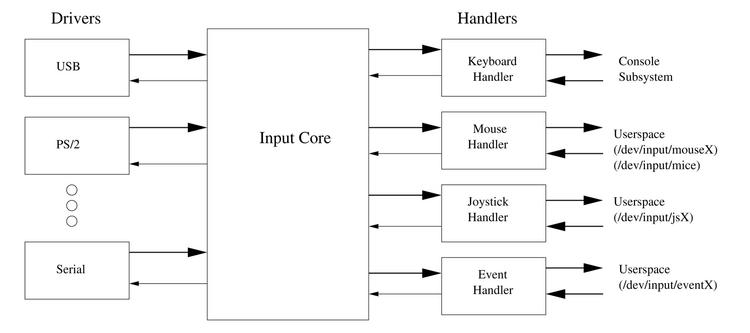
Figure 1. The Relationship between the Elements of the Input Subsystem
The interaction between various elements is through events, which are implemented as structures (see Listing 1). The first field (time) is a simple timestamp, while the other fields are more interesting. The type field shows the generic type of event being reported, for example, a key press or button press, relative motion (like moving a mouse) or absolute motion (like moving a joystick). The code field tells which of the various buttons or axes are being manipulated, while the value field tells you what the state or motion is. For example, if the type is a key or button, code tells you which key or button it is, and value tells you if the button has been pressed or released. Similarly, if type is a relative axis, then code tells you which axis, and value tells you how much motion you have and the direction of that motion on that axis. If you move a mouse in a diagonal direction, while simultaneously moving the scroll wheel, you will get three relative events per update: one for motion in the vertical direction (Y-axis), one for motion in the horizontal direction (X-axis) and one for motion of the wheel.
Listing 1. event-dev-struct.txt
Event handlers provide the interface to user space, converting the standard event format into the format required by a particular API. Handlers usually take care of the device nodes (/dev entries) too. The most common handler is the keyboard handler, which is the “standard input” that most programmers (especially C programmers) are familiar with.
Drivers usually interface with low-level hardware, such as USB, PCI memory or I/O regions, or serial port I/O regions. They convert the low-level hardware version of the user input into the standard event format before sending it to the input core. The input core uses a standard kernel plugin design, with input_register_device() used to add each device and input_unregister_device() used to remove it. The argument to these calls is the input_dev structure, which is shown in Listing 1. Although this structure looks quite large, most of the entries are provided to allow a driver to specify the capabilities of the device, such as which event types and codes may be sent or received by the device.
In addition to managing drivers and handlers, the input core also exports a useful /proc filesystem interface, which can be used to see what devices and handlers are currently active. Here is a typical example from /proc/bus/input/devices showing a USB mouse:
I: Bus=0003 Vendor=046d Product=c002 Version=0120
N: Name="Logitech USB-PS/2 Mouse M-BA47"
P: Phys=usb-00:01.2-2.2/input0
H: Handlers=mouse0 event2
B: EV=7
B: KEY=f0000 0 0 0 0 0 0 0 0
B: REL=103
The I: line is the identity information—showing bus type 3 (which is USB) and the vendor, product and version information from the USB descriptors in the mouse. The N: line shows the name, which in this case is a string provided by the USB descriptors. The P: line shows the physical device information; here, it's structure information comprised of the PCI address for the USB controller, the USB tree and the input interface. The input0 part indicates this is the first logical input device for the physical device. Some devices, such as multimedia keyboards, can map part of the physical device to one logical input device and map another part to a second logical input device. The H: line shows the handler drivers associated with this device; we'll discuss this in more detail later in the article. The various B: lines show the bitfields that identify the devices' capabilities, in this case some keys for the buttons and relative axes for the ball and the scroll wheel.
This /proc interface is a useful way to test some simple drivers. Let's consider the example of a driver that registers on init and unregisters on removal, as shown in Listing 2. This does some preliminary initialization using init_input_dev(). It sets up the name, physical and identification descriptors, and then sets up the bit arrays to indicate that the device is capable of providing one type of event (EV_KEY indicating buttons and keys) with two possible codes (KEY_A and KEY_B, indicating the key labels). The initialization routine then registers the device with the input core. If you add this code to the kernel (using modprobe), you can see the new device has been added to /proc/bus/input/devices, as shown below:
I: Bus=0019 Vendor=0001 Product=0001 Version=0100
N: Name="Example 1 device"
P: Phys=A/Fake/Path
H: Handlers=kbd event3
B: EV=3
B: KEY=10000 40000000
If we actually want to send events from our device driver to the input core, we need to call input_event or one of the convenience wrappers, such as input_report_key or input_report_abs, provided in <linux/input.h>. An example of code that does this is shown in Listing 3. This example is basically the same setup as the previous one, except that we add a timer that calls ex2_timeout(). This new routine sends four presses of KEY_A and four presses of KEY_B. Note that 16 key press events are created in total, because a separate event is created for each press and each release. These events are passed to the input core and, in turn, to the keyboard handler, which will cause the pattern “aaaabbbb” or “AAAABBBB”, depending on the Shift key selection, to be transmitted to the console or command line. The timer is then set up to run four seconds later, looping infinitely. The four-second delay is intended to give you enough time to remove the module when you have seen enough of the pattern. If you reduce the delay, make sure you have another way of accessing the system, such as an SSH connection. Also note the call to the input_sync function. This function is used to inform the event handler (in this case, the keyboard handler) that the device has transmitted an internally consistent set of data. The handler may choose to buffer events until input_sync is called.
Let's look at one final example of a driver, this time showing how relative information is provided, shown in Listing 4. This example is a driver that emulates a mouse. The initial setup configures the device to have two relative axes (REL_X and REL_Y) and one key (BTN_LEFT). As in the previous example, we use a timer to run ex3_timeout. This timer then calls input_report_rel to provide small relative motion (five unit steps—the relative movement is the third argument to the function) consisting of 30 steps right, 30 steps down, 30 steps left and 30 steps up, so the cursor is moved in a square pattern. To provide the illusion of movement, the timeout is only 20 milliseconds. Again, note the call to input_sync, which is used to ensure that input handlers only process events that make up a consistent set. This specification wasn't strictly necessary in our previous example. But, it is definitely required to convey information like relative movement to the input core, because more than one axis may be required to represent movement. If you were moving diagonally, you would do something like:
...
input_report_rel(..., REL_X, ...);
input_report_rel(..., REL_Y, ...);
input_sync(...);
...
which ensures that the mouse will move diagonally and not across, then up.
In the previous section, we saw that the device drivers basically sat between the hardware and the input core, translating hardware events, usually interrupts, into input events. To make use of those input events, we use handlers, which provide a user-space interface.
The input subsystem includes most of the handlers you'll likely need: a keyboard handler to provide a console, a mouse handler for applications like the X Window System, a joystick handler for games and also a touchscreen handler. There is also a general-purpose handler called the event handler, which basically provides input events to user space. This means you almost never need to write a handler in the kernel, because you can do the same thing with the event handler and equivalent code in user space. This API discussion is covered in the second part of this article.
I'd like to thank Greg Kroah-Hartman and Vojtech Pavlik for their assistance with this article.

Brad Hards is the technical director for Sigma Bravo, a small professional services company in Canberra. In addition to Linux, his technical focus includes aircraft system integration and certification, GPS and electronic warfare. Comments on this article can be sent to bradh@frogmouth.net.
