
Kylix 3.0 Enterprise (with C++)
Kylix is a powerful RAD (rapid application development) tool. All three flavors of Kylix 3.0 (Open, Professional and Enterprise) come with both C++ and Delphi (Pascal) compilers. The Enterprise edition I reviewed comes with more than 190 components for rapid application development. On top of generic GUI-building components, it also comes with Borland's dbExpress architecture, which enables native access to DB2, Oracle9i, Informix, Informix SE, InterBase, MySQL and PostgreSQL databases. It also comes with BizSnap, WebSnap and DataSnap components, which enable easy development of web services that interoperate with enterprise databases.
The Kylix 3.0 Enterprise package contains a lot of documentation:
Quick Start Guide: an introduction to the product. You will learn how to customize the IDE, and it will also give you an idea of the terminology used to describe various parts of the user interface and its functions.
Kylix Developers Guide: a decent-sized book with in-depth information on usage and development with Kylix. It contains numerous code examples in both C++ and Delphi syntax. It also gives a rather detailed description of the CLX component library. Most of the CLX components are portable between Windows and Linux. For the components that are not portable, this guide has a whole chapter dedicated to porting applications from Windows to Linux.
Delphi Language Guide: the name of this guide says it all. It comes in handy if you've never used Object Pascal but are interested in learning. It also can be a good reference if you are a Delphi programmer.
CLX (pronounced “clicks”) Object Hierarchy poster: this poster shows in an easy-to-read tree view how all the CLX components (objects) fit together. It uses color coding to represent the editions of Kylix in which the objects are available. The Enterprise edition has the most components, and the Open edition has the least.
Borland Solution Partner Resource Guide: creating components for Kylix is a business in itself. Many different companies write various components for Kylix. For a few hundred dollars, most of the solution partners will provide you with objects that can drastically cut down on your development time. A full list of solution partners is available at www.BorlandSolutions.com.
Kylix Enterprise (CD): contains the Kylix development executables, libraries and other resources, including source code for all the components. The full component source is useful, but because all the components were written in Delphi, they might be a bit hard to understand if you are not a Pascal buff. The CD also contains both C++ and Delphi versions of the compiler and a lot of sample code. After installing the software, take a look at the examples in the kylix3/examples/ directory and the tutorials in the kylix3/documentation directory.
Companion Tools (CD): I definitely recommend browsing through this CD as it includes a lot of nice tools. This software doesn't belong to Borland; the tools were written by individuals, groups or corporations. Here you will find various components such as compression, profiling, scripting and game components. Each and every tool comes with its own license, and it's nice to find a lot of open-source code under the GPL and LGPL.
Enterprise Server (CD): here you will find Borland's application server. The server comes with a development license; a deployment license key needs to be obtained separately.
Rave Reports (CD): this visual designer by Nevrona Design lets you create custom reports. Once you start the designer, you can point and click to design the look of your report. You can generate reports through different data sources, including database lookups. Once you have your design ready, you save the design into a file, which is later used by calling on the Rave components to generate a report.
On the installation CD are several text files that you should probably read before installing. They contain descriptions of caveats associated with the installation, development, building and deployment process. After reading the text files on the CD, I ran the installation script. The software can be installed in text mode or graphical mode under X. The script will check to see if it can make a connection to the X server. If it can, the installation process will run under X. This portion of the installation actually uses the Loki installer, and everything is pretty straightforward. One problem was that it didn't create the KDE icons, despite the fact that I checked the box for the installer to do so.
When you run the command startbcb to bring up the C++ version of the IDE, a registration window will pop up. After filling in the data, the on-line registration went without a problem. After the registration window is closed, a nice splash window pops up. It takes quite a bit of time to load the IDE, so I can see the need for a splash screen. When the development environment is fully loaded, a default project is generated.
The IDE is comprised of several floating windows. The main window is docked to the top of the desktop, and it contains all the menus and tabs with the components that are available for use. The second window is the Object Inspector, which shows all the properties and events of an object. A property of a visible component is, for example, what color it should be, its placement rules, caption and more. Under the Events tab of the Object Inspector, you can see all the events this component supports, such as On Click, On Start Drag, On Drag Over and more. The third window is the code editor that shows files that are a part of your program. There is a tab for each open file plus a tab called Diagram. You can drag and drop components onto the Diagram tab from the Object Tree View to create diagrams of your project. The fourth window is the Object Tree View, which shows the tree hierarchy of your program as you add components to it. For a visual representation, take a look at Figure 1.
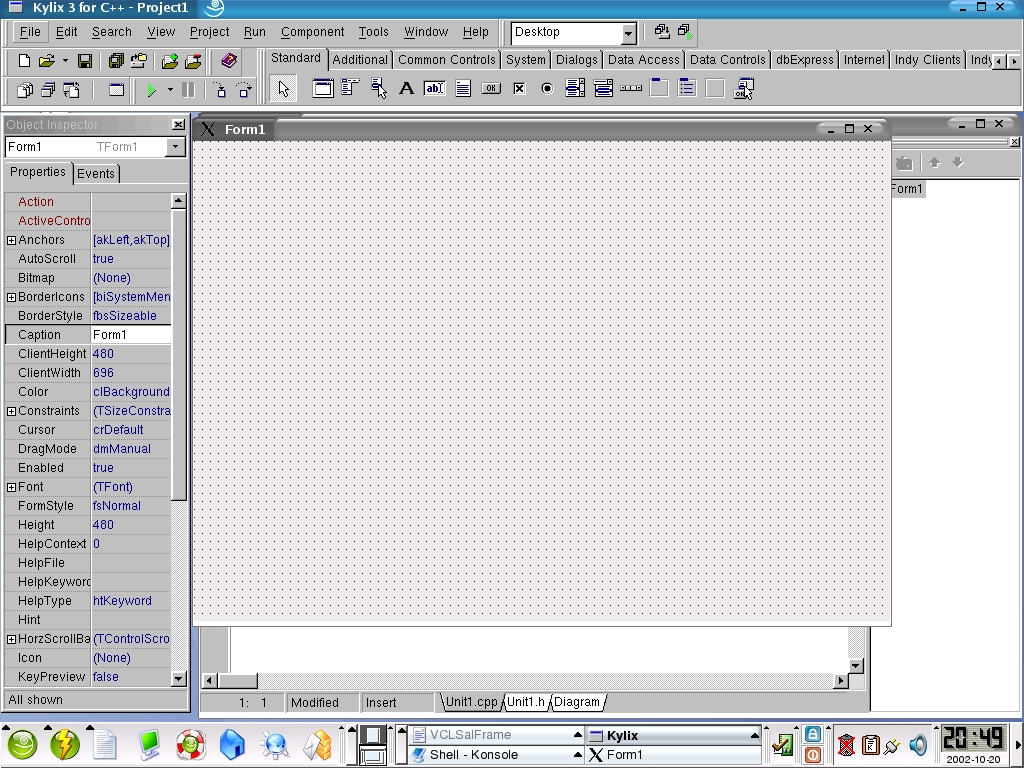
Figure 1. A C++ Application in the IDE
I decided to press the Run button with the default project. It turns out that my default installation of Linux didn't install the glibc-devel package. As you can imagine, this generated a lot of compile errors. It's not a big deal, but I would expect the installer to warn me about missing package dependencies. I installed the RPM and pressed the Run button one more time. This time, the compiler finished, but the linker had problems finding libX11.so. I knew exactly what was wrong; reading all the Readme files before the installation paid off. SuSE installer didn't create the symbolic link libX11.so to libX11.so.6. After I created the link manually, everything worked. I was ready to write, or should I say “point and click”, some code.
The whole IDE interface might be a bit confusing at first. After you get a feel for it, you will find it's really easy to build applications. Application design works exactly like a WYSIWG editor. I grab a few components from the component bar and drop them onto my form. I assign one or two of the components properties. What I am looking at is an application that I have not even compiled yet, but the database lookups are running. Simply setting the Active properties to true on the database components was enough to get queries going. I can see how my application would look if I had actually compiled and ran it. Take a look at Figure 2 to see what I mean.
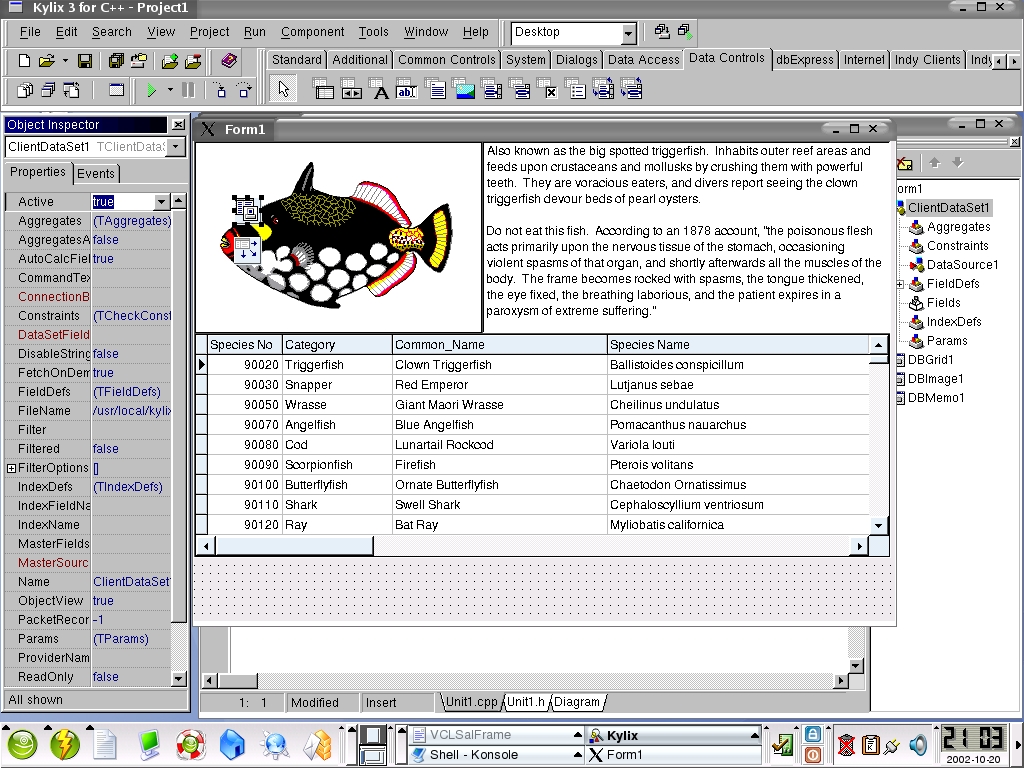
Figure 2. Previewing an Application with Real Data before Compiling
After clicking around I decided that I wanted to see how the actual coding experience is with the tool. I grabbed a button from the component bar and placed it onto my form (application main window). When I double-clicked this button, the Object Inspector switched to the Events tab and selected the OnClick event. Meanwhile in the code editor, a code framework for the click event was built. My keyboard focus was placed at the function block start, ready for code entry. I wanted the application to close when I clicked the button that I just placed on the form. I started typing “Application->” and a small window popped up in the editor. It listed all the functions and properties of my application instance called “Application” (Figure 3).
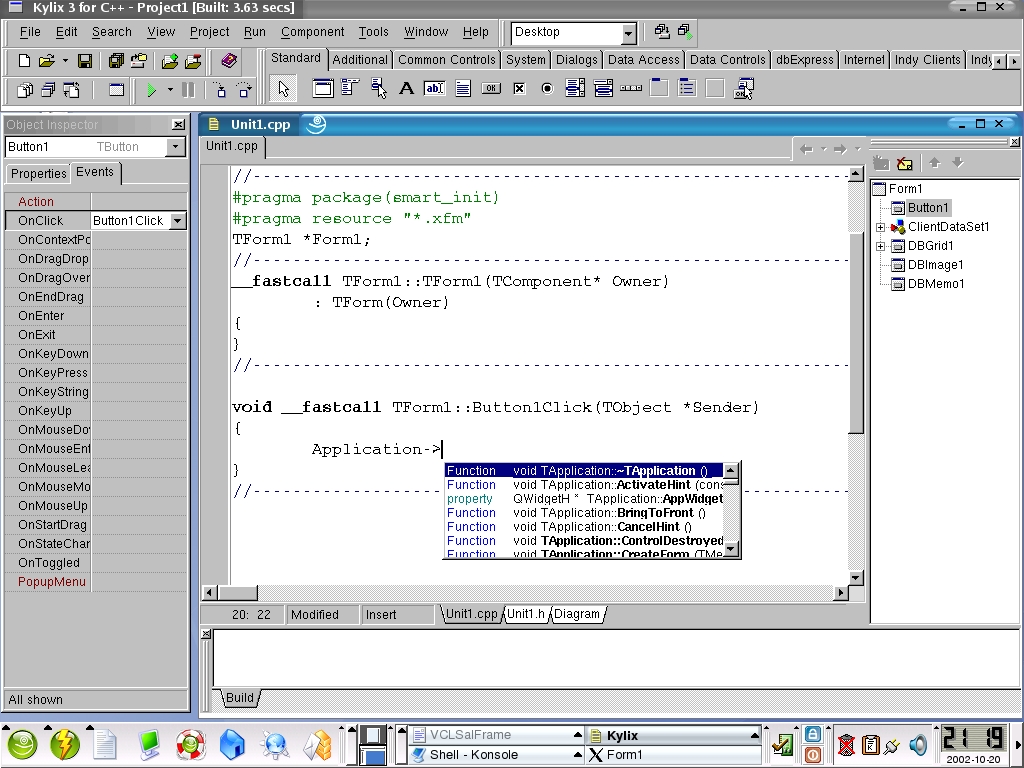
Figure 3. Automatic Function Name Completion in the Editor
As I typed in the letter T of the function name (Terminate) that I wanted to call, the code-completion feature eliminated properties and functions that didn't match up. When I saw what I was looking for, I scrolled up and down through the list and pressed Enter. That filled in the code in the editor, then I need to add the semicolon at the end. I thought to myself “that's nice but how about if I spice it up a bit?” I included a Linux header file called utsname.h and instantiated a structure of type utsname and name tst. I typed in tst. and waited to see what would happen. The same window popped up and listed all the structure members and their types (e.g., char[65]). This comes in handy in those “what's that function called again?” moments.
Borland introduced Delphi for Windows a long time ago, with many of the Kylix features. Years later they introduced the C++ Builder for Windows, which as the name suggests, was the C++ version of Delphi. It is nice that a C++ edition of Kylix for Linux is finally here. All in all, I like the design of Kylix. Despite the fact that it's not a new concept, it still has benefits.
After playing around with Kylix some more I found a few bugs in the software. When trying to assign images to components, the application would freeze. I am guessing it's possibly some sort of synchronization issue because attaching to the Kylix process with strace brought it back to life. I also found that the code-completion window sometimes refused to pop up. To put things in perspective I must say that Kylix was not certified to run on the distribution that I had freshly installed on my laptop. I used SuSE 8.1, although Kylix 3.0 was certified to run on SuSE 7.3.
As a final thought, if you are looking into evaluating development tools for enterprise applications I would recommend putting Kylix 3.0 on your “tools to evaluate” list.
email: visitor@xalien.org
Dragan Stancevic is a kernel and hardware bring-up engineer in his late twenties. Although Dragan is a software engineer by profession, he has a deep interest in applied physics and has been known to play with extremely high voltages in his free time.
