
Security Tools in Linux Distributions, Part I
With so many security tools available, it can be hard to know what to use. Many users do not want to be bothered with downloading, learning and configuring security software when so many other things need to be done. The good news is tools that system administrators would manually install, and checks that they would write scripts to do as part of a security audit, are available out of the box in Linux distributions.
People rarely notice the security enhancements until they start receiving security reports or until they have been hacked. Most of the time, security features are the last bullets on the marketing material and glossed over in product reviews. Although many reviews of each distribution appear with each new release, none seem to focus much on the security tools.
This article, presented in two parts, is an overview of the security enhancements of two Linux distributions, Red Hat 7.3 and SuSE 8.0, and of how to maximize security simply by selecting and using the software provided in the distribution. It should be noted at the start that security is an ongoing process, and no one program can keep a system completely secure. But you can get a head start by starting with a secure distribution and using good tools that are readily available.
The article discusses two Linux distributions, Red Hat, the best known, and SuSE, the most technologically advanced. But many of the same tools are available in other distributions, such as Mandrake, Debian and Turbolinux. The article starts with selecting security tools during the installation, and then shows how to use the tools to harden the operating system and monitor for intrusions.
This is not an attempt to rate the security of the distributions, because many other issues come into play, such as total number of packages in the distribution, number of security alerts, timeliness of patches and number of releases. To limit the scope of the discussion, this article focuses on hardening and monitoring tools that come on the distribution media. The article also does not address the issues of on-line updates, securing and maintaining applications or firewalls, due to space limitations.
The security software in Red Hat 7.3 is distributed in different software package groups of the installation. Starting with the default workstation installation as a reference point, Red Hat's installation menu shows that the security applications are located in various software packages groups, some in applications/systems, some in applications/internet and others in system environment/dæmons group, depending on their usage. This is not surprising because many utilities can be used as security tools, including top, ps and tcpdump. Rather than search through all the software groups individually, we can select the security applications from the flat file view listing of all programs.
Some notable security applications selected by default include Logwatch, Nmap, tcp_wrappers and Xinetd. Programs that were available, but not selected, are Arpwatch, Ethereal, Ethereal Gnome (Ethereal's GUI), Iptraf and Tripwire. Using the default workstation installation, we added Tripwire, Iptraf, Arpwatch, Ethereal and Ethereal Gnome as optional tools to the installation.
Red Hat 7.3 | SuSE 8.0 | |
Tool | ||
aide | A | |
arpwatch | A | A |
ethereal | A | X |
hardening program | Harden_Suse (A) | |
Iptraf | A | X |
Logdigest | A | |
logwatch | X | |
nessus | A | |
nmap | X | A |
saint | A | |
scanlogd | A | |
security_scripts | seccheck (A) | |
snort | A | |
tcp_wrappers (tcpd) | X | X |
tripwire | A | A |
X = installed by defaultA = available as optionblank = not available
Once we have installed the system operating, the next step is to secure, or harden, it. This consists of limiting the network services and ensuring that critical system files are not vulnerable. Limiting network services means removing all unwanted network services and restricting the necessary ones. Network services can be started in two ways: as a standalone dæmon started by the application or on demand by a services dæmon, such as Inetd (internet services dæmon) or Xinetd (extended internet services dæmon).
Services started on demand by a service dæmon also can be routed through an access control dæmon called tcp_wrappers to restrict access to the service. Typically this means changing the Inetd configuration file in /etc/inetd.conf to shut down all the ports and services we don't want. Then the connection is routed through the tcp_wrapper dæmon, tcpd, to filter the connection based on IP and service before starting the service.
Red Hat, starting with 7.0, uses Xinetd, rather than Inetd, to control services connections. Xinetd controls network connection requests, such as Telnet, finger and FTP, in a similar manner to Inetd, but Xinetd allows for extended functionality, including limiting Denial of Service (DoS) attacks. The Xinetd services configuration files are located in /etc/xinetd.d rather than /etc/inetd.conf. Red Hat disables all services in the workstation install and adds the Xinetd configuration files as part of the software package. A closer look at the config files in xinetd.d shows that the services are not being routed through tcp_wrappers by default. Previous versions of Red Hat that used Inetd had tcp_wrappers enabled by default.
The danger here exists because tcp_wrappers is installed by default and the hosts.allow and hosts.deny files already exist in /etc, so users may mistakenly assume that tcp_wrappers is being used on service connections. They may run applications to take advantage of tcp_wrappers, when in fact Xinetd is not using tcp_wrappers. Users can get around not using tcp_wrappers by enabling options to filter packets using the firewall rather than tcp_wrappers.
The next step in hardening a system is to ensure the critical system files do not have weak file permissions, such as world-writable binaries. Since no harden scripts are included as part of the Red Hat 7.3 distribution, you have to trust the system file permission scheme installed by default, unless you use an external program such as Bastille Linux. (See www.bastille-linux.org.)
Security is an ongoing process, not an end state. Staying secure means staying informed about what is happening with your system. To this end, intrusion detection tools can check for misuse or anomalies in the system and alert you to the fact that the system has been probed and perhaps even cracked. Two common types of intrusion detection tools can be used: host-based intrusion detection systems (HIDS) and network-based intrusion detection systems(NIDS). Red Hat 7.3 has both.
Red Hat 7.3 installs Logwatch as a HIDS monitoring tools by default. Logwatch is an analysis and reporting program for system logs. It saves a tremendous amount of time by sorting the information in the system logs and presenting it in a summarized form. It breaks down the information into sections, reporting on changes in system levels, modules loaded, number and bytes of mail transferred, dæmon messages and from where and when a user logged on. Red Hat also installs a Logwatch crontab in /etc/cron.daily by default to parse the system log and send the results to root after midnight. Logwatch is written in Perl and can be customized by editing /etc/log.d/logwatch.conf. It allows plugin modules to analyze logs for specific applications, such as proftpd, Samba and ssh. Checking logs is one of the most important and most tedious tasks for a system administrator. Therefore, a log analyzer is one of the most useful security tools for any system administrator.
Tripwire, on the other hand, is a HIDS program that we installed as an option. Tripwire is a system file integrity checker that creates a database of file signatures. It can be used to alert you to changes in the filesystem. When Tripwire is installed, Red Hat automatically adds a crontab to /etc/cron.daily that checks the filesystem every night.
Before Tripwire will work correctly, you have to run the install script /etc/tripwire/twinstall.sh to create the local- and site-encrypted keys and write the policy file. The twinstall scripts makes setting up Tripwire a breeze. But one annoyance is the Tripwire policy file is not up to date and contains entries for files that no longer exist. This will generate error messages whenever Tripwire is run. Because there is no updated Tripwire signature file from Tripwire.org, you will have to edit the Tripwire policy file yourself to get rid of the error messages.
After setting up the encrypted keys and policy file, you need to create the Tripwire database by running
# tripwire --init.
This will create a pristine database from which you can compare future Tripwire checks. Tripwire should be installed and initialized before putting the system on the network. It is a good idea to keep a copy of the database and policy file on CDR in case your system is cracked and the database deleted.
Nmap is a port scanner installed by default. It can be used to do a sanity check on your system by making sure only the enabled services are running. Nmap can be used to determine which hosts are up in a network and the network services they offer. It supports a variety of sweeps and can identify, or fingerprint, an operating system by detecting the characteristics of a host's response to the port connections. Nmap is considered to be one of the best tools in its class, and it has many addons. So use it to secure your system, because hackers will be using it to probe your system.
To use Nmap, type
# nmap localhost
Anyone administering a system should use Nmap periodically to check that no new service has been added to the system. Strange network service ports indicate that your system might have been cracked.
Arpwatch, Ethereal and Iptraf are optional NIDS tools included in Red Hat 7.3. Arpwatch monitors network IP and Ethernet address pairs to check for possible IP spoofing on your network. It can be started as a system process from /etc/rc.d/init.d/arpwatch. It listens on the network and sends a report to root whenever a network IP and Ethernet address pair changes. This may not be very useful for systems using DHCP, because the IP/Ethernet address pairing may change as the DHCP IP lease expires and a new IP is assigned to a machine.
Ethereal and Iptraf are both network traffic analyzers. They collect and present network packet information that keeps you aware of the traffic on your network. System administrators use them to monitor the network for suspicious activity and congestion. Iptraf collects and displays the packet information in real-time using an ncurses terminal display. To run iptraf, type
# iptraf
The default options work well, and there are options to turn on features such as reverse DNS lookup, services name lookup, logging and promiscuous mode. This is a good tool to use if you are not in a graphical environment.
Ethereal collects information from the network and displays information either in real-time or from a network traffic capture file. Ethereal has two components in Red Hat: the Ethereal package, the terminal capture portion of the program, and Ethereal Gnome, the X display portion of the program. If both Ethereal packages are installed, Ethereal can be started by typing
# ethereal
in an X terminal. It can read packets captured from a number of packet sniffers, including tcpdump, Sun snoop, AIX's iptrace, Cisco's Secure IDS IPlog and Microsoft's Network Monitor. It also supports filters and plugins.
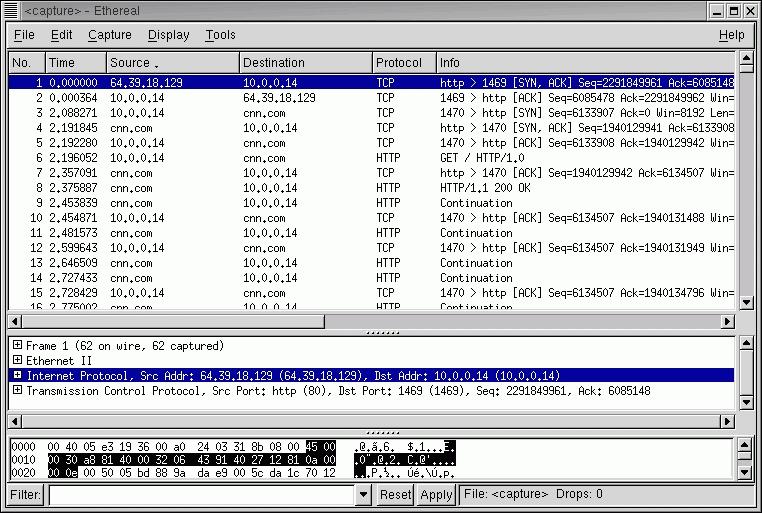
Figure 1. Ethereal GUI
Both Iptraf and Ethereal are good information collection tools, but they are usually run on an as-needed basis. If you feel your network is unusually slow, they can be used to collect information about network activity. Unusual traffic to or from your host, or to or from other hosts, may be an indication that something is going on that should not be, such as a compromised host attacking another system.
In part two of this article, I'll look at the security tools included in the SuSE 8.0 distribution.
For more detail discussions of the tools in this article, see:
"Using xinetd", Jose Nazario, Linux Journal, March 2001.
"Checking Your Work with Scanners, Part 1: nmap", Mick Bauer, Linux Journal, May 2001.
"Intrusion Detection for the Masses", Mick Bauer Linux Journal, July 2001.
"Understanding IDS for Linux", Pedro Bueno, Linux Journal, May 2002.
"Checking Your Work with Scanners, Part II: Nessus", Mick Bauer, Linux Journal, May 2001.
For more information about Linux distribution features, see "2001 Linux Functional Review", D.H. Brown Associates, Inc, September 2001.
For more information on widely used security tools, visit "Top 50 Security Tools"
Security Consensus Operational Readiness Evaluation, Linux.doc Checklist
For more information about Harden_Suse, visit Marc Heuse's web site.
For more about scanlogd, see the Scanlogd man page.
Bobby S. Wen is a senior technical manager with two engineering degrees and an MBA. He started playing with Linux in 1994 and has been addicted ever since. In his spare time, he tries to prevent his children from hacking into the home gateway server and turning on chat and file sharing.
email: bwen@yahoo.com
