
Linux from Kindergarten to High School
February 1st, 2003 by Michael Surran in
As the bell rings to begin class at Greater Houlton Christian Academy, enthusiastic students sit down at their shiny, new computer workstations. In one corner, the red cabinet housing the server hums quietly as two stuffed penguins look on fondly from their perch. Other penguins keep watch from different locations as the students enter their user names and passwords to access their accounts. Ask a student who “Tux” is, and he or she will point to the large penguin painted on the front wall of the computer lab and say, “He's the Linux penguin!” About this time KDE has loaded, and young boys and girls are opening the application they need for class as easily as kicking a ball.

Figure 1. First graders learning some penguin art fundamentals.
Now for a little history. Greater Houlton Christian Academy (GHCA) is a private school and nonprofit organization in Maine. As such, it does not have the same access to funding as the public school system. As the computer science teacher and system administrator, this means I have to be creative about providing our students with computer technology while working with a tight budget. In the past I relied on area businesses and generous individuals to donate their used computers. While these donations were a great blessing to us, they were a temporary solution at best.
Last year it became quite evident that we would need to replace our old, secondhand computers running Windows 95. The decision to move from donated computers to new computers was based on many factors, though our primary goal was to make sure our students had the best technology available for the enhancement of their educational experience. Therefore, this would be a software upgrade as well as a hardware upgrade. In fact, choosing the software was by far the bigger challenge.
Interestingly enough, it was during this time that many schools in the western US were being audited by Microsoft concerning the school's use of Windows and Office software. I began to realize my ignorance concerning exactly how strict and inflexible the Microsoft EULA is. It was also during this time that Microsoft's new licensing initiative, called Software Assurance, was causing quite a stir in the tech headlines. As my research opened my eyes to the various limitations to proprietary software, I began to think that the answer for us might be found in open-source software.
The decision to switch to an open-source platform for our new computer lab was not an easy one. My experience was with DOS and various versions of Windows and not with UNIX-compatible operating systems. I had experimented with Linux a few years earlier but found it somewhat difficult and incomplete. Because some time had passed, I decided to give Linux another try. Going with Mandrake's 8.0 distribution, I installed Linux at home to see if it could replace Windows in a desktop environment. To my amazement, I found Linux to be much more capable this time around. I was one step closer to making my decision to switch our computer lab to the Linux OS.
Other factors went into the final decision to go with open-source software, not the least of which was cost. By purchasing bare-bones computer “kits”, we were able to save considerable money on the hardware. Part of the savings in purchasing a bare-bones system is that the computer does not come with an operating system. We knew by then we would have to spend more money on software than we did on hardware if we went with Microsoft. Not only would I need to consider the initial purchase of the operating system and application software, but I would also need to factor in the costs of upgrading our software every couple of years. Needless to say, going with an open-source platform would save us considerable money now and in the future.
Another key issue was flexibility. As many of you know, it takes time to install an operating system, customize it for the particular hardware it runs on and install the desired applications. Having purchased 20 new, identical computers, it made sense to completely configure one machine and then clone the hard drive to the other 19 computers. However, Microsoft's EULA prevents a user from doing this, even if they have 20 copies of Windows. Not only would Linux save me considerable time by allowing me to clone my configured PC, it also gave me great flexibility in the degree to which I could customize the OS for the hardware. By recompiling the kernel to take advantage of our specific hardware, I could fine-tune the OS to run at peak performance. Linux would even save us money in the cloning process, thanks to the dd command.
A few aspects, however, made the decision to switch to Linux a difficult one. The smaller software base to choose from and the lack of mature drivers for our hardware were among the lesser obstacles. The major obstacle was my own lack of experience with the Linux OS. In fact, most of the money and time spent in the software upgrade of our computer lab was for a shelf full of books I had to purchase and read to really feel confident using and teaching Linux. It isn't always easy to teach an old dog new tricks, but I found the experience one of the most challenging and rewarding experiences of my IT career.
Today our private school of over 170 students has one of the finest computer labs in Maine. We have 20 computers with Athlon 1600+ XP processors, 128MB of RAM, 20GB hard drives and all the accessories—3-D graphics, sound, 17" monitors and 100Mbps Ethernet networking. Our computers run Mandrake Linux 8.2 with KDE 3.0.2. What is most amazing is we upgraded our computer lab for under half the cost of what many neighboring schools paid for inferior equipment. Most of this savings was the result of switching to Linux.
Our servers also run Linux. Using NFS, students can access their accounts from any computer in the lab. Student- and staff-owned files are backed up on a daily basis, so gone are the days of “the computer lost my homework.” Our proxy server runs Squid to help speed our wireless internet connection to 20 workstations, and we use proxy software along with iptables to provide firewall protection. A nice program called Dansguardian provides filtering to protect our children from pornography and other inappropriate content.
Many of you may be asking at this point, “How do you use Linux in teaching your students?” GHCA is a K-12 school, and so we strive to offer some level of computer training for each grade. Kindergarten students, for example, can use such programs as Potato Guy to practice hand-eye coordination and familiarize themselves with how to use a mouse to manipulate objects on the computer screen. Elementary and secondary teachers integrate the computer lab into their curriculum by using the computer for research, multimedia enhancements or even something simple as coloring digital pictures.
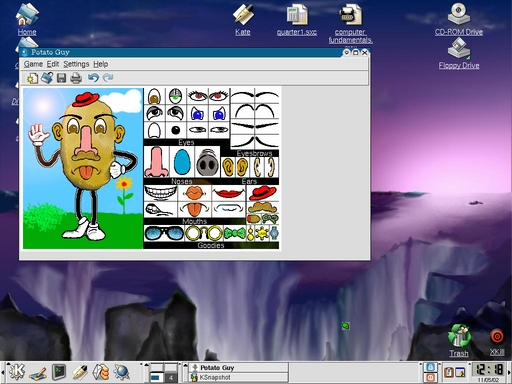
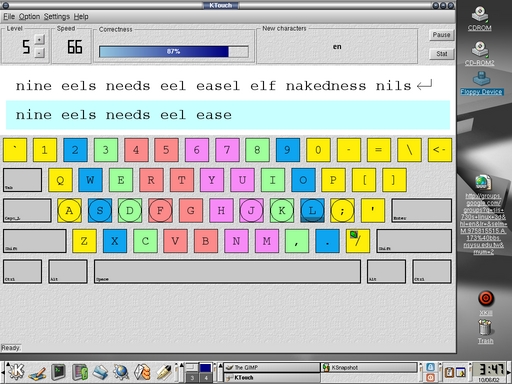
Starting with grade seven, education in computer science takes a more formal approach. Seventh graders are taught keyboarding skills using programs such as KTouch and TuxTyping. Grade-eight students are taught the basics of programming with the kate editor and yabasic interpreter. It is during this class that students gain a better understanding of how computers process instructions.
Computer Fundamentals is a one-credit course that introduces the ninth-grade student to “how a computer works” and “how to work a computer”. During the second semester, students learn about the purpose and use of the operating system and various applications, such as word processors, spreadsheets and web browsers. Because our computers run Linux, it is the Linux OS and open-source software that students learn in this class. Being sensitive to the fact that Microsoft currently dominates the PC market in corporate America, I do spend time discussing the similarities and differences between Linux and Windows.
Tenth- through twelfth-grade students can chose from a variety of computer electives, including how to upgrade and repair computers, web site design, advanced programming and even an upcoming course in robotics. In making the switch to Linux, I easily found all the tools needed to teach these courses using open-source software. In many cases, the open-source software we now use is superior to the proprietary software originally donated to us.
This is our first year with our new computer lab, and I am very pleased with how it is progressing. One of the most pleasing experiences I am having as a system administrator of a Linux-based lab is the actual ease of administration. Once I set something up in Linux, I rarely need to worry about it again. This was not the case with Windows. Last year we were constantly suffering from system crashes, frozen servers, strange bugs and the infamous “blue screen of death”. Needless to say, it was a frustrating situation for many students. While Linux is not bug-free, it has been a far more stable operating system for both our workstations and servers. Linux also has shown itself to be a much more versatile operating system to administer in a network environment. My job is more pleasurable thanks to our switch to Linux.
As a teacher of computer science, I am finding this year a fascinating test for Linux. Very few of our students, parents or teachers knew what Linux was before this year. I have actually found this to be a great advantage in teaching computers. In the past, I have found students to be disinterested in learning about the personal computer running Windows, because it is something most of them grew up with at home. This lack of interest made it more difficult to teach the more-advanced aspects of the operating system. However, Linux is something completely new, different and unexplored. Instead of being intimidated by the change, as many adults might be, young people are excited to explore the “uncharted territory”. This opens a door for me as a teacher, allowing me to educate eager minds in the more-advanced aspects of computer operating systems and software. In fact, it only took two weeks until students began to ask me, “Where can I get Linux?”
People sometimes ask me, “Is teaching our students Linux preparing them for the workplace?” This question is based on the fact that Microsoft is the current dominating presence in operating systems and office software. It is a question I have thought over a long time, and the answer I always come up with is, “Yes, most definitely.” The basic principles of any type of operating system, office application or other similarly grouped software are the same. A student who becomes proficient in Linux will not find themselves lost in a Windows environment. I have found Linux to be the more advanced of the two operating systems, yet our students are very quickly and easily learning it. The process of copying a file or formatting a paragraph is not so different between one operating system and the other. The important thing is we are able to offer the latest in hardware and software tools to train our students in these fundamental principles—something we could not do if we went with proprietary software.
Another question that may be even more important to ask is, “What is the future of Linux?” When our students graduate a few years from now, will they enter a Microsoft-dominated workplace or will the tide have changed? Even in our small New England town of Houlton, Maine, businesses are beginning to look to Linux as an alternative to proprietary operating systems. These businesses will need qualified personnel familiar with the Linux operating system and open-source applications. Greater Houlton Christian Academy will be graduating young men and women who will be able to meet that need, a claim not many schools in our nation can currently make. In fact, some of our students may go on to write the future applications for Linux, giving back to the community that helped them during their school years.
For us, switching to open-source software running on the Linux operating system has been the right choice, allowing us to provide our students with modern equipment and software for a fraction of the cost of a computer lab running proprietary software. If Linux continues to grow in popularity and gain a foothold in the workplace, we will look back at our choice as one of the most important decisions we've ever made.
Special Magazine Offer -- 2 Free Trial Issues!
Receive 2 free trial issues of Linux Journal as well as instant online access to current and past issues. There's NO RISK and NO OBLIGATION to buy. CLICK HERE for offer
Linux Journal: delivering readers the advice and inspiration they need to get the most out of their Linux systems since 1994.
Sorry, offer available in the US only. International orders, click here.
Subscribe now!
Recently Popular
| Linux HOWTO: Video Editing Magic with ffmpeg | Jul-23-08 |
| Man vs. Myth: Greg Kroah-Hartman and the Kernel Driver Project | Jul-21-08 |
| Google Gadgets for Linux | Jul-21-08 |
| Building a Call Center with LTSP and Soft Phones | Aug-25-05 |
| Review: HP 2133 Mini-Note | Jul-16-08 |
| Boot with GRUB | May-01-01 |
Featured Videos
Non-linear video editing tools are great, but they're not always the best tool for the job. This is where a powerful tool like ffmpeg becomes useful. This tutorial by Elliot Isaacson covers the basics of transcoding video, as well as more advanced tricks like creating animations, screen captures, and slow motion effects.
Shawn Powers reviews the HP Mini-Note portable computer.
Thanks to our sponsor: Silicon Mechanics
Silicon Mechanics is a leading manufacturer of rackmount servers, storage, and high performance computing hardware. The best warranty offerings available are backed by experts dedicated to customer satisfaction.
From the Magazine
August 2008, #172
There's nuttin like a Cool Project to give you some relief from the summer heat, so get out your parka cuz we got a bunch of em. First up is the BUG, not a bug, The BUG. It's got a GPS, camera and more, in a hand-sized package that's user programmable. The BUG does everything. It's both a floor wax and a dessert topping. Get one now. Need a software version of a Swiss Army knife? Take a look at Billix, and don't leave home without it. Then, chew on this one, an X server on a Gumstix device driving an E-Ink display. Need more storage? How about 16 Terabytes? Can do.
And, of course, we have the usual cast of characters: Marcel, Reuven, Dave, Kyle, Doc, plus the new kid on the block Shawn Powers. But it doesn't stop there: build a MythTV box on a budget, build your own GIS system, set up the tools to monitor your enterprise and more. Finally, remember The War of the Worlds? Now you can play too.


Delicious
Digg
Reddit
Newsvine
Technorati


Linux for the Long Haul
On November 20th, 2007 Mr. Michael Surran (not verified) says:
It's been 5 years since I wrote this article, and in April I wrote a follow-up article called "Linux for the Long Haul." The editors jumped on the idea, but after I spent considerable time writing the article, preparing photos, etc., the editors have kept me "on hold". Considering the amount of email that I get asking, basically, "How's it working out for you?", I really want to get the article out "in the wild."
Despite my frustration with the lack of communication from LJ (if the article is garbage, just tell me!), I rather publish the article through LJ vs. another magazine because it really is a "part 2" to this story - a follow-up 5 years later. If you would be interested in reading about the triumphs, trials, and learning experiences of adapting and sticking with Linux, both on the desktop and the server, over a period of many years, then I'd love to hear from you! Actually, I am hearing from many of you (and I apologize when it takes a little while for me to answer all the emails). Maybe the editors at LJ need to hear from you. I answer all your questions in the article they are currently sitting on. Feel free to encourage them to either publish the article or "give it back" so I can publish it elsewhere.
Thanks for your interest and support!
Michael
Linux for the Long Haul
On February 17th, 2008 Robert Pogson (not verified) says:
Migration to GNU/Linux is not very newsworthy these days. Staying with it and counting the blessings should be. Those who say GNU/Linux is not ready for the desktop have no data. The GNU/Linux community should be allowed to present some.
I have used GNU/Linux in schools since 2000. It is ready. It works. Kids love it. Teachers love it.
School linux.
On December 8th, 2006 Big Bear (not verified) says:
I, like so many others here, find it to be a great thing that you hve made the move to Linux.
I am an old Novell Netware trained computer network tech, who has gone through Netware, MS DOs to XP, Apple, and Linux. I have jumped into the Linux boat with great enthusiasm.
My children go to a local catholic school where MS is the dominant OS. Not out of contract, but lack of knowledge. I volunterily support their computers, all the while, consistantly, constantly, recommending they try Linux.
Due to ignorance, and ego, mixed in with unfamiliarity and fear of change, they have thus far been not very open to the idea.
I am now working with the Principal and some teachers to try a live disc of PCLinuxOS and Ubuntu to let them see how well it can work. ( actually, I use Edubuntu to give them an idea ofthe educational apps available.)
You have done great work. Schools should be the ideal for Open Source, as they are there for learning. Linux is growing and advancing by leaps and bounds. It's limitations are not unlike those "growing pains" experienced by MS or any other system during their development, except that MS did not have a bigger company constantly throwing dirt in the way of them along the way.
cool
On July 29th, 2006 pavithran (not verified) says:
Thats a cool thing to do!
Hey I am pavithran from India.
My dads in a govt school.
Its medium of instruction is telugu !
There is a telugu distro called http://www.swecha.org/
I wanna implementg it on Pentium 1 old PC
Is it possible ?
mail me at pavi.geek@gmail.com
Re: Linux from Kindergarten to High School
On September 6th, 2004 Anonymous says:
Last year our entire school used Windows NT. There was one server for both pupils and teachers. The teachers accounts were cracked. The IT department work up.
Over the holiday, people who had previously insisted that my managed hub was passive (despite it have a socket labelled "management"), installed two working linux servers.
Unfortunatly, they did not switch the lients (Still NT), and LiveCDs are forbidden.
Old Macs and Linux - Looking for Draw Templates
On October 6th, 2003 Kappaluppa (not verified) says:
Hi...
I teach computer class at a small Christian school in Evergreen, CO, GraceChristianschool.org. We have about 40 kids in the school. We had been running our lab with a mixture of old Macs - at one time we had 20 stations and 10 different models. We are now pretty 'sophisticated' with 4 G3's and 15 PowerMacs. But, my kids grew out of our little lab too fast. We now have all the Macs - some running OS 7.6 & some 9.1 - set up to VNC to a PC server running Mandrake 9.0. We have begun a fund raising effort to purchse at least 15 new boxes (one down, 14 to go!) Visit our website if you'd like to contribute :o).
My 5th - 8th graders are all familiar with Spreadsheets, Word Processing, Drawing and using Claris Works and presentation projects using HyperStudio. Now we are kicking it up a notch with OpenOffice so the students can get familiar with an MS Office look and feel.
I have always used MS Office, so we are all learning together. I am looking for templates for OOo Draw so my kids can design brochures and business cards to go along with a project we are doing this year.
Tutorials for all of the OOo applications would save me a lot of time too!
Thanks!
Kathy
Would like to teach Linux
On November 24th, 2005 Lloyd Samuel (not verified) says:
I wish I can Teach Linux at any level.I would be very happy if you contact me as I am looking to work for a Christean organisation.
Re: Linux from Kindergarten to High School
On June 6th, 2003 Anonymous says:
Michael,I really enjoyed your article on your computer lab endeavors. Good luck and keep it going for the benefit of the students.
As for those who are talking about using the old equipment and why it was replaced, perhaps you have missed the obvious issues.
1. Even if the machines "could" perform adequately(and I doubt this), if it is possible to get new equipment to use why not! It adds excitement to the learning experience for the students if they get "new" equipment to learn on.
2. Hardware is prone to failure given enough time. "Old" equipment, and new equipment for that matter, have a rating of MTBF (mean time between failure). At some point everything fails and you don't want this to be when a student is trying to learn a concept in a classroom evironment.
3. Time is money, don't be penny wise and dollar foolish supporting ancient hardware.
Save old boxes for science projects?
On March 23rd, 2006 Anonymous (not verified) says:
More advanced students can always use old hardware for science projects -- hooking up physics experiments to the parallel port is something that's easy to do but not scary if it's your new hardware.
I'm trying...
On February 12th, 2003 Anonymous says:
to get the Sharon High School to switch from Windoze to Linux.
any ideas?!!!
i'm sending them a letter soon (inspired by this article of course) but I need some suppliments!!!!
Re: Linux from Kindergarten to High School
On February 5th, 2003 Anonymous says:
Congratulations on venturing into this area and leaving behind the MS baggage and dues which are paid for MS allegiances.
An introduction followed by 2 questions...
We looked at using Linux for our server software 5 years ago. Despite the various advantages of going open source software and reduced cost, the learning curve stopped us. This was aided by getting educational pricing for Windows NT4 for $300.00 plus $9.00 per client licence for 50 computers. (All Canadian $$)
We have an inventory of $20,000. in current software - classroom applications for various subject areas plus the standard kids wp, office package, math tutorials, grammar reinforcement software, multimedia authoring, webbing etc. My understanding is that we would have to replace all that software.
Recently we purchased an upgrade for our server. Windows 2000 server for $205.00 canadian. A small price to pay. We use new server hardware every three years but work with donated pentium 200 multimeda computers. Altogether 100 identical units networked throughout the school of 340 students. It would be a major change to switch to Linux.
My question is, "Is there any compelling reason to switch? Will our current inventory of software work in a Linux environment?
Re: Linux from Kindergarten to High School
On February 25th, 2003 Anonymous says:
While there are methods of running Windows software on Unix and Linux (no they aren't the same thing), they are both a pain to install/configure and can be quite slow. But, for some apps that you just can't live without, it is doable.
In our setup, the library software (Follett) has the database portion running on a Linux server, all the client software is installed to a Samba share on the Linux server, and the client computers run the Windows client (OPAC) on Windows 98. A couple schools wanted to be able to do library searches from within the Linux lab, so we took a week and installed WINE and OPAC on the Linux client. It works, although there are glitches and crashes.
You are better off waiting until the next go round of upgrades when you realise that Office XP 2004 will not run on anything less than a Pentium-4 with 512 MB RAM running Windows.NET. :) At that point, you need to look at your existing equipment and budget and decide which is less painful: purchasing all new computers, software, and setting it all up, or losing all the accumulated software and moving to a less-resource intensive infrasctructure.
If everything is working now, then there is no incentive to change. But take a look at the trends in your budgets (how much you have in total, how much goes to software licenses and hardware purchases) and extrapolate where things will be next year, the year after, and the year after that. If things are going downward, then now would be a good time to look into alternatives: upgrading software but not hardware, upgrading hardware but not software, moving just the servers over to Unix, moving just the desktops over to another OS, moving the servers and the desktops over to another OS, or something else.
Re: Linux from Kindergarten to High School
On February 2nd, 2003 Dreamer3 (not verified) says:
I have found that one of the largest problems with Microsoft (licensing costs) and other non-open source software is missed by a lot of small companies with little understand of the EULA, or blatant disregard for it. They get one bundled copy of Windows 98 with a new pc they buy, and it gets installed on other PCs that are donated, or acquired through other sources. A virus program is required for 15 PCs, one copy is purchased and installed on all 15.
Soon a total software investment easily in the >$10,000 category is reduced _considerably_ to little more than purchasing/acquiring one copy of something as it is needed. When you mention cost savings everyone is like "huh, it's not so expensive the way we do it", but then again stealing is often advantageous in the short-term. And sometimes they don't even understand that this behavior is illegal under the terms of most all proprietary software's EULAs. Often they don't care (I mean if you have to have software, but can't afford it, and MS is the "only" way, what else is one to do?).
Also, I've found that non-computer literate users are often satisifed with slow, or unreliable performance from computers and have almost come to expect it with older copies of MS Windows and un-maintained older PCs, especially when all PCs around them are in the same condition. It becomes "good luck" to get one "that works". Not to say the latest MS offerings are free from such, problems, but they are considerably improved. These same people sometimes equate older PCs with bad/unreliable when (most of the time) it isn't age, but simply the state of the installed OS or bloat of the installed OS. Or they buy newer computers with newer versions of Windows (which naturally are faster) and thereby seem to validate the thinking that old PCs were the problem. I have a P3 733 with plenty of RAM and laugh at 2.5GHz machines and the people that "need" them for anything more than gaming, CAD, or graphics work.
I've found it hard to sell the financial advantages and even the reliability of Linux and open-source sofware to such companies. When you don't have to pay for Windows and it's "good enough" or works "most the time"...
Unfortunately these companies also rarely have someone capable to administer the PCs they have (or not given the TIME needed because it's not understood that time IS needed) and are under the assumption that Linux actually requires MORE effort to maintain than Windows... which I think is a laughable assumption once it is properly setup and configured.
Ok, enough ranting...
Re: Linux from Kindergarten to High School
On February 1st, 2003 Anonymous says:
What a nice article! One of such that keeps me visiting LJ's site. It's a great encouragement to Linux geeks and newbies that Linux is getting acceptance in schools. I'm particularly happy about the performance GHCA is getting. As Microsoft beems it's searchlight in third world countries, we would be seeing such moves like GHCA's in a country like Nigeria. Linux provides an alternative which new users are fond of exploring. I agree with Michael that with Linux education the students would still cope in Windows dominated world. The difference in using office productivity apps is becoming blurred everyday on both platforms. Software manufacturers are increasingly porting their software to Linux platform and making development tools available. Linux cannot be ignored. My lovely younger sister once she could click found little difference in using KDE and Windows. By the time these students though not all are giving back to Linux platforms the growth will be great. Micheal, keep up with the good work. My love to the young Linux armies.
Kunle Ogunfolabi, Nigeria
Linux at School
On January 22nd, 2003 Anonymous says:
http://linuxatschool.org
We are a group of volunteers in San Diego, CA that are working to get LINUX installed at a local Middle School.
Check out the site...we are trying to become a central collaboration point for installing, running, and maintaining LINUX in school environments.
Coments and questions are openly invited and encouraged.
~Chris Moody - systems architect
chrism@roel.com
Is this Chris Moody from EHS?
On November 15th, 2006 Jami Olsten (not verified) says:
Is it you?
Jami
Re: Linux at School
On February 4th, 2003 Anonymous says:
You may want to check out http://k12linux.org
Re: Linux from Kindergarten to High School
On January 20th, 2003 Anonymous says:
I hope that Michael venture into the diskless workstation and reuse his old equipments to better serve his student to save money & the environment with aged hardware.
yabasic?
On January 19th, 2003 Anonymous says:
My first programming was Applesoft BASIC, and I have fond memories. That being said, there are some easy to learn languages out there that are very powerful and are being used to write large applications. I'm not aware of any large-scale professional projects being done in yabasic.
If I were to pick a language for a begining computer class, I'd pick Python. It has an interactive interpreter, so students can type in their code one line at a time. Python is very fast to learn, yet has a large rich library. Higher order functions, generators, etc. may not be suitable for a seventh grader's introduction to programming, but they're available in Python should a student take interest. Python is just as readable as BASIC, and yet is used in all kinds of professional and scientific applications. I was forced to learn Python in order to work on some large-scale distributed simulation software. (Physical simulations using MPI on a beowulf cluster. Most code was written in C, but the glue code and control logic was in Python.) Python is free. Python is very multi-platform, and Python interfaces cleanly with C. More importantly, Python is easy to learn, encourages legible code, yet very powerful and scalable. Python is also object-oriented but is perfectly happy letting the user forget about OO constructs.
My favorite languages are actually Java and C, and I prefer Ocaml to Python, but it's hard to beat Python for a good first language. (BTW, if you like Python, try Ocaml. It feels a lot like a strongly typed Python without forcing any formatting style on the user.)
That being said, once students have a reasonable handle one language, you should concentrate on concepts like good design and architecture. Students have an early advantage if you just teach them to bang out code, but bad habbits will trip them up in large projects. Over time, languages change, but the habbits and concepts stick with them forever.
Re: yabasic?
On January 20th, 2003 Anonymous says:
Long Live Descent
Planet Descent
The Descent BB
Descent-3.com
Descent Help
Team NuB
Re: Linux from Kindergarten to High School
On January 19th, 2003 Anonymous says:
Great article! As the IT Manager for a high school, and am also investigating Linux for our students labs, it is great to know someone else has already done it.
About yabasic
On January 19th, 2003 Anonymous says:
Hmm. Why go with basic? It is outdated. There are much cooler "little" languages that can be understood quickly and which are more useful as foundations.
Basic is not used in Unix world for anything that I know of. The closest would be StarBasic from StarOffice/Openoffice. Oops! But that is a basic used in the Unix world, isn't it? Not really. It's a decendant of Basic as is Visual Basic from MS. It has more in common now with Pascal and object oriented languages than the original. Nothing stays still.
May I suggest that you try Python ? While it is object oriented there is no need to actually use or teach those features that are not required. I mention it because it has a *very* clean and uncluttered syntax. Easier to learn.
Re: About yabasic
On January 19th, 2003 Anonymous says:
And another thing.
I see that you move on to Java later in the curriculum. Well that's nice.
You should know that Jython (Java Python) takes Python code and compiles it to run in the Java VM. So your students can bring over their early work over to the JVM later.
Check out www.python.org
Re: About yabasic
On September 25th, 2004 Anonymous says:
Just FYI on this story, they have switched to using Python in their courses. Mr. Surran told me of how the students are learning pygame. Neat, eh?
Re: Linux from Kindergarten to High School
On January 19th, 2003 Anonymous says:
Well done, Michael.
Please, I wish you would consider expanding this into a series of articles. I'm sure that you can find a publication which would love to see this broken down into details understandable by other lab administrators.
This could even be material for a full instructional book.
Re: Linux from Kindergarten to High School
On January 19th, 2003 Anonymous says:
typo
students can chose from
should be
students can choose from
Re: Critical note: WHY go for Linux?
On January 19th, 2003 Anonymous says:
I'm happy to read about your school going for Linux, but want to place a -big- note here.
From reading the article, I conclude that it was time to get new hardware/software, some possible choices were checked, and Linux proved adequate, and possibly cheaper, etc.
But: as so often, it appears that the how and why have been reversed. I read nowhere about WHY new hardware/software was needed, or why a Linux-based solution was chosen.
For a school, I think such a choice should be based on the FUNCTION of "all that computer stuff together". Why do you have those in the 1st place?
The best choice would then be whatever performs that function best.
For instance, you use it to teach kids to work with computers? Doing what? Using them, or teaching them how they work? If it's to use them, then any modern OS would do, Apple's are not so different from a Windows GUI. If it would be to learn how a computer works, you might as well disassemble one in the classroom, and learn about what every component does. And for instance, take a small, simple to understand system to start with. If it is about teaching kids how an OS works and what it does, then why not use something like Minix, or FreeDOS, or OpenBSD for that matter?
And when you know what you want to do, then what to use sort of follows from that choice, limited by hardware/software you already have, budget, future prospects etc, taking as many aspects as possible into account.
I'm sad that in many such important choices, it's often a matter of "this is what we have (budget, etc.), what can we do with it?", instead of "What (in essence) is it that we want to do, and what can we best use for that, and why?"
For instance, I myself use Linux more and more, with one reason becoming even more important than any other: FREEDOM. The freedom to use it as I like, for whatever I want to with it, on whatever system that I choose.
Ask yourself: why are you reading this in the 1st place?
Alwin Henseler from Enschede, the Netherlands
http://huizen.dds.nl/~alwinh/FREEDOM
Re: Linux from Kindergarten to High School
On January 16th, 2003 Anonymous says:
I am impressed with the fact that you actually took the time to research your students' and school's requirements and made an informed choice based on that research. I imagine that so many others have just gone with the flow, took the road most travelled, and chose Microsoft as the provider of choice. I think that linux has a sound future in the world of business and education and I am seeing many organisations using it in production environments.
May I suggest another topic that you could add to your IT curicullum? Computer ethics with particular reference to computer security and hacking. If we are to teach our kids advanced IT concepts such as system administration, programming, etc then I believe (very strongly) that they should be encouraged to use that knowledge responsibly.
Well done.
TK
Bris Vegas AUS
Re: Linux from Kindergarten to High School
On January 17th, 2003 Anonymous says:
Good point! Actually, we do teach computer ethics, but I don't mention this in our curriculum overview. I'll have to revise the overview to reflect this. Through practice and lecture they are trained in proper password usage and security, some basics concerning hacking (I don't train them to be full-fledged hackers), and other very important topics such as avoiding various traps on the Internet (pornography, Internet stalkers, scam sites, etc.)
Mike
Re: Linux from Kindergarten to High School
On January 19th, 2003 Anonymous says:
For computer ethics I hope you do include a section about software licenses and the fact that it is illegal to share commercial software but not opensource. Possibly a class where they design some little games, like board games, and discuss how one license would let other kids play only if they each paid a fee while an opensource license would et everyone play with every game. I always like to encourage children to understand the benefits of opensource even if they can't grasp every little detail of the legalities.
If you teach programming it is a great idea to teach them how to audit their own code for security flaws. I think teaching minor white hat hacking can be beneficial. Not how to compromise systems as much as how to check their own systems for possible problems.
I did wonder that you said you were teaching a version of basic. Have you looked into eith PHP or Python? I find students pick up PHP really quickly because of the ease of developing interactive web projects. Python is an excellent language that is easy to learn and use and with the wxPython library you can develop full GUI apps easily. Logo is also a great language for teaching.
What software/hardware were you using for your robotics class? Mindstorms?
Was there any software you feel a lose not having? I'm always interested in ideas for projects to work on but obviously I can't anticipate everything that schools might need.
Re: Linux from Kindergarten to High School
On February 25th, 2003 Anonymous says:
One thing to note is that Open-Source does not mean no-fee. Anyone can charge for an Open-Source piece of software, they just have to make the source code available to those who wish to see it. You can even charge for the source if it's distributed on some kind of media like floppy or CD (to cover the cost of the media).
Free software (as in no-fee) is not the same as Open-Source software. There is a lot of overlap, but they are not synonymous.
Typing
On January 15th, 2003 Anonymous says:
I see that you teach the archaic Qwerty keyboard layout. A truely forward looking person would realize that we need to eliminate this abomination by teaching our children the much better Dvorak layout which is easily switched to on any current operating system.
Tsk, Tsk.
NR
Colemak
On July 9th, 2007 Kalon (not verified) says:
I was itching to try dvorak a while back but then ran across Colemak and thought I would give it a try. I've been using it for about three months.
Dvorak has some problems and well it may be faster to type on, people often use computers for thing other than typing. Hot keys (cut,copy,past) are an obvious problem.
Colemak does a fair job at addressing the problems a but is of course is used even less than dvorak and is not in any default layout lists, so needs to be set manually or with software.
I like Colemak and think it is worth taking a look at http://colemak.com but doubt you would be doing children a favor by teaching it or dvorak in a Qwerty world.
***** shove the dvoraz keyboard up your ass
On January 19th, 2003 Anonymous says:
nay sayers have only one thing to say "nay". I'm sure keyboards were the last thing on their mind.
sheesh
Re: Typing
On January 19th, 2003 Anonymous says:
man this guy has done something incredibly amazing.
and you got people posting responses like the parent....talk about off topic, it's not even related to linux or opensource software.
must be a microsoft employee.
Re: Typing
On January 19th, 2003 Anonymous says:
Agreed!! We should give Micahel an award for his boldness and for coming to his senses.
Eric
Malaysia
Re: Typing
On January 19th, 2003 Anonymous says:
I had tried Dvorak about eight or nine years ago, got pretty good at it, and saw its advantages. The problem is, whenever I had to use somebody else's keyboard, I had to re-train my mind all over again. It ended up being more frustrating than it was worth.
Re: Typing
On January 18th, 2003 Anonymous says:
I agree! I was brought up on qwerty and I just can't get the hang of dvorak. But I see some younger friends of mine who've moved over to it, and they type remarkably faster than I do. Not to mention reduced Carpal Tunnel (sp?) syndrome...
I wish I had been taught dvorak originally :(
Re: Typing
On January 16th, 2003 Anonymous says:
I've wanted to try dvorak..
Re: Linux from Kindergarten to High School
On January 15th, 2003 Anonymous says:
I think it
Re: Linux from Kindergarten to High School
On January 14th, 2003 Anonymous says:
This great article and Micheal I can only aplaud you for wise decision. Not only savings money but saving cost of ownership as well as getting access to vast Linux resources.
Do not overlook Sun offers Star Office free to Schools. More Schools should follow your footsteps go with Linux. Saving money,no 60 000 viruses and systems really working very well.
Good Job.
Re: Linux from Kindergarten to High School
On January 13th, 2003 Anonymous says:
My hat is off to you Michael! Thank goodness there are people like you willing to take a chance on Linux. I have been working on our local Clark County School Administrator.Their problem seems to be funding, or lack of funding. They are mostly a Novell shop. The administration aspects of Linux are a great draw. I hope my School District catches on.
Regards
Doug Phillipson
Re: Linux from Kindergarten to High School
On January 19th, 2003 Anonymous says:
Clark County, Washington.
i am student in the evergreen district and would love to see this happen. drop me an email. demod@xprt.net
Re: Linux from Kindergarten to High School
On January 19th, 2003 Anonymous says:
You might try convincing them to first integrate some Linux workstations into the Novell environment. That's how we started. I built an LTSP system and integrated it with our (then) existing Novell network. Novell has some projects that allow you to manage Linux (UNIX) accounts and an NFS server for integrating file sharing.
As of this year, we are Novell free (all Linux!!) It wasn't easy, but it was worth it.
-Derek
http://network.gouldacademy.org/
Re: Linux from Kindergarten to High School
On January 13th, 2003 Anonymous says:
"People sometimes ask me, ``Is teaching our students Linux preparing them for the workplace?'' "
One truthful answer would be that you are educating leaders, not training followers. But that might be a bit blunt for some to appreciate.
Re: Linux from Kindergarten to High School
On January 19th, 2003 Anonymous says:
"... training leaders not followers ..."
i think that comment is great enough and should be more emphasized.
Re: Linux from Kindergarten to High School
On January 16th, 2003 Anonymous says:
A more positive and truthful statement I have never heard!
Re: Linux from Kindergarten to High School
On January 13th, 2003 Anonymous says:
This is the best story I have seen. While looking around some picture in this school, everything is in Linux. BUT THE META NAME OF THEIR WEB PAGE IS IN MICROSOFT FRONTPAGE. WHY???
Re: Linux from Kindergarten to High School
On January 14th, 2003 Anonymous says:
Howdy from the webmaster of the site in question!
The site was created back in 1999 on my own personal computer using Frontpage. In fact, I continue to use FP2002 on Windows XP to work on the site (one of the few reasons I reboot my home PC out of Linux). Why? Well, I am very much used to using Frontpage. Also, I paid good money for it, so why throw it out now? Also, there are things on our website tied into frontpage extensions that I don't have time to replace with non-frontpage alternatives at this time.
I know this is taboo for those in the Stallman free-software camp, but I, like Torvalds, do use proprietary software when I need to. I received an email from someone demanding that I switch our website ASAP to a free editor and remove all references to FP. Someday I can see myself switching to a Linux website editor, especially since I really dislike the bugs in FP2002 and MS products in general, but for now, FP does the job I need it to do.
Mike
Re: Linux from Kindergarten to High School
On January 19th, 2003 Anonymous says:
For the future. Check out Quanta or Bluefish. They are both excellent HTML editors for Linux.