
Zero Copy I: User-Mode Perspective
By now almost everyone has heard of so-called zero-copy functionality under Linux, but I often run into people who don't have a full understanding of the subject. Because of this, I decided to write a few articles that dig into the matter a bit deeper, in the hope of unraveling this useful feature. In this article, we take a look at zero copy from a user-mode application point of view, so gory kernel-level details are omitted intentionally.
To better understand the solution to a problem, we first need to understand the problem itself. Let's look at what is involved in the simple procedure of a network server dæmon serving data stored in a file to a client over the network. Here's some sample code:
read(file, tmp_buf, len);
write(socket, tmp_buf, len);
Looks simple enough; you would think there is not much overhead with only those two system calls. In reality, this couldn't be further from the truth. Behind those two calls, the data has been copied at least four times, and almost as many user/kernel context switches have been performed. (Actually this process is much more complicated, but I wanted to keep it simple). To get a better idea of the process involved, take a look at Figure 1. The top side shows context switches, and the bottom side shows copy operations.
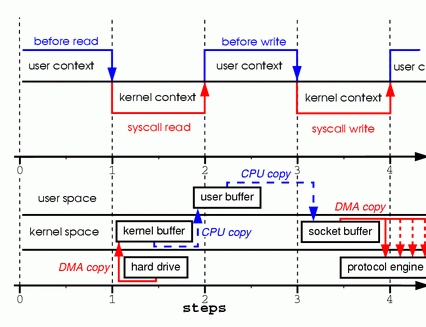
Figure 1. Copying in Two Sample System Calls
Step one: the read system call causes a context switch from user mode to kernel mode. The first copy is performed by the DMA engine, which reads file contents from the disk and stores them into a kernel address space buffer.
Step two: data is copied from the kernel buffer into the user buffer, and the read system call returns. The return from the call caused a context switch from kernel back to user mode. Now the data is stored in the user address space buffer, and it can begin its way down again.
Step three: the write system call causes a context switch from user mode to kernel mode. A third copy is performed to put the data into a kernel address space buffer again. This time, though, the data is put into a different buffer, a buffer that is associated with sockets specifically.
Step four: the write system call returns, creating our fourth context switch. Independently and asynchronously, a fourth copy happens as the DMA engine passes the data from the kernel buffer to the protocol engine. You are probably asking yourself, “What do you mean independently and asynchronously? Wasn't the data transmitted before the call returned?” Call return, in fact, doesn't guarantee transmission; it doesn't even guarantee the start of the transmission. It simply means the Ethernet driver had free descriptors in its queue and has accepted our data for transmission. There could be numerous packets queued before ours. Unless the driver/hardware implements priority rings or queues, data is transmitted on a first-in-first-out basis. (The forked DMA copy in Figure 1 illustrates the fact that the last copy can be delayed).
As you can see, a lot of data duplication is not really necessary to hold things up. Some of the duplication could be eliminated to decrease overhead and increase performance. As a driver developer, I work with hardware that has some pretty advanced features. Some hardware can bypass the main memory altogether and transmit data directly to another device. This feature eliminates a copy in the system memory and is a nice thing to have, but not all hardware supports it. There is also the issue of the data from the disk having to be repackaged for the network, which introduces some complications. To eliminate overhead, we could start by eliminating some of the copying between the kernel and user buffers.
One way to eliminate a copy is to skip calling read and instead call mmap. For example:
tmp_buf = mmap(file, len);
write(socket, tmp_buf, len);
To get a better idea of the process involved, take a look at Figure 2. Context switches remain the same.
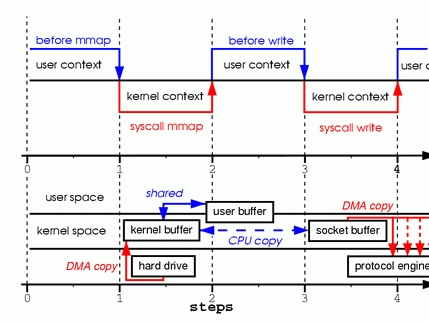
Figure 2. Calling mmap
Step one: the mmap system call causes the file contents to be copied into a kernel buffer by the DMA engine. The buffer is shared then with the user process, without any copy being performed between the kernel and user memory spaces.
Step two: the write system call causes the kernel to copy the data from the original kernel buffers into the kernel buffers associated with sockets.
Step three: the third copy happens as the DMA engine passes the data from the kernel socket buffers to the protocol engine.
By using mmap instead of read, we've cut in half the amount of data the kernel has to copy. This yields reasonably good results when a lot of data is being transmitted. However, this improvement doesn't come without a price; there are hidden pitfalls when using the mmap+write method. You will fall into one of them when you memory map a file and then call write while another process truncates the same file. Your write system call will be interrupted by the bus error signal SIGBUS, because you performed a bad memory access. The default behavior for that signal is to kill the process and dump core—not the most desirable operation for a network server. There are two ways to get around this problem.
The first way is to install a signal handler for the SIGBUS signal, and then simply call return in the handler. By doing this the write system call returns with the number of bytes it wrote before it got interrupted and the errno set to success. Let me point out that this would be a bad solution, one that treats the symptoms and not the cause of the problem. Because SIGBUS signals that something has gone seriously wrong with the process, I would discourage using this as a solution.
The second solution involves file leasing (which is called “opportunistic locking” in Microsoft Windows) from the kernel. This is the correct way to fix this problem. By using leasing on the file descriptor, you take a lease with the kernel on a particular file. You then can request a read/write lease from the kernel. When another process tries to truncate the file you are transmitting, the kernel sends you a real-time signal, the RT_SIGNAL_LEASE signal. It tells you the kernel is breaking your write or read lease on that file. Your write call is interrupted before your program accesses an invalid address and gets killed by the SIGBUS signal. The return value of the write call is the number of bytes written before the interruption, and the errno will be set to success. Here is some sample code that shows how to get a lease from the kernel:
if(fcntl(fd, F_SETSIG, RT_SIGNAL_LEASE) == -1) {
    perror("kernel lease set signal");
    return -1;
}
/* l_type can be F_RDLCK F_WRLCK */
if(fcntl(fd, F_SETLEASE, l_type)){
    perror("kernel lease set type");
    return -1;
}
You should get your lease before mmaping the file, and break your lease after you are done. This is achieved by calling fcntl F_SETLEASE with the lease type of F_UNLCK.
In kernel version 2.1, the sendfile system call was introduced to simplify the transmission of data over the network and between two local files. Introduction of sendfile not only reduces data copying, it also reduces context switches. Use it like this:
sendfile(socket, file, len);
To get a better idea of the process involved, take a look at Figure 3.
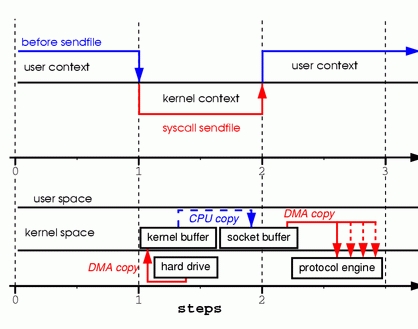
Figure 3. Replacing Read and Write with Sendfile
Step one: the sendfile system call causes the file contents to be copied into a kernel buffer by the DMA engine. Then the data is copied by the kernel into the kernel buffer associated with sockets.
Step two: the third copy happens as the DMA engine passes the data from the kernel socket buffers to the protocol engine.
You are probably wondering what happens if another process truncates the file we are transmitting with the sendfile system call. If we don't register any signal handlers, the sendfile call simply returns with the number of bytes it transferred before it got interrupted, and the errno will be set to success.
If we get a lease from the kernel on the file before we call sendfile, however, the behavior and the return status are exactly the same. We also get the RT_SIGNAL_LEASE signal before the sendfile call returns.
So far, we have been able to avoid having the kernel make several copies, but we are still left with one copy. Can that be avoided too? Absolutely, with a little help from the hardware. To eliminate all the data duplication done by the kernel, we need a network interface that supports gather operations. This simply means that data awaiting transmission doesn't need to be in consecutive memory; it can be scattered through various memory locations. In kernel version 2.4, the socket buffer descriptor was modified to accommodate those requirements—what is known as zero copy under Linux. This approach not only reduces multiple context switches, it also eliminates data duplication done by the processor. For user-level applications nothing has changed, so the code still looks like this:
sendfile(socket, file, len);
To get a better idea of the process involved, take a look at Figure 4.
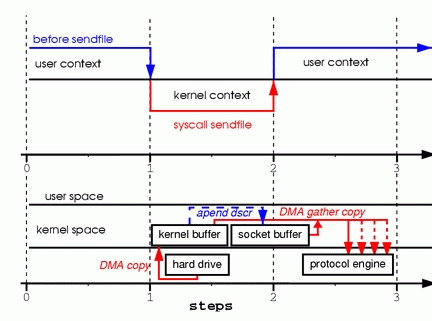
Figure 4. Hardware that supports gather can assemble data from multiple memory locations, eliminating another copy.
Step one: the sendfile system call causes the file contents to be copied into a kernel buffer by the DMA engine.
Step two: no data is copied into the socket buffer. Instead, only descriptors with information about the whereabouts and length of the data are appended to the socket buffer. The DMA engine passes data directly from the kernel buffer to the protocol engine, thus eliminating the remaining final copy.
Because data still is actually copied from the disk to the memory and from the memory to the wire, some might argue this is not a true zero copy. This is zero copy from the operating system standpoint, though, because the data is not duplicated between kernel buffers. When using zero copy, other performance benefits can be had besides copy avoidance, such as fewer context switches, less CPU data cache pollution and no CPU checksum calculations.
Now that we know what zero copy is, let's put theory into practice and write some code. You can download the full source code from www.xalien.org/articles/source/sfl-src.tgz. To unpack the source code, type tar -zxvf sfl-src.tgz at the prompt. To compile the code and create the random data file data.bin, run make.
Looking at the code starting with header files:
/* sfl.c sendfile example program
Dragan Stancevic <
header name                 function / variable
-------------------------------------------------*/
#include <stdio.h>          /* printf, perror */
#include <fcntl.h>          /* open */
#include <unistd.h>         /* close */
#include <errno.h>          /* errno */
#include <string.h>         /* memset */
#include <sys/socket.h>     /* socket */
#include <netinet/in.h>     /* sockaddr_in */
#include <sys/sendfile.h>   /* sendfile */
#include <arpa/inet.h>      /* inet_addr */
#define BUFF_SIZE (10*1024) /* size of the tmp
                               buffer */
Besides the regular <sys/socket.h> and <netinet/in.h> required for basic socket operation, we need a prototype definition of the sendfile system call. This can be found in the <sys/sendfile.h> server flag:
/* are we sending or receiving */
if(argv[1][0] == 's') is_server++;
/* open descriptors */
sd = socket(PF_INET, SOCK_STREAM, 0);
if(is_server) fd = open("data.bin", O_RDONLY);
The same program can act as either a server/sender or a
client/receiver. We have to check one of the command-prompt
parameters, and then set the flag is_server to run in sender mode.
We also open a stream socket of the INET protocol family. As part
of running in server mode we need some type of data to transmit to
a client, so we open our data file. We are using the system call
sendfile to transmit data, so we don't have to read the actual
contents of the file and store it in our program memory buffer.
Here's the server address:
/* clear the memory */
memset(&sa, 0, sizeof(struct sockaddr_in));
/* initialize structure */
sa.sin_family = PF_INET;
sa.sin_port = htons(1033);
sa.sin_addr.s_addr = inet_addr(argv[2]);
We clear the server address structure and assign the protocol family, port and IP address of the server. The address of the server is passed as a command-line parameter. The port number is hard coded to unassigned port 1033. This port number was chosen because it is above the port range requiring root access to the system.
Here is the server execution branch:
if(is_server){
    int client; /* new client socket */
    printf("Server binding to [%s]\n", argv[2]);
    if(bind(sd, (struct sockaddr *)&sa,
                      sizeof(sa)) < 0){
        perror("bind");
        exit(errno);
    }
As a server, we need to assign an address to our socket descriptor. This is achieved by the system call bind, which assigns the socket descriptor (sd) a server address (sa):
if(listen(sd,1) < 0){
    perror("listen");
    exit(errno);
}
Because we are using a stream socket, we have to advertise our
willingness to accept incoming connections and set the connection
queue size. I've set the backlog queue to 1, but it is common to
set the backlog a bit higher for established connections waiting to
be accepted. In older versions of the kernel, the backlog queue was
used to prevent syn flood attacks. Because the system call listen
changed to set parameters for only established connections, the
backlog queue feature has been deprecated for this call. The kernel
parameter tcp_max_syn_backlog has taken over the role of protecting
the system from syn flood attacks:
if((client = accept(sd, NULL, NULL)) < 0){
    perror("accept");
    exit(errno);
}
The system call accept creates a new connected socket from the
first connection request on the pending connections queue. The
return value from the call is a descriptor for a newly created
connection; the socket is now ready for read, write or poll/select
system calls:
if((cnt = sendfile(client,fd,&off,
                          BUFF_SIZE)) < 0){
    perror("sendfile");
    exit(errno);
}
printf("Server sent %d bytes.\n", cnt);
close(client);
A connection is established on the client socket descriptor, so we
can start transmitting data to the remote system. We do this by
calling the sendfile system call, which is prototyped under Linux
in the following manner:
extern ssize_t
sendfile (int __out_fd, int __in_fd, off_t *offset,
          size_t __count) __THROW;
The first two parameters are file descriptors. The third parameter
points to an offset from which sendfile should start sending data.
The fourth parameter is the number of bytes we want to transmit. In
order for the sendfile transmit to use zero-copy functionality, you
need memory gather operation support from your networking card. You
also need checksum capabilities for protocols that implement
checksums, such as TCP or UDP. If your NIC is outdated and doesn't
support those features, you still can use sendfile to transmit
files. The difference is the kernel will merge the buffers before
transmitting them.
One of the problems with the sendfile system call, in general, is the lack of a standard implementation, as there is for the open system call. Sendfile implementations in Linux, Solaris or HP-UX are quite different. This poses a problem for developers who wish to use zero copy in their network data transmission code.
One of the implementation differences is Linux provides a sendfile that defines an interface for transmitting data between two file descriptors (file-to-file) and (file-to-socket). HP-UX and Solaris, on the other hand, can be used only for file-to-socket submissions.
The second difference is Linux doesn't implement vectored transfers. Solaris sendfile and HP-UX sendfile have extra parameters that eliminate overhead associated with prepending headers to the data being transmitted.
The implementation of zero copy under Linux is far from finished and is likely to change in the near future. More functionality should be added. For example, the sendfile call doesn't support vectored transfers, and servers such as Samba and Apache have to use multiple sendfile calls with the TCP_CORK flag set. This flag tells the system more data is coming through in the next sendfile calls. TCP_CORK also is incompatible with TCP_NODELAY and is used when we want to prepend or append headers to the data. This is a perfect example of where a vectored call would eliminate the need for multiple sendfile calls and delays mandated by the current implementation.
One rather unpleasant limitation in the current sendfile is it cannot be used when transferring files greater than 2GB. Files of such size are not all that uncommon today, and it's rather disappointing having to duplicate all that data on its way out. Because both sendfile and mmap methods are unusable in this case, a sendfile64 would be really handy in a future kernel version.
Despite some drawbacks, zero-copy sendfile is a useful feature, and I hope you have found this article informative enough to start using it in your programs. If you have a more in-depth interest in the subject, keep an eye out for my second article, titled “Zero Copy II: Kernel Perspective”, where I will dig a bit more into the kernel internals of zero copy.

Dragan Stancevic is a kernel and hardware bring-up engineer in his late twenties. He is a software engineer by profession but has a deep interest in applied physics and has been known to play with extremely high voltages in his free time.

