
Security, with a Sprinkle of Video
Come here, François, have a look at this. Yes, you are watching a movie of yourself from a few moments ago. Why? As you know, François, the theme of this issue is security. As everyone is talking computer and network security, I wanted to offer our guests something a little different. Security, like wine, comes in many flavors, non?
Here you are coming back from the cellar. You have a very amusing walk, mon ami. François, you are not looking. What has you distracted? Ah, I see. Our guests have arrived. Welcome, mes amis! Please, sit down and make yourselves comfortable. François, run down to the wine cellar and bring back that 1997 Napa Valley Merlot we were sampling earlier. You will love this wine, mes amis--deep red with lots of black raspberry and cherry flavors and long on finish.
There he is! Mes amis, let me direct your attention to this monitor. Watch closely. As you can see, François is in the east wing of the wine cellar. The reason I am showing you this is to introduce you to our menu for today, “Security with a Touch of Video”. When we talk security in the Linux kitchen, we almost always mean network security. On some rare occasions, we are willing to discuss user security. But what about home security? Perhaps you have an extensive wine cellar that you want to keep an eye on. Isn't that expensive? Complicated? Did you know you can set up a video surveillance system for not much more than the cost of an inexpensive webcam? For this recipe, I used a Creative Labs CT6840 USB camera from Radio Shack, my Linux system and a few keystrokes. Sounds good? But wait; as they say on television, there's more.
Inexpensive and simple video surveillance is particularly interesting when combined with motion detection technology. That's the idea behind Lawrence P. Glaister's Gspy, a GNOME security camera application. You even can use Gspy to generate daily MPEG movies for later perusal with the Berkeley MPEG tools (more on that shortly). The software captures frames in JPEG format at regular intervals that you can define. Once the absence of motion is confirmed, less frames are written out, although all frames continue to be date- and timestamped. As soon as motion is detected, regular, high-frame capture resumes. This results in a time-lapse video that concentrates on areas of interest. Figure 1 shows a snapshot of Gspy in action.
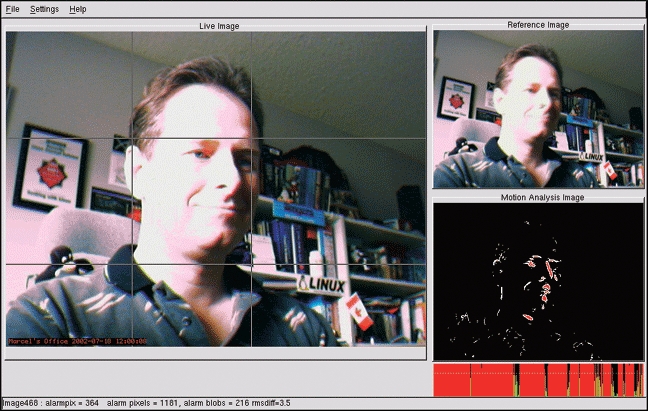
Figure 1. Under the Watchful Eye of Gspy
A successful implementation of Gspy will require the video4linux extensions (in 640 × 480 size) and most likely USB support (for the camera). That means you should probably be running a fairly recent Linux distribution or kernel. To get started, pick up the Gspy source at gspy.sourceforge.net.
Once you have the source safely on your hard disk, it is time for the classic extract and build five-step:
tar -xzvf gspy-0.1.4-src.tar.gz
cd gspy
./configure
make
su -c make install
That is all there is to it. Almost. I mentioned the creation of movies, so let us look at what we will need to do this. You will need a program called mpeg_encode, part of the Berkeley MPEG tools, available at bmrc.berkeley.edu/frame/research/mpeg/mpeg_encode.html. Now, extract the source and switch to that directory:
tar -xzvf mpeg_encode-1.5b-src.tar.gz
cd mpeg_encode
Ah, the young lady at table 22 noticed that I did not have you jump into the classic extract and build five-step. Bravo, Mademoiselle. Building the Berkeley MPEG tools is not complicated, but it does require a little advance tweaking. For starters, you need to edit the Makefile and comment out the current CFLAGS definition and also uncomment the line that corresponds to a Linux build (just search for LINUX). Then, you need to comment out the malloc definition in headers/libpnmrw.h. Here's what that section looks like:
/* #include <malloc.h>
#if !defined(sco) && !defined(sgi) && !defined(IRIX)
extern char* malloc();
#endif */
Note the comment start (/*) at the beginning of the first line and the comment end (*/) at the end of the last line. I also needed to comment out the extern char* sys_errlist[]; definition in libpnmrw.c before I could build the package. When you have done all this, you can do a make followed by a su -c make install. Is there, you ask, an easier way? The answer is yes. You'll find prebuilt RPMs if you do a quick search for mpeg_encode at www.rpmfind.net.
So, mes amis, now we have everything we need. Start the program by typing gspy &. Gspy makes use of /dev/video0 as the default input device, but you can change it with the Preferences menu. Have a look at Figure 2 for a snapshot of the configuration dialog. I have specified a folder called “spy” in my home directory. In that folder, the application will create another folder whose name is the date on which the pictures are taken; for instance, the folder for July 19, 2002 is called 20020719. Individual images are stored in the files, and the number of images depends on several things.
Look again at the General configuration tab where I have defined a picture interval of one second. I also have told the program to store an image every 20 seconds. This means that even if no motion is registered, a frame still will be saved (complete with data and timestamp) every 20 seconds.

Figure 2. Configuration Options for Gspy
The other tabs allow you to specify the video4linux device (/dev/video0 by default), various alarm thresholds and a checkbox, should you feel the need to have the system beep each time it notices movement.
The obvious catch is you can use up a fairly large amount of disk space on this task, so please be aware of this. When you have collected enough information, you can click File on the Application menu and elect to compile all your frames into an MPEG movie, which will be called video.mpg. After the movie has been created (remember more frames means more time, so be patient), you can fire up your favorite MPEG viewer and watch the action. Aside from some nice graphical players included with GNOME or KDE, you probably also have the simple plaympeg program pre-installed as part of the smpeg package.
Motion, as the name implies, is another video program that employs video4linux support with motion detection. The approach, however, is a bit different. First of all, the program is command line-based and provides a great deal of configuration options through a global configuration file (/usr/local/etc/motion.conf by default). The program can run as a dæmon in the background, only storing images when motion is detected. Like Gspy, Motion also can take all those captured frames and assemble them (using the Berkeley MPEG tools) into a movie for later viewing. Motion also can output to other programs, run programs before or after detection and store data to an SQL database. The web site also provides links to external programs that have been developed to work with Motion.
To get started, head on over to the Motion web site at motion.technolust.cx. When I dropped by, I picked up version 3.0.4 of the program. This is another simple build following the familiar extract and build five-step:
tar -xzvf motion-3.0.4.tar.gz
cd motion-3.0.4
./configure
make
su -c make install
That's all there is to it. To run the program, you can just type motion and accept all the defaults that exist in the configuration file at /usr/local/etc/motion.conf. Or you can pass command-line arguments like this:
motion -B -w -g 30 -t /home/mgagne/motionBefore I explain these arguments, I should tell you that the defaults in the configuration file caused the program to fail with a VIDIOCGCHAN error. That's because I wasn't using the video loopback option (which requires a separate driver), but the configuration file still had it set. If you run into the same problem, comment out the input 2 line near the top of the file. The paragraph looks something like this:
# The input to be used
# Default: 8
input 2
The last line is the one I commented out with a hash mark. Now that I've told you about my trials and tribulations, let me tell you about those command-line switches. The -B option tells Motion to create MPEG movies after registering an event. The -w activates the light-switch filter, which tells motion to ignore (more or less) changes in light levels as events, whereas the -g option defines the number of seconds between events. Finally, you'll want to have some place where these images are stored, and this is what the -t option is all about.
One other problem you may experience has to do with how you came by your MPEG tools. If you built from source, the mpeg_encode program will be in the /usr/local/bin directory. If you used the RPM package, the binary will be under /usr/bin. Motion looks for mpeg_encode in the /usr/local/bin, so you'll need to modify the configuration file for things to work properly. Look for the following line in /usr/local/etc/motion.conf and make sure it is uncommented:
mpeg_encode yes
If you used the RPM package, add the following line below the one above:
mpeg_encode_bin /usr/bin/mpeg_encodeWhile Motion runs and captures, it stores the images in the directory you specified but with this structure: there will be a subdirectory for the year, followed by one for the month, then the hour and finally, the minute. Movies generated with the -B option will appear in the day folder. For instance, the movies that Motion captured as I wrote this column were in /home/mgagne/motion/2002/07/19.
The configuration file contains a number of parameters that can be set there rather than at the command line. The file is fairly easy to understand, and you should take the time to go through it. One setting that I found particularly useful was this one:
jpg_cleanup yes
If you are creating movies after each event, it might make sense to get rid of the saved JPEG images. This little setting will do it for you automatically. Also consider setting “quiet yes” unless you want motion to beep each and every single time it detects movement. Therein lies madness.
As closing time draws near, mes amis, I must confess to an overwhelming feeling of being watched. As this tends to make me a little nervous, I must share with you my favorite means of calming these feelings. François, please refill our guests' wineglasses a final time. And whatever you do, make sure you keep that camera trained on the wine cellar. Until next month. A votre santé! Bon appétit!
Marcel Gagné lives in Mississauga, Ontario. He is the author of Linux System Administration: A User's Guide (ISBN 0-201-71934-7), published by Addison-Wesley (and is currently at work on his next book). He can be reached via e-mail at mggagne@salmar.com.
