
The Kernel Hacker's Guide to Source Code Control
Many issues involved with Linux kernel development are different from traditional software development processes. When working on a portion of the kernel (or a specific driver), you need to 1) stay aware of changes that are happening to other portions of the kernel with which you interact, 2) constantly apply your changes to the moving target of a fast-based kernel development release schedule, 3) resolve any merge conflicts between changes you have made and changes made by other people and 4) be able to export your changes in a format others can use easily.
For a number of years, I developed and maintained the USB to serial port drivers and then eventually took over maintaining all of the USB code in the kernel. In this article, I explain some of the tools I used in the past to do this work and show how some new tools have enhanced my ability to keep on top of changes in the kernel and let me do my job with less effort.
One of the most common methods of doing kernel work is to use the patch and diff programs. You can use this and no other type of source-code control system to do kernel development. One way is to use two different directory trees: a “clean” one and a “working” one. The clean tree is a released kernel version, while the working one is based on the same released kernel version, but contains your modifications. Then you can use patch and diff to extract your changes and forward port these changes to a new kernel release. For example, let's start off with a clean 2.4.18 kernel (available at www.kernel.org/pub/linux/kernel/v2.4/linux-2.4.18.tar.gz) in our working directory:
$ ls
linux-2.4.18.tar.gz
Uncompress this kernel, and then rename the created directory, which will be called “linux” to something that makes sense:
$ tar -zxf linux-2.4.18.tar.gz
$ mv linux linux-2.4.18
$ ls
linux-2.4.18  linux-2.4.18.tar.gz
Now create a duplicate version of this kernel version, and name it something else:
$ tar -zxf linux-2.4.18.tar.gz
$ mv linux linux-2.4.18-greg
$ ls
linux-2.4.18  linux-2.4.18-greg  linux-2.4.18.tar.gz
Now we can do all of our development in our -greg directory and leave the clean, original kernel directory alone. After we are finished with our work, we need to create a patch to send to other people. The Documentation/SubmittingPatches file explains the proper format that most kernel developers like for sending and receiving patches. It also explains the usage of a dontdiff file, which can help with generating these patches. The dontdiff file can be found at www.moses.uklinux.net/patches/dontdiff and contains a list of files that you do not want to have the diff program pay attention to.
To create a patch, use the following command:
$ diff -Naur -X dontdiff \
linux-2.4.18 linux-2.4.18-greg/ > my_patch
This creates a file called my_patch that contains the difference between your work and a clean 2.4.18 kernel tree. This patch then can be sent to other people via e-mail.
If a new kernel version is released, and you want to forward port your changes to the new version, you need to try to apply your generated patch onto a clean kernel version. This can be done in the following steps:
Generate your original patch, as in the previous example.
Using the official patch from kernel.org, move the old kernel version forward one release:
$ cd linux-2.4.18
$ patch -p1 < ../patch-2.4.19
$ cd ..
$ mv linux-2.4.18 linux-2.4.19
Move your working directory forward one release by removing your patch, then applying the new update:
$ cd linux-2.4.18-greg
$ patch -p1 -R < ../my_patch
$ patch -p1 < ../patch-2.4.19
$ cd ..
$ mv linux-2.4.18-greg linux-2.4.19-greg
Try to apply your patch on top of the new update:
$ cd linux-2.4.19-greg
$ patch -p1 < ../my_patch
If your patch does not apply cleanly, resolve all of the conflicts that are created (patch will tell you about these, leaving behind .rej and .orig files for you to compare and fix up manually using your favorite editor). This merge process can be the most difficult part if you have made changes to portions of the source tree that have been changed by other people.
If you use this development process, I highly recommend getting the excellent patchutils set of programs (found at cyberelk.net/tim/patchutils). These programs enable you to manipulate text patches easily in all sorts of useful ways, and they have saved kernel developers many hours of tedious work.
The process of kernel development using patch and diff generally works quite well. But after a while, most people grow tired of it and look for a different way to work that does not involve so much tedious patching and merging.
A few years ago I discovered BitKeeper (available at www.bitmover.com) and have been using it ever since for kernel development. It originally enabled me to track easily external changes to the kernel tree and allowed me to forward port my kernel changes with almost no effort. Now that Linus Torvalds and Marcelo Tosatti are using BitKeeper for their kernel development, it also allows me to send patches to them easily for inclusion into the main kernel tree.
The use of BitKeeper as a kernel development tool is one that a lot of people find contentious, given BitKeeper's licensing strategy. Read over the license and decide for yourself if you should use it. You also should go through the tutorial on the BitMover web site to familiarize yourself with the tool and some of the different commands.
To do kernel work with BitKeeper, you can base your kernel off Linus' or Marcelo's kernel tree, or you can create your own, with all of the different versions. However, unless you are planning on using BitKeeper to send your patches to Linus or Marcelo, I recommend creating your own kernel tree. That way you are not buried in the vast number of different changesets that all of the different kernel developers are creating, and you can focus on your work.
Again, with BitKeeper you end up creating two different trees (or repositories as I will now call them) to do kernel work: a clean tree and a working tree.
To create a clean BitKeeper repository, start with a released kernel in your working directory:
$ ls
linux-2.4.18.tar.gz
Uncompress this kernel:
$ tar -zxf linux-2.4.18.tar.gz
$ ls
linux  linux-2.4.18.tar.gz
Now create a BitKeeper project called linux-2.4:
$ bk setup linux-2.4BitKeeper will ask you a few questions and then provide a file to edit where you should describe your project. Fill this out with your favorite editor, and save it.
You will now have a directory called linux-2.4, which is where your project will be held. Now import the original kernel version into the new repository:
$ ls
linux  linux-2.4  linux-2.4.18.tar.gz
$ bk import -tplain linux linux-2.4
This will take some time. After BitKeeper is finished importing all of the files, I recommend tagging this point with the kernel version number. This will allow you to find the different kernel versions more easily in the future:
$ cd linux-2.4
$ bk tag LINUX_2.4.18
Now make a clone of that repository, which is a clean kernel tree, in a different directory so you can make your own changes:
$ bk clone linux-2.4 greg-2.4All of our kernel work will be done in the greg-2.4 directory.
You can use the -l option to bk clone. That will use a lot less disk space and go faster by creating hard links to the metadata files. If a file is modified, BitKeeper will break the link and create a new one where needed. If you end up creating a lot of different repositories on the same disk, you should use this option.
After we are finished with our work, creating changesets by checking in our changes all during the development process (see the BitKeeper tutorial for more details of this), we would like to create a patch to show our changes. This can be done with a simple command from within the greg-2.4 directory:
$ bk export -tpatch -rLINUX_2.4.18..+ -h \
> ../my_patch
This will create a patch showing all of the changes from the tagged version (LINUX_2.4.18) up to the current changeset and save it in the my_patch file. This patch can then be sent to other people through e-mail, just like any patch created with diff. You will notice that creating this patch was a much shorter process than the previous method of using diff and patch.
When a new kernel version is released, you will want to forward port your changes to the new version. This is where BitKeeper really shines over the previous patch and diff method.
First, go to the original, clean kernel tree and import the new patch:
$ ls
greg-2.4 linux-2.4 patch-2.4.19
$ cd linux-2.4
$ bk import -tpatch -SLINUX_2.4.19 ../patch-2.4.19 .
If BitKeeper thinks any files that the patch file shows as created and deleted might actually be files that were renamed or moved around the tree, it will pop up a GUI tool that you can use to show manually which files were renamed, which files simply were deleted and which ones simply were created. Figure 1 shows an example of this dialog box.
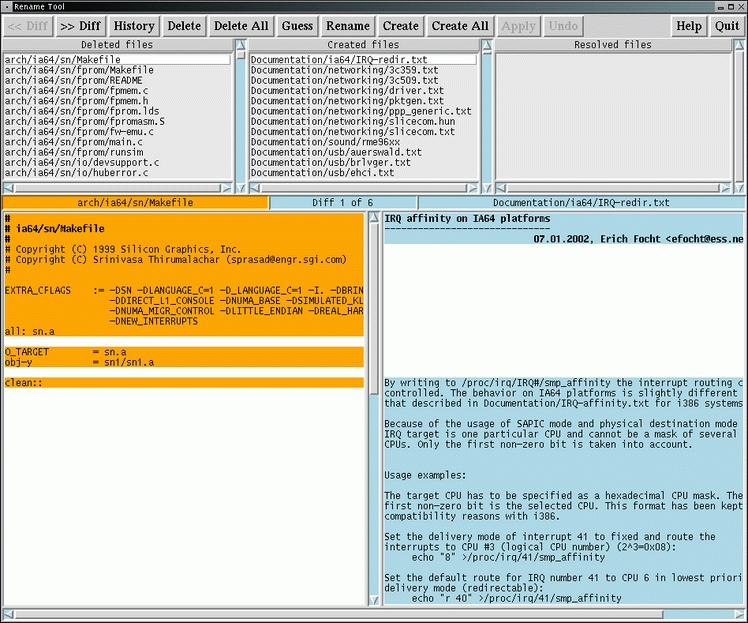
Figure 1. BitKeeper Example Dialog Box
Now go back to your working repository and pull the new changes into it:
$ cd ../greg-2.4
$ bk pull
BitKeeper will then merge all of the changes between kernels 2.4.18 and 2.4.19 into your working repository. If there are any merge conflicts between any changes you have made and changes that have showed up in the new kernel version, it will report this and ask you what you want to do. I suggest using the graphical three-way merge tool to help resolve these conflicts. This tool shows the original file with the changes that you have made and the changes that the patch (or someone else) has made. It then lets you pick which change you want to accept, or you can hand-edit the file, merging both changes together. Figure 2 shows an example of a change that I made to a file that conflicts with a change that happened in the main kernel.
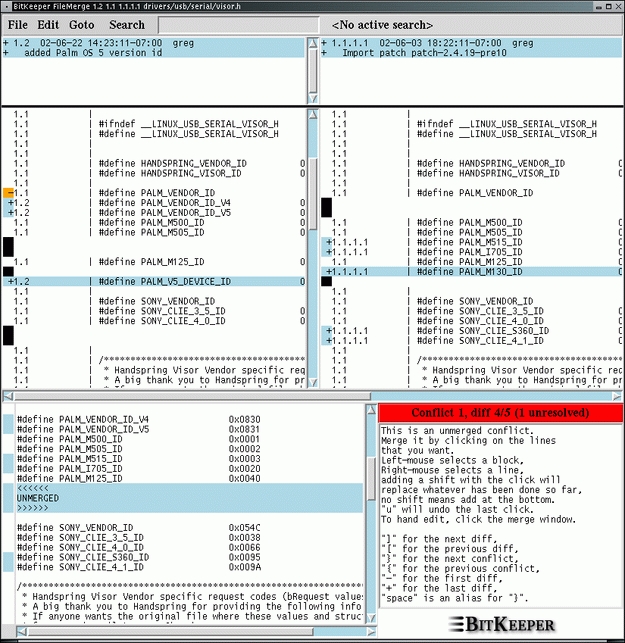
Figure 2. A Merge Conflict
After you are finished resolving any conflicts (and wasn't that much easier than manually looking through .rej files?), you can continue working in your updated kernel. Again, to export a patch with all of the changes you have created, use the following command within the greg-2.4 directory:
$ bk export -tpatch -rLINUX_2.4.19..+ -h \
> ../my_patch
BitKeeper also allows you to see easily all of the changes that have happened to a specific file over time. You can see if the file was modified by one of the main kernel patches or by yourself. An example of the changes that have happened to the drivers/usb/serial/usbserial.c file over time in my repository can be seen in Figure 3. With this tool, you can see what other changes happened at the same time and even what line of code was modified in which version.
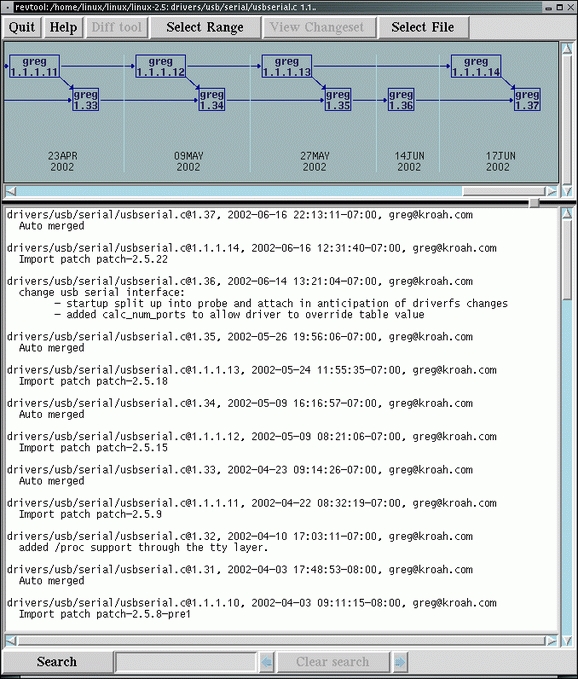
Figure 3. BitKeeper Keeping Track of Changes
One of the strongest benefits of using BitKeeper for your kernel development is that it is a very powerful version control system, and it allows you to work with other developers on the same sections of code at the same time. You can allow other people to pull from your working tree, or you can set up a local server to store your working tree. See the BitKeeper tutorial and documentation for some good examples of how this can be set up and how the development life cycle can be used.
I have shown two different ways of doing Linux kernel development, one with only patch and diff and one using BitKeeper. Personally, BitKeeper has enabled me to spend more time actually doing development work and less time messing with merges. It has also kept me sane in trying to track the 2.2, 2.4 and 2.5 kernel trees for the Linux USB and Linux Hot Plug PCI drivers.

