
Paranoid Penguin: Using iptables for Local Security
Most of us think of iptables strictly as a firewall tool for keeping remote attackers at bay. But did you know it also can be used to keep local users in line? The experimental match extension owner adds new iptables options that can be used to help prevent local users from sending packets through other local users' network processes.
For example, suppose one of root's cron jobs uses Stunnel to send files to a remote rsync process. While that tunnel is open, any local user also may use it to access the remote rsync server. iptables can help you prevent such sponging; this month's column shows how.
Tunneling utilities comprise one of the most important new categories of security tools at our disposal. They allow us to wrap insecure services, such as Telnet, IMAP and POP3, in encrypted virtual “tunnels”, transparently and effectively. I've written at length in these pages about the Secure Shell and its powerful port-forwarding capabilities; Stunnel and SSLWrap are similar free tools that can be used for this purpose under Linux.
But what happens when you set up such a tunnel on a multi-user system? What's to stop unauthorized local users from sending their own traffic through the tunnel? Until recently, practically nothing. Since most tunneling utilities work by creating a new local listener (e.g., localhost:992) for the near side of the tunnel, and since normally any local user can connect to a local listening-port, it's usually up to the server application at the other end of the tunnel to authenticate users.
For example, suppose I use Stunnel to create a secure sockets layer (SSL) tunnel from my local system “crueller” to the remote system “strudel”, over which I'm going to run Telnet. (Never mind that this sort of transaction is simpler with SSH; maybe I don't want SSH installed locally for some reason.) On the remote host, which is already running the Telnet dæmon (via inetd) on TCP port 23, I run Stunnel in dæmon mode with this command:
stunnel -d 992 -r localhost:23 -p \
/etc/stunnel/strudel.pem
On the local host, I'll run Stunnel in client mode, also listening on the local port TCP 992 but forwarding connections to TCP port 992 on strudel:
stunnel -c -d 992 -r strudel:992If you've never used Stunnel before and these two commands mean nothing to you, don't worry. The important thing to understand is that to use this example tunnel to Telnet securely from crueller to strudel, I'll use this command on crueller:
telnet localhost 992At this point, I'll be prompted for a user name and password by strudel, and unlike with normal Telnet, my login credentials will be encrypted by Stunnel rather than transmitted over the network as clear text. (The remote Stunnel process will decrypt the packets and hand them to strudel's local Telnet process. This happens for the entire Telnet transaction, not just the authentication part; Stunnel acts as a middleman for both parties during the entire transaction, a middleman who neither knows nor cares what he's tunneling as long as it's TCP.)
So far so good; I've got encryption, which I didn't have without Stunnel, and I've got a modest amount of authentication by virtue of Telnet itself. The problem is that any user on crueller can Telnet to the local Stunnel listener on TCP 992 and try to log in to strudel. Maybe I'm worried about someone guessing my strudel password and maybe I'm not; but how to stop them from sending any packets down the tunnel to begin with? With iptables and its new owner match extension, that's how.
iptables' owner match extension adds four match criteria to the iptables command:
—uid-owner UID: matches packets generated by a process whose user ID is UID.
—gid-owner GID: matches packets generated by a process whose group ID is GID.
—pid-owner PID: matches packets generated by a process whose process ID is PID.
—sid-owner SID: matches packets generated by a process whose session ID is SID.
Of these four, the first two are the most useful for our purposes here.
The owner match extension isn't necessarily included in your distribution's stock kernel; it's considered an experimental feature (by the Linux kernel team, not necessarily by the iptables team), so you may need to compile it yourself. Its source code, however, is part of the standard 2.4 kernel codebase, so this is done easily with any recent version of your distribution's (2.4.x) kernel source package.
When recompiling your kernel, you'll need to set several things explicitly. First, under Code maturity level options, select “Prompt for development and/or incomplete code/drivers”.
Next, in addition to the other network protocols and features you customarily select in Networking options, make sure to select “Network Packet Filtering”. This will enable the subgroup IP: Netfilter Configuration, shown in Figure 1. You may compile these options either into the kernel (by selecting them with an asterisk) or as modules (with an M), but most people compile them as modules because all are seldom used at one time.
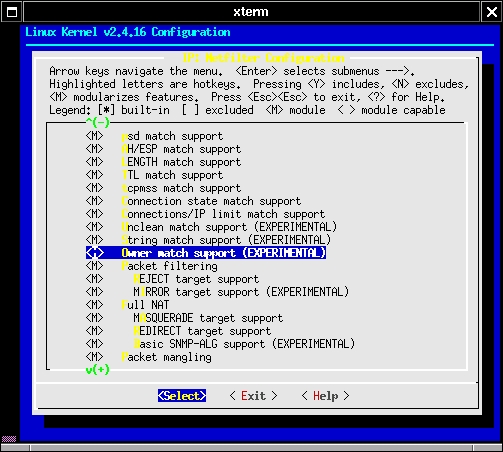
Figure 1. Compiling a Kernel with owner Match Extension Support
Naturally you can select as many of the Netfilter modules as you like. They don't take up much disk space, and if compiled as modules they needn't be loaded unless necessary. The one we're most concerned with right now, though, is owner Match Support.
The rest of the procedure for compiling and installing the Linux kernel and its modules is well documented elsewhere (notably in the kernel source's own README file). Once you've compiled, installed and rebooted with your kernel, you can use your shiny new owner module, which will be named ipt_owner.
To load this module, use the modprobe command:
modprobe ipt_owner
In practice you'll probably want to load your iptables rules from a startup script in /etc/inet.d. If so, make sure you add the above modprobe line to the beginning of this script (i.e., above any iptables commands that use owner matches).
Note: neither Bastille-Linux's automated firewall configuration functionality nor SuSE Linux's SuSEfirewall scripts support owner matching without major hacking. This should hardly be surprising; they and other simple packet-filter rule generators are intended primarily for low-impact internet protection, not for the advanced control of local user access. For the latter, you need to write your own iptables rules.
Let's return to our example Stunnel client, crueller. Suppose crueller's kernel has been compiled with the ipt_owner module. You've loaded this module with modprobe and, for the time being, iptables isn't configured, i.e., nothing's being filtered yet.
Suppose further that you wish to restrict use of the Telnet-over-Stunnel socket we considered at the beginning of the article to root only. (You may recall we set up a Stunnel listener on crueller at TCP port 992, which encrypts and forwards packets to the same TCP port on strudel.)
If crueller isn't a firewall, we may be able to get away with an accept-by-default policy for the OUTPUT chain. On firewalls, all chains should have a drop-by-default or reject-by-default policy, but single-homed (single-network-interface) bastion hosts may sometimes have a more permissive stance on outbound traffic. If this is the case on crueller, then we need only one filtering rule to achieve the desired restriction:
iptables -A OUTPUT -p tcp --dport 992 -d localhost \
-m owner ! --uid-owner root -j REJECT
Let's dissect that command line one field at a time:
-A OUTPUT: tells iptables we want to add a rule at the end of the chain OUTPUT. Since owner matches apply only to packets originating locally, and since outbound traffic is handled in the OUTPUT chain, this is the only chain in which you can use owner matches.
-p tcp: tells iptables to match only TCP packets and to load iptables' TCP options.
—dport 992: this TCP-specific option tells iptables to match only TCP packets destined for port 992.
-d localhost: tells iptables to match packets destined for the localhost (i.e., the loopback interface 127.0.0.1).
-m owner: tells iptables to load the owner match extension.
! --uid-owner root: tells iptables to match only packets not created by processes owned by root.
-j REJECT: tells iptables to reject packets that meet all match expressions in this line.
In summary, this rule tells the kernel (via iptables) to drop packets sent to the local TCP port 992 unless they're sent by one of root's processes.
Suppose now that crueller has the more cautious default OUTPUT policy of DROP rather than ACCEPT. A drop-by-default policy is preferable on most iptables installations; the Principle of Least Privilege is one of the most important concepts in information security (i.e., “that which is not explicitly permitted must be denied”).
Now, however, we'll need a longer OUTPUT chain. Starting again with an empty chain, first we'll need to tell iptables to pass packets belonging to sessions it has already accepted:
iptables -I OUTPUT 1 -m state --state \
ESTABLISHED,NEW -j ACCEPT
The -state match extension provides iptables with crucial state-tracking abilities, allowing iptables to evaluate packets in relation to actual sessions and data streams. Aside from the desirability of this intelligence for its own sake, it also drastically reduces the number of rules you need to specify in order to accommodate a single transaction. Without state tracking, you'd need two rules rather than one to allow, for example, an outbound Telnet transaction; one each in the OUTPUT and INPUT chains. This is why the above rule should nearly always be used at the top of any chain whose default policy is DROP.
Next, we need to allow Stunnel itself to connect to strudel:
stunnel -A OUTPUT -p tcp -dport 992 -d strudel \
-j ACCEPT
This command appends a new rule to the bottom of the OUTPUT chain that permits outbound connections to TCP port 992 on strudel.
Finally, we enter a command similar to the one in the accept-by-default example, but this one is for the target ACCEPT rather than REJECT and for the absence of the negating exclamation point before the --uid-owner option:
iptables -A OUTPUT -p tcp --dport 992 -d localhost \
-m owner --uid-owner root -j ACCEPT
Let's look at one more example. rsync is a powerful file-transfer utility that can perform differential file transfers. It can compare a remote file with a local copy and download only those parts that differ. rsync can be used in conjunction with SSH or, you guessed it, with Stunnel.
Suppose you've got a cron job on crueller that uses rsync to compare the file stuff.txt on strudel with a local copy and downloads any differences. Suppose further that stuff.txt contains some sensitive stuff, so you use Stunnel to encrypt these transfers. But only the local administrators, all of whom belong to the group “wheel”, need to control the script or use the tunnel.
On strudel, rsync is running in dæmon mode, having been configured to share a module (virtual volume) named attic. Assuming /etc/rsyncd.conf is properly configured (the specifics of which are beyond this article's scope), the command to run rsync in dæmon mode is simply:
rsync --daemon
In addition, strudel also has a Stunnel listener on TCP port 273 that decrypts and forwards traffic to the rsync process (which is itself listening on TCP port 873). The command to run Stunnel this way on strudel would be:
stunnel -d 273 -r localhost:873 -p /etc/stunnel/
    strudel.pem
On crueller, a corresponding client-mode Stunnel listener would be
invoked like this:
stunnel -c -d 273 -r strudel:273Okay, we now have a tunnel set up whereby packets sent to TCP port 273 on crueller will be encrypted and sent to TCP port 273 on strudel, where they'll be decrypted and forwarded to strudel's local rsync process on TCP 873.
In the absence of iptables rules, if the ordinary user plebian on crueller tries to use the tunnel, he or she will succeed:
rsync --port=273 -v localhost::attic/stuff.txt .
stuff.txt
wrote 508 bytes  read 575 bytes  2166.00 bytes/sec
total size is 48188  speedup is 44.49
Unless, that is, we add an iptables rule on crueller that restricts local use of the rsync tunnel to members of the group wheel:
iptables -A OUTPUT -p tcp -d localhost --dport 272 \
-m owner ! --gid-owner wheel -j REJECT
Now, plebian's attempt to pilfer the new stuff.txt file will fail:
rsync --port=273 -v localhost::attic/stuff.txt .
rsync: failed to connect to localhost:
    Connection refused
rsync error: error in socket IO (code 10)
    at clientserver.c(97)
But if wheel group member admin7 tries to connect, this will
succeed:
rsync --port=272 -v localhost::chumly/stuff.txt .
stuff.txt
wrote 508 bytes  read 575 bytes  2166.00 bytes/sec
total size is 48188  speedup is 44.49
Hopefully, you noticed that this presumes a default allow policy. If OUTPUT instead uses a default drop policy, we'd need a rule in the OUTPUT chain allowing an outbound connection to TCP 273 on strudel. The OUTPUT chain also would need to begin with an allow established/related sessions rule. Since both these rules would resemble strongly those in the previous example, I won't bother showing them here.
As you can see, the uses of --uid-owner and --gid-owner are pretty straightforward. One thing I haven't mentioned yet is that both options accept names, as I've shown in the examples, or numeric IDs.
Another issue I've dodged is TCP Wrappers-style access controls. On any system that uses TCP Wrappers (or whose stunnel binary was compiled with support for libwrapper), you must add appropriate entries to /etc/hosts.allow for Stunnel to work properly, whether you run Stunnel in client mode or dæmon mode on that host. This is a good thing; rather than being one more thing capable of preventing Stunnel from working, you should think of it as another layer of your security onion.
Finally, I'm leaving it to you to tinker with --pid-owner and --sid-owner. I will give you a hint, though. Many dæmons write their parent PID in a predictable place on startup, that is, /var/run/sshd.pid. By reading such a PID file into a variable in your iptables startup script, you can match packets originating from a specific process. Good luck!
Mick Bauer (mick@visi.com) is a network security consultant for Upstream Solutions, Inc., based in Minneapolis, Minnesota. He is the author of the upcoming O'Reilly book Building Secure Servers With Linux, composer of the “Network Engineering Polka” and a proud parent (of children).
