
BestCrypt: Cross-Platform Filesystem Encryption
March 2002 was a bad month for advocates of personal cryptography tools. Network Associates officially dropped support for its PGP Desktop products, easily the most popular, mature and useful suite of end-user cryptographic tools in common use. As much as I hate to admit the superiority of any commercial product over free tools, Commercial PGP, while far from perfect, seemed to have the best chance of bringing strong cryptography to the masses. The world needs good crypto, specifically user-friendly good crypto with a time- and brainpower-saving GUI, and nobody benefits from PGP Desktop's demise, particularly in the absence of compelling alternatives.
None of which is meant to in any way impugn the admirable work of Werner Koch and the GnuPG team, on whom I've heaped heartfelt accolades in earlier Paranoid Penguin columns. In fact, let me heap some more on now: GnuPG rocks [see Paranoid Penguin in the September and October 2001 issues of LJ]. It's evolved into a stable and mature application in an astoundingly short period of time and has already taken its rightful place among other essential Linux tools that are part of nearly every mainstream distribution. Geeks love GnuPG, and you should too.
Unfortunately, in a GUI-centric world, GnuPG's various front ends need to realize much more of their potential before we can realistically hope to get nontechnical users to embrace GnuPG. And without accommodating nontechnical users in this way, we can forget about bringing strong crypto to the masses, even if it's free. GnuPG has this usability issue in common with Linux as a whole (uh-oh, here comes the hate mail).
Furthermore, GnuPG addresses only part of PGP Desktop's functionality. Whereas GnuPG does match PGP Desktop's abilities in e-mail and file encryption, among other things, it doesn't do filesystem encryption, which was one of the very best things about PGP Desktop. PGPdisk (PGP's filesystem utility) made filesystem encryption simple, fast and transparent.
About the only thing it lacked was client software for Linux, which seriously impaired PGPdisk's usefulness on dual-boot systems. As a dual-boot laptop user, I always found this frustrating; any portable system must have filesystem encryption on all OSes it boots, period. Sure, I could set up an encrypted loopback filesystem on my Linux installation, but that isn't cross-platform either. It would be much better to share a single encrypted partition between both environments than to maintain two separate “vaults”.
That brings us, albeit obliquely, to the subject of this month's column, which is actually about neither PGP nor GnuPG. It's about BestCrypt, a commercial but open-source application that allows you to share encrypted volumes between Windows and Linux systems, with all the transparency, simplicity and speed of PGPdisk.
BestCrypt is a filesystem encryption utility that allows you to create, mount and manage “containers” (encrypted volumes) on your computer that look and behave like any other mounted volume but are stored as encrypted files when not in use. This protects your sensitive data from computer thieves or anyone else who achieves unauthorized access to your system.
Because BestCrypt containers are ordinary files, they can be stored on removable media, archived, e-mailed as attachments and in general, manipulated like any other file. BestCrypt containers even can be placed on network shares and mounted by remote clients (though of course only one client may mount a given container at one time).
In addition, a BestCrypt container may be mounted by either the Linux or Windows version of BestCrypt; the same file format is used by both versions, with no loss of functionality in either direction.
BestCrypt can be downloaded from Jetico, Inc.'s web site in Finland at www.jetico.com/download.htm. It's a fast site, and BestCrypt is fairly compact—the Linux version is only 160K! The Windows versions are bigger, due no doubt to the fact that they're binary distributions, whereas the Linux version is distributed as source code. (For now I'm going to focus on the Linux version, but will talk about the Windows version shortly.)
Before you attempt to install BestCrypt, make sure that you've got the source code to your kernel installed under /usr/src/linux, where /usr/src/linux is either a symbolic link to or the actual root directory of your kernel source code. If you use a stock kernel from your distribution, simply install the corresponding kernel source package (just make sure the version is the same and that /usr/src/linux points to its root). If you've never built a kernel on your system, you then need to change your working directory to /usr/src/linux and execute these commands:
make mrproper
make menuconfig  # configure the source to match
                 # your kernel
make dep
You don't actually need to build the kernel (unless you want to) by then doing make bzImage modules modules_install; the point is to build your kernel source's dependencies so that BestCrypt can compile additional kernel modules that match. (The first time I built BestCrypt on my SuSE 7.1 laptop, I forgot that I'd never compiled a kernel on that system, so BestCrypt wouldn't compile. Following the above procedure and then trying again did the trick, though.)
Once your kernel source is in place and its dependencies built, you can build and install BestCrypt. If you use an RPM-based Linux distribution, get the source RPM (as of this writing the current one is BestCrypt-1.0b-5.src.rpm) and build it with the --rebuild flag:
rpm --rebuild ./BestCrypt-1.0b-5.src.rpm
This will build a binary package of BestCrypt in either /usr/src/redhat/RPMS/i386 (on Red Hat systems) or /usr/src/packages/RPMS/i386 (on SuSE and probably others too). You can then install that package like you would any other, for example:
rpm -Uvh /usr/src/packages/RPMS/i386/
    BestCrypt-1.0b-5.i386.rpm
After BestCrypt's binaries and READMEs are in place, the RPM's
post-installation script will load BestCrypt's kernel modules.
You're now ready to use BestCrypt.
If you use a non-RPM-based distribution such as Debian or Slackware, download the tarball instead of the source RPM (the most current one at the time of this writing is BestCrypt-1.0b-5.tar.gz). Unpack it in /usr/src, change your working directory to /usr/src/bcrypt and do a make && make install. If your kernel source is set up correctly, BestCrypt should compile and install without errors.
The tarball's Makefile, however, isn't quite as sophisticated as the RPM installation scripts. You'll need to load BestCrypt's modules manually before using BestCrypt for the first time. The simple way to do this is with BestCrypt's startup script, e.g., /etc/init.d/bcrypt start.
In addition to BestCrypt itself, you should download the documentation tarball too. This contains a directory providing BestCrypt's documentation in the form of HTML pages (Figure 1).
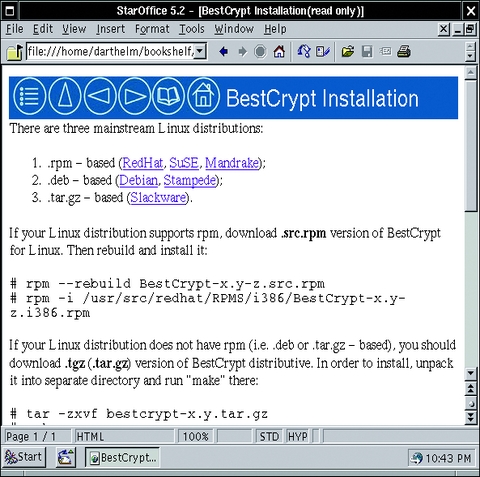
Figure 1. BestCrypt's Documentation
Another thing you may want is BC_Panel, the BestCrypt Control Panel. This is available only in the form of a binary RPM (though it may be installable under Debian using alien). BC_Panel provides a GUI for BestCrypt that very closely resembles BestCrypt's Windows GUI.
Since the current version of BC_Panel as of this writing is 0.2-1, and since it doesn't appear to support all the features of the command-line version (or of the Windows GUI), BC_Panel appears to be a work-in-progress. Still, it's useful for some things and appears to be stable.
Creating a BestCrypt container is quick and easy. Here is a sample session:
bctool new myvault.jbc -s 150M -a twofish
-d "my test vault"
  Enter password:
  Verify password:
BestCrypt has one main command-line tool, bctool. To create a new container you simply send bctool the command new followed by the container's filename, size, encryption algorithm and description. BestCrypt then prompts you for a password.
Make sure to use a strong password. Although all of BestCrypt's supported algorithms except DES use 128-bit or greater keys to encrypt containers, a container's key is itself hashed with your password. An easily guessed password means an easily decrypted container, no matter how big of a key it was encrypted with.
Make sure also to write down your password and keep it in a safe place, or choose a password you're positive you won't forget; according to Jetico, passwords are absolutely nonrecoverable, and there are no backdoors in BestCrypt for password recovery. This is very much a positive thing: while it means you will lose data irretrievably should you forget or lose your password, it also means the only way for an attacker to decrypt your container is to guess or brute-force your password.
After creating a container, you need to create a filesystem in it. This is done with bctool's format command:
bctool format -t msdos ./myvault.jbc
Use the -t flag to specify a filesystem format supported by your system. If you're going to share this container with the Windows version of BestCrypt, be sure to specify msdos (if you actually use the vfat long filename extensions, aka Windows 95 long filenames, you should still format the container as msdos, and then mount it as vfat). BestCrypt can format containers in all file formats supported by your system.
Once a BestCrypt container has been created and formatted, it can be mounted. The command syntax to do so is very similar to that of the familiar mount command:
bctool mount -t vfat ./myvault.jbc ./mnt/kraunj00lz
From this point on (until you dismount the volume) the volume may be accessed like any other directory. By default, the volume's user and group will be set to those of the user who mounted it, with permissions set to 0700 (drwx------). In other words, other (non-root) users won't be able to access your volume unless you intentionally mount it with different ownership or permissions. You can specify a different user, group and permission mode at mount time with bctool's -o, -g and -m flags, respectively. See the bctool(8) man page for details and examples.
When you're done using the BestCrypt container, you can unmount it like this:
bctool umount ./mnt/kraunj00lz
While a BestCrypt container is unmounted, it can be backed up, copied and otherwise treated like any other file. While it's mounted, though, it can't be changed or manipulated (except by bctool).
I mentioned that BestCrypt for Linux has a GUI, but as of this writing it's still in a beta state. BC_Panel (Figure 2) is available only as a binary RPM.
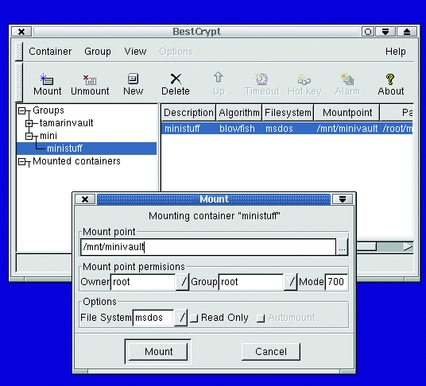
Figure 2. BC_Panel v0.2b, BestCrypt's Linux GUI
On the one hand, BC_Panel (the binary is actually called bestcrypt, but for clarity's sake I'll stick to BC_Panel here) is stable, obviously well written and at least cosmetically is very similar to its Windows counterpart. However, BC_Panel supports only a subset of the functionality provided by bctool and therefore, only a subset of the Windows GUI for BestCrypt; it isn't quite up to date with either.
For example, the New (container) dialog lists only a few possible algorithm options out of the ten or so actually supported. Worse still, trying to create a container with any of the algorithms presented as options by BC_Panel fails with an error message unless you're logged on (and running X) as root.
If you're root, BC_Panel does successfully create, format, mount, unmount and re-encrypt (with a different algorithm) BestCrypt containers, and even dynamically detects and lists containers mounted by the bctool command (for volumes on which the user running BC_Panel has read-permissions, that is). Thus, while I wouldn't rely on it for production use, BC_Panel seems to be useful for certain maintenance functions (if you don't mind conducting entire X sessions as root) and generally shows great promise; I hope Jetico releases a production-worthy version of it soon.
Okay, I've established that BestCrypt is easy to install and use under Linux. But what about its compatibility with Windows? And what kind of potential does BestCrypt have for bringing disk-volume encryption to the Windows-using masses? The news is good on both counts.
For the past week I've been alternating booting my laptop system to Windows 98 and SuSE Linux 7.1, using the same BestCrypt container (which resides on my DOS/VFAT partition) as the working directory for my writing activities under both OSes. Other than an apparently harmless blue-screen error when I shut down Windows (Windows complains that one or more files are still open on the BestCrypt volume when it's unmounted), BestCrypt has performed flawlessly. I've lost no data, noticed no slowdown in disk performance when using the BestCrypt volume and have noticed no discrepancies whatsoever between the two versions of BestCrypt's handling of my shared container.
Equally nifty, I've had to invest practically no time at all in reading documentation or scanning mailing-list postings in order to use BestCrypt under Windows (unlike practically every other tool I've written about lately). BestCrypt's Windows GUI is extremely easy to use (Figure 3).
Granted, I'm intimately acquainted with the inner workings of public-key cryptography and have used other tools like PGPdisk for years. In other words, my credentials as an ordinary end user are suspect, to say the least. Still, I feel confident in stating that as far as usability is concerned, BestCrypt has at least an equally good chance asPGPdisk had in becoming the essential mainstream tool that elevates the masses to a Zen-like state of encrypted-volume enlightenment (and security).
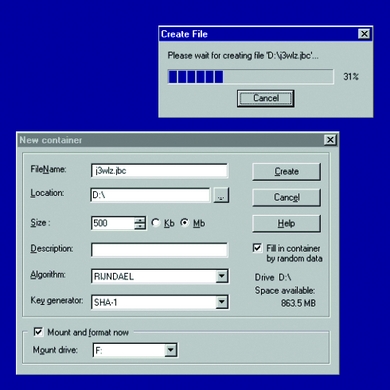
Figure 3. Creating a New BestCrypt Container under Windows
What I'm not confident stating is that based on painstaking cryptanalysis and code review, I believe BestCrypt to be impregnable. (Boy, I sure hope that sentence never gets partially quoted. Good thing those Jetico folks seem so highly principled!) Being neither a professional cryptologist nor even a programmer, I will have to leave it to others to judge the real strength of BestCrypt's security.
What I can tell you is that BestCrypt supports an impressive collection of known-good algorithms (or, as the more cynically minded might put it, it's “crypto-buzzword-compliant”), including the newly announced US Government Advanced Encryption Standard, Rijndael, plus two of the more promising runners-up in the AES contest: Ron Rivest's RC6 and Bruce Schneier's Twofish. If all three of those are too new for you, BestCrypt also supports Triple-DES, Blowfish (with several different key sizes), IDEA, CAST and the Russian Federal standard GOST algorithm. BestCrypt also supports “single” DES, though its use isn't recommended due to its easily brute-forced (small) key size.
As an added bonus, Windows users get two additional features: Swap-file encryption, which protects you from attempts by others to extract passwords and other sensitive data from your Windows swap-file, and BCWipe, a low-level file eraser. Of these two, the swap-file encryption feature doesn't appear to be part of the Linux version yet.
BCWipe, however, can be purchased separately for Linux (i.e., it isn't bundled with BestCrypt as it is in the Windows version). BCWipe, like PGP's Wipe feature, repeatedly overwrites the data that remains when you “delete” a file, making it nearly impossible for deleted data to be recovered by any but the most sophisticated disk-recovery tools (if at all).
Thus, to the best of my qualifications in determining so, BestCrypt's security appears to be strong from a technical standpoint: it supports a number of important cryptographic and noncryptographic security technologies.
My evaluation of this product has centered on functionality, usability, Linux-friendliness, support for algorithms I like and trust, and of course, overall polish. I think BestCrypt succeeds on all those counts, and based on the consistently high quality of Jetico's software in those areas, I'm willing to believe that their cryptographic implementations are equally meticulous and well executed.
In conclusion, BestCrypt is an impressive product. If stability, comprehensive and modular support for a variety of popular encryption algorithms, and overall tightness are anything to go by, it seems to be highly secure as well. I enthusiastically recommend considering BestCrypt for your filesystem encryption needs, especially if you use both Linux and Windows. It's helped restore some of my hope for a more crypto-enabled populace and has been fun to play with, too.
Mick Bauer (mick@visi.com) is a network security consultant in the Twin Cities area. He's been a Linux devotee since 1995 and an OpenBSD zealot since 1997 and enjoys getting these cutting-edge OSes to run on obsolete junk.

