
Linux System Administration Tools

May 15th, 2002 by Dee-Ann LeBlanc in

Dee-Ann introduces Linuxconf, Webmin, YaST and COAS.

Linux old-timers revel in reminding newcomers that they used to have to do everything by hand, at the command line, uphill, both ways, with duct tape for shoes. What really gets some of these folks sputtering is today's collection of system administration tools that introduce quite a bit of automation. There's good reason for this, actually; if you don't know how to administer your system by hand then you are sunk if something goes wrong. However, this factor doesn't mean you shouldn't take advantage of available helping hands.

There are four major players in the world of Linux system administration tools: COAS, Linuxconf, Webmin and YaST. One of these, YaST, is tied specifically to SuSE Linux. The other three, COAS, Linuxconf and Webmin, come by default with some distributions but are independently available for download and installation.

Linuxconf

Linuxconf (Figure 1) comes with Mandrake Linux and Red Hat Linux, but is also available for most modern Linux distributions. You've probably encountered this tool before if you use one of these distributions, either as the whole package or in one of its modular components. Multiple interfaces for Linuxconf have been available for years, but now we're up to four: GUI, Web, command-line and ncurses.
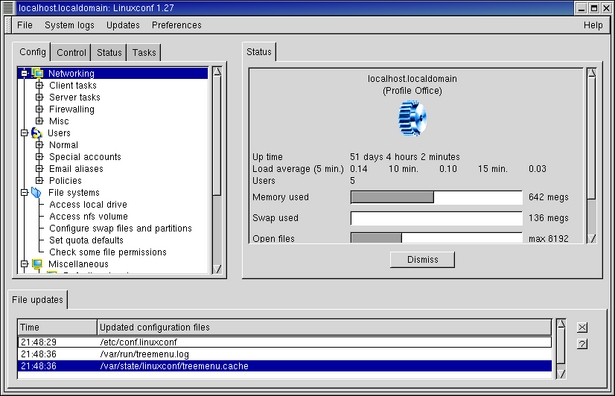
Figure 1. The GNOME Version of Linuxconf

Linuxconf has actually been around for years, which means its bugs have had longer to shake out than the other distribution-neutral tools. You can download and find out more about this tool at www.solucorp.qc.ca/linuxconf. Be sure to read through what each portion of the Linuxconf package is used for. There is a base package with the non-GUI components, and then there are various GUI front-end pieces from a more general X Window System version to one specifically built for GNOME.

Whether you stick with the command-line version or add a GUI front end, you run the tool by typing linuxconf. From here you navigate text or point and click menus to access a wide variety of system settings, everything from basic networking details to GRUB configuration. Linuxconf also plays well with people who refuse to use the root account for anything but the most vital tasks. If you try to run it as root, the tool simply asks for the root password--if this fact makes you nervous, then you may want to consider not using this tool, but this practice is fairly standard in modern administration tools. When you consider that anyone could just try to su to the root account at whim, you start to see why it is so important to have a secure root password in place.

Webmin

Webmin (Figure 2) comes with, and was recently acquired by, Caldera Linux. This tool is not only available for most modern Linux distributions, it also runs on most major flavors of UNIX and is available in around twenty languages (though some modules are not available in all of the languages). As you might guess, Webmin is purely a web-based application and a heavily modular one at that.
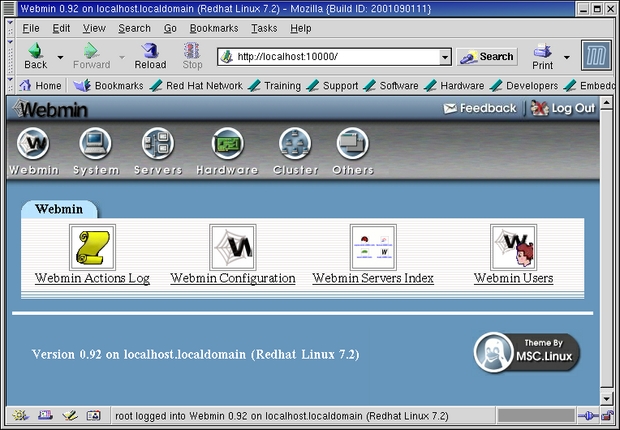
Figure 2. Webmin in Red Hat Linux 7.2, under GNOME

There is a set of core modules that handle the usual system administration functionality, and then there are the third-party modules available for administering a variety of packages and services. To download and learn more about Webmin, point your web browser to www.webmin.com/webmin. Once again, this package is available in a number of formats specific to different distributions.

Where any user can install Linuxconf, Webmin must be installed by root. After that you can access this tool from any user account as long as you know the root password.

There are three separate rows of icons on this tool's front page. On the upper right, you have a pair of administrative links, one to log you out of the Webmin tool and another that allows you to fill out a feedback form that sends your comments back to the Webmin team. In the same top row on the upper left you can click on the word Webmin and go to the product home page. On the upper bar directly beneath those links, there are a series of menu icons, which are, from left to right:

  • Webmin: takes you back to the main Webmin screen.

  • System: a collection of configuration issues, such as user and group manipulation, disk quotas and cron jobs.

  • Servers: configuration routines for a number of servers you may have installed on your system, such as Apache, WU-FTPD and sendmail.

  • Hardware: configuration utilities for hardware issues such as RAID, printers and disk partitions.

  • Cluster: a collection of cluster maintenance tools.

  • Others: a set of tools that system administrators typically need, such as a command prompt, an alias manager and a file manager.

Finally, there is the Webmin tab, which has a series of Webmin management tools:

  • Webmin Actions Log: if you've enabled Webmin logging, this function allows you to search through the logfiles for what you've utilized this tool to do to your system.

  • Webmin Configuration: takes you to the amazing number of configuration options available for Webmin, everything from strengthening your Webmin authentication requirements to upgrading either the main package or individual modules.

Yet Another System Tool (YaST)

YaST (Figure 3) and its cousin YaST2 (Figure 4) come with SuSE Linux; these items are specific only to a single distribution.

Figure 3. SuSE's YaST
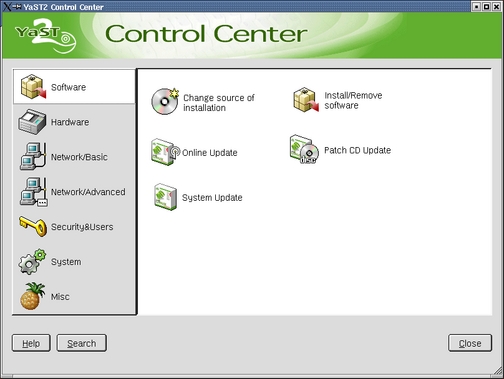
Figure 4. SuSE's YaST2 in KDE

Generally speaking, you'll want to use YaST2 when at all possible; YaST2 is the graphical version, and the older YaST is a great fallback if you aren't able to get into the GUI or have not installed a GUI. YaST2 is laid out in a standard file-manager format, with the menu of categories on the left and icons for the various configuration routines on the right, which change to correspond with your category choice. The categories are:

  • Software: the selection of SuSE software-management utilities, such as the ability to update your system over the Internet or add and remove packages from the SuSE CD-ROM or DVD-ROM.

  • Hardware: a selection of hardware configuration routines, including printers, sound cards and scanners.

  • Network/Basics: the selection of configuration tools formodem and other connectivity devices, Ethernet cards and more.

  • Network/Advanced: the section where you can configure many of your network services, such as sendmail, routing and NIS+.

  • Security&Users: the selection of user and group-management tools, as well as a couple of useful security tools.

  • System: the selection of overall system-configuration tools, including a boot script (rc-config) file editor, boot loader configuration editor and routines for changing the language, keyboard and so on.

  • Misc: a collection of tools that couldn't be otherwise grouped into the other categories. Some of the items represented here involve alternate print setup tools, some for working with log files, and some for communicating with SuSE.

The Caldera Open Administration System (COAS)

COAS comes in a rudimentary form with Caldera OpenLinux but is available for most modern Linux distributions, and is open source and covered by the GPL. This tool comes in four different formats, so you can use the interface that's most comfortable: command-line, ncurses (command-line but menu driven), GUI and Web for remote use. This tool is still under development but will be included in its entirety in later versions of Caldera OpenLinux--though there are rumors that because Caldera now has a stake in Webmin, COAS may be on its way out. This concern is born out by the fact that the COAS web site doesn't seem to have been updated since September of 1999.

This tool is modular, meaning that rather than loading its full set of features into memory when you start it, only the portions you're using come into play. Adding and removing modules is typically transparent as you work with the tool unless you require an external module, one made by a third party or one that for some reason is not included with the core release.

Right now the system is in development, specifically using KDE's Qt library set, but rumor has it that a GTK (GNOME) version is in the works. You can find out more about this tool by visiting www.coas.org, including the list of the tool's anticipated capabilities.

Dee-Ann LeBlanc is a Linux writer, trainer, course developer and consultant who never seems to be able to stick with doing just one thing.

__________________________


Special Magazine Offer -- 2 Free Trial Issues!
Receive 2 free trial issues of Linux Journal as well as instant online access to current and past issues. There's NO RISK and NO OBLIGATION to buy. CLICK HERE for offer

Linux Journal: delivering readers the advice and inspiration they need to get the most out of their Linux systems since 1994.

Sorry, offer available in the US only. International orders, click here.

Comment viewing options

Select your preferred way to display the comments and click "Save settings" to activate your changes.

What is File management in Linux

On May 4th, 2005 Anonymous (not verified) says:

I would like to know what is file management in Linux please

Re: Linux System Administration Tools

On April 8th, 2003 Ciberaula (not verified) says:

The only thing that is better in Microsoft systems is the easy way of doing anything. When become Linux an easy operating system for everyone the people will choose Linux. I think this is near.

Re: Linux System Administration Tools

On July 28th, 2003 Anonymous says:

Cpanel still does it best IMHO & IMGO
:)

Re: Linux System Administration Tools

On May 25th, 2002 cchamb2 (not verified) says:

I'm just a newcomer to the Linux world and networking, and I would only partially agree with the concept that web-based administrative tools are not yet ready for widespread deployment.

While initial configuration is still best done at command line, the web-based tools will catch on as post-install interfaces through which [remote] tech support people can have the EU (network or system admin) address settings issues.

SABIEN Administration

On August 29th, 2002 Anonymous says:

I agree with the Post Setup GUI idea - this is why I am working on a commercial system

www.sabien.uklinux.net

Though the Gurus will argue this Ive had over a 1000 hits in 2 weeks so the demand for a GUI must be high

info@sabien.uklinux.net

In addition Im going to try and make it clear to a learner what SABIEN is going to do to the config before applying changes and have plently of user friendly context specific help

Thanks,

Steve

Re: Linux System Administration Tools

On May 20th, 2002 Anonymous says:

This author is either out of touch or very unfamilar with configuration tools these days. YaST1 is dead, LinuxConf is not pushed by either RedHat nor Mandrake (and hasn't been for at least a year), and Caldera's COAS isn't really worth mentioning considering it's age and quality.

Additionally, the author forgets Mandrake Control Center (MCC) which is probably the easiest to use control panel.

-Tim

Re: Linux System Administration Tools

On May 22nd, 2002 Anonymous says:

To Tim:

What can you do with MCC. For example do you configure dns, mail server,Sql. Or can you use all of servers as integrated for a domain.

Re: Linux System Administration Tools

On June 2nd, 2002 Anonymous says:

To the best of my knowledge you can not configure a mail server or MySQL with mcc. MCC, like Mandrake is oriented toward the desktop. However, phpMyAdmin is included with and is an excellent way to handle MySQL stuff.

MCC takes care of things like Bootup configuration, DHCP, Dialup internet, security settings using "msec," package management, X11 config etc. Think something between YaST1 and YaST2-like functionality, and you get a pretty good idea of what MCC is.

-Tim

tournament

On September 21st, 2005 tournament (not verified) says:

In your free time, check the sites about betting ...

Re: Linux System Administration Tools

On May 21st, 2002 Anonymous says:

hmm, interesting... so you're advocating that MCC will work on my Slackware setup? Since YaST is indeed dead, can I use MCC on SusE?

Re: Linux System Administration Tools (2)

On June 2nd, 2002 Anonymous says:

I believe it very well might run on Slackware. I tested one component (Menudrake) on Debian and it worked fairly well. With a bit of work, you could definately get MCC to work on pretty much any setup. And you are free to do so since it is Free Software.

Re: Linux System Administration Tools

On May 21st, 2002 Anonymous says:

Relax, cut the author some slack ok? The point of the article was show the different configuration tools (old or new) that can be used for system management. True linuxconf is not pushed anymore by RH or MDK but this utility is still very much included in the distros and just not installed on default. In fact, a lot of sysads still use linuxconf particularly on RH setups just because IT IS THERE.

The author did in fact mentioned the outdatedness of COAS and YaST1 being replaced by YaST2. The mere mention of them is just for academic comparison.

Re: Linux System Administration Tools

On June 2nd, 2002 Anonymous says:

My point is that one should not write an article claiming to cover the major configuration tools and then basically spend most of the time talking about tools that are no longer of use.

Re: Linux System Administration Tools

On May 20th, 2002 Anonymous says:

What is the replacement for linuxconf in RH 7.3?

Easy and complete solution is Easilix SM!

On May 20th, 2002 Anonymous says:

Why Nothing about the Easilix SM. That is unified, secure, complete, easy and simple Linux server and system admin tool. More than tool, it is complete solution especially for intranet. I tried to use both of them (webmin and linuxconf),but my opion is Easilix much better than all.

Re: Easy and complete solution is Easilix SM!

On June 10th, 2003 Anonymous says:

Yeah it's great. Should it can install on PentiumMMX machine or Vmware just to testing? I have problem with it when in partition disk, I always got error message. Could you help me?If you have some good idea please mailme: olymtang@hotmail.com

Re: Easy and complete solution is Easilix SM!

On May 20th, 2002 Anonymous says:

How can i find it?what is its web page or download url?

Re: Easy and complete solution is Easilix SM!

On May 23rd, 2002 Anonymous says:

You can download full ISO from:

http://www.easilix.com

Re: Linux System Administration Tools

On May 18th, 2002 Anonymous says:

First of all I think people should know that the only GUI tools that are alive are Webmin and Yast.

Second, GUI tools can screw you over if you don't know how to do it manually. Webmin asks you to configure the modules before you get to use them. That means you are screwed if you don't know how to configure them manually in the first place.

It may sound like I don't like GUI tools but I do. I just don't want new Linux users to think that GUI tools will save them if they don't know how to do something at the command line.

SABIEN Linux Administration Tools

On August 29th, 2002 Anonymous says:

Im currently working on a administration system for Linux that will be commercial

Though the Gurus will argue this Ive had over a 1000 hits in 2 weeks so the demand for a GUI must be high

www.sabien.uklinux.net

In addition Im going to try and make it clear to a learner what SABIEN is going to do to the config before applying changes and have plently of user friendly context specific help

I would really appreciate any feedback

info@sabien.uklinux.net

Thanks,

Steve

Re: Linux System Administration Tools

On May 17th, 2002 Anonymous says:

What about VI, sed, awk and emacs?

Re: Linux System Administration Tools

On May 20th, 2002 Anonymous says:

are you kidding?

Re: Linux System Administration Tools

On May 17th, 2002 Anonymous says:

People seem to forget a very important thing. Computers are very complex. Configuring, installing and troubleshooting a server is a task for a highly qualified professional and a layman will not be able to do it properly weather it is GUI or console. Recent IIS adventures have shown us that. As a professional I would take flexibility over ease of use any day. Desktop systems are different, but a generic desktop user doesn't want to configure his/her computer at all GUI or console. Generic desktop user gets scared of MS control panel let alone console. It would be much easier for a professional to help end-user if directions to reconfigure computer would sound like "type ... press ENTER' then "click here, click there, press OK, click Preferences..." So, I think projects like linuxconf and YAST are very bad for Linux. Webmin in my opinion is a very poor substitute for SSH.

Re: Linux System Administration Tools

On May 17th, 2002 Anonymous says:

Ok well someone here needs to go back to Linux or *Nix school.

Webmin in my opinion is a very poor substitute for SSH.

That's a very uneducated statement. First of all SSH and Webmin are two VERY different things. SSH (secure shell) is a replacement for telnet and many of the r* services.

Webmin is a web-based administrative tool that use Perl/CGI to alter system configuration files. So tell me where is the corelation between the two?

While I am not a HUGE fan of this GUI admin tools Webmin has to be one of the best (if not the best) webbased tool for many of the Unix system administrative tasks that are out there. Webmin is a tool for those seasoned Unix admins out there who want to reduce some typing but otherwise you still have to know what you're doing.

Re: Linux System Administration Tools

On May 17th, 2002 Anonymous says:

All these tools are good, but as long as each app has its own proprietary conf file syntax, a front end tool like webmin will have to know each one of these formats and mess around with regexp. These means hard work and posibility for error. All conf files should be xml-s and posibly also restricted by some standars. This should be the future. Imagine the posibilityes. It would be so much easier to front end an xml.

Come on, you gotto grow up.

On June 14th, 2007 Anonymous (not verified) says:

Seriously, what was the point in saying 'What can i say?" Did that bit of cuteness add anything of value to this thread?

If you have nothing useful to say, then you have nothing to say, so say nothing.

XML is rubbish

On May 19th, 2002 Anonymous says:

All XML does is call each "proprietary conf file syntax" XML and leaves the poor user to trackdown the definition of this particular XML format. Added to which the vast piles of verbage that XML adds make the file harder for humans to read and understand.
Saying that "All conf files should be xml" is like saying "All conf files should be text, with lots of extra bits to make it hard to read".
TWW

Re: XML is rubbish

On April 22nd, 2004 Anonymous says:

XML has its good points. As does SQL? or say HTML? A little knowledge never hurts. Remember BBS systems? and then there was this thing called hypertext. The point is not how XML works but rather how various systems work with XML. After all effenciency is the goal here as is smaller code. Dont you think?

This is not

On May 17th, 2002 Anonymous says:

GUI admin tools do not automate. They do just the opposite. They lock you into a GUI. Linuxconf is a perfect example. The traditional, well documented, human readable, hand editable config files are overlayed with Linuxconf config files - files that are nonstandard, less readable and poorly documented.

This means the GUI becomes your only option. The only way to make config changes is to plant a shaved ape in front of a terminal. "This file is automaically generated - Do not hand edit!" Automation is no longer an option. No scripting allowed. The Windows Way. Lotsa ROI cause your shaved ape doesn't need to know what he's doing. Just point and click. And if it doesn't work... call tech support and curse your own impotence. Just like NT.

Re: This is not

On May 8th, 2003 Anonymous says:

Very lucid.

I would love to talk to you.

310-980-6241

Al

Re: This is not

On May 18th, 2002 Anonymous says:

Absolutely. I find that the only thing I can count on when dealing with various different Unixes (SunOS, HP-UX, Linux) is the text config files and Vi. That's all I need, and thankfully, Debian keeps true to this.

Open COE

On May 17th, 2002 Anonymous says:

Still very immature, there is a project called OpenCOE to implement the DoDs cross platform system management APIs for user and software management. If you are familiar with DII COE, you might want to check out http://rhinohide.cx/opencoe

Re: Linux System Administration Tools

On May 16th, 2002 Anonymous says:

Outdated arcticle: RedHat doesn't deliver linuxconf anymore with RedHat 7.3, yast1 is history with SuSE 8.0.

Re: Linux System Administration Tools

On May 21st, 2002 Anonymous says:

I beg to differ, linuxconf is very much still included in the RH distros. It is included as an option and not installed as default. It may be outdated, But IMHO it still does the job it was originally designed to do.

Re: Linux System Administration Tools

On May 21st, 2002 Anonymous says:

Of course linuxconf is in RH 7.3!!! check the contrib dir!!!

Re: Linux System Administration Tools

On May 17th, 2002 Anonymous says:

what replaces linuxconf in redhat 7.3 ? what replaces yast in suse 8 ?

Re: Linux System Administration Tools

On May 17th, 2002 Anonymous says:

suse dropped yast (the original one) in favor of yast2. one of the big changes in suse 8.0 was the switch from using the /etc/rc.config file to the /etc/sysconfig directory structure (as specified by the LSB). since yast2 is more modular than yast, it was much easier for suse to upgrade yast2 to work with the changes. however, there seem to be a lot of people who are upset over the loss of yast.

Re: Linux System Administration Tools

On May 17th, 2002 Anonymous says:

If your doing an install on a system that is basically not GUI capable (I don't recall the requirements for a GUI install with SuSE, but I've worked on several systems that didn't meet them) yast is much prefered. The "text mode" yast2 is painfully slow on such systems, and a real pain in the ass to navigate without a mouse. Basically, it's only a problem on systems 5 or more years old, but enough people have those lying around that they'd like to throw Linux on that it becomes an issue.

Re: Linux System Administration Tools

On May 18th, 2002 DaveCallaghan (not verified) says:

I standardized on SuSE because I have Intel and PowerPC-based systems. Configuring an RS/6000 with a terminal and a keyboard using YAST is difficult, but still possible. Barely. The end of YAST may mean the return of AIX for me, depending on how they resolve the text-only YAST2 issues that you mentioned.

Re: Linux System Administration Tools

On May 17th, 2002 Anonymous says:

What is the replacement for linuxconf in RH 7.3?

Re: Linux System Administration Tools

On May 16th, 2002 Anonymous says:

Hmmm, could have used some deeper information than "these tools exist." Linuxconf is famous for goobering up configuration files. Some GUI tools maintain their own configuration databases, rather than simply being a front-end to the existing, standard text configuration files, and are responsible for some serious hose jobs. It would be valuable to know how they work under the hood. I like Webmin very much, I understand it is a Perl frontend to text configuration files. That's how it should work.

Re: Linux System Administration Tools

On May 16th, 2002 Anonymous says:

Why nothing about the Mandrake Control Center ? They provide a feature that should be in every config tool imho: explanations. Each config tool reports what it is doing, what files are modified and what commands are executed.

This helps the user to learn how a config task is done, can also be used to debug by experimented admin and give more confidence in the tool because it eliminates the black box syndrom.

Re: Linux System Administration Tools

On May 20th, 2002 Anonymous says:

Why Nothing about the Easilix SM. That is unified, secure, complete, easy and simple Linux server and system admin tool. More than tool, it is complete solution especially for intranet. I tried to use both of them (webmin and linuxconf). But Easilix much better than all.

Re: Linux System Administration Tools

On May 26th, 2002 Anonymous says:

Easilix isn't Open Source as in Free Software. It's likely that the article discusses administration tools that follow the spirit of the Operating System being managed, and the likelihood of already finding the tools packaged freely with that Free Open Source Operating System.

Re: Linux System Administration Tools

On May 19th, 2002 Anonymous says:

I'm a Mandrake addict.

but seeing how YaST2 runs in KDE (screenshot above) I think that my love for SuSE is starting to shine yet again...

Just another proof that the more time passes on, the more the open source movement is strong... so strong...

Re: Linux System Administration Tools

On May 17th, 2002 Anonymous says:

It's rather amazing... and does a lot of things. It's the easiest I've ever seen on linux (just try to set up your cable modem - Eth card, etc...)

And which is better: it does not overwrites your old configuration files under /etc/sysconfig, but makes rotated backups of these (unlike Webmin).

Apart from this, it interoperates perfectly with Webmin.

Webmin is excellent

On May 16th, 2002 Anonymous says:

Whilst I still prefer to edit configuration files by hand, I was amazed by Webmin's depth when I used it for the first time earlier this year.

Webmin has modules for configuring a huge number of services (including Apache, BIND, DHCPD, NIS, NFS, PAM, sendmail/postfix/qmail, sshd, WUFTP/ProFTP) and performing a large number of tasks (including adding users, scheduling at and cron tasks, modifying disk quotas, killing processes, viewing system logs). There's also several other modules that can be downloaded.

This tool has not caused any problems for me since using it for many mundane system administration tasks (this can not be said of Linuxconf) for the past month, and would be perfect for delegating simple tasks to help desk workers or colleagues.

The other advantage of Webmin is that it imports and uses the existing settings quite well, rather than overwriting settings with another default copy (something YaST does quite badly).

Highly recommended.

None of them, excellent.

On May 20th, 2002 Anonymous says:

Administration tools use different interfaces. They aren't full-featured. Also some tools interfere with manual file editing. As an result, Linux makes everyone to being expert.

Re: Webmin is excellent

On May 16th, 2002 Anonymous says:

I agree. I have been linuconf for *quite* some time now. Even though i personally prefer editing configuration files by hand, i too was amazed at the depth of webmin.

I have found modules for servers like Tomcat, Orion and other application servers. Not to mention the fact that we have come up with our own to let the users tailor their own settings.

Webmin's an excellent software and highly recommended from me too :)

Re: Webmin is excellent

On May 16th, 2002 Anonymous says:

Agreed; the only issue with Webmin is security, and I believe that can be addressed by sending the Webmin-relevant HTTP requests to the target system over an SSH session.

Featured Videos

Non-linear video editing tools are great, but they're not always the best tool for the job. This is where a powerful tool like ffmpeg becomes useful. This tutorial by Elliot Isaacson covers the basics of transcoding video, as well as more advanced tricks like creating animations, screen captures, and slow motion effects.

Shawn Powers reviews the HP Mini-Note portable computer.

Thanks to our sponsor: Silicon Mechanics

Silicon Mechanics is a leading manufacturer of rackmount servers, storage, and high performance computing hardware. The best warranty offerings available are backed by experts dedicated to customer satisfaction.

From the Magazine

August 2008, #172

There's nuttin like a Cool Project to give you some relief from the summer heat, so get out your parka cuz we got a bunch of em. First up is the BUG, not a bug, The BUG. It's got a GPS, camera and more, in a hand-sized package that's user programmable. The BUG does everything. It's both a floor wax and a dessert topping. Get one now. Need a software version of a Swiss Army knife? Take a look at Billix, and don't leave home without it. Then, chew on this one, an X server on a Gumstix device driving an E-Ink display. Need more storage? How about 16 Terabytes? Can do.

And, of course, we have the usual cast of characters: Marcel, Reuven, Dave, Kyle, Doc, plus the new kid on the block Shawn Powers. But it doesn't stop there: build a MythTV box on a budget, build your own GIS system, set up the tools to monitor your enterprise and more. Finally, remember The War of the Worlds? Now you can play too.

Read this issue