
Large-Scale Mail with Postfix, OpenLDAP and Courier
Although this article provides instructions on setting up an integrated mail server using Postfix, OpenLDAP and Courier-IMAP, it does not discuss how these software components were chosen, which could be a whole article in and of itself. The goal is to set up an SMTP mail server for multiple domains on a single machine with remote access via IMAP. Also, instead of having mail delivered only to people with shell accounts, we want to have IMAP accounts that do not have a corresponding shell account. This gives rise to two classes of accounts: local and virtual. Local accounts are those with shell access. They use their shell user name and password to access IMAP. Virtual accounts have a user name and password that only works for logging in to IMAP. The terms local and virtual are used throughout the rest of the article.
Figure 1 shows how Postfix, Courier, Procmail and OpenLDAP interact. Local account information is stored in /etc/password, and authentication is handled by pluggable authentication modules (PAM). Virtual account information is stored in an LDAP directory. LDAP provides both account lookup and authentication capabilities. It is possible to avoid an LDAP directory, but it will be more difficult to administer the virtual account information. For example, Postfix and Courier both support virtual accounts using configuration files, but they have different file formats.
Postfix accepts incoming mail from SMTP. It will reject any mail for unknown accounts, both local and virtual. It delivers the mail itself for virtual accounts and uses Procmail as the MDA for local accounts. Courier provides remote access to the mailboxes via the IMAP and POP protocols.

Figure 1. Overall Design
A local account's mail is stored in its home directory at ${HOME}/Maildir/ in the Maildir format. It is standard practice for Maildir delivery to go into the account's home directory rather than /var/spool/mail. Both Postfix and Courier work out of the box with this standard behavior.
Unlike local accounts, there is no standard location for virtual accounts' e-mail. We created a single UNIX account, called vmail, that holds the mail for all the virtual accounts. Each virtual domain has a subdirectory within the ~vmail/domains/ directory. For example, if there is an account <john@example.com>, mail would be stored in ~vmail/domains/example.com/john/ in maildir format. You can also spread virtual accounts across multiple UNIX accounts, for example, by creating a UNIX account for each virtual domain.
There are many possibilities when designing your directory, and not all aspects of this topic are covered here. One useful reference is the iPlanet Deployment Guide (see Resources). This article assumes you are familiar with LDAP concepts and terminology. You should take the time up front to design a tree that matches your specific requirements.
Figure 2 shows a sample directory tree for a web hosting company. The company's domain name, myhosting.example, was chosen as the root suffix. Postfix and Courier both search the o=hosting,dc=myhosting,dc=example subtree for e-mail information. The o=accounts,dc=myhosting,dc=example subtree shows how you could integrate shell account information for PAM into the same directory, but this is not necessary for setting up e-mail. Each hosted domain gets its own organization beneath the hosting organization. Each e-mail account goes under the domain's subtree. Thus, the distinguished name for the <user2@domain2.example> e-mail address is:
mail=<user2@domain2.example>,o=domain2.example,
 o=hosting,dc=myhosting,dc=example
This is a fairly stable design as accounts will never transfer between domains. The end result is good LDAP design, because moving subtrees can be troublesome in LDAP. The design is also quite flexible because each domain's tree can be tailored, if necessary. Each domain must have a postmaster entry that provides dual functionality. Its primary function is for access control, but it also acts as a forwarding e-mail address. Each domain also must have an abuse alias that forwards mail to the system administrator.
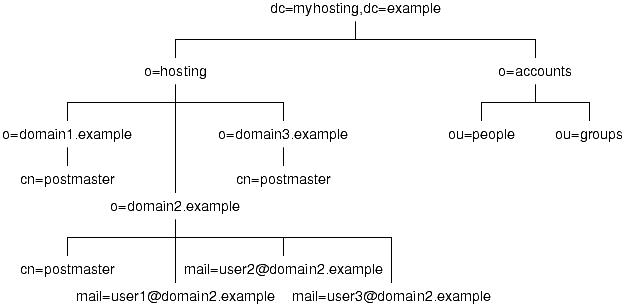
Figure 2. A Sample Directory Tree for a Web-Hosting Company
The schema defines which attributes an entry can have by defining object classes. None of the default schemas that come with OpenLDAP are really suited for entries used exclusively for e-mail mailboxes or forwarding. We are using the schema that Courier provides in its distribution. Another possible schema to look at is the schema distributed with the qmail-LDAP Project. You also can design your own schema, but be aware that you should use OIDs registered with the Internet Assigned Numbers Authority (IANA).
The courierMailAccount object class, summarized in Table 1, is used for virtual e-mail accounts. The courierMailAlias object class, summarized in Table 2, is used for e-mail addresses that forward to another address.
The courierMailAccount object class does not exactly fit our needs. We do not need uidNumber and gidNumber because all mail goes to the vmail account. However, we must put in dummy values as the schema requires them. Note that these values would be meaningful if we were spreading virtual accounts over many UNIX accounts. We require the mailbox attribute, because it is needed to determine the location of the mailbox on the filesystem. The mailbox must end in a slash to indicate that it's a Maildir-style mailbox. The userPassword attribute also is required because all e-mail accounts must have a password in order to be accessed via IMAP or POP. We do not use the other optional attributes.
The courierMailAlias object class is a good fit for our needs. We use only the two required attributes and do not use either of the optional attributes. The maildrop attribute can be another e-mail address or a local account on this machine.
OpenLDAP provides many possibilities for access control. By default, the root account has read and write access to all entries in the tree. We would like to delegate some of this administration to individual accounts in each hosted domain so they can do minor changes on their own without access to the root account. This is done by making the postmaster entry an organizationalRole with a roleOccupant attribute for each entry with administration privileges. OpenLDAP can then be configured to allow access only to members of this group.
This section describes how to implement a virtual mail solution. Not every little detail is covered, only what is needed above and beyond the standard installations.
Following is the list of software, with version numbers, with which we tested this configuration:
Red Hat Linux 6.2, 7.1, or 7.2
Postfix 1.1.x
OpenLDAP 2.0.21
Courier-IMAP 1.4.1
Procmail 3.22
You need to create the vmail account, and then create the ~/vmail/domains/ directory. You also need to create an account and two groups for Postfix as covered in Postfix's INSTALL documentation.
You do not need to follow any special instructions for compiling and installing OpenLDAP, so consult its documentation for instructions. For a production environment, read up on running OpenLDAP as a non-root account, setting up a chroot environment and replication. This article describes how to configure slapd for a single server, create the base tree structure and insert some basic data into the LDAP directory. Figure 2 shows the LDAP tree we set up here.
You need to make Courier's schema file available, so copy the file from authlib/authldap.schema in the Courier distribution to /usr/local/etc/openldap/schema/courier.schema. Courier's schema depends on cosine.schema and nis.schema. Add these lines to slapd.conf:
include   /usr/local/etc/openldap/schema/cosine.schema
include   /usr/local/etc/openldap/schema/nis.schema
include   /usr/local/etc/openldap/schema/courier.schema
Next, set up a database definition with the following lines in slapd.conf:
database      ldbm
directory     /usr/local/var/openldap-ldbm
suffix        "dc=myhosting,dc=example"
The database directive specifies the back-end type to use (use LDBM as the back-end database). The directory directive specifies the path to the LDBM database. Make sure the directory specified exists prior to starting slapd and that slapd has read and write permissions on the directory. The suffix directive specifies the root suffix for this database. The next few lines set up the superuser or root account:
rootdn       "cn=Manager,dc=myhosting,dc=example"
rootpw       {SSHA}ra0sD47QP32ASAlaAhF8kgi+8Aflbgr7
The rootdn entry has complete access to the database, which is why
the password is stored outside the actual database. The password in
rootpw should always be stored in hashed format. Do not store the
password in clear text. To convert the clear text password secret
to a hashed format, use the slappasswd command:
% slappasswd
New password: secret
Re-enter new password: secret
{SSHA}ra0sD47QP32ASAlaAhF8kgi+8Aflbgr7
Take the output from slappasswd, and copy that into slapd.conf, as
we did above.
To speed up searches, you should create indexes for commonly searched attributes:
index   objectClass  pres,eq
index   mail,cn      eq,sub
The last part in slapd.conf is the access control. The OpenLDAP FAQ contains good information on how you would set up postmaster as a group ACL.
Now that slapd is configured, it's time to start adding data to the LDAP directory. We use the command-line tools that come with OpenLDAP and create LDIF files to modify the directory.
The first step is to create a base tree structure with our root node, the hosting organization and an entry for the rootdn. Create a file called base.ldif with the following contents:
dn: dc=myhosting, dc=example
 objectClass: top
 dn: cn=Manager, dc=myhosting, dc=example
 objectClass: top
 objectClass: organizationalRole
 cn: Manager
 dn: o=hosting, dc=myhosting, dc=example
 objectClass: top
 objectClass: organization
 o: hosting
Now use ldapadd, binding as the root account, to add this LDIF:
ldapadd -x -D "cn=Manager,dc=myhosting,dc=example" \
-w secret -f base.ldif
Domains can now be added under the hosting tree. Each domain needs to have postmaster and abuse entries at minimum. To make a tree for domain1.example, create a file called domain1.example.ldif with the following contents:
dn: o=domain1.example, o=hosting, dc=myhosting,
 dc=example
objectClass: top
objectClass: organization
o: domain1.example
dn: cn=postmaster, o=domain1.example, o=hosting,
 dc=myhosting, dc=example
objectClass: top
objectClass: organizationalRole
objectClass: CourierMailAlias
cn: postmaster
mail:
maildrop: postmaster
dn: mail=abuse@domain1.example, o=domain1.example,
 o=hosting, dc=myhosting, dc=example
objectClass: top
objectClass: CourierMailAlias
mail:
maildrop: abuse
Notice that the maildrop attributes are local e-mail accounts and will forward to the postmaster and abuse accounts in /etc/aliases. There are no accounts in the postmaster role, so only the root account can create accounts at the moment. Add this domain with the following command:
ldapadd -x -D "cn=Manager,dc=myhosting,dc=example"
\
-w secret  -f domain1.example.ldif
Now, let's add an account with an e-mail <user1@domain1.example>. Let's also grant this account postmaster privileges for domain1.example. Create a user1.domain1.example.ldif with the following contents:
dn: mail=user1@domain1.example, o=domain1.example,
 o=hosting, dc=myhosting, dc=example
objectClass: top
objectClass: CourierMailAccount
mail:
homeDirectory: /home/vmail/domains
uidNumber: 101
gidNumber: 101
mailbox: domain1.example/user1
dn: cn=postmaster, o=domain1.example, o=hosting,
dc=myhosting, dc=example
changetype: modify
add: roleOccupant
roleOccupant: mail=user1@domain1.example,
 o=domain1.example, o=hosting,
 dc=myhosting, dc=example
The first section adds a new entry for the account. The home directory and mailbox point to the physical mailbox on the filesystem. The uidNumber and gidNumber attributes are required but not used, so they are filled in with dummy values of 101. The second section modifies the postmaster entry by adding a roleOccupant attribute with the DN of user1@domain1.example. Let's create this account:
ldapadd -x -D "cn=Manager,dc=myhosting,dc=example"
\
-w secret -f user1.domain1.example.ldif
The account does not have a password yet, so even though it has been granted postmaster privileges, it cannot be authenticated. Use the ldappasswd command to set the initial password to user1:
ldappasswd -x -D "$DN" -w $PW -s user1 \
"mail=user1@domain1.example, o=domain1.example,
o=hosting, dc=myhosting, dc=example"
Other domains and accounts can be added with similar LDIF files. Creating LDIF files by hand can be cumbersome and error-prone. We discuss alternatives for administration later.
We cover only the sections of Postfix that pertain to the mail hosting. To deal with other parts of Postfix setup, please visit the Postfix web page.
Download the Postfix source and untar it. You need to rebuild the Postfix Makefiles to be aware of LDAP and link against it. To do this, execute the following command:
make makefiles CCARGS="-I/usr/local/include
-DHAS_LDAP" AUXLIBS="-L/usr/local/lib -lldap
-L/usr/local/lib -llber"
At this point, follow the normal Postfix compiling and installing instructions as documented in its INSTALL and LDAP_README files.
While configuring Postfix for this task, we are mostly concerned with /etc/postfix/main.cf. For most of the Postfix configuration, you will configure in a way that makes the most sense for your site, and you can follow the documentation contained in the Postfix source or on the Postfix web site. Here, we talk about the settings that are affected by this setup. If any of the configuration examples shown below aren't explicitly attributed to a specific file, assume they can be found in main.cf.
The transport table maps domains to message delivery transports (as specified in /etc/postfix/master.cf) and/or relay hosts. For our virtual domains, we want to map them to the virtual delivery agent that comes with Postfix. A transport table could look something like this:
domain1.example           virtual:
domain2.example           virtual:
After making your transport table in plain text, you need to make it into a binary DB file using postmap (see man postmap). At this point, tell Postfix that there is a transport table and where to find it. You also need to let Postfix know that we accept mail for those domains. This is done through the transport_maps and mydestination directives:
transport_maps = hash:/etc/postfix/transport
mydestination = $myhostname, localhost.$mydomain,
  $mydomain, $transport_maps
You can define multiple LDAP sources easily. LDAP source parameters are documented in README_FILES/LDAP_README in the Postfix source. The parameter names follow the pattern of <ldapsource>_parameter. The LDAP source name is defined by use. In main.cf, you'll need one LDAP source definition per each lookup.
The first LDAP source definition is for virtual aliases. We've named this LDAP source aliases. In our configuration, our LDAP server is running on localhost. The search base is the top of the hosting subtree we defined in our LDAP server. We're querying for items where the mail elements match the e-mail recipient as well as items that are of the courierMailAlias object class. The destination of the alias is stored in the maildrop attribute. Postfix won't bind using an account, instead it will do an anonymous lookup:
aliases_server_host = localhost
aliases_search_base =
  o=hosting,dc=myhosting,dc=example
aliases_query_filter =
  (&(mail=%s)(objectClass=CourierMailAlias))
aliases_result_attribute = maildrop
aliases_bind = no
When using the accounts source we're looking for entries that have an object class of courierMailAccount. We request the mailbox attribute as the result:
accounts_server_host = localhost
accounts_search_base =
  o=hosting,dc=myhosting,dc=example
accounts_query_filter =
  (&(mail=%s)(objectClass=CourierMailAccount))
accounts_result_attribute = mailbox
accounts_bind = no
A second source for accounts, accountsmap, also needs to be defined to help locate accounts when a catchall is used. Without this lookup, a catchall in the aliases would override virtual accounts in a domain:
accountsmap_server_host = localhost
accountsmap_search_base = o=hosting,dc=myhosting,dc=example
accountsmap_query_filter =
(&(mail=%s)(objectClass=CourierMailAccount
accountsmap_result_attribute = mail
accountsmap_bind = no
Now that the aliases and accountsmap LDAP source are defined, let Postfix know to use it by defining the virtual_maps parameter in main.cf:
virtual_maps = ldap:aliasesFor this example, assume there is a vmail UNIX account created that has a UID of 125, a GID of 120 and its home directory is /home/vmail:
:virtual_mailbox_base = /home/vmail/domains
virtual_mailbox_maps = ldap:accounts
virtual_minimum_uid = 125
virtual_uid_maps = static:125
virtual_gid_maps = static:120
Set the virtual_uid_maps and virtual_gid_maps to a special static map and hard code it to the UID and GID of the vmail account. All of the parameters shown here are fully documented in README_FILES/VIRTUAL_README, which comes with the Postfix source.
We also need to edit the local_recipient_maps parameter to look at the virtual_mailbox_maps so Postfix knows what accounts are valid. This is needed so Postfix can reject mail for unknown accounts:
local_recipient_maps = $alias_maps
  unix:passwd.byname $virtual_mailbox_maps
There aren't any special instructions for installing Courier, so see its documentation for full instructions. It should autodetect LDAP and build it in. You should seriously consider passing the --enable-workarounds-for-imap-client-bugs option to ./configure, otherwise Netscape mail users may have trouble interacting with your server. This bends the IMAP protocol a little bit, but it's better to have happy users than a perfect protocol with unhappy users.
Courier uses an authentication dæmon to keep authentication separate from the other parts of the system. Configure it so that a valid e-mail account is either found in either LDAP or PAM. Specify this in authdaemonrc using the authmodulelist parameter:
authmodulelist="authldap authpam"
All LDAP parameters are in authldaprc. Most parameters are self-explanatory. To use the Courier schema, you actually have a few modifications to make, though. You also need to map all virtual accounts to the vmail account. Here is a summary of the updates you need to make to authldaprc:
LDAP_GLOB_UID           vmail
LDAP_GLOB_GID           vmail
LDAP_HOMEDIR            homeDirectory
LDAP_MAILDIR            mailbox
LDAP_CRYPTPW            userPassword
Three other settings to be concerned with are LDAP_AUTHBIND, LDAP_BINDDN and LDAP_BINDPW. These relate to authenticating the user. LDAP_AUTHBIND is mutually exclusive with LDAP_BINDDN and LDAP_BINDPW. We recommend using LDAP_AUTHBIND. A comment in authldaprc mentions a memory leak in OpenLDAP when using LDAP_AUTHBIND, but it has been fixed in OpenLDAP version 2.0.19.
If you use LDAP_BINDDN and LDAP_BINDPW, you are limited to the crypt, MD5 and SHA algorithms for passwords. SMD5 and SSHA are not available. Also, you must put the root LDAP password in clear text in authldaprc when defining LDAP_BINDPW. There are security issues with putting the root LDAP password in clear text, so definitely use LDAP_AUTHBIND if you can.
The last change is to enable the IMAP server by setting the IMAPDSTART parameter to YES. You should now be able to use the courier-imap.sysvinit startup script to start and stop the IMAP dæmon.
Most of the administration tasks, such as adding, modifying and deleting accounts and aliases, require modifying the LDAP directory. You can do this with the OpenLDAP command-line tools or a generic LDAP browser like gq. These methods are cumbersome, however, because they are generic tools and are not tailored to the task of administering e-mail accounts. We've been working on a web administration application called Jamm that is essentially an application-specific LDAP browser written in Java and JSP. It also has its own LDAP schema that is a slightly modified Courier schema. Jamm is currently usable and is constantly evolving. Visit the Jamm web page on SourceForge for the latest Jamm information.
When you create an account or an alias inside the LDAP database it will instantly become active as far as the mail system is concerned. For virtual accounts, note that the UNIX directory in ~vmail is not created at this time. However, we can work around this because Postfix's virtual delivery agent will create the necessary directories the first time it has to deliver mail. Due to this fact, we recommend sending a welcome e-mail as soon as you create the account.
When you delete an account or an alias in the LDAP database, it will instantly become inactive. For virtual accounts, note that the UNIX filesystem isn't cleaned up. In other words, the data remains on disk until a system administrator can remove it. This allows you to keep the data from dead accounts for a grace period in case the account was deleted in error. However, if another account is created with the same name and the same mail path, the data will be available to the new account. This could be considered a privacy violation for the previous user.


