
Smart (Script-Aided) Browsing

March 14th, 2002 by Marco Fioretti in

How to mirror a web site from within your browser.
Your rating: None

Basically, there are two ways to surf the Net: interactively, with any text or graphical browser, or in batch mode, with a program that copies single pages or whole web sites to your hard drive for later use. Script-aided browsing is that part of client side web scripting that makes your use of the Web more efficient and powerful by merging these two techniques in one of the two following ways.

In the first case, you run, either directly or as a dæmon, a script that downloads a web page, extracts from its source code an interesting URL and terminates, thereupon opening your favourite web browser to the corresponding page. Several examples of this first method, applied to Konqueror, Galeon and Netscape (Mozilla uses the same commands as its cousin) have been already described in my article "Client Side Web Scripting", published in the March 2002 issue of Linux Journal.

The second case, also mentioned in that article, is the opposite of the first. That is, during normal interactive web browsing, you notice an hyperlink pointing to an interesting page, and, from within your browser, you launch a web script that will automatically download that page and perform some more or less complex action on it. This action can be anything you can imagine: download all the images contained in that page, list in a pop-up window all the pages it points to and so on. You are limited only by your scripting skills.

Here's an example: mirror a web page and all the pages it points to. Let's assume that you just discovered some new, interesting program. On its home page, a link points directly to the voluminous subsection of the web site containing the complete user manual, and you want to mirror all of the information on your hard disk. The standard tool for these cases is wget, so we don't need to write a new one. However, how do we launch it directly from the web browser, without opening a terminal window and typing the URL by hand? The rest of this article explains how to automate this operation in Konqueror; the example has been tested with the standard KDE, Konqueror and wget tools that come with Red Hat 7.2.

Step 1: Prepare the wget Script

Write a simple shell script that invokes wget with the -m (mirror) option on the first argument and call it wgetscript.sh (or whatever you want, of course). The content of my script is:

                       #!/bin/bash
                       /usr/bin/wget -m -L -t 5 -w 5 $1
                       exit

Put the script in the proper directory (I choose $HOME/bin and make it executable, chmod 755 <filename>.

Step 2: Add the Script to the KDE Application Menu

Following the guidelines in this paragraph of the KDE user guide, www.kde.org/documentation/userguide/adding-programs.html, add the script to the KDE menu. Figure 1 shows what I had to write to accomplish this. The string "mymirror" is the one that actually appears in the menu, and the comment is self-explanatory. The really interesting thing in this picture, i.e., the bit of black magic absolutely essential for the correct working of the whole procedure, is the content of the "Command" box:

/home/marco/bin/wgetscript.sh %u

Apart from using the complete path to the script, what is important is the %u part; this is what will tell Konqueror to launch the script with the complete URL that we selected as the first argument. Notice also that I checked the Run in terminal option. In this way, a Konsole window will open and run your script, and it will be possible to see what happens.
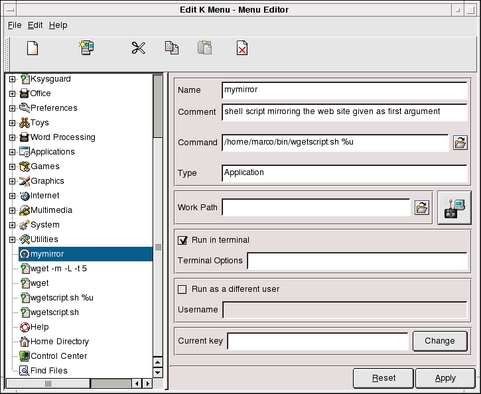
Figure 1. Adding wget to the KDE Menu

Step 3: Launch the Script

Now, to use this script from Konqueror, you have to right-click on the link that you want to mirror, (I choose the "Manuals online" link on the Free Software Foundation page for this example), and select the Open with.. option. Konqueror will open the window showed in Figure 2, which will you allow to choose "mymirror".
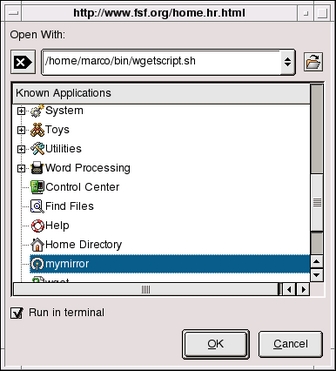
Figure 2. The Open with Option

Step 4: Go Have a Nap

That's it! Now Konqueror will open a Konsole and start the script with the complete URL ("wgetscript.sh http://www.fsf.org/manual/manual.html" in my example). You can browse some other page or do whatever you want, and when you're done, the pages you wanted to read will be available on your hard disk.

As shown in Figure 3, thanks to the -m (mirroring) option, wget will first download and save on disk the URL it was given, then parse it, download all the pages it points to and so on, recursively. Be very cautious with this (or any other automatic web navigation tool, for that matter), and consult the wget manual to tune it to your needs, proxy settings and bandwidth.
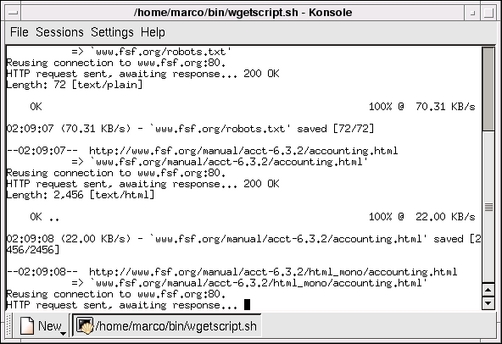
Figure 3. The wget Mirroring Option

Step 5: Enjoy the Result

When mirroring, wget creates a directory with the same name as the web server (www.fsf.org in this case) and puts everything in there. The last picture, Figure 4, is a listing of that directory made while wget was still working. As you can see, all the subdirectories present on the web site are preserved, and all the relative links are corrected automatically, to allow proper navigation among the mirrored pages.
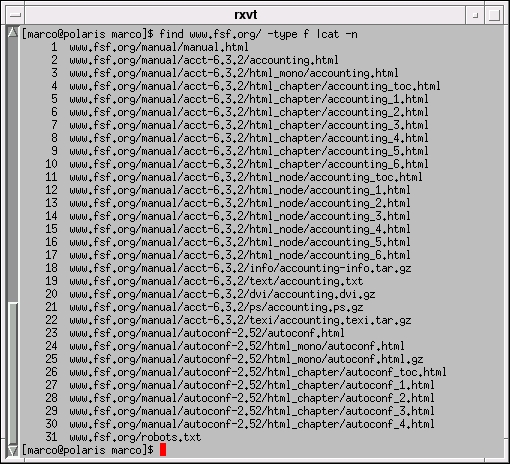
Figure 4. The Directory wget Mirrored

Conclusion

I have shown in detail how to launch shell scripts directly from Konqueror. How to do this is not one of the most documented features of Konqueror; at least, it's not the easiest one to find. I learned how to do this a couple of years ago, but I since lost my notes and spent half a day on the KDE and Konqueror site without success. I am really grateful to David Faure for giving me all the information I needed.

I am still trying to add this capability to other popular browsers, especially Mozilla and Galeon. I haven't had success so far, because (at least in the versions shipped with Red Hat 7.2) these browsers are missing the "Open with" menu option that made the trick on Konqueror. Any suggestions or pointers to relevant documentation is highly appreciated.

__________________________

The one book on software and digital technologies no parent can ignore: http://digifreedom.net

digital rights writings: http://mfioretti.com


Special Magazine Offer -- Free Gift with Subscription
Receive a free digital copy of Linux Journal's System Administration Special Edition as well as instant online access to current and past issues. CLICK HERE for offer

Linux Journal: delivering readers the advice and inspiration they need to get the most out of their Linux systems since 1994.

Comment viewing options

Select your preferred way to display the comments and click "Save settings" to activate your changes.
Anonymous's picture

Re: Smart (Script-Aided) Browsing

On March 17th, 2002 Anonymous says:

Interestingly some news websites like www.ananova.com analyse the http headers received from the client to detect whether the client is a command-line tool like wget or curl or a graphical web browser like Netscape or Explorer. The reply you get from the web server is different depending on the type of client you are using. Presumably this is done deliberately to stop users mirroring content. wget will actually fail to download web pages from www.ananova.com. Perhaps somebody knows of a ready-made command-line client which can simulate the http headers of Netscape et al.Wills (/. 242929) -- unable to login for some reason despite having both cookies and referrer enabled.

Anonymous's picture

reply from the author

On March 18th, 2002 Anonymous says:

The technical solution to your question is here:

http://www.linuxgazette.com/issue70/chung.html

Even Konqueror and other browsers allow you to set the User-Agent string at your will. As Mr chung points out, however, the real problem is:

Warning: the above tip may be considered circumventing a content licensing mechanism and there exist anti-social legal systems that have deemed these actions to be illegal. Check your local legislature. Your mileage may vary.)To me (Marco Fioretti), this is the same as saying that someone will sell to me a VHS tape only if I commit to look at it only with the most expensive VHS player around, from a particular vendor of his choice. The real solution in these cases is to politely tell to the webmaster that he got the whole internet thing backward, that you will never visit that site again, and will encourage everybody you know to do the same.

Best Regards,

Marco Fioretti

www.freesoftware.fsf.org/rule/

Anonymous's picture

complications

On March 18th, 2002 Anonymous says:

I think the situation is more complicated than you suggest. The website www.ananova.com detects which type of client you are browsing with (i.e., command-line tools such as wget and curl, or graphical browsers such as Netscape and Explorer) by looking at the http headers instead of by looking at the user-agent. This can be proved by using the --user-agent option in wget to set the user-agent to any of the typical values for a graphical browser, e.g., Mozilla/4.0 (compatible; MSIE 4.01; Windows 98). If you try this, wget will fail to read any pages from www.ananova.com. To see the differences in the http headers, try watching the communications (when you are browsing www.ananova.com) between your computer and www.ananova.com using something like either tcpdump host www.ananova.com port 80 -w - | strings, or strace -f on the process id of a junkbuster proxy. Graphical browsers like Netscape and Explorer supply http headers such as Proxy-Connection, Accept, Accept-Encoding, Accept-Charset, etc. The command-line tools like wget and curl don't supply these headers. The differences are enough for www.ananova.com to be able to recognise the browser type and react differently in each case.On your second point regarding legality of wget, I do not know how the law applies in your country but in the UK intention is the decisive factor. If your intention is to read a public website, and you have not previously entered a contract to use only one specified method of reading that website, then you are free to use any reading method of your choice on your own computer as long as it causes no loss or damage to anyone else and their property. There is no UK case law on methods of reading a website so UK statutes provide the default legal framework. If, however, your intention was to use wget to copy a website and sell the copied content to others, then you are committing several offences under UK law including one of copyright infringement.Wills (still unable to login despite having enabled both cookies and referrer)

Anonymous's picture

Re: complications

On March 19th, 2002 Anonymous says:

Wills,

thank you for your explanation. I know that some webmasters prefer to spend their time applying such measures, rather than providing portable content.

In such cases, I can't hep but repeat my suggestion to boycott such sites.

This assuming that wget and friends are used only for personal purposes, i.e. reading at your convenience a public website. Copyright infringement is a crime, and must be avoided or prosecuted.

Regards,

Marco Fioretti

(now searching for a wget-like applications providing all the missing headers, will report...)

Anonymous's picture

Re: complications

On March 22nd, 2002 Anonymous says:

man wget

[...]

--header=additional-header

Define an additional-header to be passed to the HTTP

servers. Headers must contain a : preceded by one or

more non-blank characters, and must not contain new-

lines.

You may define more than one additional header by

specifying --header more than once.

wget --header='Accept-Charset: iso-8859-2'

--header='Accept-Language: hr'

http://fly.srk.fer.hr/

Specification of an empty string as the header value

will clear all previous user-defined headers.

[...]

Post new comment

Please note that comments may not appear immediately, so there is no need to repost your comment.
The content of this field is kept private and will not be shown publicly.
  • Allowed HTML tags: <a> <em> <strong> <cite> <code> <pre> <ul> <ol> <li> <dl> <dt> <dd> <i> <b>
  • Lines and paragraphs break automatically.

More information about formatting options

Newsletter

Each week Linux Journal editors will tell you what's hot in the world of Linux. You will receive late breaking news, technical tips and tricks, and links to in-depth stories featured on www.linuxjournal.com.
Sign up for our Email Newsletter

Tech Tip Videos

From the Magazine

December 2009, #188

If last month's Infrastrucuture issue was too "big" for you then try on this month's Embedded issue. Find out how to use Player for programming mobile robots, build a humidity controller for your root cellar, find out how to reduce the boot time of your embedded system, and if you're new to embedded systems find out the basics that go into one. You can also read about the Beagle Board, the Mesh Potato and a spate of other interestingly named items. And along with our regular columns don't miss our new monthly column: Economy Size Geek.


Read this issue
