
Dillo, the GTK Web Browser
The purpose of this article is to introduce Dillo, a web browser written by a group of programmers led by Jorge Arellano Cid. Although the version reviewed (0.6.4) is still alpha code, it has some features that already make it useful.
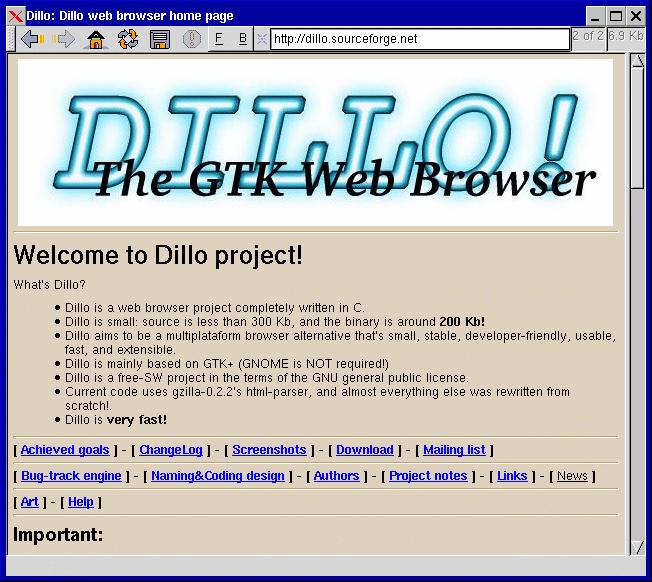
Dillo is a very small and fast web browser written completely in C. The uncompressed source code tarball is approximately 1.2MB and the resulting executable file is 1.1MB. While Dillo is based on GTK+ (GTK version 1.2.0 or higher is required), GNOME isn't required to run it. Dillo uses the HTML parser from the gzilla project, so Mozilla doesn't have to be installed either, as is the case with Galeon.
Basic functionality is provided, such as forward and backward histories, home, along with reload, abort and save buttons. A handy feature is a button that clears the URL textbox, allowing you to paste URLs from the clipboard without having to manually clear the textbox first.
Dillo can open files from the local disk either by clicking on the underlined F in the toolbar or by typing its full name preceded by file: in the URL textbox.
The configuration is handled by manipulating the ~/.dillo/dillorc file with a text editor. A sample dillorc file is found in the source code directory.
Dillo can display PNG and JPEG pictures, and it does a decent job of displaying tables. Since frames aren't supported yet, Dillo displays a link to each frame on the page that allows the user to display them one at a time. Dillo has correctly displayed sites such as Freshmeat, NewsForge and Linux Journal.
Right now Dillo can download files via HTTP by right-clicking on the link and selecting Save Link As. To download a file via FTP you need a program such as WebDownloader for X. Copy the link to the clipboard by right-clicking on it and selecting Copy Link Location, then paste the link into the external download program.
A Find dialog is accessed by pressing CTRL-F. When a match is found, Dillo tries to scroll the page so it is at the top of the window. One thing to note is that the matching word is not highlighted, which can make it difficult to find.
Keyboard shortcuts include ALT+, and ALT+. to navigate forward and backward through your history. Double-clicking on the browser toggles the toolbar between visible and invisible, freeing up some more viewing space.
Dillo currently isn't capable of handling things such as JavaScript, cookies and secure web sites. A patch is available, however, that provides Dillo with SSL and cookie capabilities. I have been able to compile the patch only against a specific CVS snapshot of the source code. Instructions for downloading the patch and building the patched version of Dillo are below.
In order to use the SSL-Cookies patch for Dillo, you need OpenSSL installed, and you have to get the Dillo source code dated Jan. 14, 2002 from the CVS archive. This is accomplished by the following steps:
Get the Dillo sources from the CVS archive:
$cvs -d:pserver:anonymous@cvs.dillo.sourceforge.net:/cvsroot/dillo login
(Hit Enter when asked for your CVS password)$cvs -z3 -d:pserver:anonymous@cvs.dillo.sourceforge.net:/cvsroot/dillo co -D 01/14/2002 dillo
Copy the dillo-ssl-cookies.2002-01-14.diff file into the dillo directory created above.
It might be a good idea to make a backup copy of the source code in case you encounter problems with the patching procedure. Move into the dillo directory and apply the patch with the following command:
$patch -p1 -i dillo-ssl-cookies.2002-01-14.diff
Execute autoconf to create the new configure file.
$autoconf
Configure the software to include the OpenSSL libraries with the following command:
$./configure --enable-ssl --with-ssl-inc=/usr/local/ssl/include --with-ssl-lib=/usr/local/ssl/lib
If the configure script answered yes to the following lines then your build should work:SSL_connect in -lssl, BIO_ctrl in -lcrypto, openssl/ssl.h and openssl/err.h
Make the executables by issuing the make command and then install the files by changing to root and issuing make install.
$make $su $make install
If you get an error about a missing AM_PATH_GTK macro when Dillo starts compiling, look for a file called gtk.m4 on your system. If it is in /usr/share/aclocal, then it needs to be copied or symlinked to /usr/local/share/aclocal.
To determine which cookies Dillo accepts and rejects, create a cookie_controls file in your ~/.dillo directory. The Cookies.txt file placed in the doc directory by the patch contains information on using the cookie_controls file. Saved cookies are stored in the ~/.dollo/cookies file.
Realizing the promise of Apache® Hadoop® requires the effective deployment of compute, memory, storage and networking to achieve optimal results. With its flexibility and multitude of options, it is easy to over or under provision the server infrastructure, resulting in poor performance and high TCO. Join us for an in depth, technical discussion with industry experts from leading Hadoop and server companies who will provide insights into the key considerations for designing and deploying an optimal Hadoop cluster.
Sponsored by AMD
Built-in forensics, incident response, and security with Red Hat Enterprise Linux 6
Every security policy provides guidance and requirements for ensuring adequate protection of information and data, as well as high-level technical and administrative security requirements for a system in a given environment. Traditionally, providing security for a system focuses on the confidentiality of the information on it. However, protecting the data integrity and system and data availability is just as important. For example, when processing United States intelligence information, there are three attributes that require protection: confidentiality, integrity, and availability.
Learn more about catching the bad guy in this free white paper.
Sponsored by DLT Solutions
| Designing Electronics with Linux | May 22, 2013 |
| Dynamic DNS—an Object Lesson in Problem Solving | May 21, 2013 |
| Using Salt Stack and Vagrant for Drupal Development | May 20, 2013 |
| Making Linux and Android Get Along (It's Not as Hard as It Sounds) | May 16, 2013 |
| Drupal Is a Framework: Why Everyone Needs to Understand This | May 15, 2013 |
| Home, My Backup Data Center | May 13, 2013 |
- Linux Systems Administrator
- New Products
- Senior Perl Developer
- Technical Support Rep
- UX Designer
- Web & UI Developer (JavaScript & j Query)
- Designing Electronics with Linux
- Dynamic DNS—an Object Lesson in Problem Solving
- Using Salt Stack and Vagrant for Drupal Development
- Making Linux and Android Get Along (It's Not as Hard as It Sounds)
- Favorite (and easily brute-forced) pw's
1 hour 16 min ago - Have you tried Boxen? It's a
7 hours 7 min ago - seo services in india
11 hours 39 min ago - For KDE install kio-mtp
11 hours 40 min ago - Evernote is much more...
13 hours 40 min ago - Reply to comment | Linux Journal
22 hours 25 min ago - Dynamic DNS
22 hours 59 min ago - Reply to comment | Linux Journal
23 hours 58 min ago - Reply to comment | Linux Journal
1 day 48 min ago - Not free anymore
1 day 4 hours ago
Enter to Win an Adafruit Pi Cobbler Breakout Kit for Raspberry Pi

It's Raspberry Pi month at Linux Journal. Each week in May, Adafruit will be giving away a Pi-related prize to a lucky, randomly drawn LJ reader. Winners will be announced weekly.
Fill out the fields below to enter to win this week's prize-- a Pi Cobbler Breakout Kit for Raspberry Pi.
Congratulations to our winners so far:
- 5-8-13, Pi Starter Pack: Jack Davis
- 5-15-13, Pi Model B 512MB RAM: Patrick Dunn
- 5-21-13, Prototyping Pi Plate Kit: Philip Kirby
- Next winner announced on 5-27-13!
Featured Jobs
| Linux Systems Administrator | Houston and Austin, Texas | Host Gator |
| Senior Perl Developer | Austin, Texas | Host Gator |
| Technical Support Rep | Houston and Austin, Texas | Host Gator |
| UX Designer | Austin, Texas | Host Gator |
| Web & UI Developer (JavaScript & j Query) | Austin, Texas | Host Gator |
Free Webinar: Hadoop
How to Build an Optimal Hadoop Cluster to Store and Maintain Unlimited Amounts of Data Using Microservers
Realizing the promise of Apache® Hadoop® requires the effective deployment of compute, memory, storage and networking to achieve optimal results. With its flexibility and multitude of options, it is easy to over or under provision the server infrastructure, resulting in poor performance and high TCO. Join us for an in depth, technical discussion with industry experts from leading Hadoop and server companies who will provide insights into the key considerations for designing and deploying an optimal Hadoop cluster.
Some of key questions to be discussed are:
- What is the “typical” Hadoop cluster and what should be installed on the different machine types?
- Why should you consider the typical workload patterns when making your hardware decisions?
- Are all microservers created equal for Hadoop deployments?
- How do I plan for expansion if I require more compute, memory, storage or networking?


Comments
Dillo -- New Home Page
Hey guys, Dillo is leaving Sourceforge!
Check out the new home page at:
dillo.cipsga.org.br!!!!
Re: Dillo, the GTK Web Browser
FAST does not begin to describe it. Works great as is.
Re: Dillo, the GTK Web Browser
Not bad. As someone else pointed out, this may well be a good basis for help systems -- konqueror cannot be counted on to be there, gecko is too big to bundle, and opera is non-free. Alas, unless they do active marketing, nobody will probably do it. Also, as the details are implemented, the program will surely grow significantly. Remember Mozilla Alpha also had good basic rendering abilities, but one main problem is that many pages have shitty HTML that needs to be interpreted leniently.
Re: Dillo, the GTK Web Browser
jgfhjfghjfghjfhjfghj
etgwertwetwe
Re: Dillo, the GTK Web Browser
I use xfce and have the F1 key bound to dillo http://www.mirror.ac.uk/sites/www.linuxdoc.org/HOWTO/HOWTO-INDEX/howtos....
and the xfce help key bound to dillo/usr/share/xfce/help/html/help.html
The result is a blazingly fast help system.
Damn, it's FAST!!!
Wow... this has got to be the fastest browser
I've ever tried. Plus it makes a very small
memory footprint. It seems to be very
stable for me! :-)
Can't wait till Dillo gets more features!
BTW: There here are some interesting
screenshots.
Re: Damn, it's FAST!!!
Ooops, here are the screenshots:
http://dillo.sourceforge.net/screenshots/
Bad name
Seriously, whos idea was it to give it a name that resembles the name of a sex toy? Is this good marketing or bad?
Re: Bad name
What you are thinking of is spelled with one less "l" and one more "d". I believe "dillo" is short for armadillo. Armadillo - n : burrowing chiefly nocturnal mammal with body covered with strong horny plates
Re: Bad name
if i remember correctly : the first browser was called gzilla. due to confusions that could happen between mozilla and gzilla the browser became 'armadillo'. later the sourcecode was forked and called dillo. i don't think armadillo exists any longer.
Re: Bad name
Armadillos are alive and abundant in Texas.
Re: Bad name
Uh... That didn't come to my mind when I read the name. I thought of a similar sounding animal.
Re: Dillo, the GTK Web Browser
Hey guys, the binary file size is just over 200k. The resultant file size you quote is that of the debugging symbols. Read the Makefile
Change of site
Change of site http://www.dillo.org