Quantcast
Username/Email:  Password: 

Linux Maximus, Part 1: Gladiator-like Oracle Performance

Simple ways to achieve performance improvements using Linux for enterprise-level databases like Oracle.

"Damn the torpedoes! Full speed ahead." -
Admiral David FarragutAs it does for many people today, the Linux movement
enthralls me. I'm interested not only because I'm more of a
UNIX-based DBA but also because of the amazing speed with which
major vendors, such as HP, Compaq, Dell, IBM and Oracle, have
embraced this open-source operating system. Last year Linux server
sales accounted for approximately 30% of Compaq's, 13.7% of Dell's
and 13.5% of IBM's total server sales, according to eWeek.
Moreover, IBM spent a billion dollars on Linux development in 2001,
after having ported Linux to all their hardware platforms in 2000.
Furthermore, Intel's new 64-bit Itanium CPU lists only four
supported operating systems: Windows, Linux, AIX and HP-UX. And
let's not forget that Oracle released 9i on Linux months ahead of
the Windows port. Then again, maybe I just like the underdog--I
mean I'm writing this article on my AMD Athlon-based PC.But no matter how fashionable Linux may be, that popularity
does not automatically translate into nor does it guarantee
performance. Even though Linux runs on everything from IBM 3/90s to
Sun SPARC-based boxes, most people at this point are still probably
running Linux on Intel-based server platforms. Now without sounding
condescending, let me state that the PC architecture was never
really intended to scale to the heights Linux makes possible. Thus
we need to make sure that we squeeze every last drop of blood out
of the turnip when we deploy an Intel based Linux
server--especially for enterprise databases like DB2 and Oracle.
Believe it or not, it's quite easy to get upwards of 1000% database
improvement through proper Linux tuning and database configuration
for Linux.As with any scientific endeavor, in this article we will
attempt to evaluate different tuning techniques by establishing a
controlled environment where we can ascertain a baseline, identify
all the changeable relevant variables, modify one variable at a
time and obtain a reliable measurement of the effects for that one
change. Wow, I haven't written techno-babble like this since I was
a Physics student at Ohio State. In plain English, we must test one
tuning concept at a time in order to accurately measure the
observable effects of only that change.First you need a test environment. I used a Compaq quad CPU
server with 512 megabytes memory and eight 7200 RPM ultra-wide SCSI
disks. Then I did the exact same tests with a single CPU Athlon
system with the same amount of memory, but with a single 7200 RPM
ultra100 IDE disk drive. Although the raw numbers and percentages
were not identical, the observed improvement pattern was. That is,
every test made each system better in the same general direction
and similar magnitude.Linux servers are truly universal in function, utilized
easily as web servers, application servers, database servers,
routers, firewalls, e-mail servers, file servers, print servers and
combinations of the above. But we need to pick one such usage;
remember our single variable requirement.For simplicity, I chose the TPC benchmark as my testing
methodology. It's widely recognized as a reliable OLTP workload
benchmark, it has both on-line and deferred transactions, it's
non-uniform in nature and it applies to numerous databases,
including Oracle and DB2. Plus the TPC can be configured to stress
all aspects of the hardware: CPU, memory, bus and disk. And to be
totally honest, I'm a DBA, and Quest has a wonderful tool called
Benchmark Factory that makes defining, running and measuring TPC
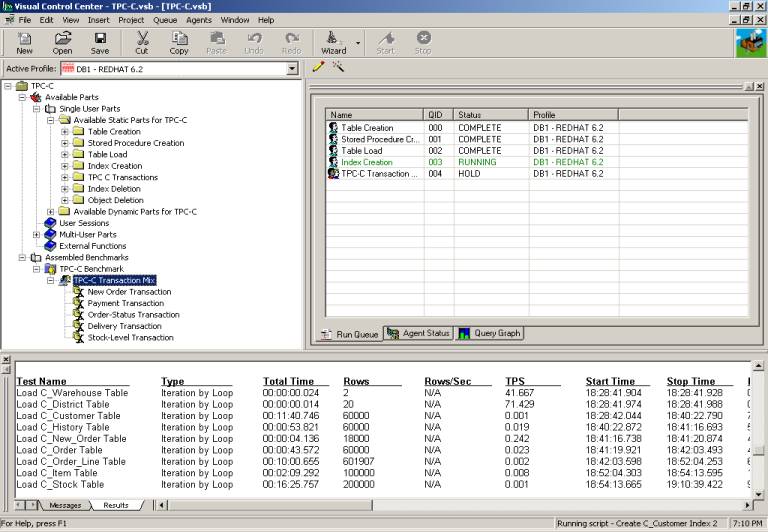
tests as simple as sending e-mail. The screen snapshot below shows
Benchmark Factory's complete interface. With it you can create a
TPC benchmark project, define some parameters such as database size
and number of concurrent users, copy the tests you want to measure
to the run queue, run the tests in the queue and observe the
results. No work at all, really.Figure 1. Benchmark Factory's GUI
Interface
Remember, I said that we'd start by looking at some very high
ROI approaches. That means we're looking for items so easy and
apparent in terms of applicability and impact that we only need
observe the runtime differences in the TPC to see if we're on the
right track. So we'll be only looking at what I call the OS and DB
low-hanging fruits.NOTE: If you're positive your Oracle database has been
created perfectly for Linux, you might choose to skip the database
low-hanging fruits section. For many DBAs it might serve as a
refresher of some obvious database configuration and tuning
issues.DB Low-Hanging FruitsLet's begin by looking at a typical initial database. Often,
people start with either the default database created by the Oracle
Installer or a database they created using the Database
Configuration Assistant. Either way, the default settings are
generally quite useless. Plus, a novice DBA or a consultant passing
as a DBA might select values that actually make things worse. The
point is that databases set up with poor initialization parameters
and using dictionary tablespaces as shown in table DB1 are not
uncommon.DB1: Initial DatabaseDatabase Block Size2KSGA Buffer Cache64MSGA Shared Pool64MSGA Redo Cache4MRedo Log Files4MTablespacesDictionaryTPC Results (our baseline)Load Time (Seconds)49.41Transactions / Second8.152The obvious first choice is to increase the SGA size. So we
increase the buffer cache and shared pool as shown in table
DB2.DB2: Cache & PoolDatabase Block Size2KSGA Buffer Cache128MSGA Shared Pool128MSGA Redo Cache4MRedo Log Files4MTablespacesDictionaryTPC ResultsLoad Time (Seconds)48.57Transactions / Second9.147Not quite what we had hoped for; only a 1.73% improvement in
load time and a 10.88% increase in TPS. Okay, so maybe we should
have increased the SGA redo log as well. Of course, we don't want
the redo log file to be smaller than the SGA memory allocation, so
we'll need to bump up the redo log file size to match. This is
shown in table DB3.DB3: Log BufferDatabase Block Size2KSGA Buffer Cache128MSGA Shared Pool128MSGA Redo Cache16MRedo Log Files16MTablespacesDictionaryTPC ResultsLoad Time (Seconds)41.39Transactions / Second10.088Now we're getting somewhere. Notice the load time improved by
10, or by 17.35%. And once again the TPS time improved about the
same amount, 9.33%. This makes sense because the load and
simultaneous inserts, updates and deletes needed much more room
than 8M. But it seems like the memory increases are yielding very
small improvements. The I/O aspect seems to be where the current
problem is. So even though it's an OLTP system, let's try
increasing the block size as shown in table DB4.DB4: 4K BlockDatabase Block Size4KSGA Buffer Cache128MSGA Shared Pool128MSGA Redo Cache16MRedo Log Files16MTablespacesDictionaryTPC ResultsLoad Time (Seconds)17.35Transactions / Second10.179Now we're cooking. Even a PC with its limited bus and I/O
capabilities can reap huge benefits from a larger block size. The
load time improved over 138%, with no detriment to the TPS. For the
moment, let's assume we don't want to try the next block size
increase for whatever reason. The next simple idea that comes to
mind is to switch from dictionary to locally managed tablespaces,
something Oracle has been touting pretty hard. Thus we end up with
that shown in table DB5.DB5: Local TablespacesDatabase Block Size4KSGA Buffer Cache128MSGA Shared Pool128MSGA Redo Cache16MRedo Log Files16MTablespacesLocalTPC ResultsLoad Time (Seconds)15.07Transactions / Second10.425So Oracle is right, locally managed tablespaces are
definitely the way to go. We got over a 15% improvement on the load
and about 2% on the TPS. That's okay, but we would really like to
see more results like those we saw with the 4K block size. So let's
try 8K, as shown in table DB6. It worked before, so maybe it will
work again.DB6: 8K BlockDatabase Block Size8KSGA Buffer Cache128MSGA Shared Pool128MSGA Redo Cache16MRedo Log Files16MTablespacesLocalTPC ResultsLoad Time (Seconds)11.42Transactions / Second10.683Not too bad. As before, the larger block size yielded
improvements to the load (almost 32%) with no detriment to the TPS.
In fact, the TPS improved over 2%. But notice that we have reached
a critical juncture in block size increases. The load time
improvement decreased quite significantly--138% to 32%--and the TPS
gain was nearly three times as much as that of the 4K block size.
Further, block size increases will not likely be a good source of
no-brainer gains (i.e., so obvious that we don't need to use other
performance measuring tools).So we're rapidly approaching the end of the DB low-hanging
fruits. The only other thought that comes to mind is that we have
multiple CPUs, maybe we can set up I/O slaves to leverage them.
It's worth a try and is shown in table DB7.DB7: I/O SlavesDatabase Block Size8KSGA Buffer Cache128MSGA Shared Pool128MSGA Redo Cache16MRedo Log Files16MTablespacesLocaldbwr_io_slaves4lgwr_io_slaves (derived)4TPC ResultsLoad Time (Seconds)10.48Transactions / Second10.717That's another 9% improvement on the load but almost nothing
for the TPS. It appears we've gotten all there is from the
low-hanging fruits. We got improvements of 342% for the load time
and 24% for the TPS; not bad for requiring absolutely no extensive
or detailed performance monitoring. The results are summarized
below.

OS Low-Hanging Fruits
So you've just installed Linux. It's smart enough to
recognize hardware issues, such as the manufacturer, speed and
number of CPUs, the amount of system memory available, and the
type, speed and number of disk drives. Nonetheless, many simple,
no-brainer opportunities for performance improvement remain to be
leveraged. In this case, we'll start on a typical Red Hat 6.2
install. Note that this means that we'll be starting with kernel
2.2.14-5smp, the one that shipped with 6.2.The first thing anyone should do to Linux after the install
is to create a monolithic kernel (i.e., recompile the kernel to
statically include libraries you intend to use and to turn off
dynamically loaded modules). The idea is that a smaller kernel with
just the features you need is superior to a fat kernel supporting
things you don't need. Sounds reasonable to me, so we'll
cd over to /usr/src/Linux and
issue the make clean xconfig command (use
make clean config if you boot to the command
line instead of X).There are literally hundreds of parameters to set, and I
could recommend any one of a dozen good books or web sites to
reference on the subject. Some key ones that stick out in my mind
include CPU type, SMP support, APIC support, DMA support, IDE DMA
default enabled and quota support. My advice: go through them all
and read the xconfig help if you're unsure.Since we know we're going to recompile the kernel, we might
as well fix the IPC (inter process communication) settings, as
documented in the Oracle installation guide. For the 2.2 kernel,
shared memory settings are located in
/usr/src/Linux/include/asm/shmparam.h. I suggest setting the SHMMAX
parameter value to at least 0x13000000. The semaphor settings are
located in /usr/src/Linux/include/Linux/sem.h. I recommend setting
SEMMNI, SEMMSL and SEMOPN to at least 100, 512, 100,
respectively.Now we recompile the kernel by typing make dep clean
bzImage
. Copy the link map and kernel image to your boot
directory, edit /etc/lilo.conf, run lilo and reboot. If you've done
everything correctly, the machine will boot using your new, leaner
and meaner kernel.In my case, the monolithic kernel with properly sized IPC
settings improved the load by nearly 10% and the TPS by nearly 8%,
as shown in table OS1.OS1: Mono Kernel & IPCTPC ResultsLoad Time (Seconds)9.54Transactions / Second11.511If simply recompiling a specific version of the kernel can
yield such improvements, then it stand to reason that a newer
version of the same kernel family will also provide improvements.
So I obtained the latest stable kernel source within the same
family from www.Linux.org
(in my case 2.2.16-3smp). But improvements were a paltry 1.5% for
the load and practically nothing for the TPS, as shown in table
OS2.OS2: Newer minor version kernelTPC ResultsLoad Time (Seconds)9.40Transactions / Second11.522Since many Linux distributions now use kernel
2.4.x as their base, it made sense to try this
next. So I downloaded the kernel source 2.4.1smp, and the new
kernel was worth the wait. It yielded improvements of almost 13% on
the load and over 10% on the TPS, as shown in table OS3.OS3: Newer major version kernelTPC ResultsLoad Time (Seconds)8.32Transactions / Second12.815Although these are not bad results so far, in my mind tuning
the OS should provide some big hitters, like those we had with the
database low-hanging fruits. During our low-hanging fruits for the
database discussion, we found that items reducing I/O, such as
block size and locally managed tablespaces, made big improvements.
So the goal is to find a Linux technique to reduce the I/O. That's
when it hit me: there's a dirt simple way to cut the I/O in half.
By default, Linux updates the last-time-read attribute of any file
during a read operation. It also does this for writes, but that
makes sense. We really don't care when Oracle reads its data files,
so we can turn that off. This is known as setting the noatime file
attribute (a similar setting exists for Windows 2000 and Windows
NT).If you want to do it for only the Oracle data files, the
command is chattr +A
file_name
. If you want to do
an entire directory, the command is chattr -R +A
directory_name
. But the best
method would be to edit /etc/fstab, and for each entry, add the
noatime keyword to the filesystem parameter list (i.e., the fourth
column). This ensures that the entire set of filesystems benefits
from this technique and, more importantly, that the settings
persist across reboots. The results are amazing, improvements of
nearly 50% for loads and 8% for the TPS, as shown in table
OS4.OS4: noatime file attributeTPC ResultsLoad Time (Seconds)5.58Transactions / Second13.884Another area that comes to mind regarding I/O is the Linux
virtual memory subsystem. And as is the beauty of Linux, that too
is controllable. We simply need to edit the /ect/sysctl.cong file
and add an entry to improve filesystem performance, as
follows.vm.bdflush = 100 1200 128 512 15 5000 500 1884
2
Where according to
/usr/src/Linux/Documentation/sysctl/vm.txt:The first parameter 100 %:
governs the maximum number of dirty buffers in the buffer cache.
Dirty means that the contents of the buffer still have to be
written to disk as opposed to a clean buffer, which can just be
forgotten about. Setting this to a high value means that Linux can
delay disk writes for a long time, but it also means that it will
have to do a lot of I/O at once when memory becomes short. A low
value will spread out disk I/O more evenly.The second parameter 1200
ndirty: gives the maximum number of
dirty buffers that bdflush can write to the disk in one time. A
high value will mean delayed, bursty I/O, while a small value can
lead to memory shortage when bdflush isn't woken up often
enough.The third parameter 128
nrefill: the number of buffers that
bdflush will add to the list of free buffers when refill_freelist()
is called. It is necessary to allocate free buffers beforehand, as
the buffers often are of a different size than the memory pages,
and some bookkeeping needs to be done beforehand. The higher the
number, the more memory will be wasted and the less often
refill_freelist() will need to run.refill_freelist() 512: when
this comes across more than nref_dirt dirty buffers, it will wake
up bdflush.age_buffer 50*HZ, age_super parameters
5*HZ
: govern the maximum time Linux waits before writing
out a dirty buffer to disk. The value is expressed in jiffies
(clockticks); the number of jiffies per second is 100. Age_buffer
is the maximum age for data blocks, while age_super is for
filesystem metadata.The fifth 15 and the last two
parameters 1884 and 2
: unused by the system so we don't
need to change the default ones.The performance improvements were 26% for loads and 7% for
TPS. That brings our final results to less than 5 seconds to load
what took 50 seconds and nearly double the TPS rate. And remember,
we never had to monitor anything; these were the no-brainer or
low-hanging fruit improvements.OS5: bdflush settingsTPC ResultsLoad Time (Seconds)4.43Transactions / Second14.988The summarized results were as follows:The second part of this series,
"Linux Maximus, Part 2: the RAW Facts on
Filesystems"
, is now available
.

email: bscalzo@yahoo.com

______________________

Comments

Comment viewing options

Select your preferred way to display the comments and click "Save settings" to activate your changes.

Re: Linux Maximus, Part 1: Gladiator-like Oracle Performance

Anonymous's picture

Another performance improvement missing are analyzed tables. I don't know (and I don't care) how much that would improve benchmarks tests, but in real world applications like ERP or data warehouse with DB sizes >100GB and tables with xx million rows, properly analyzed tables are a must.

Re: Linux Maximus, Part 1: Gladiator-like Oracle Performance

Anonymous's picture

most of the oracle tuning "low hanging fruit" tips sound like rule of thumbs.

Just look at what the app/SQL is waiting on.

Solve that and then the next highest, etc...

It is mechanical, repeatable and plain easy.

You shouldn't tune a database without at least some understanding of what the app is trying to achieve. Sometimes fixing poor "program/procedure" logic makes looking at the database a waste of time.

eg. Visiting a row in the table via a bind variable is fast, but not if you are going to visit every row in the table...

Have Fun

Re: Linux Maximus, Part 1: Gladiator-like Oracle Performance

Anonymous's picture

can you please explain this sttmt of urs ?

Visiting a row in the table via a bind variable is fast, but not if you are going to visit every row in the table...

thanx

-Shalini

Re: Linux Maximus, Part 1: Gladiator-like Oracle Performance

Anonymous's picture

nonsense.

a bind variable is used as a placeholder for a literal, so that a statement can be re-used without the need to re-parse.

"Visiting a row ..." - forget it - I"m not even going to get into it.
you are just plain so far off, please read the concepts manual and the performance tuning guide on otn - http://otn.oracle.com.

The Tome Kyte site has some very good material:
http://asktom.oracle.com

spend some time there. learn.

BDBAFH

Changing 'bdflush' parameters

Anonymous's picture

Note that messing with the VM parameters is generally not advisable unless you know what you are doing and are willing to accept the risks.

In your case, setting the (rather aggressive) values you have set has improved your numbers because (some of) the data is still sitting in buffers, waiting to be flushed to disk. If there is a power problem or other issue that causes the box to shutdown uncleanly, those buffers won't have been written to disk and data could be lost.

Adam McKenna

adam@flounder.net

Re: Changing 'bdflush' parameters

Anonymous's picture

no. the database can still be made consistent, even though dirty data blocks have not been flushed to disk.

provided that the redo log buffer has been flushed to disk (this happens during a commit) instance recovery will bring the database back to a consistent state. First, the database is rolled forward, then the uncommitted transactions are rolled back. The redo stream has both the undo and the redo. If you don't believe me, check out the Oracle Logminer utility, and see for yourself.

Also, the Oracle documentation is available online. Start with the concepts manual - http://otn.oracle.com - free registration required.

Do not set for write-back or delayed caching of the redo, and you'll be in good shape (filesystem corruption due to use of a non-journaled filesystem aside).

Oracle uses several different types of writes (as well as reads), so they are not all the same.

Use a UPS.

BDBAFH

Re: Linux Maximus, Part 1: Gladiator-like Oracle Performance

Anonymous's picture

Performance tuning is an art! There are no absolute rules. Therefore, this article should be used as a guideline. DBAs are so oppinionated. Every DBA you speak to says, “This is the best way to do this!”. Of course each DBA will give you a different answer.

The author spent the time to do some testing and in his environment these things worked. Many of them are good suggestions. I don’t see why everyone is so critical!

Re: Linux Maximus, Part 1: Gladiator-like Oracle Performance

Anonymous's picture

I agree with you. Half of the DBAs who posted comments here I would not hire. There are some people who get so technical about things they will spend 5 days setting up a database that could be set up in 1 day. Yes their database may be 5% faster, but in the overall scheme of things the cost was not worth it!

It's the old 80/20 rule. If you can spend a little time getting most of potential performance gains, go for it. Don't waste another 5 years getting the 20%!

Re: SGA Redo Cache=16M ?? What's that?

Anonymous's picture

It would be nice if author can clarify "Redo Cache" size?? The only parameter that controls size of Redo Log Buffer is LOG_BUFFER which must be <=500K or 128K * CPU_NUMBER whichever is larger. So how can you setup 16M "Redo Cache"?

Ales

Re: SGA Redo Cache=16M ?? What's that?

Anonymous's picture

Setting the Redo cache or the oracle parameter log_buffer to 16m is most certainly detrimental to the database performance. Only under the most overutilized system have I ever seen the need for this... 16 cpu, server with tps rate 300+ ( tps was 11 rows per across 6 tables with Referential integrity + 9 indices ). Only then was this acceptable to set the value this high, while also setting an oracle "hidden" parameter. This parameter caused the oracle lgwr background process to start flushing the redo buffers prior to the buffer cache hitting the 1/3 mark. Like most things in oracle, bigger is not always better. This goes for the redo log buffers, Shared pool ( there is only one latch ) and buffer cache. So tune, but know what and why you are tuning.!!!! Start at the application layer first, you will see 80% of your performance gains there.

Overall nice article and useful comparison of the various file systems and the performance implications.

Re: Linux Maximus, Part 1: Gladiator-like Oracle Performance

Anonymous's picture

Did I miss it? What version of Oracle is this? If it's not 9i, you must have created another database to compare performance with different db_block_size. For years DBAs have argued about the best db_block_size without actually benchmarking it. Your wonderful experiment says 8k is better than 4k on Linux. But as far as I know, ext2 file system block size (really, I/O size, not disk allocation size or disk sector size) is 4k. At least that's the suggested I/O size (perl -e '$a=(stat ".")[11]; print $a' gives you that or you write a C program to get the 11th element of stat(2)). I thought matching db_block_size with file system I/O size gives the best performance. Please comment. Thanks. -- Yong Huang

Re: Linux Maximus, Part 1: Gladiator-like Oracle Performance

Anonymous's picture

I can't understand why the Oracle tuning series did not optimize on the LOG_BUFFERS init.ora paramater which determines the size of the redo log buffer within the SGA and the chunk size the log writer can operate with. It is tunable without rebuilding the DB.

Its standard value is 160k, which is much too small. Depending on the type of application an optimum is reached at much higher values.

us@webde-ag.de

Re: Linux Maximus, Part 1: Gladiator-like Oracle Performance

burns's picture

A big reason that Linux (and Unix) versions of Oracle products hit the street first is that Oracle uses Unix and (to a lesser degree) Linux as development environments, thus facilitating release in those environments. The Windows version, however, needs to be ported thus taking longer.

Rumor has it that Oracle does not consider Windows sufficiently stable to serve as a native development environment.

Re: Linux Maximus, Part 1: Gladiator-like Oracle Performance

Anonymous's picture

This is absolutely wrong. NT and Solaris are THE

dev platforms...all others become a porting kit, sent

to porting automation lab and then productized ...

Solaris and NT are released at the same time

Re: Linux Maximus, Part 1: Gladiator-like Oracle Performance

Anonymous's picture

The Linux version of Oracle is a port from the Windows source due to the low level X86 interfaces.

Shared Pool vs. Buffer Cache

Anonymous's picture

Hmmm...some of the improvements here may or may not work in real-life multi-user situations.

One of the things that stands out to me is the automatic increase of the shared pool along with the buffer cache is inferred to be an automatic performance increase. Another is having the "SGA redo cache" (redo_log_buffer?) the same size as the redo logs themselves, again in the guise of performance increases.

To keep my explanation short, just do a search on http://www.ixora.com.au for some suggestions on tuning the above in "real" DBs. Steve's site is great for Oracle tuning tips!

What I'm trying to say is that this low-hanging fruit can often get you into trouble. I know I've been burned by the misconception that "Larger Oracle Parameter" = "More Performance".

Rich J.

Proper Use of Percentages

Anonymous's picture

The load time improved by 138%? That would mean that the load time went negative. A 100% improvement would mean that it took zero time to load.

Which TPC benchmark?

Anonymous's picture

TPC bencharks (www.tpc.org) are usually denoted with a letter, like TPC-W for web, or TPC-B for the older bank style transaction benchmark.

Which one did this guy run? And could he give us an average number of inserts/delets/selects/updates happen per transaction?

Oracle for Linux webpages; setting kernel parameters, etc.

Anonymous's picture

I would like to point out the pages at http://www.suse.com/oracle/

You'll find lots of info there - applicable also to other Linux versions of course (note that you can CLICK on any icon in the matrix in the bottom half of that page, something some people miss although it's written at the top of the table in red ink... and those links contain the real info), although Oracle develops on SuSE Linux now (as of 9i). For example, there's the package orarun.rpm which provides a script (and the links) for automated startup/shutdown of the database (and agent and listener) at system startup/shutdown, AND it also allows the setting of ALL the kernel parameters Oracle mentions anywhere in their docs, and it provides reasonable defaults for them.

12 tps????

Anonymous's picture

I'm not 100% sure I followed this entire article and maybe I misunderstand the definition of "transaction" but isn't 12 tps an abysmal rate for a database? I just spent the last week fighting with Oracle on HPUX using Tomcat and the thin JDBC and I could not beat 12 tps -- we ended up using perl scripts against flatfiles because we couldn't get Oracle anywhere near fast enough to capture 45000 inserts inside of 30 minutes. I found it incredible that Oracle should be so slow, but this article seems to suggest we weren't far off base.

Re: 12 tps????

Anonymous's picture

Tried a stupid benchmark with a servlet that did 30,000 inserts on a notebook equipped with a celeron 700 and a 4200 rpm hard drive.

Putting oracle in the worst scenario with dynamic sql+autocommit it took 240 seconds; putting cursor_sharing=force and putting autocommit=off it tooks 90 seconds; optimizing the code by removing autocommit, using bind variable + batch insert (30) and comming every 1000 records the time fallen down to 7 seconds.

So i cannot believe you werent able to do 45,000 records in 30 minutes ;)

Re: 12 tps????

Anonymous's picture

I work for the company that was Sequent

The Oracle Database on Numa Boxes with a one quad processor box (300 Mhz Pentiums) and 2 gigs of ram is capable of 40,000+ transactions per hour and more. Easily.

Huge companies that are international use these systems.

So sad that sequent's Numa boxes are no longer being actively "Sold" by IBM. But IBM systems have a lot of power with DB2.

Re: 12 tps????

Anonymous's picture

What to pay my consulting bill? I will give you tree times what you were trying to get on any decent pentium IV 2GHz with 1 Gig memory running red-hat.

Re: 12 tps????

Anonymous's picture

what are you using an PC_AT x86(60Hz) with 16mb memory?

Re: 12 tps????

Anonymous's picture

Are you kidding?

45,000 inserts in 30 seconds is penuts.

Now, I don't see what hw he had or memory on the whole machine, but with Oracle on Sun 280R with 4G memory, we were pushing a millon records an hour and the database wasn't even getting stressed at all. We loaded 200Gig's of new data into the database in a week. Mostly it was the app which couldn't load the database any more. Check your Jakarta-tomcat app first, before laying the blame on Oracle. Try a sql-plus script that writes to the database and then compare with tomcat results through JDBC. Identify the bottleneck before laying the blame on a proven technology.

Re: 12 tps????

Anonymous's picture

I insert around 1 * 10 ^ 6 rows a week into an Oracle database on a Dual CPU 450 PIII machine. We have a pretty good disk subsystem. I insert something like 45000 rows in 5 - 10 minutes depending on system load. My performance isn't that great, my disk subsystem is overloaded. Oracle can outperform flat files, yes you read that correctly. When it is time to scale up Oracle will crush flat files. It might not outperform MySQL, but Oracle when properly tuned on a good system can run circles around any naive flat filesystem implementation. There is a reason people wen to databases. ACID is nice, but they actually went to databases for speed reasons. Implementing Indexes and query languages is buggy, databases solve all that.

Re: 12 tps????

Anonymous's picture

that is wrong. the first relational databases were painfully slow compared to other technologies at the time. integrity is what relational databases

are about.

Re: 12 tps????

Anonymous's picture

If you have data in flat files, you should use sql*loader with direct load.

I really doubt that your perl script against a flat file is doing "transactions" at all, in the ACID sense.

Several things might be slowing your inserts down:

1. Are you using bind variables? If not, you are reparsing the SQL every time. This involves internal SQL to see that the tables and columns exists, to see that your user session has grants to access them, to find what indexes on the tables exist, to (re)construct the access plan, and a bunch of other internal things.

2. Are you committing every statement? If so, you are forcing disk IO that must complete to satisfy ACID properties.

3. Are your redo logs to small? Oracle defaults to rather small redo logs, and every log switch forces a checkpoint, which involves IO on every dirty buffer.

4. Are your redo logs on their own disk? If not, you are contending for mandatory IO. Picture the needle on your disk moving back and forth across the platter as opposed to camping over the proper place.

5. Use the APPEND hint in your insert SQL. This tells oracle not to look for free space, but just to raise the high water mark.

These are general guidelines, but Oracle keeps very high quality wait statistics, which should tell you exactly what the bottleneck is.

Re: 12 tps????

Anonymous's picture

The end of a transaction is marked by a commit.

Commit after every 1000 inserts instead of every single one, and you should be able to get those 45,000 inserts done in less than a couple minutes.

Re: 12 tps????

Anonymous's picture

We have applications that easily insert 7,000 rows/seconds.

Note however that that a row insert is NOT a transaction. If you want an actual transaction to occur then you MUST wait for Oracle to write to it's redo log and have the log written to disk.

As this is a physical activity, think disk heads and spinning platters.

Of course you can beat this with Perl scripts writing to a file system or using MySQL. You don't have transactional integrity. If you're system stops unexpectedly and doesn't get a chance to flush to disk then you are going to have problems recovering.

I think the above test as well indicates 12 tps on a single database connection.

Have a look at the array DML feature if you want to get large amounts of data into Oracle rapidly (and want to retain transactional integrity)

Re: 12 tps????

Anonymous's picture

I have to agree - 12 TPS is really poor, but a transaction is not a transaction is not a transaction. 12 instances of "change a customer's phone number" is one thing, 12 instances of "reschedule production for an 800 step MRP system" is another. It can also get really slow if there are multiple triggers involved.

Maybe the author can elaborate and describe the transactions in more detail.

Re: 12 tps????

Anonymous's picture

I'd be also highly interested to learn what's hidden behind the word 'transaction' here. Without more details given, I have no idea if your performance turned from 'ridiculous' to 'very poor' or from 'good' to 'excellent'.

I understand that most DB vendors don't allow you to publish details of benchmarking. However, without the right notion of 'transaction' the figures published are useless.

Maybe you can describe the idea behind the transaction in a non-technical way without getting in conflict with some obscure NDA.

Re: 12 tps????

Anonymous's picture

Try www.tpc.org for transaction details.

Re: 12 tps????

Anonymous's picture

Use Transactions. Commit every 30 minutes instead of every transaction. If that is not an option, I fear you're out of luck.

Re: 12 tps????

Anonymous's picture

12 tps is pretty slow. You could probably have Oracle meet your performance requirements simply by tuning it some more (and there are a LOT of things you can tune in Oracle, this article has barely scratched the surface, so I suggest taking an Oracle Performance Tuning class, book, or media-based training). If that still doesn't work, then adding/upgrading more hardware should do the trick.

There are a lot of features Oracle will give you, such as great reliability, that you can't get from flat files. There indeed is a performance penalty for that, but if you really care about your data (and you have lots of it), flat files really aren't the way to go.

Re: 12 tps????

Anonymous's picture

That's why some, under specific circumstances, switched to MySQL!

Re: 12 tps????

Anonymous's picture

You kidding?

If you want file system on steroids use mysql, if you want a database, I assume, you understand what a database means, use Oracle. Look for ACID tests of a database and then compare mysql aginst oracle.

Re: Linux Maximus, Part 1: Gladiator-like Oracle Performance

Anonymous's picture

You missed an Oracle low hanging fruit. Try increasing the sort_area_size to 1M from the incredibly low (v8 & 8i) default of 64k.

Kernel Recompilation

Anonymous's picture

I administered Linux systems for quite a while and I agree with the above poster. There is no performance advantage to static compilation over loading as a module.

If there is one thing I have learned over the years it is to minimize the amount of customization you do to

a distribution. Customize only when you have to. Linux distributions change very fast and if you want

to minimize the problems in upgrading, don't mess around with anything more than you have to. Recompiling a kernel just to change from loadable module to static compilation is an avoidable chore.

Re: Kernel Recompilation

Anonymous's picture

I administered Linux systems for quite a while and I agree with the above poster.

How ironic.

There is no performance advantage to static compilation over loading as a module.

Really? Can you show me some benchmark testing results which demonstrate this? Perhaps this is based on your perception as an end user where bash seems to respond the same no matter what you do. *shrug* Like I said, show me the test results. (BTW, test is a verb. benchmark is not)

Customize only when you have to. Linux distributions change very fast and if you want

to minimize the problems in upgrading, don't mess around with anything more than you have to.

WHAT? What on EARTH are you talking about? If you've got a box running RH 6.2 (as per the example in the article) and you go through all the trouble of tuning it specifically for your application, why on earth would you upgrade the entire distribution? Anybody who upgraded a production 6.2 system to 7.0 as soon as it came out is an utter fool, and 7.1 wasn't much better. 7.2 seems to be more stable, but with some oddball changes like a different default filesystem which seems like a bizarre thing to do in the middle of a major version series. Who cares how fast your vendor comes out with new releases? If you've got a box that works, other than patching the (bind || sendmail || sshd) expoloit of the day, there's absolutely positively no reason to upgrade the entire distribution which means that it's perfectly reasonable to roll your own kernel because it's not going to go anywhere anytime soon. Honestly, I would have expected you to know that as you have administered Linux systems for quite a while.

David Barnard

RHCE

david at linuxbrains.net

This space intentionally left blank

Re: Kernel Recompilation

Anonymous's picture

This is especially annoying since author promised changing only one variable at a time.

And then he changes both ipc settings and kernel, and claims that improvement in speed was due to kernel without modules.

Using kernel without modules is a security measure.

Re: Linux Maximus, Part 1: Gladiator-like Oracle Performance

Anonymous's picture

I would like to point out one bit of misinformation that has always been a pet peeve of mine. There is not inherent performance benefit to recompiling your kernel and removing loadable module support. The performance gains listed above are certainly related to the changing of the shared memory settings, etc. Having loadable module support in the kernel does not significantly add to its size (I don't believe it is more than a few KB) and there is zero performance difference between kernel code loaded as a module and code compiled statically into the kernel.

The only thing I see is additional admin overhead. Building your own kernel is a great way to introduce subtle errors into the process, for example by having and inconsistant devel environment (different versions of gcc or devel libraries between kernel builds). Annother benefit is that lodable modules can be removed and replaced at runtime, without downing the whole server. For example if you need a fix in your network driver, one can be more easily built and installed with the absolute minimum in downtime (seconds). One other point to consider is that many commercial and/or proprieatary packages will come with modules precompiled and tested against the standard distribution kernels (RedHat, SuSE, etc.). These are much more easily and reliably integrated into a standard setup as opposed to a highly custom setup. One last point is that several distributors do extra testing and fixing of their kernels, building a kernel.org kernel may cause you to back out of critical bugfixes causing more problems.

I only recommend building your own kernel when there is a specific need and the admin is willing to incur the additional responsibility of maintaining their own custom kernel and they know what they are doing. It is not something that should be generally recommended, IMHO.

Re: Linux Maximus, Part 1: Gladiator-like Oracle Performance

Anonymous's picture

Wow. You must have taken a Red Hat administration class. That's the only other place I've ever heard this "obey your vendor" dogma professed so vociferously. Next you'll tell me there are no security implications to recompiling monolithic either.

David Barnard

RHCE

This space intentionally left blank

Re: Linux Maximus, Part 1: Gladiator-like Oracle Performance

Anonymous's picture

"there is zero performance difference between

kernel code loaded as a module and code

compiled statically into the kernel. "

This is not correct. The issue was discussed

about a month ago on linux-kernel, when the

issue of forcing all drivers to be modules

in Linux 2.5 came up.

Kernel code in the form of modules is slightly

slower, because it requires more TLB entries

and increases pressure on the CPU cache.

See this

message http://marc.theaimsgroup.com/?l=linux-kernel&m=101106367332753&w=3

for the gory details.

changing SHMALL etc. without kernel compilation

Anonymous's picture

2.4.x kernels allow the change of the IPC parameters without kernel recompilation:

# echo 0x13000000 >/proc/sys/kernel/shmmax

# echo 512 32000 100 100 >/proc/sys/kernel/sem

You can check the parameter with:

# cat /proc/sys/kernel/shmmax

# cat /proc/sys/kernel/sem

You must add the the echo lines to your /etc/rc.d/boot.local (Suse). Otherwise the parameters will be lost after the next reboot.

BTW you may improve the performance of IDE disks by using hdparm. Read the "fine" manual before using it! I use hdparm -k1 -c1 -d1 /dev/hda. Distributions might set it already for you; check with hdparm -ckd /dev/hda.

Ulrich Kunitz (gefm21@uumail.de)

Re: changing SHMALL etc. without kernel compilation

Anonymous's picture

You don't have to put the kernel config options in as echo's in rc.local. You can use /etc/sysctl.conf. I know this works under RedHat. I don't know how cross-distro /etc/sysclt.conf is.

The file is /etc/syctl.conf. Add lines like:

kernel.shmmax = 318767104

kernel.sem = 512 32000 100 100

Then these tunings are perserved over boots.

So you really do all this

Anonymous's picture

So you really do all this mess for a bunch of rows/s?
I can't believe...
I work with a sustained INSERT rate of 17 MILLION rows/hour, and a peak load of 60 MILLION rows/hour. It's a Dell PowerEdge Server with Windows 2003. Carefully study Oracle and your programs before tricking with the kernel.

Post new comment

  • Allowed HTML tags: <a> <em> <strong> <cite> <code> <pre> <ul> <ol> <li> <dl> <dt> <dd> <i> <b>
  • Lines and paragraphs break automatically.
  • Use to create page breaks.

More information about formatting options