
Setting Up an Old 386 on Your Home Network
July 1st, 2002 by Jim Hatridge in
My wife has a profound mistrust of the blessings of modern life. Computer-wise she recently upgraded to a recycled Compaq DeskPro 386/25e after wearing out the XT she bought in 1987. All she needs from a computer is a text editor for writing and a spreadsheet program for organizing. She uses WP 4.2, Norton commander (to move files) and VP Planner (a Lotus 123 clone); all three she got around 1987. But now she wanted me to add her system to our home network, but without changing anything on her system. First she wanted to be able to transfer files from her system to mine. This I solved quite easily. Then she wanted Internet access from her old DOS machine—not so easy.
My home network is made of eight systems that I run as a Beowulf. Each system is different, and I made all of them from recycled parts. So I decided to hook my wife's little computer to the head node. The following is a description of how I did this and the hardware I used.
My system, tenn, (short for Tennessee Tuxedo, a cartoon penguin in the US) is a dual-boot Linux/MS 3.1 PI/166MHz with a 6.4GB hard drive and a PCI NIC. My wife's system, hilde, is a Compaq 386/25e with a 120MB hard drive and a NE2000 clone NIC that I added. Patch cables go from both systems to a D-Link 8-port hub. Looking at the software, she has MS-DOS version 5.0 on her computer. I have a standard install of SuSE 7.2 pro on my system.
The idea was to set this up so that my system was a fileserver to her system. I solved the fileserver problem two times. The first time she wanted to be able to connect to my system as if it was her DOS d:\ partition. To do this, I set up Microsoft's DOS Network client on her computer and then started Samba on my Linux system.
New problem: when I told my wife that I had used MS software to get her system connected, she was not amused at all and demanded that I use open-source software only. It did not sway her when I explained that she was already running MS-DOS. Her reasoning was that MS-DOS was written before MS became the evil empire, so it was okay.
Back to the drawing board. I found in my SuSE CDs a DOS utility called XFS, an open-source NFS client for DOS. This software was what I needed. On her system I set up XFS and on my system I added pcnfsd so XFS could login.
Here, then, is how I set up file sharing both ways. You decide which is better for you.
First you need to download Microsoft's DOS Network client software from their FTP site. There are two files from MS dsk3-1.exe and dsk3-2.exe. If you have the DOS drivers for your NIC, you only need the first file. But it was easier to use the MS disks, so I did.
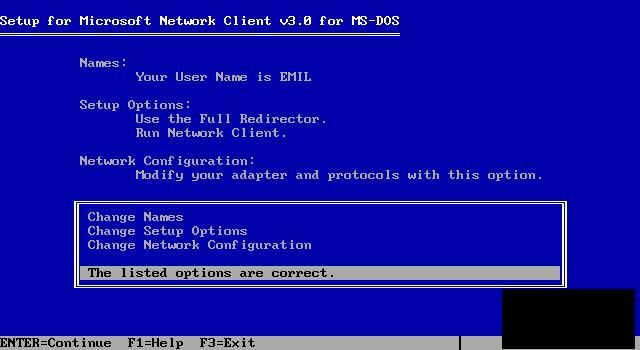
Here is where you start the MS install. Going from the top of the list, you need to give, i.e., change, your machine a name. I gave hilde as the name on the first two lines, but the other two can be left at the default “workgroup”.
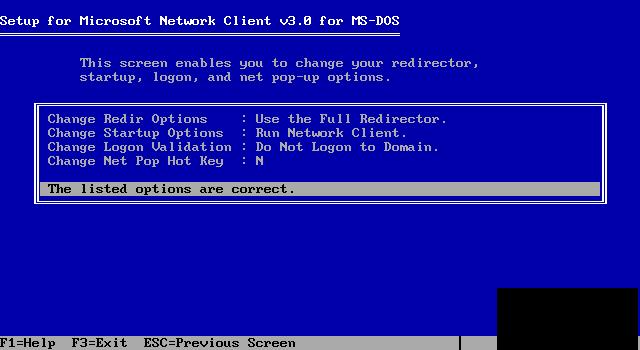
Go back to the main menu and make the next selection, Setup. You can leave all of this set to the defaults.
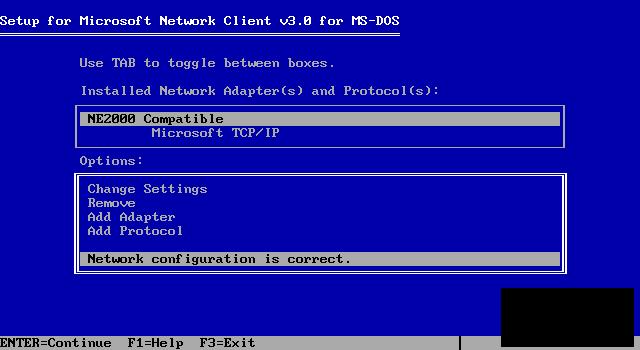
Now we get to the meat of the setup, Change Network Configuration. At this menu the first thing we should do is “add adapter”. Clicking on this will give you a list of all the drivers MS has. Select the one for your machine. Now we should change settings. If you have a NIC selected, it should show up on this menu. You'll need to add the IO and the IRQ numbers here, as well as the “adapter slot number”, the slot you've put your NIC in. Start with the left slot as number 1 counting to the right, up to number 8. This information is probably needed only for an EISA motherboard.
“Add protocol” is the next step, and the spot where most people mess up. MS will default to IPX, but you need to change it to TCP/IP. At the same time you should delete the IPX line, so that MS will not be confused. To delete the IPX protocol you need to tab to the upper menu and highlight the IPX line. Then tab back to the lower menu and click delete.
At this point highlight the line that says “options are correct” and press Return. MS will take over and install all the software. Now you need to reboot your DOS machine.
To keep it as simple as possible on the DOS system, I wrote two batch files for hilde. The startd.bat file loads all the networking files that DOS needs to connect. Because my wife does not need to be connected all the time, I put all the network programs into this file. Doing so frees up more of her system's memory. On that note, I wrote stopd.bat. This way she could free the memory up for other things when she was done transferring files. Her system has 4MB of main memory, which is quite a bit for a DOS-only system, so it's seldom that she receives an out-of-memory error.
############### startd.bat #############################################
@echo off C:\NET\net initialize C:\NET\netbind.com C:\NET\umb.com C:\NET cptsr.exe C:\NET inyrfc.exe C:\NET\nmtsr.exe C:\NET\emsbfr.exe C:\NET\net start net use * \ enn\cdisk
This batch file is a lot simpler than it looks. When I set up the MS client on hilde, the setup program put all the c:\NET\XXX programs in the autoexe.bat file. Since I did not want to have the Net start up every time the system turned on, I took these lines out and put them in the startd file. At the last line the system really makes the connection. This Net command means use the first open dir letter, i.e., *. You could give a letter, for example D:\, and connect to system \ enn's cdisk. Please note that this is not tenn's dir cdisk but the Samba share cdisk. Lastly you can add a password for Samba at the end. It is unnecessary here, but if you leave it off the program will ask you for one each time it starts.
When my wife is done with moving files around, she can turn the connection off by commanding stopd.bat, which contains the line net use * /delete.
The MS client uses about 100k of memory when it's running, which is no real problem because hilde has 4MB of memory. But some of the older DOS programs recognize only the first 640k. So even when the computer has plenty of space they bomb out. I later found out that stopd does not stop all the MS Net software; two or three programs are still running in the background. It seems that the only way to stop them is to reboot the system.
The easiest way to start Samba is to edit your rc.config file in /etc. Change the START_SMB="no" line to START_SMB="yes". Then run SuSEconfig. Of course, you have to do this part as root. If you cannot find this line in rc.config, Samba is not yet on your system and you need to install it. You can do that in YaST, the SuSE program to configure and administer your operating system. If you use another Linux distribution, use its configuration tools to install Samba.
To get Samba to work, you have to edit the file named “smb.conf”. Since my system is a home network and is not connected to the Internet, I've left out all security. If you are connected to the Net, don't use this or, if you do, be sure to add all the security measures.
# Global parameters
[global]
workgroup = workgroup
null passwords = Yes
[cdisk]
comment = DOS system
path = /cdisk
read only = no
browseable = yes
public = yes
guest ok = yes
To keep it simple, I did not add printer support. This is easily added, but WP 4.2 does not print correctly on my Epson, so I left it off. When my wife needs something printed, I transfer it to AbiWord and print it under Linux. Because her computer hilde has a MS-DOS filesystem, it would have problems reading my Linux files. Therefore, I restricted hilde to have access to only my /cdisk, which I had set up as a MS-DOS system for MS Windows. After you've got this done you should, as root, restart Samba with smbd restart so that Samba will read the changes. At this time, I also added hilde to my hosts files with this line:
192.168.17.99 hilde
This might not be needed, but it makes it easier than always typing 192.168.17.99 when I am referring to hilde.
The MS software comes with its own packet driver for the NE2000. Oddly enough, when I switched to other software the MS driver would not work. Therefore I had to look for a different driver for my card. Files full of drivers for almost all the older cards can be found on the Internet. The best packet driver I found was written by Crynwr; it's was simple and problem free. The driver has only three options and two are not always needed.
As much as possible, I use the most common type of cards in all my computers. It just makes things simpler. In this case I had in my wife's computer a NE2000 clone card, the most common of all NICs. To get it up and running I only had to use the command ne2000 0x60 10 0x300.
On the first SuSE CD is a directory called DOSutils. It has two subdirectories for XFS, one for plain DOS and the other for Windows. I used the plain DOS directory, called xfs186. This should work on any non-Windows DOS systems. It is easy to put all the XFS files on one 1.44 diskette and move it to the DOS system. I put all the files in the directory named XFS, then added the directory to the path list in the autoexec.bat file.
There are three files you need to configure in the XFS directory on your DOS system: hosts, xfs.bat and init.
# XFS Version 1.71 # hosts # # Note: Please keep this file in LF/CR (DOS) format! # 192.168.17.1 gateway 192.168.17.255 broadcast 255.255.255.0 netmask 192.168.17.44 tenn nfs-server 192.168.17.99 hilde
The host's file comes with sample data. All you need to do is change the names and numbers to the ones of your home network machines.
############### XFS.BAT ############################################ @echo off rem XFS Version 1.71 loadhigh ne2000 0x60 10 0x300 rem loadhigh winpkt 0x60 loadhigh xfskrnl 0x60 fstool @c:\xfs\init rem done
The above is the xfs.bat file, which starts the XFS system running. The first line loads your packet driver into high memory. If you have a NIC other than a NE2000 clone, you need to change this first line to match your NIC's software. The next line is needed only if you plan on using Windows 3.1; otherwise you can delete it. Next is the XFS program itself. Once the program is up and running, we have to initialize the connection between the two systems. This is done with the xfstool program. This one line runs the entire command script below. In the sample the line only says xfstool @init. But there is one problem: the program cannot find the script file, even though the XFS dir is part of the path in autoexec.bat. Solution: I had to add the path to it, then it worked fine.
# XFS Version 1.8 # Command Script init hilde csum=off # authentication pcnfsd tenn login mount d: tenn:/home/hilde/temp mount e: tenn:/cdisk # mount lpt2: speedy:laser timeo=30 umask 000 #
In the command script you start with, initialize the connection between hilde and tenn. Then you must tell tenn that you need the NFS filesystem with the command pcnfsd tenn.
Now you can login to the NFS system and mount the directories you need. For the XFS system I set up two DOS letter directories, d and e. The d: dir is in the Linux filesystem, and the e: dir is in the MS-DOS system. The umask command tells XFS to set the read/write permissions to allow access to all (chmod 666 *on the Linux system).
One odd thing about using the XFS system here is that I can read and write on the Linux filesystem without any problems. But I get permission-denied errors when I try to write to the MS-DOS partition. For example, a file is opened on tenn and saved as zero bits. I can read the partition fine, so it looks like a bug in the XFS software. Since hilde does not need to access the printer, I commented out the mount printer line.
When you run a normal Linux NFS system, you will find a dæmon called nfsd. This dæmon only works with other Linux/UNIX systems. To get XFS (on hilde) to run with your Linux computer, you need a different dæmon; you need to add the pcnfsd software to your system. In SuSE it's simple to add this dæmon. Simply run YaST and install it, then turn it on in the rc.config file. Each time you add a dæmon to your system, any configurations you need to do will be added to the end of this file.
Next you need to add this line to the exports file in /etc.
/ hilde(rw)
This allows hilde access to all files on your computer. You might want to limit it to some part like this:
/cdisk hilde(rw)
Now hilde can only mount your /cdisk. At this point you need to command (as root) pcnfsd restart to get this dæmon up and running. Once you have hilde connected, you should find in your systems messages file these two lines:
Feb 1 12:35:14 Tenn mountd[459]: NFS mount of /home/hilde/temp attempted from 192.168.17.99 Feb 1 12:35:14 Tenn mountd[459]: /home/hilde/temp has been mounted by 192.168.17.99
Once I had my wife connected to our home network, she wanted to be able to send and receive e-mail and browse the Web. So I had to come up with a way to do that. I looked at all the DOS programs for e-mail and browsing and came to the conclusion that they were all a bit of a pain. Adding in the fact that I would have to set up IP masquerading, etc., on Linux, it became a major pain. So I decided to set her up as a user on my system. Now she can Telnet into my computer and run Pine and Lynx under Linux, and I avoid all the setup problems with DOS.
I did a search on the Net for DOS Telnet clients. Going over all of them, I ended up using sshdos. This is a secured client that is somewhat overkill for a home network, but if you are Telneting by the Net, it is quite nice to have.
A major problem with DOS is there is no central hosts file, so each piece of software demands its configuring files in another place. There are three files to configure to get sshdos running. sshdos uses the Waterloo TCP/IP software.
# Waterloo TCP/IP Host file # # ip-address hostname [alias(es)..] 127.0.0.1 localhost loopback 0.0.0.0 null 192.168.17.44 tenn ############################################################### # File of networks and domains # # name number [alias(es).. ] loopback 127 tenn 192.168.17.44 tenn ############################################################### print = "Waterloo TCP/IP setup" ; optional key/value my_ip = 192.168.17.99 ; really is 0.0.0.0, mandatory hostname = "hilde" ; optional netmask = 255.255.255.0 ; mandatory if not using DHCP nameserver = 192.168.17.99 ; primary DNS, gateway = 0.0.0.0 ; mandatory if not using BOOTP/DHCP domain_list = "Hilde.epost.de" ; mandatory if not using DHCP
My wife uses a monitor with a 12" color screen, too small for any type of windowing software. Such a little screen, overloaded with windows, is hard to read and a horror for somebody who believes, like my wife does, in simplicity. Therefore, I taught her how to use Lynx and Pine. A standard SuSE install normally includes these, so I will not go into installing them. Beyond teaching my wife how to use each program, I had to do very little. I wanted Lynx to be in color, and I wanted her bookmarks appear on the screen when she started. Therefore I added an alias in the .bashrc file for Lynx. Here is the line to add to the .bashrc file:
alias lynx='lynx-color lynx_bookmarks.html'
The neat thing about this is when you add a bookmark to your file, it will show up next time you use Lynx.
On Pine I only showed her how to write an e-mail and send it. I also helped her set up a .sig file. Of course, you will need to reconfigure sendmail and fetchmail for two (or more) users. But that's another article.
James Hatridge has a BS in Informations Systems Management. and lives on a farm in Bavaria.
Special Magazine Offer -- 2 Free Trial Issues!
Receive 2 free trial issues of Linux Journal as well as instant online access to current and past issues. There's NO RISK and NO OBLIGATION to buy. CLICK HERE for offer
Linux Journal: delivering readers the advice and inspiration they need to get the most out of their Linux systems since 1994.
Sorry, offer available in the US only. International orders, click here.
Subscribe now!
Recently Popular
| Linux HOWTO: Video Editing Magic with ffmpeg | Jul-23-08 |
| Man vs. Myth: Greg Kroah-Hartman and the Kernel Driver Project | Jul-21-08 |
| Google Gadgets for Linux | Jul-21-08 |
| Building a Call Center with LTSP and Soft Phones | Aug-25-05 |
| Review: HP 2133 Mini-Note | Jul-16-08 |
| Boot with GRUB | May-01-01 |
Featured Videos
Non-linear video editing tools are great, but they're not always the best tool for the job. This is where a powerful tool like ffmpeg becomes useful. This tutorial by Elliot Isaacson covers the basics of transcoding video, as well as more advanced tricks like creating animations, screen captures, and slow motion effects.
Shawn Powers reviews the HP Mini-Note portable computer.
Thanks to our sponsor: Silicon Mechanics
Silicon Mechanics is a leading manufacturer of rackmount servers, storage, and high performance computing hardware. The best warranty offerings available are backed by experts dedicated to customer satisfaction.
From the Magazine
August 2008, #172
There's nuttin like a Cool Project to give you some relief from the summer heat, so get out your parka cuz we got a bunch of em. First up is the BUG, not a bug, The BUG. It's got a GPS, camera and more, in a hand-sized package that's user programmable. The BUG does everything. It's both a floor wax and a dessert topping. Get one now. Need a software version of a Swiss Army knife? Take a look at Billix, and don't leave home without it. Then, chew on this one, an X server on a Gumstix device driving an E-Ink display. Need more storage? How about 16 Terabytes? Can do.
And, of course, we have the usual cast of characters: Marcel, Reuven, Dave, Kyle, Doc, plus the new kid on the block Shawn Powers. But it doesn't stop there: build a MythTV box on a budget, build your own GIS system, set up the tools to monitor your enterprise and more. Finally, remember The War of the Worlds? Now you can play too.


Delicious
Digg
Reddit
Newsvine
Technorati


Great article - exactly what
On February 21st, 2007 Alexander (not verified) says:
Great article - exactly what i was looking for!
Re: Setting Up an Old 386 on Your Home Network
On April 30th, 2003 Anonymous says:
i would have shot her, you have way more patience than me, congrats. ~simontek
Re: Setting Up Compaq 386 portable with 1MB
On August 25th, 2002 Anonymous says:
Were going to have to see how this works on a Compaq 386 Portable with 1MB ram, 40MB IDE, 3c509 (I may change this back to a generic NE2000), and the Beautiful Rugged Plasma display (nice at night time in a car or when your looking through night vision you don't get blinded. )
WFW wouldn't run. It installed but when rebooting... Not enough memory.
With intersvr.exe and interlnk.exe was I able to make any connection to this box. But hell that's no fun... ;o)
Win3.11 ran but not enough memory when running win + winsock + the drivers for the card.
DesqViewX wouldn't run, no extended / expanded memory.. bagh..
I'd love to see linux on it, but not if it is slower than DOS is.
I'd try using it as a dumb terminal with a modem, but I already have a WY75 for that. (nice on IRC btw)
Someone snagged my EV-135 card, I still have the LIM 4.0 drivers though.. damn... that will be hard to find another one now.. heh heh
Well here's to tweeking... Which is what I will be doing again. You gave me hope again at least.
If I can track that telnet proggie down..
That's one of the hassles right there, finding old software. I had a few things cause I ran a bbs way back, but there are some things I don't have.
Another thing that would kick butt is PING.EXE for DOS.
At least with the FILENAME I can find things. Never forget to give the FILENAME. even when you skip giving a link.
for example http://www.filesearching.com/cgi-bin/s?q=dsk3-1.exe&t=f&d=&l=en&x=0&y=0
Sure make it easier..
peace for now
Re: Setting Up an Old 386 on Your Home Network
On August 23rd, 2002 Anonymous says:
I've got an old Philips laptop at home (it uses an NEC chip which is equivalent to the 8086), and I've simply put a terminal program on it and connected it to my Linux box via a Null modem cable. Surely that kind of sepup needs less effort and expense. You could have moved the HDD from the old PC to the server and set dosemu up to boot from that
Re: Setting Up an Old 386 on Your Home Network
On August 21st, 2002 Anonymous says:
this is simply amazing... i've done almost the exact same thing with old boxen... i even have an XT netbios server on my network just because i can >
[this takes the addition of a file or two from another M$ package and a simple edit of the config file(s) but don't try to run any real applications on that machine... even with utils that can place programs in "high" memory, there's still little of that base 640 left for other things...]
on your problem of some software going TSR and not leaving memory when your wife runs stopd, you should see if you can locate a copy of the MARK and RELEASE utils... i use them to unload tsrs that don't have any way of unloading them...
ie: mark
tsrprog
mark
'nothertsr
[sometime later]
release ; releases 'nothertsr
release ; releases tsrprog
these utils were, IIRC, put out by a company known as Turbo Power... they wrote software libraries for turbo pascal and other languages... one of their most popular packages was used in the development of DOS-style BBS packages... the BBS is where folk went with their computer and modem before the internet was "released for public consumption" by the US gov't...
hope this info helps... if you can't locate those utils, i'll be reading the mag and the online stuffs... just ask, eh? >
Re: NFS
On July 3rd, 2002 Anonymous says:
I don't understand the need for NFS. You can mount SMB shares in Linux with smbmount, even put it in the fstab. Requires the kernel to be required with support.
Re: NFS
On July 7th, 2002 Anonymous says:
SMB is single-user only; NFS is trusted-client multi-user. In other words, when you mount an SMB share, every transaction you do with that mount is performed as a specific user (specified at mount time). With NFS, you specify the user to use for each transaction. It is not particularly secure, since the server has no way of knowing if the client is being honest about who is doing what - that's what makes it "trusted-client".
(Note: PCNFS over MS-DOS is single-user, just like SMB.)
For a more secure system, use DCE/DFS, which uses Kerberos to ensure that individual clients can't cheat so easily, since they have to convince a trusted third party (the KDC) that they are legitimate.
Re: Setting Up an Old 386 on Your Home Network
On July 3rd, 2002 Anonymous says:
Boy this sure comes as a reminder, that before Microsoft's Windows graphical shell, everything in the MS world was text based! That there are still people computing in this environment, I find quite intriguing.
Re: Setting Up an Old 386 on Your Home Network
On July 3rd, 2002 Anonymous says:
From another farm dweller on another continent :-)
Have you tried talking your wife into switching to Linux? I suspect she would take well to the transition, especially if she "gets" free software already. Have her try it out (telnet'ing into your
current system from hers) to see what she thinks.
I wrote an article a while back about setting up Linux on a slightly higher-spec system (486/33, 170MB hard drive, 8MB RAM). Use joe or pico for text editing, sc for a spreadsheet, and the same networking software you set up for her on the "main" system.
Since you already have NFS shares set up for her, you could set up her 386 with root/boot/swap and mount /usr, /home, and so forth over NFS. My 486 is more of a standalone system, including some basic X11 capability, and it has about 50MB free space on the hard drive. Her 120MB hard drive should be large enough for a console-only system, especially if most of the system is on someone else's hard drive.
Good luck!
Re: Other nice color text programs for 386 telnetting
On July 3rd, 2002 Anonymous says:
A couple of other nice color text applications for linux are:
Above applications need either slang or ncurses library.
For local machine there are also text CD-players etc.
- Eero
DHCP
On July 3rd, 2002 Anonymous says:
You can use DHCP to configure DOS-clients. Both MS-client and WatTCP stack supports it.
Re: Setting Up an Old 386 on Your Home Network
On July 2nd, 2002 Anonymous says:
In case you'd like to let your wife know... MS started becoming very evil while still in their DOS years -- just ask Digital Research, the makers of DR DOS, and Stac Electronics, and many others who's cries were drown out by the pro-MS media.
Of course, they weren't as evil as they have been, but just a little evil doesn't hurt? right? ...FreeDOS and OpenDOS should be available even as we speak.
Re: Setting Up an Old 386 on Your Home Network
On July 2nd, 2002 Anonymous says:
I'm getting nitpicky here, but the MS network client was written well before DOS 5.0 was. So by your wife's logic, if DOS 5.0 is OK, so is the MS network client. Though I would argue that MS was the evil empire even before DOS 5 came out.
Re: Setting Up an Old 386 on Your Home Network
On July 2nd, 2002 Anonymous says:
Definitely. If I remember correctly, DOS 5 was the one that was designed to break Lotus.
Basically, MS was corrupt from the very beginning. It's the mindset of the founders that made the company what it is. Just read the "open letter" that bill gates sent to the hacker movement back in the late 70's, and you can see that there is no difference in his thinking between then and now.
Re: Setting Up an Old 386 on Your Home Network
On July 2nd, 2002 Anonymous says:
Wow! I mean, Wow!
This got to be one of the geekiest articles I've read in a long time. VP Planner ! I didn't use it, but I sure do remember the name. Heh, long time no see, bwana...
Congrats to your wife on her wisdom -- and to you, too, for being even wiser ;-)
I myself once used Linux with a CGA video card (monochrome 80x25 no graphics) so you might still give that old XT (or parts of it) some usage.
I've been considering a Beowulf, too, or rather that OpenMosix thing. I know nothing about this, so I shall try it sooner or later, of course. :-P
I don't know how this compares, but there's an app called "sc" which does look like Lotus 1-2-3 for Linux, and it's not graphical. My only gripe with it is the usage of C-N and C-P for cursor movement, instead of the arrow keys (this can be changed by editing "termcap", but I'm into minimal-hardware graphical usage).
Good luck, thanks for this account and, again, congrats on an excellent hack!
Renato.
Re: Setting Up an Old 386 on Your Home Network
On August 1st, 2002 Anonymous says:
If you are interested in Bewoulfs email me
James.Hatridge@epost.de
Re: Setting Up an Old 386 on Your Home Network
On July 8th, 2002 Anonymous says:
Hear hear! My first PC was a 386, and I got it onto the web (using Arachne and Lynx), and the feeling of seeing the yahoo! page download was *fantastic*! Apart from networking, I was probably more productive on that 386SX with 1MB RAM than I am now with a whopping great machine for development. Such is progress!
Re: Setting Up an Old 386 on Your Home Network
On July 4th, 2002 Anonymous says:
SC = SuperCalc. It was more powerful spreadsheet (true 3D) than Lotus and others I came across. I used it extensively for years on my old AST Bravo 386 16SX with 2MB and a 40 MB HD!
SC was owned by ComputerAssociates who have long abandoned it.
Bodvar
Re: Setting Up an Old 386 on Your Home Network
On July 2nd, 2002 Anonymous says:
You also might want to try upgrading. You can get a new machine for probably $400 (that is a conservative estimate).
Re: Setting Up an Old 386 on Your Home Network
On July 2nd, 2002 Anonymous says:
hell, you could always even dumpster dive a weak 586.
Microtel PCs W/ LindowsOS -- As low as $299!
On July 2nd, 2002 Anonymous says:
http://www.lindows.com/lindows_home_go_walmart.php
turn it into an x-terminal
On July 2nd, 2002 Anonymous says:
even better get xappeal (x server for dos). it runs over packet drivers and supports many cards.
for sharing files you might prefer mars_nwe on the linux side and netx or vlm on the dos side - it works faster than the m$ software
Re: Setting Up an Old 386 on Your Home Network
On July 2nd, 2002 Anonymous says:
You may want to D/L the textbrowser links from http://atrey.karlin.mff.cuni.cz/~clock/twibright/links/. It is much better than lynx (it handles tables, frames, etc. much better.)
However, please buy your wife a 17" monitor, and use VESA drivers to push it to 85 Hz, or else she will get nearly blind (12" @ 60 Hz is SO BAD for the eyes).
And you make jokes, isn't it? Where do you got a 386 from? Here in Austria it would be impossible to get such old PCs. People are happy if you take their old P II 266 Mhz Lin-Boxes for free, so they don't have to pay the waste disposal costs, and are able to upgrade.
I hope I didn't fell into a timehole.
Re: Setting Up an Old 386 on Your Home Network
On July 8th, 2002 Anonymous says:
Any old 286's or 386's in the Cardiff (UK) area would be welcome! Contact me on alan_james1969@yahoo.co.uk
Re: Setting Up an Old 386 on Your Home Network
On October 29th, 2002 Anonymous says:
someone trash is always someone 's treasure :)
man... when will we start throwing computer like that ? .. ppl in au..!!
Re: Setting Up an Old 386 on Your Home Network
On July 3rd, 2002 Anonymous says:
If anyone in Canada has an old computer they want to get rid of (that works) I would pay to have it shipped. Email me haskinsian@[high-temperature]mail.com
Re: Setting Up an Old 386 on Your Home Network
On July 2nd, 2002 Anonymous says:
Such old systems? Hey, I am looking for exactly these "old" machines to use for LTSP in schools here in Vienna! If you know of anyone who has such a machine they want to get rid of in the manner you say, I will be pleased to pick it up myself. Send me an email to ian-removethisantispambit-@midori.shacknet.nu
I am in the process of getting Linux, based on LTSP into a school here, and because of the threat that the school will lose thier entire compuer network because of the use of "unauthorised" software, such computers and LTSP will solve this problem very well. Please contact me.
Re: Setting Up an Old 386 on Your Home Network
On July 2nd, 2002 Anonymous says:
If you have anyone who wants to get rid of their old systems please contact me. cashaww@yahoo.com. I will pay for shipping if the systems are in working order.
Re: Setting Up an Old 386 on Your Home Network
On July 1st, 2002 Anonymous says:
You might want to look here:
http://www.freedos.org/
If you can migrate your wife to this, it would give you another article to post!
Stay Free!
Roy K
Re: Setting Up an Old 386 on Your Home Network
On July 2nd, 2002 Anonymous says:
Free DOS does not support networking and high memory, AFAIK.
Re: Setting Up an Old 386 on Your Home Network
On July 2nd, 2002 Anonymous says:
In a way, DOS in general does not support networking, since you must use external programs to do it. But you can network with FreeDOS using xfs as described in this article. FreeDOS also supports high memory, but last I knew, while the 286 version of high memory management worked reliably, the 386 version was still considered beta and was buggy. There is preliminary documentation relating to NFS networking with FreeDOS at http://fd-doc.sourceforge.net/mini/en/nfs.txt
Re: Setting Up an Old 386 on Your Home Network
On July 1st, 2002 Anonymous says:
You could be better off on the DOS side using Novell's Client32. It takes less than 10k conventional/upper memory, loading all the rest in extended memory. And it's free!
On the Linux side, you would use mars-nwe 0.99pl20 (SuSE has it all right) as a Novell 3.11 file/print server emulator.
Of course, you could continue using the telnet approach for TCP/IP networking; just use odipkt over Novell's IPXODI. This little gem uses only about 3k upper memory.
If you are of the fearless type, perhaps DV/X could be of interest to you; but since your wife is of the KISS type, it does not seem a good idea.
Migrate Her to Linux
On July 1st, 2002 Anonymous says:
You could probably start migrating her to Linux by
using a DOS emulator under Linux and gradually
trying to migrate her data over.. Do the old applications
support exporting to text formats? Can you program
a little?
If not, you could use LTSP and either a floppy boot
disk or a NIC with LTSP boot ROM to start her
386 computer up as a thin-client to your more
powerful server.. I'd start with just an LTSP boot
floppy until you feel comfortable with it.
Some day her old system is going to fart and die.. of old age.
Matthew
Re: Migrate Her to Linux
On July 8th, 2002 Anonymous says:
Dunno if you're interested, but I use WordPerfect 5.1 on xdosemu with no problems whatsoever (even emulated, it is way faster than SO). Even managed to get some of my old games going!
I have also found a page with Desqview Desqview/X in case you're interested: http://disvr.cjb.net/freedv/index.html
Re: Migrate Her to Linux
On July 2nd, 2002 Anonymous says:
Actually, those old systems are the ones that take longest to die. The fact that their cpu's are still built like tanks makes them very, very durable. Why else do you think NASA stuffs 486's in everything they build?
Re: Migrate Her to Linux
On July 2nd, 2002 Anonymous says:
Because that's what they could buy when their procurement budget was released. It's not because the 486 is better than something else...
Re: Migrate Her to Linux
On July 3rd, 2002 Anonymous says:
It's not because the 486 is better than something else...
Actually, it is. First, it costs a huge amount of money and time to radproof a CPU, so not every new chip is produced in a radproof version. Secondly, 486's and moreover 386's cram less circuits in the same area, and hence are inherently more resistent to radiation and easier to radproof.
Re: Setting Up an Old 386 on Your Home Network
On July 1st, 2002 Anonymous says:
I don't now if you have enough mem in your system, otherwise you could setup a X terminal Server using ltsp for example (www.ltsp.org). You only need a simple bootdisk on the 386 system then.
Re: Setting Up an Old 386 on Your Home Network
On July 1st, 2002 Anonymous says:
Excellent. I have a similar problem with my brother computer, so i'll use your solution
copy PDF
On March 14th, 2005 raka (not verified) says:
saya ingin sekali mengcopy tutorial dalam bentuk PDF karena saya tertarik untuk mencoba OS linux di komputer type 386, itu karena saya gemar belajar linux.
thank's