
The Linux Router
Routers are amongst the most crucial components of the Internet, as each bit of information on the Internet passes through many routers. Most of the routers used on the Internet are made by Cisco. Although these have good performance, they come at a high price.
In situations where we need to economize, the Linux router is an attractive alternative. When used as a simple gateway for a LAN, it can be almost free. All that is needed is an old 486DX machine with more than one network interface. A monitor is not always necessary. If used for a sophisticated application you will need a Pentium PI 200MHz MMX, which is costs more but is still three or four times cheaper than a commercial router with comparable functionality.
If one has a small lab with several LANs and wishes to set up a reliable, as well as secure, connection to the Internet, the cost of a commercial router may not be justifiable. The most economical solution in this case is to use a low-cost processor running the LRP (Linux Router Project, www.linuxrouter.org) distribution, which is a networking-centric, micro-distribution of Linux.
LRP is so small that it can safely boot from a single 1.44MB floppy disk. It makes the building and maintenance of firewall, routers, switches, hubs, and so on, cheap and straightforward.
In this article we show how to set up a Linux router for two to four LANs and test its performance under different conditions. All of the work described here was done on Intel PIIIs running at 733MHz. For comparison we also used Pentium Is and IIs. Here we present the results of our investigation into the performance of the Linux router and compare it with a commercial router.
The most common function of the Linux router is a connection between two networks. Typically, this would be a LAN and the Internet. For our experiments, given the unavailability of a connection to the Internet fast enough to stress the router sufficiently, we used a server to simulate the Internet.
For performance measurements, we set up a simple router configuration as follows:
Download a copy of the idiot image (lrp 2.9.8). See the Sidebar “Which Disk Image to Use” for details.
Extract the image to a floppy disk (1.44MB/1.68MB super-formatted) and make it bootable. The best way to do so is to use WinImage (www.winimage.com).
Get the kernel module for the Ethernet card you are using. We used RealTek Ethernet cards with the RTL8139 chipset, so the module we used was rtl8139.o. Add this to your kernel. Your Linux router is now ready for its configuration. See the Sidebar “Adding Kernel Modules for Ethernet Cards” for details.
Boot from your LRP disk and open the network.conf file (located in /etc/network.conf). Now modify it so that it looks like Listing 1 [available at ftp.linuxjournal.com/pub/lj/listings/issue100/5826.tgz]. Appropriate comments are there for modifications.
Save the changes and back them up. Reboot.
The configuration of the Linux router is now complete. Now we'll describe its performance in different configurations. Because we are not using dynamic routing, we will define static routes in the following experiments according to the configuration of the experiment. Note: after you are done configuring the Linux router, write-protect the floppy disk you are using.
The test setup in our computer lab uses a 100Base-T Ethernet. The NICs and switching hubs are 100Base-T. All platforms are running Linux 2.2 kernels, and the Linux router is the default gateway for all of them. Performance is measured on different LRP boxes, such as PI 133MHz, PI 200MHz and PIII 733MHz.
The first configuration uses one client and one server. We connected the server at the first NIC on the LRP box (eth0) and the client at the second NIC (eth1) through cross-UTP 100Mb cables. Then we set the ipchains rules on the Linux router for forwarding the traffic between client and server by issuing the following command:
ipchains -I forward -j ACCEPT -s 192.168.1.0/24
-d  192.168.0.0/24 -b
We measured the bandwidth of the Linux router when there was traffic flow between the server and the client. See Table 1 for the measurements for the different LRP boxes.

Figure 1. Setup Number One for Measurement of Bandwidth of LRP Box
Table 1. Bandwidth Measurement Results
In this case, the measurements for the Pentium I are misleading, as the bottleneck is the 90Mbps practical limit of 100Base-T Ethernet and not the capacity of the router.
Configuration two was done with one server and multiple clients. We connected a server on the first NIC of the LRP box (eth0) and three LANs through different hubs to the other three NICs respectively. The setup is depicted in Figure 2. The ipchains rules for this setup would look like:
ipchains -I forward -j ACCEPT -s 192.168.0.0/24
-d  192.168.1.0/24 -b
ipchains -I forward -j ACCEPT -s 192.168.0.0/24
-d  192.168.2.0/24 -b
ipchains -I forward -j ACCEPT -s 192.168.0.0/24
-d  192.168.3.0/24 -b
ipchains -I forward -j ACCEPT -s 192.168.1.0/24
-d  192.168.2.0/24 -b
ipchains -I forward -j ACCEPT -s 192.168.1.0/24
-d  192.168.3.0/24 -b
ipchains -I forward -j ACCEPT -s 192.168.2.0/24
-d  192.168.3.0/24 -b
You can write a script to run these rules eliminating the need to enter them at the command prompt every time you boot your LRP box. It should be placed in the root directory so that the user is able to run all the rules by just entering ./filename. We measured the bandwidth of the router when there was traffic between the server and more than one client (clients may be from the same or different LANs).
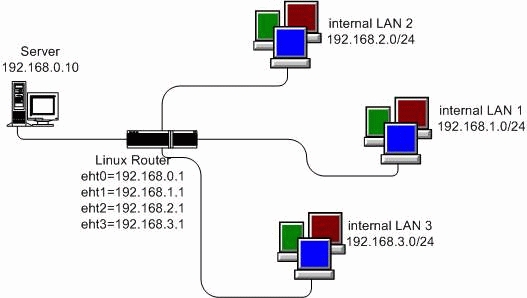
Figure 2. Setup Number Two for Measurement of Bandwidth of LRP Box
The graph in Figure 3 shows the performance of LRP while routing the traffic between the server and the clients. From this graph we conclude that a PI 133MHz-based Linux router is sustaining a bandwidth of about 51Mbps, and a PI 200MHz-based Linux router is sustaining a bandwidth of about 82Mbps. The measured bandwidth between two platforms that are on the same network segment (say both are at internal LAN1) was found to be equal to 90Mbps. In this case, the router is not involved in the communication. This is direct communication between two computers on 100Base-T Ethernet, start topology, so Ethernet has a practical limit of 90Mbps. The bandwidth of the PIII-based Linux router cannot be calculated due to the limitation of the physical medium of transmission.

Figure 3. Bandwidth Measurement of Linux Router
For the third configuration we set up multiple servers and multiple clients (cross-pinging). In this test setup we used two servers connected on eth0 and eth2 of the LRP box.

Figure 4. Setup for Cross-Pinging
A slight reduction (1-2% only) in the bandwidth of the Linux router was observed when there was cross-pinging of packets between server 1 and client 1 and server 2 and client 2, simultaneously.
The Linux router is very stable in its operation. We have run it for long periods, and it showed a very stable performance over the entire length of time. The graphs in Figures 5 and 6 show that the bandwidth of the Linux router is fairly constant with a great increase in the amount of data.
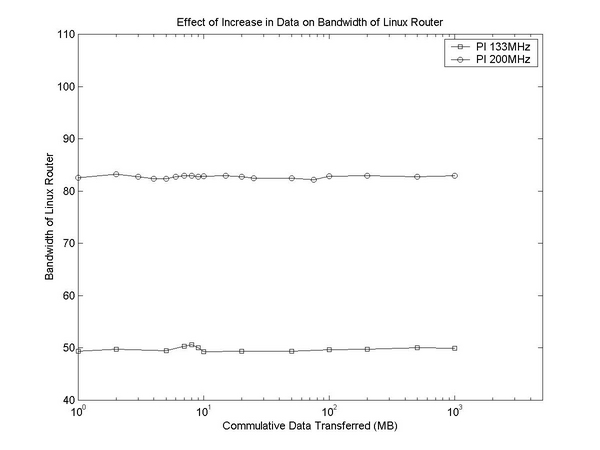
Figure 5. Effect of Increase in Data on Bandwidth of Linux Router
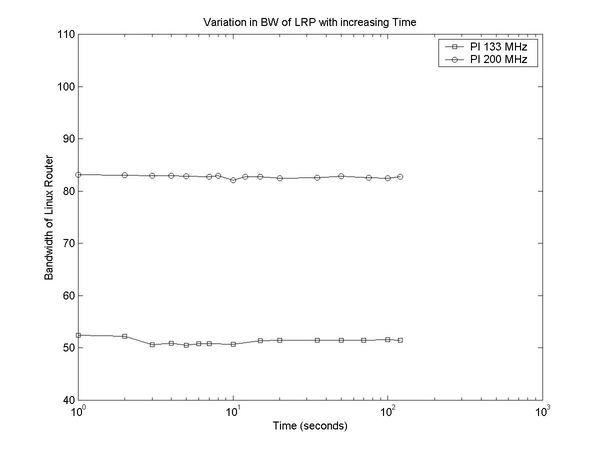
Figure 6. Variation in Bandwidth of LRP with Increasing Time
The write-protected medium for booting off the Linux router gives it increased security from crackers. Once booted, it runs exclusively off RAM. You may safely take your floppy out of the floppy drive and put it in a secure place until it's needed again. Also, a single floppy can be used to boot many identical Linux routers with a runtime change in configuration.
The Linux router is easy to handle and configure. It does not require any special care for its use other than that required for a normal PC. If there is a problem, configuring it only takes a few minutes. Moreover, it is basically software on a floppy disk; if your LRP box gets damaged because of power fluctuations (a common problem in the third world), you can instantly convert another available PC into your router by adding NICs from the corrupted LRP (if they are not corrupted) and boot it off the floppy disk. No configuration will be required for this router at all, except the runtime configuration. You can imagine what a great advantage this is—think of what would happen if your Cisco router were to be corrupted.
The following is a comparison of the Linux router with the Cisco 2620 router available in our laboratory.
The cost of building a good Linux router (based on a Pentium I, 200MHz MMX) with 1FDD, 32MB of RAM is less than $100 US. (It may be nearly free if you use the minimum required hardware, i.e., a 486DX with 16MB RAM.) A monitor is not necessarily required. You can use a borrowed monitor temporarily at configuration time or configure via a remote serial connection (if you include support for that through the serial.lrp package). On the other hand, the cost of the Cisco 2620 with a 50MHz Motorola Processor, 16MB Flash RAM and 40MB DRAM is more than $3,500 US.
Although power consumption here is not of great concern, in most applications it is notable that the Linux router (running on PI 200MHz, MMX) consumes less than 30W of power, while Cisco 2600 series routers consume 75W.
You can add as many NICs in the Linux router as you wish (limited by the number of slots on the main board). In Cisco 2600 there is only one Fast Ethernet card available.
The modularity of the Linux router is matchless. Its packaging system allows easy removal and addition of features. You can add/remove packages, even at runtime, using the lrpkg command. You need to shut down the Linux router to add a module only if it requires some additional hardware. However, the kernel module for the hardware can be installed at runtime using insmod. The design of the Cisco router is not as modular.
For the Linux router there are a large variety of hardware and software products available in the open market as it has the complete structure of the ordinary Linux operating system. You can use the product of any manufacturer that has support for the Linux router. Cisco routers, on the other hand, are limited in this respect. Usually only Cisco products are used with Cisco routers.
Having Linux as the operating system on your router gives you the extra advantage that you can build your own packages according to your needs using shell scripting. You also can get a lot of help from the available literature for Linux. Cisco routers have their own specific operating system called Internet Operating System. The Cisco 2620 uses IOS release 12.1. Although it is developed on a regular basis, you can use only those features that are available in the specific IOS release used on your specific router.
Like Cisco routers, the Linux router also supports the multiprotocol feature. It has support for RIP, BGP, OSPF and many more that are added through packages.
Services such as Ethernet router, firewall, DNS and ISDN may be initialized on a Linux router. However, initializing services like DNS (which is highly CPU-bound) will degrade its performance. It is better to use a separate machine as a DNS server. The Cisco router has multiservice integration of voice, data and video. As with Cisco routers, IP masquerading, port translation, load balancing, transparent proxy and interface alias may all be implemented on a Linux router.
Cisco routers support IPX, Token Ring, VLAN, VPN, Apple Talk and DDR for advance routing. The Linux router also can support these features through proper packages. Although to do so, some expertise in Linux and some additional hardware are required, which will increase the cost of Linux router, but it still will be much less than that of a Cisco router.
Depending upon the model and series of the Cisco router, it has a limited number of WAN slots. In the 2620 there are two WIC (WAN Interface Cards) slots, one network module and one advance integrated mode slot. The two-port serial WAN card has a asynchronous speed of 115.2Kbps, and synchronous speed equals 2.048Mbps. Port 1 supports only synchronous mode. The Linux router also has support for WAN interface cards. Sangoma WICs (www.sangoma.com), which have a synchronous data rate of 8Mbps, are quite popular among LRP users. With these cards you can combine many LRP boxes. However, the disadvantage is that the cost of the LRP box increases—this card costs about $400 US.
The bandwidth of a 133MHz Pentium I-based Linux router is about 51Mbps and that of a 200MHz Pentium I-based Linux router is 82.5Mbps. The performance of the Linux router on a 733MHz PIII is so high (90Mbps) that it saturates the 100MHz Ethernet. We also studied the effect of RAM on routing. In this case it turned out that there is no effect on routing performance with an increase in RAM. However, by increasing RAM you can set up larger RAM drives that you may need if your routing table gets quite large.
We have explored the performance of Linux router, its stability, cost, highly modular design, low power consumption, and so on. More work on the Linux router is underway to improve its routing performance. For a small office or laboratory, where the pursuit of cost-savings is a major consideration, the Linux router is the ideal solution. A typical configuration for a small business would be as shown in Figure 7.
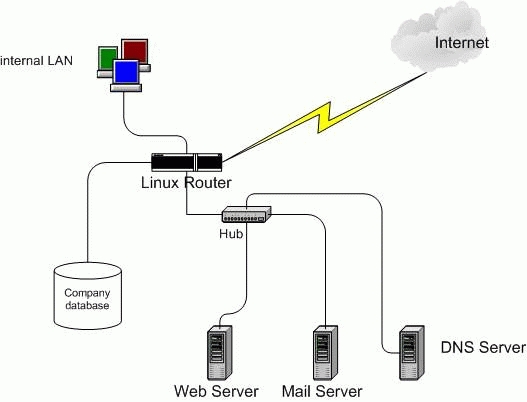
Figure 7. Typical Configuration for a Small Business
This work was performed in the Computer Communications Laboratory and the Digital Computers Laboratory at the Department of Electrical Engineering, University of Engineering & Technology, Lahore, Pakistan, under the supervision of Professor Shahid H. Bokhari.

Kaleem Anwar (kaleem_002@yahoo.com) is graduating in Electrical Engineering with a specialization in Computer Engineering from the Department of Electrical Engineering, University of Engineering and Technology Lahore, Pakistan. His fields of interest include Linux, Java, control systems, computer networks, algorithm design and digital signal processing.
Muhammad Amir (amirsher03@hotmail.com) is graduating in Electrical Engineering with a specialization in Computer Engineering from the Department of Electrical Engineering, University of Engineering and Technology Lahore, Pakistan. His fields of interest include Linux, Java, control systems, computer networks, algorithm design and digital signal processing.
Ahmad Saeed (electri17@yahoo.com) is graduating in Electrical Engineering with a specialization in Computer Engineering from the Department of Electrical Engineering, University of Engineering and Technology Lahore, Pakistan. His fields of interest include Linux, Java, control systems, computer networks, algorithm design and digital signal processing.
Muhammad Imran (imran_uet@hotmail.com) is graduating in Electrical Engineering with a specialization in Computer Engineering from the Department of Electrical Engineering, University of Engineering and Technology Lahore, Pakistan. His fields of interest include Linux, Java, control systems, computer networks, algorithm design and digital signal processing.
