
Build a Virtual CD-ROM Jukebox
This article describes how to set up a virtual CD-ROM jukebox (VCDJ) using Samba and Linux. A VCDJ is a network server that provides access to the contents of a large number of CD-ROM disks, without the need for more than one CD-ROM drive. In addition, it simultaneously provides access to the ISO 9660 CD-ROM images in a format suitable for burning copies of the CD-ROMs using a CD-RW drive.
A CD-ROM jukebox is usually a file server (or file server appliance) connected to a CD-ROM drive tower. It is able to share (often via SMB/Windows Networking) the contents of a number of CD-ROMs to clients on the network. It's valuable because users of the network do not have to locate a particular CD-ROM physically when they wish to install software or access data.
However, this approach suffers from some drawbacks. The number of CD-ROMs it can serve is limited to the number of CD-ROM drives in its tower(s). To add more CD-ROMs, more drives must be obtained and installed. The CD-ROMs must be in the drives at all times, making them unavailable for other purposes. Also, there is no easy way to make copies of the CD-ROMs (especially bootable copies) without removing them from the server, which makes them unavailable for network users.
A VCDJ surmounts all of these limitations. It is different from a regular file server because, while a regular file server might contain the contents of a number of CD-ROMs, the VCDJ contains an ISO 9660 image of the CD-ROMs. When we're done, it will serve both the images and the contents of the images efficiently (on a file-by-file basis) at the same time. Additionally, the original CD-ROM disks can be stored away where they won't get lost.
Whereas traditional CD-ROM servers are limited by the amount of CD-ROM drives they contain, the VCDJ is limited by the amount of disk space it contains. Hard drives are an order of magnitude cheaper than CD-ROM towers, and they scale better. One 40GB hard drive occupies one spot on an IDE or SCSI controller. It can contain the equivalent of 57 full-sized CD-ROMs (at 700MB each). We would need 57 CD-ROM drives attached to the server to get the equivalent functionality, which is a practical impossibility.
At my place of work, we have found the VCDJ invaluable for publishing the contents of regularly updated software subscriptions. We used to lose track of CD-ROM disks as we loaned them out to others; now we just give them access via their Windows Domain credentials. And, we easily can burn new copies of any bootable CD-ROMs we need. The original disks remain locked away.
To create our VCDJ, we'll need the following pieces:
One CD-ROM drive in a computer running a recent version of Linux. The drive will be used to create ISO 9660 CD-ROM images. (ISO 9660 is the format of the filesystem usually used on CD-ROM disks. So we refer to a soft copy of a CD-ROM disk as an ISO 9660 image.)
Enough hard drive space to hold all of the CD-ROM images we want to serve.
A loopback device, to allow access to the files contained within the ISO 9660 images.
The automounter, to mount the ISO 9660 CD-ROM images automatically.
Samba set up to serve network shares.
The first task is to obtain the ISO 9660 images of the CD-ROM disks. Any tool you can use to, say, make duplicates of CD-ROMs can generate proper images. You also can download ISO images of your favorite Linux distribution.
On Linux, the simplest way to make an image is with cat. Put the desired CD-ROM disk into the CD-ROM drive. Make sure the directory /mnt/images/ exists. If your CD-ROM disk block device is hdc, the image is created like this:
cat /dev/hdc > /mnt/images/image1.iso
You'll want to give the image file a more descriptive name. Reading the image may take awhile. Repeat this process for each CD-ROM disk of which you want an image.
Now that we have the CD-ROM images, we'd like to access the contents of the images. The normal method for accessing the contents of the image is to use a loopback device, like this:
mount -t iso9660 -o loop,ro /mnt/images/image1.iso
        /mnt/isosrv/image1/
This mount command says that we are going to mount some data that uses the ISO 9660 filesystem format. It also says to use the loopback device. The loopback device is a nifty kernel feature that allows you to designate a file, in this case /mnt/images/image1.iso, to be used as if it were a character device, like a hard disk or CD-ROM drive. This command mounts the image file in a read-only format. The contents of the CD-ROM image can be seen in /mnt/isosrv/image1/.
If our VCDJ has a lot of ISO 9660 images, it won't be possible to mount all of them statically. The next step is to configure the automounter. The automounter will mount an ISO 9660 image only when it is accessed. It will unmount it after a time of inactivity. We need this because there is a limit to how many filesystems can be mounted via the loopback device at one time. It's unlikely that all of the CD-ROMs will be in use simultaneously, so it's the automounter to our rescue. (See “Tux Knows It's Nice to Share, Part 4” by Marcel Gagné at /article/5298 for instructions to install and initially set up the automounter.)
First, edit /etc/auto.master, and append to it the following line:
/mnt/isosrv_auto /etc/auto.isosrv --timeout=60
Make sure the directory /mnt/isosrv_auto exists. Restart the automounter for this change to take effect.
Create the file /etc/auto.isosrv, and append to it the following line:
image1 -fstype=iso9660,ro,loop :/mnt/images/image1.iso
Create a similar line for every ISO 9660 CD-ROM image that is to be automounted.
If you mount on your VCDJ, you should see a line like this:
automount(pid782) on /mnt/isosrv_auto type autofs
(rw,fd=5,pgrp=782,minproto=2,maxproto=3)
(The various numeric values will likely be different on your system.)
The automounter does not have to be restarted when changes are made to /etc/auto.isosrv. So far we've told the automounter that when some process tries to access a file or directory somewhere in /mnt/isosrv_auto/image1/, it will mount image1.iso. After a period of time of no access to the directory, the image will be unmounted.
There's one last problem. List the contents of /mnt/isosrv_auto/
ls /mnt/isosrv_auto/
If nothing has accessed the contents of the CD-ROM image recently, this directory will appear to be empty.
If you explicitly list the contents of the CD-ROM,
ls /mnt/isosrv_auto/image1/
you will see the contents. Now go back and list the contents of /mnt/isosrv_auto/ again, and you will see image1. Eventually, the automounter will unmount the image, and once again the directory will be empty.
This is a problem because it means the users will have to know the names of all the CD-ROMs that they want to access. Directory browsing won't work, which is clearly not acceptable.
The solution is to create another directory called /mnt/isosrv/. Enter that directory and perform the following commands:
mkdir image1
cd image1
ln -s ../../isosrv_auto/image1 disc
Repeat this for every ISO 9660 CD-ROM image.
Listing the contents of /mnt/isosrv/ will show all the available images, regardless of whether the automounter has mounted them.
See “Tux Knows It's Nice to Share, Part 5” by Marcel Gagné (/article/5297) for instructions on installation and initial setup of Samba. Be sure that you have authentication set up to protect the CD-ROM contents properly, according to their licensing agreements. (Not a problem if everything is open source!)
Recall that one goal is to provide access to the ISO 9660 images and their contents simultaneously via Samba. To do this, edit /etc/smb.conf (or maybe /etc/samba/smb.conf), and append the following lines:
[isoimages]
        comment = ISO9660 CD ROM images
        path = /mnt/images/
[cdroms]
        comment = Contents of CD ROMs
        path = /mnt/isosrv/
Restart Samba. Now go to a Windows client (or any other computer that can be an SMB client) and browse your VCDJ. You should see two new shares: isoimages and cdroms. In the isoimages share are all the ISO 9660 images, and in the cdroms share are the contents of the images. Browse the contents of the directory image1 in the cdroms share. If you mount on your VCDJ, you should see a line like this:
/mnt/images/image1.iso on /mnt/isosrv_auto/image1
        type iso9660 (ro,loop=/dev/loop0)
Figure 1 shows a diagram of the order of things when a network client accesses data in the cdroms share. Note that if the client accessed an ISO 9660 image directly, the Samba process would directly read from /mnt/images/, bypassing all symlinks and the automounter.
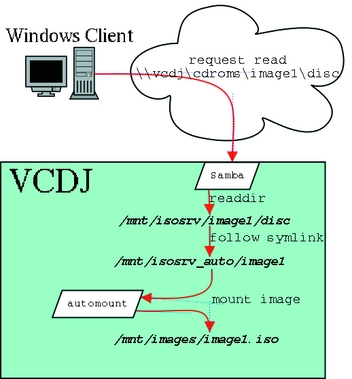
Figure 1. Network Client Accesses Data in the cdroms Share
As you add more ISO 9660 images, you'll come to appreciate the value of a VCDJ. You're only limited by available disk space, and the cost and degree of effort to add more capacity is much less than trying to add more physical CD-ROM drives. Now you can make all your CD-ROMs available across your enterprise, whether in your office or in your home, and you'll never have to worry about people not returning borrowed CD-ROM disks.

Jeremy Impson (jeremy.impson@lmco.com) is a senior associate research scientist at Lockheed Martin Systems Integration in Owego, New York. There he's a member of The Center for Mobile Communications and Nomadic Computing, where he uses open-source software to develop mobile computing systems.
