
UNIX under the Desktop
March 15th, 2002 by Doc Searls and Brent Simmons in
When Steve Jobs introduced Apple's new iMac in January 2002, the spotlight was focused entirely on the physical architecture of the first mainstream computer that fully defied the term “box”. The new iMac is a white dome with a flat screen that floats on the end of a chrome arm. It looks like a cross between a Luxo lamp and a makeup mirror. Jobs called it “the best thing we've ever done”.
Coverage—including a TIME magazine cover story—was all about hardware. Nobody paid attention to Steve Jobs' slickest move of all, which is leveraging UNIX where it counts. Starting in January 2002, every new Mac will ship with OS X as its default operating system. OS X is built on Darwin, an open-source implementation of BSD on a Mach kernel. So now every new Mac is a Trojan horse that arrives with an invisible army of UNIX experts.
Regardless of the technical and religious differences that separate the many breeds of UNIX, expertise at one ports well to another: from Solaris to HP-UX to AIX to Linux to BSD to Darwin and OS X. If you want to hack, the environment is there—so are the tools and the community.
Put another way, OS X gives us the first popular desktop OS that fits into a prevailing Linux environment and also into the prevailing marketplace. On the bottom, it's UNIX. On the top, it runs Microsoft Office and the whole Adobe suite. This has its appeals.
In iDevGames.com, Aaron Hillegass writes:
Tomorrow I will get on a plane. I'll have my PowerBook with me. On that flight, I can write Cocoa apps, PHP-based web sites, Tomcat web applications, AppleScripts or Perl scripts. I can use Project Builder, Emacs or vi. I'll have my choice of MySQL or PostgreSQL to use as a back-end database. I'll use Apache as my web server. And it is all free! If I'm willing to spend a little cash, I can also run Word or Photoshop. I may even watch a DVD on the flight.
The social effects of OS X on the Open Source community were already apparent at the O'Reilly Open Source Convention in July 2001, when slab-like Macintosh G4 Titanium laptops seemed to be everywhere. At one Jabber meeting, four out of the seven attendees tapped away on TiBooks, including Jabber's creator, Jeremie Miller. Terminal windows were scattered across his screen. When we asked what he was doing, he replied, “compiling code while I catch up on some e-mail”.
The growing abundance of OS X fruit on the UNIX tree creates new and interesting market conditions for Linux, along with every other UNIX branch. There are sales projections for six million iMacs alone. Many of these machines will be penetrating markets where Linux has strong incumbent server positions, such as science and education. Lawrence Livermore National Laboratory was once Apple's biggest customer and might easily reclaim the title. In January 2002, the state of Maine announced its intent to give a new iBook to every teacher and student in the seventh and eighth grades. All those kids will have their own UNIX machines. Consider the implications.
Is there a server market for OS X? It's worth noting that OS X Server has existed as a product for more than two years and has never attracted much attention. Also, while every new OS X Mac is ready to perform a variety of server functions, that's not why it sells. IT Manager and Mac columnist John C. Welch calls OS X an “okay server, mostly due to hardware limitations and immaturity”. Meanwhile he says, “Linux is an excellent server. It runs on more and better hardware than Windows can ever dream of, thanks to IBM and Sun.” So OS X is no threat to Linux in the server space. And it's utterly absent from Linux's other home turf, embedded computing.
Where OS X will succeed is in the one category where Linux has struggled for popularity (if not functionality) from the start: on the desktop.
Is this a problem? That was the question at the top of our minds when we visited Macworld in January 2002. To our surprise, the answer was quite the opposite. Not only were plenty of familiar Linux figures walking around kicking tires (approvingly, it appeared), but there were UNIX geeks wearing Sun and SGI schwag as well. One Linux hacker told us OS X was “subversive” because it “seeds” the world with millions of open-source UNIX machines. Another said, “I can go to my Mom's, fire up her iMac, open a shell, ssh to my own server and get some real work done.” So the market logic of Linux and OS X appears to be AND, not OR.
Apple also has attracted some top talent from the open-source ranks. Brian Croll, who runs OS X engineering for Apple, was recruited from Eazel. Jordan Hubbard, the world's foremost BSD hacker (and a founder of FreeBSD), actually pitched his way into a job working on Darwin at Apple. After seeing OS X in preview form, he said “Hallelujah” and “This is what I've been waiting for the past 20 years....I never thought about working for Apple before, and now I was saying, How do I join?”
Working with the Open Source community is still new for Apple, and the relationship has been a challenge to the company's highly proprietary approach to intellectual property. But Apple has compromised on some issues. After hackers barfed on Apple's original public source license, the company issued a new one that the Open Source Initiative soon approved. Shortly after the new license was issued in January 2001, OS X product manager Chris Bourdon summarized it this way: “You can take Darwin and do anything you like. It's there for everybody.”
We first tried OS X when it entered public beta in November 2000. At that time nothing in the last paragraph was anywhere in sight, and the new public source license was more than a month away. It was vastly different from the “Classic” Mac OS (which it ran under emulation) and from other desktops on both Linux and Windows. It was pretty, but also slow and notably devoid of drivers for CD-ROM burners, DVD players and other peripherals essential to the modern desktop computing experience. If we had reviewed it then, as we had planned, our thumbs would have pointed toward the floor. And we wouldn't have been alone. “Frankly, I think it's a piece of crap”, Linus Torvalds wrote in his book, Just for Fun, which was also in the works around that time.
Things got better the following spring, when Apple released the 1.0 version of the OS. But it was still slow and some key drivers were still lacking. In September 2001, version 10.1 was released with kernel version 1.4.1, which by all accounts was vastly improved. Soon plenty of drivers showed up, reports of kernel panics fell below noise level, and the OS was ready for prime time.
Since then a good thing has become steadily better, thanks in large part to what the open-source geeks have brought to the table. XFree86 and XonX brought the X Window System to Darwin. Fink used Debian tools like dpkg and apt-get to build a package manager. Their site lists hundreds of available packages. In fact, you don't even need to run Darwin on Apple hardware, since an x86 version is available as well (from Apple, even). GNU-Darwin is already the leading non-Apple Darwin distribution. Watching all this happen, our thumbs began rotating toward the ceiling.
Then last week we put OS X on a Titanium laptop. It blew our minds.
When we plug in a second monitor (or a projector), the OS autodetects it, then lets us decide whether to make it mirror the laptop screen or operate as a contiguous extension anywhere on all four sides. When we plug in a FireWire drive or a USB storage device (such as a camcorder, an MP3 player or a digital camera), the device shows up on the desktop, in the appropriate applications and in the directory. When we soft-eject the FireWire drive, it goes away, unless something requiring it is in use—in which case the OS gives me a warning or a rebuke, never a crash.
Installing OS X (now at 10.1.2) was a snap. It immediately ran every one of several dozen Classic Mac applications that were already on the machine, including Adobe GoLive and Photoshop, both of which are big, resource-intensive programs. Running Classic and OS X native apps concurrently isn't a concern. Everything looks and acts just fine.
But OS X really performs when it comes time to move the machine. In the past this was an exercise in prophylaxis that required running down a checklist of things that might go wrong. Not anymore.
On its desk the Titanium is connected to the network through Ethernet and DHCP. The rest of the building is covered by an 802.11b wireless network. We can close the TiBook's lid while it's hooked up through Ethernet, watch it go to sleep instantly, unplug everything (seven cables, including USB, FireWire, Ethernet, speakers, power and monitor) and watch it wake up instantly when I open it up on the kitchen table, where it's now connected to the network, wirelessly. Later we can close the lid, return it to the desk, plug everything back in, open it up and watch it wake instantly and carry on as before. We've been doing this several times a day with no ill effects.
Not that life is perfect. Every so often the laptop starts to slow down. Then we usually look for responsible processes. (Memory, incredibly, feels like a non-issue, even though we have “only” 384MB.) Apple provides a helpful GUI uitility called Process Viewer, but we'd rather do it the right way: through a terminal session. We just run top or top -u, isolate CPU hogs and kill them off. In UNIX fashion, life goes on.
The usual culprit is TruBluEnv, which is part of the Classic emulation environment. Apple obviously still has some work to do there. But again, failures are never catastrophic and are far less common than they were with the Classic Mac OS, which would typically crash several times a day.
Want to know the killer app for OS X? It's the uptime command. Right now it says this about the Titanium: “11:21AM up 6 days, 16:54, 3 users, load averages: 1.81, 1.55, 1.36”. On another desk is a G4/500 dual-processor desktop, also running OS X. There uptime says, “11:22AM up 22 days, 1:50, 2 users, load averages: 0.16, 0.04, 0.00”. On that machine I'm also running a little program called CPU Monitor, which shows activities on both CPUs. Pretty cool.
In his book In the Beginning Was the Command Line, Neal P. Stephenson compared Linux, Microsoft and Apple to car dealerships. Linux consisted of volunteers making tanks that were free for the taking. Microsoft made ironically popular but failure-prone station wagons and SUVs. Apple made “expensive but attractively styled cars with their innards hermetically sealed, so that how they worked was something of a mystery”.
There is still plenty of hermetically sealed stuff inside OS X, but you can open the hood and work on the thing. At last, it has a command line.
The terminal lives in /Applications/Utilities. Open it up, do an ls / and you'll find familiar directories (bin, etc, sbin, tmp, Users, usr, var) alongside others such as Applications, Library, Trash and so on.
Look in /usr/bin and many of the tools you expect to find are there: autoconf, bison, cvs, fetchmail, nslookup, perl, ssh, whoami and so on. The unexpected tools come from the Mac side of OS X's heritage. One example is osascript, which lets you run an AppleScript script from the command line—a feat one imagines the original AppleScript designers never envisioned.
Some usual suspects are missing: no Python or Pine, for instance. But these are itches open-source developers are free to scratch, which is exactly what many are doing. The OSXGNU archive already includes Python, bash (the OS X default is tcsh), Pine and Lynx. So their absence is corrected easily.
The Fink Project distributes ports of ant, MySQL, Nmap, Ruby and so on, with the stated intent to make OS X “a coherent, comfortable distribution that matches what Linux users are used to”.
It's interesting to discover that much of the software included with OS X is BSD- or MIT-licensed, while much of the software one downloads is GPLed. Though that's just a rule of thumb, it's a definite contrast between OS X and Linux. For example, OS X comes with Curl, available under the MIT license, rather than the more familiar GPL-licensed GNU Wget. This may be attributed to an allergy to GPL-licensed software in Apple's legal department.
Though there is a separate OS X Server, OS X itself includes server software such as Apache, sendmail, named and sshd. AppleTalk and Samba support are built-in.
Because OS X is so new, kinks are still being discovered. For example, a security issue was uncovered in Apache, since HFS+, the Mac's native filesystem, is not case-sensitive. This meant a URL that would otherwise be denied would be made readable just by changing the case of the request. Apple responded with a new Apache module that enforces pseudo-case-sensitivity, and which any build instructions for Apache on OS X must take into account.
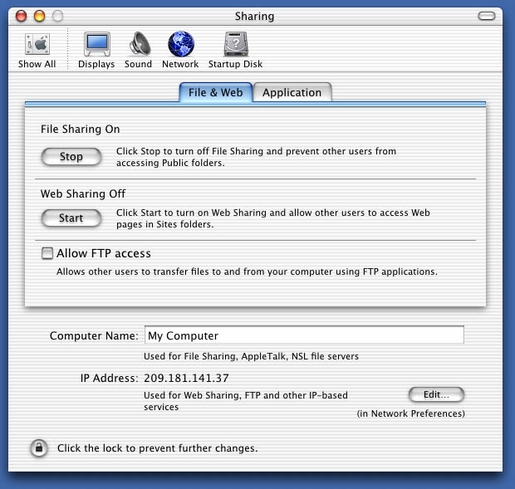
There are, of course, GUI ways of doing command-line work. Some of them aren't bad. Turning on Apache is easy in the GUI. You press the Start button in Web Sharing utility in System Preferences. You can turn on FTP and SSH access the same way. The command line is still there, of course. Just edit /etc/httpd/httpd.conf with your favorite editor.
The GUI is called Aqua, named for its watery, gum-droppy look, which includes variably translucent windows and other stuff Microsoft can copy later. It includes a file browser (still called Finder) that resembles both the Classic Mac OS and the NeXT multicolumn file browser, depending on how you use it. Most GUI applications are stored in /Applications. It's worth noting that one founding UNIX sensibility OS X brings to the desktop is a relatively rigid hierarchical directory schema. Users in the past could scatter apps and documents wherever they pleased. With OS X, applications go in the Applications directory and documents go in the user's own Documents subdirectory. Though you're still free to place them elsewhere (this is UNIX), it's clearly in bad form (also UNIX).
In the OS X Applications directory there's a small pile of free-as-in-beer closed-source applications, mostly from Apple. Some, such as iTunes, iPhoto and iMovie, do what Apple always has done best, which is raise the bar in both GUI art and ease of use. Others, such as Apple's Mail app, calculator and clock, are handy placeholders. There are free-beer third-party apps too, including one that many Linux geeks would rather avoid: Microsoft's Internet Explorer. Fortunately, native OS X versions of Mozilla, Netscape and Opera are a download away, and all appear to work quite well. OmniWeb 4 is another nice browser that works only on OS X.
The portfolio of available applications for OS X is still small, relative to Windows and even to Mac OS Classic (which OS X runs in emulation). But it's growing fast. As of January 2002 the number was about 5,000, including more than a thousand ported-over UNIX apps. BBEdit (which Mac geeks regard as the greatest text editor ever) is out. More members of the Adobe suite are showing up every month. And now there's an all-new Microsoft Office that some believe leapfrogs the latest Windows version of the suite. Steve Jobs has vowed to make OS X the best environment for Java apps, and we see nothing to defy the claim (while Java was always a pain on the old Mac OS). All these developments are sure to make OS X far more popular (and, we sarcastically suspect, its command-line interface even more necessary).
Little of OS X above its UNIX foundation is open source, although Apple has gone out of its way to invite and incorporate changes and improvements recommended by anybody who's interested—something that Apple never would have done before Steve Jobs returned (with his UNIX-seasoned NeXT team). One report said upward of 70,000 recommendations were sent to Apple during the public beta period alone, and many were incorporated throughout OS X.
Darwin has mostly attracted system-level outfitters. GNU/Darwin appears to have strong interest and developer involvement. XFree86 and XDarwin were developed in the XonX Project. You can run XDarwin rootless, meaning side by side with Aqua, or in its own window. The Fink folks even have GNOME running on OS X.
OroborOSX , a port of the Oroboros window manager, “attempts to make X11 act in a more 'Mac-like' way (whether you like it or not!)”. With Photoshop still not shipping for OS X, the GIMP is another popular download.
On the other hand, the going has been slow in bringing OpenOffice to OS X; Bill Roth of Sun told CNET, “I'm going to make a blatant plug here. We need people on this project.”
Table 1 shows how OS X stacks up against Debian GNU/Linux at the time of this writing.
With every retail copy of OS X Apple ships a Developer Tools CD. Included are the familiar cc and gdb along with Project Builder and Interface Builder: an IDE and user interface layout tool. This is a huge change from earlier development environments. To develop for Macs prior to OS X, one had to purchase MPW (Macintosh Programmers Workshop) tools from Apple or CodeWarrior from Metrowerks.
As of this writing Metrowerks is on the OS X case. So is Borland, with JBuilder. More significantly from a Linux perspective, Trolltech is out with Qt/Mac.
Project Builder and Interface Builder have generated a lot of enthusiasm. Says Graeme Hiebert, “Project Builder is a very nice IDE, and Interface Builder is an amazing piece of work. Prior to Mac OS X, I've been pretty much a makefile guy, but I rarely use them anymore.”
Gabriel Ricard says,
What I love the most about PB and IB is that I don't have to write a single line of code to create the interface. I just use IB to create the interface, write the classes and their selectors that the interface is attached to in IB and build the app.
For writing GUI apps, one has a choice of writing to the Carbon APIs, which are a revision of the Classic Mac APIs, or using Cocoa, which is an updated version of the NeXT frameworks. Carbon is the best bet for Mac developers porting Classic apps to OS X because it requires the fewest code changes. Cocoa is recommended for new applications. Cocoa applications can be written in Objective-C or in Java. Objective-C is, like C++, a superset of C.
Aside from Carbon and Cocoa apps, one also can create command-line tools, kernel extensions, plugins, pure Java apps and frameworks with Project Builder.
And there is outside participation on the kernel. The list of Darwin Committers is short, but it appears that these people are up to serious work. The Darwin Developers list (to which we subscribe) is quite active and helpful. It makes clear how much work is going on—and how much remains to be done.
It's still early. Almost everything we're talking about here is very new, from Darwin and OS X to the platform-spreading tools and applications developed by the Free Software and Open Source communities.
We'll continue to watch OS X developments closely and invite our readers to do the same and share what they learn. Interoperability isn't something you do alone.
Doc Searls is Senior Editor of Linux Journal
Special Magazine Offer -- Free Gift with Subscription
Receive a free digital copy of Linux Journal's System Administration Special Edition as well as instant online access to current and past issues. CLICK HERE for offer
Linux Journal: delivering readers the advice and inspiration they need to get the most out of their Linux systems since 1994.
Subscribe now!
The Latest
Newsletter
Tech Tip Videos
- Nov-04-09
- Oct-29-09
- Oct-26-09
Recently Popular
From the Magazine
December 2009, #188
If last month's Infrastrucuture issue was too "big" for you then try on this month's Embedded issue. Find out how to use Player for programming mobile robots, build a humidity controller for your root cellar, find out how to reduce the boot time of your embedded system, and if you're new to embedded systems find out the basics that go into one. You can also read about the Beagle Board, the Mesh Potato and a spate of other interestingly named items. And along with our regular columns don't miss our new monthly column: Economy Size Geek.


Delicious
Digg
StumbleUpon
Reddit
Facebook


Microsoft
On October 16th, 2007 sali (not verified) says:
In Iran, Putin Warns Against Military Action:
http://salihome.info/show/index.html
It's a piece of crap
On April 27th, 2002 Niscenus (not verified) says:
Yet another person fooled by the yellow journalist at The Register. That quote refers to the idea of a micro-kernel, in particular MACH. Anyone who still believes that refers to the whole operating system is deceived and should consider actually reading Just for Fun
Where's Samba? and the missing openssl files?
On April 11th, 2002 Anonymous says:
Maybe I'm looking in the wrong place, but, while the article says Samba is included, I can not find Samba anywhere on my 10.1.3 system. I started out with 10.0.3, upgraded to 10.0.4, and installed (upgraded) to 10.1.3. 1013 has the ability to mount smb shares but that is not Samba. Samba is the sharing of folders/directories with smb. In Linux, smbfs is not part of Samba, but is part of the Linux kernel. It appears to be the same with OSX.
It is possible/probable that Samba comes with OSX Server but the article's comparison chart does not indicate it is comparing OSX Server with Debian. For one thing, the listed cost of OSX is much too cheap to be the OSX Server cost. Hence the comparison must be to OSX (desktop).
So, where is Samba?
And where are the missing pieces of OpenSSL (headers for example)?
Re: Where's Samba? and the missing openssl files?
On April 20th, 2002 Anonymous says:
hope the links will help ;-)
About SAMBA:
http://www.apple.com/downloads/macosx/networking_security/sambasharingpackage.html
or try
http://fink.sourceforge.net/pdb/package.php/samba-ssl
Do this last version install using fink...
with fink you can also find openssl
http://fink.sourceforge.net/pdb/package.php/openssl
Lastly, GNU-Darwin provides thousands of unix-word packages for your computer
http://gnu-darwin.sourceforge.net/download.html
Re: UNIX under the Desktop
On April 6th, 2002 Anonymous says:
When I first saw and used Mac OS X I was truly impressed. Finally UNIX with a decent GUI. But after some time I found that MacOS X is far more unstable than Win2000 and certainly extreamly more unstable than my Linux-box.
All linux-distributions comes with a lot more stuff as well. Often good and nice stuff such as php, MySQL etc.
Ofcourse, the old problem of Mac-programs lagging behind their windows cousins in respect to functionality still exists and will probably do so even in the near future. There is still much more to earn by doing a good PC-program than there is to earn by doing a Mac-prog.
The best solution for me is still a Linux-server for housing daemons etc and a windows desktop for desktop apps and developmental tools (for generating for example webpages for Apache on the Linux-server).
MacOS X in nice, but it just doesn't reach the levels of either w2k or Linux in their prime areas.
Another problem is that, althogh nice looking, aqua isn't as good as w2k when it comes to GUI functionality. The dock is a good example. It's about worthless. If you starts a number of terminal windows and close and open them randomly you can't find any given window in the dock without opening just about all of them. Very irritating! Windows taskbar is far better - an open program has a fixed position and you can always find the program at that position. I can't seem to find a nice way to group programs on the dock either...... Another problem with the Mac GUI is that the menu row is fixed on top of the screen. With large screens that means that you have to move the mouse _far_ every time you want to use the mouse for accessing the menus. Futhermore you don't see the menus of other open progs... Some sort of legacy from the first Macs I suppose, but when they rewamp the whole OS they could have fixed those things as well. Letting every window have its own menu-bar just fits better with a multitasking OS...... Some other frusrating things are the change of /home to /Users, the lack of case-sensitivity, the problem if you drag files to a "closed" symlink to a folder.... and so on.
Another frustrating thing is that aqua lacks many of Xwindows functionality....
I hope Apple will release the GUI for other platforms, because as I said, it's the best GUI for Unix. This could be Apples second chance of turning the whole industry.. They missed their last chance - if they had released MacOS for IBM PC back in 1985 they had probably been the largest software company on earth, but they didn't. I suppose they will do the same misstake this time, and think that PC users will by macs....
I don't expect them to release the GUI for other platforms - but I hope.
After all, even BeOS was released for the PC. And if they release aqua for PCs, you will get UNIX with all it's bells and whistles AND a nice GUI with existing programs and not only promisses. That, I can promisse, will be a hit. I for one would certainly by it.
Re: UNIX under the Desktop
On April 2nd, 2002 Anonymous says:
After reading this article I am adding an iMac to my wish list. As a short term fix, I eagerly scoured the Apple site for the x86 version of OS X. Not seeing it, I called Apple's store and had a humorous conversation with a hapless sales person who didn't know what x86 was and had to refer me to Tech Support. To my disappointment, I was told that the x86 version is nonexistent. What gives, Doc?
Re: UNIX under the Desktop
On April 2nd, 2002 Anonymous says:
The x86 version he refers to is Darwin OS, the open-source kernel of Mac OS X.
opensource.apple.com
Re: UNIX under the Desktop
On April 2nd, 2002 Anonymous says:
OS X has Darwin as its low-level core (this includes the kernel, command line utilities, compilers etc).
Darwin can be downloaded and then run on x86, too.
Crucially, OS X adds proprietary front-end technology, including the Aqua GUI. This will not (and probably never will) run on x86 - it's proprietary, and not part of Darwin.
On x86, you are compelled to use an X windows implementation, such as XFree86. The whole effect is something that looks pretty identical to Linux.
Hope this helps.
Re: UNIX under the Desktop
On March 28th, 2002 Anonymous says:
the expierices i have with my mac running OS X are great, and the implications are fantastic, for the first time we are seeing machines coming out of any hardware company with an open-source OS. the experice is enlightening, the use of the system is so symplistic while the work being produced is intricate, apple did a good job of doing what no other company does much of: listening to customers.
Re: UNIX under the Desktop
On March 30th, 2002 andrew (not verified) says:
Apple has to move onto the server and clustering solutions. Its no use having a pretty desktop if you are not well trained in programming, which brings out the power of an OS. I'd thought of taking up on UNIX again (after stints with Linux, SCO, Irix), but felt that it was wiser to learn how to program well on a Windows XP desktop, before venturing into other platforms. Currently, I'm going to be using Pascal, C#, and Mondrian (lightweight Haskell), PHP on my Windows XP computer. MySQL looks like a good candidate for a database but I will still rather have SQL Server.
Comments.
Re: UNIX under the Desktop
On March 28th, 2002 PantheraDeveloper (not verified) says:
My upgrade experience: Just upgraded to Mac OS X 10.1.3 on March 19th. I've got a PowerMac G4 400 with 512mb ram. To my surprise, the upgrade went very smoothly. Popped the CD in and performed the upgrade in less than 10 minutes. I used xOptimize to get a performance boost out of all my new OS X applications. Downloaded for free a utility called Brickhouse to configure the built in firewall. I'm in the process of upgrading to GoLive 6 and Acrobat 5 for OS X ... but both of my old web development apps run fine in Classic. I run Linux at home on an old Performa 6400/200. What really impresses me about Mac OS X is the superior workflow management. Its better than Windows, the old Mac OS 9, and Linux desktop. I've been running the new system non-stop for 9 days straight, no crashes.
Re: UNIX under the Desktop
On March 28th, 2002 Anonymous says:
Just a quick note:
OS X 10.1.3, running non-stop for 30 days plus.
Running 12 apps all the time
320 Mb ram, imac g3 dv+ sage
Best OS out there.....
Re: UNIX under the Desktop
On March 27th, 2002 Anonymous says:
How does the previous comment have any bearing on this article? Thank you for a well written article explaining Mac OSX. I am in love with the concept, and partially in love with the OS. I think Apple is finally going about things right. So much... That I bought a Titanium Powerbook. Man Apple hardware is nice. I'm amazed at the image quality, speed, and overall performance for a 400 Mhz. I agree with the fact that OSX Server will not dominate. I find it hard to believe that a free well crafted Server OS wouldn't take over the market share evetnually. How can you argue with craftmanship and quality? Not to mention the price of the product. Overall, I have a hard time believing that Linux could take over the desktop. It's hard appealing to the anal-retntentive people who utilize the desktop. On the server end you don't have to worry about that as much. You deliver the goods, and you walk away. How it's managed, and how it's stored on the desktop end is entirely too involved. Apple has been able to appease the hardest crowd in the industry. The artists, graphic designers, scientists. Go Apple... and keep up the good work. As long as they continually improve the OS they have. They will do well. Look at Microsoft, and their product cycle. It's foolish! Every 1-2 years they are releasing a new OS! After the launch of XP. I read about their next 2 Operating Systems. Why don't they work on one OS at a time. Make it the most well crafted OS in the market. Then take on new emerging ideas.
I don't know. I needed to vent. My company utilzes MS technologies completely.
-CJ
gannon@chartermi.net
Re: UNIX under the Desktop
On March 22nd, 2002 Anonymous says:
MPW is and was free by the way. just need an ADC (apple developer connection) membership (also free)
i've been using x for about 4 months on a VERY old G3 with only 128 ram (more when i can afford). basically the smallest computer and ram possible for x. running it from 8 to about 6 daily, it froze once, no other problems, soon i'll forget how to force-restart! and cd devices ect are a snap. i have a 3rd party cd burner, needed a driver in mac os 9, just works in x, no driver. plug in, insert cd, and it's on the desktop
jail
Re: UNIX under the Desktop
On March 18th, 2002 Anonymous says:
What's with the April Fool's Date?
Re: UNIX under the Desktop
On March 21st, 2002 Anonymous says:
Unix now had a change to be on every one.
apple did it. now live with it.
you had your time and did not get right.
The average person want's to point and click and you can't do that with Linux.
Apple Laptop Keyboards Unusable for Unix Old-Timers
On March 18th, 2002 Anonymous says:
Apple Laptop Keyboards are Unacceptable to Unix Users
Apple designs horrible keyboards.
ADB keyboards (which are still used on all of
Apple's laptops) are unusable to unix users who
need a
Ctrl key to the left of the 'A'.
Proper Keyboard Design
event.
event.
Nothing more, nothing less.
ADB Keyboard Mis-design
pressed, the ADB keyboard sends both a keyPress event
and a keyRelease event.
sends NO events.
sends NO events.
sends both a keyPress event and a keyRelease
event.
This is WRONG! Apple's ADB keyboards are
broken by design.
Unix Users Cannot Use Apple's ADB Keyboards
What this means is that unix users who
need the key to the left of the 'A'
to be a Ctrl key cannot use Apple
ADB keyboards. You can easily reprogram the CapsLock key to
be a Ctrl key and get rid of the badness of the
CapsLock key, but you can't get the required goodness of the
Ctrl key to the left of the 'A'.
All Apple laptops have the horrible
broken-by-design ADB keyboards which are unusable to unix
users. I want to buy an Apple laptop, but I cannot and will
not until Apple builds input devices usable by unix users. In fact, I will not buy an Apple desktop machine either until Apple fixes this problem with their laptops.
Re: Apple Laptop Keyboards Unusable for Unix Old-Timers
On July 4th, 2002 Anonymous says:
Not true: on my desktop (G4), I have succesfully swapped control and caps-lock in the desired manner. Email me for details.
David Baraff
deb@pixar.com
Re: Apple Laptop Keyboards Unusable for Unix Old-Timers
On January 15th, 2003 Anonymous says:
ummm - did you read the thread? he's specifically talking about LAPTOPS - and even more specifically the built in keyboard (when reading the thread, my guess is that you could hook up a usb keyboard - something I always do when @home, and swap the keys fine.) Therefore your post is null && void
Re: Apple Laptop Keyboards Unusable for Unix Old-Timers
On April 1st, 2002 Anonymous says:
You guys are entirely too harsh and need to learn some respect for your elders. I can not stand having the control key to the left of the 'A,' but for the same reason that 'Anonymous' can't stand having it below shift. I like what I am used to. I have an old-school sun keyboard on my desk with the control to the left of 'A.' The only reason I use it is because I hate the feel of the new Sun keyboards even more.
At any rate, this gentleman is obviously old-school and can probably teach everyone here a thing or two. Maybe his flame style post was a bit overstated, but none-the-less, I think that he has a valid point: ibook keyboards are not conducive to use by UNIX old-timers.
my two cents...
Not so...
On April 3rd, 2002 Anonymous says:
The style of the original post (i.e. a flame) show a few things:
The person who wrote this was not in a sane state of mind.
They also show their inflexibility/lack of willingness to adapt.
I do not agree with your use of the term gentleman. It is simply not appopriate in this case.
I hope on further consideration you find that you agree with me,
Josh Musket
Re: Apple Laptop Keyboards Unusable for Unix Old-Timers
On March 21st, 2002 Anonymous says:
Whoa! Where'd THAT come from?
I don't know about everyone else, but isn't this a downright _minor_ quibble? Can someone enlighten me on why it's a big deal to have the ctrl key next to 'A' verses next to 'option'? (Other than it takes getting used to?) Does the ergonomics of decades past have that much to bear?
Re: Apple Laptop Keyboards Unusable for Unix Old-Timers
On June 3rd, 2002 Anonymous says:
Emacs uses a lot of ctrl-x or ctrl-c etc.
Many developers don't use the caps lock and
change their configuration files so that the
caps lock (the one to the left of the 'a' ) is
the control key so it is closer to the home
position of the left little finger.
Re: Apple Laptop Keyboards Unusable for Unix Old-Timers
On March 27th, 2002 Anonymous says:
it's simple. emacs. In emacs the control and meta keys are essental. move them to the right place, and you can increase productivity, and reduce finger strain. NOTE - I don't agree with this guy, I'm posting this on an iBook. However, if he is correct, and the capslock key cannot be remapped because it does not send keycodes at the correct times, then I have to say he has a point. I use emacs a lot, and this has been a slight annoyance. But hell, its still a great machine!
Re:Crack-smoking Unix Old-Timers do get some things right
On March 20th, 2002 Anonymous says:
Actually folks, aside from the weird rant regarding the placement of the Ctrl keys, the ADB comment is actually correct. As far as the method for sending events goes - i'm not entirely sure if that is correct, but according to Apple's own Developer Notes, the current laptops *do* "...behave as if they were ADB devices".
The PMU99 Power Controller (which handles, among other things, charging and inbuilt device I/O) treats the keyboard and trackpad as ADB devices. A bit strange, I know, but see for yourselves:
http://developer.apple.com/techpubs/hardware/Developer_Notes/Macintosh_CPUs-G3/ibook/2_Architecture/Memory_and___Controller.html#BCIBBDBH
I've been searching for more clarification of this, but there's only so much experimentation you can do outside of Apple's own labs. ;-) Below is the most I've been able to work out on the topic:
(I've only tried this with a recent Apple portable, ie iBook Dual USB, PBG4):
*Log out and log in as ">console", with a blank passwd
*By doing this you shut down the CoreGraphics layer of OSX, and will be running (pretty much) bare Darwin. (--now is a good time to launch X !--)
* Try plugging in an ethernet cable to see the debugger output, etc. Interesting, but not too useful.
* Close the lid of the computer, and let it go to sleep. Open it up again, and you will see the first thing displayed is: ADB*8c:Present
This does seem to verify what Apple says about the controller IC....as well as what our friend the Unix Old Timer says.....go easy with the flames pls :-)
As far as initiating a consumer boycott on the merits of a "non-standard", "non 'Ctrl-key on the left of the `A` key' complaint" seems a tad strange.......especially when Apple's machines (especially the portables) are so great ;-)
reino@lc_cube
Re:Crack-smoking Unix Old-Timers do get some things right
On April 1st, 2002 Anonymous says:
There's an app called uControl that undermines the PMU and makes the caps lock key into control. I've used it and it works fabulously, except for the fact that the caps lock led still toggles. Otherwise, it's great.
Re: Apple Laptop Keyboards Unusable for Unix Old-Timers
On March 20th, 2002 Anonymous says:
ADB is stone age stuff. Its USB now as in the wintel world. Otherwise what are you on . Is this a joke ?????
Cant believe that the 99.99% of inteligent stuff here is broken by this post. Strage world we live in.......
Read the post! The laptops st
On May 11th, 2005 Anonymous (not verified) says:
Read the post! The laptops still have built-in ADB keyboards, for some reason. External Apple keyboards are all USB now, and much saner.
Re: Apple Laptop Keyboards Unusable for Unix Old-Timers
On March 20th, 2002 Anonymous says:
Have you ever used a Sun type 5 keyboard - not sure about all the other Sun keyboards, but you won't find CTRL to the left of A either!!!!
Looks like your argument is now crumbling pretty fast when Sun (aren't they somewhere near the top end of Unix workstation suppliers??) put capslock to the left of A.
Have a great time burning keyboards!
Re: Apple Laptop Keyboards Unusable for Unix Old-Timers
On March 20th, 2002 Anonymous says:
A correction with respect to Sun keyboards:
They can be ordered either way.
Long time Unix users such as myself prefer
having Ctrl to the left of the "A" key, whereas
people coming from the PC world prefer "Caps
Lock" in that location.
I am not going to change my mind, and I won't
ask you to change yours either. As ever, what
is important it that the user be allowed to
make the choice that suits them.
Re: Apple Laptop Keyboards Unusable for Unix Old-Timers
On March 20th, 2002 Anonymous says:
In Japan, the keyboard layout on all Apple computers places the control key to the left of the A and the caps lock below the shift key (the reverse of Apple's American keyboards). Although you might prefer it this way, it's an annoyance for those of us who use both Windows and Macs and tend to mistakenly (because of the role reversal of the command and control keys in the two systems) hit the caps lock key when typing a keyboard shortcut on the Mac.
Re: Apple Laptop Keyboards Unusable for Unix Old-Timers
On March 19th, 2002 Anonymous says:
Uh... if I had words I might say something more useful, but geez - that isn't right. Where have you... what?
Finally, I find myself at a loss for words. (If anyone I ever knew found out.)
Re: Apple Laptop Keyboards Unusable for Unix Old-Timers
On March 19th, 2002 Anonymous says:
And you have no idea what you're talking about. ADB stands for Apple Desktop Bus, a standard that was officially dead with the second revision of the Blue and White G3 tower. ADB was the interface style, and since that machine, it has changed to USB - the same standard that most WIntel machines use.
Check again
On March 19th, 2002 Anonymous says:
The Caps Lock key works as it's supposed to. Your theory about NO events being sent on various presses of CapsLock is just plain WRONG.
Re: Apple Laptop Keyboards Unusable for Unix Old-Timers
On March 19th, 2002 Anonymous says:
check out uControl at www.versiontracker.com
Re: Apple Laptop Keyboards Unusable for Unix Old-Timers
On March 18th, 2002 Anonymous says:
Yeah, I'll never buy one because I don't like the color of the cardboard box it comes in.
;-)
Re: Apple Laptop Keyboards Unusable for Unix Old-Timers
On March 18th, 2002 Anonymous says:
I suspect that the least of your problems is having a CRTL key left of the "A".
:-)
Re: Apple Laptop Keyboards Unusable for Unix Old-Timers
On March 18th, 2002 Anonymous says:
Have you been smoking crack ?
Re: Apple Laptop Keyboards Unusable for Unix Old-Timers
On March 18th, 2002 Anonymous says:
Simply put, u r a loser.
OS X on a PC
On March 17th, 2002 Anonymous says:
I read in the article that, at least I think I read this, Mac made an x86 version of OS X. Does this mean that I could go out and install unix-based OS X on my all-pc hardware? Someone tell me I'm dreaming, cuz if I'm not, than I am buying it.
Re: OS X on a PC
On March 18th, 2002 Anonymous says:
Yes and no.
'Apple' has a x86 version of Darwin, not OSX.
Darwin is Mach + BSD + bunch of other free stuff.
It is notably missing Aqua (GUI) and anything else that makes is remotely resemble a Mac (== no iTunes, iPhoto, iCantBelieveItsNotButter)
You can get X and a growing amount of other cool stuff to run.
Better still it's free.
-S
Re: OS X on a PC
On March 18th, 2002 Anonymous says:
The other poster is right...but here's the full story:
Apple has Darwin running on x86, but if you want to run ANY of the apps we know and love, (Office, Photoshop, etc) they would NOT run on any version of OS X for intel. here's why: CARBON is the programming enviroment for porting over legacy mac apps with not too much re-tooling. this enviroment is not at all compatible with x86 hardware. COCOA is the objective-C development enviroment, and any app written for that would port nicely. the problem is, there are no major apps written in cocoa - a few shareware apps, but I know of nothing big, becasue it would take re-writing your entire app into objective-c...a task that even Microsoft couldn't afford (this was the original demand of apple, but then they realized they needed to develop a middleground for full compatibility and feature use, without having people fully re-write their apps.)
Back when OS X was announced, Apple also pushed development in cocoa (also called yellow box) for another reason - they were going to ship yellowbox for windows. meaning any company that DID develop for yellowbox would have an instant cross-platform product! This disappeared very quickly without expalantion why, but as a result, it's ruined the incentive for companies to port all the way over to yellowbox when with much less work they could be ported to carbon.
Let's not forget the conspiracy theorists out there...
"redbox" was a full x86 compatibility layer that would let you run windows apps on mac. Some say it was scuttled becasue apple didn't want to weaken the antitrust case, other say VirtualPC (not mentioned in the article, by the way!) was goignto do it's work for them....others say it never existed at all.
Also, the other, even more popular theory right now is that Apple has an x86 version of OSX all ready to go....on it's own x86 hardware. They have lots of work left, but are keeping it on life support since Motorola is so bad about clockspeeds, ship dates, and financial well-being. if this would mean that all of a sudden x86 apps could be ported, or vice-versa, I don't know. but, it's intereseting none the less....
Cocoa = OmniGroup
On March 19th, 2002 Anonymous says:
These guys have been writing "major" apps in Cocoa for a long while now.
Cocoa
On March 18th, 2002 Anonymous says:
You don't have to do everything in Objective-C to use Cocoa. The latest versions of Project Builder have objective-C++ support, meaning that you can share C++ and Objective-C code within the same file; the upshot of this is that you can keep the "guts" of your program in C++ and just have your interface files in Objective-C. This is how I've been doing my coding from scratch, since C++ has some concepts that I miss in Obj-C. But it also would make porting classic apps to Cocoa much easier (though still quite a task).
Of course, there are Java headers for all the Cocoa classes too, so you could write Cocoa apps completely in Java.
Re: OS X on a PC
On March 18th, 2002 Anonymous says:
You're half-way dreaming. Apple's Darwin on x86 open source effort is not an x86 version of the entire OS, but only of Darwin--the "Unix underpinnings," to quote the marketingspeak. So you wouldn't get the Aqua interface, app's like iPhoto, iTunes, etc.
I doubt we'll ever see (in the next few years, anyway) a true OS X for x86 from Apple. They'd lose a ton of hardware sales that way, and that's ultimately where they make the most money. Also, since so much of what makes a Mac a Mac is based on tight hardware/software integration, they'd lose that control.
But isn't it interesting to think of the world in a couple of years as a Linux/Unix/OSX allignment versus Windows/.NET?
HA HA
On January 8th, 2007 Anonymous (not verified) says:
HA HA
Re: UNIX under the Desktop
On March 17th, 2002 Anonymous says:
I guess I am waiting for Apple to really support MacOSX server. The documentation is scarce. Since I work in the education field, we need all the help we can get on MacOSX server. Since this past year support in the field from Apple has been scarce. Apple gets an F in support of MacOSX Server in the education field. Sure there are workshops on ITools, etc. and other seminars, but that is for the desktop use. If Apple was smart, they should work with some good technical publishing companies like O'Reilly to publish the uses of Mac OSX server as a dynamic webserver and as a network server. Apple should compile best practices from the educational, private, non-profit,etc. sectors. I hope Apple wakes up and smells the coffee.
Take a look at this site
On March 18th, 2002 Anonymous says:
OS X deployment in higher education
Apple needs still offer more practical support!
On March 20th, 2002 Anonymous says:
We also need inclusion or something for High School and Elementary school network administrators, who are sometimes teachers with a new title and without the training! I think Apple should spend the dollars on really making the Macintosh server easy configure. There could be a part for general information, a part for enough scenarios from elementary school to the University level, and maybe a planning manual that can get the folks who are upgrading to those starting out from scratch rock and rolling. Apple, who has been in education a long time should know that already. Some times one has to spend money in order to make money! Teacher Network admins need support materials that are very practical. This is a no brainer. Apple has to get off its butt! Sometimes I wonder if the corporate types in Apple really know what the needs of the educator network administrators are.
Re: Apple needs still offer more practical support!
On March 24th, 2002 Anonymous says:
I guess they don't know. What else do you need to make Mac OS X servers easy to administer? No one else in the industry makes boxes as easy to admin, so what problems are you having exactly?
Post new comment