
Help with Designing or Debugging CORBA Applications
This article explores how I have added some useful extensions to an open-source protocol analyzer in order to allow the extraction of OMG IDL (interface definition language) defined data types from TCP/IP traffic (using GIOP/IIOP). I also discuss the development and use of a helpful tool (idl2eth) that can take your own OMG IDL file(s) and generate protocol analyzer plugins, and lead you through the steps of creating your own plugin for the CORBA project you are working on.
So, if you are designing or debugging a CORBA application that is using GIOP/IIOP, you can take the CORBA IDL file(s) and generate plugins that will decode your data and show you what it looks like "on the wire".
This would be most useful for debugging, say, traffic between a client and server or for learning how OMG IDL data types are marshaled via CDR (common data representation) Transfer Syntax onto an octet stream. It also would aid ORB interoperability testing, especially considering the number of new ORB implementations that are appearing lately.
For brevity, I'll refer to OMG IDL as IDL in this article. It is important, however, to remember that there are other forms of IDL besides OMG IDL in use daily. They will not be discussed here.
With the proliferation of so many IP-based protocols in today's networks, it is hardly surprising that the need arises for good protocol analyzers. They generally have the ability to monitor many different types of traffic and to sort or filter them according to the users' wishes.
The resulting data normally is captured (optionally passing through one or more capture filters) and also displayed (optionally passing through one or more display filters), so that one can sort out the interesting packets from the rest.
A wonderful example of an open-source protocol analyzer is Ethereal (www.ethereal.com). It is a highly capable analyzer that compiles and runs (thanks to autoconf) on many flavors of UNIX (including Linux), Windows, MacOS X, etc.
It can capture packets from a number of different types of networking devices and also can read capture files taken earlier using either Ethereal or other programs such as tcpdump, snoop and various other network analyzer programs. The following is a list of capture file formats it can read (Ethereal's native format is the libpcap format also used by tcpdump, so captures taken with Ethereal can be read by other programs that read tcpdump captures, such as tcpdump itself): libpcap/tcpdump, snoop, Shomiti, LANalyzer, MS Network Monitor, AIX iptrace, NetXray, Sniffer, Sniffer Pro, RADCOM, Lucent/Ascend debug output, Toshiba ISDN router snoop output, HPUX nettl, ISDN4BSD i4btrace utility, Cisco Secure IDS and pppd log files (pppdump format).
Ethereal also understands many different protocols, from AARP to ZEBRA, and a lot of others in between. I would estimate that it understands in excess of 200 protocols according to the latest Ethereal CVS tree.
Some of the more common protocols it can decode are DNS (domain name service), NFS (network file system), Telnet, SMB (server message block protocol), HTTP (hypertext transfer protocol) and POP (post office protocol).
It also has the ability to follow TCP streams and has useful filtering capabilities. (For the impatient, you can jump ahead and look at Figure 4 to see Ethereal in action.) And it has the ability to incorporate new protocols as either plugin dissectors or built-in dissectors.
Built-in dissectors are compiled as part of the Ethereal binary, whereas a plugin dissector is a shared library and loaded at runtime. This helps keep the Ethereal binary down to a reasonable size and also allows protocol dissection code to be distributed as a shared library if you wish. It also means, because its a shared lib, if you modify the plugin and run make again, the Ethereal binary is not recompiled, and this saves a lot of time.
Like most things in life, it is when we are faced with a problem to solve that we seek out solutions. For our staff at Ericsson Inc., based in the Telecom Corridor in Richardson, Texas, we were interested in debugging some CORBA traffic on the wire to support our R&D efforts involving CORBA applications.
I was already familiar with Ethereal and saw that some initial code to decode the GIOP header information was present in Ethereal, but that it had progressed no further. This is partly due to the fact that once the header information is decoded, then the payload is highly dependent on which CORBA operation is being called at that time. The operations that, for example, a CORBA server (or servant) provide are defined using OMG IDL.
OMG IDL is a declarative language used to describe one or more interfaces that CORBA object implementations provide. You don't write applications using OMG IDL, but you describe interfaces that objects support. The syntax of OMG IDL is not too difficult to understand. Here is a simple example:
module example{
   interface demo {
      short getSize();
                  };
              };
This says an object that supports the demo interface from the module example provides an operation called getSize. It takes no arguments and returns a value of type "short". OMG defines the integer data type short as a 2 octet value (see CORBA ref Chap 15).
A slightly more detailed example would be:
module example {
   interface Penguins {
      enum Food {squid, krill, fish, rock_crab};
      typedef Food Food_t;
      Food_t favouriteFood();
                      };
               };
This says that an object supporting the Penguins interface from the module "example" provides an operation called favouriteFood(). It takes no arguments and returns a value of type Food_t. Of course Food_t is a typedef of Food, which is an enumeration. Typedef and enum may be familiar to you already from other language implementations (C, C++, etc.).
IDL files for real-world applications will be far more complex than this and may include structs, sequences, exceptions and a host of other IDL types. I urge readers to visit the OMG site (www.omg.org) and grab a copy of the CORBA specification. It is available in a number of different formats.
So what can you do with all this OMG IDL? Here's where IDL compilers enter the picture.
There are a variety of IDL compilers in existence today. They normally include a particular ORB implementation. You can see a reasonable list of them by doing a Google search using "linux corba".
Some examples of IDL compilers are listed below. This list represents just a small percentage of the ever-growing IDL compiler family: omniidl from the omniORB distribution, idl2java from Visibroker, idlj from Sun's J2SE v1.3 release and tao_idl from TAO distribution. There are many more of course, as you can see by doing a quick Google search.
IDL compilers can do a lot of useful things. Some of the more important tasks include verifying correct syntax of the IDL file(s) being read, generating target code for a variety of languages (Java, C, C++, Lisp, Python, etc.), producing client stubs and producing object skeletons.
The one that interested me was omniidl. It consists of the compiler front end and allows you to write compiler back ends to suit your particular task.
One of the things I liked with omniidl was that you write the back end in Python and access tree data structures (representing the parsed IDL) via a nice API. With this in mind, let's see how CORBA GIOP messages are structured so we know how to decode them.
Thankfully there are just a handful of GIOP messages used to allow client/server interaction. They also are defined using OMG IDL and belong to the GIOP module. You can see them described in detail in Chapter 15 "General Inter-ORB Protocol" of the CORBA specification:
Request: used for attribute accessor operations and for CORBA object invocations.
Reply: the response to a Request message, if the response expected flag is TRUE in the Request message.
LocateRequest: used to determine if the current server can handle requests directly or to find out where the client should send requests for a given object reference.
LocateReply: the response to the Locate Request message.
CancelRequest: tells the server that the client is no longer expecting a reply to a specific Request or LocateRequest message.
MessageError: sent when the recipient does not recognize the version number or message type of the specified message, or that the message header is not correctly formed.
Fragment: used to support fragmentation of Request and Reply messages (e.g., when a Reply message carries a lot of data that could not be sent in the original Reply message).
To find out how OMG IDL types get formatted on an octet stream, there are detailed rules defined in CDR transfer syntax and also in the CORBA specification. I will not delve too deeply into this other than to say that alignment of data types are, on their natural boundaries, relative to the beginning of the octet stream or start of an encapsulation.
Table 1 shows these alignment restrictions for some of the more commonly used types. Note, there are a lot more types defined in the CORBA specification than are shown here.
So, with all these rules, how can we decode GIOP/IIOP messages? Let's add a GIOP API to Ethereal that understands these rules.
Tap tap tap (and some time later...) packet-giop.[ch] from the Ethereal distribution was upgraded to provide an API, with accessors like
gint16 get_CDR_short(tvbuff_t *tvb, int *offset,
    gboolean stream_is_big_endian, int boundary);
and
gint32 get_CDR_long(tvbuff_t *tvb, int *offset,
    gboolean stream_is_big_endian, int boundary);
where tvb is a ptr to a tvbuff_t type containing octets (in a buffer), offset is a ptr to an offset with the tvb, stream_is_big_endian is endianess to use for extracting data types (big endian or little endian) and boundary is alignment to use for extracting data from the tvb.
You can see that get_CDR_short() returns a gint16, and get_CDR_long() returns a gint32. These types are defined as part of the glib library (see Resources) and are used extensively throughout the Ethereal source. These data types are then added to the Ethereal GUI as an item attached to a tree or subtree.
There are, however, some OMG IDL types that are quite complex and handled slightly differently. One example of a complex type would be Object Reference:
/*
 * Decode an Object Reference and display it
 * on the tree.
 */
void get_CDR_object(tvbuff_t *tvb, packet_info *pinfo,
                   proto_tree *tree, int *offset,
                   gboolean stream_is_big_endian,
                   int boundary);
An object reference in CORBA can be represented as an IOR (Interoperable Object Reference) when being passed over GIOP/IIOP. These types can be rather large, as shown in Figure 7. For this case, the get_CDR_object() accessor simply will add the decoded data inside an IOR, directly to the tree, rather than trying to pass some complex data structure back to the user.
Now Ethereal has functionality to pull OMG IDL defined data types from GIOP/IIOP messages. You could build a plugin manually using this new API, but wouldn't it be fun to generate one automagically from your own IDL files?
Tap tap tap (and several weeks later)...enter idl2eth, an OMG IDL to Ethereal plugin generator.
idl2eth is a compiler back end to omniidl that I wrote (in Python) to automate the process of generating an Ethereal plugin based on the user's OMG IDL file(s).
So now that we can generate a plugin from an OMG IDL file, let's do it (after all, that's what this article is about).
I develop and run all examples on a Red Hat 7.1 with the 2.4.3-12 kernel, but most recent Linux distributions should have the required tools already installed. The only extras may be the latest Ethereal src tree (download nightly CVS tarball), omniOrb, J2SE v1.3 and JacORB or similar to test the examples. I assume you are capable of compiling and running the JacORB examples. Please ensure you can compile and run the JacORB examples before proceeding any further.
The steps for creating your new plugin are pretty simple, so let's work though them. For the purpose of this example, because the OMG IDL file for our example is called server.idl, we will use "server" as the plugin name also, to be consistent.
First you should see that you can build Ethereal before adding your own plugin. Unpack a recent Ethereal nightly CVS snapshot tarball:
tar -zxvf ethereal-2001-09-17.tar.gz
cd ethereal-2001-09-17
Next, run ./autogen.sh. Compile the source tree with make and install Ethereal. This will install Ethereal and other helper programs. It also will install man pages and plugins. Make sure you are root when you do make install.
You now should have Ethereal successfully installed on your system. So, let's build a GIOP plugin. First, generate plugin source code from a JacORB example and store the output in Ethereal's plugin/giop/ directory:
idl2eth ~/JacORB1_3_30/demo/grid/server.idl > plugin/giop/packet-server.c
Next, add packet-server.c to plugin/giop/Makefile.am. This is mainly a cut-and-paste exercise that should take about one minute to do. Just look at what the other GIOP plugin entries for cosnaming and coseventcomm look like:
Add server.la to plugin_LTLIBRARIES.
Add server_la_SOURCES entry.
Add server_la_LDFLAGS entry.
Add server_la_DEPENDENCIES.
Add server to CLEANFILES.
Add packet-server-static.o entry.
Then add packet-server.c to plugin/giop/Makefile.nmake. This too is mainly a cut-and-paste exercise similar to the previous step:
Add packet-server.obj to OBJECTS.
Add entry for server.dll.
Add server entry to clean: target.
Run ./autogen.sh again to include our changes. Compile the source tree with make. You should see your new plugin being compiled as a shared library. This part will be quicker, as we are not rebuilding the entire Ethereal binary this time. Install the new Ethereal build containing your plugin. Make sure you are root when you do make install.
That's it. Now you can fire up Ethereal and check some CORBA logfiles containing the IDL operations logged when running the JacORB demo/grid example. You can decode existing capture files as a normal user. Or if you have root privileges, run Ethereal as root to capture live data from a network interface. In my case I selected "lo" (loopback) net device, as I was running JacORB examples entirely on my local machine:
ethereal &
You should be presented with a window that looks something like that shown in Figure 1.
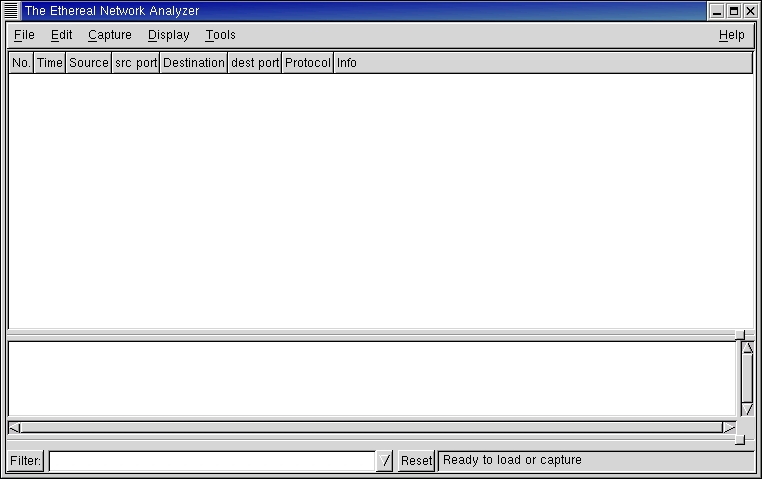
Figure 1. The Ethereal Network Analyzer
Select Capture from the main menu and then Start to bring up the Capture Preferences window. The Interface option is a drop-down selection list. Go ahead and select lo if you run Ethereal, JacORB nameserver and its examples all on the same host. You also can disable "Capture packets in promiscuous mode".
To see if your new plugin is available, try one or both of the following:
Select Edit and then Protocols. You should see giop-server is present (Figure 2) and that it can be toggled on or off. By default, it is on.
Select Tools and then Plugins. This should list the available plugins that Ethereal is using. It should look like the list in Figure 3.
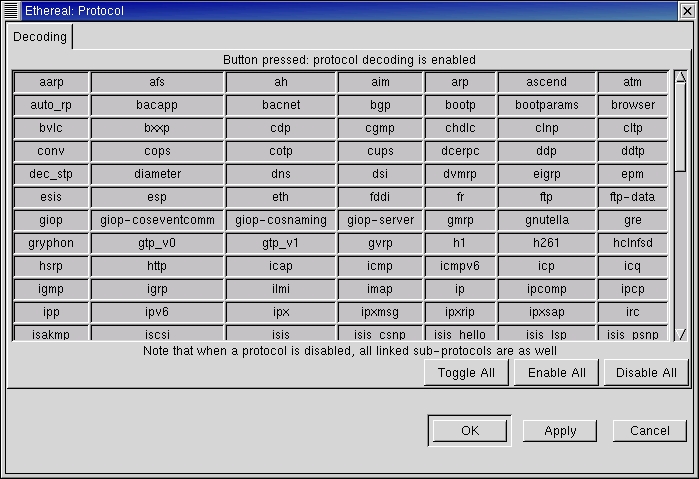
Figure 2. Ethereal Protocol
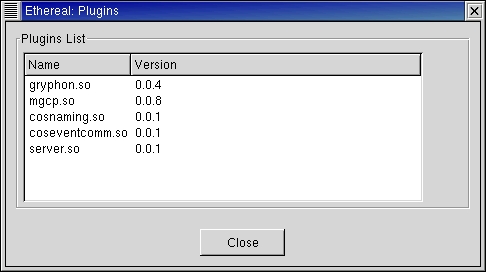
Figure 3. Available Plugins
What follows now is an example of using our new plugin to monitor some CORBA GIOP/IIOP traffic generated by JacORB and its examples. I assume you can run these examples already (i.e., already compiled and set Java's CLASSPATH etc correctly).
In a new xterm, start the JacORB nameserver:
ns public_html/NS_Ref &
[2] 1850
JacORB V 1.3.30, www.jacorb.org
       (C) Gerald Brose, FU Berlin, 13 June 2001
[ POA RootPOA - ready ]
[ POA NameServer-POA - ready ]
Next, start server for demo.grid example:
jaco demo.grid.Server & [3] 1890
JacORB V 1.3.30, www.jacorb.org
       (C) Gerald Brose, FU Berlin, 13 June 2001
[ POA RootPOA - ready ]
[ New connection to 127.0.0.1:1295 ]
[ Accepted connection from 127.0.0.1:1298 ]
[ Bound name: grid.example ]
The Ethereal Capture Summary window will show what type of traffic is being captured (e.g., UDP, TCP).
Run demo.grid client, as shown here:
[frank@cray frank]$ jaco demo.grid.Client
       JacORB V 1.3.30, www.jacorb.org
       (C) Gerald Brose, FU Berlin, 13 June 2001
[ New connection to 127.0.0.1:1295 ]
[ Accepted connection from 127.0.0.1:1327 ]
[ New connection to 127.0.0.1:1307 ]
[ Accepted connection from 127.0.0.1:1328 ]
[ New connection to 127.0.0.1:1307 ]
[ Accepted connection from 127.0.0.1:1329 ]
Height = 31
Width = 14
Old value at (30,13): 0.21
Setting (30,13) to 470.11
New value at (30,13): 470.11
MyException, reason: This is only a test exception,
no harm done :-)
[ Closing connection to 127.0.0.1:1307 ]
[ Closing connection to 127.0.0.1:1295 ]
done.
[ Closing connection to 127.0.0.1:1327 ]
[frank@cray frank]$ [ Closing connection to 127.0.0.1:1329 ]
Now, stop data collection in Ethereal. Press the stop button on the Capture window. Notice that you should have seen some traffic by now.
Back in the main Ethereal GUI you should see three window panes, as shown in Figure 4. The top pane is a summary of traffic, showing Frame number, Time, Source and Destination, then Protocol and Info fields. The middle pane will contain a tree-like structure with all the layers of protocols. When you click on a packet in the top pane, its structure should be shown graphically in the middle pane. The lower pane provides a raw hex dump and highlights which octet(s) are related to whichever field you click on in the middle pane. This is a great feature. To the right of the hex dump you will see an ASCII dump for whichever characters are printable.

Figure 4. Summary of Traffic, Layers of Protocols and a Raw Hex Dump
You may have quite a bit of traffic, only some of which is GIOP. In order to select only GIOP traffic, we can apply a Display Filter.
In the bottom left-hand corner type giop in the Filter entry box (see Figure 4), and press Enter on the keyboard. You should be looking at GIOP/IIOP traffic only.
Now it's time to see in more detail what type of data is present in the GIOP/IIOP traffic and to see the relationship between IDL definitions and how it is marshaled via CDR Transfer Syntax rules onto TCP/IP.
Let's take a look at IDL file that represents the demo.grid example. It should look something like this:
  1     // grid.idl
  2     // IDL definition of a 2-D grid:
  3
  4     module demo
  5     {
  6     module grid
  7     {
  8         interface MyServer
  9         {
 10             typedef fixed <5,2> fixedT;
 11
 12             readonly attribute short height;
 13             readonly attribute short width;
 14
 15
 16             void set(in short n, in short m, \
                     in fixedT value);
 17
 18             // return element [n,m] of the grid:
 19             fixedT get(in short n, in short m);
 20
 21             exception MyException
 22             {
 23                 string why;
 24             };
 25
 26             short opWithException() \
                   raises( MyException );
 27
 28         };
 29     };
 30     };
Let's quickly step through and make sure we understand it. Interface demo/grid/Myserver contains two attributes, "height" and "width"; and it contains three operations, set(..), get(..) and opWithException(..). Exception MyException contains one member, "why", which is a string.
We also see a typedef at line 10 that uses a "fixed" type. This means that, for example, the "in" parameter called "value" in line 16 could be a value like 123.45 or -987.65, i.e., five digits with two digits after the decimal point.
Now, let's take a look at some of these and see how they look on the wire.
Example one: remember this operation definition from line 19:
fixedT get(in short n, in short m);
If you look at Figure 4 you can see both of the "in" parameters, i.e., parameters "n" and "m" are of type "short", so each is two octets in length. The "n" parameter has value of 30, and if you look at the hex dump in the bottom pane you can see "00 1e", which is the hex value for 30.
Example two: using the same operation definition from example one, let's look at the return value for this operation. It is of type fixedT, which is a typedef of a fixed type. You can see the return value in Figure 5. It occupies three octets, in this case 47 01 1c. These three octets map onto a value of +470.11, which is shown highlighted in the middle pane.

Figure 5. Return Value (See Example Two)
Example three: if you remember the operation definition for opWithException(), you see that it can raise an exception. According to the IDL, this exception MyException contains one member, a string.
In Figure 6, you can see a GIOP reply message that contains this exception: a string, of length 48, with the text This is only a test exception, no harm done :-).
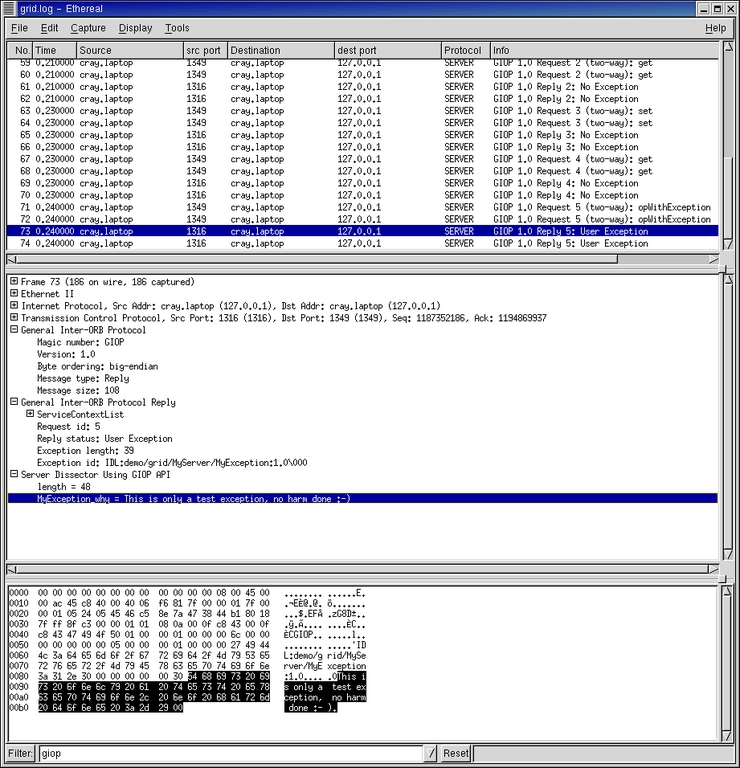
Figure 6. GIOP Reply Message
Example four: although from a different capture, I have included an example of an operation decoded according to a plugin generated from CosNaming.IDL (see Figure 7). Here you can see an IOR and its structure. IORs can be much larger than this.

Figure 7. Example of an Operation Decoded According to a Plugin Generated from CosNaming.IDL
The aim of this article was to introduce you to generating CORBA GIOP/IIOP plugins for Ethereal using the new GIOP API recently implemented and also, to show how to generate compilable plugins (using idl2eth) for your project with a minimum amount of work.
We will continue developing the CORBA side of things within the Ethereal Project to improve areas such as operation, name collision and FRAGMENT handling.
Hopefully readers will find these enhancements to a great open-source project as useful as I did.
Useful Links
Ethereal: www.ethereal.com
glib: developer.gnome.org/doc/API/2.0/glib/index.html
J2SE: java.sun.com
JacORB: www.inf.fu-berlin.de/~jacorb
Linux DCE, CORBA and DCOM Guide: linas.org/linux/corba.html
OMG: www.omg.org
omniORB: www.uk.research.att.com/omniORB/omniORB.html
TAO: www.cs.wustl.edu/~schmidt/TAO.html
References
CORBA v2.4.2 Specification, OMG, February 2001.
Ethereal User's Guide: www.ethereal.com
Java Programming with CORBA, 3rd Edition by Gerald Brose, Andreas Vogel and Keith Duddy. Wiley, 2001.
I would like to acknowledge the help and assistance of the following people: Lalin Sourjah (Manager, BSS, ASO Americas) for fostering a creative work environment for us at Ericsson Inc., Trevor Shepherd (Senior Software Engineer, Ericsson Inc.) for assistance with GIOP API development, Gerald Combs (original Ethereal author) and all of the Ethereal developers for their support and constructive feedback. It was most welcome.
Frank C. Singleton (VK3FCS/KM5WS) works for Ericsson Inc., based in Richardson, Texas. His main roles are GSM software verification and troubleshooting. He is one of the founding members of hamlib (sourceforge.net/projects/hamlib). When not hacking, he usually is found making furniture in his workshop.
email: frank.singleton@ericsson.com
