
Using GTK+/X as an Embedded GUI
Consumer embedded devices require a graphical user interface (GUI) tailored to specific device characteristics. To offer a handful of examples:
Touchscreens should use large buttons to accommodate the width of fingers and inaccurate measurements.
Softkeys require a dedicated on-screen softkey region.
A keyboard-centric device should organize data into vertical lists, whereas a mouse-centric device should organize data by geographic space.
Devices with low-contrast screens should avoid swaths of gray.
A major factor in the success of Palm Pilots is a user interface (UI) paradigm designed to fit the Palm device. The plain widget look provides on-screen simplicity, the menu system offers a good compromise between offering user options and optimizing screen real estate, and the applications are designed around stylus input. One of the reasons why WinCE and Palm-sized PC devices have not done very well is that a general-purpose GUI design borrowed from desktop paradigms is not appropriate for embedded devices.
There are several embeddable GUIs for Linux, including Qt/Embedded, FLTK and GTK+. Which toolkit should a developer use? How much engineering effort is needed to tweak to spec? What footprint will this require?
This article describes our experience designing and implementing a custom GUI for a consumer Linux device. We decided to use GTK+ running on the X Window System. It took five engineer-months to produce our rock-stable, customized and reduced-footprint GUI totaling 2.9MB (including X).
We designed a custom UI to match our device's I/O characteristics. Our device has a small, low-quality screen and no mouse. A row of softkeys under the screen provides primary user input (see Figure 1). The bottom 14 pixel region of the screen is reserved for displaying monikers above softkeys; this is the softkey bar.
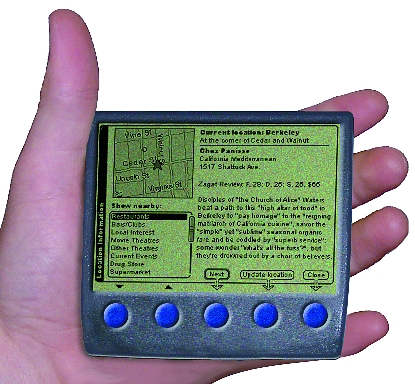
Figure 1. Device Mockup
Rather than create new paradigms that would confuse users, the rest of the UI is drawn as a typical point-and-click interface, complete with buttons and scrollbars. We maintain the user's control metaphor of physically "pushing" widgets by substituting push-via-softkey for point-and-click. Each button is arranged horizontally with an arrow dropped under it that extends across the window border into the softkey bar. Figures 2-5 show the elements of our UI design, including buttons.

Figure 2. Buttons extend an arrow into the softkey bar. While pressed, the button and its arrow are filled with gray.

Figure 3. Text-entry fields use a boldface font for the label and a plain-face font for the user's text. This uses minimal screen real estate to differentiate between the two elements.

Figure 4. Scrollbars visually fit into the scrolled panes they control, giving an uncluttered look.

Figure 5. Application windows and dialogs are shaped and drawn with different title bar designs. The topmost window gets the softkey bar.
After hammering out this draft UI design and testing innumerable mockups, we heaved a collective sigh of relief. Our device would be usable. Our glee was cut short with thoughts of actually putting the UI together. We conscientiously had avoided considering implementation when drafting this UI. What programmer in his or her right mind would want shaped windows, arrows spanning different widgets and a myriad of fonts? Now it was time to pick a GUI, roll up our sleeves and get to work.
We chose to use GTK+ 1.2.8 running on the X Window System, in turn running on a framebuffer. While both GTK+ and X are often considered to be bulky desktop-only solutions, they are sensible choices for embedded devices for the following reasons:
X and GTK+ are reliable. X has seen aeons of development. GTK+ has a well-established and (hyper)active development community.
X has a robust client/server model. An application crash does not affect the rest of the GUI. This is an important feature for a device allowing third-party add-on applications.
GTK+ has two well-designed helper libraries: Gdk and Glib. Gdk abstracts low-level windowing functions. To port GTK+ to a different windowing system, we simply need to port Gdk. Glib is a toolkit of data types, macros, type conversions, string utilities and a lexical scanner. Any application can link against Glib and use its types and methods to avoid re-inventing the wheel and reduce the footprint.
It was easy to reduce GTK+/X. They have well-selected configuration options and clean codebases that enable safe removal of large chunks of code.
GTK+ has a large application base.
X is under a non-copyleft free license, and GTK+ is licensed under the LGPL. This allows proprietary third-party software to link against either one.
Both are written in C (see Sidebar "C vs. C++ on Embedded Devices").
GTK+ implements an object-oriented architecture in C.
Before choosing GTK+/X, we considered other GUI options including Qt/Embedded, FLTK and Microwindows. Qt/E is the most advanced of these. It is a complete, framebuffered GUI written by Trolltech. It sports great graphics, including TrueType fonts and alpha blending. We decided against Qt/E because:
Trolltech's dual-license scheme either releases Qt/E under the GPL or requires licensing and royalties. We wanted to avoid fees for our sake and wanted the more compatible LGPL for the sake of after-market developers.
Qt/E is written in C++.
It is big. The iPAQ QPE distribution includes a 3.3MB Qt/E library and a 718KB QPE library (analogous to Xlib). Although Trolltech claims Qt/E can be as small as 1MB, we were unable to get it to compile at this size.
Qt/E is unstable. The Qt/E demos inspired more fear than confidence. In all fairness, Qt/E has advanced in the months since we first ran into it. The QPE demo is good but still crashes. All things being equal, we prefer to place our trust in publicly maintained, mature codebases.
FLTK (the Fast Light Toolkit) is a small GUI system. We rejected it because it was written in C++, lacks many features and has a small application base.
Microwindows is an alternative windowing system to the X Window System that uses 100-600KB of RAM and file storage space (see "Introduction to Microwindows Programming" in the January/February 2001 issue of ELJ). Although there is a GTK+ port available, we rejected Microwindows because it was not yet mature when we were deciding on our target GUI.
A lot of highly public work has gone into reducing the size of X. Keith Packard's TinyX server is the best-known effort. Our work focused on chopping unused code and static data out of Xlib, like the color management system, arcs and wide lines.
Jim Gettys, a founder of the X Window System, has articulated a growing realization in the Linux community that "most of what you hear about X being too big is from people who know little or nothing about the topic." He recently defended the future of PDAs running X, stating that "I believe very strongly that either GTK+/fb [GTK+ running on a framebuffer] or Qt/E are dead ends" for PDAs because they cannot share applications with desktop systems easily and lack network transparency. He goes on to describe the ongoing work to put Xlib "on a diet" (see http://www.linuxpower.org/display.php?id=211).
"Tailoring" is a good description for the next stage of our UI process. We started with the standard distribution of GTK+ 1.2.8 and snipped away excess, altered existing code and added some new features. These modifications ranged from minor to extreme. Some even broke core GTK+ assumptions.
The easiest change was trimming out unused widgets. The list of widgets is too long to reproduce here. It includes obviously unused widgets like GtkGamma and GtkHRuler, outdated widgets like GtkList (replaced by GtkCList) and widgets not required by our style guide like GtkFrame (why waste screen real estate on extra borders?).
The next round of changes was altering how widgets sized and drew themselves. GTK+ provides a theme engine mechanism for controlling widget look and feel. It enables runtime selection of fonts, spacing and drawing code. This mechanism did not meet our needs for two reasons. First, it wasn't flexible enough. Many spacing and drawing constants were hard-coded. Second, a theme would be an additional chunk of code and parameters that would sit alongside the GTK+ library and increase the footprint.
It required a fair bit of sleuthing to unearth all the factors that go into a widget's size. Consider the parameters that go into GtkButton's sizing and drawing: border width (inherited), x and y thickness (theme engine), default spacing (constant), default left and top shift (constant), child spacing (constant), focus (in code) and relief (drawn by theme engine). We confronted this complexity by simplifying code to ignore GTK+'s extreme flexibility in favor of our tight requirements.
While good OOP (object-oriented programming) methodology dictates that widget changes should be implemented as a new subclassed widget, space constraints required us to tweak code in-place.
GTK+ assumes that when one widget contains another widget (has a relationship) they are nested. This is not true for application and dialog windows that have softkey bars. The bar belongs to, but is outside of, the owning window. To break GTK+'s assumption, we added inelegant special-case additions to GtkWindow code that treated softkey bar child widgets differently from other child widgets.
Softkey behaviors required additional GtkWindow changes. The owning window listens for softkey key events and passes them to its softkey bar. Softkey arrows poke through the owning window's border and display feedback when the softkey is pressed, so softkey callbacks are registered with the parent window that will draw when these events occur. We provide API at the level of the top-level windows to manage creating the softkey bar, populating it with softkeys and attaching signals.
A more innocuous hack was managing the special case of an application window containing just one scrollable region. It would be a waste of screen real estate to draw a window border around a scrolled region border. As a special case, windows with a single-scrolled widget do not display a border.
Finding a lightweight mechanism to display many fonts on the screen turned out to be a hairy problem. The difficulty is a combination of GTK+'s heavyweight widget style and X's archaic font management scheme.
As mentioned before, GTK+ has a theme engine that controls widget look and feel. Just before a widget is displayed it gets a style object, GtkStyle, which is either a pointer to a parent's style or a new style that applies to that widget and its children. This style is determined by default settings, rc text files and the application. To change a widget's font, you must clone the widget's style and load a new font using an X font name like -adobe-helvetica-bold-r-normal--12-*-*-*-p-*-iso8859-1.
There are several problems with this practice. GtkStyle is a large object. If a screen has many widgets with different fonts and each has a unique GtkStyle object, we waste memory. Finally, X does not support relative font changes. You cannot ask X to "take this font and make it bold", because X considers different font faces to be different fonts. It is assumed that you will either hard-code the desired font or parse a font name, change it and verify that the result is on the font server.
We wrote a more elegant font management system that circumvents GtkStyle. It lets a programmer request a widget font by attribute, relative to the base font rather than by absolute X font name. For example, to display a widget in boldface one step larger than the base font size, call:
gtk_widget_set_font_bold (widget, TRUE);
gtk_widget_set_font_enlarge (widget, 1);
We implemented this font management system by adding a GdkFont * font member to GtkWidget, the parent class of all widgets. If widget->font is set, widget->font is used; otherwise, widget->style->font is used.
An infuriatingly thorny issue involved letting programmers set widget font attributes relative to the base font at any time, even before the theme engine has determined the base font. We store requested font changes until a widget is shown, at which time its base font is known and we can apply the changes and use the actual font.
The final step of implementing our UI was creating a window manager. We chose to modify Aewm, a tiny open-source X manager written by Decklin Foster of Red Bean Software.
We hard-coded our windowing behavior preferences into Aewm. The topmost window gets focus. Only dialogs can be moved, and only such that at least one-third the area of the dialog is on screen and most of the title bar is visible. The root background is white.
Our design calls for application windows with vertical title bars and dialogs with horizontal title bars. Our modified version of GTK+ communicates this window type information to the window manager via X atoms, and the window manager draws the title bars. GTK+ also passes an atom requesting the title-bar font.
The window manager is a communication dæmon for managing intra- and inter-application windowing. Each user application window establishes a communication socket with the window manager and may name itself (e.g., FooApp). An application can request that it be lowered to the bottom of the window stack or that a named application be raised. If a dialog opens on top of the topmost application window, the window manager tells the application window that it no longer has focus and should draw its widgets in an insensitive state. An application may request window-manager eye candy like a zoom special effect.
After the dust had settled from the frenzy of implementing our UI, we were left with a stable system that looked and behaved exactly like our draft UI. Compiled for the ARM architecture, our GUI's footprint is as follows:
GTK libraries: GTK+--1MB, Gdk--235KB and Glib--166KB; X libraries: X11--752KB, Xext--60KB, Xi--30KB and Xpm--57KB; framebuffered X server: Xfbdev--691KB; which gives a total of 2.9MB.
GTK+ still includes code that we will never use and that could be removed. We estimate that another engineer month of effort will reduce GTK+ to 850KB, bringing the GUI footprint to 2.8MB.
Despite running on an under-powered ARM7 CPU (analogous to a 100MHz Pentium), our UI gives reasonable runtime performance. Widget response time to user events is lightning fast. New screens are built and drawn at acceptable speeds.
We have, however, been plagued by slow launch times. On the target hardware, our most complicated application takes as long as 2.4 seconds to load and display. Of this, 1.5 seconds are spent building and displaying the UI.
This lag stems from running GTK+ on X, which writes to a framebuffer, on under-powered hardware. No one factor is to blame. When we ran applications on our desktop machines displaying remotely to the device, initialization and drawing times were negligible. Conversely, there was good performance when running applications on the device displaying remotely to our desktop machines. Neither packet transmission, nor drawing to the framebuffer, nor GTK+'s computations were a bottleneck. The slowdown appears to be a consequence of these factors in tandem. We probably max out the slow CPU. It is likely that there are also memory bandwidth constraints. At initialization time, GTK+ constructs many objects, GTK+ and X are communicating via shared memory, X is writing to the framebuffer, and the framebuffer is constantly written to the display. This takes place in the same memory space across a limited bus, which may explain a slowdown.
We realize that X is pure overhead, and that it is most costly at initialization time. The client GTK+ application has to connect with the server, be authenticated and negotiate bit depth and other resources. The benefits of using X outweigh the overhead, however. X provides a robust client/server model that allows add-on applications. We can show different applications' windows at the same time, which cannot be done for most framebuffered solutions like GTK+/Fb (QPE is becoming a notable exception).
A 2.4 second lag is not the end of the world. On a 700MHz Windows NT machine, Microsoft Word, Excel and Internet Explorer all take more than two seconds. KEdit, a KDE application, loads in 1.37 seconds on a 500MHz PIII. This may not be a legitimate comparison, however. Users accept lag on powerful desktop machines but expect an instant response on portable devices. Palm achieves its almost instant application load times by running everything in a single process. We aspire to an almost instant load time without losing the benefits of Linux's architecture.
We have adopted two interim strategies for dealing with the launch-time problem. The first strategy is to amuse the user with eye candy as the application launches. A slow response can be forgiven as long as something happens to show that the computer is working on your behalf. The other strategy is to predictively launch commonly used applications in the background.
We were able to target a few areas of GTK+ for future optimization. We profiled the effect of removing floating-point calculations from GTK+. The ARM7 lacks an FPU so floating-point calculations are a big performance hit. GTK+ uses floating-point variables in a few commonly used widgets. We concluded that removing these calculations would give a 3-12% speed improvement, depending on the application.
Pixmap-rich applications were unacceptably slow. Upon investigation, we discovered that the problem largely was caused by inefficient pixmap handling methods in GTK+ and X. The X pixmap (XPM) format is designed for compatibility, not speed. X pokes pixels into the server's pixmap one pixel at a time. GTK+'s pixmap handling is uncharacteristically poorly written. For instance, it reads XPM files using fgetc(), incurring O(n) context switches.
The X Window System architecture also contributes to slow pixmap loading. The GTK+ client has to load and parse an XPM file, send the pixmap to the server via a protocol transmission, and then the server puts the pixmap into the framebuffer. It would be far more efficient for the client to pass the pixmap by reference to the framebuffer server.
We fixed the obvious pixmap problems with GTK+ and wrote a temporary hack to grab post-rendered pixmaps from the X server and use the raw data as a replacement to XPMs. These raw images could be forcibly written to the X server. While this is an ugly solution that nobody in his or her right mind should use, it was 80% faster than using XPMs and demonstrates that an alternate pixmap solution could yield much better performance.
Consumer devices deserve a lovingly handcrafted GUI. There are many good, embedded-GUI options available for Linux devices. The benefit of using an open-source GUI is that it can be tailored to meet even the most bizarre requirements. GTK+ was the best GUI toolkit for our needs, and the X Window System provided a stable client/server model that was worth the cost of footprint and launch speed. While we are proud that we got a 2.9MB custom GUI up and running on our hardware with five engineer-months of effort, most of the credit is due to the Open Source community, which produces fine software that can be squished and prodded into embedded devices.

Chuck Groom (cgroom@bluemug.com) is a project engineer for Blue Mug, Inc. One of his pet peeves is that too many embedded devices are technically brilliant but useless.
email: cgroom@bluemug.com

