
PostgreSQL Performance Tuning
PostgreSQL is an object-relational database developed on the Internet by a group of developers spread across the globe. It is an open-source alternative to commercial databases like Oracle and Informix.
PostgreSQL was originally developed at the University of California, Berkeley. In 1996, a group began development of the database on the Internet. They used e-mail to share ideas and file servers to share code. PostgreSQL is now comparable to proprietary databases in terms of features, performance and reliability. It has transactions, views, stored procedures and referential integrity constraints. It supports a large number of programming interfaces, including ODBC, Java (JDBC), Tcl/Tk, PHP, Perl and Python. PostgreSQL continues to improve at a tremendous pace thanks to a talented pool of internet developers.
There are two aspects of database-performance tuning. One is improving the database's use of the CPU, memory and disk drives in the computer. The second is optimizing the queries sent to the database. This article talks about the hardware aspects of performance tuning. The optimization of queries is done using SQL commands like CREATE INDEX, VACUUM, VACUUM ANALYZE, CLUSTER and EXPLAIN. These are discussed in my book, PostgreSQL: Introduction and Concepts at www.postgresql.org/docs/awbook.html [see also Stephanie Black's review on page 76].
To understand hardware performance issues, it is important to understand what is happening inside the computer. For simplicity, a computer can be thought of as a central processing unit (CPU) surrounded by storage. On the same chip with the CPU are several CPU registers, which store intermediate results and various pointers and counters. Surrounding this is the CPU cache, which holds the most recently accessed information. Beyond the CPU cache is a large amount of random-access main memory (RAM), which holds executing programs and data. Beyond this main memory are disk drives, which store even larger amounts of information. Disk drives are the only permanent storage area, so anything to be kept when the computer is turned off must be placed there (see Table 1). Figure 1 shows the storage areas surrounding the CPU.
Table 1. Types of Computer Storage
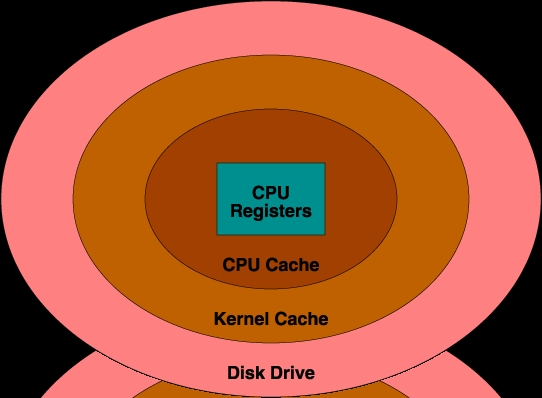
Figure 1. Storage Areas
You can see that storage areas increase in size as they get farther from the CPU. Ideally, a huge amount of permanent memory could be placed right next to the CPU, but this would be too slow and expensive. In practice, the most frequently used information is stored next to the CPU, and less frequently accessed information is stored farther away and brought to the CPU as needed.
Moving information between various storage areas happens automatically. Compilers determine which information should be stored in registers. CPU chip logic keeps recently used information in the CPU cache. The operating system controls which information is stored in RAM and shuttles it back and forth from the disk drive.
CPU registers and the CPU cache cannot be tuned effectively by the database administrator. Effective database tuning involves increasing the amount of useful information in RAM, thus preventing disk access where possible.
You might think this is easy to do, but it is not. A computer's RAM contains many things, including executing programs, program data and stack, PostgreSQL shared buffer cache and kernel disk buffer cache. Proper tuning involves keeping as much database information in RAM as possible while not adversely affecting other areas of the operating system.
PostgreSQL does not directly change information on disk. Instead, it requests data be read into the PostgreSQL shared buffer cache. PostgreSQL backends then read/write blocks, and finally flush them back to disk. Backends that need to access tables first look for needed blocks in this cache. If they are already there, they can continue processing right away. If not, an operating system request is made to load the blocks. The blocks are loaded either from the kernel disk buffer cache or from disk. These can be expensive operations.
The default PostgreSQL configuration allocates 64 shared buffers. Each buffer is eight kilobytes. Increasing the number of buffers makes it more likely that backends will find the information they need in the cache, thus avoiding an expensive operating system request.
You may think, “I will just give all my RAM to the PostgreSQL shared buffer cache.” However, if you do that, there will be no room for the kernel, or for any programs, to run. The proper size for the PostgreSQL shared buffer cache is the largest useful size that does not adversely affect other activity.
To understand adverse activity, you need to understand how UNIX operating systems manage memory. If there is enough memory to hold all programs and data, little memory management is required. However, if everything doesn't fit in RAM, the kernel starts forcing memory pages to a disk area called swap. It moves pages that have not been used recently. This operation is called a swap pageout. Pageouts are not a problem because they happen during periods of inactivity. What is bad is when these pages have to be brought back in from swap, meaning an old page that was moved out to swap has to be moved back into RAM. This is called a swap pagein. This is bad because while the page is moved from swap, the program is suspended until the pagein is complete.
Pagein activity is shown by system analysis tools like vmstat and sar and indicates there is not enough memory available to function efficiently. Do not confuse swap pageins with ordinary pageins, which may include pages read from the filesystem as part of normal system operation. If you can't find swap pageins, many pageouts is a good indicator you are also doing swap pageins.
You may wonder why cache size is so important. First, imagine the PostgreSQL shared buffer cache is large enough to hold an entire table. Repeated sequential scans of the table will require no disk access because all the data is already in the cache. Now imagine the cache is one block smaller than the table. A sequential scan of the table will load all table blocks into the cache until the last one. When that block is needed, the oldest block is removed, which in this case is the first block of the table. When another sequential scan happens, the first block is no longer in the cache, and to load it in, the oldest block is removed, which in this case is now the second block in the table. This pushing out of the next needed block continues to the end of the table. This is an extreme example, but you can see that a decrease of one block can change the efficiency of the cache from 100% to 0%. It shows that finding the right cache size can dramatically affect performance.
Ideally, the PostgreSQL shared buffer cache will be large enough to hold most commonly accessed tables and small enough to avoid swap pagein activity. Keep in mind that the postmaster allocates all shared memory when it starts. This area stays the same size even if no one is accessing the database. Some operating systems pageout unreferenced shared memory, while others lock shared memory into RAM. The PostgreSQL 7.2 Administrator's Guide has information about kernel configuration for various operating systems (www.postgresql.org/devel-corner/docs/admin/kernel-resources.html).
Another tuning parameter is the amount of memory used for sort batches. When sorting large tables or results, PostgreSQL will sort them in parts, placing intermediate results in temporary files. These files are then merged and resorted until all rows are sorted. Increasing the batch size creates fewer temporary files and often allows faster sorting. However, if the sort batches are too large, they cause pageins because parts of the sort batch get paged out to swap during sorting. In these cases, it is much faster to use smaller sort batches and more temporary files, so again, swap pageins determine when too much memory has been allocated. Keep in mind that this parameter is used for every backend performing a sort, either for ORDER BY, CREATE INDEX or for a merge join. Several simultaneous sorts will use several times this amount of memory.
Both cache size and sort size affect memory usage, so you cannot maximize one without affecting the other. Keep in mind that cache size is allocated on postmaster startup, while sort size varies depending on the number of sorts being performed. Generally, cache size is more significant than sort size. However, certain queries that use ORDER BY, CREATE INDEX or merge joins may see increases in speed with larger sort batch sizes.
Also, many operating systems limit how much shared memory can be allocated. Increasing this limit requires operating system-specific knowledge to either recompile or reconfigure the kernel. More information can be found in the PostgreSQL 7.1 Administrator's Guide (www.postgresql.org/docs/admin/kernel-resources.html).
The physical nature of disk drives makes their performance characteristics different from the other storage areas mentioned in this article. The other storage areas can access any byte with equal speed. Disk drives, with their spinning platters and moving heads, access data near the head's current position much faster than data farther away.
Moving the disk head to another cylinder on the platter takes quite a bit of time. UNIX kernel developers know this. When storing a large file on disk, they try to place the pieces of the file near each other. For example, suppose a file requires ten blocks on disk. The operating system may place blocks 1-5 on one cylinder and blocks 6-10 on another cylinder. If the file is read from beginning to end, only two head movements are required—one to get to the cylinder holding blocks 1-5, and another to get to blocks 6-10. However, if the file is read non-sequentially, e.g., blocks 1,6,2,7,3,8,4,9,5,10; ten head movements are required. As you can see, with disks, sequential access is much faster than random access. This is why PostgreSQL prefers sequential scans to index scans if a significant portion of the table needs to be read. This also highlights the value of the cache.
The disk head moves around quite a bit during database activity. If too many read/write requests are made, the drive can become saturated, causing poor performance (Vmstat and sar can provide information on the amount of activity on each disk drive).
One solution to disk saturation is to move some of the PostgreSQL data files to other disks. Remember, moving the files to other filesystems on the same disk drive does not help. All filesystems on a drive use the same disk heads. Database access can be spread across disk drives in several ways:
Moving Databases—initlocation allows you to create databases on different drives.
Moving Tables—symbolic links allow you to move tables and indexes to different drives. Movement should only be done while PostgreSQL is shut down. Also, PostgreSQL doesn't know about the symbolic links, so if you delete the table and recreate it, it will be created in the default location for that database. In 7.1, pg_database.oid and pg_class.relfilenode map database, table and index names to their numeric filenames.
Moving Indexes—symbolic links allow moving indexes to different drives from their heap tables. This allows an index scan to be performed on one disk while a second disk performs heap lookups.
Moving Joins—symbolic links allow the movement of joined tables to separate disks. If tables A and B are joined, lookups of table A can be performed on one drive while lookups of table B can be done on a second drive.
Moving Log—symbolic links can be used to move the pg_xlog directory to a different disk drive. (Pg_xlog exists in PostgreSQL releases 7.1 and later.) Unlike other writes, PostgreSQL log writes must be flushed to disk before completing a transaction. The cache cannot be used to delay these writes. Having a separate disk for log writes allows the disk head to stay on the current log cylinder so writes can be performed without head movement delay. You can use the postgres -F parameter to prevent log writes from being flushed to disk, but an operating system crash may require a restore from backup.
Other options include the use of RAID features to spread a single filesystem across several drives.
Fortunately, PostgreSQL doesn't require much tuning. Most parameters are automatically adjusted to maintain optimum performance. Cache size and sort size are two parameters administrators can control to make better use of available memory. Disk access can also be spread across drives. Other parameters may be set in share/postgresql.conf.sample. You can copy this file to data/postgresql.conf to experiment with some of PostgreSQL's even more exotic parameters.

