
Boa: an Embedded Web Server
Most of the world thinks of a web server as something on the Internet that can help find a football score, access a bank account or find an airplane flight. That's well and good but, in the embedded world, there are lots of places where a web server could come in handy. A common example is a network-connected printer. Being able to inquire about the status of the printer is useful, and if a small enough web server is available, it could offer a convenient interface.
This isn't just theory. Tektronics, for example, includes a web server in its 780 color laser printer. Their server allows you to configure the printer, access documentation, inquire about printer status--including toner levels--and includes links for ordering supplies. I am sure the cost of the web server is offset by supplies revenue and decreased support costs.
The most popular web server for traditional web sites is Apache. Apache is full-featured, very configurable and very reliable. It has proven itself in the general-purpose web server market and has been adopted by major players, including IBM.
Apache's design requires it to spawn (fork and exec) a separate task for each simultaneous connection. This is not necessarily a bad design, but in the embedded world, it is likely that you will need something that uses fewer resources--an average memory footprint in the tens of thousands of bytes rather than in the megabytes, for example.
Boa is a tiny web server that also offers extremely high performance. It is specifically designed to run on UNIX-like systems, which includes Linux, as well as the *BSD systems. To get all the legal stuff out of the way, Boa is available for free and is covered by the GNU Public License (GPL). The source code for Boa, as well as documentation, can be found at http://www.boa.org/.
The following point taken from the Boa web site shows why I have decided to write about Boa:
Boa currently seems to be the favorite web server in the embedded crowd, and embedded Linux, despite all the marketing hype, really is a big deal. Supposedly, an older version of Boa, v0.92q, runs in 32K address space on m68k, like used in uClinux. See http://www.uclinux.net/.
Unlike traditional web servers, Boa is single-tasking. What this means is that it internally multiplexes all of the ongoing HTTP connections rather than the more traditional forking of multiple copies for each connection. It must, of course, fork separate processes to execute CGI scripts, but that is well defined and under the control of the system designer.
My use of Boa has been to handle very low-volume HTTP connections on the order of a few hundred to a few thousand pages served per day. The Boa web page, however, claims that tests show Boa capable of handling several thousand hits per second on a 300MHz Pentium and dozens of hits per second on a 20MHz 386/SX. Thus, for most applications, it's unlikely that performance is going to be an issue.
Of course, in an embedded application, it is likely that the primary job of the processor will be handling something other than running a web server. What this means is that running Boa is not likely to significantly decrease the resources available for the primary purpose of the embedded CPU.
This small size and high performance doesn't come for free. However, what Boa doesn't do generally woudn't be missed for an embedded system. Here is the short list:
The REMOTE_HOSTNAME environment variable is not set. What this means is that a CGI program doesn't have the name of the accessing host available. The REMOTE_ADDR variable is available, so if the CGI program actually cares, it can do its own lookup.
Boa does not support server-side includes. SSI is slow because the text of each requested document must be searched for each request.
The ability to change root directories (chroot) is not available.
Rather than offering access control features, Boa just uses Linux/UNIX filesystem permissions to determine what can be served. This is generally not a problem as Boa can be configured to run as any user ID you desire.
Because Boa is so compact, it is also very easy to install and configure. The details are on the Boa web site, but if you are familiar with installing typical tarballs, Boa will be no surprise. The basic steps are:
Download the software.
Unpack using tar xvzf.
Optionally edit the defines.h file in the src directory to change the default SERVER_ROOT. This isn't mandatory; you can also specify the server root on the command line when you start Boa.
Run the configure script (./configure) and then type make to build the executable. Recently, I built Boa on my laptop. The make step took less than 11 seconds.
Edit the configuration file, boa.conf, to set up your local configuration.
Make sure the appropriate directories (such as the log directory) exist and have the proper permissions.
Start Boa from the command line. Use the -c command-line option to specify the server root if you didn't set SERVER_ROOT to the desired directory location in define.h.
That's it. You should have a working version of Boa. Point your web browser at it and see what happens. If it doesn't work, check the error_log file.
Once you have the basics running, check out the config file (boa.conf) for additional configuration options. Here is a quick summary of the most important. The config file is well commented so if you don't see what you need here, read the comments for additional options.
Port allows you to specify the port to listen on. The default is 80, which is the standard HTTP port. For any port less than 1024 you must start Boa as root.
By default, Boa binds to all IP addresses. This means that any request that comes into the system on the specified port is served by Boa. If this isn't acceptable, you can use either the VirtualHost directive to point different requests to different files, or you can run individual copies of Boa for each IP address.
User and Group allow you to specify the name of the user and group Boa runs as. Normally you would start Boa as root, and then once it configures itself, it changes to run as the specified user and group.
ErrorLog and AccessLog allow you to specify where the log files are located. If you comment out the AccessLog line, no access log will be created.
DocumentRoot specifies the root directory of the HTML files.
UserDir specifies a directory name that can be appended onto a user's home directory to locate web pages accessed by using ~user in the URL.
DirectoryIndex specifies the name of the index file. This is traditionally index.html.
DirectoryMaker is the path to the program used to create index listings. Comment this out if you don't want to allow directory listings.
Alias is used to specify a redirect, allowing a specified URL to access a page in a different location. Multiple Alias directives are allowed.
ScriptAlias is used to specify where CGI scripts can reside. Essentially, this allows a shorthand in the URL for locating the scripts.
In order to test Boa I created two files: one HTML file (Listing 1) and a CGI script written as a shell script (Listing 2). Figure 1 shows what is displayed by the HTML script, and Figure 2 shows what is displayed by the CGI script. Note that I created these scripts using vi. If you would rather use an editor specifically designed for creating HTML, many are included with every Linux distribution. For example, KWebDev is one of the many included with KDE. WebMaker is another.
Listing 2. Shell Script to Test CGI
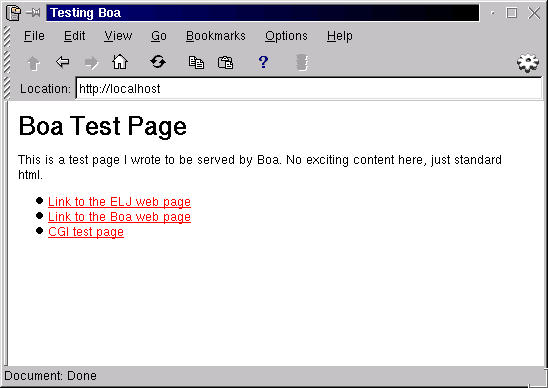
Figure 1. Screenshot of What the HTML Script Displays

Figure 2. Screenshot of What the CGI Script Displays
The only problems I encountered were mistakes on my part with configuration parameters and file locations. Once I got everything in the right place, Boa performed as expected. If you have the need for a web server in an embedded product, Boa offers a great choice.

Sid Wentworth prefers animals to people but also sees that computers can be his friend. He has over 20 years of experience working with computers, virtually all without involvement with Microsoft products. Sid can be reached at swentworth@hushmail.com.
email: swenthworth@hushmail.com

