
Visual Development with Qt 3.0
Only two serious choices for a GUI toolkit are left: Qt and GTK. Motif still lives on, but nobody uses it for anything new.
When Qt 3.0 was released in October 2001, it was a singificant upgrade and was well received. The most important features of Qt 3.0 are the extensions of the utility libraries, the addition of a rich text edit widget, fabulous support for international fonts and a vastly improved Qt Designer.
Personally, I find the most exciting addition to Qt 3.0 to be improved support for foreign fonts. My own pet project, Kura, is a application for working with texts in all kinds of languages and using Unicode fonts was hell. One needed a real Unicode-encoded font, one that contained all the characters needed. However, Qt 3.0 can combine fonts to fill gaps where the main font lacks glyphs, making rendering texts much more responsive. Even more exciting is the improved rendering of complex scripts like Arabic and Burmese. In this respect, Qt 3.0 is perhaps as capable as Pango will be. You won't need to concern yourself with the encoding capabilities of the font--all you do is select a script. This improvement is mainly the work of Lars Knoll.
Of the added modules, the database module (SQL) was probably the result of queries from Trolltech's commercial customers. I'm not sure whether it's a completely valid addition to a GUI library, but the actual implementation is not bad. Database stuff is useful, but not exciting.
A few new utility applications made their appearance in QT 3.0 as well. Qt Linguist is helps create translation files for screen texts in Qt applications. It's largely comparable with KDE's KBabel, but it doesn't use the GPLed gettext library. Qmake is a cross-platform alternative to the rather involved automake; it is probably less powerful, but at least cognizant of moc and the .uic files generated by Qt Designer.
The rich text editor is welcomed by all; whether you want to create a programmer's editor with syntax highlighting or a GUI DocBook editor, this widget comes to the rescue. Indeed, the KDE KOffice development team, notably David Faure, was so enthusiastic that they decided to backport most of it to KDE 2, which used Qt 2.3 at the time.
Of course, there are also a lot of other improvements. There's a QCanvasSpline for working with multibezier splines on a QCanvas, something I have missed particularly. Clipboard handling improved; it now complies with the standard laid out by www.freedesktop.org. An interesting change of approach occurs with the common dialogs: a call to the static functions of QFileDialog now calls the native common dialogs of the platform Qt is running on. Threading support has come of age, and there are a myriad other improvements I haven't mentioned yet.
One concern might be that Qt is growing too large. One of the complaints most often levelled against Java is that the JDK is a labyrinthine library of Gormenghastian proportions. Isn't Qt heading the same way? Well, some additions are a bit jarring, like the SQL module. This isn't enough to cause immediate anxiety, but Qt is expanding beyond the confines of a GUI toolkit, something to be expected from a library that bridges platforms as disparate as Windows, PDAs and UNIX/X11--not to mention that Qt is driven by what the customers ask Trolltech to create. There's no gainsaying that databases rule the world, and that a cross-platform XML module is handy to have (but libxml is nice, too), on the other hand, Trolltech is quite conscientious about removing old cruft. Perhaps the lack of an official deprecation mechanism like Java has its advantages --it makes it more difficult to keep old classes around.
Qt Designer has always been one of the more pleasurable GUI designers. It has no dearth of creature comforts, like the accelerator-checker or the tab-order-editor. Of course, there were also rather irritating omissions: if you select a bunch of widgets, and set a property in the property palette, it isn't set for all selected widgets.
Another area where there had been complaints, the main window, has been fixed. In previous incarnations, you could create only dialog windows and widgets with the Designer. There was no way to design the whole main window, with menubars, toolbars and statusbar. Now, however, if you select New in the File menu, one of the available templates is tantalizingly named Main Window.
And it doesn't lie. Select it and you are presented with what will be a nice wizard once the artwork is done. With it, you can create the QActions that together form the contents of your menubar and toolbars. The QAction concept was new in Qt 2.x, and I've always regarded it as one of the better innovations. A QAction is the encapsulation of a certain action the user can ask the GUI interface to perform.
The creation of a new file, for instance, is a single action that can be initiated from the keyboard (with Ctrl-N), from the File menu and also from the toolbar. By creating a single QAction, all this information, along with the icon used on the toolbar, the menu, the tooltip text, the statusbar help text and status information (enabled/disabled, toggled on/off) is encapsulated in a single place. The Main Window wizard makes good use of this concept, and certain default actions are prepared for you (see Figure 1).
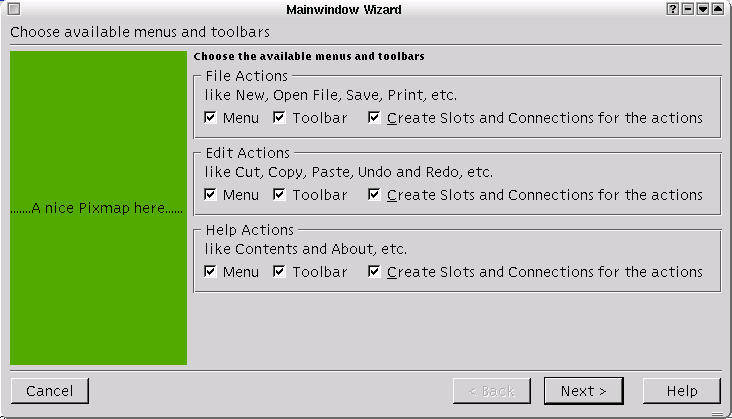
Figure 1. The First Page of the Main Window Wizard
Notice that Qt Designer can generate the necessary signal/slot connections for you at the same time. Menubars generally have more choices than toolbars, so it is not surprising that you next have the option of selecting certain actions for inclusion in the main toolbar (see Figure 2).
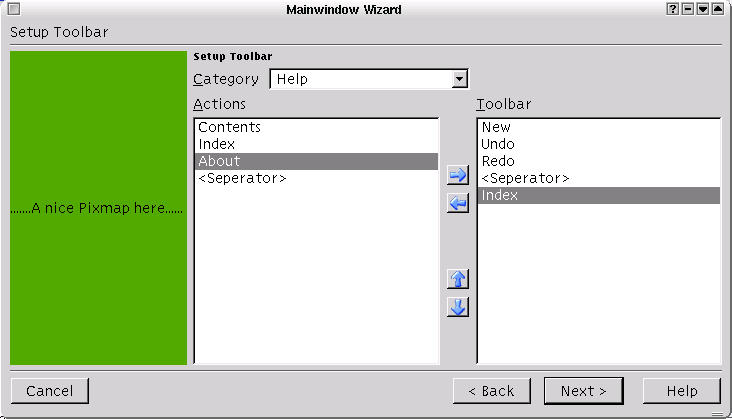
Figure 2. Selecting Actions for the Main Toolbar
Of course, more is needed for a really comfortable interface, but the wizard gives us a good start. After finishing with the wizard, Qt Designer shows us our main window, floating in a classical docking-IDE-type interface. Nobody who has ever used Visual C++ or any of the other Visual-type IDEs will be surprised by the Designer interface; nor will the users of KDevelop or KDE Studio be culture-shocked.
The interface is nice, but infinitely more interesting are the additions to Designer. One of them is immediately obvious: the Action Editor (see Figure 3).
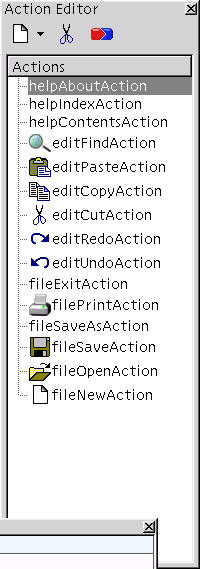
Figure 3. The Action Editor
Additional QActions can be created with this utility. By pressing the New toolbar button in the Action Editor, a new QAction is created. You can then select the action in the list and edit its properties in the Properties Editor (see Figure 4). By dragging the action from the list in the Action Editor to its intended place in the menubar and toolbar, you place it where it will reside.
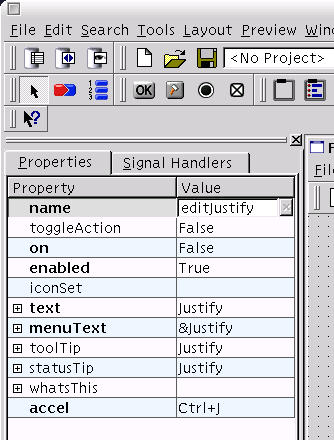
Figure 4. Properties of a QAction
Adding new slots to a design under consideration has always been possible with Qt Designer. With a bit of forethought it is possible to create almost complete dialog windows that can be made useful by subclassing and a bit of added functionality. Of course, you can also add new slots to the main window class, but most of the useful work has already been done for you. The wizard has already created a menuItem slot for each QAction in the main window, and it's a few minutes to do the same for your own QActions (see Figure 5).

Figure 5. Editing the Slots of a Main Window Class
Having done all this, connecting the activated() signal to the editJustify slot is no work at all. At that point, most of the design is finished. However, Qt Designer nowadays includes a C++ code editor. It's not a particularly strong one, but you can enter C++ code for each and every defined slot (see Figure 6). This C++ code is saved as part of the XML .ui file and used in the generation of C++ code by the uic user interface compiler. Of course, now that Qt includes a rich text control, adding a small editor is a no-brainer. It even includes an incremental search option, paren matching and syntax completion. This is interesting code, to be found in the designer/editor branch of the Qt source.
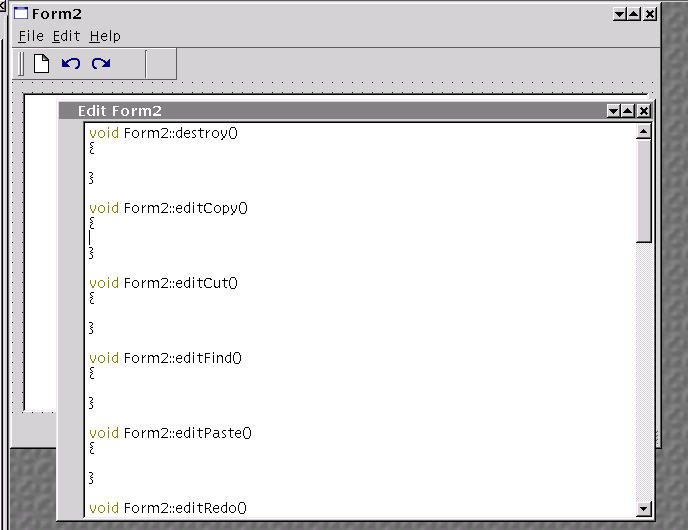
Figure 6. An Editor for the Filling in of Slots
Qt Designer is clearly moving toward a complete visual design and development environment for C++. Using the Source tab of the Object Explorer, you can add includes, forward declarations and class variables to your design (see Figure 7).
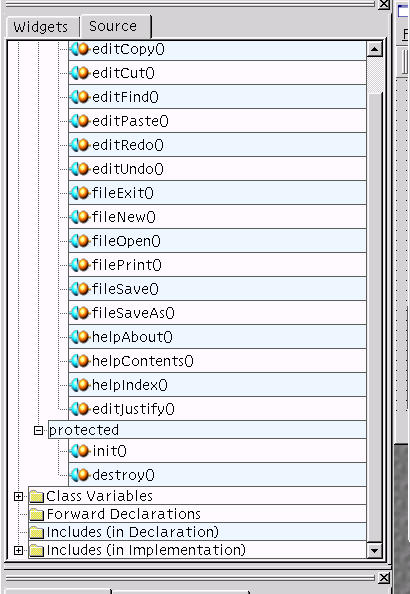
Figure 7. The Object Explorer Allows the Definition of C++ Source-Related Items
Before actually creating code, it is a good idea to determine whether it is actually useful to mix design and code at this stage. Entering C++ code here means it will be that much more difficult to generate code for other languages from the user interface definitions. This is certainly an issue for Python, which can make use of the Qt library and the designer definitions with the PyQt toolkit or the BlackAdder IDE. In my experience, moreover, having a bit of implementation at one level, and another bit of implementation at another level, makes for confused projects. You should think carefully before adding code to otherwise language- and implementation-agnostic designs.
Creating working C++ code entails running the user-interface compiler, or uic. This must be done twice, once to create the header file and once to create the implementation. Given that, we created a design for a main window called mainwin.ui:
boud@calcifer:~/qt3 > uic mainwin.ui  > mainwin.h
boud@calcifer:~/qt3 > uic -impl mainwin.h mainwin.ui > mainwin.cpp
Of course, depending on how much code you've entered in your design, the generated class can be slightly useful in itself or not useful at all. In order to actually do something with it, you need to subclass the generated class or, at least, create a bit of code that will start it:
#include <qapplication.h>
#include 'mainwin.h'
int main( int argc, char* argv[])
{
    QApplication app (argc, argv);
    MainWindow * mw = new MainWindow();
    mw->setCaption(Main Window');
    mw->show();
    app.connect(&app, SIGNAL(lastWindowClosed()), &app, SLOT(quit()));
    return app.exec();
}
Then you need to create a moc file from the generated header files:
boud@calcifer:~/qt3 > moc -o moc_mainwin.cpp mainwin.h
his is followed by compilation. You will usually do this from a Makefile--indeed, the generation of header and implementation files from .ui designs is best done with make. Nevertheless:
boud@calcifer:~/qt3 > g++ -I$QTDIR/include mainwin.cpp main.cpp moc_mainwin.cpp -L$QTDIR/lib -lqt
should do the trick. Run the result to see what is, in essence, exactly what you will see in the Designer preview window. It gets more interesting when you subclass your designs in order to add more functionality. The boundaries have become blurred, however, now that you can enter slot implementations into your design.
A skeleton for this subclass can be generated by uic, too:
boud@calcifer:~/qt3 > uic -subdecl MyMainWin mainwin.h mainwin.ui > mymainwin.h
boud@calcifer:~/qt3 > uic -subimpl MyMainWin mainwin.h mainwin.ui > mymainwin.cpp
Careful consideration of the output of this step shows that everything it generates is already present in mainwin.cpp.
Qt Designer offers other features that aren't discussed in this article. I haven't used the database-related functionality, for instance. But it too involves the use of well-thought-out wizards and will make the life of people who create database applications in C++ a lot easier. Three options are offered: Data Table, Data View and Data Browser. There is also a menu option for the creation of templates, a project manager and a lot of other features.
Qt Designer has matured and can now hold its own against every other visual design environment I've ever used. Modular (based on plugins), well designed, responsive and genuinely helpful, I cannot imagine how I ever created GUI designs without it.
libxml and libxslt, Open-Source XML and XSLT Libraries Used by KDE and GNOME: xmlsoft.org
Pango, a Cross-Toolkit (but Mainly GTK) Rendering Framework for International Scripts: www.pango.org
PyQt, the Open-Source Python Binding of the Qt Library: www.thekompany.com/projects/pykde
Trolltech, Vendor and Supporter of Qt: www.trolltech.com
Coding C++ Applications with Qt Designer
Boudewijn Rempt is a senior developer with Tryllian, a company which specializes in development of mobile software agents.
Cameron Laird is Vice President of Phaseit, Inc., a small consultancy specializing in high-performance and high-reliability software.
email: claird@lairds.com
email: claird@lairds.com
