
Modeling Seismic Wave Propagation on a 156GB PC Cluster
Large earthquakes in densely populated areas can be deadly and very damaging to the local economy. Recent earthquakes in El Salvador (magnitude 7.7 on January 13, 2001), India (magnitude 7.6 on January 26, 2001) and Seattle (magnitude 6.8 on February 28, 2001) illustrate the need to understand better the physics of earthquakes and motivate attempts to predict seismic risk and potential damage to buildings and infrastructures.
Strong ground shaking during an earthquake is governed by the seismic equations of motion, which support three types of waves: pressure (or sound), shear and surface waves. Numerical techniques can be used to solve the seismic wave equation for complex three-dimensional (3-D) models. Two major classes of problems are of interest in seismology: regional simulations (e.g., the propagation of waves in densely populated sedimentary basins prone to earthquakes, such as Los Angeles or Mexico City) and the propagation of seismic waves at the scale of the entire Earth. Every time an earthquake occurs, these waves are recorded at a few hundred seismic stations around the globe and provide useful information about its interior structure.
At the Seismological Laboratory at the California Institute of Technology, we developed a highly accurate numerical technique, called the Spectral-Element Method, for the simulation of 3-D seismic wave propagation. The method is based upon the classical finite element method widely used in engineering. Each of the elements contains a few hundred points, solves the seismic wave equation on a local mesh and communicates the results of its computations to neighbors in the mesh. To model seismic wave propagation in the Earth, we create a mesh of the globe, which we divide into a large number of slices (see Figures 1 and 2). Each slice contains a large number of elements (typically several tens of thousands). The objective is to run the calculations on a parallel computer because the size of the mesh makes it impossible to run our application on a shared-memory machine or a workstation. Therefore, the method is perfectly suited for implementation on a cluster of PCs, such that each PC handles a subset of all the elements of the mesh. We use message-passing techniques to communicate the results between PCs across the network. This idea of parallel processing under Linux has developed rapidly in the scientific community (see the articles by M. Konchady and R. A. Sevenich listed in Resources).
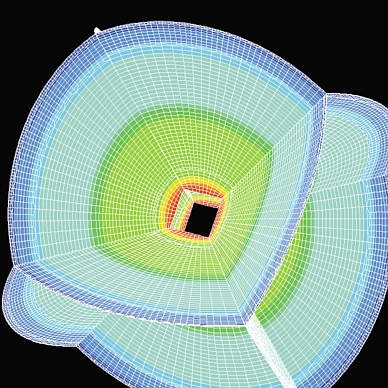
Figure 1. Mesh of the Globe

Figure 2. Slices Assigned to Processors
Research on how to use large PC clusters for scientific purposes started in 1994 with the Beowulf Project of NASA (beowulf.org), later followed by the Hyglac Project at Caltech and the Loki Project at Los Alamos (see Tom Sterling and collaborators' book How to Build a Beowulf and cacr.caltech.edu/resources/naegling). Hans-Peter Bunge from Princeton University was among the first to use such clusters to address geophysical problems, and Emmanuel Chaljub from the Institut de Physique du Globe in Paris, France introduced the idea of using message passing to study wave propagation in the Earth. Clusters are now being used in many fields in academia and industry. An application to a completely different field, remote sensing, was presented in a recent issue of the Linux Journal by M. Lucas (see Resources).
For our project we decided to build a cluster from scratch using standard PC parts. The acronym COTS, for commodity off-the-shelf technology, is often used to describe this approach. The main constraint was that we needed a large number of PCs and a lot of memory because of the size of the meshes we wanted to use in our simulations. Communications and I/O are not a big issue for us since the PCs spend most of their time doing computations, and the amount of information exchanged between PCs is always comparatively small. Therefore, our particular application would not benefit significantly from the use of a high-performance network, such as Gigabit Ethernet or Myrinet. Instead, we used standard 100Mbps Fast Ethernet. Due to the large number of processors required (312 in total), we used dual-processor motherboards to reduce the number of boxes to 156, thus minimizing the space needed for storage (and the footprint of the cluster). This structure impacts performance because two processors share the memory bus (which causes bus contention but reduces the hardware cost) since only one case, motherboard, hard drive, etc., are needed for two processors. We ruled out the option of rackmounting the nodes, essentially to reduce cost, but chose to use standard mid-tower cases on shelves, as illustrated in Figure 3. This approach is sometimes given the name LOBOS (“lots of boxes on shelves”). The shelving system was placed in a computer room already equipped with a powerful air-conditioning system and 156 dual-processor PCs.

Figure 3. 156 Dual-Processor PC Cluster. The boxes are connected using a standard 100Mbps Fast Ethernet network (the green and blue cables). In the back, one can see the 192-port Cisco switch. The height of the shelving system is approximately eight feet.
Deciding between Pentium IIIs and AMD Athlon processors was difficult. The Athlon is said to be faster for floating-point operations, which is the main type of operation used in most scientific applications, including ours. At build time, no dual-processor Athlon motherboard was available. As mentioned above, using single nodes would have increased the total cost of the cluster. For this reason, we selected the Pentium III.
It is tempting to use the latest technology when assembling a PC. However, new processors are more expensive than six-month-old technology and offer a small increase in performance. Three- to six- month-old processors provide the best trade-off between price and performance. We used 733MHz processors when we assembled the machine in the summer of 2000.

Figure 4. Price/Performance Ratio for the Pentium III
Figure 4 shows the ratio between price and performance for the Pentium III processor. The prices shown are an average of typical prices from retailers in the US. As one can see, old processors are cheap but relatively slow. New processors are faster but much more expensive. The optimal price/performance ratio is obtained in between.
We decided to put the maximum possible amount of memory on the motherboards, i.e., fully populate the memory slots with 1GB of RAM per PC for a total of 156GB of memory in the cluster. Each PC is also referred to as a “node” or “compute node”. Note that memory represents more than 50% of the total cost of the cluster.
The rest of the hardware is fairly standard: each PC has a Fast IDE 20GB hard drive, a Fast Ethernet network card and a cheap 1MB PCI video card, which is required for the PC to boot properly and can be used to monitor the node if needed. We use high-quality, mid-tower cases with ball-bearing case fans because the mechanical parts in a cluster, such as fans and power supplies, are the most likely to fail. Note that the total disk space in the cluster is enormous (20GB × 156 = 3,120GB = 3TB). To further reduce the cost of the cluster and to have full control over the quality of the installed parts, we decided to order the parts from different vendors and assemble the nodes ourselves, rather than ordering pre-assembled boxes. It took three people about a week to assemble the entire structure. One PC, called the front end, has a special role in the cluster: it contains the home filesystems of the users (SCSI drives NFS-mounted on the other nodes with the autofs automounter), the compilers, the message-passing libraries and so on. Simulations are started and monitored from this machine. The front end is also used to log in to the nodes for maintenance purposes. The nodes are all connected using a 192-port Catalyst 4006 switch from Cisco, which has a backplane bandwidth of 24Gbps (see Figure 5).

Figure 5. Catalyst 4006 Cisco Switch
All the nodes in the cluster run Linux Red Hat 6.2. Linux corresponds perfectly to the demands of our application; we require very high reliability because the machine is being used by researchers who need their jobs to run without having to worry about nodes crashing. We have not had a single system crash since the machine was built nine months ago. The operating system needs to be tuned to the hardware in order to reach maximum performance; with the open-source philosophy, we have been able to recompile the kernel with a minimal set of options corresponding to our hardware configuration. We recently installed the 2.4.1 kernel, which has much better support for dual-node SMP machines than the 2.2 kernel. The performance is excellent; by switching from 2.2 to 2.4, the CPU time of our application has decreased by 25%. In terms of network configuration, the 156 nodes are on a private network of 192.168.1.X addresses. For security reasons, the cluster is not connected to the outside world, and all the post-processing and analysis of the results is done locally on the front end. We use rdate once a day in the cron table of each node to synchronize the time with the front end.
The biggest price we had to pay for the use of a PC cluster was the conversion of an existing serial code to a parallel code based on the message-passing philosophy. In our case the price was substantial because our group is composed of researchers who are not professional programmers. This situation meant we had to dedicate a few months to modifying several tens of thousands of lines of serial code. The main difficulty with the message-passing philosophy is that one needs to ensure that a control node (or master node) is distributing the workload evenly between all the other nodes (the compute nodes). Because all the nodes have to synchronize at each time step, each PC should finish its calculations in about the same amount of time. If the load is uneven (or if the load balancing is poor), the PCs are going to synchronize on the slowest node, leading to a worst-case scenario. Another obstacle is the possibility of communication patterns that can deadlock. A typical example is if PC A is waiting to receive information from PC B, while B is also waiting to receive information from A. To avoid deadlocking, one needs to use a master/slave programming methodology.
We use the MPI (message-passing interface) library to implement the message passing. Specifically, we installed the open-source MPICH implementation developed at Argonne National Laboratory (see the 1996 article by W. Gropp and collaborators, available at www-unix.mcs.anl.gov/mpi/mpich). This package has proven to be extremely reliable with Linux. MPI is becoming a standard in the parallel-computing community. Many features of MPI are similar to the older PVM (parallel virtual machine) library described in the article of R. A. Sevenich in Linux Journal, January 1998.
An additional difficulty with our project was the amount of legacy code we had to deal with. A lot of modern codes are based on libraries that contain legacy code developed in the 1970s and 1980s. Almost all scientific libraries were written in Fortran77, the language of choice at that time; use of C was not yet widespread. We decided not to convert the 40,000+ lines of code to C, rather we upgraded from Fortran77 to the modern Fortran90. The new version has dynamic-memory allocation, pointers, etc., and is back-compatible with Fortran77. We wrote a Perl script to perform most of the conversion automatically, fixing a few details by hand and changing memory allocations from static to dynamic. Unfortunately, to our knowledge no free Fortran90 compiler is currently available under Linux. The GNU g77 and f2c packages only support Fortran77. So, we had to buy a commercial package, pgf90 from The Portland Group, pgroup.com. This is the only non-open-source component in our cluster.
A limitation of PC clusters is the problem of system administration and maintenance. Using hundreds of PCs, one increases the probability of hardware or software failure of nodes. In the case of a hardware problem, the nice thing about PCs is that parts are standard and can be bought and replaced in a matter of hours. Therefore, the cost associated with maintenance is low compared to expensive maintenance contracts researchers used to need for classic supercomputers.
Software maintenance is more of an issue—with 156 nodes, how do you make sure they are all working properly? How do you install new software? How do you monitor the performance of a job that is running? When we installed the cluster, we wrote scripts that collected information from the nodes by sending rsh commands. Since then, universities like Berkeley and companies like VA Linux have developed efficient software packages for cluster monitoring and have made them open source. We use a node-cloning package called SystemImager from VA Linux (valinux.com) to do software upgrades. With this package we only need to upgrade the first node manually. Then the package uses rsync and tftp commands to copy (or clone) the changes to the other 155 nodes in a matter of minutes. To monitor the cluster and the jobs that are running, we use the Ganglia package from Matt Massie at Berkeley (millennium.berkeley.edu/ganglia), which is a fast and convenient package that uses a system of dæmons to send information about the state of each node to the front end, where it is gathered and displayed.
In Figure 6, we show a Tcl/Tk interface to the Ganglia package. The GUI we use is based on another open-source package, bWatch by Jacek Radajewski (sci.usq.edu.au/staff/jacek/bWatch). We modified it for our needs and to use Ganglia instead of standard rsh commands for much faster access to the nodes. Also, VA Linux has recently released the VACM package (VA Cluster Management), which we have not yet installed.
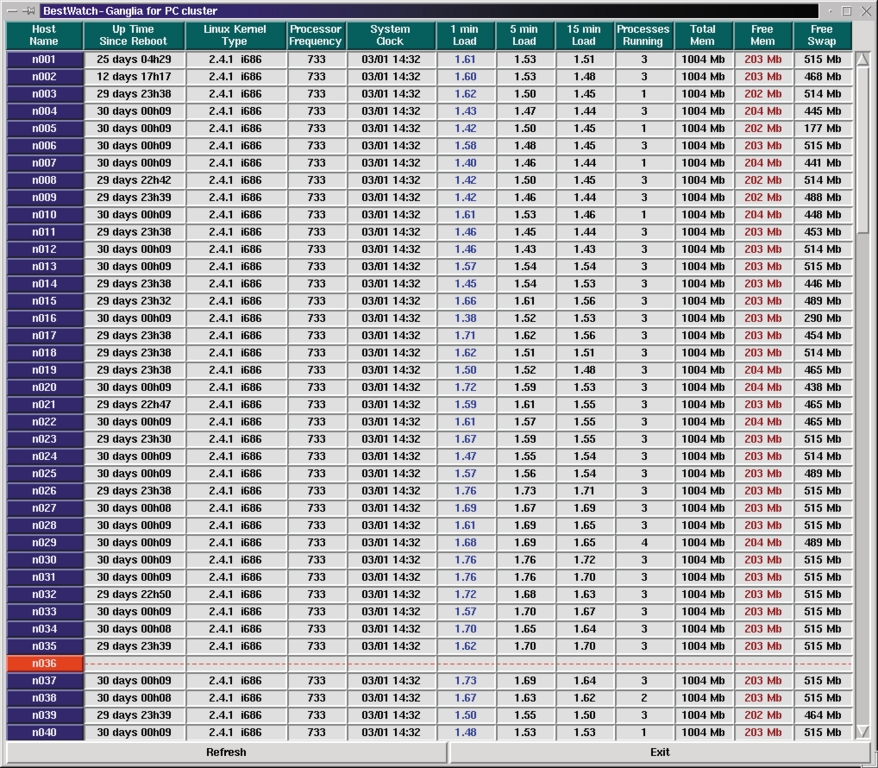
Figure 6. Monitoring with Ganglia
On June 9, 1994, a huge earthquake with a magnitude of 8.2 on the open Richter scale occurred in Bolivia, at a depth of 641 km (400 miles). Most earthquakes occur at much shallower depths, usually less than 30 kilometers. This event in Bolivia was one of the largest deep earthquakes ever recorded. Due to its unusual characteristics, this earthquake has become the subject of numerous studies in the seismological community. We tried to simulate this event on our cluster.
Figure 7 shows a still of the ground shaking (displacement of the Earth at a given location due to the passage of a seismic wave generated by the earthquake). The epicenter in Bolivia is indicated by the purple triangle. The waves travel inside and along the surface of the Earth. They can be seen propagating across the United States, for instance. A permanent displacement is visible at the surface of the Earth around Bolivia, extending as far as the Amazon river to the north. This effect, which was recorded by several seismic stations in Bolivia, is called the “static offset”. The earthquake was so big that it moved the ground permanently by a few millimeters. The vertical displacement reached up to 7mm, i.e., ¼“ to the south). It is correctly reproduced by our code.

Figure 7. Seismic Waves during the 8.2 Bolivia Earthquake
Due to the fact that the waves travel all around the globe, seismic recording stations in other countries were able to detect the Bolivia earthquake. Figure 8 shows an actual record from a station in Pasadena, California and the corresponding record simulated by our method. Again, the agreement is satisfactory. At each time step, this simulation required solving a system of equations with 500 million unknowns (also called the degrees of freedom of the system). Simulating the propagation of seismic waves for an hour and a half after the earthquake took 48 hours on the cluster using half of the nodes (150 processors).

Figure 8. Vertical Velocity as Recorded in Pasadena
Needless to say, our research has benefited tremendously from the power and the reliability of Linux and from the open-source philosophy. Using a large cluster of PCs, we are able to simulate the propagation of seismic waves resulting from large earthquakes and reach unprecedented resolution.
Luis Rivera provided invaluable information and help for this project. We thank Jan Lindheim, Tom Sterling, Chip Coldwell, Ken Ou, Jay Nickpour and Genevieve Moguilny for discussions regarding the structure of the cluster. Matt Massie added several options to his nice Ganglia package to help us monitor more parameters on our cluster. Rusty Lusk provided some useful insight about running MPICH on large clusters.


