
Battening down the Hatches with Bastille
Are you one of the many people who, when running ps -ef for the first time after installing Linux, has no idea what half of those processes are? Don't be embarrassed; we all have to start somewhere, and it takes time (and a lot of man-page lookups) to understand the myriad of applications and dæmons it takes to make a UNIX system run. While there's no substitute for doing those man-page lookups and truly understanding our systems, we shouldn't punish ourselves by running insecure systems until we've achieved guru status.
Bastille Linux, a powerful set of system-hardening Perl scripts, secures Linux systems and educates their administrators: when run in interactive mode it asks clear, specific questions that allow it to create a custom security configuration for your system. It also explains each question in detail so that by the time you've finished a Bastille session, you've learned quite a bit about Linux/UNIX security.
If you already understand system security and are only interested in using Bastille to save time, you can run Bastille in its “explain less” mode that asks all the same questions but skips the explanations. If you're running Bastille on a “clean” Linux installation, you can even skip the questions altogether and choose one of several “secure by default” security templates depending on what type of system you want. And if you're a real cowboy/girl, you can write your own Bastille configuration template from scratch (or, more likely, by tweaking one of the provided templates to fit your needs).
You may be thinking “Why does so much stuff have to be running and enabled by default? Isn't it silly to use special scripts just to trim the fat, when we could simply leave out all that fat in the first place?”
In my opinion most distributions of Linux do have too many things enabled by default. But the fact is that ever-increasing numbers of Linux users are absolute beginners, and if the first time they install and reboot their Linux system, it doesn't do very much (or worse still, doesn't work at all), then fewer people will stick with Linux and learn to run it securely.
In other words, Linux packagers (the people who create distributions such as Red Hat, Caldera, etc.) usually prefer to err on the side of usability rather than on security. Personally I wish more distributions offered both maximum functionality and “paranoid” configuration options in their installers. (Note that Red Hat 7.0's installer does in fact offer such options, although their “paranoid” option isn't necessarily as secure as a post-Bastille configuration.)
The original goal of the Bastille team (led by Jon Lasser and Jay Beale) was to create a new secure Linux distribution based on Red Hat. The quickest way to get their project off the ground seemed to be to start with a normal Red Hat installation and then to “bastillify” it (my term) with Perl scripts.
Before long, the team had decided that a set of hardening scripts that could be used on different distributions would be less redundant and more flexible than an entirely new distribution. Rather than moving away from the script approach altogether, the Bastille team has instead evolved the scripts themselves.
The Perl scripts that comprise Bastille Linux are quite intelligent and make fewer assumptions about your system than they did in the days when Bastille was meant only to be used on fresh installations of Red Hat. Your system need not necessarily be either a “clean install” or even Red Hat for Bastille to work, thanks to new functionality in version 1.1.x that transparently gleans a good deal of information about your system before making changes to it.
Okay, you're psyched and ready for automated, educational system-hardening. One little warning before we proceed: your mileage may vary. Although Bastille can be used on most Linux distributions, it started out as strictly a Red Hat utility and is still optimized for Red Hat and Red Hat-derived distributions. I'll offer some tips on using Bastille on non-Red Hat-derived distributions, but I can't guarantee your results. When in doubt, refer to Bastille's web page (see Resources).
Speaking of which, that's the home and definitive source of both Bastille Linux and its documentation. A link to the latest version of Bastille Linux can always be found in big bold letters near the top of the home page at http://www.bastille-linux.org/. Once you've downloaded the tarball, move it to /root and unpack it:
tar -xzvf ./Bastille-X.Y.Z.tgz
That's it, it's installed!
Note that Bastille expects to live in /root. You can probably hack the Bastille scripts to reflect some other home, but I don't recommend it as this is an unsupported action (and affects a lot of scripts). This shouldn't bother you; we usually don't get to choose where RPMs and other software packages get installed either.
Also, you need to have the Perl 5 scripting language installed in order to run Bastille Linux. To check your system for Perl (and its version) simply enter the command perl -v. If Perl replies with a version number less than 5.0, or if your system replies with perl: command not found then you need to upgrade or install Perl. No current Linux distribution lacks a Perl 5 package; refer to your Linux CD-ROMs or your distribution's home page to obtain a binary package for your system.
Using Bastille is easy. From /root/Bastille, you run the script InteractiveBastille.pl (see Figure 1), which asks you a long list of questions about what you need enabled and how you need it configured for a balance of functionality and security appropriate for your particular needs. These questions are split into different sections: IPChains, PatchDownload, FilePermissions, etc. The results of this Q&A session are stored in a file called config.
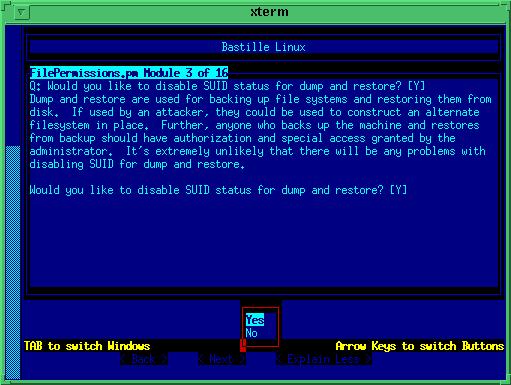
Figure 1. InteractiveBastille.pl
Next, run the script BackEnd.pl, which invokes the scripts corresponding to each section in InteractiveBastille.pl, using config to define the numerous variables that determine how these scripts behave. Depending on how you answered Bastille's questions, some of the component scripts may not be invoked at all (e.g., if you answered “no” to “Configure IPChains?”).
If you don't want to bother with all those questions, you can instead run AutomatedBastille.pl, which will give you the choice of several default security baselines and will then immediately harden your system accordingly. AutomatedBastille.pl is an extremely simple script; really, it's just a mechanism for invoking BackEnd.pl with a canned configuration file.
The included baselines (Default_Workstation and Default_Workstation_plus_Firewall in Bastille v.1.1.0) can easily be adapted for your own particular needs; thus, it's a simple matter to create your own baselines and add them to AutomatedBastille.pl if you have large numbers of systems to harden. Alternatively, you can skip AutomatedBastille.pl altogether and simply run BackEnd.pl with the configuration file of your choice, for example:
./Backend.pl ./myconfig /root/bastille-output-log
InteractiveBastille.pl explains itself extremely well during the course of a Bastille session. If you take the time to read this script's explanations of its own questions, you'll learn a lot about system-hardening. If you already know a lot, you can select the explain less option at any point to make the questions a bit less wordy (and if you change your mind, you can choose “explain more” later).
Bastille's verbosity notwithstanding, the following general observations on certain sections may prove useful to the beginner:
Module 1: IPChains.pm—IPChains is Linux's firewall system. If your host is going to be accessible by hosts on the Internet, I strongly recommend that you configure IPChains. Even a few simple packet-filtering rules will greatly enhance overall system security.
Module 2: PatchDownload.pm—if you have a Red Hat system, Bastille can download and install RPMs of any software that has changed since you originally installed it.
Module 3: FilePermissions.pm—this module restricts access to certain utilities and files, mainly by disabling their SUID status. Generally speaking, SUID is used to allow a process to behave as though it had been invoked by root, allowing nonroot users to use utilities such as mount, ping and traceroute. However, these utilities are usually not needed by unprivileged users and can in fact be used for all sorts of mischief. Disabling SUID status makes such commands usable only by root.
Module 4: AccountSecurity.pm—this module allows you to create a new administration account and generally tighten up the security of user-account management. These are all excellent steps to take; I recommend using them all.
Module 5: BootSecurity.pm—if it's possible for unknown or untrusted persons to sit in front of your system, reboot or power-cycle it and interrupt the boot process; these settings can make it harder for them to compromise the system.
Module 6: SecureInetd.pm—in this section, internet services are tightened down and warning banners created.
Module 7: DisableUserTools.pm—disabling the compiler is a good idea if the system's nonroot users don't explicitly need to use it. As in most other cases, when Bastille says “disable” here it actually means “restrict to root-access only”.
Module 8: ConfigureMiscPAM.pm—several useful restrictions on user accounts are set here.
Module 9: Logging.pm—too little logging is enabled by default on most systems. This module increases logging and allows you to send log data to a remote host. Process accounting (i.e., tracking all processes) can also be enabled here but is overkill for most systems.
Module 10: MiscellaneousDaemons.pm—in this section you can disable a number of services that tend to be enabled by default despite being unnecessary for most users.
Module 11: Sendmail.pm—self-explanatory.
Module 12: RemoteAccess.pm—if you don't have it yet, Bastille can download and install the Secure Shell for you! SSH is a secure replacement for Telnet, rsh and rlogin. Note that Bastille will attempt to install RPMs compiled for Red Hat systems on i386 architectures. If you run Linux on a non-PC-compatible architecture or use a distribution that chokes on Red Hat RPMs (e.g., Debian), then this module won't work for you.
So, after InteractiveBastille.pl creates config and BackEnd.pl implements it, what then? How do I know what happened? Thanks to Bastille's excellent logging, it's easy to determine exactly which changes were successful and, equally important, which failed, and that makes this a good place to discuss running Bastille on non-Red Hat distributions.
As I mentioned earlier, while Bastille is optimized for Red Hat and Red Hat-derived Linux distributions (e.g., Mandrake, Yellow Dog, etc.), it is intelligent enough to work on others as well. And in fact, my own experience bears this out: I ran Bastille 1.1.0 on a system running SuSE Linux 6.3, and I'm pleased to report that far more of Bastille worked than not.
The first thing I noticed during my SuSE-6.3 Bastille session was that several actions are explicitly Red Hat-centric (InteractiveBastille.pl gives warning to that effect). Module 2, PatchDownload.pm, is strictly for Red Hat systems. And as noted above, Module 12, RemoteAccess.pm, installs the Red Hat i386 version of Secure Shell 1.2.27.
One other question in my session, regarding whether I should run named in a chroot jail [see “Paranoid Penguin: Securing DNS and Bind”, LJ October 2000] came with the same warning. Luckily, both downloading patches and configuring named to run chrooted are things one can do manually without too much trouble.
Although these were the only explicitly Red Hat parts that Bastille warned me about during the InteractiveBastille.pl session, there were other parts of Bastille that didn't deal with SuSE too well. BackEnd.pl returned no errors (to the console) at all; I wasn't aware that anything had failed until I read Bastille's logs.
Note that it's probably a good idea to review these logs regardless of whether you think something's gone wrong; meaningful logging is one of Bastille's better features. And whether a beginner or a security guru, you should know not only what changes Bastille makes, but how it makes them.
Logically enough, Bastille writes its logs into /root/Bastille/log/. Two logs are created by BackEnd.pl: action-log and error-log. action-log provides a comprehensive and detailed accounting of all of Bastille's activities. Errors and other unexpected events are logged to error-log.
Most of the errors in my SuSE Bastille session involved files not residing where Bastille expected them. In a few cases this was due to SuSE keeping them in different places than Red Hat does; for example, Red Hat puts Apache (web server) configuration files in /etc/httpd/conf, whereas SuSe puts them in /etc/httpd. Bastille therefore failed to make any changes to Apache on my SuSE system.
In this example and most other file-location errors, it was fairly easy to figure out how to make the changes manually; Bastille's list of questions, /root/Bastille/Questions.txt, provides plenty of hints (easily found via grep), and if you understand Perl you can parse the scripts in /root/Bastille/Bastille to determine precisely what Bastille was trying to do.
The easiest thing to do, however, is simply to change the paths in the Bastille scripts and then rerun BackEnd.pl. Many of the paths that I needed to change for SuSE were in /root/Bastille/Bastille/FilePermissions.pl. For each file identified by error-log as missing, I simply checked for it using which. If it did indeed exist but in an unexpected location, I edited /root/Bastille/Bastille/FilePermissions.pl accordingly.
In the example below (an excerpt of the real error-log on my SuSE system) we see that Bastille couldn't find, setserial, chkconfig or ifdown:
#ERROR: chmod: File /bin/setserial doesn't exist!
#ERROR: chmod: File /sbin/chkconfig doesn't exist!
#ERROR: chmod: File /sbin/ifdown doesn't exist!
I happen to know that chkconfig and ifdown don't exist on SuSE systems; they're unique to Red Hat and its derivatives. Therefore those particular “errors” were moot. What about setserial? Entering the command:
which setserialreturned the output:
/sbin/setserialThen, entering the command:
grep setserial /root/Bastille/Bastille/*returned the output:
/root/Bastille/Bastille/FilePermissions.pm: &B_chmod(0750,"/bin/setserial");The which command told me where setserial lives on my system; the grep command told me which Bastille module and even which line I had to edit to fix setserial's path.
For a relatively small number of nonexistent files this was no big deal; for each file I determined whether it existed on my system and if so, where. I then verified that FilePermissions.pm was the offending module and edited it accordingly. Doing this for all the files cited in error-log and then rerunning BackEnd.pl took less than 20 minutes.
There was one other problem that needed fixing, and it's illustrated in the following example:
#open /etc/httpd/conf/httpd.conf.bastille failed...
#open /etc/httpd/conf/httpd.conf failed.
Couldn't replace line(s) in /etc/httpd/conf/httpd.conf
#open /etc/httpd/conf/httpd.conf.bastille failed...
#open /etc/httpd/conf/httpd.conf failed.
Couldn't replace line(s) in /etc/httpd/conf/httpd.conf because open failed.
As you can see, this was caused by the aforementioned difference between Red Hat's and SuSE's Apache environments. Again I used my handy grep command:
grep httpd.conf /root/Bastille/Bastille/*.pmThis returned several lines:
API.pm:  $GLOBAL_FILE{"httpd.conf"}=

API.pm:  $GLOBAL_FILE{"httpd_access.conf"}=

API.orig.pm:   $GLOBAL_FILE{"httpd_access.conf"}=

Apache.pm:  my $httpd_file=$GLOBAL_FILE{"httpd.conf"};
This told me that Bastille's Apache module references a variable
called GOLBAL_FILE to store httpd.conf's path, and this variable is
set in API.pm. Changing this path in API.pm and again rerunning
BackEnd.pl (with everything commented out except the line invoking
Apache.pm) was a trivial matter.
This may seem like a lot of tinkering for the sake of paranoia. But, even if Bastille succeeds in completing only 80% of its tasks on a non-Red Hat system, that system is still significantly more secure than it was before, right? Absolutely.
But Murphy's Law tells us that one of those utilities whose permissions Bastille couldn't tighten down could very well be the one that a mischievous user exploits to grant himself or herself root access. Taking the time to identify and correct these Bastille “hiccoughs” pays off, especially if you've got more than one system to harden. Obviously, the more systems of a given type that need hardening, the bigger the return on your time investment in customizing Bastille for that type.
Okay, we've carefully read and answered the questions in InteractiveBastille.pl; we've run BackEnd.pl; we've checked Bastille's work by going over its logs, and we've gone back and rerun BackEnd.pl after tweaking a module or two. Are we there yet?
No, nor will we ever be! Security is a process, not a product. The surest way to create a vulnerable system is to plug it in, turn it on and forget about it, even if at some point prior to forgetting about it you hardened it.
Oops, I'm preaching—force of habit (I do this stuff for a living). Well, even in the immediate task of hardening our system, after running Bastille we've still got a few tasks left before taking a breather.
Remember back at the beginning of the article when I started preaching about the big trade-off that comes with functionality? One of the many ramifications of this is that even Bastille can only do so much; it's impossible to anticipate and create Bastille modules for every software package that might be installed in any given Linux distribution.
Some distributions, Debian and SuSE in particular, include an enormous number of packages—so many that in a recent Slashdot interview Bastille's Jon Lasser (see Resources) referred to them as being especially problematic as a result, from a security standpoint. He hastened to point out that this doesn't mean that systems with a lot of different software packages can't be secured; it simply means that it takes more work.
Therefore, be sure to do the following after running Bastille:
Disable Any Remaining Unnecessary Services: Check which services still have startup scripts in /etc/rc.d/rcX.d, where X is your default runlevel. (You can find your default runlevel with the command grep initdefault /etc/inittab.)
Startup scripts begin with a capital S. If you don't know what “Ssomedaemon” does, try man somedaemon. If you don't need it, then mv Ssomedaemon dis_Ssomedaemon (if it doesn't begin with S, the script won't be run at startup).
Take the Time to Learn and Secure Your Applications: Bastille makes it possible to secure a system before knowing very much about system security—that's why its creators have spent so much time adding educational content to it. But both the applications it secures and especially the ones it doesn't won't remain secure unless you invest the time needed to understand them.
BIND, for example, which provides DNS (name) resolution to network applications, has a variety of security features. Bastille configures some of them (on Red Hat and Mandrake, that is) but only scratches the surface. The Bind Operators' Guide and the named man page are required reading for any system administration who runs BIND, period. Put another way: RTFM!
Disable Any Remaining Unused User Accounts: One of SuSE's more annoying quirks is the inclusion of a long list of entries in /etc/passwd for application-specific user accounts regardless of whether those applications are even installed. While very few of these are privileged accounts, many can be used for interactive login (i.e., they specify a shell rather than /bin/false).
This is hardly unique to SuSE. Therefore, be sure to check /etc/passwd and comment out any unnecessary entries. If in doubt, change the final field (default shell) from a real shell to /bin/false—only actual user accounts need shells!
Maintain Your System Software: I've said it at least twice already, but there's no substitute for keeping current. Keep abreast of your distribution's security patches and bulletins! And as you learn more about Linux security, make sure you apply that knowledge to the stuff you installed back when you were a newbie. Do not hook your machine up to the Internet, power it up and forget about it.
Install an IDS: As soon as possible after installing the operating system, install Intrusion Detection software like tripwire or snort. It's the simplest thing you can do to minimize your chances of finding out from the wrong people (FBI, angry system administrators, etc.) that your system has been hacked and used to attack others. See Bobby S. Wen's article “Open-Source Intrusion Detection Tools for Linux” (LJ October 2000).
Monitor Your Logs: The last system-hardening tidbit I'll leave you with this month is the necessity of reading the logs you told Bastille to enhance. These logs are no good to you at all if you never open them.
Parsing log files can be tedious work though, so it's a good idea to either write scripts that periodically check the logs for suspicious activity, or install a tool like swatch, which does for log monitoring what Bastille does for system tightening. In fact, it's worth its own Paranoid Penguin column....


