
Linux Reads Bar Codes
Bar codes printed on machine-readable labels simplify automatic identification of various things. The Linux kernel device driver module developed by Hewlett-Packard provides serial port access to an HP handheld wand-style bar code reader. An interface circuit is presented for connecting the wand to a PC serial port, and we develop software for reading the Bookland bar code. The Bookland bar code is used in the book trade for encoding the International Standard Book Number (ISBN). Because Bookland and the Universal Product Code (UPC) both use the European Article Number (EAN) bar code patterns for encoding decimal digits, it turns out that our software also decodes the UPC, widely used for groceries and other retail merchandise.
The Hewlett-Packard HBCS-A300 Bar Code Wand (Figure 1) brings out a 3-wire serial interface consisting of two power lines and a signal line. When provided with +5 Vdc power and ground, the open-collector signal line can be pulled up with a resistor to the positive rail so that it becomes a TTL-compatible logic level output. As the wand moves over a bar code pattern, the output signal from the wand is low for a white bar, high for a black bar. This logic level signal does not swing negative, and therefore is not RS-232-compatible. As it turns out, however, it doesn't have to be. Inside a PC, the RS-232 signal and control lines typically are connected to a 1489-type bipolar-to-TTL signal translator called an RS-232 receiver. Information from the wand passes correctly through a 1489-type signal translator because the signal translator's threshold voltages are +1 and +2 volts when the IC's response control pin is left open, as it normally is. In that configuration, the translator operates as an inverting buffer for TTL-compatible signals. A white-level input signal below +1 volts translates into TTL-compatible high at the UART input pin, while a black-level input signal above +2 volts translates into TTL-compatible low.

Figure 1. The Hewlett-Packard HBCS-A300 Bar Code Wand
The wand cable is equipped with a DIN connector that Hewlett-Packard describes as a 5-pin connector. It is really a 6-pin DIN connector with the center pin omitted. Sometimes this kind of DIN connector is described as a 5-pin ``240 degree'' connector. The ``other'' 5-pin DIN connector, such as on the PC/AT keyboard, is the one you will get if you are not careful what you ask for; it has five pins arranged in a 180-degree arc. The socket that matches the Hewlett-Packard wand is a 6-pin DIN socket, such as Mouser catalog number 16PJ224, or Digi-Key 275-1020-ND.
Surplus bar code wands obtained from Electronic Goldmine, and also from All Electronics, had the DIN connector wired differently from the pin-out given in Hewlett-Packard's data sheet. Both pin-outs are shown in Figure 2. Different wiring could have been the result of engineering change or possibly manufacturing snafu. In any case, once the power and signal lines had been identified and properly connected, the surplus wands worked the same as new.

Figure 2. Pin-outs for Bar Code Wands
The wand responds to light and dark bars. A nonreflecting black bar results in a logic high (+5 volt) level output, while a reflecting white space results in a logic low (ground level) output. There is, however, more to the story. That quick description implies static behavior, but the wand's response is not static at all. Light-source control and light-sensor signal processing circuits located inside the wand appear to be identical to the circuit diagrammed in Hewlett-Packard's data sheet for the 24-pin special-purpose HBCC-0500 integrated circuit (see Figure 3). That circuit creates dynamic behavior. Whenever the wand sees no transition, either white to black, or black to white, it times out after a short delay, and the output reverts to the low (white) level. It turns out that this behavior simplifies processing of the video signal received from the wand. The timeout expires after a very short delay, so there is high probability that the output signal will be in a known state, the low (white) state, when the wand is first picked up to begin a scan. In our software, this timeout feature is also used to detect abnormal termination, such as occurs when the wand is lifted off early or stopped in the middle of a bar code. Even if the wand is stopped on a black bar the circuit quickly times out and the output reverts to the white (low) level.
Hewlett-Packard's description of the wand's electrical operation says basically the same thing, in techno-speak:
The HBCS-A000 series digital bar code wands consist of a precision optical sensor and an electronic circuit that creates a digital output of the bar code pattern. The open collector transistor requires only a pull-up resistor to provide a TTL-compatible output.
A nonreflecting black bar results in a logic high (1) level output, while a reflecting white space will cause a logic low (0) level output. The initial state will be indeterminate. However, if no bar code is scanned, after a short period, (typically less than one second) the wand will assume a logic low state.
Hewlett-Packard's PDF file for the HBCC-0500 data sheet--a portion of that data sheet is visible in Figure 3--can be found in the archive file, barcode.tgz, at http://www.seasurf.com/~jdennon/.

Figure 3. HBCC-0500 Data Sheet
The HBCS-A000 Series of HP wands have a data sheet of their own. A link to the PDF file for the wand data sheet is available at http://www.semiconductor.agilent.com/barcode/hbcsa000.html.
It turns out that the initial state of the wand circuit is, in practice, quite predictable for the very reason that the circuit does indeed revert to a known state whenever the wand is idle. We do make use of this property in the code that processes the video signal from the wand. When we start a scanning operation we always begin by waiting for a black bar. This method of initiating processing of the video signal has proven in practice to be quite reliable.
When we see the beginning of the first black bar, we reset our clock to zero. We then cycle in a loop while advancing the clock and waiting for the signal to toggle to the white level. When the video signal toggles to the white level we read the clock and write down the reading as the measured width of the first black bar. We reset the clock to zero and again cycle while advancing the clock and waiting for the next video signal transition. When we get the white-to-black transition we read the clock and write down that reading as the width of the first white bar. We continue to time the width of the bars in this way until we either fill our data buffer or our clock counts all the way up to a preset value called ``white timeout''. Either event terminates data collection. In keeping with Jens Axboe's general rules for kernel modules, all of this timing and busy waiting, by the way, is handled in user-side code rather than in our device driver.
Doing the hard part in user-side code will be fault or feature depending on how you look at it. Although Linux is not designed for real-time work, the user-side experimental code works fine, as long as it is the only process Linux is running. On a more heavily loaded system, however, it may not work at all because the count accumulated by our software timer will, of course, be meaningless if the software loop is interrupted. For use on a heavily loaded Linux system, most of the processing now done in user-side code would be located in a dedicated microcomputer built into the wand interface, such as found, for example, in the :CueCatTM wand [Linux Journal, November 2000, page 138]. When the goal is to learn how to process the video signal, however, development is expedited by working on the user side where we have the full power of Linux at our disposal.
The interface circuit shown in Figure 2 can be used to connect a Hewlett-Packard HBCS-A300 Bar Code reader wand to a PC serial port. A printed circuit board for the interface circuit, designed around the Digi-Key PCB-mount DIN socket, is shown in Figure 4. The wand operates from a 5-volt DC supply and consumes less than 5 milliamps, so we obtain sufficient power for the wand from the PC's RS-232 control line called Data Terminal Ready (DTR). The DTR line will be at -12 Vdc after the computer has been reset and remains there until a program asserts the DTR signal at that serial port, at which time it switches to +12 Vdc. To isolate our interface circuit from the negative voltage, we have a diode in front of the 78L05 voltage regulator. When we assert DTR to power up the wand, the voltage on the DTR line goes to about +12 Vdc. The diode that serves to isolate our interface circuit from the initial negative voltage, now serves to drop the +12 voltage down toward +11 volts. This off-loads the regulator slightly and still leaves it with some 6 volts of ``head room'', which is still excessive. We get away with it in this case because 5 milliamps of current through a 6-volt drop dissipates only about 30 milliwatts in the regulator, and so it barely warms up.
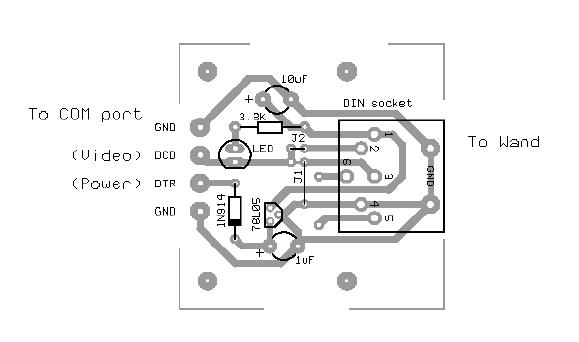
Figure 4. Serial Port Interface Circuit for the Digi-Key PCB-Mount DIN Socket
The 3.3K resistor provides the pull-up for the open-collector output from the wand, giving us a TTL-compatible signal. Like the diode, the LED serves two functions: it shows when DTR is high, telling us that the circuit is powered up, and it flickers reassuringly while the wand is transmitting video data on the Data Carrier Detect (DCD) line.
With the wand connected to the serial port of the PC, our kernel device driver code has only to raise DTR to high to turn on the power to the wand. We can then read the modem status line called Data Carrier Detect to sample the video signal being generated by the wand. Some circuit diagrams refer to this signal as Received Line Signal Detect (RLSD). Our driver module will turn the wand power on when we install the module and leave it on. Spurious data is created when the power is toggled, so we leave power on all the time whenever the device driver is installed. We turn the wand power off only when the driver module is removed by our ``cleanup'' routine. To keep the kernel side code ``too small to cause trouble'', the device driver read function of our kernel module, when called by user-side code, simply samples the state of the DCD line and returns that state to the calling program. While the 100Hz interrupt that takes control back to the kernel finds little or nothing to do there, the delay created is uniformly merged into the delay loop of our software timer, which then appears to work just fine.
On the back cover of most trade books these days you will find a Bookland bar code for the ISBN, followed usually by what is called a price extension that states a recommended retail price for the book. When we scan a Bookland bar code and its price extension, we should find exactly 91 bars: 46 black and 45 white. The first three bars are black, white, black; each of these bars is one unit wide. These are the so-called ``left guard bars''. The next 24 bars encode the left group of six digits. Four bars are used to encode each digit in a white, black, white, black, pattern. Each of these bars can be one, two, three or four width-units wide, but the total width of the four-bar digit pattern must be exactly seven width units. The first ISBN digit, by the way, usually a ``9'', and usually printed in the clear at the left of the bar code pattern, is not represented in the bar code.
Following the six digits of the left group we find the five ``middle guard bars''. These bars are white, black, white, black, white; each one unit wide. The next 24 bars encode the right group of six digits. Again, four bars encode each digit, this time in a black, white, black, white, pattern; just the opposite of the ink pattern used for digits in the left group of six digits. The right group of six digits is followed by three unit-width ``right guard bars'', black, white, black, that mark the end of the ISBN bar code.
Following the ISBN portion of the bar code there is a large white space that provides the ``quiet zone'' in front of the price code extension. This quiet zone will be read as one large white bar. Next we see a unit-width black bar, a unit-width white bar and then a black bar two units wide. These three bars are the price extension guard bars.
Following the price extension guard bars we find the price extension itself in the form of five encoded decimal digits. For example, a book with price digits 51695 means that the book has a recommended retail price of $16.95 US. (The first five indicates that the price is in US dollars. Prices over $100 would be impossible for the present scheme to handle.) Each digit is encoded with four bars (white, black, white, black, just as in the left group of the ISBN), but here, two additional unit-width bars (white, black) are inserted into each gap between digits. These are the so-called price code extension inter digit ``delineators''. In our software that decodes bar data, we pretty much ignore both the guard bars and the inter digit delineators. Possibly the redundant bars could be used to help calibrate a scanner if that turned out to be needed. The algorithm that we use here just steps over the guard bars and interdigit delineators and works with the groups of four measured bar times for each digit. Guard bars and delineators are, of course, assumed to be present in the captured data, and so in a sense they do provide framing information, somewhat like serial line start and stop bits.
The EAN ``symbology'' used by Bookland, encodes the decimal digits 0 through 9, using four bar widths. Each bar can be one, two, three or four units wide. Each encoded decimal digit occupies exactly seven units of bar space, so the sum of the four bar widths for any digit must be seven. Scanner software that decodes the bar code will make use of that. In terms of bar widths, the code looks like that shown in Table 1.
The left group of six digits uses bar patterns from groups A and B; the right group of six digits uses patterns from group C. A bar width pattern uniquely identifies a decimal digit. In terms of bar width, as we can see here, there are just 20 distinct bar-width patterns.
Whether the bar pattern for any given digit of the ISBN is taken from bar pattern group A, group B or group C, depends on the so-called parity pattern. The parity pattern used for the left group of six ISBN digits is always ``ABBABA''. The parity pattern used for the right group of six ISBN digits is always ``CCCCCC''. The parity pattern used for the price code extension is selected by a single-digit hash value computed using the price digits themselves.
For the five-digit price code extension, the parity pattern always includes three odd (O) digits from group A and two even (E) digits from group B, in some combination selected from the array:
UPC5PARITY =["EEOOO","EOEOO","EOOEO","EOOOE","OEEOO",
<@cont_arrow>å<@$p>"OOEEO","OOOEE","OEOEO","OEOOE","OOEOE"]
The parity pattern used depends on the price digits being encoded. To encode the price $24.95 US, for example, the hash value is calculated like this:
5  2  4  9  5
5  +  4  +  5  =  14
   2  +  9     =  11
   3  *  14    =  42
   9  *  11    =  99
   42 + 99 = 141
   141 modulo 10 = 1
The ordinal 1 would be used for picking the parity pattern out of the array:
UPC5PARITY = ["EEOOO","EOEOO","EOOEO","EOOOE","OEEOO",
<@cont_arrow>å<@$p>"OOEEO","OOOEE","OEOEO","OEOOE","OOEOE"]
The parity pattern at ordinal 1 is ``EOEOO'' and so the price code digits ``52495'' would be encoded by selecting bar patterns from groups A and B in the order ``BABAA'', taking even digits from group B, odd from group A. The four interdigit delineators--inserted between each two adjacent digits of the price code extension--possibly provide additional clocking information or possibly achieve that certain complexity agreeable to the bureaucratic mind.
Our user-side program stores bar-width readings in the array bartime[ ]. The width reading for the first bar of the ISBN left guard bars will be at bartime[0]. The width reading for the last bar of the last digit of the price extension will be at bartime[90]. Using an array index we can access bar-time data for whatever digit we are interested in.
For the digit we wish to decode, we begin by summing the four measured bar times. Since we know that the total width of a four-bar digit pattern must be seven units, we divide the sum by seven to obtain the value of the local unit-bar-width for this four-bar digit. We calculate this local unit-bar-width as a floating-point value. Using this local unit-bar-width, we determine the size, as an integer value, of each of the four bars that make up this digit. If the four integer bar sizes thus calculated do not sum to seven, then we fiddle with the rounding threshold, reducing or increasing it a little, until the bar sizes do sum to seven. How much fiddling we have to do to make the bar sizes sum to seven gives us some idea of the quality of the bar code; assuming, of course, that while data was being gathered, the wand moved with fairly uniform speed across the bar pattern, and the software clock was not erratically interrupted.
To keep things simple, the kernel module portion of our bar code reader system implements only the module initialize, module remove, device open, device close and device read functions. We need no data buffer because our read( ) function returns just one bit of information each time it is called: the state of DCD. In place of the character count that is normally returned by the read function, our read function simply returns the state of DCD, the wand's output line, at the instant the read function was called. Using this device read function, our user-side program repeatedly samples the state of the wand output while advancing a software clock that measures the time duration of its high and low states. These measured bar-time durations are saved in a linear list that becomes the input data for the algorithm described above.
In a UNIX-type system, such as Linux, attached peripheral devices preferably are accessed through the filesystem. A directory entry that points to a peripheral device is said to point to a special file, also called a device file. Such an entry can be placed in any directory, but it is conventional to gather the special device file directory entries into the directory called /dev. To access the line printer, for example, there will be a device file in this directory. The command
ls -l /dev/lp*
may display entries such as these
crw-rw----  1 root  daemon  6, 0 Apr 27  1995 /dev/lp0
crw-rw----  1 root  daemon  6, 1 Apr 27  1995 /dev/lp1
crw-rw----  1 root  daemon  6, 2 Apr 27  1995 /dev/lp2
The ``c'' in the string crw-rw--- means that the device named /dev/lp0, in this case, is a character device, and the rest of this string shows that root and members of the dæmon group have read and write access to this device. The line printer driver in this system has been assigned major number six and is intended to handle up to three attached printers that are to be selected via minor numbers 0, 1 and 2.
The kernel takes notice only of the device type ``c'' and the major number. The minor numbers are used only by the device driver. The major number is the ordinal into a kernel table of pointers to device drivers. The kernel reserves location 42 in this table for device-driver testing purposes, so that is the major number we use here to create a device file directory entry. Promote yourself to superuser with the command su and type in root's password. Create the device called ``wand'' with the command mknod /dev/wand c 42 0. Use the command exit to restore your normal user state. The command ls -l /dev/w* should now create a display including a line such as
crw-r--r-- 1 root root 42, 0 Nov 22 16:43 /dev/wand
showing that you have a character type special device file named /dev/wand that has major number 42 and minor number 0.
Any text editor will do, but here, of course we use the author's able editor, described in his book Build Your Own LINUX C Toolbox. Call your editor with a command such as able barcode. and type in the text shown in Listing 1.
Do set COM_BASE in this file to the base I/O address of the serial port you will actually be using.
To create the device-driver source file, call your editor with a command such as able bcdrv.c and enter the text shown in Listing 2 (available at ftp://ftp.linuxjournal.com/pub/elj/listings/issue02).
When we compile this code to create the object module that can be loaded into the kernel by insmod, the compiler needs to be told to access include files from /usr/src/linux/include, and we need to define some control flags for the preprocessor. Let us encapsulate these details in a little shell script. Call your editor with a command such as able mcomp.sh and type in the text
#! /bin/bash
gcc -D__KERNEL__ -I/usr/src/linux/include -DMODULE\
             -Wall -O2 -c $1.c -o $1.o
Save the file and then mark it executable with the command chmod+x mcomp.sh. When called from the shell prompt using the command mcomp.sh bcdrv this shell script becomes the command:
gcc -D__KERNEL__ -I/usr/src/linux/include -DMODULE\
            -Wall -O2 -c bcdrv.c -o bcdrv.o
This asks gcc to compile the file bcdrv.c and create the object
file bcdrv.o containing our loadable kernel device-driver module.
To load the device driver into the kernel, first promote yourself to superuser with the command su and then type in root's password. Then use the command insmod bcdrv or the command insmod bcdrv.o to load the device driver into the kernel. The module loader appears to accept either form.
Type exit to restore normal user status, and return to your own directory. The command cat /proc/modules should now show that your kernel has registered a device driver named ``bcdrv''.
For a quick test of the bar code hardware and software, the little program seen in Listing 3 can be used to display continuously the state of the video signal line. While it is running and displaying whether the video signal is ``WHITE'' or ``BLACK'', the program will catch control-C. The first control-C closes the device, the second control-C exits to the shell.
A user-side program, available for download from the source listed below, reads and decodes Bookland and UPC bar codes. It is in principle not much different from this test program. Once you get the hang of scanning with a nice steady motion, the verbose output from that program--which includes the measured width of each bar--can be used to determine the quality of a printed bar code.
To remove the device driver, promote yourself again to superuser with the command su and type in root's password. Using the command rmmod bcdrv will drop DTR to turn off power to the wand interface and remove the driver from the system.
Before ever loading your device driver, entering the shell command cat /proc/ioports will probably show that the serial port you propose to use is already reserved by some kernel driver. That reservation gets pushed aside when we load our bar code device driver. If that initial reservation needs to be restored, then you have what is called an exercise for the reader: Modify the cleanup_module( ) routine such that the original port reservation gets restored when the bar code device driver is removed. It would seem that a call to reserve_region( ) with the original driver's name would do the trick, but I have not tried it, so you get to experiment.

Jack Dennon (jdennon@seasurf.com) studied mechanical engineering at Oregon State University in Corvallis, mayhem at the Infantry School at Fort Benning and low flying at the Army Aviation School at Fort Rucker. Nowadays he uses DOS for maintenance of legacy sawmill systems, studies how to replace them with Linux and helps his wife homeschool their four children.
email: jdennon@seasurf.com
