
The 101 Uses of OpenSSH: Part II of II
Most people who use SSH never get past its simplest two functions: encrypted remote shells and encrypted file transfers (which is as far as we got last month in this column). That's fine; there's no point in learning features you don't need. But many of you highly self-motivated readers doubtlessly stand to benefit from at least some of SSH's other 99 uses. So let's get down to the really cool features of SSH, specifically those of OpenSSH.
Note: throughout this article I'll use “SSH” to refer to Secure Shell generically, i.e., “the Secure Shell system”. Specific Secure Shell processes will be displayed in fixed-width font and in lowercase, e.g., ssh, sshd, etc. This is consistent with my other articles: if it looks like something you'd see typed at a console-prompt, it probably is.
A complete description of public-key cryptography (or “PK crypto”) simply won't fit in an article that's supposed to be about OpenSSH. If you're completely unfamiliar with PK crypto, I highly recommend the RSA Crypto FAQ (available at http://www.rsasecurity/rsalabs/faq/) or, even better, Bruce Schneier's excellent book Applied Cryptography.
For our purposes here, it's enough to say that in a public-key scheme each user has a pair of keys. Your private key is used to digitally sign things, and to decrypt things that have been sent to you. Your public key is used by your correspondents to verify things that have allegedly been signed by you and to encrypt data that they want only you to be able to decrypt.
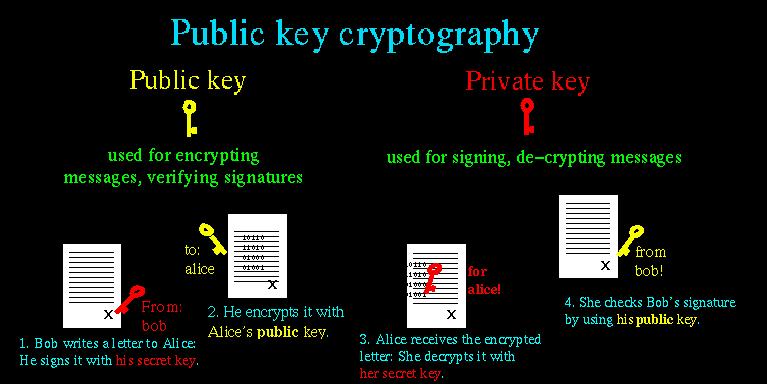
Figure 1. Public-Key Cryptography
Along the bottom of Figure 1 we see how two users' key pairs are used to sign, encrypt, decrypt and verify a message sent from one user to the other. Note that Bob and Alice possess copies of each other's public keys but that each keeps their private key secret.
As we can see, the message's journey includes four different key actions: (1) Bob signs a message using his private key; (2) Bob encrypts it using Alice's public key (NOTE: aside from the fact that Bob has probably kept a copy of the original message, he can not decrypt this message—only Alice can); (3) Alice receives the message and decrypts it with her private key; and (4) Alice uses Bob's public key to verify that it was signed using his private key.
Compared to block ciphers such as blowfish and IDEA, in which the same key is used both for encryption and decryption, this may seem convoluted. Unlike block ciphers, for which secure key-exchanges ensure that both parties obtain the key without exposing the key to eavesdropping or other attacks, PK crypto is easier to use securely.
This is because in PK schemes two parties can send encrypted messages to each other, without first exchanging any secret data whatsoever. There is one caveat: public-key algorithms are slower and more CPU-intensive than other classes of cryptographic algorithms such as block ciphers and stream ciphers (e.g., 3DES and RC4, respectively). As it happens however, PK crypto can be used to securely generate keys that can be used in other algorithms.
In practice, therefore, PK crypto is often used for authentication (“are you really you?”) and key-negotiation (“which 3DES keys will we encrypt the rest of this session with?”) but seldom for the bulk encryption of entire sessions (data streams) or files. This is the case with SSL, and it's also the case with SSH.
Key-negotiation is one of the very first things that happens in any SSH transaction, and the thing that enables a relatively weak form of authentication (username/password combinations) to be used. How the Diffie-Hellman Key Exchange Protocol works is both beyond the scope of this article and complicated (for more information, see the Internet Draft entitled “draft-ietf-secsh-transport-07.txt”, available at http://www.ietf.org/). You need only to know that the result of this large-prime-number hoedown is a session key that both parties know but which has not actually traversed the as-yet-unencrypted connection.
This session key is used to encrypt the data fields of all subsequent packets via a “block cipher” agreed upon by both hosts (transparently but based on how each SSH process was compiled and configured). Usually one of the following is used: Triple-DES (3DES), blowfish, or IDEA. Only after session-encryption begins can authentication take place.
But before we dive into RSA/DSA authentication, let's pause for a moment and consider how key-negotiation can be transparent, given that it uses PK crypto and that private keys are usually passphrase-protected. SSH uses two different kinds of key pairs: host keys and user keys.
A host key is a special key pair that doesn't have a passphrase associated with it. Because it can be used without anybody needing to enter a passphrase first, SSH can negotiate keys and set up encrypted sessions completely transparent to users. Part of the SSH installation process is the generation of a host key (pair). The host key generated at setup time can be used by that host indefinitely, barring root compromise. And Because the host key identifies the host, not individual users, each host needs only one host key. Note that host keys are used by all computers that run SSH regardless of whether they run only the SSH client (ssh), SSH dæmon (sshd), or both.
A user key is a key associated with an individual user and is used to authenticate that user to the hosts he or she initiates connections to. Most user keys must be unlocked with the correct passphrase before being used.
User keys provide a more secure authentication mechanism than username/password authentication (even though all authentication occurs over encrypted sessions). For this reason, SSH by default always attempts PK authentication before falling back to username/password.
When you invoke SSH, SSH checks your $HOME/.ssh directory to see if you have a private key (named “id_dsa”). If you do, SSH will prompt you for the key's passphrase and will then use the private key to create a signature that will send, along with a copy of your public key, to the remote server.
The server will check to see if the public key is an allowed key (i.e., belonging to a legitimate user and therefore present in the applicable $HOME/.ssh/authorized_keys2 file). If the key is allowed and identical to the server's previously stored copy of it, the server will use it to verify that the signature was created using this key's corresponding private key. If this succeeds, the server will allow the session to proceed, possibly after also performing username/password authentication.
(Note: the above two paragraphs refer to the DSA authentication used in SSH Protocol v.2; RSA authentication is slightly more complicated but, other than using different filenames, is functionally identical from the user's perspective.)
PK authentication is more secure than username/password because a digital signature cannot be reverse-engineered or otherwise manipulated to derive the private key which generated it; neither can a public key. By sending only digital signatures and public keys over the network, we ensure that even if the session key is somehow cracked, an eavesdropper still won't be able to obtain enough information to log on illicitly.
Okay. You're ready to enter the next level of ssh-geekdom by creating yourself a user key pair. Here's what you do.
First, on your client system (the machine you wish to use as a remote console) you need to run ssh-keygen. You've got some choices: among other things, you can specify either RSA or DSA keys; key-length; an arbitrary “comment” field; the name of the key-files to be written; and the passphrase (if any) the private key will be encrypted with.
Now that RSA's patent has expired, choosing the algorithm is somewhat arbitrary. On the other hand, the SSH protocol v.2, which is the version submitted to the IETF for consideration as an Internet Standard, uses DSA keys. If you don't care either way, I recommend DSA. But if for any reason you want RSA then go for it. The -d flag sets DSA as the algorithm, otherwise RSA is the default.
Key-length is a more important parameter. Thanks to Adi Shamir's “Twinkle” paper (which describes a theoretical but plausible computer capable of brute-force-cracking RSA/DSA keys of 512 bits or less), I highly recommend you create 1024-bit keys; 768 is okay, but not noticeably faster to use than 1024. However, 2048 is definitely overkill: it isn't significantly more secure, and slows things down noticeably. The default key-length is 1024, but you can use the -b flag followed by a number to specify a different one.
The “comment” field is not used by any ssh process: it's strictly for your own convenience. I usually set it to my e-mail address on the local system. That way, if I encounter the key in authorized_keys files on my other systems, I know where it came from. To specify a comment, use the -C flag.
The passphrase and file names can, but needn't be provided in the command line (using -N and -f, respectively). If missing, you'll be prompted for them.
Listing 1. Generating a DSA User-Key Pair
In Listing 1, I'm creating a DSA key pair with a key length of 1024 bits and a comment-string of mbauer@sprecher.enrgi.com. I let ssh-keygen prompt me for the file to save the key in. This will be the name of the private key, and the public key will be this name with “.pub” appended to it.
In this example I've accepted the default filename of id_dsa (and therefore id_dsa.pub). I've also let ssh-keygen prompt me for the passphrase. The string of asteriks (“******************”) won't actually appear when you enter your passphrase—I inserted those into the example to indicate that I typed a long passphrase that was not echoed back on the screen.
By the way, passphrases are “all or nothing” propositions: your passphrase should either be empty (if you intend to use the new key as a host key or for scripts that use SSH) or should be a long string that includes some combination of upper- and lower case letters, digits and punctuation. This isn't as hard as it may sound; for example, a line from a song with deliberate but unpredictable mispellings can be easy to remember but difficult to guess. The more random the passphrase, the stronger it will be.
That's all that must be done on the client side. All that needs to be done at each remote machine you wish to access from this host is to add the new public key to $HOME/.ssh/authorized_keys2 (where “$HOME” is the path of your home directory). authorized_keys2 is a list of public keys (one per very long line) that may be used for login by the user whose home directory authorized_keys2 resides in.
To add your public key to a remote host you have an account on, simply transfer the file containing your public key (id_dsa.pub in the above example) to the remote host and concatenate it to your authorized_keys2 file. How you get the file there doesn't matter a whole lot. Remember, it's your public key, so if it were to be copied by an eavesdropper en route, there would be no need for concern. But if you want to be paranoid about it, simply do a scp ./id_dsa.pub remotehostname:/your/homedir--see last month's column for scp instructions. To then add it to authorized_keys2, log on to the remote host and enter:
cat id_dsa.pub >> .ssh/authorized_keys2
  (assuming you're in your home directory)
That's it! Now whenever you log in to that remote host using SSH, the session will look something like what you see in Listing 2.
Listing 2. Logging in Using DSA Keys
Notice that when I invoked ssh in the listing, I used the -2 flag: this instructs SSH to try SSH Protocol v.2 only. By default Protocol v.1 is used, but v.1 only supports RSA keys and we just copied over a DSA key. Note also that the key is referred to by its local path/filename: this is a reminder that when we use RSA or DSA authentication the passphrase we enter is only used locally to “unlock” our locally stored private key and is not sent over the network in any form.
There's one last thing I should mention about the simple example above. It makes two assumptions about the remote server: (1) that I have the same username as I do locally and (2) that the remote server recognizes SSH Protocol v.2. If the first assumption isn't true I need to use the -l flag to specify my username on the remote host. (Alternatively, I can skip -l and instead use scp-style username@hostname syntax, e.g., mick@zippy.pinheads.com.)
If Protocol v.2 isn't supported by the remote sshd dæmon I'll have to try again without the -2 flag and let SSH fall back to username/password authentication, unless I've got an RSA key pair whose public key is registered on the remote machine.
To do all this with RSA keys we follow the same steps but with different filenames:
Create an RSA user-key pair with ssh-keygen, for example:
ssh-keygen -b 1024 -C mbauer@homebox.pinheads.com
On each remote host you wish to connect to, copy your public key onto its own line in the file authorized_keys in your $HOME/.ssh directory. (The default filenames for RSA keys are identity and identity.pub.)
Again, if you run ssh without the -2 flag, it will try RSA authentication by default.
What happens if you forget your RSA or DSA key's passphrase? How will you get back into the remote machine to change the now-unusable-key's authorized_keys file? Not to worry: if you attempt RSA or DSA authentication and fail for any reason, SSH will revert to username/password authentication and prompt you for your password on the remote system.
If you wish to disable this “fallback” mechanism and maintain a strict policy of RSA/DSA logins only, change the parameter PasswordAuthentication to “no” in sshd_config on each remote host running sshd. As long as we're talking about the server-side of the equation, note that by default sshd allows both RSA and DSA authentication when requested by an ssh client process. The sshd_config parameters to explicitly allow or disallow these are RSAAuthentication and DSAAthentication, respectively.
Establishing one or more user keys improves authentication security and harnesses more of SSH's power than username/password authentication. It's also the first step in using SSH in shell scripts. There's just one small obstacle to automating the things we've done with PK crypto: even though the PK crypto-based authentication is transparent, the preliminary key-authorization isn't. How can we safely skip or streamline that process?
There are several ways. One is to create a key with no passphrase, in which case none will be prompted for whenever the key is used. (We'll talk about passphrase-less keys in a moment.) Another way is to use ssh-agent.
ssh-agent is, essentially, a private-key-cache in RAM that allows you to use your private key repeatedly after entering its passphrase just once. When you start ssh-agent and then load a key into it with ssh-add, you are prompted for the key's passphrase, after which the “unlocked” private key is held in memory in such a way that all subsequent invocations ssh and scp will be able to use the cached, unlocked key without re-prompting for its passphrase.
This might sound insecure, but it isn't. First, only a ssh-agent process' owner can use the keys loaded into it. For example, if “root” and “bubba” are both logged in and each have started their own ssh-agent processes and loaded their respective private keys into them, they cannot get at each other's cached keys; there is no danger of bubba using root's credentials to run scp or ssh processes.
Second, ssh-agent listens only to local ssh and scp processes; it is not directly accessible from the network. In other words, it is a local service, not a network service per se. There is no danger, therefore, of an outside would-be intruder hijacking or otherwise compromising a remote ssh-agent process.
Using ssh-agent is fairly straightforward: simply enter ssh-agent and execute the commands it prints to the screen. This last bit may sound confusing, and it's certainly non-instinctive: before going to the background, ssh-agent prints a brief series of environment-variable declarations appropriate to whichever shell you're using that must be made before you can add any keys. Simply select these commands using your mouse and right click to paste them at a command prompt to execute them (see Listing 3).
In Listing 3, I'm one third of the way there: I've started a ssh-agent process, and ssh-agent has printed out the variables I need to declare using BASH syntax.
All I need to do now is select everything after the first line above and before the last line (as soon as I release the left mouse-button this text will be copied), and right click over the cursor on the last line (which will paste the previously selected text into that spot). I may need to hit the enter key for that last echo to be performed, but that echo isn't really necessary anyhow.
Note that the above cut and paste will work in any xterm, but for it to work at a tty (text) console gpm will need to be running. If all else fails, you can always type the declarations manually.
Once ssh-agent is running and SSH_AUTH_SOCK and SSH_AGENT_PID have been declared and exported, it's time to load your private key. Simply type ssh-add followed by a space and the name (with full path) of the private key you wish to load. If you don't specify a file, it will automatically attempt to load $HOME/.ssh/identity. Since that's the default name for an RSA user-private-key, if yours is named something else or if you wish to load a DSA key you'll need to specify its name, including its full path, e.g., ssh-add /home/mbauer/.ssh/id_dsa.
You can use ssh-add as many times (to load as many keys) as you like. This is useful if you have both an RSA and a DSA key pair and access different remote hosts running different versions of SSH (i.e., some that only support RSA keys and others that accept DSA keys).
ssh-agent is useful if you run scripts from a logon session or if you need to run ssh and/or scp repeatedly in a single session. But what about cron jobs? Obviously, cron can't perform username/password or enter a passphrase for PK authentication.
This is the place to use a passphrase-less key pair. Simply run ssh-keygen as described above, but instead of entering a passphrase when prompted hit the enter key. You'll probably also want to enter a filename other than “identity” or “id_dsa”, unless the key pair is to be the default user key for some sort of special account used for running automated tasks.
To specify a particular key to use in either an ssh or scp session, use the -i. For example, if I'm using scp in a cron job that copies logfiles, my scp line might look like this:
scp -i /etc/script_dsa_id /var/log/messages.*
   scriptboy@archive.g33kz.org
When the script runs, this line will run without requiring a passphrase: if the passphrase is set to <Enter>, SSH is smart enough to not bother to prompt the user.
But remember, on the remote-host-side I'll need to make sure the key in /etc/script_dsa_id.pub has been added to the appropriate authorized_keys2 file on the remote host, e.g., /home/scriptboy/.ssh/authorized_keys2.
CAUTION: always protect all private keys! When in doubt, chmod go-rwx private_key_filename.
Now it's time to take a step back from all this PK voodoo to discuss a simple feature of SSH that is especially important for scripting: remote commands. So far we've been using the command ssh strictly for remote shell sessions. However, this is merely its default behavior; if we invoke ssh with a command line as its last argument(s), SSH will execute that command line rather than a shell on the remote host.
For example, suppose I want to take a quick peek at my remote system's log as seen in Listing 4.
Listing 4. Running cat on a Remote Host
As shown in Listing 4, the host “zippy” will send back the contents of its /var/log/messages file to my local console. (Note that output has been piped to a local more process.)
Two caveats are in order here. (1) Running remote commands that require subsequent user interaction is tricky and should be avoided—with the exception of shells, ssh works best when “triggering” processes that don't require user input. Also, (2) all authentication rules still apply: if you would normally be prompted for a password or passphrase, you still will. Therefore, if using SSH from a cron job or in other noninteractive contexts, make sure you're either using a passphrase-less key or that the key you are using is first loaded into ssh-agent.
Before we leave the topic of SSH in scripts, I would be remiss if I didn't mention “rhosts” and “shosts” authentication. These are mechanisms by which access is automatically granted to users connecting from any host specified in any of the following files: $HOME/.rhosts, $HOME/.shosts, /etc/hosts.equiv, and /etc/shosts.equiv.
As you might imagine, rhosts access is incredibly insecure since it relies solely on source-IP addresses and host names, both of which can be spoofed in various ways. Therefore, rhosts authentication is disabled by default. shosts is different: although it appears to behave the same as rhosts, the connecting host's identity is verified via host-key-checking; furthermore, only root on the connecting host may transparently connect via the shost mechanism.
By the way, combining rhosts access with RSA or DSA authentication is a very cool thing to do, especially when using passphrase-less keys. See the sshd(8) man page for details on using rhosts and shosts with SSH, with or without PK authentication.
And now we arrive at the payoff (and the section for which I saved room by sacrificing a more complete discussion of rhosts/shosts): port-forwarding. ssh gives us a mechanism for executing remote logins/shells and other commands; scp adds file-copying. But what about X? POP3? FTP proper? Fear not, SSH can secure these and most other TCP-based services!
Forwarding X applications back to your remote console is extremely simple. First, on the remote host edit /etc/ssh/sshd_config and set “X11Forwarding” to “yes” (in OpenSSH version 2x, the default is “no”). Second, open an ssh session using the authentication method of your choice from your local console to the remote host. Third, run whatever X applications you wish. That's it! Needless to say (I hope), X must be running on your local system; if it is, the remote application will send all X output to your local X desktop.
Listing 5. Forwarding an xterm from a Remote Host
After the xterm & command is issued, a new xterm window will pop up on the local desktop. I could just have easily (and can still) run Netscape, the GIMP or anything else my local X server can handle (and which is installed on the remote host, of course).
X11 is the only category of service that SSH is hard-coded to automatically forward. Other services are easily forwarded using the -L flag. Consider the session shown in Listing 6.
Listing 6. Using ssh to Forward FTP
The first part of the ssh line looks familiar: I'm using SSH Protocol v.2 and logging on with a different username (mbauer) on the remote host (zippy) then locally (mick@homebox). The -f flag tells ssh to fork itself into the background after starting the command specified by the last argument, in this case sleep 20. This means that the ssh process will sleep for 20 seconds instead of starting a shell session.
Twenty seconds is plenty of time to start our tunneled FTP session, which is actuated via the magic following the -L flag. -L defines a “local forward”: a redirection from a local TCP port on our client system to a remote port on the server system. “Local forwards” follow the syntax local_port_number: remote_hostname: remote_port_number where local_port_number is an arbitrary port on your local (client) machine, remote_hostname is the name or IP address of the server (remote) machine, and remote_port_number is the number of the port on the remote machine you wish to forward connections to.
Note that any user may use ssh to declare local forwards on high (greater than or equal to 1024) ports, but only root may declare them on privileged ports (less than 1024). Staying with the above example, after ssh “goes to sleep” we're returned to our local shell prompt and have 20 seconds to establish an FTP connection. Note that in Listing 6 I'm using ncftp: this is because ncftp supports the -p flag, which allows me to tell it to connect to my local-forward port of 7777. Note also that I give ncftp the name of my local system rather than the remote host's; ssh will take care of routing the connection to the remote host.
After 20 seconds the ssh process will try to end, but if an FTP session using the local forward is still active, then ssh will return a message to that effect and remain alive until the forwarded connection is closed. There's nothing to stop us from opening a login shell rather than running a remote command (we'll just need to omit the -f flag and then use a different virtual console or window to start FTP, etc.). If we do use -f with sleep, we are not obliged to sleep for exactly 20 seconds—the sleep-interval is unimportant (as long as it leaves enough time to start the forwarded connection).
For that matter, you can run any remote command that will achieve the desired pause, but it makes sense to use sleep because that's the sort of thing sleep is for. One more tip: if you use a given local forward every time you use ssh, you can declare it in your very own configuration file in your home directory, $HOME/.ssh/config. The syntax is similar to that of the -L flag:
LocalForward 7777 zippy.pinheads.com:21
In other words, after the parameter name “LocalForward” you should have a space or tab, the local port number, another space, the remote host's name or IP address, a colon but no space and the remote port number. You can also use this parameter in /etc/ssh/ssh_config if you wish it to apply to all ssh processes run on the local machine.
Those are some of the advanced uses of SSH and OpenSSH. For now I must bid you adieu and refer you to the man pages for further details and still more features. Go forth and encrypt!

