
SuSE Linux 7.0

Manufacturer: SuSE Inc.
URL: http://www.suse.com/
Price: $69.99 US
Reviewer: Stew Benedict
If you like to measure your Linux distributions by the pound, SuSE Linux Professional 7.0 wins hands down. With 1,500 applications on 6 CDs and a DVD, you'll be hard pressed to come up with something that is not included.
In addition to the above media, SuSE 7.0 comes with two floppies, a boot disk and a modules disk and four books, Quick Install Manual; The Handbook, a technical guide; Configuration, which covers KDE, hardware installations and general Linux command-line usage; and Applications which covers StarOffice, Netscape, Acrobat Reader, the the GIMP, Sane and other multimedia applications.

Figure 1.The SuSE Linux 7.0 Package
The SuSE Linux 7.0 Package is the “other” OS for my CAD work. I had a 6GB drive available, so I pulled the other drive and dropped this one in. This is just being overly cautious, I never know when I'll get a call and need to run that “other” OS, and I need to be able to get back up ASAP. I did another install before this one, and the installer does recognize and offer to setup LILO for other OSes. The machine is a Pentium 166 with 80MB RAM. I went into the BIOS set up, re-scanned for the new HD and set the boot options to boot from CD.
This brought me to a text-based screen that said “Have a Lot of Fun!” and then proceeded into a normal kernel boot, scanning for devices, etc. One addition I noticed was the kernel scanning for braille devices—a nice touch. In fact, the box says SuSE Linux is entirely suitable for use by the blind. I also noticed that software RAID support is included in the provided kernel. I recently implemented this at a client's site, and it has worked out quite nicely, with two drives in a RAID 1 array for a redundant, mirrored system.
From the initial boot, the screen went blank, the speaker emitted a beep and that was it! At this point, according to the install, I should have been in YaST2, the SuSE graphical installer. Apparently I have issues with my video card, an ATI Mach64-based card. The notes in the CD folder mention typing “manual” at the LILO prompt for expert installation with YaST1, so I reboot and try this route, and the install goes into YaST1. This time I get to a “dialog”, text-based install that asks my preferred language and proceeds to the option of a text-based YaST (see Figure 1), or graphical YaST2 (see Figure 2). I decide to live dangerously and try YaST2. This time I do get to the graphical interface, a little grainy at 800x600, but functional. So far, no mouse, but I can tab through the options, and it gets me to a screen where I can select my mouse type and port. Now we are off and running. Next we get to the keyboard layout and time zone, after which I am asked whether I want to upgrade or do a fresh install. I choose the fresh install. Next we have a choice of installs:
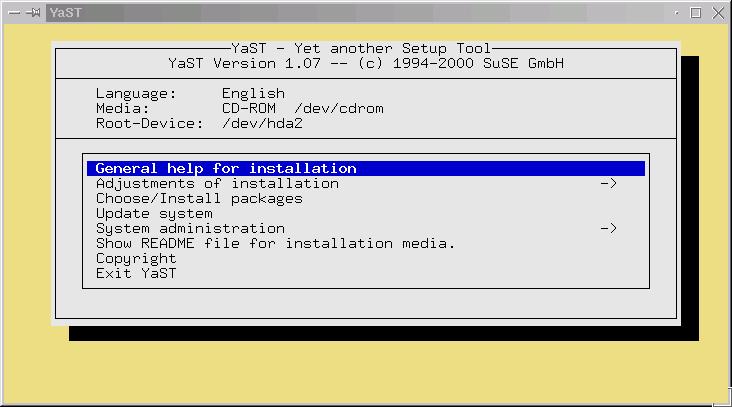
Figure 1. YaST
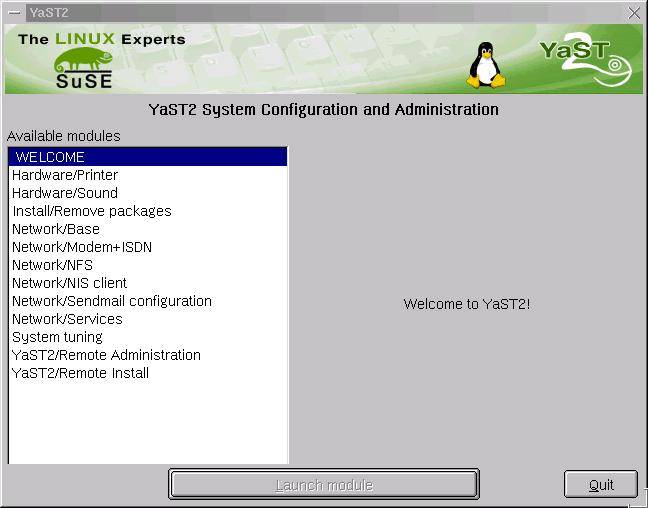
Figure 2. YaST2
Almost Everything
Minimal
Default
Default with Office
Detailed Selection.
I choose Default with Office so I can appraise what gets installed by default.
Next I'm asked where I would like LILO to be installed and go with the suggested /dev/hda.... Then I personalize the installation with my first name, last name, login and password, and lastly, the root password I would like to use.
The default partitioning scheme sets up just three partitions: /boot, / and swap. I back up and opt for custom partitioning, which allows me to choose between ext2 and ReiserFS. I set up / and /boot, /usr and /home. The install gives you an option at this point to save your settings to floppy so, in case there is a problem, you can get back into where you left off.
While we're on partitioning, I should mention a little about ReiserFS. This is a relatively new journaling file system for Linux that boasts certain improvements over the standard ext2 file system. Journaling, if you're not familiar with database systems, implies that each file system transaction is written to a journal or log. It's possible to replay this journal in the event of a catastrophe and recover the lost transactions. The journal is flushed periodically once it is certain the transactions have actually taken place.
Here's the freshmeat.net entry on reiserfs:
reiserfs is a revolutionary new approach to file system design which stores not just file names but the files themselves in a B*-tree. It is a generation ahead of alternatives that use older, plain B-tree technology and that cannot store the files themselves in the tree.
Since I have some extra space on this drive, and don't quite know what to expect with ReiserFS at this point, I set up duplicate /home and /usr partitions, one with ext2 and one with ReiserFS. The chart below shows the layout I came up with:
/ 1GB ext2 /boot 7.8MB ext2/usr 1.5GB ReiserFS/usr2 1.5GB ext2/home 900MB ReiserFS/home2 900MB ext2swap 160MB
I'll cover more on ReiserFS later in the article, once we have things installed and set up.
The partitions are set up, and we move to the installation of 341 packages. As the install progresses, you get a typical status screen displaying the package name being installed, a short description, and an overall progress update and percentage of disk space consumed. The installation I selected uses a little over 1GB of space.
At 242 packages, I am informed that the LILO boot sector has been set up, and I can restore the old one with the command:
lilo -u /dev/hda
Then the installer starts the new system, and a text screen tells me the base system has been successfully installed. The graphical YaST2 continues, asking for CD2, then resumes installing packages. Another pause at package 326, and I'm asked for CD3. Another pause at 331 for CD4.
Now we move on to X set up. I am asked for my monitor, a Mag MX17, and then the video card, which it correctly identifies as an ATI and sets for 1240x1168@16bpp. I try the test at this resolution, my color palette shifts to an unusual look and the system appears to lock up. I can't switch to a different VT, nor does CTL-ALT-Backspace or CTL-ALT-DEL have any effect, so I resort to the reset button. The system boots into SuSE and runs checks on the file systems since it wasn't shut down properly, then gets me back into YaST2 at the monitor configuration. This was nice. Even though I hit a major problem, the install recovered and resumed where I left off. This time I try a more conservative setting, 640x480@8bpp—and get a black screen and another lockup. Hmm. Seems the ATI driver has a problem with my card. There is no option to override with a generic SVGA card, so I opt for no X11 and move on. The install does tell me I can set X up later with SaX.
From here, YaST2 moves on to setting up the printers, sound, Internet and network. I do not have a modem on this machine, and YaST2 tells me it has not detected a modem or ISDN adapter. It does recognize my Creative sound card and my 3Com NIC. I go ahead and set up my IP address with the default gateway through my file server and a host name with DNS pointing to my ISP's name servers. The install checks to certify that I have entered valid IP addresses.
YaST2 tells me the NIC was configured correctly and networking is set up, which I verify by pinging the box from my file server. Looks good!
The sound card setup allows me to set the volume and test, and it plays a nice little orchestral piece—good again! Later on I look at the loaded modules, and it looks like sound is handled by ALSA.
For printing, I have an HP print server on the LAN with a NEC Silentwriter and an HP Deskjet 693C. The installer scanned the local LAN for hosts and failed to find anything, probably because I'm not running DNS on the server. Since I have a custom lpr script on the server that powers up my printers via an X10 control module when I need to print, I route the print jobs to the file server, using its IP address, and it takes care of the filtering too. One minor annoyance here is the first network printer is called “remote” with no opportunity to override that name except on the second printer. I would rather have preferred setting it to something more descriptive.
That was it on this screen, so I moved on to “Finish Installation”, and was told I could log in as “stew”. The manual reminds you to change your BIOS settings back to boot from hard drive and/or floppy.
I log in, do a ps -ax to see what is running—looks normal enough, httpd, lpd and several copies of nscd, which the man pages tell me is a name server caching dæmon—okay. lynx localhost gets me to some local SuSE pages—good. My server is on line, so I try lynx on some remote web pages, and they come up too. Looks like networking is working fine.
I take a quick visit to the SuSE web site and search their support database to see if I see anything on my X issues, but the info seems to refer only to SuSE6.4 and older versions, so I forge ahead on my own.
To see if I could pick up anything on my X issues I do an
rpm -q -a | grep mach
from the command line. I see the following:
xmach64-3.3.6-44This explains my problems since YaST2 was trying to use the XFree4.0 server. Doing a similar search on xf
rpm -q -a | grep xf86
xf86-4.0-55
xf86_3x-3.3.6-44
It looks like sticking with XFree3.3.6 would be the wise thing to do. I log out and re-log in as root to finish setting things up.
I was able to run SaX from the command line and correctly configure XFree3.3.6 by manually choosing my ATI video card, an Xpression card. Then I was able to fine tune the settings and get it set up for 1024x768@16bpp. The card is an older card with only 2MB VRAM, so this is about as good as it gets. Running startx, I am in the KDE desktop. SaX uses XFree 3.3.6 vs. SaX2, which uses XFree4.0.
Okay, now we can run startx and get into X, which defaults to the KDE desktop environment. I run the KDE control panel and try some of the settings. System sounds are disabled by default, and I notice that none of the default KDE sounds are associated with their actions. I set up the associations and enable sound, and they work as expected. I also tried an audio CD with KSCD, and it plays as expected, as did an MP3 I grabbed off my file server.
The rest of the KDE settings for colors, desktop, etc., are the same as those with which I'm familiar in other distributions. This is KDE 1.1.2, not the version 2 that everyone is talking about, although the beta comes on the SuSE 7.0 CDs.
If you prefer different Window managers or desktop environments, those are included too. I did not see the switchdesk application, common on Red Hat-based systems. When you have X working though, you can enable the graphical login kdm via YaST. Once this is done you have a choice of KDE, Windowmaker, twm or fvwm2. An interesting tool is DyDe (see Figure 3), a SuSE dynamic desktop configurator, that allows you to mix-and-match window managers and desktop environments on the fly. Once I went back into YaST2 and installed them, GNOME, Enlightenment, Sawmill and Xfce were also available.
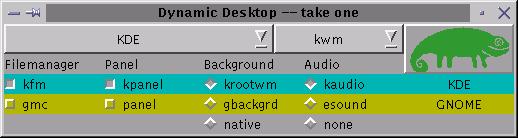
Figure 3. Dynamic Desktop Configurator
I was pleasantly surprised to find a new version of the GIMP, version 1.2 prerelease when I went to do the screenshots for the article. The GIMP is the favorite graphics tool of most Linux users, and it looks like the new version adds some nice features. Xsane was also installed by default and works nicely with my HP ScanJetIICX.
The kernel version installed is 2.2.16, although the box claims 2.2.17-pre. Looking on the CD, it looks like source is there for version 2.2.16 as well as an assortment of precompiled modules in /lib/modules/2.2.16.
Logging in as a normal user, the KDE desktop is set up with icons for Netscape, StarOffice and icons for both my CD and CDR, my Zip drive and Bernoulli drive. You are also greeted with a SuSE welcome screen (see Figure 4). Clicking the StarOffice icon launches the StarOffice 5.2 Workstation installation, which lets you do an individual install for each user. This only requires 1.6MB of space per user in their home directories. StarOffice still uses their Star Desktop work space, but I understand that they will be breaking the applications up in the open-source version to come. With Netscape 4.73 up and running, I initiated a call to the Internet from my server and successfully navigated to the SuSE web site, so my gateway setup is working. The local Apache server launches a cute page with links to local documentation, as well as SuSE's site (see Figure 5).
Figure 4. SuSE Welcome Screen
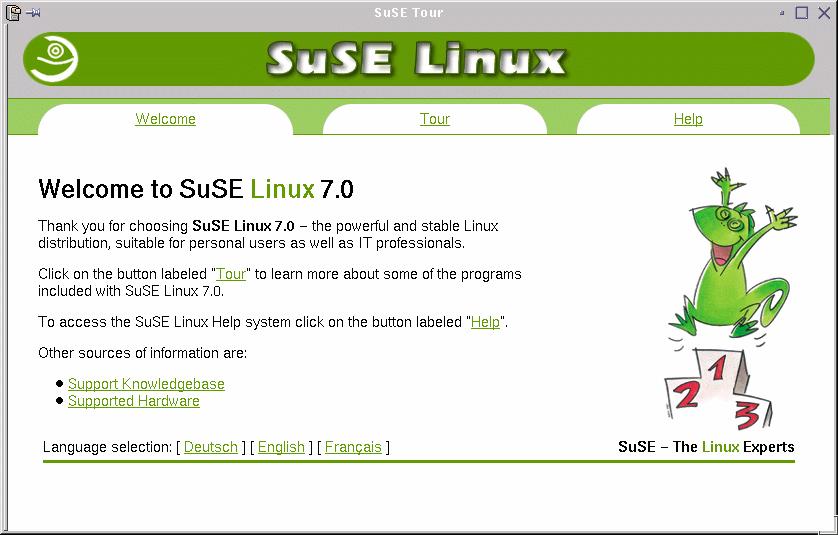
Figure 5. SuSE Links Page
Even after all these years, pine is still my e-mail reader of choice, and there it was, like an old friend, along with fetchmail. If you go for the GUI e-mail programs, kmail and Netscape messenger are installed by default with many more on the CDs.
There's also an alternate file manager for KDE—kruiser, which is an MS Explorer-style file browser.
On the commercial applications side, there are an assortment of free and demo versions including VMware, ADABAS D Personal Edition, Arkeia Backup, Lutris Enhydra, Hummingbird Exceed and Via Voice.
I won't go into all of the packages installed or on the CD, or this would turn into a SuSE 7.0 supplement. Suffice it to say with the wealth of applications provided, I don't think you will be needing to go to freshmeat or rpmfind for a while.
Since the journaling aspect of ReiserFS seems to be what everyone talks about, and this system is essentially virginal, I decided to do a completely unscientific test. I backed out of X, reverting to the graphical kdm login, then switched to VT1, logging in as root, typed “sync” to sync the file system and did the unthinkable—hit the power switch. As you might expect, when I booted back up, the kernel notes that the file system was not closed out properly and proceeds to run fsck on the ext2 partitions. For the /usr2 and /home2, at 1.5GB and 900MB, this takes 20-40 seconds each and recovers without any serious issues. Remember, I did do a sync, which flushes the disk cache buffers. For /usr and /home, which are ReiserFS, the kernel runs reiserfsck, and it completes two to seven journaled entries in one second and moves on—nice! Just for laughs, I repeated this test a couple of times with and without syncing, with similar results. Don't use this as your first line of defense for catastrophic failure, but it does look like a good way to get up and running quickly in case of such an emergency.
The messages I read on the Net talked of speed issues in using ReiserFS instead of ext2. To get a look at this, I downloaded bonnie from freshmeat.net and ran a couple of tests. In both cases, I was the only one logged into the system via Telnet with kdm running but no X session. All the rest of the system dæmons were those running by default.
On the single 200M file there did not seem to be much difference. On the 30 files tested, it looks like ReiserFS does have a bit of a cost in terms of speed, looking at the /sec readings. Again, this is not exactly a controlled, scientific test, although I did run the tests a second time with similar results. I also ran them as root, so it did not seem to be a permissions issue. In actual use, I did not notice any performance hitch in running applications. Whether you want to go for the speed of ext2 or the safety of journaling is up to you. I'll leave ReiserFS running on this system for a while.
In summary, it looks like SuSE 7.0 Professional has most of what Linux users want in a distribution and then some. The “Default with Office” had almost everything I would want in a desktop system. All of my hardware was detected and set up except my IDE-CDR, which would require a kernel recompile to burn CDs with it. I did have the initial problem with my ATI video card and YaST2, but the install had a workaround for this. I did not call SuSE support, but the package includes 90 days of installation support via telephone, e-mail and fax. SuSE's web-based support database is pretty comprehensive as well, although apparently 7.0 is still too new to have many entries. I recently did a 6.4 install on my iMac, and several of the issues I had there were covered in the database. If you are accustomed to a Red Hat-based distribution, some of the configuration tools and file locations, as well as the init scripts are a little different, but not a big issue in my book. For the $69.95 US they are asking at SuSE Shop, it's a steal compared to some other OSes.
Stew Benedict is a systems administrator for an automotive manufacturer in Cleveland, Ohio. He is also a freelance consultant, running AYS Enterprises, specializing in printed circuit design, database solutions and utilizing Linux as a low-cost alternative to commercial operating systems and software. He has been using and promoting Linux since about 1994. When not basking in the glow of a CRT, Stew enjoys time with his wife, daughter and two dogs at his future (not too much longer!) retirement home overlooking Norris Lake in the foothills of the Smokies in Tennessee.

