
A Profile of SoundTracker
SoundTracker is the most feature-packed of all the trackers I've used with Linux. Its interface presents all the program's tools on a single screen, making it easy to understand and a pleasure to use. As you will see, tracking with SoundTracker is a simple process and great fun.
SoundTracker is available in full source code, as well as RPM and tarball binaries. Update patches are also available to apply against previous version source trees. The following instructions detail building SoundTracker from the full source package.
Before building the program, study the Requirements page on the SoundTracker web site and verify that you have all the necessary libraries and development tools. SoundTracker runs in the X Window System, so most of what you will need should be included with any mainstream Linux distribution. However, if you're running an older Linux distribution, you may need to acquire the most recent GNOME and GTK packages to build and utilize all of SoundTracker's features. Visit the the project web sites at http://www.gnome.org/ and http://www.gtk.org/ to pick up the latest packages. You should also install Michael Pruett's libaudiofile, available at http://www.68k.org/~michael/audiofile/. SoundTracker's installation documentation also specifies what you need to build the program, so be sure to read the INSTALL and README files for the latest instruction updates.
After you have downloaded SoundTracker and acquired the necessary support software, you're ready to begin building SoundTracker. Type ./configure -help for a list of options you can select to customize the build process, then run ./configure (with your selected options) to create the makefiles needed to compile SoundTracker. If no errors were reported by the configuration procedure, you can then type make and watch the compilation take place. If no errors were reported by the make process, become the superuser by typing su root and entering your root password, then type make install. The tracker is now ready to use; you can start it by simply typing soundtracker in an xterm window.
As of version 0.5.5, the documentation for SoundTracker consists of a single README file, but little more is needed. Trackers all follow a similar design, and the reference materials found on the United Trackers and MODPlug Central sites will help you understand the basic use of almost any tracker.
If you have never used a tracker, you might want to pick up some mods to load and play in SoundTracker. The resource listings at United Trackers and MODPlug Central will guide you to some superb mod collections. Pick some in either MOD or XM format, load them into SoundTracker, then listen, study and learn.
All sounds used in mods are sampled sounds, so you'll want to build a collection of samples that meets your compositional needs. You can rip samples from existing modules, or you can gather sounds from the various sample collection sites listed on the United Trackers and MODPlug Central web pages. SoundTracker can load any audio file type supported by libaudiofile, so you can freely mix WAV, AIFF and AU files in the same module.
SoundTracker uses only monaural samples. If you try to load a stereo sample, the program politely informs you of that fact, then gives you the option of loading either the left or right channel or a mix of the two.
Spend some time preparing your samples. Tuning and looping are basic considerations, and SoundTracker supports extensive editing of a sample's volume and panning. Although a sample editor is included in the program, you may want a more powerful sound file editor such as MiXViews, Snd or DAP for finer editing. These dedicated editors provide greater resolution, more effects processing and file conversion routines not available in the editors included with trackers.
You may find it helpful to load a number of samples into instrument locations before beginning the tracking process. SoundTracker provides 128 locations for your samples, so you can load large libraries of sounds, then scroll through the Instr number box (just above the Module Info tab) to quickly find the sound you want. You can easily test any selected sound by pressing one of the “pitched” computer keyboard keys (see below for more details).
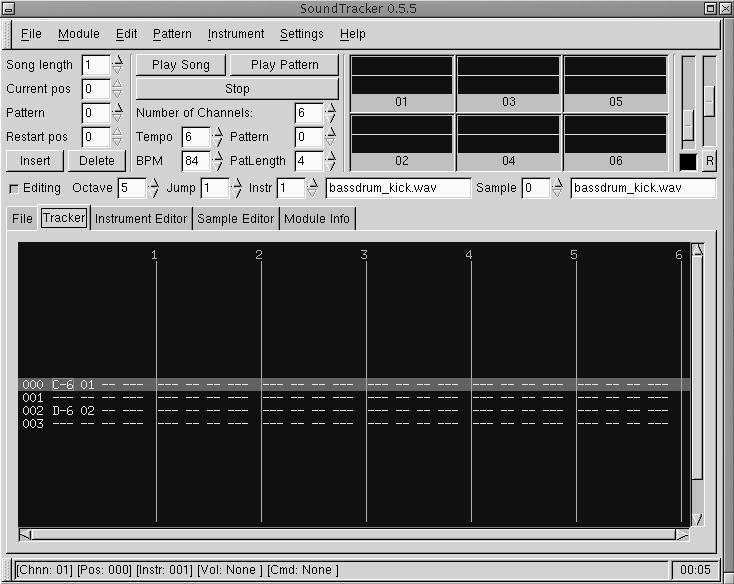
Figure 1. SoundTracker's Tracker Display
Figure 1 shows the basic track display from SoundTracker. I'll discuss how the data got there in a moment, but for now you only need to know that each of the six columns represents a track (also called a channel), and each of the four rows represents a beat.
Here is the breakdown of the rows in the first track in Figure 1:
Beat Pitch Instrument Volume Effect command Effect parameters000 C-6 01 -- -- --001 -- -- -- -- --002 D-6 02 -- -- --003 -- -- -- -- --
We see that Instrument #01 (a bass drum sample) plays on the first beat with a pitch of C6, the default value for volume, and with no command information for effects processing. Instrument #02 (a snare drum sample) is played on the third beat with a pitch of D6. If we pressed the Play Pattern button, we would see the track display repeatedly scroll the columns past the rectangular cursor, and we would hear a continuously looping pattern of four beats with bass and snare drums on beats one and three.
Instrument samples are played at the indicated pitches, and the instrument numbers may be changed within the channel. Values can carry or ramp from beat to beat. The effect command and effect parameter values define the type of effect and its intensity, and effects can be dynamically controlled beyond the first instance of a sound. Note that defining varying pitches for your percussion instruments gives a more realistic sound to drum tracks.
Taken all together, the events in Figure 1 make up a single track in a pattern. Each pattern can be up to 64 beats long and can contain up to 32 tracks. Tracks and patterns can be cut, copied and pasted. By default, all tracks are set to play together. Left click on a track's oscilloscope to toggle the track's mute status, right click the scope to solo the track.
As shown in Figure 1 (SoundTracker's default display mode), the program's global organizing controls are at the top left, a bank of oscilloscopes sits at top right, and the file manager, tracking display, instrument editor and other tools are organized in a tabbed block in the bottom half of the screen. We have seen what a track looks like, now let's find out how to create one of our own.
You can insert events into a track by using either your computer's QWERTY keyboard or an external MIDI keyboard. Both methods can be used in either real-time mode (entering and deleting events while the pattern loops) or in step-entry mode (inserting and deleting events one by one, manually incrementing the cursor position). Let's look at the QWERTY method first.
Event entry is easy with a two-octave span of notes mapped to your computer keyboard as is demonstrated in Table 1.
Table 1. Two-Octave Span of Notes
You can change the starting octave in the Octave scrolling window to the right of the Editing button (see Figure 1).
Click on the Editing button, then use the computer keyboard to audition and insert your instruments (samples) into your tracks. Just click Play Pattern while in Editing mode, and you can insert events in real time while the pattern loops (this method is easier and more accurate at slower tempos). Alternately, you can add events one by one by scrolling to an entry point and inserting sounds in step-entry mode. Events are deleted simply by selecting them with the tracker display cursor (or waiting for the event to scroll by in real time) and hitting the Delete key.
You can use the keyboard in other ways as well. Controls are available for song or pattern play, and nearly all the editing functions. The combined keyboard/mouse interface is easy to master, and you'll quickly be able to compose in SoundTracker with ease. (See Table 2 for a list of the keyboard accelerators.)
If your Linux sound system utilizes the ALSA drivers, and if you have configured SoundTracker for ALSA support, you can use an external MIDI keyboard to enter events. MIDI input is basically identical to the QWERTY method. However, you'll need to configure SoundTracker for MIDI input.
Open the Settings/MIDI Configuration menu from the top menu bar. Clicking the Volume button lets SoundTracker use the MIDI velocity value for the volume of the inserted event. Clicking on the channel button locks MIDI input to a particular track, so that MIDI Channel 1 equals Track 1, MIDI Channel 2 equals Track 2 and so forth. If you select the MIDI channel button, you must change the MIDI Out channel on your keyboard to input data to another track. If you leave the button unchecked, you can simply use the Tab or Shift-Tab keys to select a track for recording (i.e., you won't need to change your MIDI Out setting on your keyboard). Set the client and port numbers if necessary (the defaults work fine for me).
Tracking (i.e., creating a module) in SoundTracker is a simple five-step process:
Set your pattern number and length with the controls in the upper-left block of the display.
Click on the Editing radio button and select Instrument 1 in the global section.
Click the Sample Editor tab to load the sample you want for that instrument.
Click the Tracker tab, use the arrow keys to position the cursor box over the first event entry space for Instrument 1 and select the note desired from the QWERTY or MIDI keyboard as described above. Remember, any note can be deleted simply by selecting it again and pressing the computer keyboard's Delete key.
Repeat this process for each beat until you have the pattern and instrumentation desired. You can play your pattern at any time, a feature that greatly speeds up the composition process.
We have already seen that the event entry line has four fields, shown as columns of numbers, indicating the pitch chosen for the sample playback, the instrument number, the volume and the effects field. The effects field combines the effect command and parameter value into one three-digit entry. Only the pitch indicator follows the traditional pitch/octave notation; all other values are represented by decimal or hex numbering (you can select the representation you prefer).
The effects command not only adds typical effects such as vibrato, tremolo, LFO and filtering, it also provides signals to start the subsequent pattern, jump to a new position in the event list, and even jump to a new position and loop from that point for a specified time. It also provides a fine-tuning parameter for more accurate intonation of a sample at a particular pitch level.
The highlighted line in Figure 2 shows a typical tracker event entry: a bass instrument with a pitch of C6 and the defaults for volume and effects. The entry is located on the first beat of a four-beat pattern.
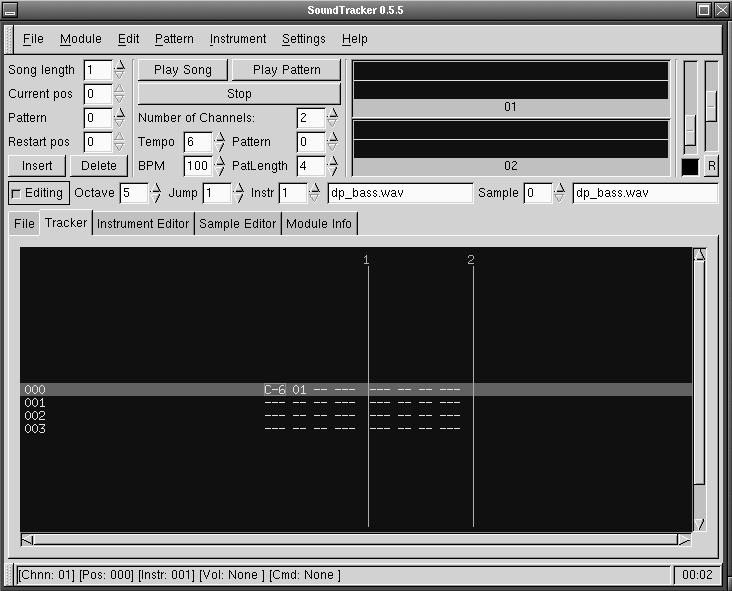
Figure 2. A Single Bass Note in a Four-Beat Pattern
Figure 3 shows the procedure carried out to create a C major scale, rising over a period of 16 beats, from C6 to C7 (the highlight line is mid-scale at F6). In Figures 1 and 2, the tempo has been set to 100BPM (beats per minute), and only two channels are represented, with nothing in channel two yet.
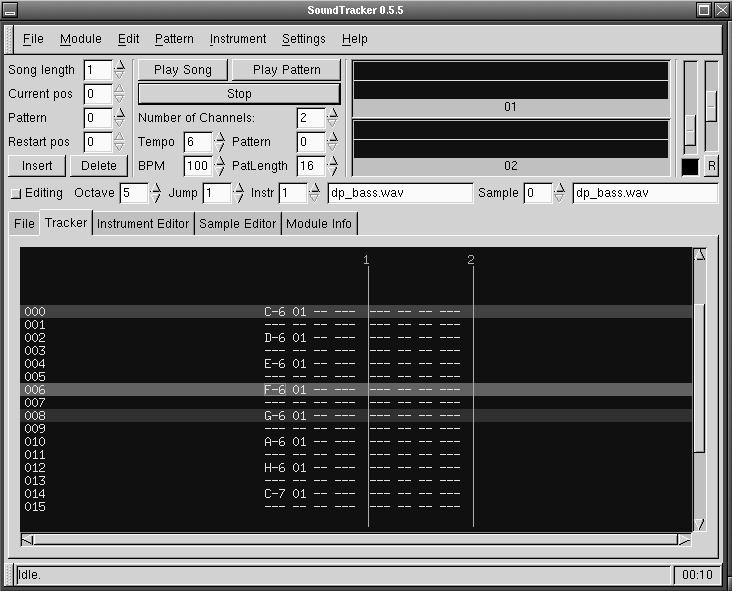
Figure 3. A Scale Played by the Bass Instrument
Note that SoundTracker provides a Tempo control as well as a BPM setting. This control is perhaps best thought of as a kind of “throttle” over the BPM setting. A Tempo of one is the fastest, and all higher numbers gradually slow the speed of the pattern playback. The default Tempo of six matches the BPM to the speed of a metronome with the same BPM setting. Note also that Tempo and BPM are global, so changing their settings will affect the speed of all patterns in your song.
The pattern length and number of channels can be varied at will in the global section. Changing the pattern length or the number of channels in the global section immediately updates both the global and tabbed sections.
Figure 4 shows a more complex pattern from a completed song. The screenshot was taken while looping pattern five, so you can see the activity of the individual instruments in the oscilloscopes at the upper right. The pattern is set to 16 beats (4/4 time) with events added for bass guitar, bass drum, snare, hi-hat, cymbal and guitar.
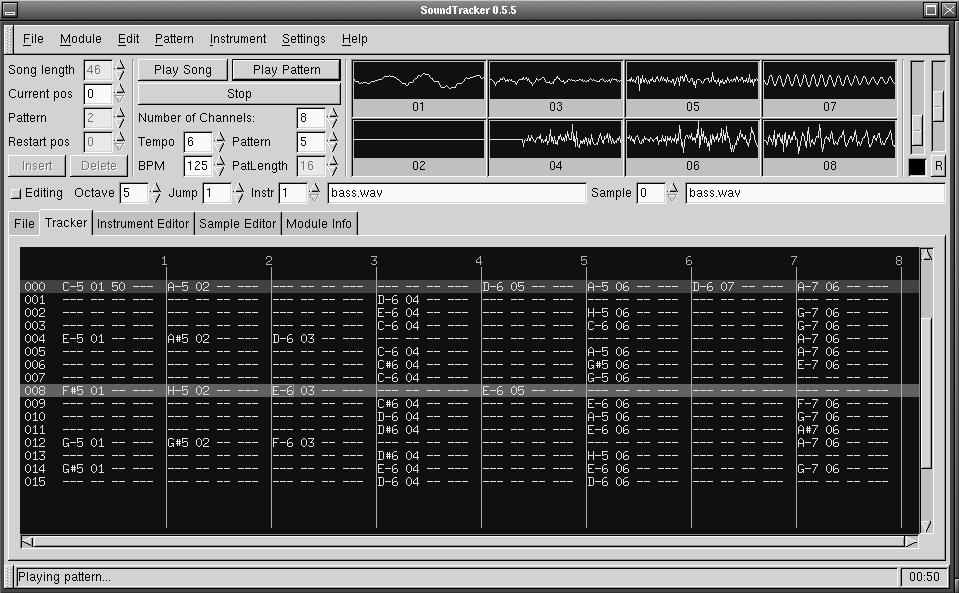
Figure 4. A More Complex Pattern
After creating patterns, you chain them together to create a completed song. This is also an easy procedure. In the upper left corner, set the song length desired (the Insert/Delete buttons can also dynamically control Song length), use the Current Position box to select an insert location point for your pattern, and then use the Pattern box to select which pattern will play at that location. In the example shown in Figure 4, the song length is set to 46 patterns. The display can show only one pattern at a time, but scrolling the Current Position box would reveal that positions 0 through 3 are taken by pattern 2, positions 4 through 6 are occupied by pattern 1, position 7 belongs to pattern 11 and so forth.
When completed, files can be saved in the common XM (Extended Module) format. You can also render your XM to a WAV file directly from SoundTracker.
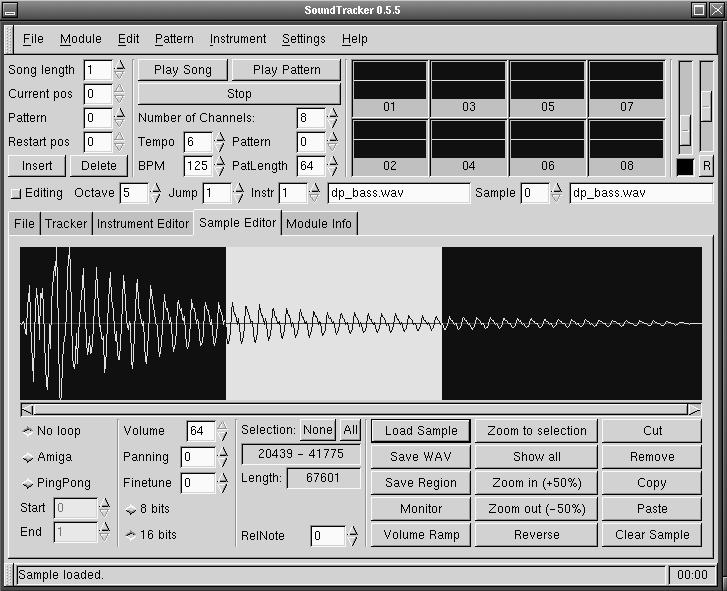
Figure 5. SoundTracker's Sample Editor
Figure 5 shows a bass WAV file loaded in the Sample Editor. SoundTracker's editor is not intended to be a full-fledged sound file editing environment, but it does provide basic cut/copy/paste operations, along with the loop mode settings and initial volume, pan and fine-tune controls. It also has the option to load 8-bit sound files.
You can record your own samples directly into SoundTracker by clicking on the Monitor button. When the Sampling Window appears, click on the Start Sampling button and record away.
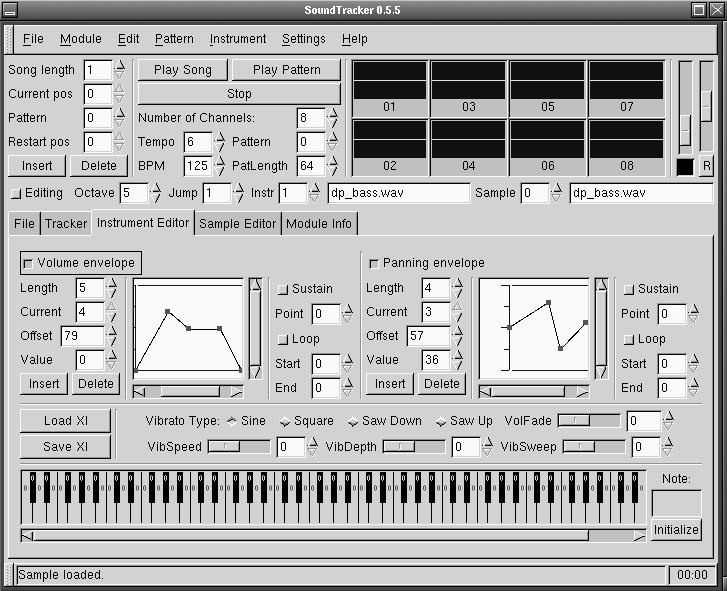
Figure 6. SoundTracker's Instrument Editor
Figure 6 shows the Instrument Editor display where you can edit the volume and pan envelopes of a sample (while the song or pattern is playing, if you wish). This panel also provides a keyboard for mapping your samples across an instrument's range.
XI instruments can be loaded and saved in the Instrument Editor as well as from the Instrument menu in the top menu bar. These instruments are samples specially prepared for use in trackers with defined loop points and envelopes for volume and panning as well as vibrato effect information. You can load and edit your sounds in the Sample Editor, edit them further in the Instrument Editor, and save them as your own XI instruments simply by selecting the Save XI option from either the Instrument Editor tab or the top menu bar Instrument menu.
For more information regarding the XI instrument format, please see the file xi.txt in the SoundTracker doc directory.
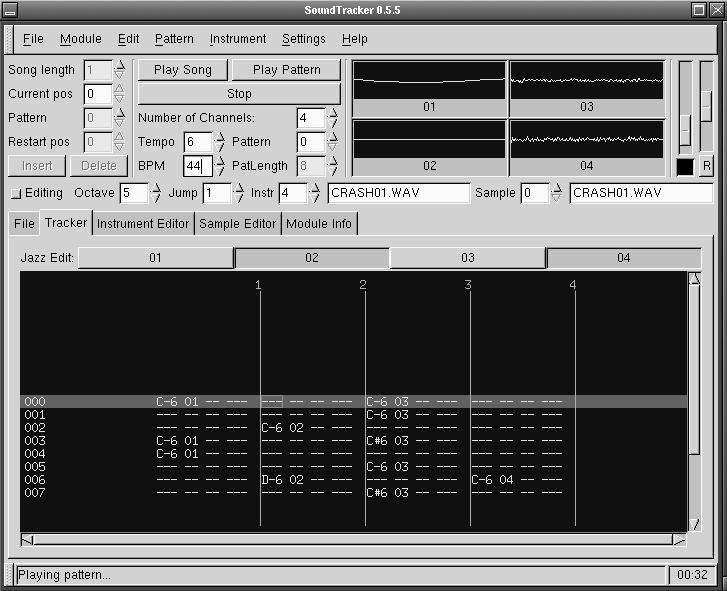
Figure 7. Tracking in Jazz Edit Mode
With the Tracker tab displayed, select Edit/Jazz Edit Mode from the top menu bar. A row of buttons will appear across the top of the Tracker panel, corresponding to the number of channels in your pattern. Click on any of these buttons to define the number of tracks to remain active for Jazz Edit mode. Now, when an event is entered into an active channel, the cursor box will automatically advance to the next active channel.
Figure 7 shows the Tracker display opened in Jazz Edit mode. The pattern has four channels, with channels 2 and 4 selected for Jazz Edit mode. After entering an event into Track 2, the cursor box will advance to the next beat in Track 4; after entering an event in Track 4, the cursor will return to Track 2 and so on. You can override this activity at any time by using the Tab or Shift-Tab keys to relocate the cursor box to another channel.
Jazz Edit is very handy in real-time tracking. In Figure 7, channels 1 and 3 will continue to play as usual while you shuttle between the tracks selected for Jazz Edit mode. Note that you can change your instrument numbers in real time and even load new samples while your pattern plays (though larger samples will likely cause playback to “hiccup”). In fact, real-time edits can be made in any entry box not greyed-out during playback.
You can modify your computer keyboard's note entry behavior by clicking on the Volume Envelope button in the Instrument Editor and then clicking on the Sustain button (seen at the right side of Volume Envelope display in Figure 6). Now, when you play your keyboard, it will respond like a real synthesizer keyboard, with your “note-off” following the key release. You may need to adjust your audio buffers for the shortest possible latency (open the Settings/Audio Configuration menu and select Editing Output from the key at the top of the dialog box). In effect, your keyboard can now be played with polyphony (simultaneous sounds) as high as the number of channels selected for Jazz Edit mode.
SoundTracker is the most developed Linux tracker available, and it continues to grow in power and flexibility. The program is consistently maintained by its author, often incorporating features and fixes submitted by users corresponding via an active and helpful mail-list. Performance is quite stable, and, as you have seen, the program is very easy to use. Whether you're a seasoned pro or a complete newbie to tracking, SoundTracker is a first-rate tool for creating your Linux mod masterpieces.
The author sends special thanks to Michael Krause and “Mister X aka Kim” for their helpful comments and suggestions. Thanks, guys!

