
Debian Package Management, Part 1: A User's Guide
Debian has one of the most powerful and versatile package management systems of any Linux distribution. It is also incredibly cryptic. However, once you start using it, I promise it does get easier.
Debian's basic package management tool is dpkg. dpkg is actually built on top of dpkg-deb, but I'll get into that later. There are a suite of tools built on top of dpkg, including dselect, apt-get, console-apt and others. This article functions as a HOWTO, providing commands and instructions on ways to manipulate dpkg and receive pertinent information about your Debian, or Debian-based system. I'm not going to cover everything, but enough so that, you'll be able to use the package management capabilities of your Debian-based system with proficiency.
Every Debian package is an archive ending with the extension “.deb”. For this article, I'll refer to a package as a “deb”. debs are usually named in the following manner:
zsh_3.1.6.pws21-1.deb
For the examples in this article, I use “foobar.deb” when a deb needs to be substituted, and “foobar” when a package name is to be substituted.
For those familiar with the Red Hat Package Management (RPM) system, dpkg's approach to package management is much different in its approaches. RPM is a file-based package manager, meaning it checks for specific files required by a package like libgtk-1.2.so.0. In contrast, dpkg is package-based, so it checks to see if you have a specific package, such as libgtk1.2.
Most people will not use dpkg for day-to-day package management, but it is an incredibly powerful and useful tool. Dpkg's most basic action is to install a package, which is done with the command dpkg -i foobar.deb. This will install the package, while backing up any existing versions of the package. The command dpkg -i -R /foo/bar will install all of the debs in a directory.
We all know from experience that sometimes a package won't install properly or refuses to configure. Or maybe the user aborted the configure process. dpkg has some helpful tools for making the configuration process easier. In these instances, dpkg -configure <package> will finish the configuration of the specific package, and dpkg --configure --pending will configure all packages with configuration pending.
It is just as easy to remove packages with a few simple commands. Using either dpkg -r <package> or dpkg -remove <package> will remove a package and leave its configuration files. If you want to remove all files related to the package, including its configuration files, use the command dpkg --purge <package>.
Debian package management provides several ways to find information on what packages are currently installed and what files each package provides. One way to sort packages is by using a pattern, facilitated with the command dpkg-l <pattern>. If necessary, a wildcard can be used as the <pattern>. Using dpkg -l alone will provide a list of all the packages currently installed on your system.
Using Debian package management also allows you to see what files were installed by a specific package with the command dpkg -L <package>. Alternatively, to find out which package owns a file use dpkg -S <file>. These searches can also be done with a pattern, including wildcards.
When you need to get information about a particular deb, this list of commands is helpful:
dpkg -I foobar.deb lists detailed information about a debdpkg -c foobar.deb lists the contents of a deb, similar totar's -c option.dpkg -x foobar.deb <dir> extracts a deb intothe specified directorydpkg -X foobar.deb <dir> lists the files asit extracts them, like tar's-v option
In addition to all of the useful information that dpkg accesses for productive package management, it also has a rich set of options for screwing up your package management system royally. To quote dpkg's manpage, “Warning: These options are mostly intended to be used by experts only. Using them without fully understanding their effects may break your whole system.” I won't cover this set of options here, as you should never really need to use them. However, if you ever need to force dpkg to ignore dependencies, overwrite files installed by other packages, ignore conflicts or anything else the Debian package management system is designed to prevent, look at man dpkg.
APT stands for “Advanced Package Tool”. It does a wonderful job of simplifying the life of a Debian user. If the last session discouraged you, fear not! APT is what I use for most of my package management. Why then, you ask, did I force dpkg on you? Because it's important to know what is underneath APT.
The APT system consists of three major parts: the configuration file, sources.list, and two programs called apt-get and apt-cache. There also are some minor parts, like apt-cdrom.
Once you learn how to use it, /etc/apt/sources.list will become one of the most important files in your system. For the most part, sources.list consists of ftp and http addresses where APT can go to pull information, and is a great way to organize your resources in one location. A typical entry looks something like:
deb http://http.us.debian.org/debian unstablemain contrib non-free
The first part of the entry is either “deb”, for a line that specifies where to acquire binaries from, or “deb-src” which specifies where to acquire debian source packages. The next part is called a URI, which is similar to a URL; this is the root of the debian directory. After the URI comes the distribution, which is generally listed as “stable”, “frozen” or “unstable”, although a specific distribution, like Hamm, Slink or Potato, can be used. Distribution can also be given as an exact path, in which case it needs to end with a “/”, and no components can be specified. Components are usually “main”, “contrib”, “non-free”, “non-us/main”, “non-us/contrib” or “non-us/non-Free”. That's about all you need to know to take advantage of sources.list. CD-ROM entries are generated by apt-cdrom (more on this later), so you don't need to write those by hand.
Editing the source.list file is done to change the sites APT uses (changing mirrors), to change which distribution APT will be getting packages from, or simply to add new URIs for “unofficial” debs, or sites which maintain newer debs, like KDE and HelixCode, respectively. After editing this file, you should always run apt-get update. For a listing of Debian mirrors to use, check http://www.debian.org/.
One way to add your Debian CD-ROMs to APT's database is with the remarkably easy-to-use apt-cdrom. The command apt-cdrom add should automatically mount your CD-ROM (provided /dev/cdrom is correctly linked), scan it and create the correct entry in /etc/apt/sources.list.
As with anything in Linux, that's not the only way to do it! If your Debian CD-ROM is mounted (the mount point must be listed in /etc/fstab), you can use a few flags to accomplish the task. Use -d <mount point> to specify the mount point,-f to make apt-cdrom not check the individual packages, and -a for a thorough package scan that will look for package files everywhere on the CD-ROM.
Debian's greatest claim to fame is apt-get, an incredibly smart (okay, smart most of the time), easy-to-use package tool that automatically deals with package dependencies and conflicts. The first thing you should do (and do it every time you edit /etc/apt/sources.list) is run apt-get update, which pulls the package information used by apt-cache and apt-get from these locations.
Now, you can go about installing packages. APT's most used action is probably install. To install a new package (and automatically meet its dependencies), use apt-get install <package>. If there are other packages that must be installed, APT will let you know before downloading them.
If you install a deb without meeting the requirements, or a problem is encountered during install or removal, you will often be unable to work with dpkg until the problem is resolved. One method to use for solving these problems is the command apt-get -f install, which will try to work everything out and ask questions as it goes along.
APT can also download sources with apt-get source <package> if you have any deb-src lines in your /etc/apt/sources.list. To remove packages, use apt-get remove <package>. If you want to clean out the archives, there are two options. To remove all archives, the command is apt-get clean; if you only want to remove old archives, use apt-get autoclean instead. When the time comes to upgrade all packages to their latest version, one easy command, apt-get upgrade, will take care of it. Meanwhile, apt-get dist-upgrade is suited for upgrading to a new version of Debian, automatically reconfiguring dependencies for packages whose names have changed.
A few other command-line options are helpful when using apt-get: “-d” only downloads archives but doesn't try to install or unpack them; “-s” for simulation, it won't actually do anything; “y” answers yes to all questions; and “-b” tries to build a source package after downloading it.
Additionally, apt-get can use regular expression patterns such as apt-get install '.*mame.*' or apt-get remove 'mozill.'. Apt-get will also try to match an element appearing at a specific point in the string. For example, to match “pilot” only in the beginning position, like “pilot-manager” and not “gnome-pilot”, use “^” (which is the “beginning of line” character) in an expression like apt-get install '^pilot.*'.
I have not yet found another distribution that makes upgrading to a new version as easy as Debian does. As mentioned previously, when you want to upgrade your version, simply change the distribution part of the URI in /etc/apt/sources.list, then do an apt-get dist-upgrade. Often, it helps to run apt-get dist-upgrade a few times to get everything happily installed and configured. You can only use this to go to a newer version, from stable to frozen, stable to unstable or frozen to unstable. You cannot downgrade.
apt-cache is great for finding information about packages, even packages you don't have installed! The command apt-cache show <package> will print various information about the package, including dependencies, full name, what it provides, the short and long descriptions, and, most importantly, the size when unpacked. apt-cache depends <package> provides a list of what other packages the selected <package> needs installed to work properly. To print a complete list of every package available, use apt-cache pkgnames.
The most useful feature of apt-cache that I've found has to be apt-cache search <string>. This option will search through all package names and descriptions looking for occurrences of your <string> selection. Obviously, this can be a great time-saving device.
To further assist your managing capabilities, there are some options that apt-cache can utilize. For example, -i lists only the important dependencies, -f prints full records (just like “show”) after a search and -names-only limits searches to package names.
While I can usually get by with dpkg for package management, apt-cache for searching and apt-get for installation, sometimes I want to get a better idea of what's available to me. This is where dselect, console-apt and gnome-apt come in.
dselect is the granddaddy of the Debian frontends. As the first part of the installation process, it is the first thing new Debian users are greeted with, and it scares them. And it's true that dselect can be incredibly scary as well as incredibly dense. This section will be the short and sweet introduction to dselect. First, my best advice when using dselect is to read all of the on-screen help. Although not very user-friendly, everything you need to know is contained there.
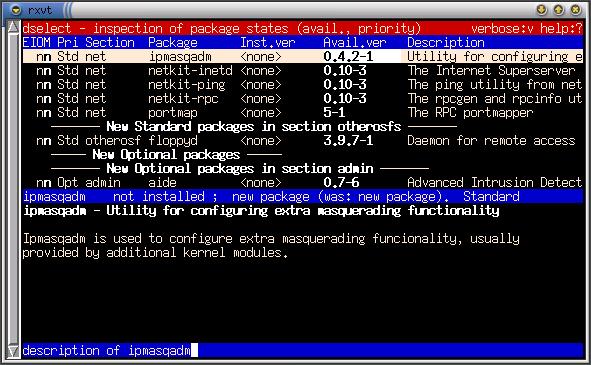
Figure 1. Dselect-Inspection of Package States
When you first start dselect, you'll want to go to “[A]ccess” to select the correct access method for installation. Meaning, select “nfs” if you have a local nfs mirror of Debian, and “apt” if you want to install over the Internet (http/ftp) or if you've configured your sources.list for local addresses. Other methods available are CD, Multi-CD (if your distribution has multiple CD-ROMs as opposed to one), Floppy and Mounted.
Once you've selected your access method, dselect needs to find out what packages it has access to; to accomplish this, select “[U]pdate” and wait a minute.
“[S]elect” is where the actual package management happens. First, you'll be presented with a help screen. READ IT! When you finish READING IT, press space to get out of help or “.” to read the keybindings. You can move around the package listings by searching or by using up/down, page-up/page-down, home/end and left/right. The following are some basic, useful keystrokes in dselect:
/ search\ repeats the last search? brings up helpd scrolls down the package informationu scrolls up it
When you've highlighted a package you want to do something with, use:
+ install or upgrade- remove= leave in present state
When you're ready to leave the selection screen, select:
<enter> to confirm, quit and check dependenciesQ to quit, confirm and override dependenciesX or Esc to abandon all changes
After you press return, you may be presented with a list of packages; these may be either dependencies of or conflicts with the packages you selected. Look at the packages; the bottom half of the screen will tell you what the problem is. Once you've resolved these problems, press enter.
After you've made your changes in “[S]elect”, either “[I]nstall” or “[R]emove” which will bring your system up to date with the changes. “[C]onfig” is only necessary if any package configuration failed.
Gnome-apt is a GUI package manager for Debian built around Gnome. It is incredibly intuitive and can be quite useful. Gnome-apt displays package sizes, dependencies and just about any other relevant information in a well laid-out interface. The packages are presented in a sorted tree (see Figure 2), and gnome-apt can display packages broken down alphabetically or by section, status or priority. It also has easy and powerful search functionality. Gnome-apt is included in Debian 2.2 (Potato) and the current unstable distribution (Woody).
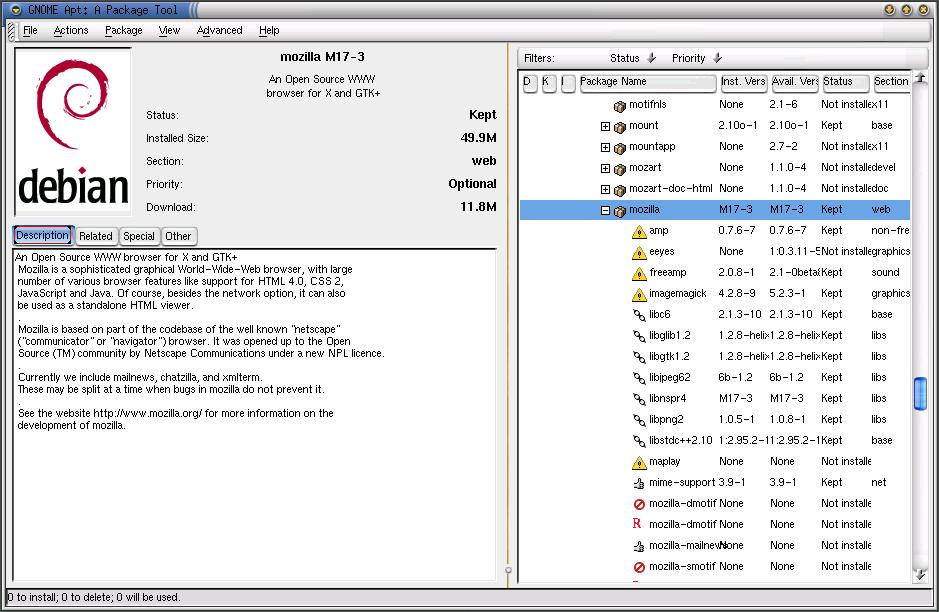
Figure 2. Gnome-apt: A Package Tool
KPackage is the KDE package front end for both RPM and Deb. It uses a combination of tabbed and tree interfaces (see Figure 3), and the functionality is similar to gnome-apt. One of the cool features of Kpackage is that the dependencies are hyperlinks to the packages they reference. Kpackage also lists the files included in each installed archive and checks to make sure they all exist. It can be found at http://www.general.uwa.edu.au/u/toivo/kpackage/.
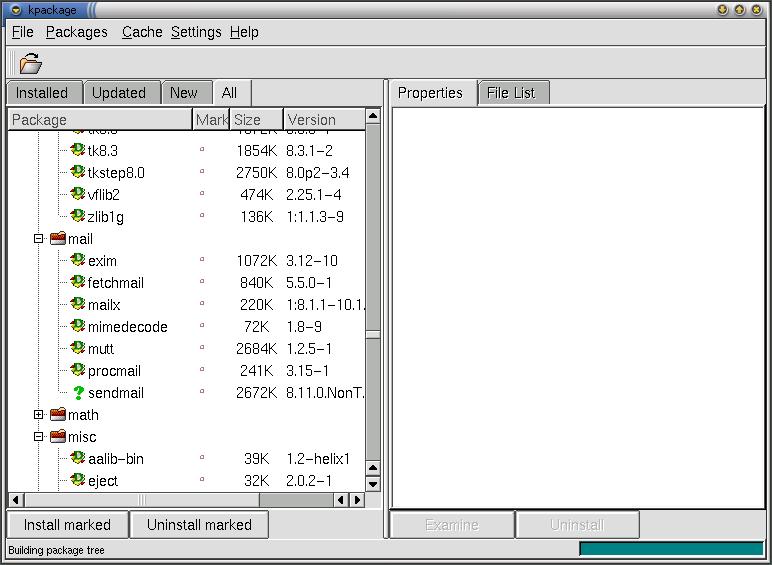
Figure 3: Kpackage: Building Package Tree
console-apt is a new front end just for APT. Currently, it is only available in the unstable distribution of Debian; as it is still in development, I won't say too much about it. Console-apt does have some nice features, though, including a much more intuitive and usable interface, progress indicators for downloads, selective upgrades and the ability to search, sort and filter the package listings.
Using these options and features, you should now be able to maintain and manage your Debian package system with ease. Trust me, it sounds more complicated than it actually is. I've tried to provide as many options as Debian offers but had to leave some out; I have not yet been able to pry myself away from APT. In conclusion, I haven't seen any RPM front end that I feel is on the same level as APT.


