
Dissecting the CueCat
I picked up a CueCat bar code scanner at RatShack (“You've got questions. We've got blank stares.”) yesterday along with a few other odds and ends. [see http://www.getcat.com/ to get your own free CueCat—Editor.] If the store actually carried the stuff in their commercial sales catalog, I'd be a happy camper—I don't need an animated Elvis Presley phone, I need a local source of microcontrollers and specialized ICs. But I digress.
One of the things that has a few people worried is that the clerk at Radio Shack takes down your name and address in their system before giving you a CueCat. However, there doesn't appear to be a way of tying a particular CueCat to a person at the time of purchase (although Digital Convergence can most likely trace a CueCat back to a particular Radio Shack). Although each CueCat has a unique serial identifier, each CueCat package has the exact same bar code on the front (which is what the clerk scans in). My goal was to find where that serial identifier lurks inside the CueCat....
I opened up the package and immediately began to open up the scanner (see Figures 1 and 2).
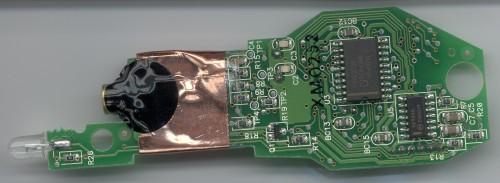
Figure 1. Scan of the Bottom Side of PCB

Figure 2. Scan of the Top Side of PCB
I carefully removed the shield and forcefully removed the serial EEPROM (see Figure 3).
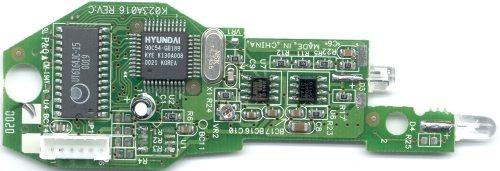
Figure 3. Image of the Board with the Shield Removed
The component that caught my eye was the small 8-pin device (U1) on the top side of the board (see Figure 4). For a detailed list of the semiconductor devices see the sidebar.

Figure 4. A Small 8-Pin Device
Semiconductor Devices of the CueCat
The scan doesn't really show the markings at all, but it's an ATC 93LC46, which is a 1kbit serial EEPROM. Unfortunately, ATC doesn't have datasheets for the device available on their page. Not to worry, as other manufacturers, such as Microchip and Holtek, have 93LC46s available. The datasheet for Holtek's HT93LC46 is located here, and it's a closer match than the Microchip unit, as it implements an ORG pin to control how the memory is accessed (in the above picture, the ORG pin is tied to VSS—this would make the unit addressable by 128 8-bit words if it was actually a Holtek 93LC46, but the ATC unit appears to be set up the opposite way—more on this later).
The first thing I tried was removing the 93LC46 from the board. However, I'm really not equipped to desolder SMT devices, so this was rather futile. So, I simply soldered some wirewrap wire onto the pins to see what's going on. I hooked my trusty scope up to them and found that the data is read out of the 93LC46 only on power up of the CueCat (about 100ms after power up, to be exact).
After this, I tried hooking up the 93LC46 to a PIC microcontroller (with a little bit of code that I whipped up) to see what lurks inside the serial EEPROM. Unfortunately, I managed to wipe the contents of the EEPROM (looks like it reads back all locations as 0xFF now). Oh well, at least I don't have that pesky serial number in there anymore.
Unfortunately, hooking up a microcontroller to erase the EEPROM is a little out of range for your average privacy-concerned individual. I'm guessing it should be possible to disable the serial number by cutting the CLK line to the EEPROM, which should be easy for anyone with a keen eye and a sharp X-acto knife.
I'll have to wait until I get another CueCat before investigating what's inside the EEPROM. In the meantime, I've been looking to find exactly what EEPROM data areas are being scanned. With my trusty Tek TDS 210, I took a closer look at the CS (chip select), SK (clock) and DI (data input) lines. For those interested, the 93LC46 is an SPI (Serial Peripheral Interface) device—it uses a synchronous serial line to transfer data (your computer's serial port is asynchronous and doesn't use a separate clock line). The CS line is used to tell that particular chip that it's being talked to, otherwise it will ignore data being sent to it.
The 93LC46 is sent a total of nine commands (they are all read commands, but more on this later). The CS line goes high a total of nine times (the first CS <\#145>pulse' is extremely long, as the CS line goes high as soon as the CueCat is powered on), and I used this as a baseline to see what was happening on the SK clock line (since my scope has only two channels, I can't look at every pin at once). I noted that there were 27 clock pulses during each CS “pulse” and I could see a gap between clock pulses where the CS line went high-low-high. I hooked up the SK and DI lines to the scope and took a look at exactly what bits were being sent: CS “Pulse” Data Clocked In
1 0110000001111111...2 0110000010111111...3 0110000011111111...4 0110000100111111...5 0110000101111111...6 0110000110111111...7 0110000111111111...8 0110001000111111...9 0110001001111111...
Okay, now the first thing to note is that the leading 0 is basically garbage, as the first 1 is really a start bit (and not yet the beginning of a command). Also, the trailing 1s aren't really bits sent to the EEPROM—these are clock pulses provided for the EEPROM to write out its data on the DO line. So what we really have is a command like this:
10000110
followed by a high DI line. The first two bits are the command, followed by the address. In the 93LC46, 10 is the read command. But what's this? We only have six bits to define the address and a lot more than eight clock pulses after the command is sent—the EEPROM must be organized as 64 16-bit words!
So, the microcontroller reads in a total of 9 16-bit words from addresses 0x01 through 0x09 (I have no idea why they didn't start at 0x00). Note in this sample scan,
.C3nZC3nZC3nYCNr2C3fWCNnY.fHmc.C3DZCxPWCNzWDNnX.<\n>
     000000001175023101      UPA     040293153502
that the serial ID field is 18 characters long (or 9 16-bit words). I wonder if they're hiding anything nifty in the other 55 words? And why did they use a serial EEPROM? I would think that something like Dallas Semiconductor's silicon serial number would be a smaller, cheaper, totally non-volatile alternative, but maybe this gives DC better control over assigning IDs (perhaps there's a “special” bar code that can be scanned in to rewrite the EEPROM?). I'm glad they used a 93LC46, though—you can desolder them and use them for other stuff...
Anyhow, I'm itching to try disabling the serial ID by cutting one of the traces to the 93LC46—I don't have a virgin CueCat to try it on, but if anyone wants to give it a shot, cutting any of the traces shown by the yellow cut marks, indicated in Figure 5, should disable the serial number (or give floating voltages to really whack out what the microcontroller is reading back—you may even be able to get some <\#145>random' serial numbers generated this way).

Figure 5. Cuts From Top to Bottom Disable the DI (data in), SK (clock) and CS
Or, you can slice the line, indicated in Figure 6, by the microcontroller to sever the DO (data out) line (I'd be inclined to try this one myself—the floating voltages could be fun here). Remember—you should need to cut only one line to disable the serial ID—take your pick.

Figure 6. Cut Here to Disable the DO (data out) line.
If anyone decides to give it a try, let me know how it turns out—your CueCat should still be able to read bar codes without any problem.
I picked up another CueCat last night—this one is the 68-1965-A model (supposedly more common) rather than the 68-1965 which is shown here. I'll be tearing apart this one later and posting the innards. How can you tell the difference? The A model has four small screws holding it together, the older one has two larger screws. The A has a small grommet for the wire on the cat's butt and a large black square for the scanning window, rather than the smaller rectangular opening on the 68-1965.
Oh, and if any lawyers representing Digital Convergence want to send me threatening letters, cease & desist orders, or more hardware to disassemble (I'd appreciate a USB CueCat when they become available). Note in advance, however, that any legal mumbo jumbo will be met with a polite “s—w you!”
Michael (mguslick@matrixpm.com) graduated with a degree in mechanical engineering from the University of Wisconsin-Milwaukee (where he was first introduced to UNIX and of course, Linux). He enjoys computers, electronics, and spending time with his fiancée, Kristin. He is also hopelessly addicted to playing paintball and squanders vast sums of money on the sport. On-line, he goes by the moniker of “Have Blue”.
