
Automated Installation of Large-Scale Linux Networks
Installing Linux on a PC has been long considered a programming guru's domain. It usually takes a novice user weeks or even longer to get the system properly configured. However, with emerging installation techniques and package management, especially from Red Hat, Linux is on the verge of becoming user-friendly. Yet, even with these newer methods, one aspect of Linux that is still frustrating is installation on a large scale. This is not because it is difficult, but rather because it is a monotonous and cumbersome endeavor. The object of this article is to discuss the basics of a technique that will simplify large-scale installation. Furthermore, a scheme is also discussed for the automatic switch-on of a LAN employing Wake-on-LAN technology.
A standard Linux installation asks many questions about what to install, what hardware to configure, how to configure the network interface, etc. Answering these questions once is informative and maybe even fun. But imagine a system engineer who has to set up a new Linux network with a large number of machines. Now, the same issues need to be addressed and the same questions answered repeatedly. This makes the task very inefficient, not to mention a source of irritation and boredom. Hence, a need arises to automate this parameter and option selection.
The thought of simply copying the hard disks naturally crosses one's mind. This can be done quickly, and all the necessary functions and software will be copied without option selection. However, the fact is that simple copying of hard disks causes the individual computers to become too similar. This, in turn, creates an altogether new mission of having to reconfigure the individual settings on each PC. For example, IP addresses for each machine will have to be reset. If this is not done properly, strange and inexplicable behavior results.
Those of us who have worked with Red Hat Linux are probably aware of the fact that it already offers a method of automated installation called Kickstart. This useful feature actually forms the foundation of the methodology we have developed. Kickstart allows us to specify beforehand our answers to all the necessary questions asked during the installation process. The specifications of a desired installation are listed in a special file called ks.cfg. This file is then placed on an NFS server and the target system is booted using a floppy disk. The setup prompt on the Red Hat distribution allows you to choose from a number of installation methods. Kickstart can be chosen as the desired technique by simply entering “ks” at the prompt. If everything has been done properly, voilà! The only message you will get at the end is the declaration of a successful installation.
We were given the task to set up a Linux laboratory of sixty-four Pentium III machines connected via a 100MB Ethernet. Sixty machines were to be set up as workstations and four as various servers. With such a large number of machines, it was clear that a powerful means of installation was sorely needed. The power of our technique is evident from the fact that the whole setup process took us about sixty hours, spread out over fifteen days. Let's take a detailed look at the method we adopted.
The sixty computers obtained for use as workstations in our laboratory (see Figure 1) had hard disks but no floppy drives. To get Kickstart running, we needed to remove the case and manually connect a floppy to each machine, boot the machine, install Linux and, finally, remove the floppy. This is a long procedure since floppies go bad all the time and, even if they do not fail, it takes a minute or two waiting for the floppy to load. This can turn into an unpleasant two minutes as you wait with your fingers crossed, watching the screen, just to get the dreaded “Boot failed” message. Moreover, if a disk does go bad, it takes even longer to write another image onto a new disk.
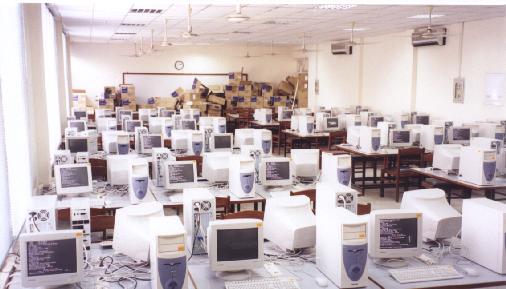
Figure 1. The Linux Laboratory
A wiser approach had to be adopted. We merged the Red Hat Installation disk with a very fine net-booting package, etherboot, to obtain a network-bootable image of the disk. Now, since we also placed this image on a NFS server, only a 16KB loader was needed on the floppy which would boot up in under twenty seconds. This loader would then retrieve the actual image over the network. A new floppy could easily be made in less than thirty seconds.
The loader is, in fact, a ROM image; hence, to make it even more reliable we burned it on an EPROM. The Red Hat boot-disk image for network installation was kept on a DHCP/TFTP server. To get the installation running, the ROM was plugged in to the network card and the machine booted from the network. The same ROM can be reused to boot other machines. As the ROM is robust and small, an efficient way was thus developed for getting the installations running. We call this super-Kickstart.
Before we could embark on setting up super-Kickstart, we needed to obtain and set up some software packages. The first was the etherboot package (see Resources). To serve our purpose, the package had to be modified a little as follows.
In the directory etherboot/netboot/mknbi-linux, edit the file mknbi.h as shown in Listing 1.
Now, edit the configuration file for etherboot, etherboot/src/Config.32, as follows. Locate the line:
CFLAGS+= -DDHCP_SUPPORT -DMOTD -DIMAGE_MENU
and change it to:
CFLAGS+= -DDHCP_SUPPORTIf the target machine has a BIOS that does not configure the network card properly, you may also need to append this line with -DCONFIG_PCI_DIRECT before compiling the packages.
Next, we moved to the top etherboot directory and did a make all to compile all the binaries.
Then, we created a directory to hold all the necessary executables for this setup. We copied the file etherboot/src/floppyload.bin and the appropriate ROM images, .rom and .lzrom, from the etherboot/src-32/ directory to this location. The file mknbi was also copied from the etherboot/netboot/mknbi-linux/ to this directory.
The second required tool was the streplace utility (see Resources). This useful package was utilized for replacing strings in files while configuring host-specific parameters that change with each workstation, e.g., host name and IP address. After compiling the binary, it was also copied to the working directory mentioned above. With these tools in hand, we happily moved on to the next step.
A closer look at the Red Hat installation disk reveals that it contains a Linux kernel, an initial ramdisk image and some configuration files. For our purposes, we utilized only the kernel and the initial ramdisk image. To have a look at the contents of the disk image, mount it as a loop device using these commands:
mount -o loop
cd mount_point
We then copied the kernel image (vmlinuz) and the initial ramdisk (initrd.img) to the directory we created earlier. In addition, the file syslinux.cfg provided the kernel options necessary for initiating a Kickstart install. They were noted. We had no further use for the installation disk beyond this point.
The Kickstart HOWTO discusses the syntax of the ks.cfg file in detail. Although very informative, it takes too long to generate this file. Therefore, the method we devised was to first install Red Hat Linux 6.1 on a machine using the “normal” CD-ROM method. All packages, options and settings for our to-be-target-machine were manually specified. Once the system was up and running, it was tested for optimum performance and then used as prototype for the rest of the installations.
A special package called mkkickstart also had to be installed. The mkkickstart utility can extract information from an installation and print it on the standard output. We used it to do exactly that:
mkkickstart >ks.cfg
Any Kickstart installation that is now run with ks.cfg as the configuration file will create a replica of our prototype workstation. We did some minor editing of this file to implement some changes. Listing 2 is a sample from the start of the file.
The Kickstart technique offers provisions for executing any necessary post-install procedures needed once the installation is complete. This feature, besides allowing individual customization, is particularly useful when packages other than those included with the standard Red Hat distribution are to be installed. In our case, these included JDK (Java Development Kit) for Linux, among many others. We added the following lines to the post-install section and created a separate script and Perl program (see Listings 3 and 4) that would execute when the Red Hat installation had finished:
%post
cd /root
tar -xvzf install:/kickstart/install.tar.gz
cd installfiles
 ./postinstall
cd /root
rm -rf installfiles
The tar file (install.tar.gz) was placed on the Installation Server (install), from where it could be retrieved and executed to customize the system. Our special customization included un-tarring JDK from our ftp server, setting up linuxconf for web access, specifying the DNS server and allowing root remote shell access of workstation from the servers.
One question that remained was where and how to place the ks.cfg file so that the target system was able to receive it even after it had undergone a DHCP/TFTP boot. An analysis of the installation procedure revealed that the tmp directory within the initial ramdisk is one of the locations that the Kickstart system looks for a configuration file.
The procedure of copying each ks.cfg to the appropriate location and then adding a kernel to initrd to make an encapsulated chunk of code was all performed by a script called superkick. A look at this script (see Listing 5) will show the steps involved in setting up the network bootable image.
We wrote another script, doitfor, to automatically customize the ks.cfg file and a post-install file for every workstation. It is shown in Listing 6. The major task that this script performed was inserting a specific host name and IP address within each ks.cfg using the streplace utility. This script takes as input the host name and IP address and generates a boot image to be uploaded using DHCP/TFTP boot.
To get the installation running, we needed to set up either a DHCPD server or a BOOTP server. The problem with the BOOTP method is that a list of network card MAC addresses has to be provided to issue IP addresses to the target machines. With a large number of installations, this would be quite a tedious job, so we opted for DHCPD. There is a long list of DHCPD options but we needed only the most basic ones, namely the default name-server address, starting IP and domain names.
Now the tricky issue here was that if we booted a machine an IP address would be issued to it. As long as it stayed on, the IP address would not be reused and any subsequent machine that was switched on would be automatically granted the next IP address by the DHCP d&\#230;mon. If the first machine was turned off, then its IP address became free. Since DHCP has the liberty to assign any unused IP addresses, there is a good chance that the same IP address would be given to another new machine. If an installation were then run, this new machine would end up with the same host name and IP address as the one that was turned off. Simply put, they would have the same network settings and would not work properly.
To solve this problem, we changed the first IP address that the DHCPD was allowed to offer. This was done by reconfiguring the /etc/dhcpd.conf file (see Listing 7) and restarting the DHCPD. The doitfor script includes the code to carry out this task every time a boot image for a new target is created. Once an IP address had been allotted, DHCPD could be switched to the next IP address and the next installation started without complications.
Once the DHCPD had been configured to offer the desired IP address for a target, we could proceed in two ways. The first was to burn the ROM image into an EPROM and plug the EPROM in to the network card. This obviously requires an EPROM programmer. The second and simpler way was to use the command
cat floppyload.bin <yourcard.rom> >>/dev/fd0
to create a bootable floppy disk carrying the ROM image and thus get the installation running. Some initial installations were carried out with the floppy method. Later, the availability of an EPROM writer allowed us to employ the EPROM technique, which worked fine and was good for experience and experimenting.
Note that completing more than two or three installations at a time overloads the network and brings down the efficiency. With two machines installing concurrently, we were able to achieve complete installations in an average time of fifteen minutes. The exact details of our installation procedure now follow.
First, we ran the shell script, doitfor, on the server to specify which machine we would be installing next. The floppy drive or the EPROM was plugged in to the target system and the system booted. The boot image was automatically retrieved, and the installation process started. While this process continued, we moved on to the next machine by running the doitfor script with new arguments corresponding to the next target. Booting the next machine would result in two installations running simultaneously. As soon as the installation on the first machine completed, we could start at the third one, and so on. The only hassle was plugging in the ROM/floppy and booting. Nevertheless, it was much faster than the standard method of using the floppy and manual settings.
If, on booting, the MAC address of the detected network card is reported as FF:FF:FF:FF:FF:FF, it is an indication that the network card is not initialized properly. There are two ways to overcome this. One is to switch off the Plug and Play OS feature of the motherboard during initial setup, forcing the BIOS to configure the network card. Note that switching this feature off is required only during the installation bootup; it can be switched on later, if required. The second method is to enable the -DCONFIG_PCI_DIRECT option in the configuration file of the etherboot as discussed earlier.
With files shared among a large number of workstations, it becomes imperative that machines have their clocks synchronized so that file time stamps are globally comparable. Time synchronization helps in maintaining logs, updating and distributing updates, etc. We simply set up all the machines to match their time to that of a reference server at every startup by utilizing the rdate utility. To enable this on the client side, we simply added the following line to the rc.local file:
rdate -s
On the server side, the default time service had to be enabled in the /etc/inetd.conf. This was done by locating and removing the # sign from the beginning of the following line and restarting inetd:
#time stream tcp nowait root internalFancy time-servers such as NTPD or TIMED could also have been used, but rdate works well for an undergraduate laboratory without causing headaches due to cryptic configuration issues.
Many volunteers helped with the installation. Once the installations were complete, security reasons demanded that we change the root password on every machine. This meant that either Linuxconf Web access was used for all the machines, or the system administrators had to manually change the password on each workstation. We wrote a script, change_password_on_all.pl (see Resources), to achieve this password change from a single server. The script requires that all workstations be configured to allow remote shell root access from the server using the rsh utility. This provision was configured during the post-install steps. It should be noted, however, that although this is not a very secure method of exchanging crucial information, it worked fine in our controlled laboratory environment. In addition, if caution is exercised by running the script only when the LAN is not being used, this method can prove to be very useful.
Now we move on to a discussion of how we automated the LAN startup and shutdown by controlling it from a single machine. To understand this we have to take a closer look at AMD's Magic Packet technology. Many network cards now come equipped with the Wake-on-LAN feature. This means that when the machine is switched off (i.e., the ATX casing has power but is not in the “on” state), it provides a small amount of power to the Wake-on-LAN enabled network card through a three-wire header connecting the motherboard and the card. Hence, the card is actually alive and able to keep watch on the LAN for a special packet, called the Magic Packet (see Resources). On receiving such a packet, the network card generates a pulse that can be used to switch on the machine. The Magic Packet is, in fact, a stream of 0xFF characters followed by the MAC address of the NIC, repeated a specific number of times. The probability of such a packet occurring coincidentally during normal operation is very rare. Hence, the reception of such a packet can be safely assumed to indicate that it is indeed meant for the target machine.
We wrote a Perl program named switch (see Listing 8) that switches one or all machines on the LAN either on or off. It generates a Magic Packet and broadcasts it over the network. The target machine, on receiving this packet, switches on. To switch a machine off, a straightforward remote shell invocation of halt or shutdown -h suffices. To make things more manageable, we made the script parse /etc/switch.conf for information regarding which host on the LAN has what MAC address. It should be obvious that the MAC addresses are required only for switching on and not off, as the shutdown invoked through the remote shell requires only target IP addresses.
A small drawback is that, although the switch-on is possible whether the target machine runs Linux or not, the switch off is possible only if the target machine properly boots into Linux. This method does not provide for switching the system off if the target machine fails to boot properly. It should, however, be noted that if a machine does fail to boot properly, it would require manual attention for fixing it anyway.
In our laboratory, we had Intel 440BX2 motherboards with D-link network cards that support the Wake-on-LAN feature. The motherboard requires that the feature be switched on from the BIOS. There is a large range of other component brands that support this feature as well. Chances are that if you have purchased your hardware in the last year, you already have these features.
We utilized standard procedures in setting up the server configuration. We set up the DNS, NIS, FTP, Apache, time and NFS services. One special consideration was that no two services were provided by a single IP address. Although we had only four actual servers, we relied heavily on IP aliasing to create virtual personalities for each service. This aliasing method provides for transparent shifting of the services from one machine to another in case of a failure, providing some degree of fault tolerance. This approach is in continuation of our previous work on network fault tolerance, reported in Linux Journal, June 2000.
autofs is a kernel-assisted auto-mounter for Linux which allows the system to dynamically mount a file system on demand. It is like using MS Windows, where, when you need to access a floppy drive, you do not have to specifically attach a drive to a mount point. For example, if autofs is configured to auto-mount a CD-ROM at, say, mount point /misc/cd, then every time a CD-ROM is inserted into the drive and the directory is changed to /misc/cd, the CD-ROM will be automatically mounted at this point. If the mount point is not used for a while, it will be automatically unmounted.
autofs was found to be very useful for our scenario. Over the span of one week, we have many different classes coming into the laboratory. Keeping all the user files mounted on each workstation all the time created a lot of server load and network traffic—an inefficient and undesirable situation. We divided the file system into four groups and mounted them individually via autofs rather than hard-binding the NFS servers in the /etc/fstab file. This reduced the server load to a quarter of its original.
To maintain flexibility, we used NIS for the autofs maps. The map auto.master provides information about the mount point of the autofs system, and auto.home gives information about what file system should be mounted and from which server. It was discovered that the autofs does not check for an NIS map if the file /etc/auto.master is present. Hence, to make it work properly, we removed the file /etc/auto.home from all the workstations that were going to employ autofs. To include these maps in the NIS database, select the rule auto.home and auto.master in the NIS Makefile located at /var/yp/.
The following line was added to /etc/auto.master on the server:
/home auto.home --timeout 60
and these lines were added to /etc/auto.home on the server:
#mount point    options         source host+path
g1      -rw,hard,intr   nfs1:/home/g1
g2      -rw,hard,intr   nfs2:/home/g2
to enable building the proper database.

Jahangir Hasan, on the right, has recently graduated from the Department of Electrical Engineering, University of Engineering and Technology, Lahore, Pakistan. He joined the doctoral program in Electrical and Computer Engineering at Purdue University in fall 2000.

