
Where to Install My Products on Linux?
For some software developers and Independent Software Vendors (ISVs), there are differing ideas about where to install one's applications and software packages. Some prefer to install in /usr/bin/ or /usr/local/bin/, yet others prefer the /opt/ directory. Your preferences may vary depending on whether you have a UNIX System V, Berkeley Software Distribution (BSD), or GNU/Linux background.
The Filesystem Hierarchy Standard 1 (FHS), Version 2.1, was written to eliminate these differences by specifying detailed guidelines as to where system services, configurations and software should be located on a UNIX or UNIX-based operating system. In detail, the FHS explains the content and purpose for each of the primary directories (see Figure 1).
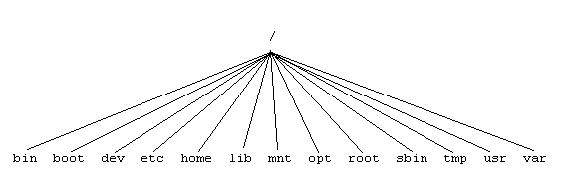
Figure 1. Schema of Primary Directories in FHS
In a nutshell, the base operating system's, or the distribution's applications are to be installed in /sbin/, /bin/, and /usr/. The system administrator can build packages from source and install them into the /usr/local/bin/ directory. However, the binary-only packages of nonessential applications and add-on software products should be installed in /opt/<package>/ directories, where <package> is the name that describes a software suite. The binary executables should be located in their respective /opt/<package>/bin/ subdirectory. If there are any accompanying UNIX manual pages, they should be installed in the /opt/<package>/man/ sub-directories.
The System V Application Binary Interface [AT&T 1990], the Intel Binary Compatibility Standard V.2 (iBCS2), the Common Operating System Environment (COSE), the Linux Standard Base (LSB), and the UNIX community in general have already established the /opt/ directory for add-on software.
The system administrator should create a separate disk partition for the /opt/ file system, and endusers should add /opt/<package>/bin/ and /opt/bin/ to their PATH environment variable. Usually the end-user's shell will find applications in their respective /opt/<package>/bin/ directories; however, the system administrator may have created symbolic links or wrapper scripts in /opt/bin/ for each package.
Host specific configurations for /opt/ binary executables should go in /etc/opt/<package>/ directories. These are the proper locations for configuration files of the /opt/ packages, because /etc/ is where all host specific system configurations reside on a UNIX-based operating system.
Variable files in a package, or files that change during the normal course of system runtime, should be kept in the /var/opt/<package>/ directories. The contents of /var/ are host specific and the directory is usually configured in its own file system to prevent the accidental filling of the root file system.
An exception to these rules is when it is necessary, or makes sense, for a package to install or create files elsewhere. For example, if a package were to create a new device, then it would be created in the /dev/ directory.
Now that we know the rules of the Filesystem Hierarchy Standard for add-on software packages, let's try to package and install a fictional software suite called Whizbang. If we are to follow the LSB specification, we should use the RPM Package Manager2 (RPM) and try to package our software for the /opt/ directory. This is shown at lines 18-20 of the whizbang-1.2-3.spec configuration file (see Listing 1). Line 8 shows how to make it relocatable so that the system administrator can install it elsewhere if so desired. However, installing in a nonstandard directory is not advisable.
Let's build Whizbang's RPM package as shown below. Using the whizbang-1.2-3.spec as the input file, RPM can build and produce a source package file whizbang-1.2-3.src.rpm and a binary package file whizbang-1.2-3.i386.rpm.
The book Maximum RPM, by Edward Bailey, or the RPM web site, http://www.rpm.org/, are excellent resources for learning to create RPM packages. For now, don't worry about the details, but recognize that there is a guideline on where to install most everything. To create the whizbang-1.2-3.i386, do the following:
# rpm -ba /usr/src/redhat/SPECS/whizbang-1.2-3.spec
Processing files: whizbang
Finding provides...
Finding requires...
Prereqs: /bin/sh
Wrote: /usr/src/redhat/SRPMS/whizbang-1.2-3.src.rpm
Wrote: /usr/src/redhat/RPMS/i386/whizbang-1.2-3.i386.rpm
Using the whizbang-1.2-3.i386.rpm binary package we just created above, we can now install it onto the system as show below:
# rpm -i \/usr/src/redhat/RPMS/i386/whizbang-1.2-3.i386.rpm
Now that whizbang is installed in /opt/whiz/bin/, try to run it from the command line. Did your shell find it? Was /opt/whiz/bin/ in your PATH environment variable? What if we wanted to make it more convenient for the enduser by creating a symbolic link to /opt/whiz/bin/whizbang from /opt/bin/whizbang? This could be done during the post-install phase of the RPM installation, as shown here:
%post
P=$RPM_INSTALL_PREFIX
mkdir $P/bin > /dev/null 2>&1
ln -fs $P/whiz/bin/whizbang $P/bin/whizbang
mkdir $P/man/man1 > /dev/null 2>&1
ln -fs $P/whiz/man/whizbang.1 $P/man/man1/whizbang.1
# EOF
This “relocatable” post-install code would be added at line 20 in Listing 1; however, the RPM %postun uninstall solution to remove the symbolic links is left as an exercise for the reader.
Sometimes it is necessary or desirable to install a software suite somewhere other than for where it was originally packaged. Now let's uninstall the whizbang-1.2-3 RPM package, and reinstall it in an alternate location.
# rpm -e whizbang-1.2-3
# rpm -i --prefix /usr/local
# /usr/src/redhat/RPMS/i386/whizbang-1.2-3.i386.rpm
In summary, binary-only packages of nonessential applications and add-on software products should be installed in the /opt/<package>/bin/ directory. We've seen the basics on how to create a relocatable RPM package and how to build it, and we have demonstrated its flexibility by being able to override the default /opt/ destination and selecting an alternate location. Following the FHS standard is the first step in making your GNU/Linux application more LSB3 compliant.

