
I'll Have My People Call Your People
Bon soir, mes amis. It is so very good to see you again. What? No, François, I do not think this is a good time. We have guests. Take a message and I will call later. Forgive me, mes amis. François has been run off his feet since we started distributing our new on-line phone book. My impetuous waiter put our name as a default record in each of the databases, and now everyone is calling! Mon Dieu!
The phone book? But, of course. In fact, in honor of this month's issue celebrating “The People Behind Linux”, we are cooking up a web-based telephone book made with rich, yet low-calorie, open-source software and our secret ingredient, Linux. I think you will find the recipe quite enjoyable and practical too, non? What is the point of knowing all these people if you never talk to them? That is why François' mother insisted that her name be put in. I jest. Please sit, mes amis, while I show you how to create your own web-based telephone book, which is sure to become a centerpiece of your intranet. For added spice, this wonder of the intranet even provides an IN/OUT board.
François! Bring some wine for our guests. Vite!
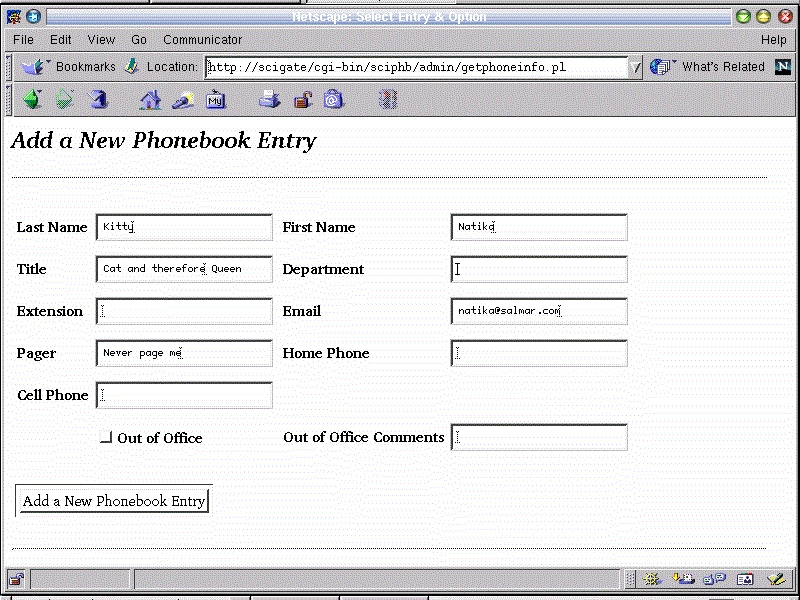
Figure 1. The web phonebook's search screen
Before we get into the meat of this recipe, may I suggest that you look at Figure 1 which shows the administration search screen. The standard user's screen is similar, but does not have the option to add a user. Figure 2 shows the results of a fairly wide search. Note the gray and red buttons that allow you to modify or delete an entry.
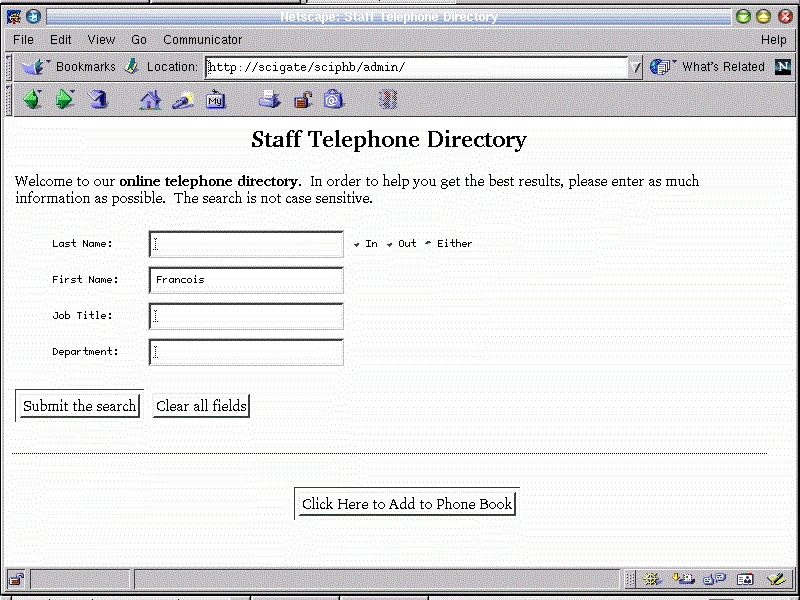
Figure 2. Administration Search Results Screen
Our telephone book is written entirely in Perl and uses PostgreSQL to store its entries. Before I get too far, I will tell you what you will need,
PostgreSQL
DBD and DBI modules for PostgreSQL from CPAN
The cgi-lib.pl Perl library
In all likelihood, Perl is already loaded on your system. Most distributions include it as part of the standard install. You should also have the Apache web server running. Again, it is extremely likely that you installed Apache with your system.
PostgreSQL can be found at the official PostgreSQL site and, in most cases, on your Linux distribution CD. For my Red Hat system, it was simply a matter of installing PostgreSQL with the rpm command.
rpm -ivh postgresql-6.5.2-1.i386.rpm
rpm -ivh postgresql-devel-6.5.2-1.i386.rpm
rpm -ivh postgresql-server.6.5.2-1.i386.rpm
Depending on when you obtain and load PostgreSQL, the numbers may vary. Part of what happens during this installation is to create a postgres user. After assigning a password to this user, log in as postgres and initialize the database environment. Remember that the paths may vary depending on your installation.
initdb --pglib=/usr/lib/pgsql --pgdata=/var/lib/pgsqlNext, you will need to create some default PostgreSQL users. If you are installing as root (for access to Perl directories, cgi directories, etc.), then root will have to be added. So will the user “nobody”. This is often the user of your httpd server. Some have a user called “www” to run web services. I will use “nobody” as mine, and you may use whatever your server is configured for. Start by logging in as your postgres user, and execute the following command to add the users root and nobody to your PostgreSQL system:
createuser rootYou'll be prompted for root's UID (accept the default) and whether user root is allowed to create databases. Answer “y”. When asked whether root is allowed to create users, I answered “n”. Now, do the same thing for user nobody. The only difference is that I answer “n” to the question of whether nobody is allowed to create databases as well. Depending on which version of PostgreSQL you are using, the question of whether a user is allowed to create other users may be worded this way:
Is user "whoever" a superuser?The answer is still n, or “no”. Finally, with the creation of nobody, you will then be asked whether createuser should create a database for nobody. Answer “y” and you are finished creating users.
Both the DBD and DBI module can be found at the CPAN FTP site, a huge Perl resource on the web. Since the two modules are in slightly different directories, I will give you both: ftp://ftp.cpan.org/CPAN/modules/by-module/DBI/ and ftp://ftp.cpan.org/CPAN/modules/by-module/DBD/.
At the time of this writing, the latest and greatest DBI version was DBI-1.13.tar.gz, whereas DBD weighed in at a comfortable DPD-Pg-0.93.tar.gz.
The DBI module is common to all the various databases, but the DBD module must be specific. DBD modules are available for numerous databases such as Oracle, Informix and, of course, PostgreSQL. DBI is an application program interface (API) for Perl5 to interface with database systems. The idea is to provide a consistent set of modules and calls so that database access code is portable without too much fuss. Since each database will vary somewhat, however, the DBD module comes into play to take those differences into consideration.
For more information on how DBI works, try this address: www.isc.org/services/public/lists/dbi-lists.html. You do not need the information in order to be able to cook up today's recipe, but it makes for interesting reading later.
Install the DBI module first by unpacking the distributions into some temporary directory and following these steps:
cd /usr/local/temp_dir
tar -xzvf DBI-1.13.tar.gz
cd DBI-1.13
perl Makefile.PL
make
make test
make install
Tres simple. To install the DBD module, the process is similar. The latest version of the DBD module now requires you to set a couple of environment variables before the install can occur. These are POSTGRES_LIB and POSTGRES_INCLUDE.
POSTGRES_LIB=/usr/lib/pgsql
export POSTGRES_LIB
POSTGRES_INCLUDE=/usr/include/pgsql
export POSTGRES_INCLUDE
Now, you can run the install:
cd /usr/local/temp_dir
tar -xzvf DBD-Pg-0.93.tar.gz
cd DBD-Pg-0.93
perl Makefile.PL
make
make test
make install
The final ingredient you will need is the cgi-lib.pl library for Perl. This has become a virtual (de facto) standard for CGI design using forms. Surf over to the following address and save the file into your /usr/lib/perl5 directory: http://cgi-lib.berkeley.edu/.
If your Perl libraries live in a different directory (e.g., /usr/local/lib/perl5), you will need to modify the require /usr/lib/perl5/cgi-lib.pl line near the top of each cgi-bin perl script to reflect your own directory structure.
After all these steps are completed, we have pretty much all the pieces we need to continue with the actual phone book creation and build. If you haven't already done so, obtain the distribution for the phone book from the Salmar web site in the downloads section or from the Linux Journal FTP web site (see Resources).
The tar, gzipped distribution file is designed to extract into the standard Red Hat file structure for the Apache server, namely /home/httpd/html and /home/http/cgi-bin.
cd /home/httpd
tar -xzvf /path_to/phonebook.tar.gz
The file list looks something like this:
html/sciphb/
html/sciphb/index.html
html/sciphb/admin/
html/sciphb/admin/index.html
cgi-bin/sciphb/
cgi-bin/sciphb/admin/
cgi-bin/sciphb/admin/getphoneinfo.pl
cgi-bin/sciphb/admin/updphone.pl
cgi-bin/sciphb/admin/getphone.pl
cgi-bin/sciphb/admin/createphdbs.pl
cgi-bin/sciphb/ugetphone.pl
cgi-bin/sciphb/getnextkey.pl
If you are running Apache from binaries built from the default source distribution, those directories will likely be /usr/local/apache/htdocs and /usr/local/apache/cgi-bin. If this is the case, you can extract the files to a temporary directory and move the sciphb directories to the appropriate cgi-bin and html/htdocs. Since there is always more than one way to do it, you could create symbolic links like this:
mkdir /home/httpd
ln -s /usr/local/apache/htdocs /home/httpd/html
ln -s /usr/local/apache/cgi-bin /home/httpd/cgi-bin
Everything will work fine from here, but you may want to verify the path to Perl. The .pl files in the cgi-bin/sciphb directory all call Perl from /usr/bin/perl. If necessary, change the first line of these files to reflect the actual path to your Perl binary.
Let this simmer for a few seconds, then change directory to the admin cgi scripts location:
cd /home/httpd/cgi-bin/sciphb/admin
There you will find a file called createphdbs.pl which (strangely enough) will create the databases necessary to use the phone book. This package is quite simple and, I believe, will provide the aspiring chef plenty of inspiration for further development. The scripts are small in number, but going through each script would take far too much space and take great advantage of the hospitality of this fine publication. I would, however, like to show you the PostgreSQL table creation for this on-line directory. Keep in mind that this is just a code morsel (Listing 1) and not the finished product. The first section shows the setup and initial calls using the Perl DBI in order to create the phone database. In particular, pay close attention to the line that begins with
$dbh = DBI->connect("dbi:Pg:dbname=$dbmain",
The dbi:Pg identifies the database interface type (DBD); in this
case, Pg stands for PostgreSQL.
Listing 2 is a portion of the actual database creation. Note the $dbh calls throughout. These are what make the DBI environment portable. Once having established the DBD (as in the connect statement above), there should be very little need to modify this code if you were to use another database.
Of course, there is more, but you will have to download the scripts to satisfy your appetite.
The phone book has two different interfaces: one for lookups only and another for both lookups and updates. You can, if you wish, use only the administration page if you are content to allow anyone in your organization to update the phone book information. Modifications of the index.html file to pull in the administration page require only a change to the actual page being pulled in. To access the default user interface, use this link: http://your_server/sciphb/.
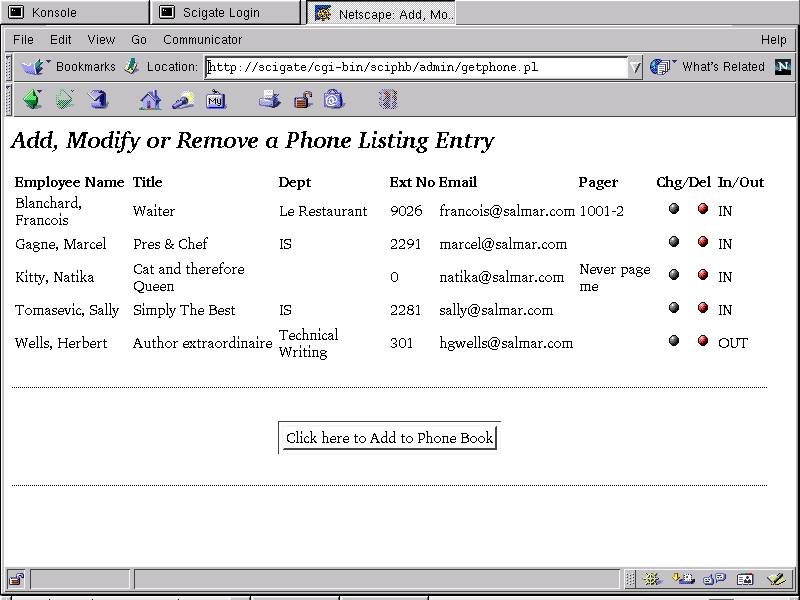
Figure 3. Adding Users Through the Phonebook's Administration
The administration version of this page (which allows the adding of users, modification of records and deletes) can be accessed by going to this address: http://your_server/sciphb/admin/.
I recommend you keep the user and administration portions separate. Give a few specific users the responsibility of updating the phone book, and the information should continue to make sense.
You might also consider changing the available fields. For instance, the IN/OUT board aspect of the directory may not be for you. Perhaps you need another field. With the scripts provided and a little time, modifying this telephone directory to suit specific needs should be quite simple.
Once again, mes amis, it is closing time. The pleasure of having you here on a regular basis puts, how shall I say, “pressure” on my wine cellar. Ho, ho! I shall have to replenish, non? It is okay, mes amis. Chef Marcel is only kidding. There is always more wine, but the doors, they must close sometime. Until next time, enjoy that on-line telephone book. Remember—you are always welcome here at Chez Marcel. Bon Appétit!


