
Comparing Java Implementations for Linux
Given the amount of hype that Linux and Java are currently receiving, the combination of the two rates a solid 12 on a hype scale ranging from 1 to 10. However, being an engineer—and thus a skeptic—at heart, I prefer hard facts over marketing slogans. So, I set out to create a simple benchmark program to compare different Java implementations for Linux.
No matter what the hype says, I believe the most important contribution of Java is that it is simply a very well-designed programming language that most professionals enjoy using. Some of the features of Java that make it attractive for software engineers are:
Java is a “pure” object-oriented programming language (unlike C++, which is a hybrid), with a simple and elegant object model. Depending on your point of view, this may be an advantage or disadvantage. My personal experience is that programmers who are new to objects get up to speed a lot faster if they use “pure” OO languages such as Smalltalk, Eiffel or Java as opposed to hybrids such as C++.
Java avoids many of the complexities of C++, thus making programs less error-prone and programmers more productive. For example, in Java there is only one way to make a new object: you call the new operator and get a reference (or pointer, if you like) to the object. Compare this to the many ways to create objects in C++.
Java needs no preprocessor and therefore is immune to “macroitis” and endlessly nested include files.
Java has a garbage collector to free memory consumed by objects which are no longer used. In C and C++, a fair amount of design and programming work must be spent on memory allocation and deallocation schemes. Freeing objects in Java is automatic (as it is in Smalltalk and Eiffel).
The sizes of basic data types such as int and float are defined by the Java language specification, so an int is always 32 bits, regardless of the platform your program runs on. How often have you implicitly assumed that a pointer has the same size as an integer in a C program, and suffered the consequences when you ported your program to an architecture where this is not true?
Finally, Java has built-in support for multithreading and synchronization of multiple threads, and comes with a huge class library out of the box (although some people, including myself, feel that the library has gotten too huge lately).
Java is still not a standardized language, and it is doubtful if it will ever be. Sun has the final say over what's in the language and the libraries and what isn't, period. The “Java 2 Platform” or simply the Java Developer Kit (JDK) V1.2 has about 1200 classes in its libraries. Sun ships its JDK on Solaris/SPARC, Solaris/Intel, Windows-32 and recently on Linux, too. IBM has recently released a JDK 1.3 implementation for Linux. I ran the benchmark with this JDK on the same hardware and OS as all other benchmarks and got the following numbers:
Elapsed time: 1384 millisecondsObjects / millisecond: 361Output of java-version: Classic VM (J2RE 1.3.0 IBM buildcxdev-20000502 (JIT enabled: jitc))
Sun's JDK achieves platform independence of Java programs by relying on an architecture-neutral intermediate code called “bytecode”, which is interpreted on each target machine. The interpreter is called a “Java Virtual Machine” or JVM for short.
Since interpretation is slow, most JVMs come with a Just in Time Compiler (JIT). A JIT translates bytecodes into machine code on the fly, i.e., while the interpreter is running. The resulting machine code is stored in memory and lost when the interpreter terminates. Generally speaking, pure interpreters show faster program startup times, while a JVM with a JIT takes longer to start (because it compiles bytecodes); but once a program is up and running, it is faster than an interpreted program. There are many optimizations that can be made to interpreters and JIT compilers. Sun's “Hotspot” JVM, which is not yet available under Linux, but should be eventually, is one attempt to get the best from both worlds.
Finally, there is nothing in the Java language specification which prevents the application of standard compiler technology, i.e., compiling Java source code directly into machine code. The Java front end to the GNU compiler system does just that.
At the time of this writing, there were quite a few Java implementations available for Linux. These are the ones I am aware of and was able to get to work:
The Blackdown port of the Sun JDK, version 1.2.2. I tested release candidate 4 of this port, which includes both an interpreter and a JIT. The JIT is a port of the JIT shipped by Sun with the JDK for Solaris. By default, the JIT is enabled, but it can be turned off with a command-line switch. The documentation that comes with this port warns that the JIT is not yet entirely reliable. I downloaded this port from one of the numerous Blackdown FTP mirrors, which are accessible from Blackdown's homepage at http://www.blackdown.org/.
Sun's own version of the Blackdown port of Sun's JDK, version 1.2.2. Recently Sun began to publish a JDK for Linux on their own web site. This port is, as far as I can tell, the same as published by the Blackdown folks. There is at least one noticeable difference though: Sun's version comes without a JIT; it is an interpreter only. However, Sun recommends using the JIT developed by Borland. I downloaded this port from Sun's Javasoft web site at http://www.javasoft.com/.
Borland's JIT for the Sun and Blackdown ports of the JDK 1.1.2. This is not a complete Java developer kit; it is only a JIT. It works with the Blackdown port of Sun's JDK 1.2.2, and hence with the Linux JDK 1.2.2 published by Sun. I downloaded this JIT, which is a simple shared library of about 170KB, from Borland's web site at http://www.borland.com/.
The Blackdown port of the Sun JDK 1.1.8. I tested version 1 of this port, which only includes an interpreter (unlike the Windows version which comes with a JIT).
IBM's JDK version 1.1.8 for Linux. This JDK has a reputation of being “very fast” and also very stable. It comes with a JIT, which is enabled by default, but can be turned off with a command-line switch. I downloaded this JDK from IBM's web site at http://www.ibm.com/.
Kaffe version 1.0b4 from Transvirtual Technologies. Kaffe was developed by Tim Wilkonson and others from scratch, without any code from Sun. The version of Kaffe I used is compatible with Sun's JDK 1.1. I used the Kaffe package which is on the Red Hat 6.1 CD-ROM; however, there is a web site devoted to the open-source version of Kaffe at http://www.kaffe.org/. Kaffe is available for a wide range of UNIX versions and processor architectures, not just for Linux on x86 processors. The version of Kaffe I used includes a JIT, which is always on, or at least, I couldn't figure out how to turn it off.
The native Java compiler from Cygnus Support shipped with their Codefusion-1.0 development environment. This compiler is an enhanced version of EGCS, the Experimental GNU Compiler System, although you can hardly call this high-quality compiler “experimental” any more. Unlike all other Java implementations I looked at, this compiler generates native code which is link-compatible with object files created from C and C++ source files. The compiler comes with a library with the necessary runtime support for Java programs, which includes, among other things, a garbage collector. The version of EGCS I used (“2.9-codefusion-990706”) is not free; you have to buy it from Cygnus. Their web site is at www.cygnus.com/ or www.redhat.com.
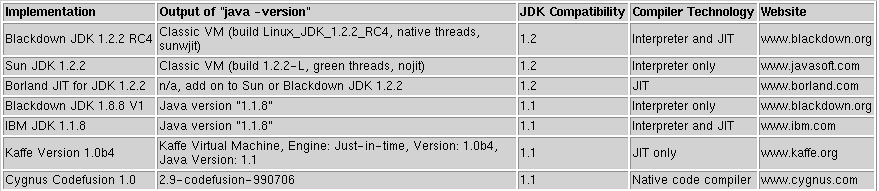
Table 1. Java Implementations for Linux
Let's start this section with a disclaimer: writing meaningful benchmark programs is very difficult, and no single benchmark can do justice to all aspects of a complex system such as a Java implementation. The benchmark I used is no exception. There are many issues it doesn't address; for example, it doesn't cover multi-threading issues, database access or graphics performance.
That said, let's look at the benchmark. The benchmark program does what most object-oriented programs do from a technical point of view: creating objects and calling methods on them. More specifically, the benchmark creates half a million very simple account objects, adds an amount to each object created, then adds up the amounts of all objects. The result of the benchmark is the elapsed time it takes to create and process all objects, and derived from that, the number of objects created and processed per millisecond.
I ran all benchmarks on a Dell Latitude CP Notebook with a 233MHz CPU and 128MB of RAM under Red Hat Linux 6.1. The code of the benchmark program is given in Listing 1.
Listing 1. Java Benchmark Source Code
As already said, this benchmark is not perfect, but I think it does give an indication of the relative performance of different Java implementations on the same platform.
Now to the results. It comes as no big surprise that a JIT is generally faster than an interpreter, and native code is even faster than a JIT. Table 2 summarizes the results.
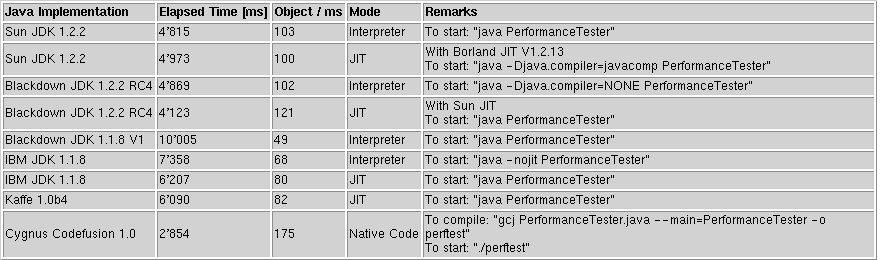
Table 2. Java Benchmark Results
There are some observations I feel are worth mentioning. First, Java 1.2 implementations are generally faster than Java 1.1 implementations. This is a strong argument to choose Java 1.2 over Java 1.1, in addition to the much greater functionality offered by Java 1.2. Second, the fastest Java 1.2 implementation is currently the Blackdown port with the JIT enabled. The JIT provided by Borland does not speed things up, at least not in this benchmark. Third, if you have to stick with Java 1.1 (e.g., for compatibility reasons), your best options are currently Kaffe 1.0b4 and IBM's JDK 1.1.8 with the JIT enabled. Fourth, if you don't need Java bytecodes and Java 1.2, the fastest option of all is to use the Java front end of EGCS. I was not able to test the open-source version of EGCS with gcj, but I suspect the performance of it is within a few percentage points of the version sold commercially by Cygnus/Red Hat.
Finally, I ran the benchmark on the same hardware with Sun's JDK 1.2.2 on Windows NT 4.0 with service pack 5. The results are disappointing for Linux aficionados. The benchmark reports 198 objects per millisecond with the JIT enabled, and 133 objects per millisecond in interpreter mode. In other words, the Java interpreter on Windows is faster than the fastest JIT available for Linux, and the Windows JIT is faster than native code on Linux. As long as Java performance on Linux is not as good as on Windows, I don't think Linux will become the platform of choice for Java developers. Let's hope that in the near future companies such as Sun or IBM invest at least as much time in tuning Java on Linux as they do in tuning Java on Windows now.
Being a longtime C and C++ programmer, I could not resist the temptation to write a similar benchmark in C++. Listing 2 has the code of the C++ version of the benchmark.
Listing 2. C++ Benchmark Source Code
I compiled the C++ benchmark program with both the standard C++ compiler that comes with Red Hat 6.1 (EGCS 2.91.66) and the C++ compiler included in Cygnus's Codefusion 1.0 development environment. Table 3 shows the results of the C++ benchmark.

Table 3. C++ Benchmark Results
The benchmark shows that a comparable C++ program is still faster, by a factor of 3, than the fastest Java implementation (the gcj native code compiler), and even 4.3 times faster than the fastest Java JIT.
If there is any conclusion to this simple benchmark at all, it is this: I'm very much impressed by Java as a programming language (i.e., its design), but I'm not too impressed by current Java implementations on Linux or any other platform, for that matter.
Java implementations are a good example for one of the oldest laws of computing, which says that software becomes slower faster than hardware becomes faster. No doubt, Java has its place, and very often—in fact, more often than not—its advantage in programmer productivity outweighs its disadvantage in performance compared to C++. Buying a CPU which is four times faster is usually less expensive than spending two times as long to develop an application. At least, this is true for custom-developed systems. Embedded systems or mass-marketed software with hundreds of thousands of copies are an entirely different story. Saving $5 on a CPU chip in a $100 device can make all the difference and pay for increased development time.
It comes as no surprise that Java is used today mostly for custom-developed enterprise applications, where development cost and time are of paramount importance. As long as Java implementations are not within 80% of the performance of comparable C++ applications, I don't think we will see off-the-shelf products such as word processors or spreadsheets written in Java.
Wouldn't it be nice to have a programming language with the elegance and simplicity of Java and the efficiency of C? Well, maybe this will be the next big open-source project.
All listings referred to in this article are available by anonymous download in the file ftp.linuxjournal.com/pub/lj/listings/issue76/4005.tgz.
email: Hirsch.Michael@acm.org
Michael Hirsch can be reached via e-mail at Hirsch.Michael@acm.org.
