
A GNU/Linux Wristwatch Videophone
Videophone wristwatches are a science-fiction concept that is here today. The two key inventive concepts that make this new technology possible are:
The use of a body-worn computer system (WearComp) as a base station (see my article “University of Toronto WearComp Linux Project” in LJ, February 1999). Images from the wristwatch are sent to the WearComp, and from the WearComp to the Internet. Images received from the Internet are sent to the wristwatch display (a full-colour VGA display). Full-colour broadcast quality is transmitted at six to eight frames per second using an experimental radio transmitter.
The use of a concomitant cover activity. Unlike science fiction's vision of how a wristwatch videophone might work, the camera points ahead rather than up at the user. In this way, the wristwatch captures a video image of what the wearer is looking at, rather than merely a picture of the wearer. Thus, taking a picture or shooting a video may be masked by a concomitant cover activity, such as checking the time or just resting an arm on a countertop (see sidebar “Concomitant Cover Activity”).
A VGA screen is configured using XF86Config set to 640x480, 24-bit colour, allowing video to be displayed at the captured resolution. The camera also operates at 640x480 resolution with 24-bit colour video capture at 30 frames per second. Images may be processed or stored locally, or transmitted at a lesser rate. A future version will transmit images at the recording speed of 30 frames per second rather than the current six to eight frames per second limit imposed by the slow (2.4 megabits per second) radio link.
The wristwatch provides a computer output screen with XF86, upon which the viewfinder function operates, using one of the windows or the root window. Graphics, including a transparent oclock, appear over the top of the video viewfinder window.
Using the VideoOrbits image stabilizer, it takes pictures at 640x480, 24-bit colour, up to 5000 pixels across, in true 48-bit colour (convertible to 24-bit colour pictures suitable for high-quality prints). VideoOrbits is available under the GPL from http://wearcam.org/orbits/.
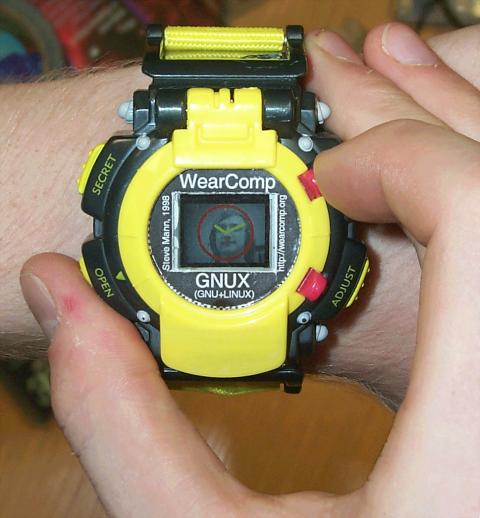
Figure 1. A Wristwatch Videoconferencing Computer
In Figure 1, Eric Moncrief is shown wearing the watch, and Stephen Ross is pictured on the XF86 screen as a 24-bit true-colour visual.
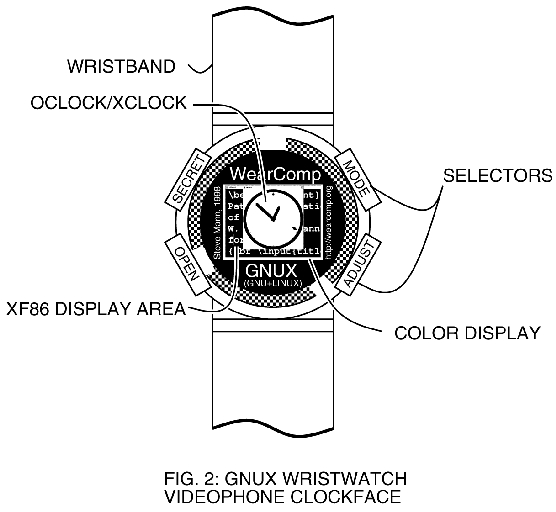
Figure 2. Clock Face
A SECRET function, when selected, conceals the videoconferencing window by turning off the transparency of the oclock, so that the watch then looks like an ordinary watch (showing just the clock filling the entire 640x480-pixel screen). The OPEN function cancels the SECRET function and opens the videoconferencing session up again.
One technical problem that arises from running GNU/Linux (GNUX) on a wristwatch is the input. We are experimenting with an input pie menu system. A user can easily select eight directions of the compass, but since this device has a clock face (at least, that is its concomitant cover usage), a 12-position pie menu makes the most sense.
The pie menu is described in “A Comparative Analysis of Pie Menu Performance” by Callahan, Hopkins, Weiser and Shneiderman, 1988.
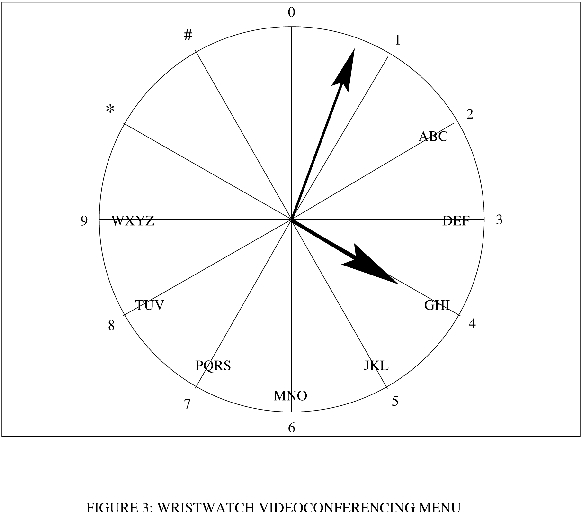
Figure 3. Wristwatch Videoconferencing Menu
Figure 3 depicts a natural choice of pie menu for a wristwatch display. The display is typically a computer screen with 480 pixels down and 640 pixels across, measuring approximately 0.7 inches on the diagonal. Upon the display is the image of a clock face, superimposed on top of a video signal from the camera. Time is displayed as a transparent xclock or oclock (or both, one superimposed upon the other). Our modified oclock is available from http://wearcam.org/gclock/ and an exclusive or (EOR) oclock is under development to reduce screen real estate use. In the figure depicted here, the time is 4:03.
The device truly looks like an ordinary wristwatch, although one in which the hands are displayed electronically, because it is in fact a wristwatch, among other things. It is natural for such a wristwatch to have a circle displayed on the screen (this is a feature of the original oclock), but unlike the oclock, it has numbers displayed around the periphery of the circle. In this way, it is easier to tell time, and the numbers may also be assigned a secondary meaning (e.g., select “0” to stop recording, “4” to kill all processes and halt the processor, “7” to wake up the system from sleep mode, etc.).
Since humans are quite good at telling time, the numbers are often missing from commercial wristwatches, and some wristwatches do not even have markings for each hour. Instead, we often rely on our heightened sense of visual acuity to discern the angle of the hands upon the clock face. Thus, it is no surprise that the clock menu is usable without paying much attention to the face of the clock. The user just needs to stroke the face of the clock in the direction desired.
The entry of numbers on a touch-sensitive clock face in the context of the current invention may be done as vectors (e.g., with no regard to location, only to direction). Thus, a stroke from left to right is regarded as the number 3, regardless of where the stroke begins or ends. A downward stroke (e.g., from top to bottom) is regarded as the number 6 regardless of where the stroke begins or ends, and so on.
Thus, telephone numbers can easily be entered into the device, and similarly, an alphabet can be constructed much like the alphabet of an automated DTMF (dual-tone multi-frequency) answering system used for voice mail and the like in telephony.
Since there are 12 pushbuttons on a telephone and also 12 hours on a clock face, there can be a one-to-one correspondence between the numbers of the clock face and those of the telephone. The hours 10:00 and 11:00 are used for the symbols “*” and “#” of the telephone touchpad.
The data entered by way of the clock face menu is typically combined with the video recording made from the scene. The clock face menu is sufficient for entering a department store manager's name, which may be appended to the video file header, so that a large database of recorded video may be navigated later using these short text headers.
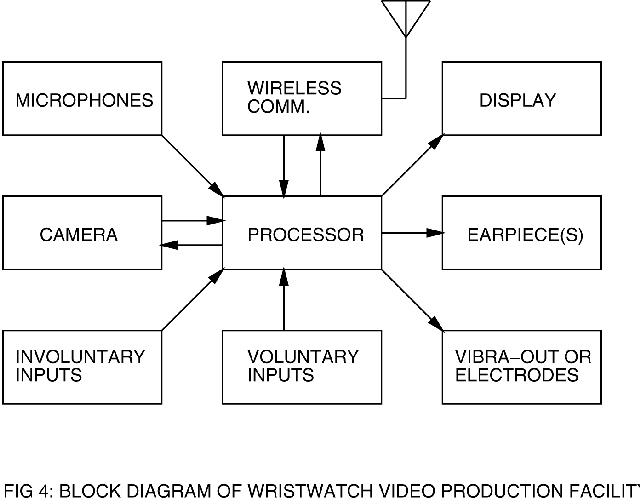
Figure 4. Block Diagram of Video Production Facility
Due to direct contact between the wristwatch and the body, the pulse (heart rate) as well as skin conductivity (sweatiness index) of the wearer may be determined, and this information may be appended to or recorded with the video signals. This may facilitate, for example, a future search through all video in which the wearer's heart rate exceeds a certain threshold. It has been found that when a department store manager is dishonest with respect to refund policies, or a clerk refuses to tell a customer his name, the customer's heart rate increases dramatically, and the customer often sweats profusely. Thus, this extra information can later help locate moments of tension in a previously recorded argument at the refund counter.
Linaccess: GNUX for Low Vision
The small size of the display required the development of an X Window System configuration that was easy to read on a small screen. This gave rise to the Linaccess project, where GNUX was made accessible on low-vision systems. This project has two distinct but closely related goals. First, to make GNUX accessible to the visually challenged, or those suffering from low vision, such as age-related macular degeneration, glaucoma or the like. (Note that this project differs from the blinux project in the sense that the goal of Linaccess is to use visual output, but to make it more accessible to those with low vision.) Second, to make GNUX usable on small screens, such as the wristwatch system. In many ways, we're all suffering from low vision when we're trying to read a 0.7-inch diagonal screen.
Dr. Steve Mann (mann@eecg.toronto.edu) is regarded by many as the inventor of the wearable computer (computing being distinct from special-purpose devices such as wristwatches and eyeglasses), and of the EyeTap video camera and reality mediator. He also built the world's first covert fully functional WearComp with display and camera concealed in ordinary eyeglasses in 1995, for the creation of his award-winning documentary “ShootingBack”. He is also the inventor of the wristwatch videophone, the chirplet transform, a new mathematical framework for signal processing, and of comparametric image processing. He is currently a member at University of Toronto, Department of Electrical and Computer Engineering.
